Cloud Resource Scheduling: Implementation and the Major Challenges
The past decade has seen an exponential rise in adopting public cloud across different business domains. As a result, migrating to the public cloud is no more an option but a necessity for businesses to scale. While the pay-only-for-what-you-use concept sounds lucrative, managing costs on AWS has been more complex for organizations that have rapidly expanded their cloud usage. Over the past several years, the idea of FinOps has been a focus, with CTOs trying to reduce their overall cloud bills. While companies have often tried to adopt complex methods and tools to reduce their cloud bills, the easiest way of lowering your cloud cost lies in the concept of public cloud; Pay-only-for-what-you-use.
Why are Businesses considering Cloud Scheduling?
Production workload being untouchable, most other teams, like development, testing, and staging, don’t really work round the clock and don’t need access to the cloud resources 24X7. These inactive hours can account for almost 50% of the total 168 hours in a week. This means that by simply scheduling your resources to shut down during inactive hours, a cloud team can save around 40-50% of their total EC2 and RDS spend.
Yes, Scheduling resources can help you create a significant impact on the overall cloud bill. Let’s get all other questions answered as well.
Can Scheduling work with the Geographically Diverse Team?
Yes, with companies adopting a remote workplace, syncing the entire team to one schedule sounds difficult. Also, finding the perfect time slot becomes difficult when no team across different geography usually access these resources. This is where the nOps Resources Scheduler recommendations come in very handy. The algorithm of the resource schedule scans historical utilization patterns of cloud resources. It detects dynamic timeslots where these resources can be scheduled to be shut down and help you save cloud cost without disrupting your global operations.
Scheduling can also be handled with a simple script, So why Scheduler?
Starting and stopping my resources can help me save tons of money, so why not get my developers to write an automation script? The simple answer is that it’s not scalable. Simple scripts defining fixed schedules for your resources won’t work, and multiple team members are accessing resources. Instead, sophisticated tools like the nOps resource scheduler help you determine dynamic schedules adjusted to your team’s resource access patterns.
What if my team wants to access the resource during the off hours?
Every nOps scheduler recommendation is backed by weeks of historical utilization data. Every recommendation is also back-tested against the historical data explaining to you the exact reason why we recommend a particular resource to be shut down during a specific time slot.
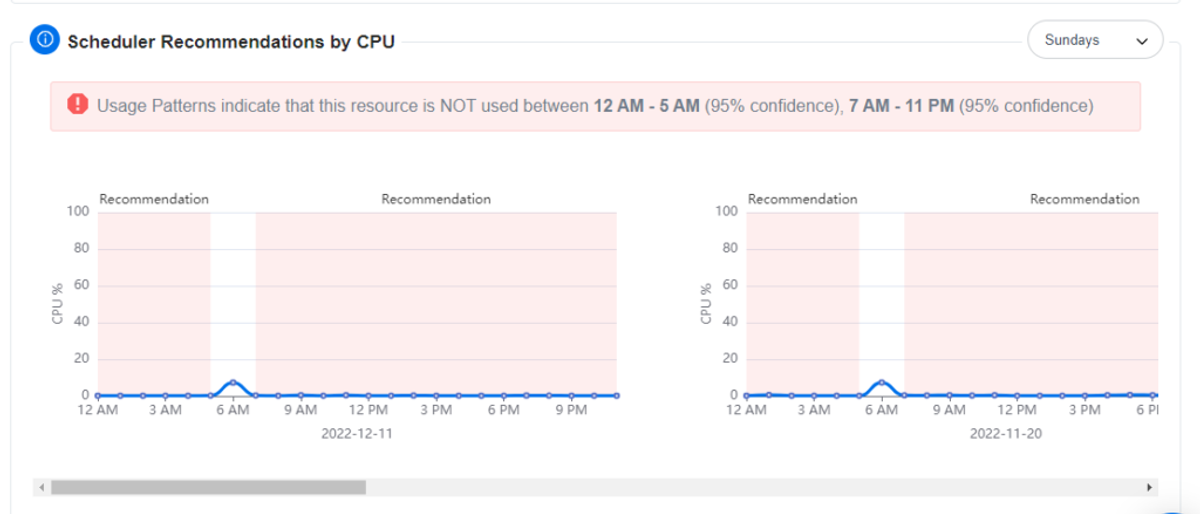
Apart from that, nOps also provides confidence levels against every recommendation, which helps users make a decision entirely backed by numbers.
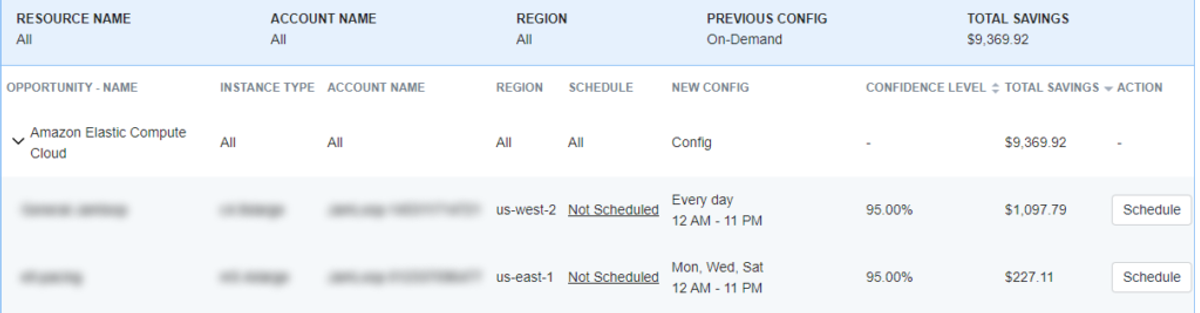
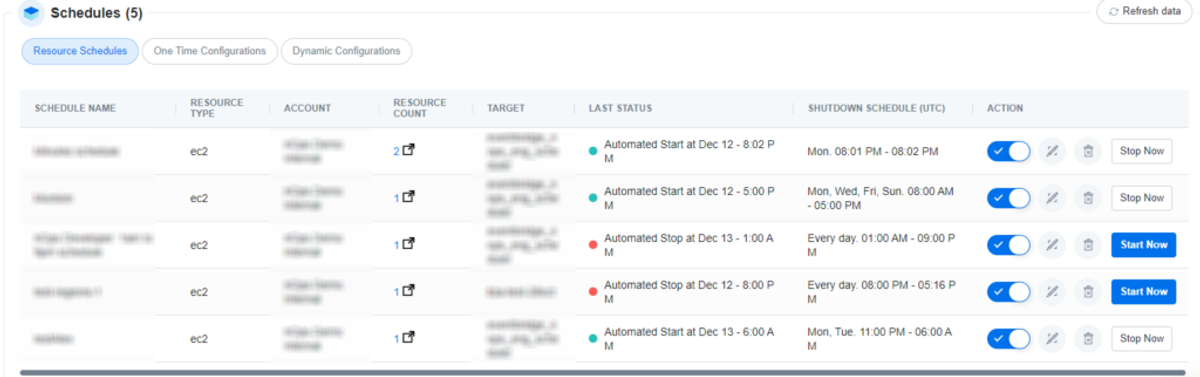
If the need arises to access the resource during off hours, nOps provides an option to manage all schedules centrally, override a schedule, or start/stop any resource at a click of a button.
Wrap Up
Resource Scheduling significantly impacts cost savings, but it is not as simple as it sounds. Adopting Resource scheduling within an engineering team is a significant task, but it reaps benefits in the long term and creates a culture around saving costs. nOps resource scheduler helps you tackle all challenges teams face in adopting resource scheduling, helping you make the best out of the available resources and reduce your overall spending on the cloud.
If you wish to implement resource scheduling and understand the nOps resource scheduler better.
Schedule a Meeting with us here: Resource Scheduler.
Demo
AI-Powered Cost Management Platform
Discover how much you can save in just 10 minutes!
Book a Demo
Cloud Resource Scheduling: Implementation and the Major Challenges