Why Do You Leave Your Dev Environments Running All The Time?
The beauty of the cloud lies in its on-demand and elastic nature. With just a single click or line of code, developers can access resources in a matter of seconds. This ease of use makes it easy to create production-like environments and turn them down when they are no longer needed. But even then, engineers tend to leave lab environments running even when they are not in use.
And most of the lab environments aren’t mission-critical. So, even when you need them, you can always wait a few minutes for them to come up.
So the question is, why do we leave them running all the time?
The simple answer is that pausing the dev environment is not an effortless experience. Although it’s possible to log in to the AWS console, stop your EKS cluster, and pause the RDS instance, you have to go to many different places, which can be time-consuming.
Typically, the end-user for lab environments is the QA person. However, QA most likely doesn’t have write permissions to stop resources, making it challenging to pause the environment.
Of course, it’s possible to write jobs and scripts and trigger them through Jenkins or Gitlab, but this requires creating scripts for different environments, which can become a full-time job to manage. As I said, it’s not an effortless experience.
Let’s add ELASTICITY back to the Cloud!
Here is how nOps can help, we provide one-click solutions for developers to pause idle resources during off hours. With nOps, we help customers in two ways: First, you pay less for what you use without the financial risk. Second, nOps enables you to use less by automatically pausing idle resources.
We automatically detect and group the lab environments, like grouping EC2 instances under EKS and RDS instances connected to the environment. We provide a one-click option to schedule downtime and offer to report on how much you are saving on a monthly and yearly basis.
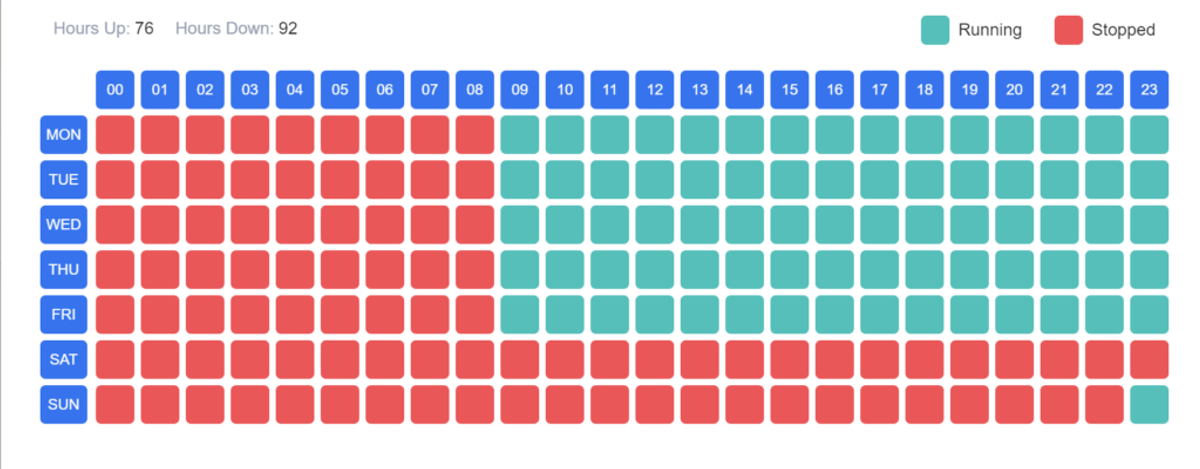
In our own environment, we turn our UAT environment off hours, resulting in a saving of around $3,000 a month.
The cloud’s agility and scalability have made it an invaluable asset for any organization, and its ease of use makes it an ideal choice for developers. We must continue to build solutions and provide experiences that enable developers to take ownership of their cloud spending and optimize their cloud usage.
Your team focuses on innovation, while nOps runs optimization on auto-pilot to help you track, analyze and optimize accordingly!
Let us help you save! Sign up for nOps today.

JT Giri
CEO
nops.io
JT Giri is a father, husband, and entrepreneur. He focuses on building a culture that allows teams to reach their highest potential. He enjoys HIIT workouts, learning, and meditating.
Demo
AI-Powered Cost Management Platform
Discover how much you can save in just 10 minutes!
Book a Demo
Why Do You Leave Your Dev Environments Running All The Time?