Delete Idle VPC Endpoints
nOps finds interface VPC endpoints that have been billed every hour for 90 days but carried no traffic, and tells you exactly which ones to delete. In our own staging account, one idle CloudTrail endpoint cost $28.40 a month, and deleting it took one command.
nOps finds interface VPC endpoints you're paying for but nobody uses. With one click, it hands the fix to Claude Code: the resource, the safety checks, the exact commands and the rollback plan are already written. Claude checks everything, asks before it changes anything, and makes the change. nOps then confirms the saving from your bill. In our own staging account, one idle CloudTrail endpoint cost $21.36 a month, and the whole fix took about a minute.
- Networking
- Interface VPC endpoints (AWS PrivateLink)
- Low effort
- Low risk
- Can't be undone, but you can recreate it
- No restart
- 90-day lookback
In the nOps docs: Delete Idle VPC Endpoint is listed under AWS in Supported recommendations (Amazon VPC · Delete · Low effort), detected by nOps from your billing data.
The problem
An interface VPC endpoint gives workloads in a private subnet a private path to an AWS service, such as CloudTrail, ECR, ECS or SSM, without going through the internet. Teams usually create a set of them together, often from a Terraform module or a landing-zone template, when they stand up a new VPC.
Those endpoints keep billing long after the workload that needed them is gone. Each one bills an hourly charge in every Availability Zone it's deployed in, whether or not anything uses it. Nothing breaks and no alarm fires, so they're easy to forget. The cost is small per endpoint but adds up across accounts, Regions and environments. In our own accounts, nOps found 16 idle endpoints costing $354.88 a month.
nOps checks every endpoint's billing for you, every day, so you don't have to audit each VPC by hand. The trade-off is that deleting an endpoint can't be undone. If something later needs it, you create it again, which is why nOps only flags endpoints that have carried zero traffic for the full 90 days.
Interface VPC endpoints give private workloads a path to AWS services without the internet. Teams usually create a set of them together when they stand up a VPC, often from a Terraform module, and they keep billing long after the workload that needed them is gone. Each one bills every hour in every Availability Zone it's in, whether or not anything uses it. Nothing breaks and no alarm fires, so they're easy to forget.
Finding them is half the job. The other half is the part teams put off: working out whether it's safe, writing the commands, double-checking the account and Region, and remembering who should know. nOps does the first half automatically, and the hand-off to Claude takes care of most of the second.
The billing model
- Hourly charge per Availability Zone. An interface endpoint bills for every hour it exists, in each Availability Zone where it has a network interface. An endpoint spread across four Availability Zones bills four endpoint-hours every hour. See AWS PrivateLink pricing.
- Data processing on top. Traffic through the endpoint bills per GB. An idle endpoint has no data processing charge, so its whole cost is the hourly charge.
- Gateway endpoints are free. S3 and DynamoDB gateway endpoints have no hourly charge, so this recommendation never flags them.
- Hourly charge per Availability Zone. An interface endpoint bills for every hour it exists, in each Availability Zone where it has a network interface. See AWS PrivateLink pricing.
- Data processing on top. Traffic through the endpoint bills per GB. An idle endpoint has none, so its whole cost is the hourly charge.
- Gateway endpoints are free. S3 and DynamoDB gateway endpoints have no hourly charge, so this recommendation never flags them.
How nOps detects it
nOps reads your AWS Cost and Usage Report for each interface endpoint over the last 90 days and raises this recommendation when the endpoint was billed on every one of those 90 days but recorded no traffic: no processed bytes and no data transfer on any line item. The estimated saving is the endpoint's hourly charge over the last 30 days, which is 100% of its cost.
nOps reads your AWS Cost and Usage Report for each interface endpoint over the last 90 days and raises this recommendation when both of these are true:
- The endpoint was billed on every one of the last 90 days.
- It recorded no traffic in that time: no processed bytes and no data transfer on any line item.
The estimated saving is the endpoint's hourly charge billed over the last 30 days. Deleting the endpoint removes the whole charge, so the saving is 100% of the endpoint's cost. The recommendation records the evidence behind it: days billed, traffic, account, Region, service, and when nOps first detected it.
How to fix it
Open the recommendation
Go to Recommendations and stay on the Open tab. Expand Delete Idle VPC Endpoint to see every idle endpoint nOps found, with each one's account, first detected date and monthly saving. Click the endpoint you want to review.
The Overview tab shows the monthly saving, the confidence and change risk, whether it can be rolled back, and a plain-language summary of what nOps found.
Read the evidence
Open Recommendation Details. What nOps detected and Evidence show the facts behind the recommendation: billed on 90 of the last 90 days, zero traffic, and the account, Region and service. Risk assessment lists what to check before you delete it, and Savings calculation shows how the saving was worked out.
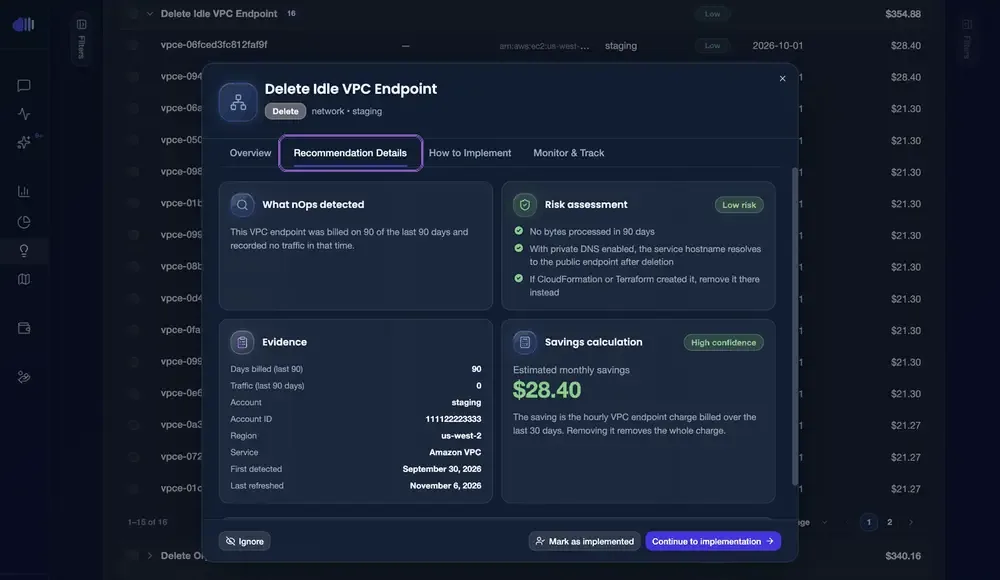
Decide whether the change fits
Before you delete an endpoint, check three things.
- Nothing uses it. nOps already confirms zero traffic for 90 days. If you want a second opinion, the endpoint's BytesProcessed and NewConnections CloudWatch metrics should be empty for the same period.
- Traffic has another way out. If the endpoint has private DNS enabled, the service's normal hostname resolves to the public endpoint after you delete it. Workloads in private subnets then need a NAT gateway (or another endpoint) to reach the service.
- Who manages it. If CloudFormation or Terraform created the endpoint, remove it there too, so the next deployment doesn't recreate it.
In our case the endpoint was for CloudTrail, it had no traffic in billing or CloudWatch, and every subnet it sat in already routed to the internet through a NAT gateway.
Get the change
Open How to Implement and pick how you want to make the change.
- Create ticket opens a Jira or Linear issue with the saving, risk level, step-by-step plan, validation steps and rollback plan.
- Hand off to AI sends a ready-to-use task to Claude Code, Cursor or Codex, with the resource IDs, safety checks and validation steps. This works well when the endpoint lives in Terraform or CloudFormation: the agent can open a pull request that removes it.
- Generate implementation shows the exact AWS CLI command (or a Bash script) for this endpoint, ready to copy.
Make the change
We used the generated command. Run it in AWS CloudShell or any terminal with access to the account:
aws ec2 delete-vpc-endpoints --vpc-endpoint-ids vpce-06fced3fc812faf9f --region us-west-2An empty Unsuccessful list means AWS accepted the deletion. The endpoint shows deleting for a few seconds, then disappears. You can also delete it in the AWS console under VPC → Endpoints → Actions → Delete VPC endpoints.
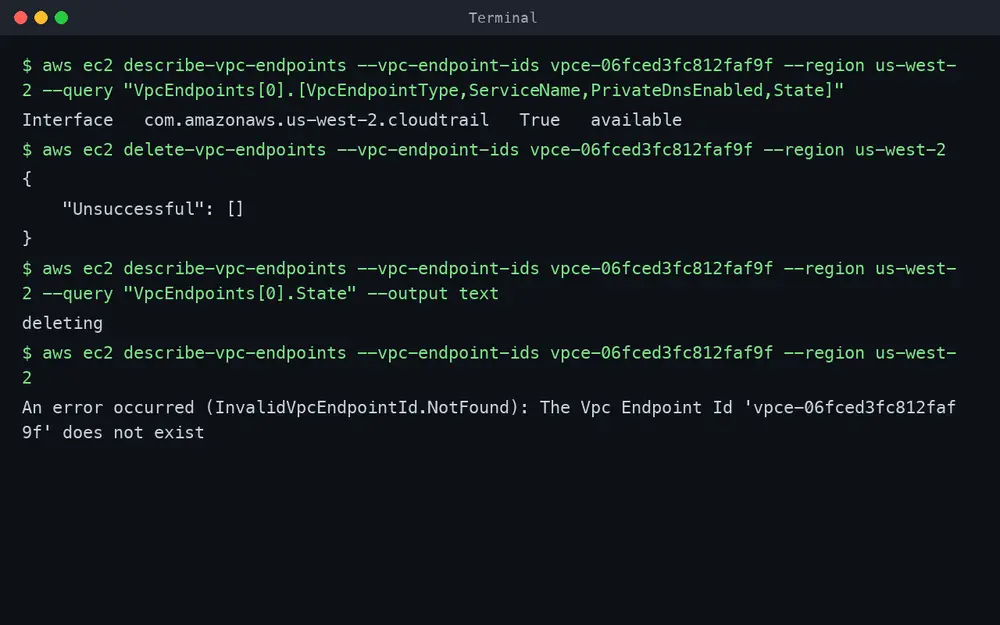
Mark it as implemented
Back in nOps, click Mark as implemented, pick the date you made the change, and add a note for your team. nOps uses that date to look for the change on your bill.
The recommendation moves to Validating Savings with the status Reviewing billing. Monitor & Track shows what nOps will confirm: that the endpoint is gone, and that the hourly charge no longer appears on the bill.
Track it until the saving is confirmed
You don't need to do anything else. nOps checks billing every day. AWS billing data usually arrives one to two days after the usage, so the saving is typically confirmed within a few days. When the hourly charge is gone, the recommendation moves to Complete as Savings confirmed, and the saving counts toward your realized savings.
You don't have to mark it implemented for nOps to notice. If someone deletes the endpoint outside nOps, the daily billing check still finds the change and confirms it.
On Monitor & Track, the checks billing can answer turn to Passed, and Savings realized shows the verified monthly saving, what you've saved since the change, and the annualized saving.
Open the recommendation
Go to Recommendations, expand Delete Idle VPC Endpoint, and click the endpoint. The Overview shows the monthly saving, the risk, whether it can be rolled back, and a plain-language summary of what nOps found.
Hand it off to Claude Code
Open How to Implement and, under Hand off to AI, click Claude Code. Claude Code opens with the task already typed in. Nothing runs until you send it.
The task nOps writes for Claude includes:
- The objective and the exact resource: endpoint, account, Region and the saving.
- Constraints: change nothing else, run every safety check first, and ask before making the change.
- Safety checks: confirm the endpoint's type and service, and whether private DNS is on.
- The change, how to verify it, and the rollback plan.
- A tracking line to add to any commit or pull request, so nOps can link the change back to the recommendation.
Prefer Cursor or Codex? The same package works with them, or click Copy AI instructions to paste it anywhere.
Let Claude do the work
Send the task. Add which AWS profile to use if you have more than one ("Use AWS profile staging").
Claude ran the safety check first, then stopped on its own: the endpoint was tagged Terraform=true, and nOps' instructions say a Terraform-managed endpoint should be removed in Terraform, or the next terraform apply will recreate it and the charge will come back. It also pointed out that with private DNS on, the VPC needs a route out (a NAT or internet gateway) for CloudTrail calls to keep working.
We'd already checked the route: every subnet the endpoint used goes out through a NAT gateway. So we told Claude to go ahead with the CLI and that we'd clean up Terraform separately. Claude deleted the endpoint, verified it was deleting, and listed what was left: the Terraform cleanup, a service check, and a note that nOps confirms the saving from billing.
Claude Code runs the checks, asks, then makes the change. If the endpoint lives in Terraform and you want to do it properly in one go, tell Claude to remove it from your Terraform code instead and open a pull request. If your GitHub repositories are connected to nOps, the tracking line in the task links that pull request back to the recommendation.
nOps keeps the record
nOps logs the hand-off in the recommendation's Activity tab automatically. When the change is made, click Mark as implemented and add a note. This step is optional: nOps checks billing every day and finds the change either way.
Watch it move to Validating Savings
The recommendation moves to Validating Savings with the status Reviewing billing, alongside anything else you've implemented.
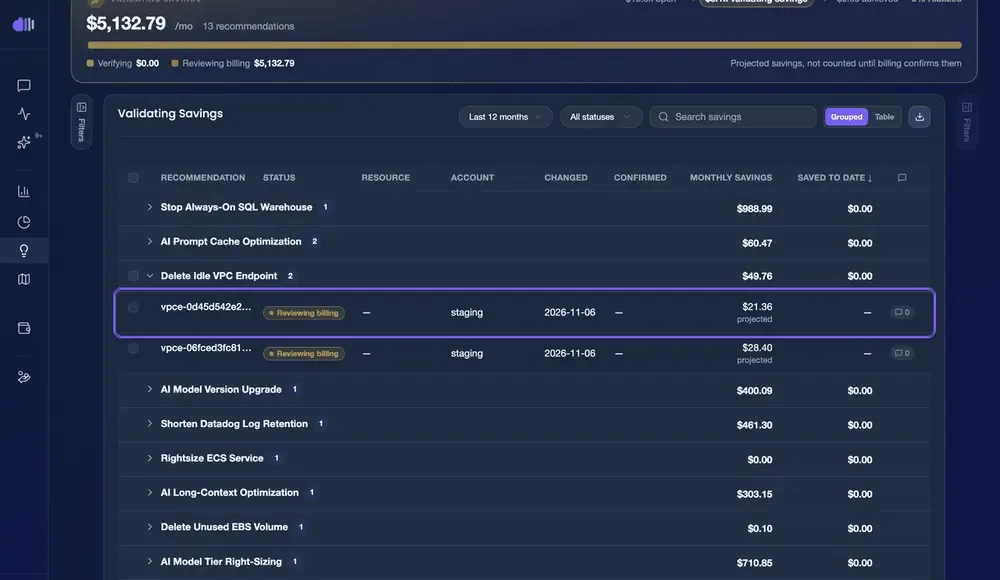
Savings confirmed
AWS billing data usually arrives one to two days after the usage. Once the endpoint's hourly charge is gone from the bill, the recommendation moves to Complete as Savings confirmed, and Monitor & Track shows the checks billing could answer as Passed.