Skip to content



- Blog
- Commitment Management
- Azure FinOps: How to Optimize and Manage Your Microsoft Cloud Costs
Azure FinOps: How to Optimize and Manage Your Microsoft Cloud Costs
In customer conversations this quarter, we keep hearing about challenges with Azure cost management. One media platform struggles to share Azure cost reports with business stakeholders because their existing tool doesn’t support multi-subscription analysis. A fintech company wants to optimize Azure Reservations and Savings Plans automatically, but their engineers are too busy to manage commitments manually. A healthcare provider manages $2M across public cloud and $3M in private infra, but lacks a single pane for cost tracking.
If that sounds familiar, you’re not alone. According to the FinOps Foundation’s State of FinOps 2026 report, 90% of organizations now manage SaaS costs, 64% manage licensing, and 57% manage private cloud. Managing and optimizing Azure costs across subscriptions, teams, and multiple cloud platforms is becoming increasingly complicated.
In this guide, we’ll cover what Azure FinOps is, why it matters in 2026, the core capabilities teams need, and how to implement Azure FinOps within a multi-cloud environment.
What is Azure FinOps?
Azure FinOps is the practice of managing Microsoft Azure cloud costs through collaboration between finance, engineering, and operations teams. The term “FinOps” — a portmanteau of “finance” and “DevOps” — represents a cultural shift where everyone takes ownership of cloud usage, supported by centralized best practices and tooling.
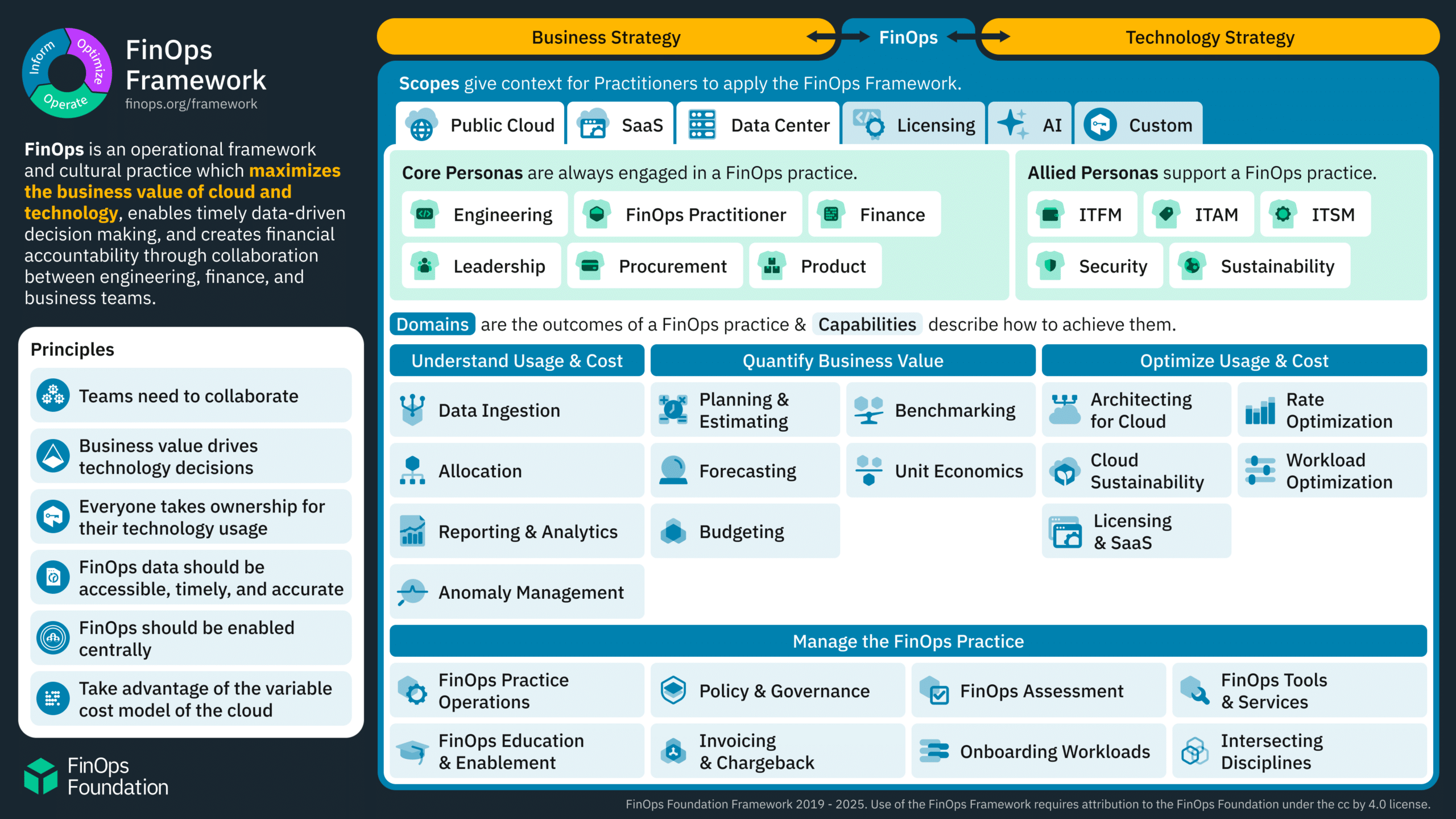
According to the FinOps Foundation, the framework is built on six principles:
Teams need to collaborate — finance, engineering, and product teams work together on Azure spending decisions
Decisions are driven by business value — optimization choices balance cost against performance and feature velocity
Everyone takes ownership — individual teams are accountable for their Azure resource consumption
Reports are accessible and timely — cost data flows to stakeholders in real-time, not monthly
A centralized team drives FinOps — a small enablement team sets standards, provides tooling, and educates distributed teams
Take advantage of the variable cost model — Azure’s consumption-based pricing rewards optimization and flexibility
Why Azure FinOps Matters in 2026
Azure usage has grown dramatically: 70% of organizations worldwide and 95% of Fortune 500 companies have adopted Azure as a cloud platform. In 2026, here’s why Azure FinOps matters more than ever:
Cloud Costs Are The 2nd-Largest IT Expense
Cloud costs have become the second-largest expense category for midsize IT companies, behind only labor. According to industry reporting, AI workloads and unpredictable month-to-month bills drive significant variability, making proactive cost management essential.
FinOps Teams Are Scaling Through Automation, Not Headcount
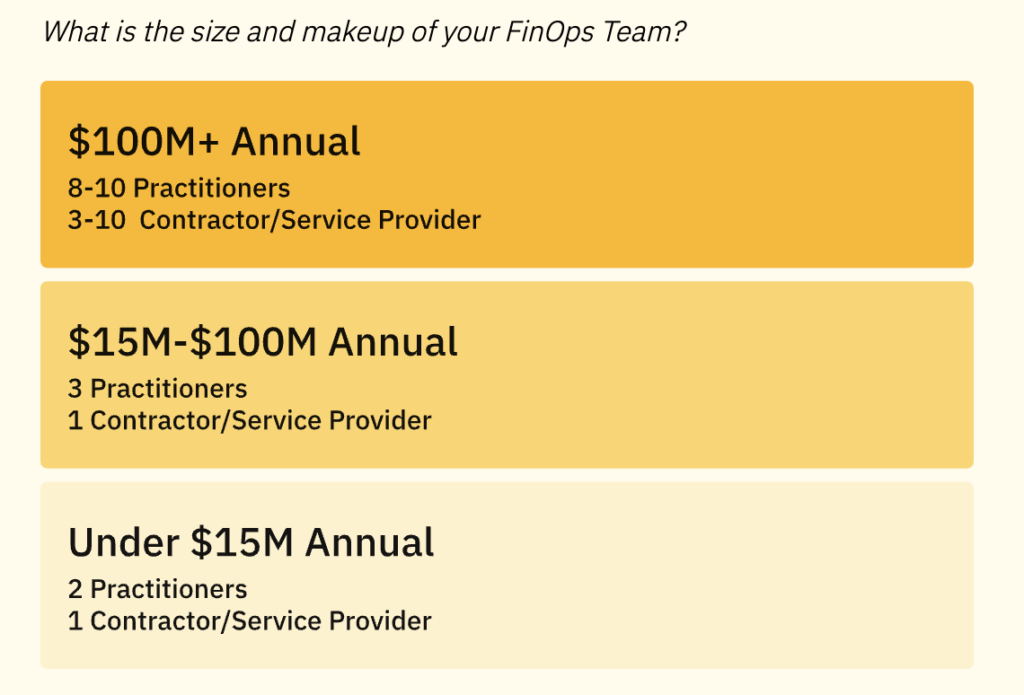
According to the State of FinOps 2026 report, organizations managing $100M+ in cloud spend typically have 8-10 practitioners and 3-10 contractors. These small teams scale through federation, automation, and AI productivity — not by hiring dozens of cost analysts. Cost optimization tooling must deliver automation that eliminates manual reporting, tracking, and optimization work.
Multi-Cloud Complexity Creates Visibility Gaps
Organizations running Azure alongside AWS, GCP, Snowflake, Databricks, and Datadog need unified visibility. As recent customer conversations allude to, the most common pain point is the inability to track costs across multiple cloud providers and third-party services in a single dashboard. Azure-native tools like Azure Cost Management provide single-cloud visibility, but they don’t aggregate costs across AWS, GCP, Kubernetes, AI or SaaS platforms. Teams need tools that unify cost tracking across all cloud infrastructure.
Azure Commitment Management Is Complex and Manual
Azure offers two commitment-based discount mechanisms: Reservations and Azure Savings Plans. Both require forecasting, purchasing, and ongoing management to effectively reduce costs. Manually managing commitments across multiple subscriptions and resource groups is time-consuming and error-prone. Teams that automate commitment management achieve 15-35% higher effective savings rates than those managing commitments manually.
Executives Demand ROI and Value, Not Just Cost Reports
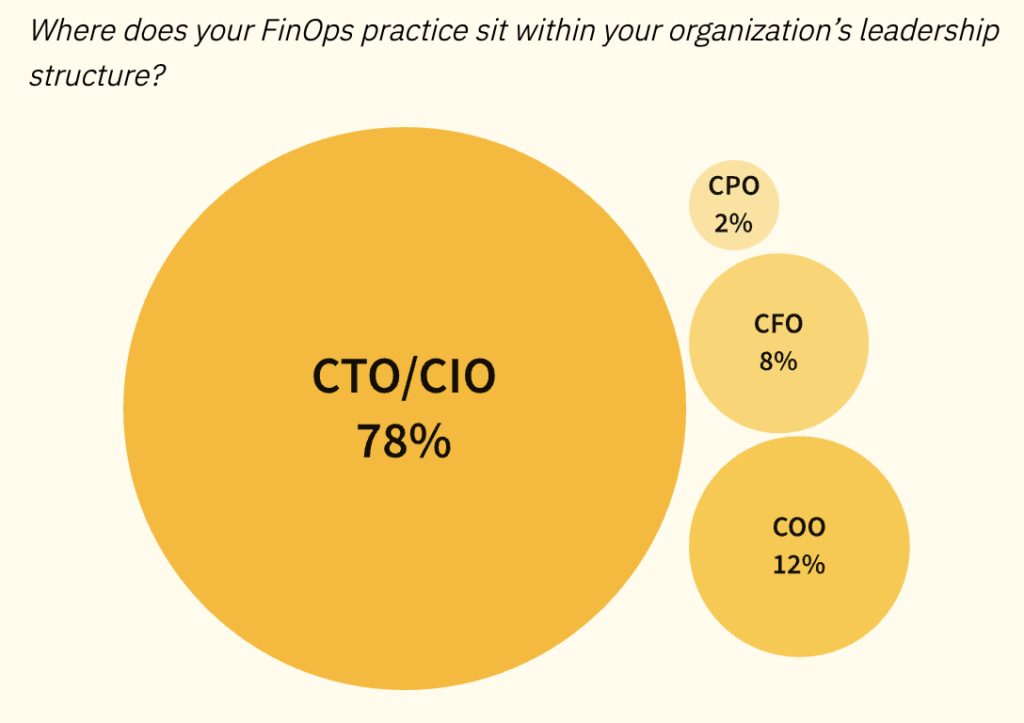
78% of FinOps teams now report to the CTO or CIO (source: FinOps Foundation), and those with VP/SVP/C-suite engagement show 2-4x more influence over technology selection decisions. Azure FinOps has expanded beyond reporting to involve demonstrating value, influencing architecture decisions, and shaping technology investments before commitments are made.
Core Azure FinOps Capabilities
Effective Azure cost optimization requires five core capabilities.
1. Visibility and Cost Allocation
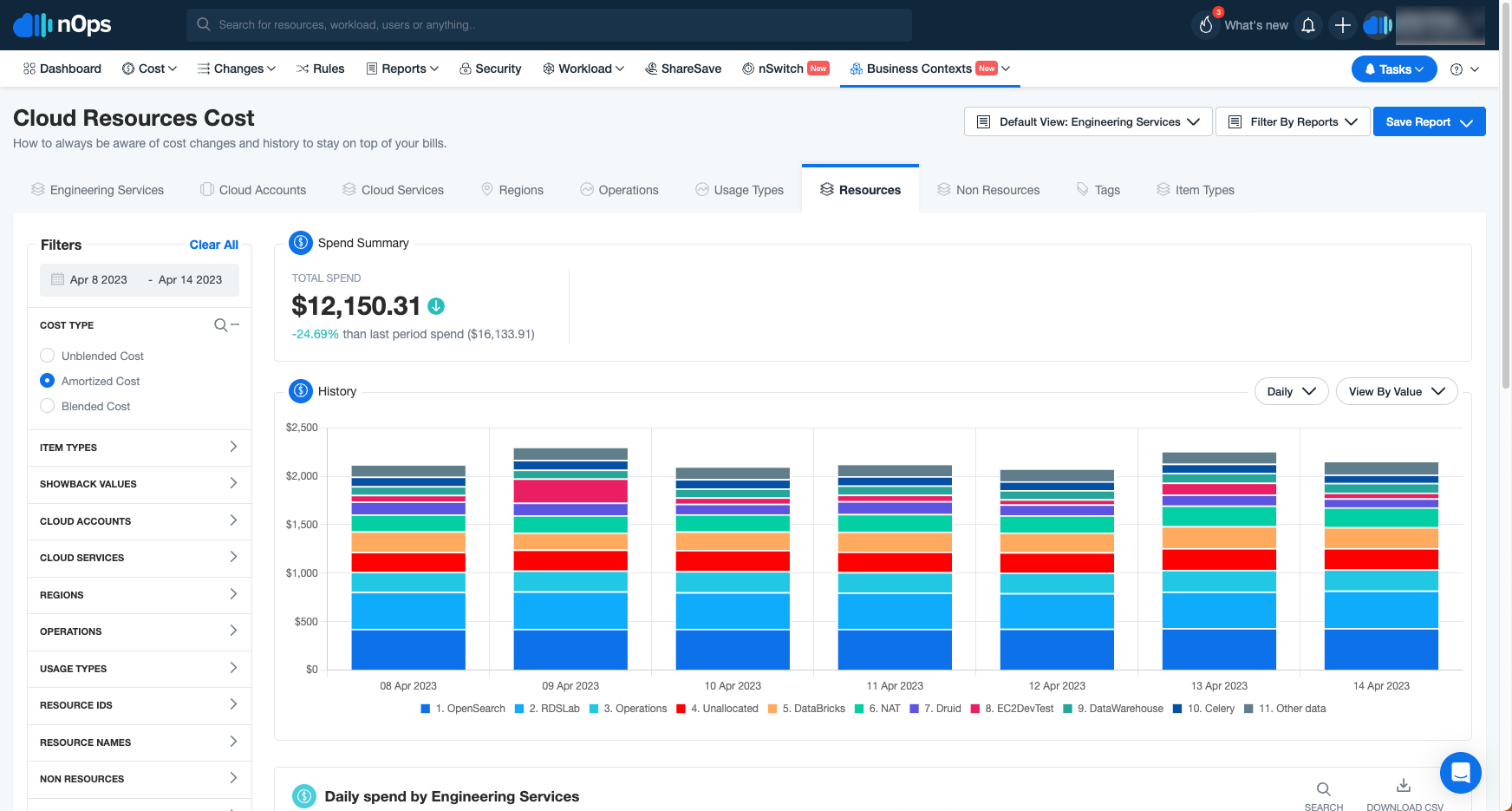
Azure FinOps starts with visibility into where costs accumulate: by subscription, resource group, service, team, customer, or business unit.
Checklist:
Track Azure cloud spend across multiple subscriptions and tenants in a unified dashboard
Allocate costs to teams, projects, customers, or products using tags
Enable showback (informational reporting) or chargeback (billing teams for consumption)
Provide stakeholders with self-service access to dashboards without direct billing access
Use third-party platforms or a custom solution to view your Azure and other costs in one pane of glass
2. Anomaly Detection and Alerting
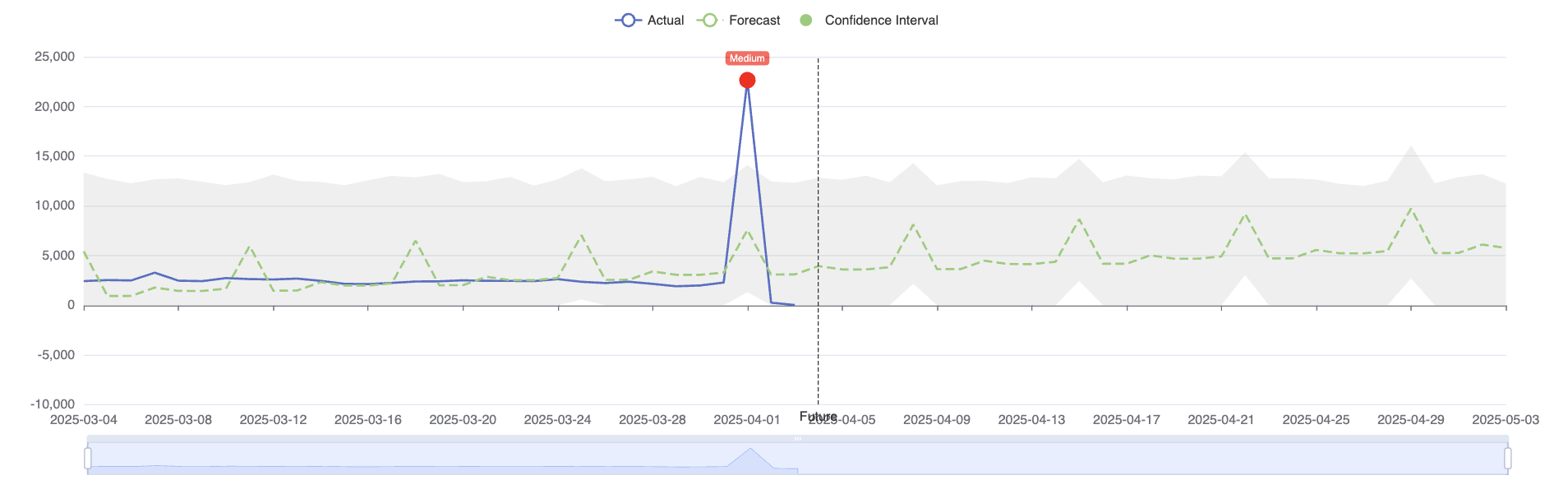
Costs change fast in cloud environments. A misconfigured autoscaling rule, unintended region replication, or runaway test workload can drive unexpected spend spikes.
Checklist:
Monitor Azure spend for anomalies (unusual cost increases or usage pattern changes)
Set budget thresholds at subscription, resource group, or service level
Receive real-time alerts via email, Slack, Teams, or webhook when spend exceeds thresholds
Automatically escalate unresolved alerts to higher-level teams if not addressed within defined timeframes
3. Rightsizing and Resource Optimization
Not all Azure cloud resources are sized correctly for their workload. VMs provisioned for peak load often run underutilized during off-peak hours. Storage accounts accumulate data that’s rarely accessed. Implementing rightsizing recommendations from Azure Advisor or other solutions can reduce Azure compute resource costs by 20-30%.
Checklist:
Analyze VM utilization (CPU, memory, disk, network) and recommend smaller SKUs where appropriate
Identify idle or underutilized resources (VMs running at <10% CPU, storage volumes with no activity)
Automate resource scheduling (shut down non-production VMs outside business hours)
Optimize storage costs by moving infrequently accessed data to cooler storage tiers
4. Commitment Management: Reservations and Savings Plans
Azure offers two commitment-based discount mechanisms for cloud services:
Azure Reservations: Pre-purchase specific VM SKUs, Azure SQL databases, or other resources for 1-year or 3-year terms at discounted rates (up to 72% savings vs on-demand)
Azure Savings Plans: Commit to an hourly spend amount on compute resources (more flexible than Reservations but slightly lower discount rates)
Checklist:
Analyze usage patterns to identify workloads suitable for commitments
Purchase Reservations or Savings Plans that match forecasted demand
Monitor utilization and coverage to ensure commitments are fully used
Rebalance commitments as workloads evolve (exchange, sell back, or adjust)
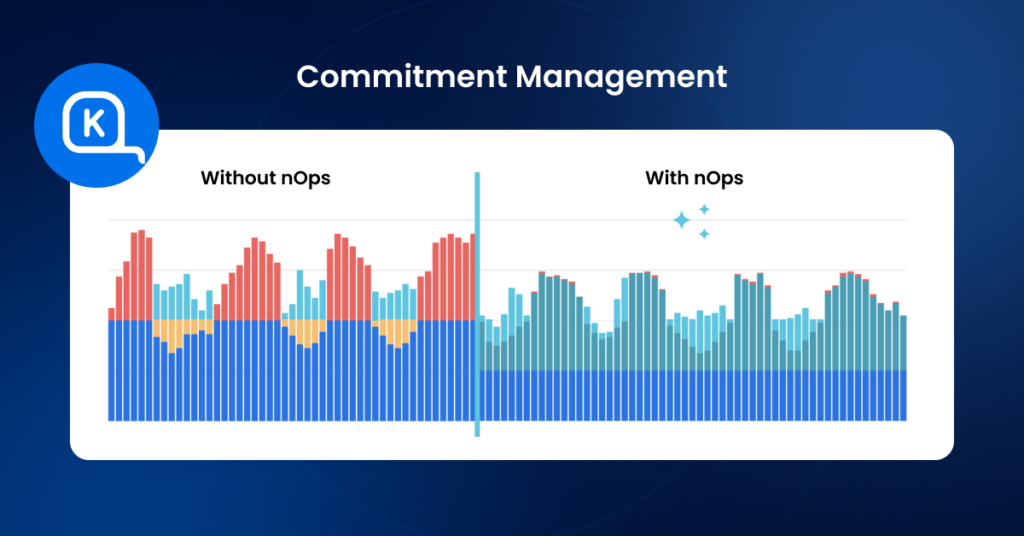
Commitment management is difficult because cloud usage changes constantly. Automation tools continuously analyze usage and rebalance commitments in small increments, helping teams achieve 35–50+% effective savings instead of the ~0–20% many organizations see with manual processes.
5. Forecasting and Budgeting
Accurate forecasting enables budget planning and prevents surprise overruns.
Checklist:
Forecast future Azure spend based on historical trends, planned growth, and seasonality
Model the financial impact of architectural changes (migrating to containers, adopting serverless, scaling new regions)
Create budgets at the subscription, resource group, or project level
Track actuals vs forecast and adjust spending or commitments accordingly
Azure Native Tools vs Third-Party Platforms
Microsoft provides a suite of native FinOps tools for Azure. For small teams running Azure-only environments, these tools may suffice. Here’s a quick list of the most important:
Azure Native Tools
| Tool | Description | Best For |
|---|---|---|
| Azure Cost Management | Suite of tools to monitor, allocate, and optimize Azure and AWS costs | Single-cloud or dual-cloud (Azure + AWS) visibility |
| Azure Advisor | Personalized recommendations for cost, performance, reliability, security, and operational excellence | Identifying quick-win cost saving opportunities |
| Azure Pricing Calculator | Estimate costs for new Azure deployments | Pre-deployment cost estimation and architecture planning |
| TCO Calculator | Estimate cost savings from migrating on-premises workloads to Azure | Business case development for Azure migration |
| FinOps Toolkit | Starter kits, scripts, and solutions to accelerate Azure FinOps implementation | Jumpstarting FinOps practice with open-source templates |
When to Use Third-Party Platforms
Third-party Azure FinOps platforms are valuable when:
Managing multi-cloud environments — you run Azure alongside AWS, GCP, Snowflake, Databricks, or other platforms and need unified visibility
Complex organizational hierarchies — you need to represent costs across multiple customers, business units, projects, or teams with custom allocation logic that Azure tags don’t support
Automated commitment management — you want to continuously optimize Reservations and SPs without manual intervention
Advanced automation — you need resource scheduling, idle resource cleanup, or policy enforcement beyond Azure native capabilities
Popular Azure optimization platforms include nOps (AWS, Azure, GCP), Turbo360 (Azure-focused), CloudZero, Finout, and CloudCheckr. These platforms aggregate cost data across clouds, provide advanced analytics, and often include automation features that go beyond Azure native tools.
How to Implement Azure FinOps: Best Practices & Practical Roadmap
Here’s a practical framework for building an effective Azure FinOps practice for your cloud spending.
Phase 1: Establish Visibility (Weeks 1-4)
Start with cost transparency:
Actions:
Connect Azure Cost Management to all Azure subscriptions
Export cost and usage data daily or weekly to a centralized data store (Azure Storage, Microsoft Fabric, or third-party platform)
Tag resources consistently: define required tags (`Team`, `Project`, `Environment`, `Customer`) and enforce tagging policies
Build basic cost dashboards showing spend by subscription, service, and tag
Identify top cost drivers (which services and subscriptions consume the most spend)
Success metric: Stakeholders can view their team’s unified costs in a dashboard without requesting finance reports.
Phase 2: Enable Accountability (Weeks 5-8)
Make teams aware of their costs and establish ownership.
Actions:
Implement showback: share cost dashboards with engineering teams showing their consumption
Set up budget alerts at the subscription or resource group level
Define cost per environment (prod, staging, dev) and cost per project
Train teams on Azure cost management basics (rightsizing, Spot VMs, storage optimization)
Establish monthly cost reviews with teams responsible for high-spend services
Success metric: Engineering teams can explain why their costs increased or decreased month-over-month.
Phase 3: Optimize Waste (Weeks 9-16)
Tackle low-hanging fruit: eliminate idle resources and implement quick-win optimizations.
Actions:
Identify and delete orphaned resources (unattached disks, unused storage accounts, idle VMs)
Implement Azure Advisor cost recommendations (rightsize VMs, reserved capacity, storage tier optimization)
Schedule non-production resources (shut down dev/test VMs outside business hours)
Optimize storage (move infrequently accessed data to cool/archive tiers, delete old snapshots)
Review and eliminate over-provisioned resources (oversized VMs, excessive backup retention)
Success metric: Reduce Azure spend by 10-20% through waste elimination within 90 days.
Phase 4: Implement Commitment Management (Weeks 17-24)
Lock in discounts for predictable workloads through Reservations and SPs.
Actions:
Analyze usage patterns to identify stable workloads (VMs, SQL databases, storage with consistent demand)
Purchase Azure Reservations for high-confidence, long-term workloads
Purchase Azure SPs for flexible compute workloads
Monitor commitment utilization weekly and adjust as needed
Rebalance commitments quarterly: exchange underutilized Reservations or increase Savings Plan commitment as usage grows
Success metric: Achieve 80%+ commitment utilization and 20%+ effective savings rate on eligible compute spend.
Phase 5: Scale Through Automation (Ongoing)
Automate repetitive tasks so your team can focus on strategic value.
Actions:
Automate resource scheduling (start/stop on schedule based on tags)
Automate idle resource detection and cleanup
Automate commitment rebalancing (purchase new Reservations/SPs based on usage trends)
Automate anomaly detection and alerting (reduce manual cost monitoring)
Integrate FinOps into CI/CD pipelines (show estimated costs for new deployments before launch)
Success metric: FinOps team productivity increases 2-3x (same team size manages 2-3x more cloud spend).
Maximize Your Azure FinOps Results with nOps
Across the challenges discussed in this guide—fragmented visibility, difficult reporting, and manual commitment management—the common theme is operational overhead. Teams know where savings opportunities exist, but maintaining alignment between resource usage and commitment portfolios is difficult when workloads change constantly.
This is where automation becomes critical.
nOps is a purpose-built FinOps automation platform designed to maximize savings outcomes while minimizing operational burden for finance and engineering teams. Key capabilities include:
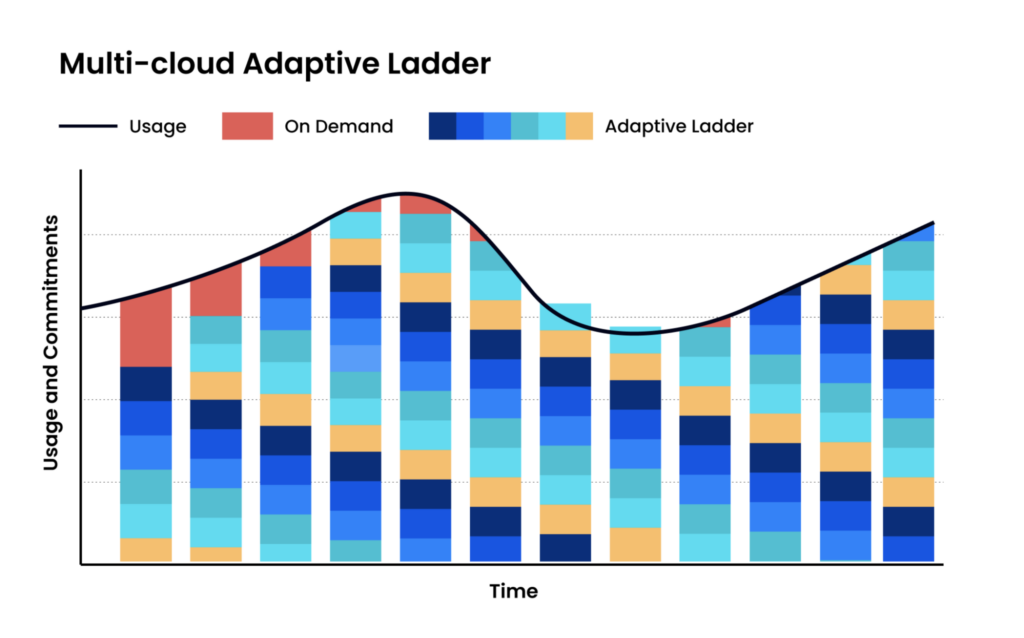
Commitment Optimization at Scale: nOps continuously optimizes Azure RIs and SPs with adaptive “commitment laddering.” Instead of making large, infrequent commitment purchases, the platform adjusts coverage hourly in smaller increments based on real demand. This helps teams capture more incremental savings as workloads evolve with no manual effort.
Visibility and Reporting: nOps provides a single pane of glass across AWS, Azure, Google Cloud, Kubernetes and AI. Get reporting, budgets, cost allocation, forecasting, anomaly detection, and AI natural language querying of your cost data all in one platform.
Savings-First Pricing Model: nOps only gets paid if we save you money — meaning there’s no upfront cost or financial risk. Customers have described it as being like “picking $20 bills off the ground”.
If you want to see where your Azure cost optimization practice stands, you can book a free savings analysis to benchmark your spend and see if you can get additional savings.
nOps manages more than $3B in cloud spend and was recently rated #1 in G2’s Cloud Cost Management category.
Demo
AI-Powered Cost Management Platform
Discover how much you can save in just 10 minutes!
Frequently Asked Questions
Let’s dive into a few FAQ about getting clear cost visibility and reducing cloud cost.
What is FinOps in Azure?
FinOps in Azure is the practice of managing and optimizing spending on Azure services through shared ownership across finance, engineering, and operations. It combines visibility, allocation, forecasting, rightsizing and cloud financial management so Azure usage decisions are tied to business value.
What are the best FinOps tools for managing Azure costs?
Azure Cost Management and Azure Advisor provide native cost visibility and optimization recommendations. However, many teams prefer automated cost saving platforms like nOps for commitment optimization, unified visibility across AWS, Azure, and GCP, and cost allocation, anomaly detection, and reporting at scale.
How to implement FinOps for Azure virtual desktop?
Tag AVD resources, separate prod/non-prod subscriptions, and enable Azure Cost Management budgets/alerts per host pool and workspace. Track cost drivers (compute, storage, networking), rightsize session hosts, schedule non-prod, and use Reserved Instances/Savings Plans to optimize Azure costs. Report showback/chargeback to app owners monthly.

Last Updated: March 10, 2026, Commitment Management
Last Updated: March 10, 2026, Commitment Management