Amazon Timestream Cost Optimization: How to Reduce Costs
Amazon Timestream offers a fast, scalable, serverless time-series database for storing and analyzing trillions of time-stamped events. But as adoption grows, so do the cost surprises — especially for workloads with frequent small writes, short recurring queries, or retention settings that do not match actual access patterns.
The shift to Timestream Compute Unit (TCU) query pricing made this even more important to understand. Instead of paying only based on the amount of data scanned, teams now need to account for the compute resources used to run queries, including minimum query charges that can make high-frequency, low-latency query patterns more expensive than expected.
This guide walks through practical strategies to reduce Amazon Timestream costs across ingestion, queries, storage, caching, and monitoring — without sacrificing performance.
What Is Timestream Cost Optimization?
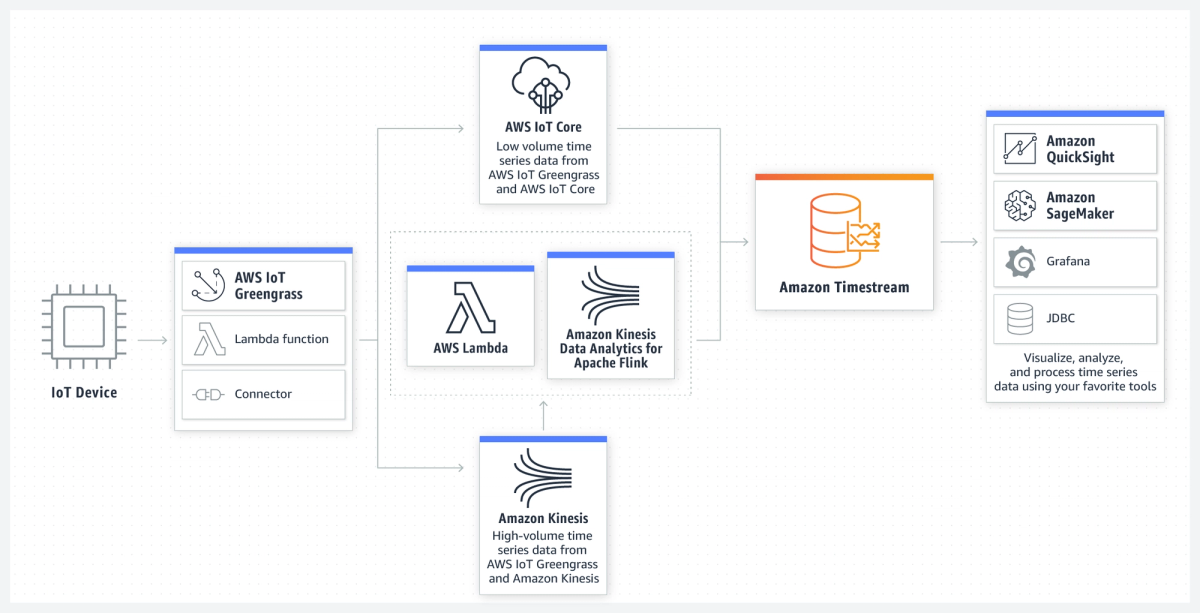
Amazon Timestream is a serverless time-series database used to store and analyze time-stamped data from applications, infrastructure, IoT devices, and other event-driven systems. Timestream cost optimization is the process of reducing spend across writes, queries, and storage by aligning your database configuration with how the workload actually behaves. That can include batching small writes, consolidating frequent queries, setting appropriate MaxQueryTCU limits, tuning Memory Store retention, and moving older data to lower-cost storage when real-time access is no longer needed.
How Amazon Timestream Pricing Works
AWS Timestream charges per write, per GB read, and per GB stored.
1. Writes — priced per million write requests, with a 1 KB minimum per write regardless of payload size
2. Storage — separate pricing for Memory Store (hot data) and Magnetic Store (cold data)
3. Queries — priced by Timestream Compute Units (TCUs), with a 30-second minimum per query
Understanding Timestream Compute Units (TCUs)
As of April 2024, Timestream queries are billed using TCUs instead of data scanned. Each TCU comprises 4 vCPUs and 16 GB RAM, priced at $0.518 per TCU-hour (US East 1). TCUs are metered per second with a 30-second minimum charge per query.
According to the AWS Database Blog, this model offers cost transparency and budget control through `MaxQueryTCU` limits — but the 30-second minimum caught many teams off guard. A query that finishes in 1 second still costs the same as one that runs for 30 seconds.
You're charged for the compute resources used, not the amount of data scanned — but short queries pay a minimum fee that can make simple queries surprisingly expensive.
TimeStream Cost Optimization: Best Practices & Strategies
Practical tips for cost efficiency include:
1. Optimize Ingestion Costs with Batch Writes
Timestream accounts for a minimum of 1 KB per ingestion, regardless of actual payload size. Writing a single 4-byte float or 1-bit boolean costs the same as writing 1 KB of data — about 200x overhead for tiny payloads.
A Medium case study by Thomas Landgraf documented this exact issue: a serverless IoT architecture where each Lambda invocation wrote one sensor reading immediately to Timestream. With 70 sensors sending data every 15 minutes, monthly costs ballooned to triple digits despite minimal data volume.
The Solution? Bulk Writes with Up to 100 Records Per Request
Timestream's `WriteRecords` API supports up to 100 records per call. Batch multiple measurements into a single request instead of paying the minimum write overhead again and again for tiny payloads.
For event-driven architectures, this usually means adding a buffer between the data producer and Timestream. Instead of having a Lambda function write each sensor reading or metric immediately, send those events to Amazon SQS first. Then, use a consumer Lambda to process messages in batches and write the grouped records to Timestream in one WriteRecords call.
The main trade-off is latency. If you configure batching with a short batching window, records may wait a few seconds or minutes before they are written. For real-time alerting, that delay may not be acceptable. But for hourly dashboards, historical reporting, IoT analytics, or other workloads where near-real-time freshness is enough, the cost savings can outweigh the delay.
AWS Best Practices for writes (as per Timestream cost optimization guide):
- Batch multiple time series events per write to reduce request count
- Use multi-measure records to write multiple measures in a single request and store data more compactly
- Use common attributes with batching to pack more events per write
2. Reduce Query Costs with Efficient Query Patterns
Every query costs at least 30 seconds of TCU time, even if it executes in 1 second. For high-frequency, low-latency queries (like dashboard widgets refreshing every 10 seconds), this minimum charge becomes the dominant cost driver.
One AWS re:Post user calculated that the minimum cost for a single simple query is approximately $0.00432 (based on $0.518/TCU-hour × 30 seconds).
Strategy 1: Consolidate Queries
Instead of querying Timestream repeatedly for small fragments of data, fetch what you need in a single consolidated query and process results in memory.
For example, an hourly KPI calculation Lambda that queries Timestream 200 times (once per device) will pay for 200 × 30 seconds = 1.67 TCU-hours minimum. Consolidating into one query that fetches all devices at once drops this to 0.0083 TCU-hours — a 200x reduction.
To implement:
- Fetch all required data upfront with one well-scoped query
- Load results into an in-memory hashmap (keyed by `deviceId`, `measureName`, `timestamp`)
- Perform all calculations from the hashmap
This works best for predictable workloads like scheduled jobs or pre-aggregation pipelines.
Strategy 2: Use Scheduled Queries for Pre-Aggregation
Timestream's Scheduled Queries feature lets you pre-compute aggregations and write results to a new table. Dashboard queries then read from the aggregated table instead of scanning raw data.
For example, instead of calculating hourly averages on every dashboard load, run a scheduled query every hour to populate an `hourly_averages` table. Dashboard queries then scan far less data and finish faster. The benefit is that this reduces both data scanned and TCU time per query.
Strategy 3: Include Time Ranges and Measure Filters
AWS recommends always including:
- Time predicates in the `WHERE` clause (e.g., `time > ago(1h)`)
- Measure names in the `WHERE` clause when querying a subset of measures
This reduces the amount of data scanned and lowers TCU consumption.
Strategy 4: Cancel Runaway Queries
If you've started a query and realize it won't return the results you need, cancel it immediately to avoid paying for unnecessary TCU time. AWS explicitly recommends this in their cost optimization documentation as well.
3. Set MaxQueryTCU Limits to Control Spend
One of the biggest benefits of the TCU model is the ability to set a hard cap on query compute usage.
How MaxQueryTCU Works
Using the `UpdateAccountSettings` API or the Timestream console, you can configure `MaxQueryTCU` per account per region. Timestream will only scale up to this limit, preventing runaway query costs.
The default is 200 TCUs per account (it can be increased up to 1,000).
Example: If you set `MaxQueryTCU = 8`, your account will never use more than 8 TCUs at a time for queries. You're only charged for what you actually use — setting a higher limit doesn't increase costs unless your workload needs it.
It's important to note that reducing the limit can take up to 24 hours to take effect.
Capacity Planning with TCUs
According to the AWS Database Blog TCU guide:
- 4 TCUs can handle approximately 76 queries per second (QPS) for simple last-point queries with p99 latency under 160ms
- 8 TCUs can handle approximately 159 QPS with p99 latency under 200ms
- More complex queries (with grouping, binning, ordering) achieve lower throughput: ~55 QPS at 4 TCUs, ~100 QPS at 8 TCUs
Billing example: If your workload uses 4 TCUs for 50 seconds per minute (due to bursty query traffic), you're billed for:
- 50 seconds = 0.0138889 TCU-hours per occurrence
- 4 TCUs × 0.0138889 hours = 0.0556 TCU-hours per minute
- At $0.518/TCU-hour, this costs ~$0.029 per minute or ~$1.73/hour
Start with a low `MaxQueryTCU` setting and monitor `QueryTCU` in CloudWatch. Increase the limit only if you see throttling or unacceptable latency.
4. Optimize Storage Costs with Retention Policies
Timestream uses a two-tier storage model:
1. Memory Store — fast, expensive, designed for recent data (hours to days)
2. Magnetic Store — slower, cheaper, designed for historical data (months to years)
Data is always ingested into Memory Store first, then automatically moved to Magnetic Store after the configured retention period.
Right-Size Your Memory Store Retention
AWS defaults to retaining data in Memory Store for a certain period (configurable per table). If your queries rarely access recent data, reduce Memory Store retention to minimize costs.
Example: If your dashboards only query the last 6 hours of data, set Memory Store retention to 12 hours instead of 7 days.
Archive Old Data to S3
For data older than a few months, Timestream's Magnetic Store may not be the most cost-effective option. Consider exporting historical data to Amazon S3 in Parquet format and querying with Amazon Athena. The benefits include:
- Lower storage costs (S3 vs. Magnetic Store)
- Lifecycle policies (move to Glacier for cold archiving)
- Analytical queries with Athena without Timestream TCU charges
5. Cache API Responses to Reduce Query Frequency
If you expose Timestream data through a public API, client behavior can drive unpredictable query volume. Some clients may poll your API every few seconds, even when data updates only hourly.
HTTP Caching with Cache-Control Headers
Add the following HTTP response header to API endpoints serving Timestream data:
Cache-Control: public, max-age=3600, immutable
This instructs browsers and CDNs to:
- Cache the response for up to 1 hour (`max-age=3600`)
- Treat it as immutable (no revalidation needed)
The goal is to drop Lambda invocations and Timestream read operations significantly after implementing HTTP caching, without impacting user experience.
6. Monitor TCU Usage with CloudWatch
Timestream provides the QueryTCU CloudWatch metric, updated every minute. This metric tracks the number of compute units used, helping you:
- Identify query cost trends
- Set alarms when usage exceeds thresholds
- Right-size your `MaxQueryTCU` limit
You can access it in the AWS Console (navigate to Amazon Timestream → Monitoring) or CloudWatch (filter by the `QueryTCU` metric). For exact TCU-hour billing, use AWS Cost Explorer and filter by "Timestream for LiveAnalytics."
Comparison: Timestream vs. Alternatives for Time-Series Data
When evaluating whether Timestream is the right fit for your workload, consider these alternatives:
Solution | Best For | Cost Model | Key Trade-offs |
|---|---|---|---|
Amazon Timestream | Serverless, high-scale, real-time analytics | Per write, TCU-based queries, tiered storage | Expensive for high-frequency small writes or queries; TCU minimum charges can surprise |
Amazon Timestream for InfluxDB | InfluxDB compatibility, single-digit millisecond queries | Instance-based pricing: Single-AZ or Multi-AZ | Less flexible than LiveAnalytics; fixed compute costs |
InfluxDB self-hosted | Cost control, data sovereignty | EC2 + EBS costs | Requires managing infrastructure, backups, and scaling |
TimescaleDB PostgreSQL | SQL compatibility, hybrid workloads | RDS or self-hosted costs | Less optimized for pure time-series workloads at extreme scale |
S3 + Athena/Glue | Long-term archival, infrequent queries | Storage + query scan costs | High latency; not suitable for real-time analytics |
When Timestream makes sense: Fully managed, auto-scaling time-series workloads where query latency matters and you can optimize write/query patterns.
When to consider alternatives: If your workload involves frequent small writes, unpredictable query patterns, or long-term cold storage, S3 + Athena or self-hosted InfluxDB may be more cost-effective.
Amazon Timestream Cost Optimization Checklist
Use this checklist to audit your Timestream deployment:
Writes
- [ ] Batch writes using `WriteRecords` with up to 100 records per call
- [ ] Use SQS as a buffer for stateless architectures (e.g., Lambda + IoT)
- [ ] Implement multi-measure records to pack more data per write
- [ ] Use common attributes with batching to further reduce request count
Queries
- [ ] Consolidate queries: fetch all required data in one query instead of multiple small queries
- [ ] Always include time ranges in `WHERE` clauses (e.g., `time > ago(1h)`)
- [ ] Filter by `measure_name` when querying a subset of measures
- [ ] Use Scheduled Queries to pre-aggregate data for dashboards
- [ ] Cancel runaway queries immediately to avoid wasted TCU time
- [ ] Set `MaxQueryTCU` limits to cap spend
- [ ] Monitor `QueryTCU` in CloudWatch and set alarms for cost spikes
Storage
- [ ] Right-size Memory Store retention to match your query patterns
- [ ] Archive old data to S3 in Parquet format for long-term storage
- [ ] Use Athena or Glue to query archived data instead of keeping it in Magnetic Store
API & Caching
- [ ] Add `Cache-Control` headers to public API endpoints serving Timestream data
- [ ] Set `max-age` to match your data update frequency (e.g., 3600 for hourly updates)
Monitoring
- [ ] Enable CloudWatch `QueryTCU` metric monitoring
- [ ] Set up Cost Explorer filters for Timestream to track TCU-hour usage
- [ ] Review AWS Cost and Usage Reports monthly for unexpected spikes
Optimize Timestream Costs with nOps
Managing Timestream costs manually can be time-consuming and error-prone — especially as your time-series workloads scale across multiple AWS accounts and regions. nOps automates cloud cost optimization for AWS services, including Amazon Timestream, giving you visibility and control without the manual effort.
How nOps Helps with Timestream Cost Optimization
- Real-Time Cost Visibility & Allocation: Track, allocate and report on Timestream along with your other AWS, Azure, GCP, SaaS, Kubernetes and AI costs in a single pane of glass
- Anomaly Detection: Get alerted when Timestream spend spikes unexpectedly — whether from a runaway query, a misconfigured write pattern, or a sudden increase in ingestion volume
- Automated Commitment Management: nOps automatically manages commitments to maximize your savings and flexibility. Savings are often 20% higher than competitors.
Curious how optimized you are on AWS? A 30-minute free savings analysis shows you your current Effective Savings Rate and where the opportunities are. Setup is 5 minutes with no agents or infra changes needed.
nOps manages $5 billion in cloud spend for its customers and is rated 5 stars on G2.
Demo
AI-Powered Cost Management Platform
Discover how much you can save in just 10 minutes!
Book a Demo
Frequently Asked Questions (FAQ)
What is the minimum charge for a Timestream query?
Every Timestream query incurs a minimum charge equivalent to 30 seconds of TCU time, even if the query completes in 1 second. At $0.518/TCU-hour and 1 TCU minimum, this works out to approximately $0.00432 per query. High-frequency queries can accumulate costs quickly due to this minimum.
Why did my Timestream costs increase after the TCU pricing change?
Many users saw cost increases because the TCU model introduced a 30-second minimum per query. If your workload involves many short queries (e.g., dashboard widgets refreshing frequently), you're now paying for 30 seconds of compute even if each query runs in 1 second — leading to a "4.3x cost increase" reported anecdotally by some users.
What is the most effective way to reduce Timestream write costs?
Batch your writes. Timestream charges a minimum of 1 KB per write request, so writing individual sensor readings one at a time is extremely inefficient. Use the `WriteRecords` API to batch up to 100 records per call, and consider using Amazon SQS as a buffer to accumulate records before writing. HTTP caching also reduces read operations to Timestream, saving costs.
Should I use Memory Store or Magnetic Store for cost savings?
Memory Store is fast but expensive; Magnetic Store is slower but cheaper. Keep only recent, frequently queried data in Memory Store (e.g., last 6-12 hours). Move older data to Magnetic Store automatically by configuring retention policies. For data older than a few months, export to Amazon S3 and query with Athena for even lower costs.
How do I set a cost cap on Timestream queries?
Use the `UpdateAccountSettings` API or the Timestream console to set MaxQueryTCU per account per region. This limits the maximum number of TCUs Timestream can allocate for queries. You're only charged for actual usage, so setting a higher limit doesn't increase costs unless your workload needs it. Start low and increase based on CloudWatch `QueryTCU` metrics.