The CFO’s Guide to AWS Discounts
How to boost margins in weeks — no prior knowledge, additional expenses, or engineering resources required
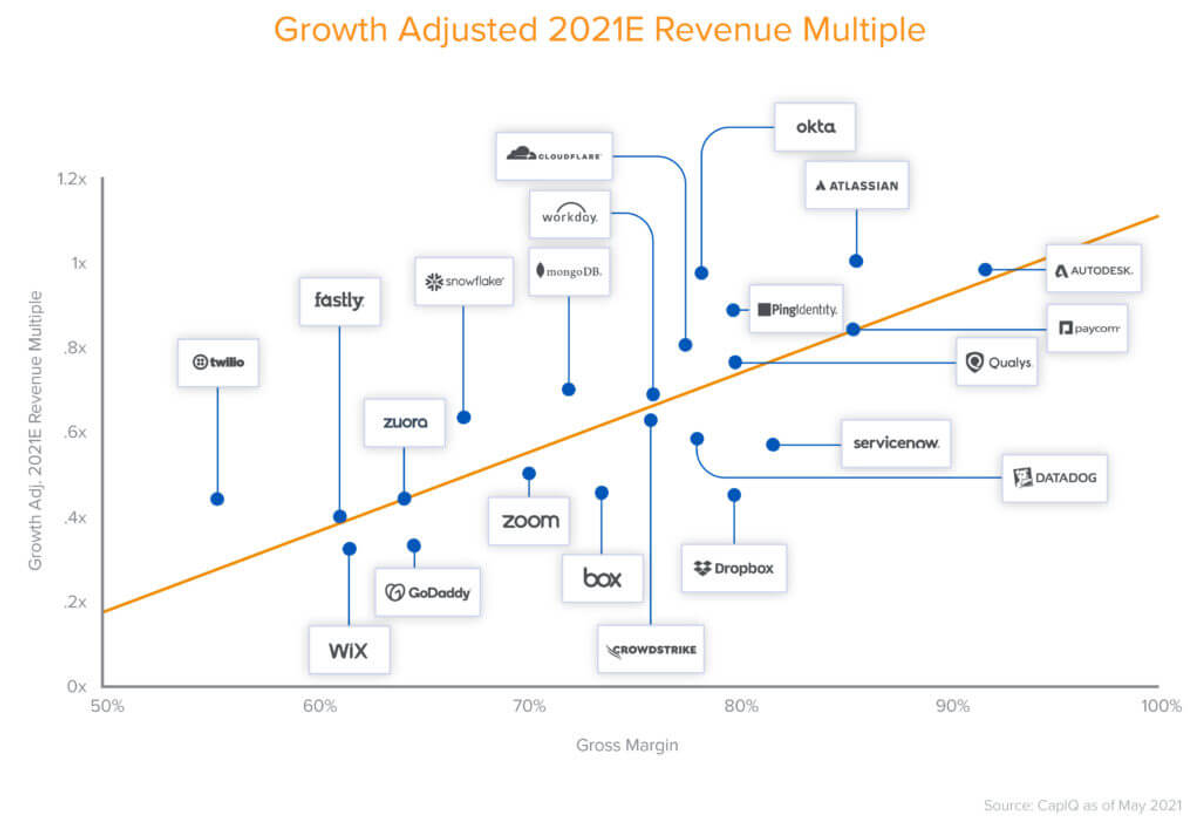
Cloud spending is one of your biggest expenses — with a massive impact on gross margins. And reducing cloud costs significantly impacts company valuation beyond just dollar savings.
A16z’s seminal study of $1T in cloud waste found that every dollar of gross profit saved translated to a 25X increase in market cap on average for public SaaS companies.
For CFOs, AWS costs rank among a company’s largest expenses. Leveraging discounts like Savings Plans and Reserved Instances can translate into up to 75%+ savings. But while these programs offer significant savings, they come with complexities, tradeoffs and financial risks.
That’s why we created this cheat sheet to help you quickly understand the key takeaways of AWS Discounts for CFOs, so you can immediately boost your margins (without any spending or engineering help required). For more info, download the complete guide.
Related Content
A CFO's Guide to AWS Discounts
How to immediately boost margins — no prior knowledge, additional expense, or engineering resource required
Download Now
What are AWS Savings Plans and Reserved Instances?
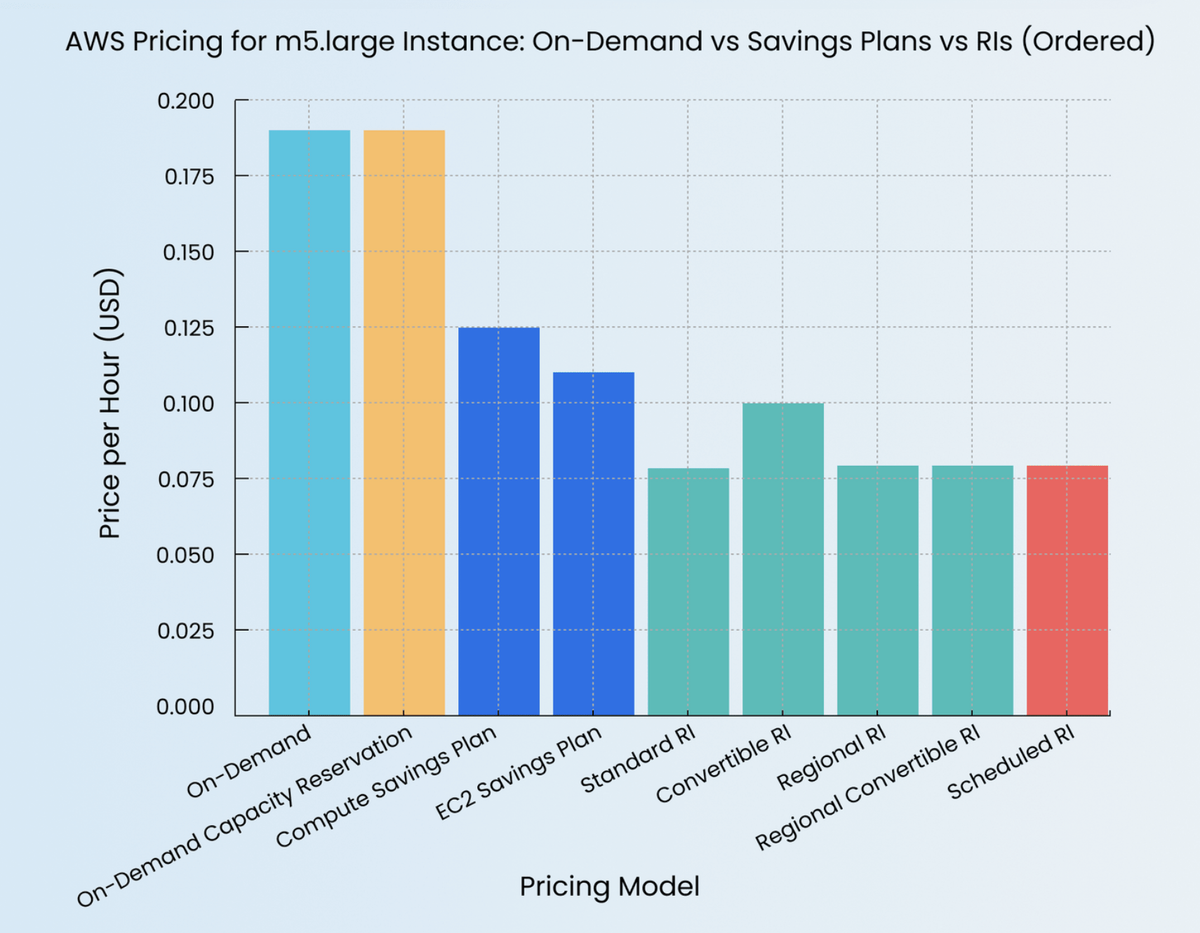
- AWS defaults to On-Demand pricing, where compute resources are billed per second or hour with no upfront commitment. This provides flexibility, but comes at a premium.
- Savings Plans (SPs) and Reserved Instances (RIs) are AWS’s primary discount models — they allow businesses to lock in lower rates by committing to usage over one- or three-year terms. Essentially, you’re trading some flexibility for savings.
What are the benefits of AWS Savings Plans and Reserved Instances?
- For CFOs, the key benefit is savings of up to 72-75% off On-Demand rates. This makes SP and RI a critical tool for controlling AWS costs.
What are the risks of AWS Savings Plans and Reserved Instances?
- The risk is that overcommitting to long-term contracts locks in spend, even if demand drops. Yet, undercommitting means you pay expensive On-Demand rates.
- AWS discount application rules are complex and easy to misapply.
AWS Savings Plans vs Reserved Instances?
The key takeaway is that you need to layer multiple types of discounts for the maximum benefit — they each offer unique benefits and types of flexibility.
- Savings Plans offer flexibility to apply discounts across different services while allowing infrastructure changes. They are easy to use because they automatically cover eligible usage. AWS recommends SP by default because of its simplicity.
- Standard Reserved Instances offer slightly higher discounts, but you have to commit to a particular instance family, size, region and tenancy — restricting flexibility. However, they can be resold on the RI Marketplace (unless they were purchased under an Enterprise Discount Program).
- Convertible Reserved Instances can be swapped for different instance families, operating systems, scopes, platforms, or tenancies, if the exchange is for equal or greater value. While they cannot be shortened, they can be extended by merging reservations, offering a unique advantage in adapting long-term cloud costs.
What is Spot?
- Spot Instances are spare AWS capacity offered at deep discounts—often up to 90% off On-Demand pricing.
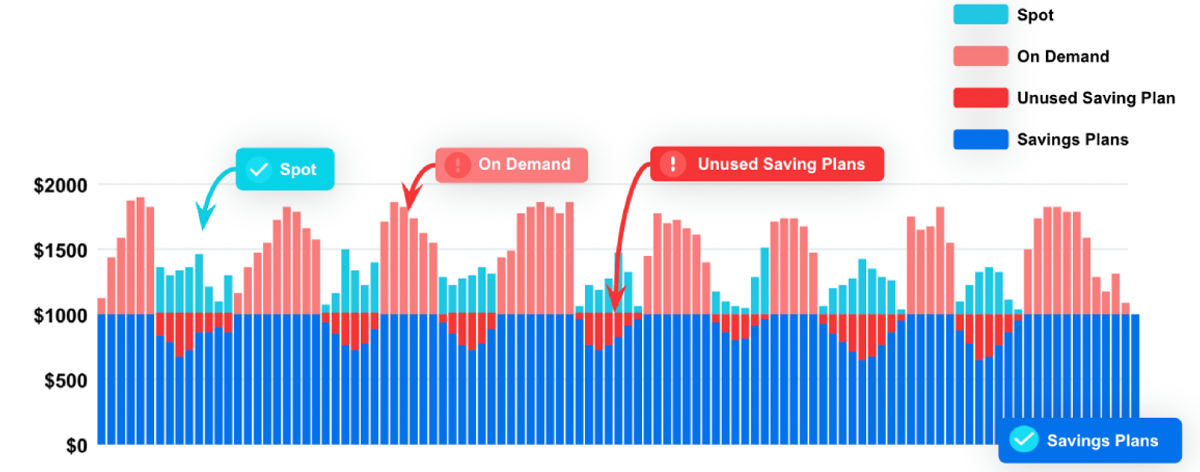
- Why do I need Spot? SP and RI don’t normally cover spikes in your usage. Any excess compute beyond your commitment is billed at On-Demand rates. To cover spikes and avoid using expensive On-Demand, you can shift some usage onto Spot.
- There is a risk of interruption — as Spot is based on unused capacity, availability can fluctuate and certain types of instances may not always be available. This makes Spot more difficult to use from an engineering perspective.
- The other challenge is using exactly the right amount of Spot. if you use too much, you risk underutilizing your SP or RI — meaning you’re essentially paying double. Here’s an illustration:
How do I maximize my overall discounts while minimizing risk?
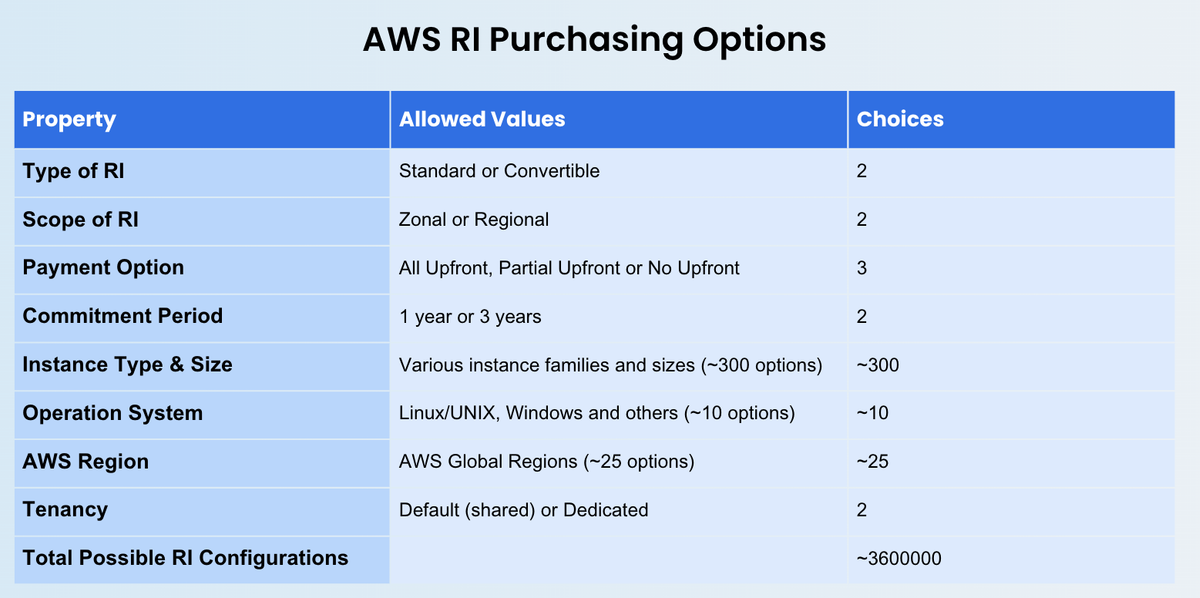
In an ideal world, you would cover predictable usage with the optimal combination of Savings Plans and Reserved Instances to maximize discounts and minimize flexibility. However, this is very difficult to do manually — there are over 3 million types of RIs alone. Each type offers different advantages and tradeoffs, and you need to continually reevaluate your changing cloud usage to ensure you’re still optimized.
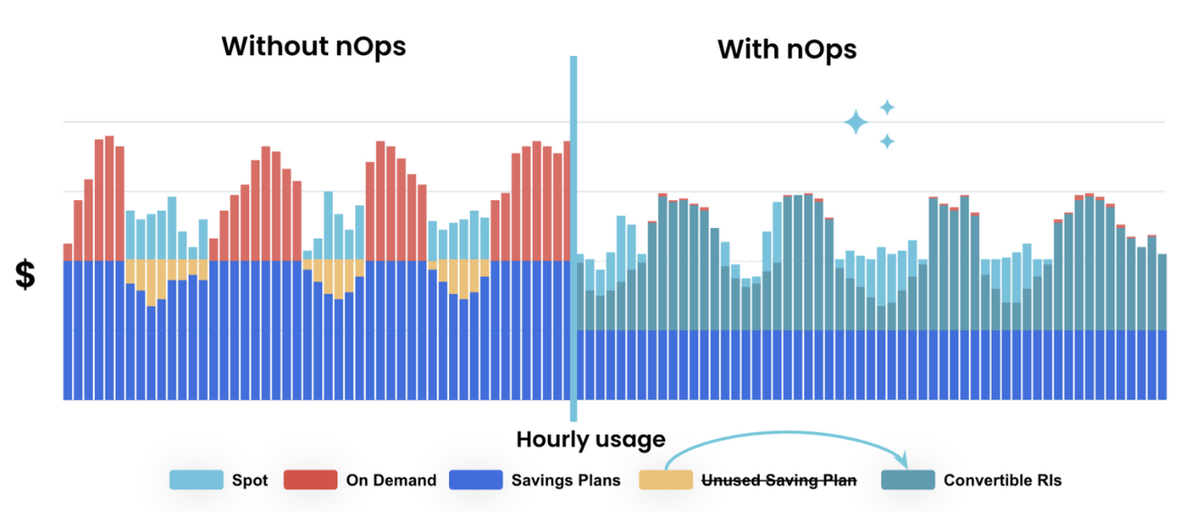
nOps takes the complexity of juggling various RI, SP, and Spot options off your hands — so you maximize cost savings with zero engineering effort. We offer a 100% utilization guarantee and the only charge is a portion of the savings, meaning there is zero risk for CFOs to try it out.
nOps was recently ranked #1 in G2’s cloud cost management category, and we optimize $5 billion in cloud spend for our startup and enterprise customers.
Join our customers using nOps to save 30-60% while reducing financial risk by booking a demo today!
Demo
AI-Powered Cost Management Platform
Discover how much you can save in just 10 minutes!
Book a Demo