Skip to content



- Blog
- Commitment Management
- Advanced GCP Commitment Strategies: How to De-Risk Commitments in 2026
Advanced GCP Commitment Strategies: How to De-Risk Commitments in 2026
In 2026, GCP commitment management is no longer a “set it and forget it” strategy.
Between the shift to net pricing, the evolving role of sustained use discounts, and the growing complexity of commitment options, teams are being forced to make higher-stakes decisions with less margin for error. The tradeoff between savings, flexibility, and risk is no longer theoretical — it shows up directly in your monthly bill.
Most FinOps teams feel this tension. Overcommit, and you’re locked into infrastructure decisions you can’t easily unwind. Stay flexible, and you leave meaningful savings on the table.
In a recent LinkedIn Live, we broke down how teams are navigating this shift — and the practical strategies that are emerging as GCP commitment management becomes a continuous optimization problem.
1. Net Price Billing Changed the Math on Every Purchase
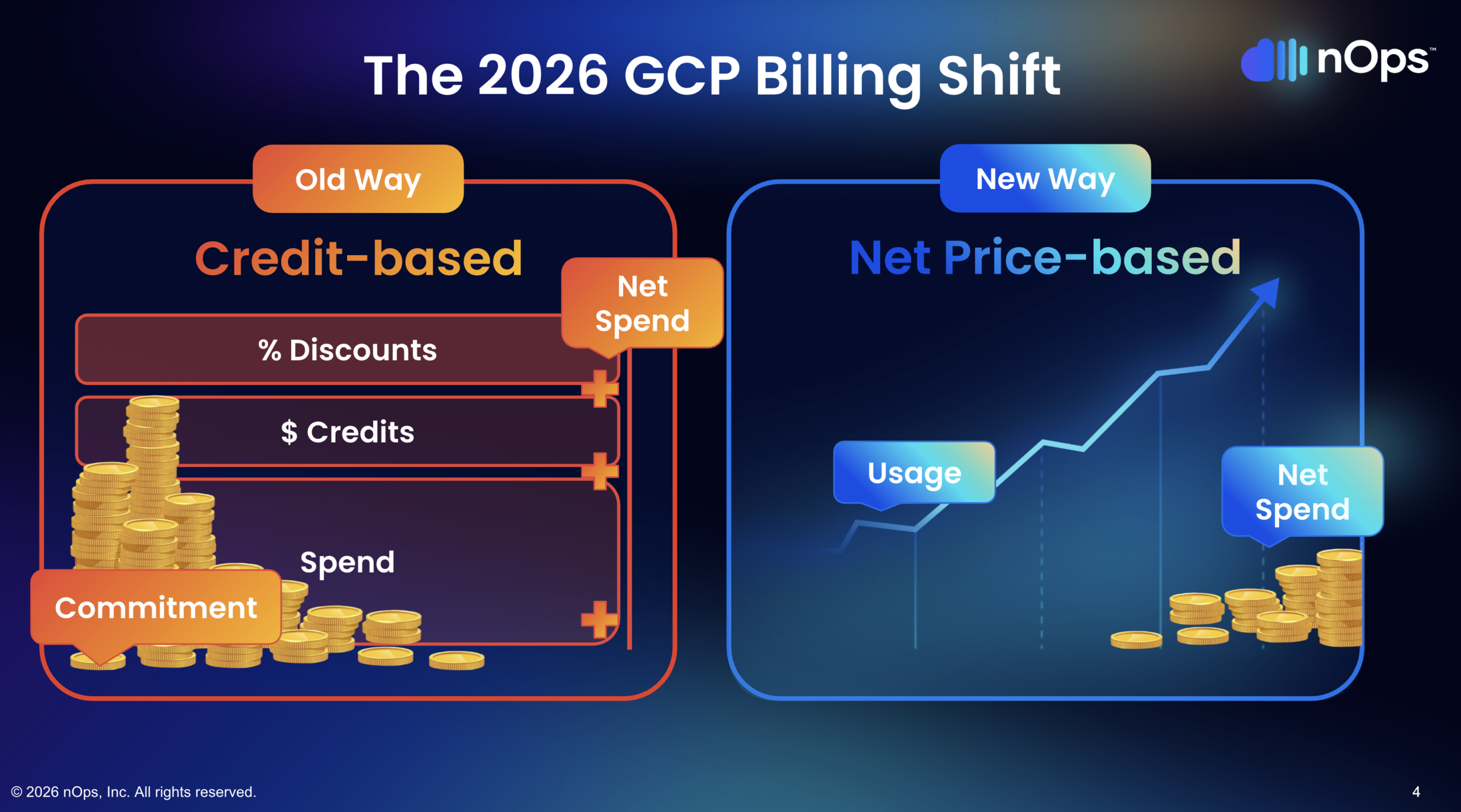
This shift looks subtle but has enormous financial implications. Under the old credit-based billing model, you saw your usage on one line, your credits on another, and your CUD discount layered on top. Savings felt additive — a bunch of negative line items showing up as credits.
Under net price billing, the commitment amount you specify is the discounted rate, not the on-demand amount you’re committing against. That single change means a $70/hour commitment under the new model covers a different volume of resources than the same $70/hour did under the old one.
Why does this trip people up? Because anyone who adopted net price billing late and then renewed their commitments at the same dollar figure they had before ended up overcommitting. The old $70/hour commitment and the new $70/hour commitment are not the same thing — the new one covers more resources at the baked-in discounted rate.
For FinOps teams, the practical impact goes beyond individual purchases. If you built reports, dashboards, COGS allocation, or savings tracking on the old billing model, those all need to be normalized. Legacy billing data doesn’t retroactively update to the new format. Any team that flipped to net price billing without refactoring their analytics is now making decisions based on inconsistent data.
2. SUDs Are Effectively Dead on Modern Machine Families
Sustained use discounts were GCP’s original on-ramp for cloud migration — run your workloads, get up to 30% off automatically, no commitment required. Great deal. Except they only apply to N1, N2, N2D, C2, M1, and M2 machine series. These are six-to-eight-year-old families at this point.
Newer machine families — C3, E2, T2D, N2D, and anything released in the last few years — don’t get SUDs at all. Google hasn’t made a formal deprecation announcement, but the direction is clear: new machine families are SUDs-free, pushing organizations toward committed use discounts as the primary savings instrument.
This creates a real budgeting trap. Organizations modernizing their infrastructure — moving from N1 to C3, for example — account for the 30% SUD in their cost projections. They run the migration, get hit with a bill that’s 30% higher than expected, and scramble to figure out what happened. The SUD they were counting on simply doesn’t exist on the new machine family.
The fix isn’t complicated, but it requires awareness: any migration or modernization plan on GCP needs to account for the SUD gap. The savings that were “free” on legacy families need to be explicitly replaced with CUDs on modern families, or the migration’s cost model is wrong from day one.
3. The Flex CUD Misconception Is Costing You Money
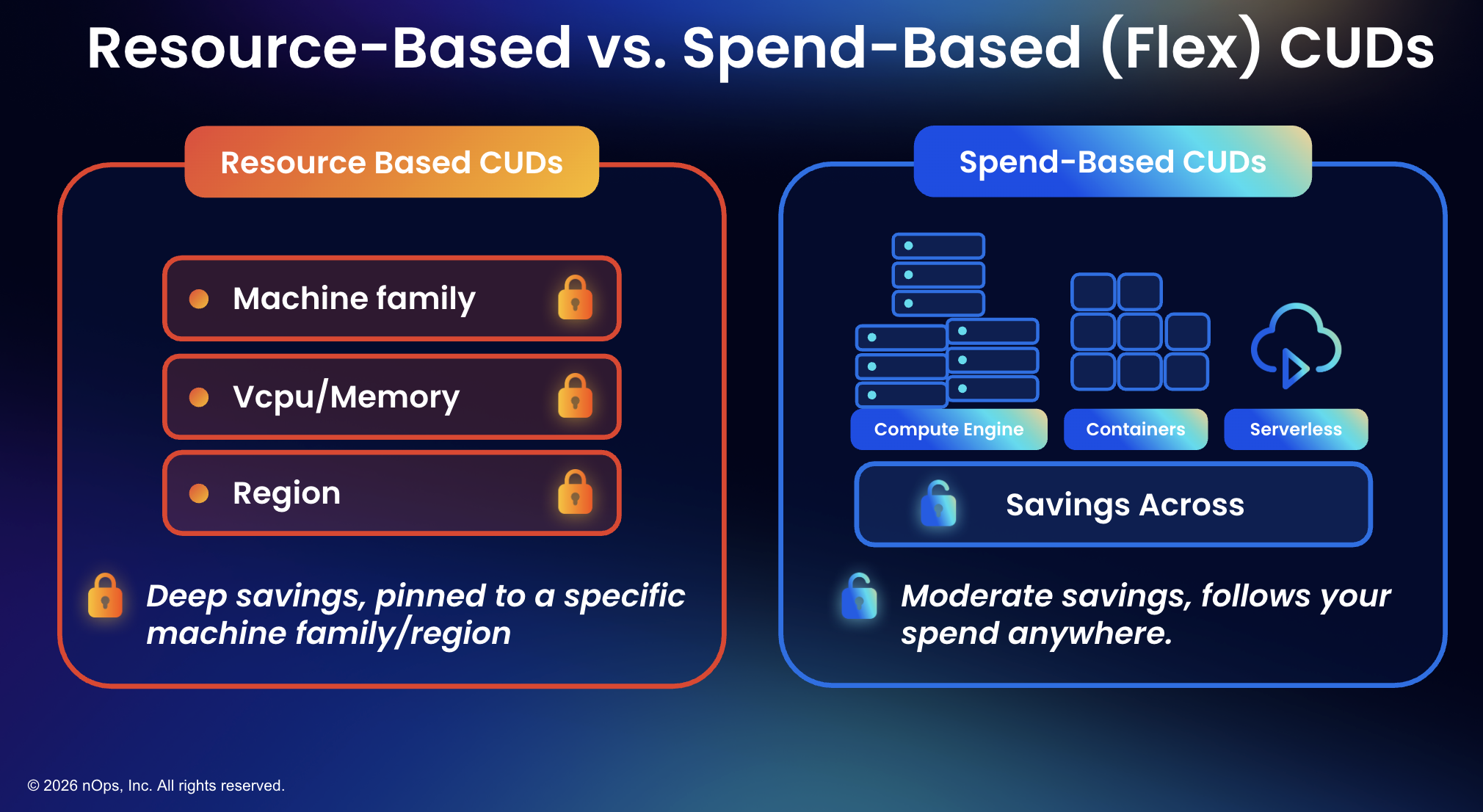
There’s a common assumption — especially from finance teams — that flex CUDs (spend-based committed use discounts) are always the better choice because of their flexibility. Buy a flex CUD, it follows your spend across eligible services like Compute Engine, GKE, and Cloud Run, and you don’t have to worry about which machine family or region your workloads land on.
Sounds great. Here’s the problem: flex CUDs do not save as much as resource-based CUDs. A one-year resource-based CUD is competitive with a three-year flex CUD on discount rate. Resource-based commitments offer up to 55% off for most machine series and up to 70% for memory-optimized families, while flex CUDs deliver moderate savings that don’t reach those depths.
And not every machine family is even coverable by flex CUDs. T2D instances, for example, can only be covered by resource-based commitments. Teams that buy a large flex CUD assuming it covers everything discover — sometimes after the purchase — that a meaningful portion of their compute isn’t eligible.
4. Use a Blended Strategy — Resource-Based Plus Flex
A blended commitment strategy — combining resource-based CUDs with flex CUDs — consistently delivers better results than either instrument alone. Resource-based CUDs maximize discount depth on stable, predictable workloads. Flex CUDs provide coverage breadth across dynamic, shifting compute environments. Together, they fill each other’s gaps.
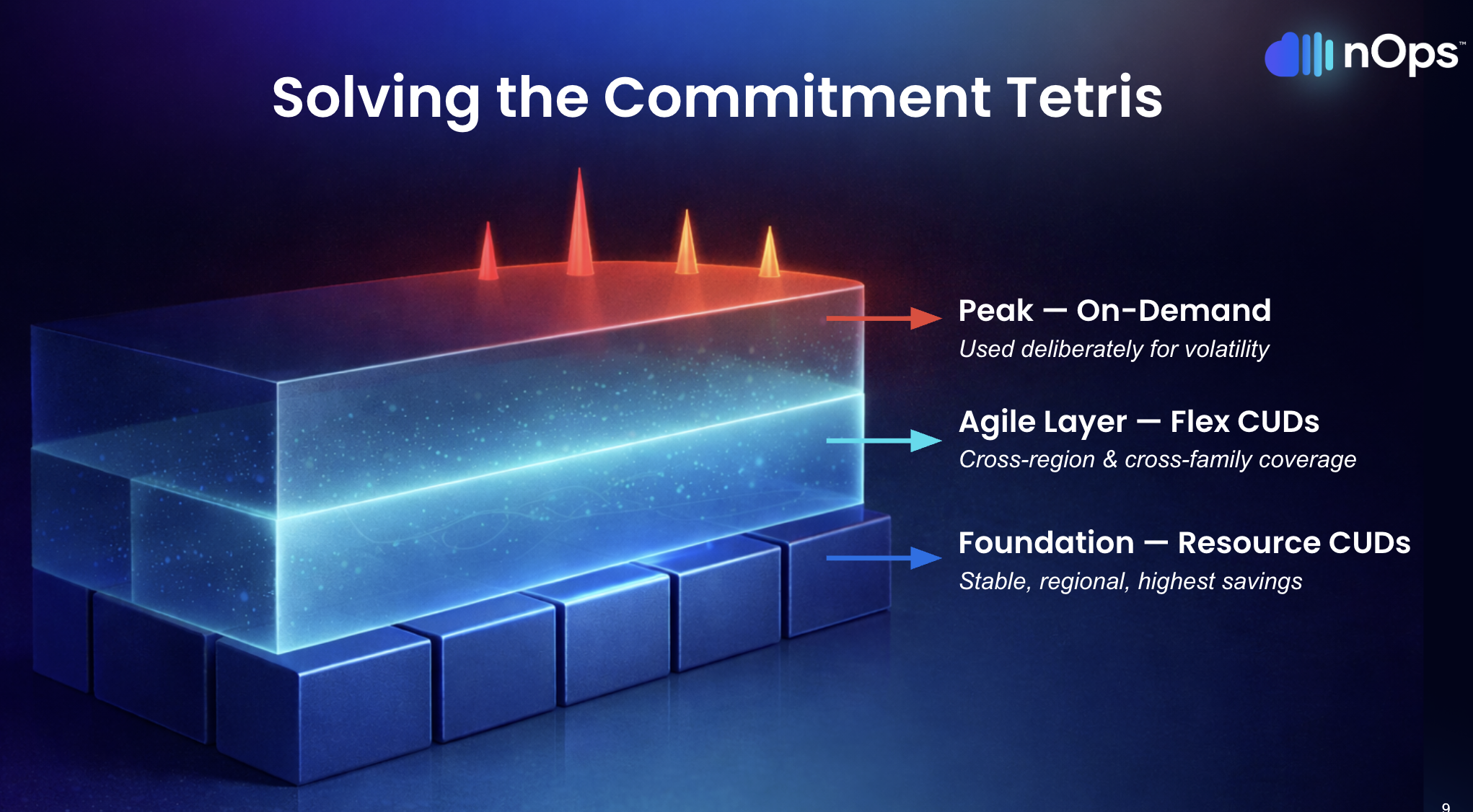
The logic follows a three-layer model that maps commitment instruments to workload behavior:
Layer 1 — Foundation (resource-based CUDs). Stable workloads that don’t change — SAP systems, core databases, long-running production services on known machine families in known regions. These get resource-based CUDs for maximum savings. You know the workload isn’t moving. Lock in the deepest discount.
Layer 2 — Agile (flex CUDs). Cross-region traffic, shifting machine families, containerized workloads that auto-scale and move across services. Flex CUDs follow the spend, so when engineering changes the underlying infrastructure, coverage doesn’t break.
Layer 3 — Peak (on-demand). Traffic spikes, seasonal surges, event-driven workloads that fire once a day or once a week. This layer stays uncommitted. It exists specifically to preserve the elasticity that cloud computing is supposed to provide.
The blended approach gives you the best coverage and the best blended savings rate. Going flex-only feels simpler, but you’re sacrificing discount depth on workloads that don’t need flexibility, and you’re leaving resource types uncovered that flex CUDs can’t reach.
5. Ladder Your Commitments — One Big Purchase Is the Riskiest Move
The most common GCP commitment mistake is making one large purchase at the beginning of a year or quarter that covers 80-90% of workloads. The first few months, the savings are flowing. Everyone’s happy.
Then engineering needs to modernize for a business requirement. And the leader who signed off on the three-year commitment’s head is on the chopping block.
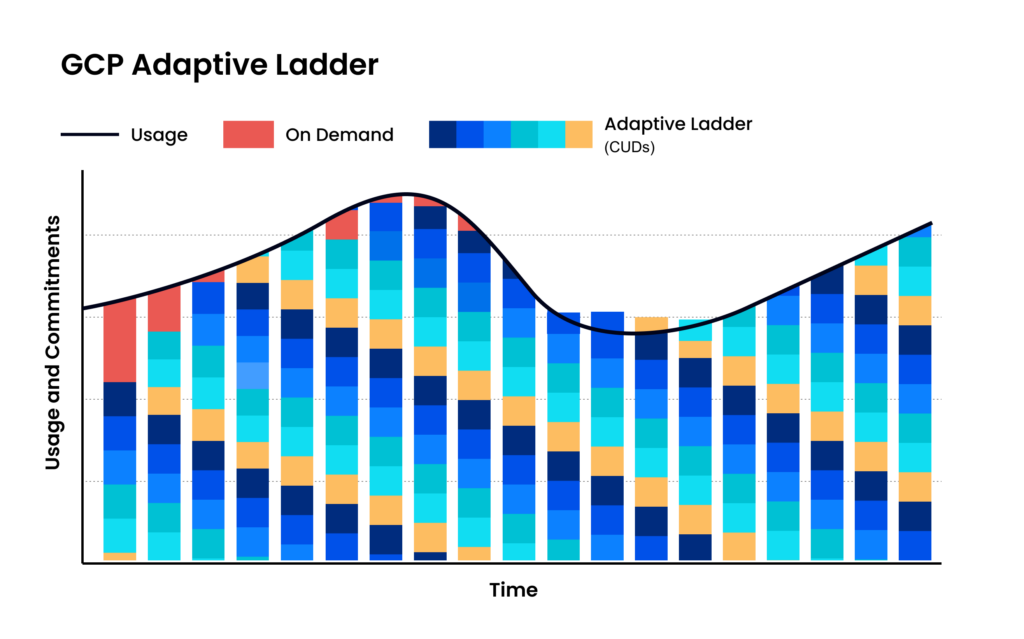
Adaptive laddering solves this by staggering commitments so they expire on a rolling basis rather than all at once. Instead of one annual cliff, you have commitments expiring every quarter, every month, or ideally more frequently, each one sized to the most current usage data.
The benefits compound:
- No renewal cliffs. Commitments expire in small batches, so there’s never a single high-stakes decision point.
- Continuous alignment with actual usage. Each new purchase reflects what the environment looks like right now, not what someone predicted twelve months ago.
- More flexibility. When architecture needs to change, there’s always a nearby expiration date that creates room.
- Lower risk per decision. A miscalculation on one small tranche costs a fraction of what a misjudged annual purchase costs.
The tradeoff: laddering requires more frequent purchasing decisions and continuous monitoring. That’s manageable with automation, but unrealistic as a manual exercise — which is exactly the point.
6. Automate on a Frequent Cycle — Manual Review Can't Keep Up
GCP commitment management at scale involves tracking potentially thousands of individual commitments across different types, terms, regions, machine families, and expiration dates. Every time a commitment expires, the unused capacity reverts to on-demand pricing. Every time a new workload spins up, it needs to be evaluated against existing coverage. Every time engineering changes infrastructure, the commitment math shifts.
Doing this manually — even monthly — means working from stale data. The environment between review cycles has already changed: new workloads deployed, old ones decommissioned, machine families swapped, regions shifted. By the time the analysis runs and the purchase gets approved, the commitment lands on infrastructure that no longer matches the data behind it.
An effective automation loop operates on three steps: observe real-time usage directly from GCP accounts (not billing exports, which lag), calculate optimal commitment allocation across existing commitments and their expiration schedules within minutes, and execute adjustments before waste accumulates.
The key insight is that this loop needs to run at least daily, not monthly or quarterly. Commitment waste happens in hours, not in months. A practitioner who was an active FinOps lead trying to ladder monthly described it as “very intensive” and still insufficient — they simply couldn’t match what an automated system could do. As the FinOps Foundation’s GCP commitment playbook notes, the lifecycle of analysis, purchase, review, and remedy should run continuously.
7. Doing Nothing Is the Most Expensive Decision
Analysis paralysis is GCP commitment management’s quiet killer. The decisions feel high-stakes — $500K commitments, $5M commitments — and the consequences of getting it wrong are real and visible. So teams wait for better data, clearer architecture plans, alignment across finance and engineering.
Meanwhile, every hour of compute that could be on a CUD runs at full on-demand pricing. One real-world example: a team had commitments expire, didn’t know what to do for six months, and the indecision cost them $100,000 in unrealized savings. Not from a bad purchase. From no purchase at all.
The laddering model specifically addresses this anxiety. You don’t need to make one giant, perfectly-sized commitment. Start with the obvious foundation — workloads that have been stable for six months or more — and lock those in with resource-based CUDs. Layer flex CUDs on the compute you’re confident about but can’t tie to specific families. Leave everything else on-demand. Build upward as patterns clarify.
Waiting for perfect visibility is itself a decision — and it’s the most expensive one on the table. Workload volatility isn’t going to decrease. AI adoption is accelerating. Infrastructure is changing faster, not slower. The cost of delay compounds every hour.

Do Google Cloud Flexible CUDs Better with nOps
We built our GCP commitment management around the same principles outlined in this article — automated laddering, blended resource-based plus flex CUD coverage, and hourly observe-calculate-execute cycles.
- Hourly automated laddering. We purchase commitments in small, right-sized increments based on real-time usage — not quarterly reviews or annual forecasts. Commitments expire on a rolling basis, creating continuous adjustment points without manual intervention.
- Blended coverage. Our platform maps workloads to optimal CUD types — resource-based for stable workloads, flex for dynamic compute — maximizing the blended savings rate across the entire GCP environment.
- Proactive risk management. We adjust the ladder before waste happens, not after. When usage patterns shift, coverage adjusts automatically — no fire drills, no renewal cliffs, no blocker conversations with engineering.
In 2026, “good enough” means you’re likely leaving money on the table. The target: capture 90th-percentile savings rates while keeping average commitment lock-in under six months. We’ve talked to companies that can save millions on their cloud bills by switching to nOps from competitors.
There’s no risk to book a free savings analysis to find out if nOps can help you get more value out of your cloud investments.
nOps manages $4B+ in cloud spend and was recently rated #1 in G2’s Cloud Cost Management category.
Demo
AI-Powered Cost Management Platform
Discover how much you can save in just 10 minutes!
Frequently Asked Questions
Let’s dive into a few FAQ about Google Cloud Commitments.
What is the difference between resource-based CUDs and flex CUDs on GCP?
Resource-based CUDs commit to specific resources (vCPUs, memory) in a specific region and project, offering discounts up to 55-70%. Flex CUDs (spend-based) commit to a dollar-per-hour spend level across eligible services like Compute Engine, GKE, and Cloud Run, offering moderate but broader savings.
Are sustained use discounts still available on GCP?
Only on legacy machine families — N1, N2, N2D, C2, M1, and M2. Newer families like C3, E2, and T2D don’t receive SUDs. Google hasn’t formally deprecated them, but no new machine families include SUD eligibility.
Should I go all-in on flex CUDs for simplicity?
No. Flex-only strategies leave money on the table because flex CUDs can’t match the discount depth of resource-based CUDs on stable workloads, and some machine families (like T2D) aren’t even eligible for flex coverage. A blended approach delivers better savings and broader coverage.
What is commitment laddering and why does it matter?
Laddering means staggering CUD purchases so they expire on a rolling basis rather than all at once. This eliminates renewal cliffs, reduces risk per decision, and keeps FinOps teams from becoming blockers to engineering changes.
How often should I review my GCP commitment portfolio?
Ideally, commitment decisions should happen hourly through automation. At minimum, quarterly — but even quarterly review cycles leave gaps where expired commitments revert to on-demand pricing while the team deliberates.

Last Updated: April 10, 2026, Commitment Management
Last Updated: April 10, 2026, Commitment Management