Skip to content



- Blog
- AWS Pricing and Services
- Azure Database Savings Plans: Everything You Need to Know
Azure Database Savings Plans: Everything You Need to Know
Microsoft has introduced a major shift in how customers optimize Azure database costs: Database Savings Plans. Unlike typical Azure launches, this rollout has been relatively quiet — there was no major announcement moment, but the feature is now live in the platform and reflected across Microsoft’s pricing and documentation.
These new commitments bring more flexibility than traditional Azure Reserved Instances while expanding cost optimization across multiple database services under a single model. This has meaningful implications. Database Savings Plans offer discounts of up to 35% depending on the workload, while allowing that discount to move across services and regions as usage changes. Instead of locking savings to a specific database configuration, a single dollar-per-hour commitment can apply across eligible Azure database services. However, this flexibility also introduces new tradeoffs, including lower maximum discounts compared to reservations and added complexity in how commitments are managed alongside existing optimization strategies.
We put together this essential guide to explain everything you need to know about new Database Savings Plans.
What are Azure Database Savings Plans?
Azure Database Savings Plans are a commit-to-spend model that discounts eligible database usage up to the amount you commit to per hour. They provide flexibility across supported database services and regions, allowing savings to follow usage as workloads change over time. You choose a dollar-per-hour commitment for a one-year term, and Azure automatically applies discounted rates across eligible database services up to that commitment.
The Advantage of Database Savings Plans: One plan Covers Many Database Services
A single Database Savings Plan applies across a set of eligible database services including:
Azure SQL Database
Azure SQL Managed Instance
Azure SQL Database Hyperscale
Azure SQL Database serverless
Azure Database for PostgreSQL
Azure Database for MySQL
Azure Cosmos DB
Azure DocumentDB
Azure Database Migration Service
SQL Server on Azure Virtual Machines hourly licenses
SQL Server hourly licenses on Arc
This consolidates what would otherwise be separate cost optimization decisions into one more flexible hourly commitment, making it easier for FinOps and engineering teams to reduce the risk of overcommitting to a single database configuration, service, or region.
#1: Expansion of Service Coverage Depth (Plus What’s Included and What’s Not)
Database Savings Plans introduce a meaningful new layer of flexibility for some of Azure’s most important database workloads.
What’s included:
| Service | Coverage Details |
|---|---|
| Azure SQL Database | Included in Azure Database Savings Plans. Microsoft’s example for the maximum stated savings is based on Azure SQL Database serverless. |
| Azure SQL Managed Instance | Included in Azure Database Savings Plans. Azure SQL reservations can save up to 33% on compute resources, and up to 80% when combined with Azure Hybrid Benefit. |
| Azure SQL Database Hyperscale | Included in Azure Database Savings Plans as part of the Azure SQL family. |
| Azure SQL Database serverless | Included in Azure Database Savings Plans. Reservation discounts are not available for the serverless compute tier of SQL Database. |
| Azure Database for PostgreSQL | Included as an eligible database service under Azure Database Savings Plans. Azure reserved capacity pricing advertises savings up to 47% for 1-year terms and up to 64% for 3-year terms. |
| Azure Database for MySQL | Included as an eligible database service under Azure Database Savings Plans. |
| Azure Cosmos DB | Included as an eligible database service under Azure Database Savings Plans. Azure reservations also apply to Cosmos DB throughput. |
| Azure DocumentDB | Included as an eligible database service under Azure Database Savings Plans. |
| Azure Database Migration Service | Included as an eligible database service under Azure Database Savings Plans. |
| SQL Server on Azure Virtual Machines hourly licenses | Included, but with an important limitation: hourly SQL Server license charges consume the plan at normal pay-as-you-go price rather than a discounted database savings plan rate. |
| SQL Server hourly licenses on Arc | Included for hourly SQL Server license consumption, again at normal pay-as-you-go price rather than a discounted database savings plan rate. |
What’s NOT Included:
| Service/Feature | Why Not Included | Alternative Options |
|---|---|---|
| Azure Database for MariaDB | Not listed among the currently covered services for Database Savings Plans. | Use existing reservation and workload optimization options where applicable. |
| Azure Cache for Redis | Not part of the currently covered services for Database Savings Plans. | Use Redis-specific reservation or configuration optimization approaches instead. |
Microsoft’s relatively low-profile rollout of Database Savings Plans may be intentional. The current offering is narrower than AWS’s, focused on core SQL and PostgreSQL workloads plus SQL Server licensing scenarios rather than a broad cross-section of Azure database services, so Microsoft may be choosing to introduce it quietly while validating adoption, refining coverage, or holding a broader push until pricing pages and supporting materials are more fully built out.
#2: Flexibility across sizes and regions as workloads change
Because purchased Savings Plans for Databases are tied to a dollar-per-hour commitment rather than a specific instance type or configuration, your discounts keep applying when you:
Move a workload from Azure SQL Database to Azure Database for PostgreSQL
Change instance sizes or switch instance families
Shift databases into different regions
The implication: you can change where and how your databases run without stranding previously purchased commitments.
#3: Serverless databases finally get discounts
Reservation discounts do not apply to Azure SQL Database serverless. With Azure Database Savings Plans, Microsoft’s top-end public savings example is now tied to Azure SQL Database serverless, with stated significant cost savings of up to 35%. This is particularly valuable because these workloads previously had ZERO commitment-based savings options.
#4: A significant hidden advantage: automatic application
If usage in one of the database services covered by Azure Database Savings Plans is reduced or retired, the savings can automatically apply to other eligible database services within the plan’s scope — helping preserve ongoing coverage as workloads change. Meaning, if you migrate from Azure SQL Database → Azure Database for PostgreSQL → serverless SQL, your commitment can continue to stay in use rather than becoming stranded. Azure Database Savings Plans help protect coverage during modernization instead of penalizing architectural change, which makes them especially useful for long-term transformation.
The Trade-Offs of Database Savings Plans
A few of the limitations of Savings Plans for databases include:
#1: Lower discounts than classic Azure Reserved Instances
Flexibility comes at the price of reduced discount depth. Database Savings Plans improve coverage and reduce the risk of stranded commitments, but they usually don’t beat classic Azure Reserved Instances or Reserved Capacity on pure percentage savings for long-lived, stable workloads. Here is how the discounts compare.
| Workload Type | Service Examples | Database Savings Plans Discount | Reserved Instance / Reserved Capacity Discount | When to Choose Database Savings Plans |
|---|---|---|---|---|
| Serverless | Azure SQL Database serverless | Up to 35% | Not eligible for reservation discounts | Best choice when you want commitment-based savings on elastic SQL workloads that reservations do not cover. |
| Provisioned SQL Database | Azure SQL Database, SQL Managed Instance | Not publicly broken out by Microsoft | Up to 33% on compute resources; up to 80% when combined with Azure Hybrid Benefit | Use Database Savings Plans when flexibility matters more than maximum discount depth; use reservations for stable, predictable SQL workloads. |
| PostgreSQL | Azure Database for PostgreSQL | Not publicly broken out by Microsoft | Up to 47% for 1-year, up to 64% for 3-year reserved capacity | Use Database Savings Plans when you expect service or region changes; use reserved capacity for steady PostgreSQL workloads. |
| SQL Server on Azure VMs | SQL Server on Azure Virtual Machines | Covered, but hourly SQL Server license charges consume the plan at normal pay-as-you-go price | Up to 72% with Azure Reserved VM Instances; up to 80% with Azure Hybrid Benefit | Use Database Savings Plans for flexibility around database licensing coverage, but Reserved VM Instances remain the stronger pure-discount option for stable VM-based SQL estates. |
| SQL Server enabled by Azure Arc | SQL Server enabled by Azure ARC hourly license | Covered, but hourly SQL Server license charges consume the plan at normal pay-as-you-go price | No direct apples-to-apples reservation number publicly provided in the sources reviewed | Use Database Savings Plans when you want a flexible commitment model across eligible SQL licensing scenarios. |
#2: How Azure Pricing Nudges Customers Toward Modern Databases
Azure Database Savings Plans do not just offer discounts; they also steer database cost strategy through pricing incentives. The new model rewards:
Azure SQL Database serverless and other flexible consumption patterns
Cross-region mobility across eligible workloads
Modernization across SQL and PostgreSQL services
Shorter, one-year commitments instead of rigid long-term reservation planning
And they apply economic pressure against:
Treating all database workloads as fixed, reservation-first commitments
Overcommitting stable discounts to workloads that may still move across services or regions
Relying exclusively on 3-year reservation strategies when flexibility matters more than maximum discount depth
Azure Database Savings Plans are currently available only as a one-year hourly spend commitment, while Azure reservations still offer one-year and three-year terms with deeper actual savings for highly stable workloads. That reinforces Microsoft’s push toward shorter, more flexible commitments for evolving database estates, while leaving traditional reservations as the stronger pure-discount option for predictable long-lived usage.
#3: More complexity for FinOps and engineering teams
It’s clear that Azure Database Savings Plans favor flexible and serverless consumption patterns. However, modernization doesn’t happen overnight. These discount drives do provide incentives to modernize the stack, but they also add the extra complexity of managing both Azure Reserved Instances and Database Savings Plans. Especially if migrating to a modern stack is on the horizon, how you manage new or existing RIs becomes important, as they become an additional layer to balance.
How nOps Analyzes Database Savings Plans Opportunities
At nOps, we’ve built automated analysis capabilities that match your actual database usage patterns against Database Savings Plans pricing to identify optimization opportunities. Here’s how it works:
1. Usage Pattern Analysis
We analyze your real-time usage data to identify:
Azure database services in use (Azure SQL Database, Azure Database for PostgreSQL, SQL Server on Azure Virtual Machines, etc.)
Deployment models and usage patterns
Regional distribution
Usage consistency (24/7 vs. variable)
Current pay-as-you-go vs. reservation coverage
2. Pricing Matching Engine
Our system matches your usage to Database Savings Plans pricing by:
Service type
Usage pattern
Region
Eligible deployment and billing context
3. Savings Calculation
For each customer, we:
Calculate live usage and existing commitments across eligible database services and how they sit within overall costs
Project Azure Database Savings Plans costs and where they can be applied for maximum savings
Project potential monthly and annual savings
Continually adjust commitment recommendations based on usage patterns, including variable and spiky workloads, to maximize ROI
Key Takeaways
Under new Database Savings Plans, it’s clear that you get more flexibility in how savings are applied across eligible database services and regions, especially for workloads that may shift over time. But that flexibility comes with tradeoffs. Database Savings Plans do not replace the deeper discounts available through traditional reservations for long-lived, stable workloads, and they can add another layer of complexity on top of existing reservation strategies.
To maximize savings without overcommitting, it makes sense to use a hybrid approach that blends Database Savings Plans and Reservations, and to adopt an adaptive “laddering” strategy rather than making one large commitment all at once. Commitments are fixed, but your cloud usage is not—especially as database estates evolve across services, regions, and deployment models.
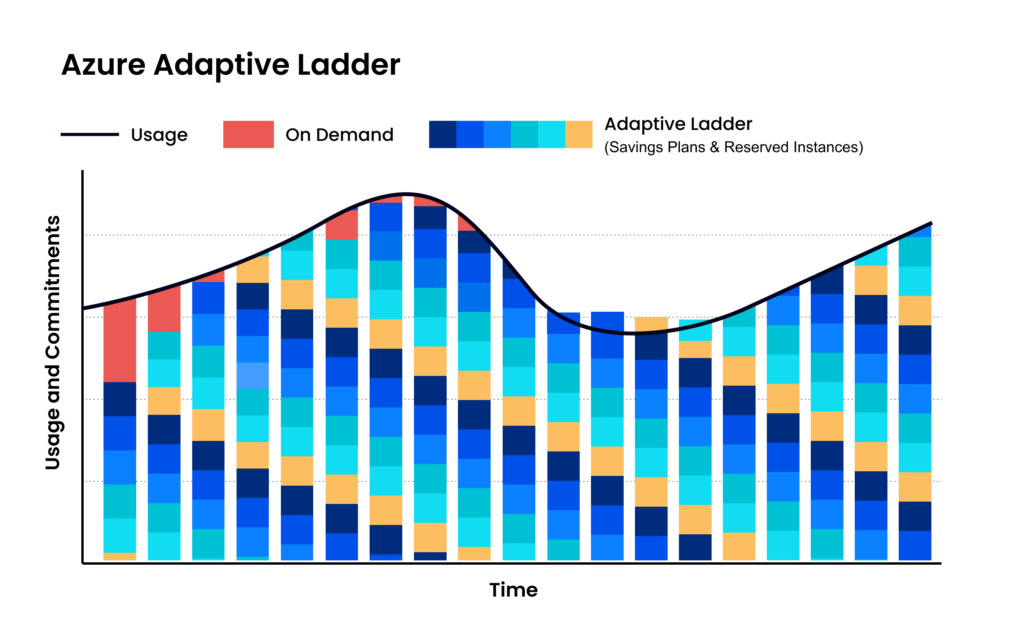
At nOps, we help customers continuously adjust their commitment mix so they maintain flexibility and coverage as their architectures change. Key benefits of nOps automated Commitment Management include:
Savings-first pricing model. nOps offers a free savings analysis, so you can see exactly how much you will save. And the fee is only a portion of savings, meaning there’s no downside.
Maximize savings on autopilot. nOps continuously adjusts commitments every hour to match real usage, which helps capture incremental savings that slower optimization approaches miss. That hourly adjustment is a big part of why nOps can drive up to 20% more savings than competing solutions
Eliminate commitment risk. nOps shortens your commitment windows down from years to a fraction of the time. That means you get the same discounts with far less risk.
Curious what that looks like in your environment? Book a free savings analysis with one of our Azure experts to find out.
nOps manages $3 billion in cloud spend for our customers and is rated 5 stars on G2.
Frequently Asked Questions
Let’s dive into a few FAQ about Database Savings Plan benefits for your cloud costs.
How do Azure Database Savings Plans differ from Azure Savings Plans for compute?
Azure offers Savings Plans for Compute and Savings Plans for Databases. Database Savings Plans apply specifically to eligible database services like Azure SQL and PostgreSQL, while compute savings plans cover VM and compute workloads. Database plans offer up to ~35% savings and focus on database consumption, whereas compute plans can reach higher discounts but apply only to eligible resources.
What are eligible resources for Database Savings Plans?
Eligible resources for Azure Database Savings Plans include Azure SQL Database, Azure SQL Managed Instance, Azure SQL Database serverless, Azure Database for PostgreSQL, Azure Database for MySQL, Azure Cosmos DB, Azure DocumentDB, Azure Database Migration Service, and SQL Server hourly licensing on Azure Virtual Machines and Azure Arc.

Demo
AI-Powered Cost Management Platform
Discover how much you can save in just 10 minutes!