Skip to content



- Blog
- Commitment Management
- Commitment Lock-In Risk: How to Build a Flexible Cloud Commitment Strategy
Commitment Lock-In Risk: How to Build a Flexible Cloud Commitment Strategy
Savings rate is typically the go-to way to measure how well you’re optimizing cloud costs. That makes sense — it shows you how much you’re actually saving compared to paying on-demand rates.
But measuring savings alone is not enough.
Commitment-based discounts—Savings Plans, Reserved Instances, Committed Use Discounts—don’t just improve your rate. They require you to commit to future spend. And that commitment introduces risk that you need to measure and quantify as part of your decision-making.
In this article, we’ll break down how commitment lock-in risk actually works, why it matters just as much as savings rate, and how to build a strategy that captures discounts without limiting your ability to adapt.
Why Savings Rate Alone is Misleading: The Lock-In Problem
When you purchase an AWS Savings Plan, you’re making an hourly commitment. Whether you use that capacity or not, AWS charges you. This creates a fundamental tension between cost savings and operational freedom.
Consider what happens in common scenarios:
- Modernization efforts: You migrate from EC2 to containers or serverless. Your Savings Plan commitment doesn’t automatically follow.
- Right-sizing initiatives: You discover instances running at 20% utilization and downsize. Usage declines but the commitment stays the same.
- Seasonal businesses: Summer traffic drops 60%, but your commitment remains fixed through low season.
- Multi-cloud strategies: Leadership decides to evaluate GCP or Azure. Your AWS commitment becomes dead weight.
The community has learned this lesson the hard way. We see it in practice all the time—VPs choosing not to renew hundred-thousand-dollar Savings Plans, teams capping long-term commitments at a fraction of their infrastructure, or deliberately leaving savings on the table to avoid getting locked in. Overcommitting is painful, hard to unwind, and when it goes wrong, it’s your head on the line.
What is Commitment Lock-In Risk?
Commitment lock-in risk is the time-based exposure created by committing to cloud spend in exchange for discounted rates. It reflects how long your current savings depend on maintaining enough usage to cover those commitments.
In practice, it comes down to two variables: how much you’ve committed and how long those commitments last. More coverage increases the amount of spend you’re locked into, and longer terms extend how long that constraint exists.
For example:
- A team commits to a 1-year Savings Plan covering 60% of their compute spend and achieves a 22% effective savings rate (ESR).
- Another team commits to a 3-year plan covering the same 60% and achieves a 32% effective savings rate (ESR).
Both improve their savings, but the second team is locked in three times longer to maintain that outcome.
How To Calculate Commitment Lock-In Risk
Commitment lock-in risk (CLR) is defined as the maximum weighted average duration of your commitment portfolio over time.
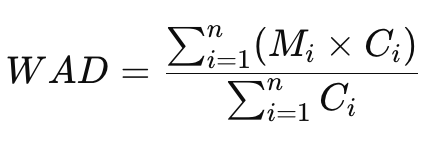
Weighted Average Duration = (sum of remaining months × commitment value) ÷ (total commitment value)
CLR = max (weighted average duration measured over time, assuming expiring commitments are replaced to maintain coverage)
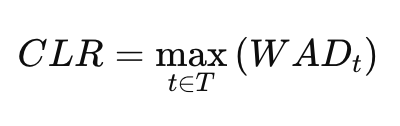
Where:
- Mᵢ = remaining months on commitment i
- Cᵢ = commitment value of commitment i (e.g., $/hr)
- WADₜ = weighted average duration at time t
- T = time horizon (typically the length of the longest commitment), assuming expiring commitments are replaced to maintain coverage
In practice, this means:
- Calculate the weighted average duration of all active commitments.
- Project that value forward over time as commitments expire and are renewed.
- Take the maximum value observed.
That maximum value (in months) is your commitment lock-in risk.
Example Calculation of CLR
To better understand how this works, let’s look at a simple example. Consider a single 3-year AWS Compute Savings Plan (CSP) with the following details:
- Current date: 3/1/2025
- CSP expiration date: 3/1/2028
- CSP commitment: $12/hr
There are 1,096 days between now and the expiration date, so the current Weighted Average Duration = (1,096 days × $12/hr) ÷ $12/hr = 1,096 days = 36.0 months.
If we project forward and measure the Weighted Average Duration over time (assuming the commitment is renewed at expiration to maintain coverage), we get the following pattern:
| Date | Weighted Average Duration (months) |
|---|---|
| 3/1/25 | 36.0 |
| 3/2/25 | 36.0 |
| 3/3/25 | 35.9 |
| ... | ... |
| 2/27/28 | 0.1 |
| 2/28/28 | 0.0 |
| 3/1/28 | 36.0 |
| 3/2/28 | 36.0 |
| 3/3/28 | 35.9 |
| ... | ... |
| 2/28/29 | 36.1 |
| 3/1/29 | 36.0 |
The Commitment Lock-In Risk is the maximum Weighted Average Duration value in the set, which is 36.0 months.
Conceptually, this means that to achieve and maintain this level of savings, this commitment portfolio carries up to 36 months of lock-in at any given point in time.
How to Mitigate Commitment Lock-In Risk
In the above example, achieving a higher realized savings rate requires accepting up to 36 months of lock-in. That’s incredibly risky for most teams.
That trade-off is the core decision behind every commitment strategy: how much risk are you willing to take on to increase savings?
In practice, most teams don’t optimize for maximum savings. They optimize for a level of commitment their infrastructure can realistically support without creating excessive lock-in.
Let’s talk about a few ways to figure out your optimal coverage point and lower your Commitment Lock-In Risk.
The Conservative Start: 50% Coverage
AWS will happily recommend 80-90% commitment coverage based on your current usage patterns. Ignore this recommendation.
Practitioners often suggest starting at 50% of your baseline compute spend to get meaningful savings/cost efficiency while preserving flexibility for the inevitable changes ahead.
Why 50%?
- Downside protection: You can scale down 50% before hitting commitment overage.
- Psychological safety: Teams make better architectural decisions when they’re not worried about stranded commitments.
- Room to optimize: You have space to right-size, consolidate, or modernize without financial penalty.
50% allows you to scale down significantly without hitting that commitment if you find other ways to save.
The math works in your favor even at partial coverage. If Savings Plans deliver 40% commitment savings over on-demand, covering 50% of workloads still yields 20% overall savings — without the risk of over-commitment.
Use Compute Savings Plans
AWS offers two primary Savings Plan types for compute workloads:
- Compute SPs: Apply to EC2, Lambda, and Fargate. Maximum flexibility, lower discount (typically 40-45% for 3-year commitments).
- EC2 Instance SPs: Apply only to specific EC2 instance families in specific regions. Higher discount (up to 72%), but rigid.
The discount delta matters less than you might think. An extra 10% savings on a commitment you can’t use is worthless. A smaller discount on flexible capacity that adapts to your infrastructure is pure value.
Use EC2 Instance SPs only for:
- Database hosts that will stay in the same instance family for years.
- Long-running production workloads with zero flexibility needs.
- Specific regulatory workloads locked to certain instance types.
Everything else should use Compute SPs.
The Layering Strategy: Matching Commitment to Workload Stability
Don’t treat all compute workloads the same. Different workload types deserve different commitment strategies.
- Base Layer (50-60% of stable compute): 3-year Compute Savings Plans for long-running production services, databases, stateful workloads, and core infrastructure services. Commit conservatively: aim for 50% of these workloads’ current spend.
- Variable Layer (20-30% of predictable compute): 1-year Compute Savings Plans for seasonal workloads with annual patterns, development and staging environments, and known project-based compute with defined timelines. Commit to 30-40% of average usage.
- Flex Layer (remaining compute): On-demand pricing or Spot for experimental workloads, short-term projects, and burst capacity.
This layering approach lets you capture 60-70% of available Savings Plan discounts while maintaining freedom to optimize the remaining 30-40% of infrastructure.
Purchase Savings Plans in Smaller Increments
Many organizations purchase Savings Plans in large batches aligned with annual budget cycles. This creates concentration risk.
A better approach is Savings Plan Laddering — distributing commitments over time instead of in single purchases.
Rather than buying $10,000/hour in January, structure it as:
- January: $2,500/hour (3-year term)
- April: $2,500/hour (3-year term)
- July: $2,500/hour (3-year term)
- October: $2,500/hour (3-year term)
Benefits of laddering:
- Regular expiration points: Every quarter, a portion of commitments expires, allowing strategy adjustments.
- Reduced lock-in exposure: Never more than 25% of total commitment locked into a single purchase window.
- Market price capture: You naturally buy at different discount rates throughout the year.
- Organizational learning: Each purchase reflects updated knowledge about your actual usage data and whether you’re subject to under commitment or over commitment
Laddering works best with 1-year plans where quarterly reviews make sense. For 3-year commitments, consider semi-annual or annual laddering cycles.
Minimize CLR and Maximize Savings with Automation
Managing Commitment Lock-In Risk (CLR) requires continuously adjusting coverage, duration, timing and commitment mix as your usage changes.
In practice, managing commitments manually is difficult to do well at scale. Usage shifts daily, commitments span years, and small mistakes compound into long-term lock-in.
nOps automated Commitment Management employs all of the strategies included in this list to maximize your effective savings rate while minimizing your commitment risk.
- Continuous automation powered by Machine Learning: Extend actual savings beyond your baseline — pushing discounts from 50-70% of usage to 100% with adaptive commitment laddering that adapts to your usage every hour.
- Maximize discounts AND flexibility: Instead of one big batch of 3-year Compute Savings Plans, nOps builds a mix, committing in small increments each hour and adjusting as needed. The result: teams slash their risk and commitment windows.
- Savings-first model: nOps only gets paid if we save you money — meaning there’s no upfront cost or financial risk. Customers have described it as being like “picking $20 bills off the ground” — there’s no downside to seeing if you can reduce costs with a free savings analysis.
nOps is entrusted with $4 billion in cloud spending and was recently rated #1 in G2’s Cloud Cost Management category.

Last Updated: March 31, 2026, Commitment Management
Last Updated: March 31, 2026, Commitment Management