New Fastly Integration for Inform — attribute and optimize CDN spend faster
Gain unified visibility into Fastly costs and usage
Modern teams rely on edge/CDN to deliver experiences, but CDN spend often lives outside core cloud cost workflows—making it hard to attribute costs by product, service, or team.
We built the Fastly integration to bring CDN costs into the same place you manage cloud spend, so FinOps and engineering can align on one source of truth for allocation, reporting, and optimization.
What's New
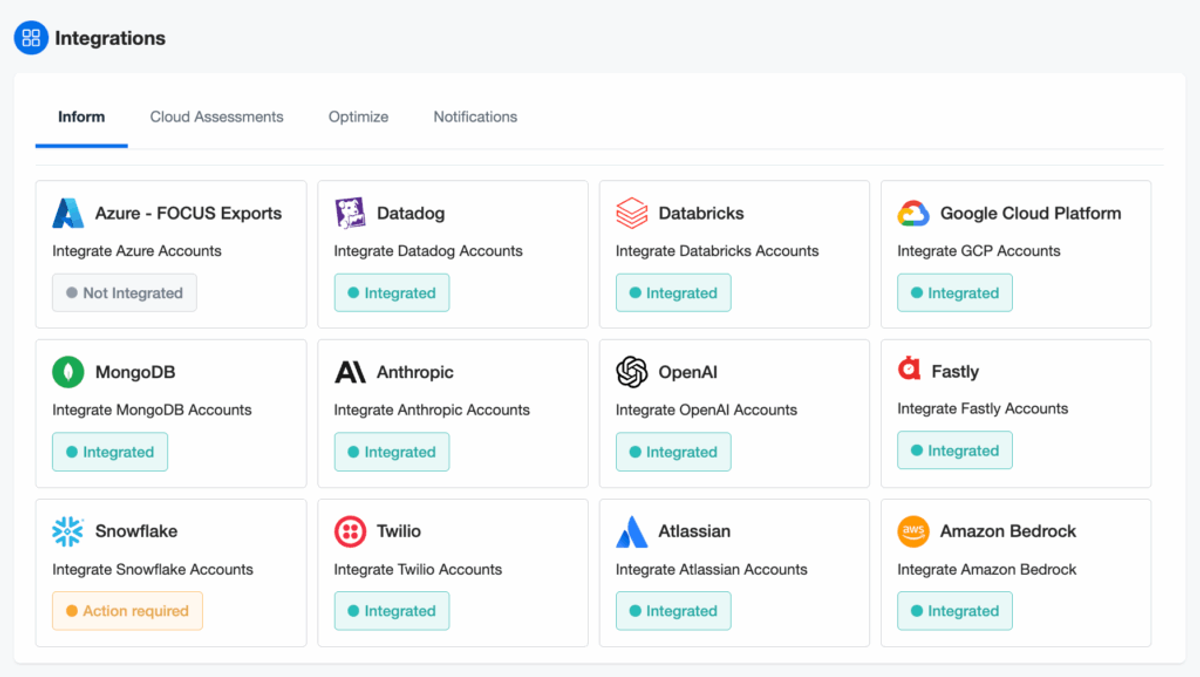
We’re excited to unveil Fastly Integration, the latest addition to nOps Inform, designed specifically to help your business bring Fastly costs and usage into Inform for accurate allocation, showback/chargeback, and optimization. Starting today, you can access this new integration directly in the nOps Settings.
Set Up In Minutes
Connecting Fastly to nOps is quick and secure. Simply provide your Fastly API token, and nOps will automatically establish the connection, validate your credentials, and display the integration’s health status in real time—so you can start attributing and optimizing CDN costs within minutes.
Key setup details:
|
Allocate Fastly Costs
Automatically map Fastly services and their costs to applications, teams, and environments in nOps. Effortlessly enable accurate showback/chargebacks, aligning CDN spend with owners to drive accountability and optimization.
Benefits include:
- All of your cloud and CDN costs in a single pane of glass
- Consisted, automated allocation across all of your services
- Shared dashboards for FinOps and Engineering
Visibility into all of your Fastly costs in nOps Inform
nOps Inform delivers true end-to-end visibility across cloud, CDN, SaaS, Kubernetes, and GenAI workloads. Fastly data integrates directly into the same dashboards and analytics you already use. In addition to cost allocation, visibility features include:
- Comprehensive Cost Analysis: Hourly visibility into all infrastructure, edge, and SaaS costs with report templates built by FinOps experts
- Anomaly Detection: Identify and resolve spend anomalies in real time before they escalate.
- Forecasting: ML-powered projections to predict future costs and track budget adherence.
- Budgets & Cost Targets: Set and monitor cost goals across teams, services, or environments to ensure accountability and prevent overspend.
Who Benefits Most
| FinOps Analysts | Engineering Managers | Product Owners |
| Faster allocation and reporting; unify CDN with cloud spend; identify optimization opportunities earlier. | Clear ownership of CDN costs by service/team; shared metrics for performance vs. cost; fewer context switches. | Visibility into feature and product costs using edge/CDN; better trade-off decisions using one source of truth. |
How It Works
1) Navigate to Settings → Integrations → Inform → Fastly.
2) Select “Add Fastly Integration.”
3) Enter your Fastly API Token (read permissions are sufficient) and click Setup.
4) nOps validates the connection and surfaces integration health (“Integrated,” “Not integrated,” or “Action required”) with actionable error messages.
5) Map Fastly spend and usage in Inform for accurate allocation and reporting.
What you’ll see in Inform:
- Region-level breakdowns for Bandwidth, Requests, and Subscription items with cost per unit, usage, and total cost
- Tiered pricing handled automatically; when multiple rates exist in a region, cost per unit is shown as “Varies by tier”
- Requests displayed in individual request units; rates normalized to ensure rate × units = amount
- Monthly period filtering (year/month) with daily refresh; the most recent day may be partially processed
How to Get Started
If you're already on nOps...
Have questions about Fastly Integration? Need help getting started? Our dedicated support team is here for you. Simply reach out to your Customer Success Manager or visit our Help Center. If you’re not sure who your CSM is, send our Support Team a message.
If you’re new to nOps…
nOps was recently ranked #1 with five stars in G2’s cloud cost management category, and we optimize $5+ billion in cloud spend for our customers.
Join our customers using nOps to understand your cloud costs and leverage automation with complete confidence by booking a demo with one of our AWS experts.
Demo
AI-Powered Cost Management Platform
Discover how much you can save in just 10 minutes!
Book a Demo