New In-Place Container Rightsizing Supported by nOps
Optimize container resources live without restarts or disruptions
In Kubernetes (before v1.33), updating container resource requests required recreating Pods. For production workloads, this meant restarting containers, which could interrupt sensitive or stateful applications.
With Kubernetes 1.33, in-place Pod resource updates (KEP-1287) allow CPU and memory allocations to be adjusted on running Pods without deleting or recreating them. This feature is currently in beta and is available by default in nOps Container Rightsizing for clusters running Kubernetes 1.33 and higher, enabling live resource optimization with zero downtime.
What's New
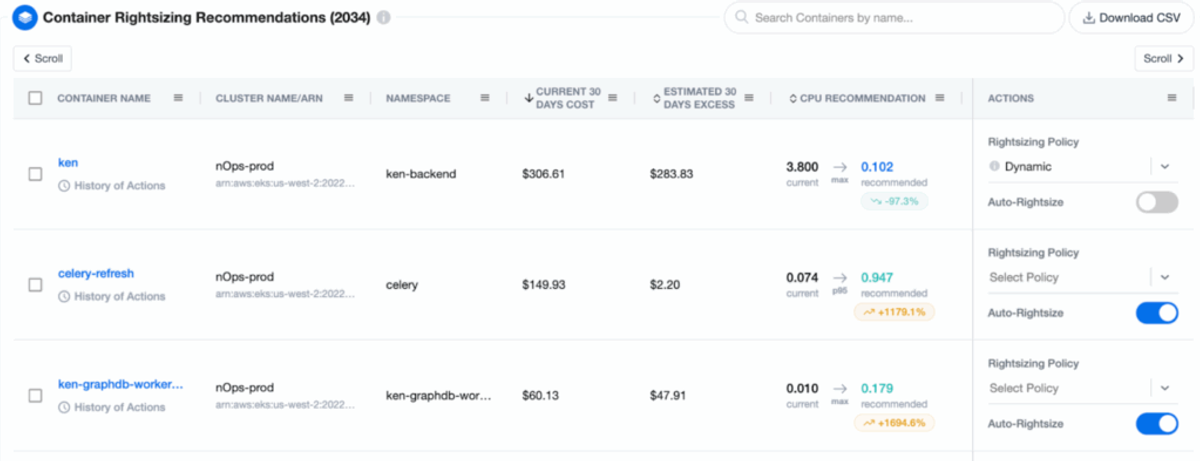
nOps now supports in-place updates for container rightsizing, dynamically adjusting CPU and memory requests for running containers without triggering Pod restarts.
Benefits include:
- Continuous rightsizing with no disruption to running applications.
- Support for stateful and legacy workloads that cannot tolerate restarts.
- Application stability and connections maintained during resource adjustments.
- Reduced operational risk and cost waste during rightsizing.
This update builds directly on Kubernetes 1.33’s native support for in-place updates via Vertical Pod Autoscaler (VPA).
More about nOps Container Rightsizing nOps container rightsizing keeps your workloads running at optimal CPU and memory levels without constant manual adjustments. This enables your applications to scale seamlessly and reduce costs by avoiding resource waste. Features include automatic detection of optimal rightsizing levels, customizable recommendation policies, IaC support, namespace-level control, and more. Find out all the details here. |
How It Works
Here’s how it works:
- Install the agent: Deploy the lightweight nOps agent in your EKS cluster to begin collecting detailed CPU and memory metrics.
- Collect and analyze the data: nOps processes historical usage data with minute-by-minute granularity to identify optimization opportunities.
- Select policies and apply: Customize recommendation policies and apply optimized CPU and memory settings with a single click.
- Save money with automation: Enable nOps for continuous, hands-off rightsizing and cost reduction.
How To Get Started
If you’re already on nOps…
Have questions about in-place container rightsizing? Need help getting started? Simply reach out to your Customer Success Manager or visit our Help Center. If you’re not sure who your CSM is, send our Support Team a message.
If you’re new to nOps…
nOps was recently ranked #1 with five stars in G2’s cloud cost management category, and we optimize $5+ billion in cloud spend for our customers.
Join our customers using nOps to understand your cloud costs and leverage automation with complete confidence by booking a demo with one of our AWS experts.
Demo
AI-Powered Cost Management Platform
Discover how much you can save in just 10 minutes!
Book a Demo