nOps Introduces AWS Migration Acceleration Program (MAP) Public API
Empower your business with customized MAP solutions using nOps' new public API
The Amazon Web Services (AWS) Migration Acceleration Program (MAP) supports companies migrating to AWS with best practices and financial incentives, including significant credits to offset migration costs.
However, to realize these financial incentives, proper tagging is crucial. The nOps MAP tool helps companies automatically tag resources, fix mistagged resources, track your migration progress, and forecast expected credits for the quarter — to accelerate your MAP migration and maximize your financial benefits.
What’s New
We’re excited to announce that nOps has made access to its MAP tracker APIs public.
Benefits for nOps customers
Access to the MAP API allows you to access and view MAP data in various formats and arrangements based on specific requirements. This provides users with greater flexibility to integrate MAP data into their own systems, supporting more efficient collaboration on AWS migration processes.
Related Content
AWS MAP is a breeze with nOps
Simplify AWS MAP and maximize your MAP funding
Book a demo
Benefits for Solutions Providers
Solutions providers can build their own purpose-built solutions leveraging the nOps MAP tracker API such as personalized dashboards, integrations with CRM and ERP systems, or business intelligence solutions. This aspect is particularly useful for Managed Service Providers (MSPs) and Cloud Solution Providers (CSPs) who wish to empower their own clients with custom tools to facilitate the AWS MAP process.
How to Get Started
First, create an API Key on the nOps Dashboard.
- Click on your name.
- Navigate to Personal Settings.
- Select API Key.
- Click Create New API Key and save it for use later.
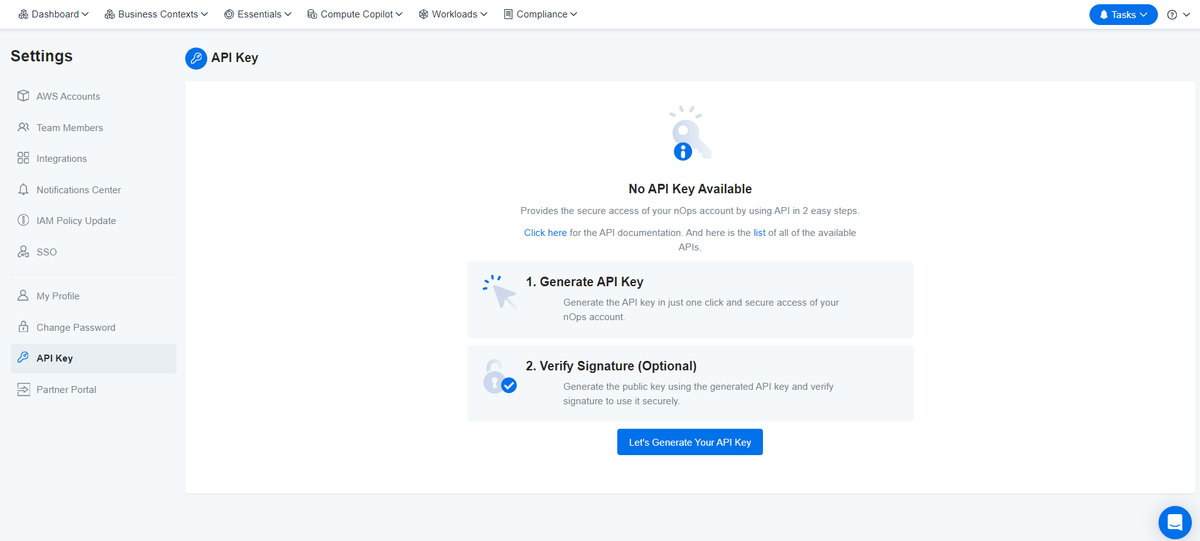
Developers may want to consult our Public Swagger.
Next, understand the data access levels available through the new Public MAP API. You can access MAP data at the project, client, or solutions provider level to suit your organizational structure.
- Project: Represents a single MAP contract signed with AWS for credits when you start migrating workloads to AWS.
- Client: Aggregates data from a collection of projects. For example, if you’ve negotiated more than oneMAP contract with AWS and added them in your nOps MAP dashboard.
- Solutions Provider: For our business partners who have multiple clients and wish to aggregate data from all of them into a single pane of glass
Thirdly, authenticate your API requests. To authenticate to the API with your API Key, include it in the request headers:
Header key: X-Nops-Api-Key Header value: the generated key that you saved earlier. Example: Request Header X-Nops-Api-Key: 12345.444hdyed37djdje8383dkedj82dFurther technical information can be found here.
How it Works: A Practical Example
Imagine you want to visualize the end date of your migration and how much you can still save with tagging in your personalized BI. This way, you can compare it with other ongoing work streams and decide if the effort required for tagging before the deadline is worth it.
You could call the API at https://app.nops.io/c/v3/map-migration/{your_project_id} to receive a response containing fields such as:
"id": 71, "untagged_resources": { "resources_count": 1234, "cost": 12345 }, "date_end": "2024-12-24"With this information, you can use the project end date and the cost of untagged resources to provide insights to your teams.
If you’re already on nOps…
Have questions about the new feature? Need help getting started? Our dedicated support team is here for you. Simply reach out to your Customer Success Manager or visit our Help Center. If you’re not sure who your CSM is, send our Support Team an email at support@nops.io
If you’re new to nOps…
nOps was recently ranked #1 with five stars in G2’s cloud cost management category, and we optimize $5+ billion in cloud spend for our customers.
Join our customers using nOps to understand your cloud costs and leverage automation with complete confidence by booking a demo with one of our AWS experts.
Demo
AI-Powered Cost Management Platform
Discover how much you can save in just 10 minutes!
Book a Demo