IBM Cloudability Alternatives & Competitors in 2026 (14 Tools Compared)
Understanding cloud costs has always been a challenge, especially as organizations scale across multiple providers and services for cloud, SaaS and AI costs.
Cloudability, acquired by Apptio in 2019 and now part of IBM as IBM Cloudability, was one of the first platforms to help enterprises get visibility into their cloud spend. It became popular with Finance and FinOps teams for its budgeting, forecasting, and cost allocation features. But as cloud environments have grown more complex — with Kubernetes, containers, and real-time optimization needs — many teams are searching for alternatives.
Customers also point out that Cloudability's pricing sits at the higher end of the market, raising questions about ROI when compared to newer, more agile tools.
In this article, we'll look at the 14 best IBM Cloudability (Apptio Cloudability) alternatives available today, grouped by segment, breaking down their pros and cons so you can choose the right solution.
IBM Cloudability Alternatives at a Glance
For unified visibility and savings in one platform, nOps is the strongest IBM Cloudability alternative: it brings multicloud, SaaS, Kubernetes and AI spend into one view and adds automated commitments, optimization recommendations and an AI FinOps agent. Flexera One fits enterprise governance and chargeback, and CloudZero fits engineering teams that want cost tied to customers and features.
| Tool | Best for | Segment | Pricing model | Kubernetes support | Multi-cloud | Automation depth |
|---|---|---|---|---|---|---|
| CloudHealth (Broadcom) | Large enterprises with hybrid and VMware estates | Enterprise governance | Quote-based, no public pricing | Limited | AWS, Azure, GCP and VMware | Policy-driven governance and alerts |
| Flexera One | Enterprises governing cloud and on-prem spend together | Enterprise governance | Quote-based, typically on spend under management | Container management through Spot Ocean | AWS, Azure, GCP and on-prem | Commitment and spot automation through Spot products and ProsperOps |
| ServiceNow Cloud Cost Management | Organizations already running ServiceNow for asset and IT management | Enterprise governance | Quote-based, own SKU or bundled with Software Asset Management Enterprise | Container cost management | All major clouds | Workflow-driven actions through ServiceNow change management |
| nOps | Teams that want unified visibility and automated savings | Automation-first | Fixed fee based on cloud spend for visibility; share of savings for commitment management | Kubernetes cost visibility | AWS, Azure, GCP | Automated commitment management |
| ProsperOps | Teams that want autonomous commitment management only | Automation-first | Share of savings | Not a focus | AWS, Azure, GCP | Autonomous commitment management |
| Usage.ai | Teams that want commitments bought automatically, with protection for unused commitments | Automation-first | Percentage of realized savings | Not a focus | AWS, Azure, GCP | Automated buying and rebalancing of commitments |
| CAST AI | Kubernetes-heavy teams that want automated workload optimization | Automation-first | Custom quote, usage-based on compute consumption | Native | EKS, GKE, AKS and OpenShift on AWS | Automated autoscaling and optimization |
| CloudZero | Engineering teams measuring cost per customer, feature or team | Unit economics and engineering-led | Quote-based, scales with spend | Allocated through dimensions | AWS, Azure, GCP and some SaaS | Allocation and anomaly detection |
| Finout | Teams that want cloud, Kubernetes, shared and AI costs in one platform | Unit economics and engineering-led | Flat fee tiered by committed spend, quote only | Yes | Yes, plus AI providers | Rules-based agents; commitment management is strongest on AWS |
| Vantage | Engineering-led teams that want self-serve pricing | Unit economics and engineering-led | Free Starter tier, fixed monthly tiers by tracked spend, custom Enterprise | Kubernetes cost reporting | 40+ providers including AWS, Azure and GCP | Autopilot for AWS Savings Plans on paid tiers |
| Kubecost (IBM) | Platform teams running production Kubernetes | Kubernetes-native | Free tier plus paid plans | Native | Reconciles with cloud provider billing | Recommendations and workflow actions |
| Turbonomic (IBM) | Enterprises automating resource management across hybrid estates | Kubernetes-native | Essentials from about $40,000 a year; Standard on spend or managed servers | Yes | AWS, Azure, GCP and on-prem | Continuous automated resource actions |
| Datadog Cloud Cost Management | Teams already using Datadog for observability | Observability-adjacent | Charged on the cloud and SaaS spend managed | Container-level cost visibility | AWS, Azure, GCP and SaaS | Recommendations and workflow integration |
| Harness Cloud Cost Management | Teams already using Harness for CI/CD | Observability-adjacent | Percentage of cloud spend | Yes | Yes | Policy-based governance with auto-shutdowns |
What Is IBM Cloudability? (And Who Owns It Now)
IBM Cloudability is a cloud financial management platform for tracking, allocating and forecasting spend across AWS, Azure and Google Cloud, and it now belongs to IBM.
What the platform does: cost visibility, showback/chargeback, forecasting, governance
Cloudability pulls billing and usage data from the major clouds into reports, dashboards, budgets and forecasts. Business-dimension mappings let finance and FinOps teams split spend by business unit, team or product for showback and chargeback, and role-based access to scoped views keeps each team looking only at its own accounts. Anomaly alerts, rightsizing and reservation recommendations sit on top. It launched in 2011 and was a founding technical advisor to the FinOps Foundation, as Apptio's 2019 announcement noted.
Reporting depth is the capability reviewers praise most. A cloud operations lead describes drilling from the account level into individual resources and down to hourly periods.
The ownership chain, stated once with dates: Cloudability → Apptio (2019) → IBM (2023), now marketed as IBM Cloudability
Cloudability was acquired by Apptio in May 2019 and became part of IBM when IBM completed its acquisition of Apptio in August 2023, and IBM now sells it as IBM Cloudability.
You will still see the product called Apptio Cloudability or simply Cloudability, and all three names refer to the same platform.
What changed for customers under IBM
Cloudability now sits next to Turbonomic in IBM's FinOps lineup. At closing, IBM said Cloudability can ingest Turbonomic's executed and proposed actions into a single view. A reviewer on the Premium tier says Turbonomic-based rightsizing is now available inside Cloudability, and also notes that those recommendations cannot yet open Jira tickets the way the standard ones do.
IBM added Kubecost to the same suite in September 2024, which puts three FinOps products under one vendor: Cloudability, Turbonomic and Kubecost.
Why Teams Look for a Cloudability Alternative
The reasons fall into five groups: pricing and return, a reporting-first design, allocation that leans on tags, implementation effort, and the fact that several common alternatives are owned by IBM too.
Enterprise pricing and ROI questions
Customers often describe Cloudability as expensive. One reviewer calls it a bit expensive, and a platform engineer at an enterprise brand calls the license cost-prohibitive for smaller companies. The Marketplace bands work out to 3.0% of managed spend at the $1 million ceiling and 2.2% at the $6 million ceiling, so the bill is easy to notice. Because the fee follows managed spend (covered in the pricing guide and in the pricing section below), the return depends on how much of the identified waste actually gets removed.
Reporting-first design: visibility without automated action
IBM's own description of the split is that Cloudability supplies the data, insights and recommendations, while Turbonomic generates optimization decisions that can be automated. That suits teams that want an analyst to review every action, but it puts automation in a second product. On the commitment side, Cloudability Savings Automation is charged separately, and reviewers list restricted automation among their complaints.
Tag-dependency and allocation gaps
Allocation in most cost platforms is only as good as the tags and account structure underneath it, and untagged or shared spend is where chargeback breaks down. Reviewers describe the same dependency in Cloudability: one says finer detail by resource tag is missing, and another says the setup gets unwieldy as business dimensions multiply and advises staffing the rollout with FinOps experts. Tools built for cost allocation without relying on perfect tagging close that gap.
Implementation time and services overhead
Reviewers describe the effort differently. One spent several weeks working one-on-one with IBM consultants on setup and praises the support. Another advises training enough people on billing concepts before rollout and staffing the project with FinOps experts. G2 puts the average time to implement Cloudability at four months. By comparison, nOps lists setup in about 15 minutes and time to value in a few days.
Three of the tools on most Cloudability-alternative lists are owned by IBM too (Kubecost, Turbonomic)
Turbonomic joined IBM in 2021 and Kubecost in September 2024, so a shortlist that swaps Cloudability for either one still ends up with the same vendor. OpenCost, the open-source project Kubecost created, is different: it is a CNCF incubating project rather than an IBM product. For teams that want to move away from IBM contract terms entirely, the enterprise governance, automation-first, unit economics and observability-adjacent segments below are the ones that do not involve IBM.
IBM Cloudability Pricing: What It Actually Costs
IBM does not publish a rate card for Cloudability, but the AWS Marketplace listing and reviewer comments show how the contract is built.
Quote-based enterprise model, no public rate card
IBM sells Cloudability through quotes tied to annual contracts. The one public anchor is the AWS Marketplace listing, which prices 12-month contracts by managed annual cloud spend (CloudZero lays out the bands). Actual quotes can differ.
| Managed annual cloud spend | Annual price | Rate at the ceiling |
|---|---|---|
| Up to $1 million | $30,000 | 3.0% |
| Up to $3 million | $76,680 | 2.6% |
| Up to $6 million | $132,480 | 2.2% |
The module that automates Reserved Instance and Savings Plan purchasing, Cloudability Savings Automation, is priced separately from the platform fee.
Percentage-of-cloud-spend vs platform-fee structures and what drives the number
FinOps tools charge in three ways, and the model matters as much as the price because it decides what happens to the bill when cloud spend grows.
Structure | How the fee is set | Who prices this way |
|---|---|---|
Percentage of cloud spend | A rate applied to managed spend, so the fee rises with the bill | IBM Cloudability; Flexera; Harness (2.25% to 2.5% on its AWS Marketplace listing); Turbonomic Standard (typically 2% to 3%); Datadog |
Platform fee tiered by spend | A fixed fee set by a spend band or committed-spend tier | |
Share of savings | A percentage of savings actually realized, so no savings means no fee | nOps for commitment management; ProsperOps; Usage.ai |
Three things move the number under any of these models: the spend band or tier you land in, which modules you add (automation is often separate), and the overage rules once managed spend passes the band.
Typical minimum commitments and contract terms
Cloudability contracts on the Marketplace run 12 months, and the smallest published band starts at $30,000 a year for up to $1 million of managed spend. Pricing steps up by band and by tier (Essentials, Standard and Premium, plus Financial Planning), with overage charges per additional unit once usage passes what the contract covers. One reviewer adds that the license is a percentage of peak consumption, so the amount can change from one renewal to the next. G2 lists an average discount of 11% on Cloudability contracts.
What review sites say about value at different spend levels
PeerSpot rates Cloudability 3.8 out of 5 from 22 reviews, with 84% of reviewers willing to recommend it, and G2 rates it 4.2 out of 5 from 221 reviews. Reviewers at very large estates are the most positive on value: a FinOps lead at a financial services firm with more than 10,000 employees says the data has become the trusted source in vendor negotiations across well over $350 million a year of cloud spend. A platform engineer who credits Cloudability with about a million dollars in savings still calls the license cost-prohibitive for smaller businesses. People think Cloudability is expensive, and the cost is easiest to justify at very large spend levels. G2 reviewers report an average of 14 months to ROI.
Top IBM Cloudability Alternatives by Segment
The 14 platforms below are grouped into five segments by the job they do best, and each segment opens with the situation it fits.
Enterprise Governance & Chargeback
Choose this segment if finance owns cloud cost and the priority is governance, policy, showback and chargeback across a large, often hybrid estate.
Tool | Best for | Pricing model | Kubernetes support | Multi-cloud | Automation depth |
|---|---|---|---|---|---|
CloudHealth (Broadcom) | Large enterprises with hybrid and VMware estates | Quote-based, no public pricing | Limited | AWS, Azure, GCP and VMware | Policy-driven governance and alerts |
Flexera One | Enterprises governing cloud and on-prem spend together | Quote-based, typically on spend under management | Container management through Spot Ocean | AWS, Azure, GCP and on-prem | Commitment and spot automation through Spot products and ProsperOps |
ServiceNow Cloud Cost Management | Organizations already running ServiceNow for asset and IT management | Quote-based, own SKU or bundled with Software Asset Management Enterprise | Container cost management | All major clouds | Workflow-driven actions through ServiceNow change management |
CloudHealth (Broadcom)
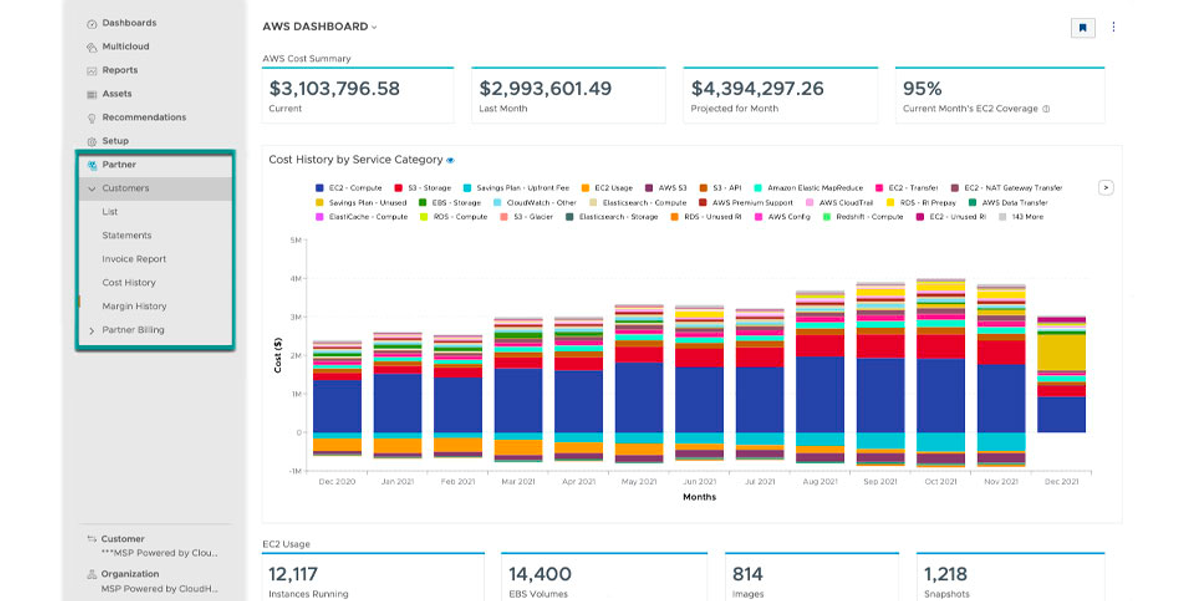
CloudHealth is a Cloudability competitor for FinOps: an enterprise-grade cloud cost and governance platform built for hybrid and multi-cloud environments. It has carried several VMware names, including VMware Aria Cost and, most recently, VMware Tanzu CloudHealth, and it now sits with Broadcom after Broadcom's acquisition of VMware. It provides cost visibility across public and private clouds, capacity planning, governance automation, and cost optimization aligned with infrastructure and operations teams.
Best for. Large enterprises already invested in VMware infrastructure, seeking integrated cost visibility, capacity planning, and governance across hybrid and multi-cloud environments.
Key capabilities. Unified visibility across public clouds and VMware infrastructure, allocation through perspectives with reallocation rules, policy-driven governance with alerts, capacity-aware rightsizing recommendations, what-if scenario planning, and forecasting.
Pricing model. Quote-based. Broadcom does not publish standard pricing, but typical structures are subscription-based and tiered by monthly cloud spend, with overage fees. Multi-year commitments are available with modest discounts.
Pros
- Unified visibility across public clouds and VMware-based infrastructures, ideal for complex hybrid environments.
- Governance automation with policy-driven cost control and alerts.
- Capacity-aware insights with rightsizing recommendations, what-if scenario planning, and intelligent forecasting.
Cons
- Requires robust tagging and organizational maturity, and lacks unit-level cost visibility such as cost per feature or customer.
- Steep learning curve and deployment complexity, best suited to enterprises with dedicated FinOps or ITOps resources.
- Pricing is opaque and contracts can be costly, often using a tiered subscription model based on cloud spend.
- Less agile compared to newer FinOps-first tools, with limited advanced automation and Kubernetes-native support.
How it compares to Cloudability. Similar in purpose and audience. The difference is the estate it fits: CloudHealth favors organizations that already run VMware, while Cloudability favors cloud-only FinOps teams.
Flexera One
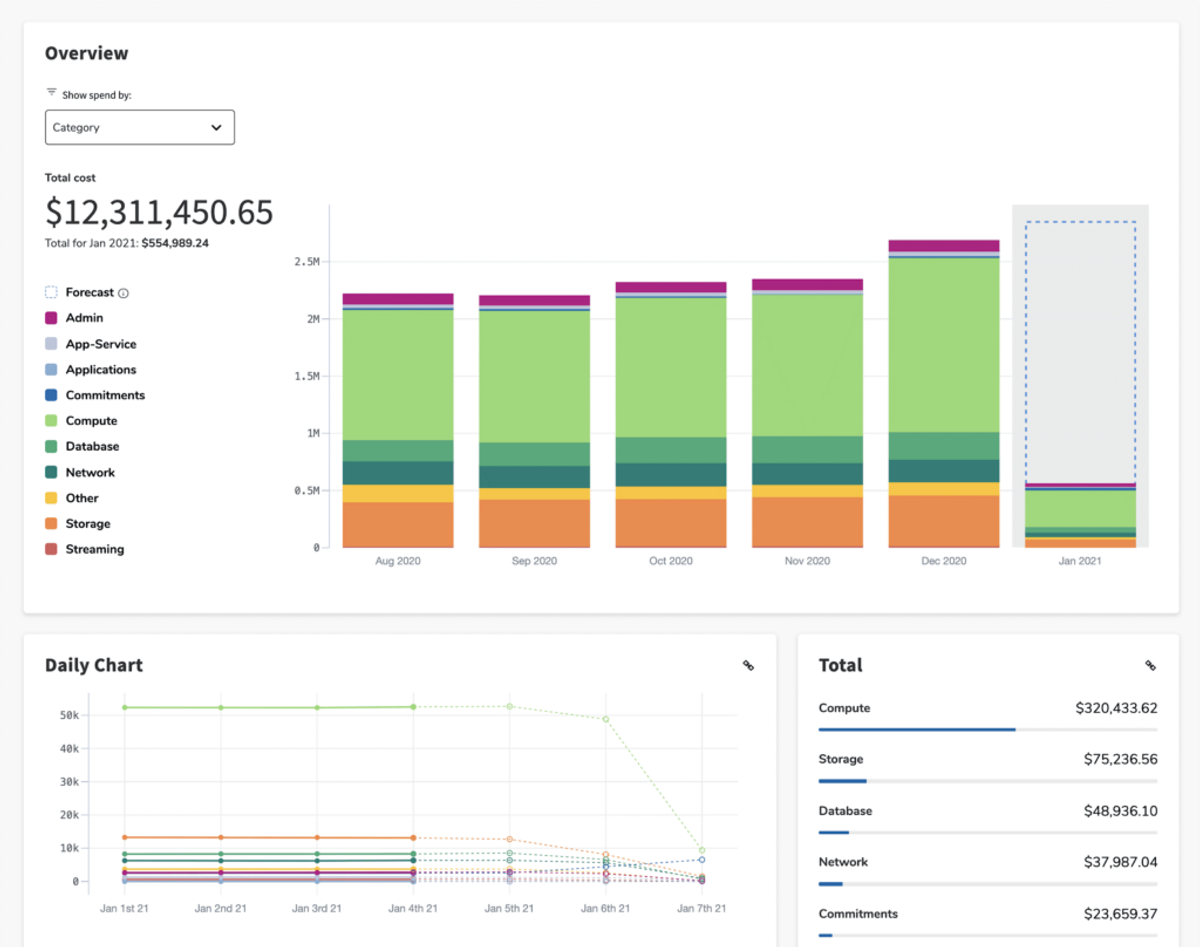
Flexera One is a comprehensive cloud cost and IT asset management platform that helps enterprises optimize spend across multi-cloud and on-premises environments. Flexera completed its acquisition of NetApp's Spot FinOps portfolio, including CloudCheckr, in March 2025 and acquired ProsperOps in January 2026. Flexera One combines traditional cloud cost governance with optimization capabilities, giving Finance and IT teams a centralized way to manage cloud visibility, budgeting, and compliance. CloudCheckr, now part of the same portfolio, adds governance, security, and compliance checks, plus multi-tenant cost allocation for managed service providers.
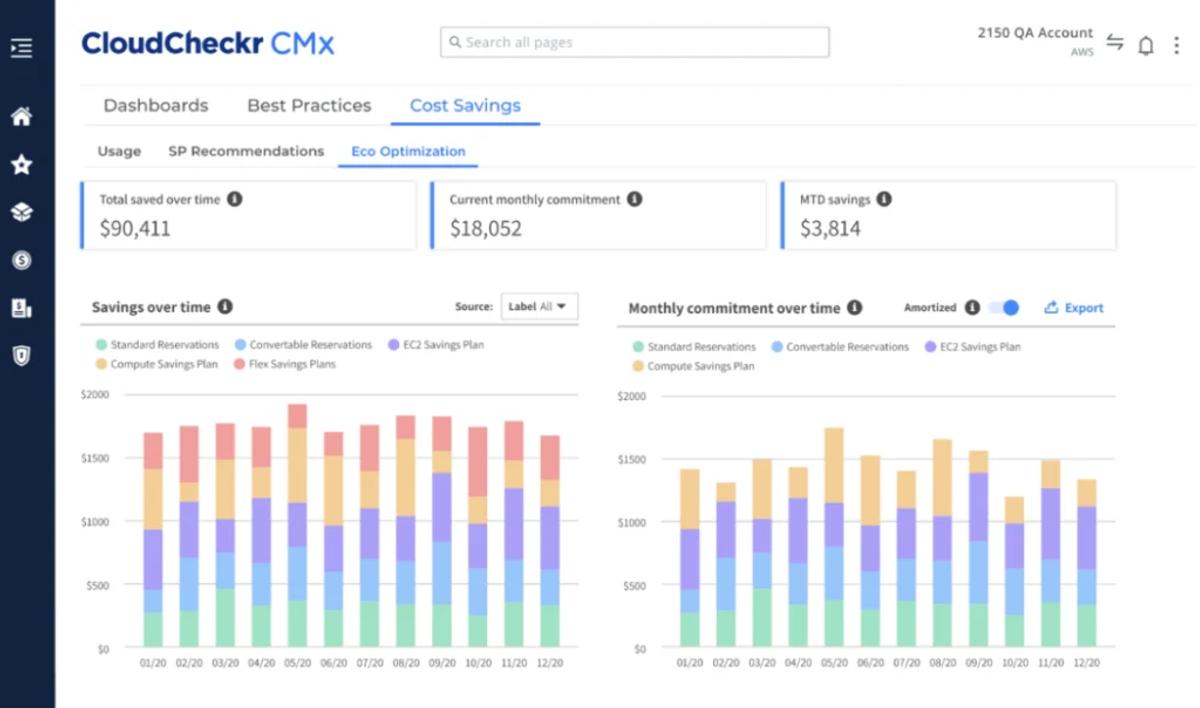
Best for. Enterprises with large, multi-cloud environments that require strict governance, compliance, and cost allocation across business units.
Key capabilities. Multi-cloud governance and reporting, cloud and on-premises visibility, shared cost allocation by tags, labels and metadata, dashboards for finance and compliance teams, and commitment and Spot automation through the Spot and ProsperOps products.
Pricing model. Contact sales. Pricing is not transparent and varies with enterprise requirements, typically based on spend under management.
Pros
- Strong multi-cloud governance and reporting for large enterprises.
- Commitment and Spot automation through the Spot and ProsperOps products.
- Robust dashboards for finance and compliance teams.
- Supports both cloud and on-premises visibility.
Cons
- Complex setup and administration, best suited for enterprises with FinOps expertise.
- Pricing requires sales engagement.
- Can feel heavy for smaller or fast-moving teams.
How it compares to Cloudability. Both price on managed spend. Flexera goes wider into on-premises and software assets, while Cloudability is narrower and cloud-focused.
ServiceNow Cloud Cost Management
ServiceNow Cloud Cost Management brings cloud cost data into the ServiceNow platform, where it connects to the CMDB, asset management and change workflows. It normalizes billing data for AWS, Azure and GCP, and its workspace shows actual and forecasted spend, budgets, savings and recommendations. Spend can be grouped by service account, cost center, business service and service category, and shared cost allocation supports showback and chargeback.
Best for. Organizations already running ServiceNow for IT and asset management that want cost actions to flow through the same approval process.
Key capabilities. Billing normalization for AWS, Azure and GCP, spend views grouped by cost center, business service and Kubernetes cluster with actual or amortized cost, budgets with threshold alerts, spend forecasting, shared cost allocation with showback and chargeback, and recommendations for business-hour scheduling, reservations and savings plans, rightsizing, and unused resources, with remediation through ServiceNow workflows.
Pricing model. Quote-based, sold as its own SKU or bundled with Software Asset Management Enterprise.
Pros
- Recommendations and remediation run through the change workflows teams already use.
- Reservation and savings plan recommendations can be accepted or declined from the workspace.
- Cost data sits next to asset and IT service data, which helps with allocation by business service.
- It needs no new system of record.
- Spend can be compared with budgets by group and service account, with potential savings shown separately from savings actually realized.
Cons
- Value depends on an established ServiceNow deployment, and it is a poor fit for teams outside that ecosystem.
- Kubernetes appears as a spend report and a grouping by cluster, but ServiceNow's documentation does not describe pod or namespace allocation.
- Reservation recommendations are accepted or declined by the team, and the documentation does not describe automated purchasing.
- Forecasts can be grouped only by provider or service account, and the environment savings chart needs production and non-production tag categories to be created first.
How it compares to Cloudability. Cloudability is a standalone FinOps product built around business-dimension allocation, dashboards and forecasts. ServiceNow covers the same ground in a smaller set of views for spend, budgets and optimization, and its distinguishing feature is that accepted recommendations move through the change and approval workflows teams already run. That routing matters most to organizations already on ServiceNow for IT and asset management; teams outside it would be adopting a platform for one module.
Automation-First Optimization
Choose this segment if you want savings executed automatically instead of reported, and you are willing to trade some reporting breadth for it.
Tool | Best for | Pricing model | Kubernetes support | Multi-cloud | Automation depth |
|---|---|---|---|---|---|
nOps | Teams that want unified visibility and automated savings | Fixed fee based on cloud spend for visibility; share of savings for commitment management | Kubernetes cost visibility | AWS, Azure, GCP | Automated commitment management |
ProsperOps | Teams that want autonomous commitment management only | Share of savings | Not a focus | AWS, Azure, GCP | Autonomous commitment management |
Usage.ai | Teams that want commitments bought automatically, with protection for unused commitments | Percentage of realized savings | Not a focus | AWS, Azure, GCP | Automated buying and rebalancing of commitments |
CAST AI | Kubernetes-heavy teams that want automated workload optimization | Custom quote, usage-based on compute consumption | Native | EKS, GKE, AKS and OpenShift on AWS | Automated autoscaling and optimization |
nOps (Best Overall Alternative)
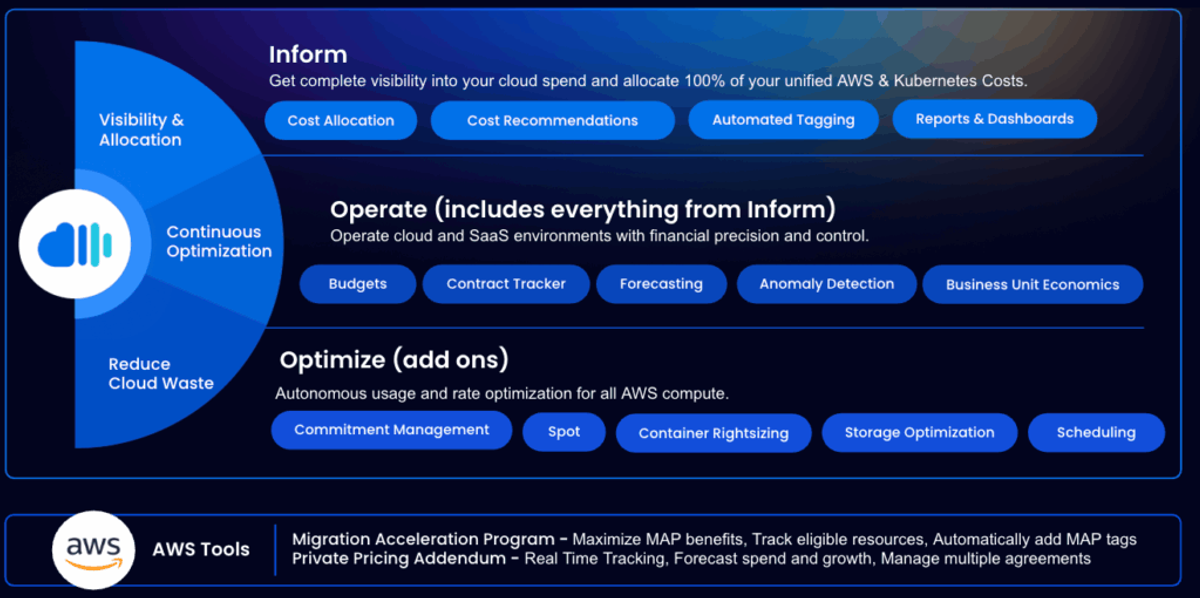
nOps gives finance and engineering one view of cloud, SaaS, Kubernetes and AI spend across all major providers, and it acts on what it finds. Commitments are managed automatically across AWS, Azure and GCP, optimization recommendations cover the rest of the bill, and an AI FinOps agent answers questions and automates tasks like forecasting, anomaly detection and reporting.
Best for. Teams that want unified cost visibility and automated savings in one platform.
Key capabilities. nOps is an all-in-one platform for:
- Visibility & Reporting across cloud, SaaS, Kubernetes and AI spend, with 100% cost allocation across accounts, teams, and workloads.
- Commitment Management: fully automated hourly management of commitments for 50-60% savings.
- Cost optimization recommendations across the rest of the bill.
- FinOps Agent: AI trained on your cost data to answer questions and automate tasks like forecasting, anomaly detection, waste reduction, budgeting, and reporting.
Pricing model. Two parts: a fixed fee based on cloud spend for visibility and allocation, and a share of savings for commitment management, so that fee depends on the savings delivered. Setup takes about 15 minutes, and teams see time to value in a few days. Book a demo to try it with your own AWS account.
Pros
- Visibility across multicloud, SaaS, Kubernetes and AI spend and automated savings come in one product.
- The savings-based fee for commitments aligns cost with results.
Cons
- It is not a full chargeback suite for hybrid and on-premises estates, which is where the enterprise governance tools lead.
How it compares to Cloudability. Unlike Cloudability, which requires manual follow-up and financial expertise to act on recommendations, nOps does the work for you, helping both engineers and finance teams see immediate results. Cloudability charges on managed spend and sells Savings Automation separately, while nOps ties its commitment fee to realized savings and includes the automation.
ProsperOps
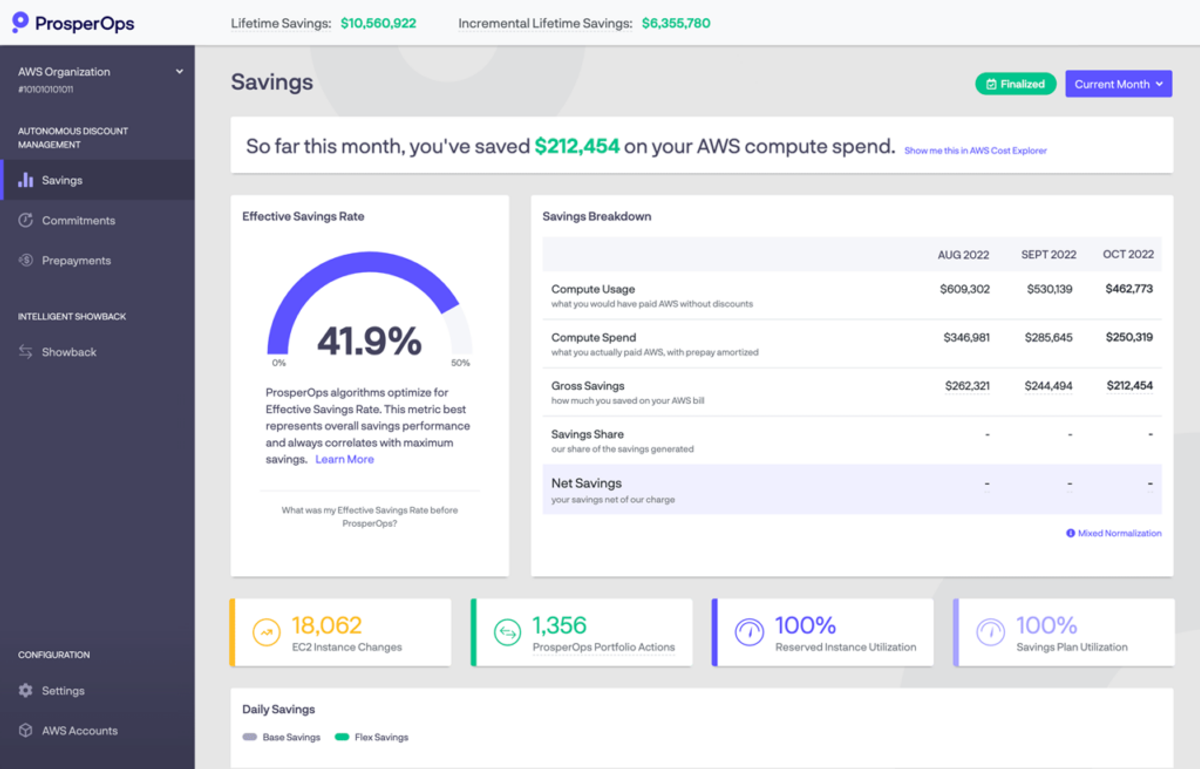
ProsperOps is a commitment management service for AWS, Azure and Google Cloud. Its Autonomous Discount Management product buys and manages AWS Reserved Instances and Compute Savings Plans, Azure Reservations and Compute Savings Plans, and Google Cloud Committed Use Discounts, working in the background within controls the customer sets. Flexera acquired it in January 2026. A separate Autonomous Resource Management product schedules resource start and stop times.
Best for. Teams that want commitment purchasing handled continuously and already have, or plan to buy, a separate tool for allocation and reporting.
Key capabilities. Autonomous Discount Management across the three major clouds, showback on commitment savings, customer-defined controls including an approved quarterly budget for prepayments, a free Savings Analysis, and a scheduler in early access for AWS Compute customers that starts and stops resources on weekly schedules.
Pricing model. A share of realized savings for commitment management, with tiered pricing for term commitments. The rate is not published. Autonomous Resource Management is a flat monthly fee per managed resource, and subscriptions are monthly by default.
Pros
- The fee follows realized savings rather than cloud spend.
- It covers commitments on all three major clouds, including Azure Reservations and Google Cloud Committed Use Discounts.
- Its IAM role for commitment management cannot launch, start, stop or terminate resources.
- The free Savings Analysis needs only minimal IAM permissions.
Cons
- It manages commitments only, so allocation, budgets, Kubernetes and AI cost visibility need another tool.
- Ending the contract can carry fees for unrealized savings on managed commitments, capped at 12 months for reserved instances.
- The scheduler is in early access, and it starts and stops resources on a schedule without finding idle ones.
How it compares to Cloudability. It replaces the Savings Automation module, not the reporting platform. Cloudability prices on managed spend, and ProsperOps prices on savings.
Usage.ai
Usage.ai buys cloud commitments for AWS, Azure and Google Cloud and rebalances coverage as usage changes. Purchases are made in the customer's own cloud account. Autopilot buys eligible commitments within approved controls, Copilot shows projected savings for each recommendation so the team approves purchases, and FlexCadence spreads purchases over time. Its protection is Cashback, which pays cash for qualifying unused value on eligible Flex Insured Commitments.
Best for. Teams that want commitments bought automatically, or approved purchase by purchase, across compute, database and analytics services.
Key capabilities. Autopilot and Copilot purchasing, FlexCadence, Cashback on eligible Flex Insured Commitments, a dashboard that tracks commitment utilization, and coverage of compute, database, analytics and AI services such as Amazon Bedrock on AWS. Analysis starts with read-only billing and usage access.
Pricing model. A share of the new savings it generates. There is no upfront platform fee or subscription, no charge on savings from commitments already in place, and no payment if no new savings result. The percentage is not published.
Pros
- Service coverage is wide, including databases and analytics services on all three clouds.
- Copilot keeps each purchase behind human approval, and Autopilot can be paused.
- The assessment shows projected savings, Usage.ai's fee and net savings before optimization is enabled.
- There is no platform fee, and no payment without new savings.
Cons
- Cashback applies only to qualifying unused value on eligible Flex Insured Commitments, on terms set in the agreement.
- Coverage adjusts through future purchases and expirations rather than by cancelling existing commitments, so over-commitment unwinds gradually.
- It does not start, stop, resize or modify resources, and it does not cover allocation or Kubernetes visibility.
How it compares to Cloudability. It does what Cloudability's Savings Automation module does, and charges a share of new savings rather than a platform fee on managed spend.
CAST AI

CAST AI is a Kubernetes cost automation platform for EKS, GKE, AKS and OpenShift on AWS. Its Autoscaler adds nodes when pods cannot be scheduled, picks the cheapest instance types that satisfy their constraints, and removes empty nodes, while the Evictor consolidates running pods onto fewer nodes. Spot support covers AWS, GCP and Azure, with an interruption prediction model and on-demand fallback when spot capacity runs out.
Best for. Platform teams running production Kubernetes that want node and workload cost handled by automation, and that track company-wide allocation elsewhere.
Key capabilities. Autoscaler and Evictor for node provisioning and consolidation, Spot automation with interruption prediction and fallback, node templates for controlling instance selection, workload and GPU optimization products, and allocation groups by namespace or label.
Pricing model. Custom quote, with usage-based plans tied to compute consumption. Rates are not published.
Pros
- It acts on clusters directly instead of only recommending changes.
- Spot handling includes interruption prediction, replacement before draining, and on-demand fallback.
- Node templates and Autoscaler settings control which instance types and zones are used.
Cons
- It optimizes clusters rather than providing company-wide allocation, so it does not replace a FinOps reporting platform.
- Spot is recommended only for non-critical workloads, and the cheapest instance is not always chosen because of quotas, cooldowns and zone constraints.
- The Autoscaler removes only completely empty nodes, so consolidating running pods depends on the Evictor.
How it compares to Cloudability. The two address different layers: Cloudability reports across cloud spend, while CAST AI changes how clusters run.
Unit Economics & Engineering-Led
Choose this segment if engineers or product teams own cloud cost and you need spend tied to customers, features and teams.
Tool | Best for | Pricing model | Kubernetes support | Multi-cloud | Automation depth |
|---|---|---|---|---|---|
CloudZero | Engineering teams measuring cost per customer, feature or team | Quote-based, scales with spend | Allocated through dimensions | AWS, Azure, GCP and some SaaS | Allocation and anomaly detection |
Finout | Teams that want cloud, Kubernetes, shared and AI costs in one platform | Flat fee tiered by committed spend, quote only | Yes | Yes, plus AI providers | Rules-based agents; commitment management is strongest on AWS |
Vantage | Engineering-led teams that want self-serve pricing | Free Starter tier, fixed monthly tiers by tracked spend, custom Enterprise | Kubernetes cost reporting | 40+ providers including AWS, Azure and GCP | Autopilot for AWS Savings Plans on paid tiers |
CloudZero
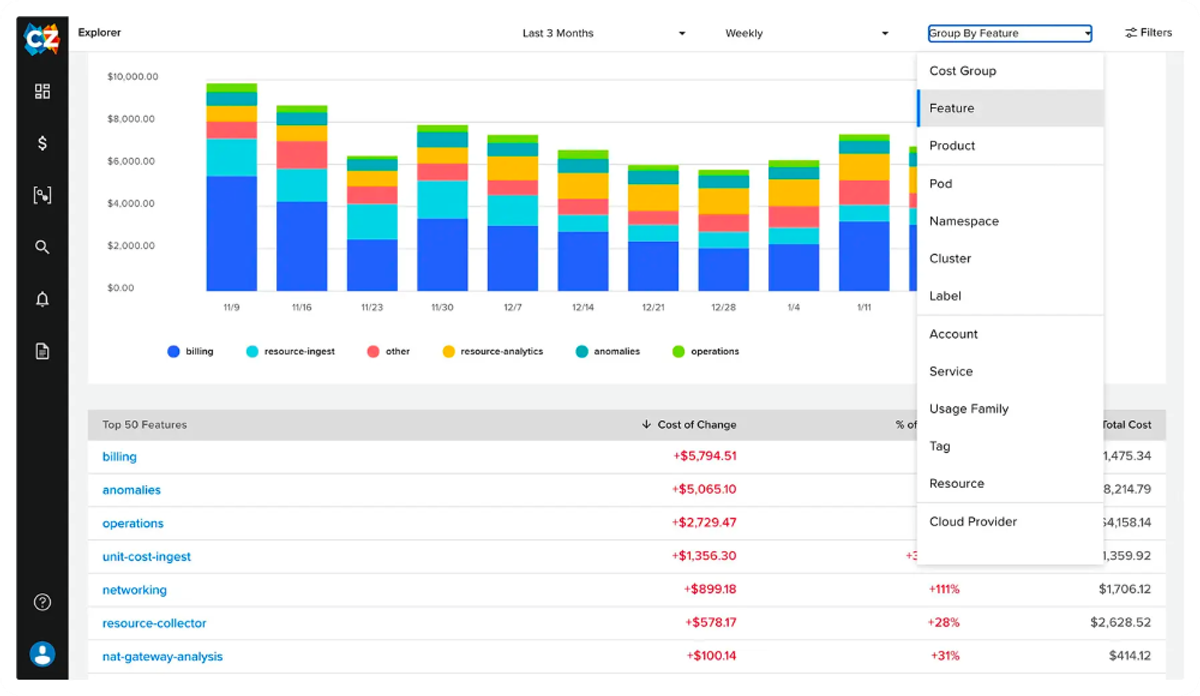
CloudZero is a cloud cost intelligence platform built for software-driven organizations that want to relate cloud spend not just to infrastructure but to business outcomes. The platform ingests spend data across cloud providers (AWS, GCP, Azure), Kubernetes, and certain SaaS tools, then applies cost allocation and anomaly detection to surface insights and drive cost accountability across engineering workflows.
Best for. SaaS, tech, and engineering-focused organizations that value cloud cost tied to business metrics.
Key capabilities. Unit-cost visibility (cost per customer, feature, or team), allocation through CostFormation that does not depend on complete tagging, hourly anomaly detection, and cost tracking for Anthropic and OpenAI usage.
Pricing model. Tiered pricing that scales with spend volume, by quote.
Pros
- Offers unit-cost visibility (e.g., cost per customer, feature, or team), enabling engineering and product teams to see precisely how design choices affect margins.
- Tag-less allocation: automatically allocates spend when tagging is incomplete.
- Ease of use with rapid onboarding and adoption.
Cons
- Forecasting and advanced reporting capabilities are relatively basic compared to mature platforms; deep financial modeling may require supplemental tools.
- Limited customization in dashboards. Users may rely on CloudZero's built-in views or work with support to build new ones.
- Initial setup might be complex for teams unfamiliar with defining business-aligned cost dimensions (e.g., product, customer, etc.).
- It recommends reservation purchases but does not buy them.
How it compares to Cloudability. Cloudability serves finance and FinOps teams with business mappings and chargeback. CloudZero starts from engineering and unit cost.
Finout
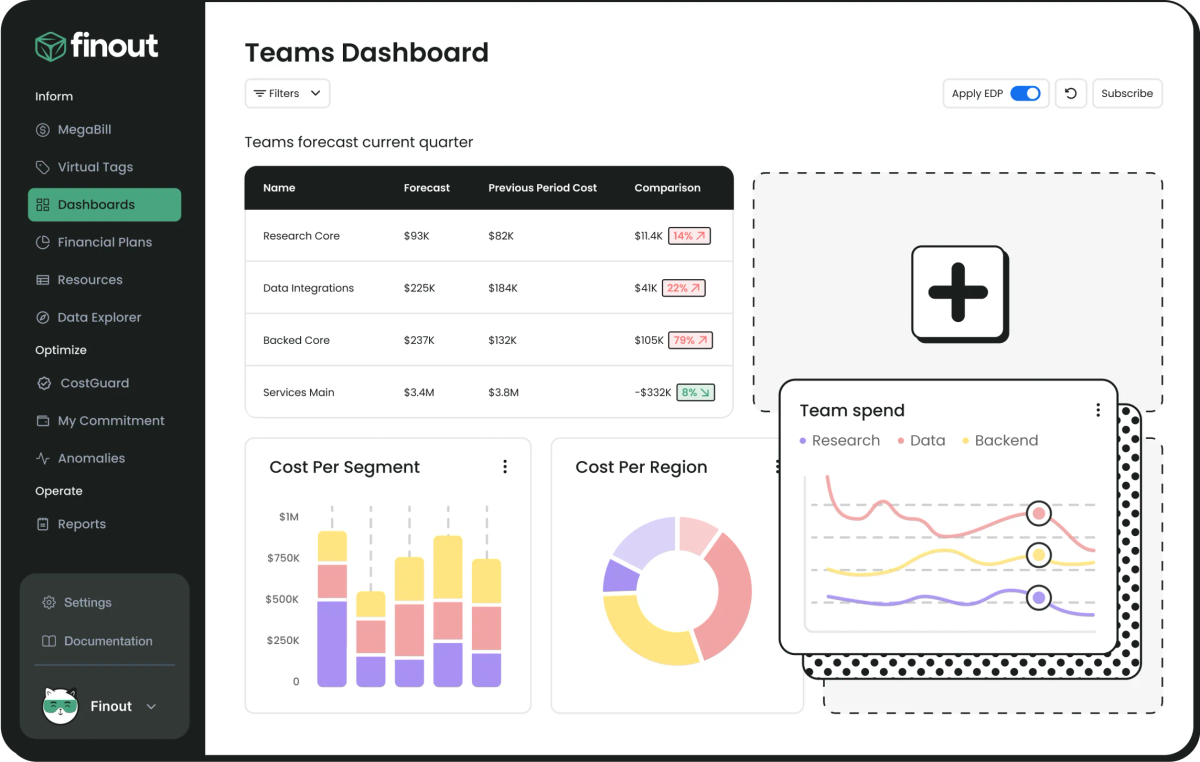
Finout is the FinOps platform built for the agentic era, where AI usage shifts weekly and infrastructure scales across cloud, Kubernetes, and shared resources faster than manual tracking can keep up. With Finout, every AI dollar is visible, allocated, and controlled across cloud AI services, direct provider contracts, AI-native tools, and shadow AI in SaaS, alongside cloud, Kubernetes, and shared costs, all in one system that engineering and finance both trust. See how it stacks up in Finout vs. Cloudability vs. CloudZero, or explore the Finout platform directly.
Best for. Teams that want cloud, AI, Kubernetes, and shared costs in one platform instead of stitching modules, BI tools, and spreadsheets together, so month end stops being a reconciliation project and allocation stays governed as the org changes.
Key capabilities. MegaBill and Instant Virtual Tags for allocation, shared cost reallocation, per-token, per-model, per-team unit economics for AI spend, and the Billy assistant plus Detector, Investigator, and Orchestrator agents that work through Jira, Slack, and ServiceNow.
Pricing model. Flat fee tiered by committed spend. Pricing is not public and requires sales engagement.
Pros
- 100% accurate, automated cost allocation, powered by MegaBill and Instant Virtual Tags.
- Unifies every AI dollar across four layers: cloud AI services, direct provider contracts, AI-native tools, and shadow AI bundled into SaaS renewals.
- Per-token, per-model, per-team unit economics for AI spend, not just raw totals.
- Billy, an AI FinOps assistant, gives live, account-specific answers and proactively surfaces issues.
- Detector, Investigator, and Orchestrator agents turn hours of manual root-cause work into minutes and close the loop in Jira, Slack, and ServiceNow.
- Rules act, AI advises: decisions that touch your environment happen the same way, every time.
Cons
- Pricing is not transparent and requires sales engagement.
- Built for organizations with real cost complexity across cloud, Kubernetes, AI, and shared costs, so it may be more platform than very small or single-cloud teams need.
- Commitment tooling centers on monitoring and purchase recommendations rather than buying commitments.
How it compares to Cloudability. Finout covers AI providers and Kubernetes in the same virtual-tag model, and it prices on a committed-spend tier rather than a percentage of managed spend.
Vantage
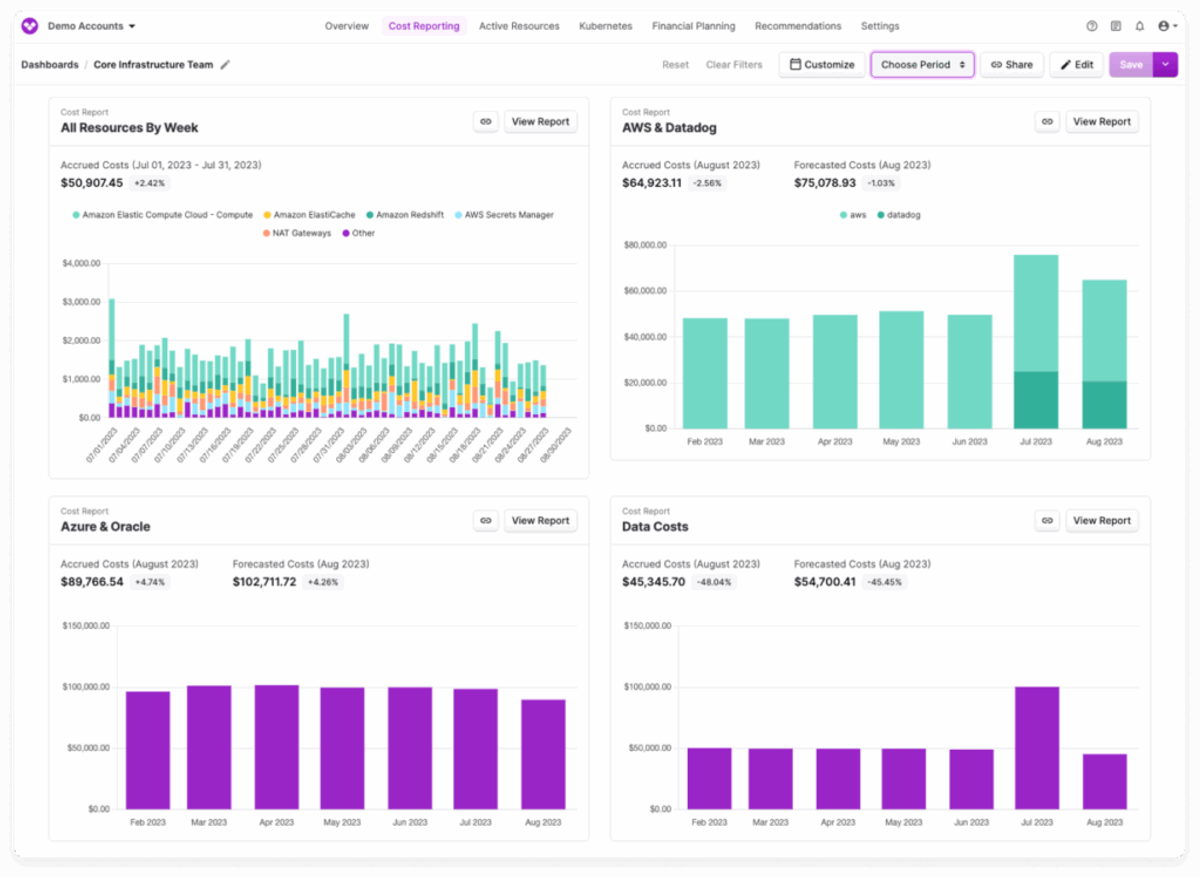
Vantage is a cost platform with integrations for more than 40 providers, including AWS, Azure and GCP, available on every tier. Virtual tags allocate spend by business metric, cost or percentage splits without changes in the cloud accounts, and Kubernetes costs break down to the pod, including per-pod GPU cost. Autopilot buys AWS Savings Plans on paid tiers.
Best for. Engineering-led teams that want self-serve pricing.
Key capabilities. Virtual tags and Autopilot from the Pro tier, Kubernetes cost per pod, cost tracking for OpenAI and Anthropic usage, SAML SSO on every tier, and an automated FinOps agent on Enterprise.
Pricing model. Public tiers. Starter is free up to $2,500 of tracked cloud spend, Pro is $30 a month up to $7,500 with a 14-day free trial, Business is $200 a month up to $20,000, and Enterprise is custom with unlimited tracked spend.
Pros
- Pricing is public and starts free.
- Integrations for 40+ providers are included from the Starter tier.
- Virtual tags and Autopilot are available from the $30 tier.
Cons
- Autopilot buys AWS Savings Plans only and is off by default.
- Tracked-spend limits on the self-serve tiers are low, so larger estates need Enterprise.
- Rightsizing recommendations are acted on by the team.
How it compares to Cloudability. Vantage publishes its prices and starts free, where Cloudability is quote-based on managed spend.
Kubernetes-Native
Choose this segment if containers are the main cost driver and a platform team owns the Kubernetes bill.
Tool | Best for | Pricing model | Kubernetes support | Multi-cloud | Automation depth |
|---|---|---|---|---|---|
Kubecost (IBM) | Platform teams running production Kubernetes | Free tier plus paid plans | Native | Reconciles with cloud provider billing | Recommendations and workflow actions |
Turbonomic (IBM) | Enterprises automating resource management across hybrid estates | Essentials from about $40,000 a year; Standard on spend or managed servers | Yes | AWS, Azure, GCP and on-prem | Continuous automated resource actions |
Kubecost (IBM)
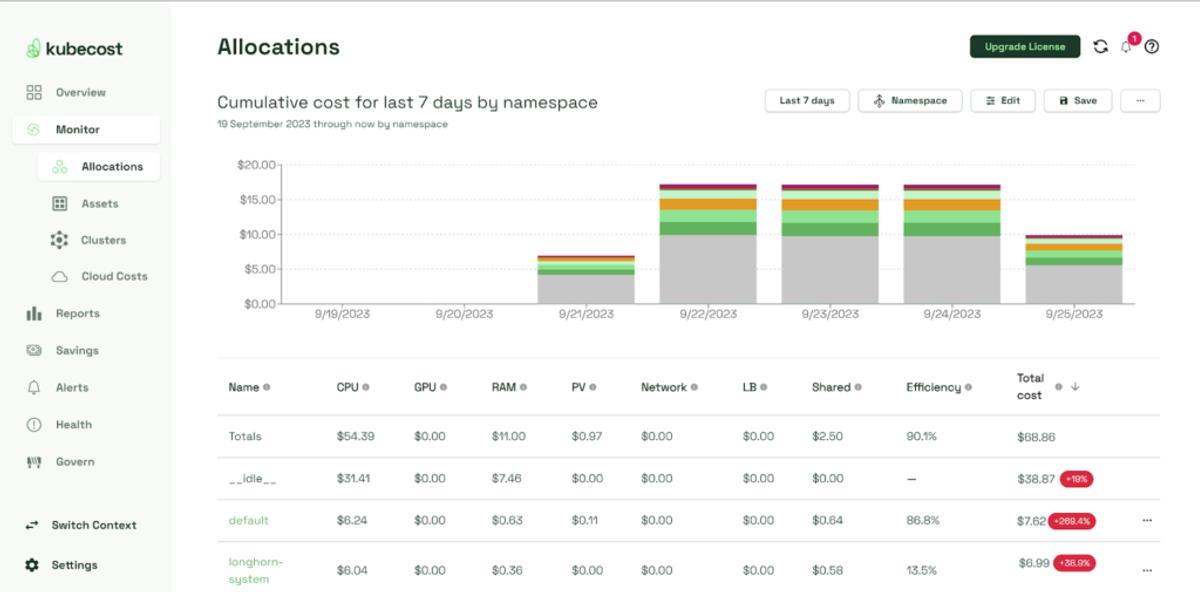
Kubecost is a Kubernetes-native cost monitoring and optimization platform, designed from the ground up for teams running containerized workloads. It delivers real-time visibility into cluster spending across Kubernetes constructs like namespaces, pods, services, and nodes, reconciling these costs with your cloud provider's billing. IBM added it to the same suite as Cloudability and Turbonomic in September 2024.
Best for. Engineering-led teams and platform engineering groups managing production Kubernetes workloads. Ideal for organizations that need precise, real-time cost insights into container infrastructure and want actionable recommendations at the cluster and pod level.
Key capabilities. Cost allocation by namespace, deployment, label and container with idle and shared cost distribution, reconciliation with cloud provider billing, and, in version 3, non-Kubernetes cloud costs with budgets, forecasting and anomaly detection.
Pricing model. Free tier up to $100,000 of spend over the last 30 days, per Kubecost 3.0, with paid plans above that. Deployable self-hosted or as SaaS.
Pros
- Deep Kubernetes-native visibility: tracks cost across namespaces, pods, deployments, containers, and more, along with out-of-cluster services for full-stack cost attribution.
- Quick installation: can be deployed via Helm in minutes, with both free and enterprise-grade options available.
- Flexible deployment models: self-hosted (on-prem or managed clusters) or cloud-hosted (SaaS), depending on operational preference.
Cons
- The free tier is gated by spend, so environments above $100,000 over the last 30 days need a paid plan.
- Anomaly detection is labeled beta, and it does not buy commitments.
- Documentation and setup can be tough: teams without strong Kubernetes experience may find setup, metric retention tuning, or alert configuration challenging.
- It belongs to the same vendor as Cloudability.
How it compares to Cloudability. Cloudability's Container Insights covers allocation inside a broader platform. Kubecost goes deeper on cluster workloads and is IBM's own option for platform teams.
Turbonomic (IBM)
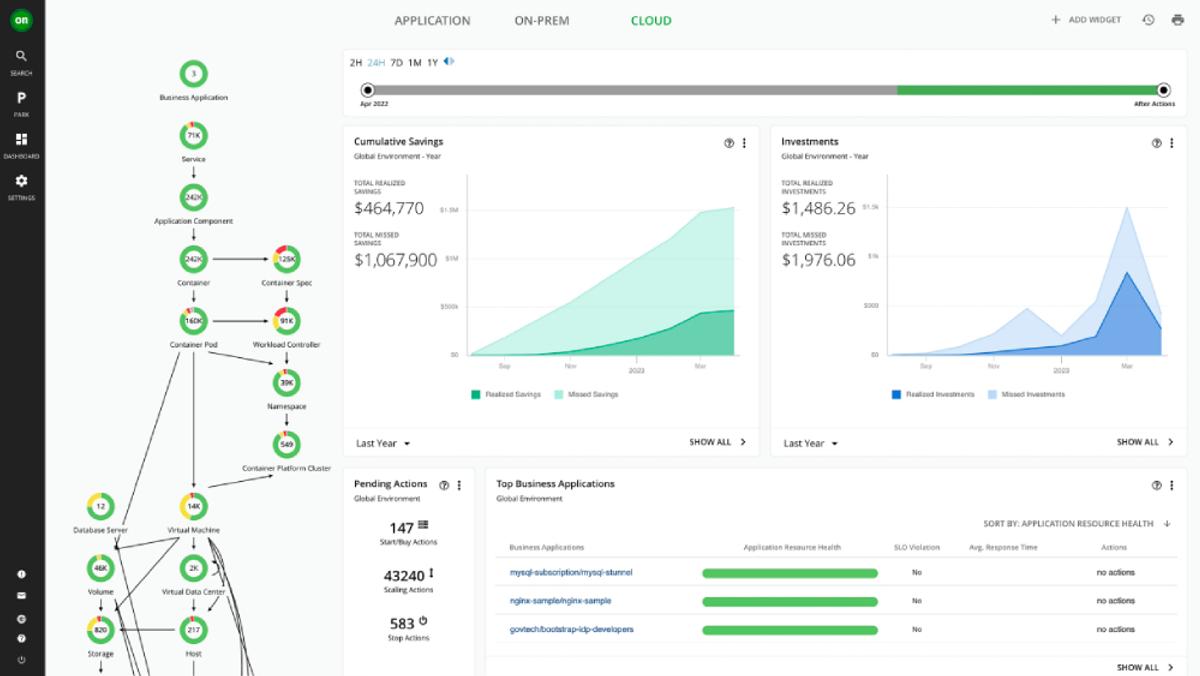
Turbonomic (formerly VMTurbo), part of IBM since 2021, is an AI-driven application resource management platform designed to continuously optimize performance and cost across hybrid and multi-cloud environments. It analyzes resource demand in real time and automates scaling of compute, storage, containers, and databases.
Best for. Enterprises operating across hybrid or multi-cloud environments or data centers that need continuous, AI-driven automation of resource management and cost control, especially where performance and compliance are critical.
Key capabilities. Generates and automates actions such as scaling VMs, resizing volumes and databases, parking idle resources, resizing containers and clusters on EKS, and reserved instance purchase actions on AWS.
Pricing model. Essentials (SaaS) starts around $40,000 a year, suited for businesses with up to about $2M in annual cloud spend. Standard and Hybrid editions are charged on a percentage of spend (typically 2% to 3%) or by managed virtual server count.
Pros
- End-to-end resource automation: aligns supply to application demand across workloads, from VMs and containers to databases.
- Broad platform support: works across AWS, Azure, GCP, on-prem infrastructure, Kubernetes clusters, and even GPU workloads.
- SLO-driven actions: optimization pathways that respect application service-level objectives, reducing manual tuning.
- Workload parking: automatically identifies and halts idle resources during off-hours.
Cons
- Complex setup and management: full value requires deployment across varied environments and tuning, often needing specialized teams.
- Pricing opacity and high cost: tier-based pricing (Essentials vs. Standard vs. Hybrid) varies by environment complexity and cloud spend, often requiring direct sales engagement.
- It is not an allocation or chargeback tool, and IBM's own pages do not document cost allocation.
- UI and performance constraints: in large-scale environments, the interface can feel sluggish, and syncing Kubernetes metrics at scale may introduce delays.
How it compares to Cloudability. IBM describes the split this way: Cloudability supplies data and recommendations, and Turbonomic generates decisions that can be automated. It complements Cloudability rather than replacing it, so choosing it keeps the contract with IBM.
Observability-Adjacent
Choose this segment if your team already works in an observability or delivery platform and wants cost in the same place.
Tool | Best for | Pricing model | Kubernetes support | Multi-cloud | Automation depth |
|---|---|---|---|---|---|
Datadog Cloud Cost Management | Teams already using Datadog for observability | Charged on the cloud and SaaS spend managed | Container-level cost visibility | AWS, Azure, GCP and SaaS | Recommendations and workflow integration |
Harness Cloud Cost Management | Teams already using Harness for CI/CD | Percentage of cloud spend | Yes | Yes | Policy-based governance with auto-shutdowns |
Datadog Cloud Cost Management
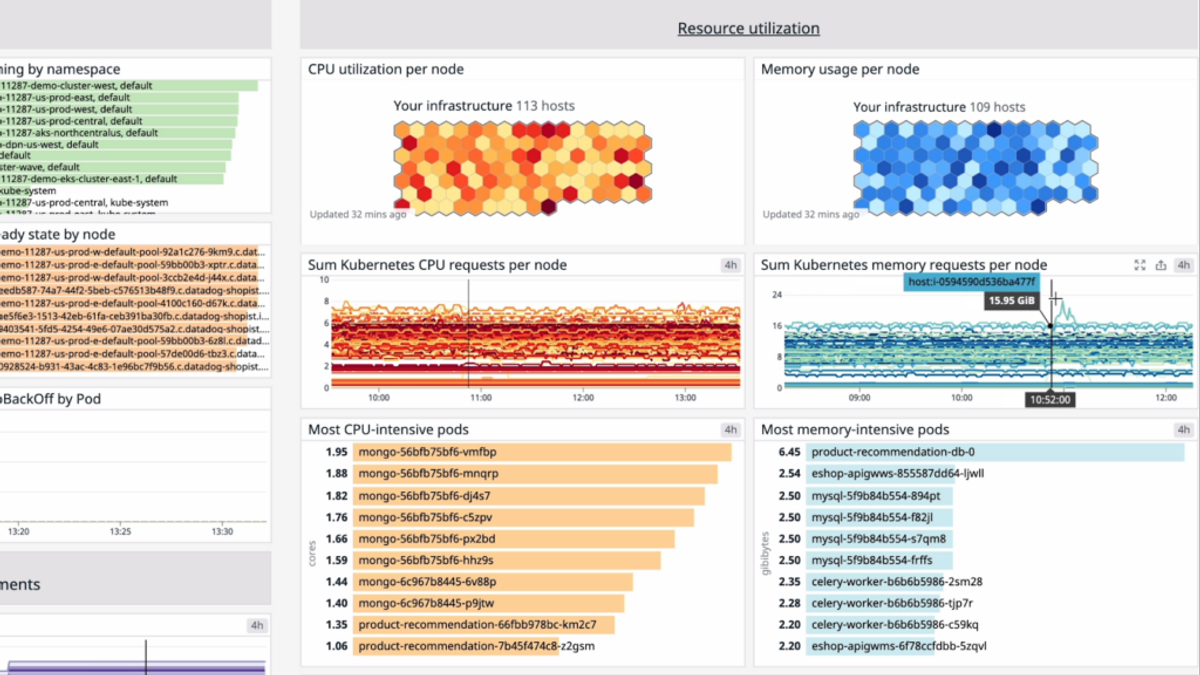
Datadog is a unified observability platform that integrates cloud cost management, called Cloud Cost Management (CCM), directly into its suite of infrastructure, application, log, and container monitoring tools. This allows both engineering and FinOps teams to see cost data alongside performance metrics, with visibility into cloud and SaaS spending through dashboards, notebooks, and monitors.
Best for. Organizations already using Datadog for observability, or those seeking a single platform where cost insights are combined with infrastructure and application monitoring, especially useful for engineering-led FinOps practices.
Key capabilities. Billing data from AWS, Azure, Google Cloud and Oracle plus SaaS and AI providers, tag pipeline rules that fix missing or incorrect tags, custom allocation rules for untagged and shared spend, container cost allocation across Kubernetes, ECS, Azure and GCP down to the pod, monitors for cost changes, anomalies, thresholds, forecasts and budgets, and AI cost coverage across model API and coding tool providers.
Pricing model. Billed on the cloud and SaaS spend managed, not per host, per Datadog's pricing page. Cost Visibility is free, Pro is $5 per $1,000 of monthly spend billed annually ($7.20 on-demand), and Enterprise is $10 per $1,000 ($15 on-demand).
Pros
- Integrated cost + observability: engineers can view cost insights within the same interface used for monitoring, tracing, and alerting, encouraging accountability and faster action.
- Automated cost recommendations: provides rightsizing guidance and one-click actions, with the ability to integrate recommendations into workflows.
- Granular multi-cloud & SaaS attribution: supports detailed tagging and allocation rules, including cost visibility down to containers and workloads.
- Tag pipeline rules can correct missing or incorrect tags and reprocess up to three months of history by default, which helps when tagging has been inconsistent.
Cons
- Pricing complexity and growth: Datadog's modular pricing model can become expensive as usage scales, requiring close monitoring.
- Observability-first depth: organizations seeking a pure FinOps tool may find the breadth of observability features unnecessary.
- Learning curve: while dashboards are powerful, the wide feature set can be overwhelming for new users.
- It does not purchase commitments.
- Cost data is only as recent as each provider supplies it, so it is not a real-time view of spend.
How it compares to Cloudability. Cloudability is a dedicated FinOps product organized around budgets, forecasting and allocation to business units. Datadog puts the same kind of cost data inside its observability platform, so engineers can chart spend next to utilization metrics in the tool they already use for monitoring. Datadog's documentation describes monitors and recommendations rather than commitment purchasing, so teams that want commitments managed need another product alongside it.
Harness Cloud Cost Management
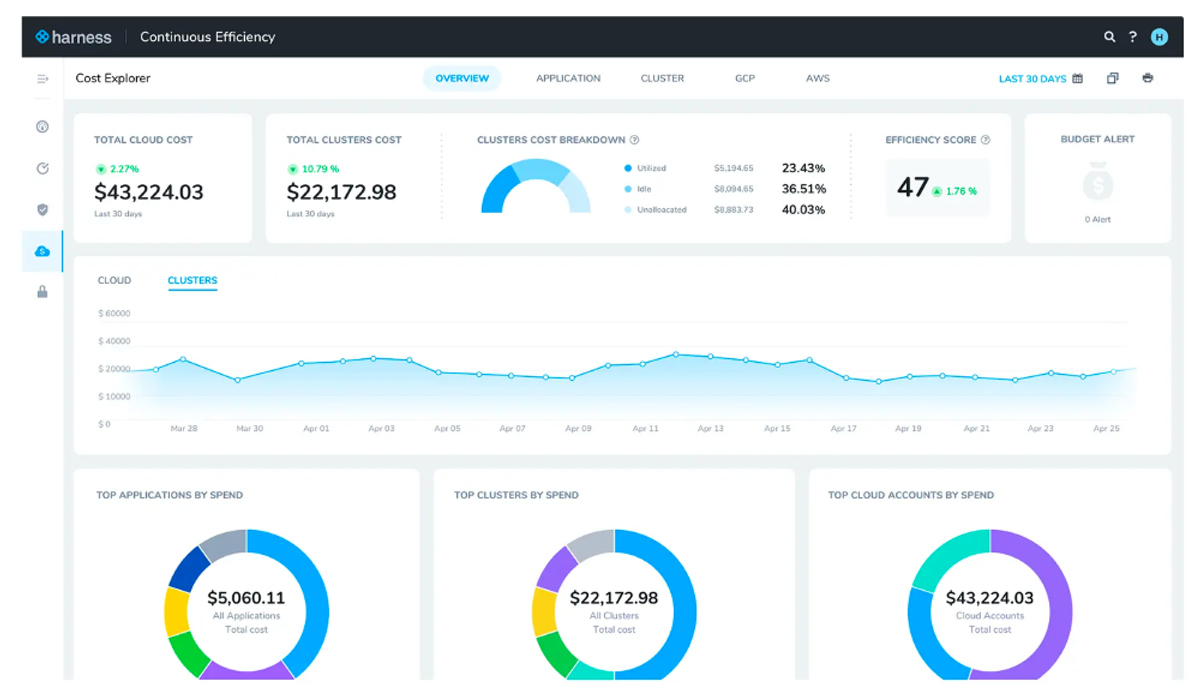
Harness is best known as a CI/CD and developer platform, but it also offers a Cloud Cost Management (CCM) module. Harness CCM is designed to give engineering and FinOps teams real-time visibility into cloud costs, with a focus on actionable insights for Kubernetes and multi-cloud environments. The platform integrates cost data directly into developer workflows, helping teams manage cloud spend as part of their delivery pipeline.
Best for. Organizations already invested in the Harness ecosystem or those seeking cost visibility tightly coupled with CI/CD workflows. Also a fit for engineering-driven teams that want detailed visualizations and strong governance controls across Kubernetes and multi-cloud setups.
Key capabilities. Perspectives that group spend into views for engineering, finance or leadership, cost categories for business allocation, anomaly alerts, budgets, rightsizing recommendations, AutoStopping for non-production resources that sit idle, asset governance policies, Cluster Orchestrator for EKS, and Commitment Orchestrator for Savings Plans and reservations on AWS EC2 and RDS, with Kubernetes coverage across EKS, GKE, AKS and ECS.
Pricing model. Percentage of cloud spend: about 2.25% of monthly spend on Teams and 2.5% on Enterprise, per its AWS Marketplace listing.
Pros
- Policy-based governance: teams can define cost policies to prevent overspending, including auto-shutdowns and limits on resource consumption.
- Developer-friendly integration: surfaces cost data within the same ecosystem developers already use for CI/CD, encouraging cost-aware engineering decisions.
- Rich visualizations: interactive dashboards that make it easier to drill into cost trends and anomalies.
- Kubernetes coverage extends past the managed services to ECS, OpenShift, Rancher and Kops.
Cons
- Premium pricing model: uses a percentage-of-cloud-spend approach, which can become costly as infrastructure scales.
- Learning curve: feature-rich dashboards and policy tools may require dedicated FinOps ownership to set up effectively.
- Limited automation depth: while policies are strong, some cost optimization actions still require manual follow-up compared to automation-first tools.
- Commitment automation is limited to AWS EC2 and RDS in the support matrix.
- Cluster Orchestrator and Commitment Orchestrator are AWS-only, so Azure and GCP coverage is visibility, recommendations, anomalies, AutoStopping and governance.
How it compares to Cloudability. Both price as a percentage of cloud spend, so the fee rises with the bill. Cloudability is organized around finance reporting and keeps commitment purchasing in a separate module, while Harness leans toward engineering, with AutoStopping, Cluster Orchestrator and Commitment Orchestrator acting on infrastructure directly. The commitment and cluster automation covers AWS only.
Free and Open-Source Cloudability Alternatives
Four free options cover different pieces of what Cloudability does, and none of them replaces it alone.
Tool | What it covers | Limits | Best for |
|---|---|---|---|
OpenCost | Open-source Kubernetes cost allocation by namespace, label and workload | Kubernetes only, self-managed, no commitment automation or anomaly detection | Platform teams that run their own tooling |
Kubecost free tier | Kubernetes allocation plus non-Kubernetes cloud costs, budgets, forecasting and anomaly detection | Free up to $100,000 of spend over the last 30 days; request sizing limited to 250 cores | Kubernetes teams under the spend gate |
AWS Cost Explorer | Cost reporting and forecasting for AWS accounts | AWS only; API requests $0.01 each; advisory recommendations only | Single-cloud AWS teams |
Infracost | Cost estimates from Terraform, CloudFormation and CDK in pull requests | Pre-deployment only; free plan covers 1,000 runs a month | Engineering teams shifting cost review left |
OpenCost
OpenCost is the open-source Kubernetes cost monitoring project that Kubecost created, and it is a CNCF incubating project rather than an IBM product. It allocates cluster cost by namespace, label and workload, accounts for GPU cost in its specification, and can use cloud billing data for accuracy. It has no commitment automation, anomaly detection or reporting outside Kubernetes, so the team runs and maintains it.
Kubecost free tier
Kubecost's free tier covers environments up to the spend gate, which version 3 measures as $100,000 over the last 30 days, and includes non-Kubernetes cloud costs with budgets, forecasting and anomaly detection. Automated container request sizing on the free tier is limited to 250 cores. Teams above the gate move to a paid plan.
AWS Cost Explorer
AWS Cost Explorer has no separate charge in the console, and API requests cost $0.01 each. Hourly and resource-level EC2 data costs $0.01 per 1,000 usage records a month and covers the past 14 days. It covers AWS only, its EC2 rightsizing recommendations are advisory, and anomaly alerts come from the separate Cost Anomaly Detection service by email or SNS.
Infracost
Infracost estimates cost from Terraform, CloudFormation and CDK in pull requests, before anything is deployed. The CI/CD plan is free for 1,000 runs a month, Starter is $250 a month for 10,000 runs, and Cloud is $1,000 a month and adds FinOps policies and cost guardrails. It does not analyze spend that is already running, so it complements a platform rather than replacing one.
Feature Comparison Table
The table compares all 15 platforms, IBM Cloudability included, on the capabilities this guide has covered. Not listed means the vendor's own documentation does not state the capability.
Tool | Allocation without tags | Kubernetes | Multi-cloud | AI/GPU spend | Commitment automation | Spot/rightsizing | Anomaly detection | Pricing model |
|---|---|---|---|---|---|---|---|---|
IBM Cloudability | Rules-based business mappings | Yes | AWS, Azure, GCP | AI usage by model | Savings Automation module, priced separately | Rightsizing recommendations | Yes | Percentage of managed spend |
CloudHealth (Broadcom) | Perspectives with reallocation rules | Limited | AWS, Azure, GCP, VMware | Not listed | RI and Savings Plan purchasing and amortization | Rightsizing recommendations and policy actions | Yes | Quote-based |
Flexera One | Shared cost allocation by tags, labels and metadata | Yes, through Spot Ocean | AWS, Azure, GCP, on-prem | Yes, tokens by vendor and model | Recommendations; automation through ProsperOps | Rightsizing and Spot automation | Yes | Quote-based, typically on spend under management |
ServiceNow Cloud Cost Management | Tag categories derived from CMDB | Container cost management | All major clouds | Not listed | Recommendations | Rightsizing and idle resource recommendations | Not listed | Quote-based |
nOps | Yes, metadata and virtual tag rules | Yes, pod level on EKS | AWS, Azure, GCP | Yes, model providers and coding tools | Yes, automated across AWS, Azure and GCP | Cost optimization recommendations | Yes | Fixed fee by spend; share of savings for commitments |
ProsperOps | Commitment showback only | Not a focus | AWS, Azure, GCP | Not listed | Yes, autonomous | No | Not listed | Share of savings |
Usage.ai | Not listed | Not a focus | AWS, Azure, GCP | Not listed | Yes, buys eligible commitments | Rightsizing recommendations | Not listed | Percentage of realized savings |
CAST AI | Allocation groups by namespace or label | Native | EKS, GKE, AKS, OpenShift | GPU utilization reporting | Imports and manages existing commitments only | Yes, automated Spot and rightsizing | Yes | Custom quote, usage-based |
CloudZero | Yes, CostFormation | Yes, through agent | AWS, Azure, GCP and some SaaS | Yes, plus GPU through agent | Recommendations only | Rightsizing recommendations | Yes, hourly | Quote-based, scales with spend |
Finout | Virtual tags and shared cost reallocation | Yes | Yes | Yes, AI providers | Monitoring and recommendations | Rightsizing recommendations | Yes | Flat fee tiered by committed spend |
Vantage | Virtual tags | Yes, per pod | 40+ providers | Yes, including per-pod GPU | Savings Plans through Autopilot on AWS | Rightsizing recommendations | Yes | Free tier, fixed monthly tiers |
Kubecost (IBM) | Namespace views without labels | Native | Reconciles with cloud billing | GPU | Not listed | Rightsizing and request sizing | Yes, beta | Free tier plus paid plans |
Turbonomic (IBM) | Not listed | Yes | AWS, Azure, GCP, on-prem | GPU metrics | RI purchase actions on AWS | Rightsizing and parking | Not listed | Essentials from about $40,000 a year |
Datadog Cloud Cost Management | Custom allocation rules | Yes | AWS, Azure, GCP, SaaS | Yes, AI providers | Not listed | Rightsizing recommendations | Yes | Charged on spend managed |
Harness Cloud Cost Management | Cost Categories and allocation rules | Yes | Yes | Yes, AI providers | Commitment Orchestrator on AWS EC2 and RDS | Rightsizing and AutoStopping | Yes | Percentage of cloud spend |
How to Choose the Right Cloudability Alternative
Five questions narrow the field quickly, and each answer points to one of the segments above.
Reporting-first vs automation-first
Reporting-first platforms such as Cloudability, CloudHealth, CloudZero and Datadog surface waste and leave the fix to engineers or analysts. That keeps people in control of every change and suits organizations where approvals matter more than speed, but savings depend on how fast the queue gets worked. Automation-first tools act within a defined scope: commitment purchasing (nOps, ProsperOps, Usage.ai), cluster scaling (CAST AI) or resource actions (Turbonomic). They remove the queue at the cost of a narrower scope. nOps sits in the automation-first group and keeps cost visibility and allocation in the same product, which commitment-only tools do not.
Single-cloud vs multi-cloud
A team on AWS alone can start with Cost Explorer, which costs nothing in the console, and add commitment automation later. Teams on two or three clouds need allocation that works the same way across providers, and nOps, Cloudability, Flexera One, Finout and Vantage cover AWS, Azure and GCP, with Vantage extending to more than 40 providers. Hybrid estates with VMware or datacenter spend are where CloudHealth and Flexera One lead.
Finance-led vs engineering-led
Finance-led programs need showback and chargeback by business unit, forecasting and governance, which is where Cloudability, CloudHealth, Flexera One and ServiceNow concentrate. Engineering-led programs need cost per customer, feature or pod close to the code, which CloudZero, Vantage, Finout and Datadog provide. nOps gives finance allocation by business context and gives engineering automation that does not need an owner.
Kubernetes-heavy environments
When most spend is containers, namespace and workload allocation decides the outcome. Kubecost and OpenCost provide it natively, CAST AI adds automated scaling, and Turbonomic automates resource actions across hybrid estates. General platforms with container allocation include Cloudability, Datadog, Vantage, Finout and nOps, which allocates at the pod level on AWS EKS.
Decision matrix
Use the situation that best matches yours.
If this describes you | Strongest fit |
|---|---|
Finance owns chargeback across a hybrid or VMware estate | Flexera One or CloudHealth |
Your IT and asset workflows already run on ServiceNow | ServiceNow Cloud Cost Management |
You want commitment savings executed automatically, with visibility and allocation in the same product | nOps |
You want commitment management only, as a standalone service | ProsperOps or Usage.ai |
You need cost per customer, feature or team | CloudZero |
You want public pricing and coverage of many providers | Vantage |
Kubernetes is most of the bill | Kubecost, CAST AI or OpenCost |
You already run Datadog or Harness | Datadog or Harness Cloud Cost Management |
You have no budget yet | Cost Explorer, OpenCost or the Kubecost free tier |
Why nOps Is the Strongest Cloudability Alternative for Automation
Cloudability is best suited for enterprises that want traditional cost visibility and reporting. It provides dashboards for cloud spend and account navigation, but optimization takes manual effort, and commitment purchasing sits in a separate Savings Automation module that is priced separately.
nOps puts unified visibility and savings in one platform. Where Cloudability reports and leaves the work to people, nOps shows spend across cloud, SaaS, Kubernetes and AI and acts on it, with the commitment fee tied to the savings delivered, so cost tracks results as your environment grows.
On the visibility side, nOps brings multicloud, SaaS, Kubernetes and AI spend into one view across all major providers. Cost data matches the AWS Cost and Usage Report down to the pod, so teams get CUR-grade detail without building the pipeline. Allocation runs on metadata and rule-based virtual tags, so spend is assigned even where tagging is incomplete, and anomaly detection compares each hour with the same hour a week earlier and alerts when spend leaves that baseline.
On the optimization side, commitment management buys and manages Savings Plans, reservations and committed use discounts across AWS, Azure and GCP, rebalancing hourly. Cost optimization recommendations cover the rest of the bill, and an AI FinOps agent helps teams find and act on savings.
Demo
AI-Powered Cost Management Platform
Discover how much you can save in just 10 minutes!
Book a Demo
Frequently Asked Questions
Let's dive into some FAQ about IBM Cloudability alternatives (2026).
Are Apptio and Cloudability the same?
Not exactly. Apptio is the company, and Cloudability is one of its products. Apptio acquired Cloudability in May 2019, and IBM completed its acquisition of Apptio in August 2023, making Cloudability an IBM-owned solution that IBM now sells as IBM Cloudability. Despite the ownership changes, Cloudability continues to operate as a core Apptio FinOps offering.
Is Cloudability a FinOps tool?
Yes. Cloudability offers FinOps capabilities through cloud financial management, including visibility, allocation, showback and chargeback, budgeting, forecasting, anomaly alerts and rightsizing recommendations, and it was a founding technical advisor to the FinOps Foundation. However, many teams supplement or replace it with newer FinOps tools that emphasize real-time automation, Kubernetes visibility, and faster ROI compared to traditional reporting platforms.
What is IBM Cloudability?
IBM Cloudability is a cloud financial management platform for tracking, allocating and forecasting spend across AWS, Azure and Google Cloud. It sits in IBM's FinOps suite alongside Turbonomic and Kubecost.
Who are the main competitors of Apptio?
For cloud cost management, which is the Cloudability side of Apptio, the main competitors are CloudHealth, Flexera One and ServiceNow Cloud Cost Management for enterprise governance, and nOps, ProsperOps, Usage.ai and CAST AI for automation. CloudZero, Finout and Vantage compete for engineering-led teams, and Kubecost and Turbonomic are IBM's own alternatives. Each is covered by segment above.
Did IBM buy Apptio?
Yes. IBM announced the acquisition in June 2023 for $4.6 billion and completed it in August 2023. Apptio, and with it Cloudability, is now part of IBM, which added Kubecost to the same suite in September 2024.
Which companies use Apptio?
Apptio's customer page lists organizations including BMO, BNY Mellon, Cargill, Chevron, FedEx, Lowe's, Philips and Siemens. Apptio's customer list spans its technology business management and cloud products, so not every name is a Cloudability customer.
Is Flexera better than Cloudability?
Flexera and Cloudability serve similar enterprise FinOps use cases, but their strengths differ. Flexera emphasizes IT asset management, compliance, and multi-cloud governance, particularly since it added CloudCheckr and the Spot FinOps portfolio. Cloudability, by contrast, is finance-focused with budgeting and forecasting features. Whether one is “better” depends on organizational priorities, scale, and FinOps maturity.
What is the difference between CloudHealth and Cloudability?
CloudHealth, owned by Broadcom and sold as VMware Tanzu CloudHealth, focuses on governance, security, and policy-driven multi-cloud management, often used by IT operations. Cloudability, part of IBM, is finance-oriented, emphasizing budgeting, cost allocation, and forecasting. Both provide visibility and rightsizing, but CloudHealth leans toward governance, while Cloudability targets financial reporting and FinOps workflows.
Are there free Cloudability alternatives?
Yes. OpenCost and the Kubecost free tier cover Kubernetes cost, AWS Cost Explorer covers AWS in the console at no separate charge, Infracost has a free CI/CD plan for pre-deployment estimates, and Vantage has a free Starter tier. Each covers part of what Cloudability does, as laid out in the free and open-source section above.
Teams comparing IBM Cloudability alternatives usually want unified visibility and savings in one platform instead of reports that need follow-up. Book a demo with one of our experts to see how nOps brings multicloud, SaaS, Kubernetes and AI spend into one view and automates commitments and savings, and discover how much you can save in just 10 minutes.
nOps manages over $5 billion in AI and cloud spend and is ranked #1 with five stars in G2's cloud cost management category.