16 Best AWS Cost Management Tools in 2026 (Compared)
Cloud spending is projected to hit $723.4 billion in 2025, up from $595.7 billion the previous year. As AWS environments grow more complex and costs climb to new heights, tracking spending, allocating costs accurately, and optimizing resources becomes increasingly challenging. Without the right tools, businesses face overspending, inefficiency, and missed opportunities for savings.
This article examines the top AWS cost management tools for 2026, breaking down how their features and benefits can help you manage cloud costs effectively while driving operational efficiency.
What is AWS Cost Management?
AWS Cost Management encompasses strategies and tools to monitor, analyze, and optimize cloud spending across platforms. It involves tracking usage patterns, identifying cost drivers, and ensuring expenses align with business goals. While AWS provides native tools like Cost Explorer and Budgets, many organizations also use third-party solutions or custom workflows to gain deeper insights, automate actions, and achieve more efficient cloud spend management.
FinOps, short for Financial Operations, extends the concept of AWS cost management into a broader operational framework that combines finance, engineering, and business teams. It focuses on continuous optimization and decision-making based on real-time cloud spend data. The Crawl, Walk, Run methodology is often used to describe an organization’s maturity in managing cloud costs. In the Crawl phase, teams start with basic cost visibility and reporting using tools like AWS Cost Explorer. In the Walk phase, they implement cost allocation models and budgets, involving more stakeholders in the process. By the Run phase, organizations achieve real-time optimization and automation, using advanced tools like third-party solutions to drive cost efficiency at scale.
What are AWS Cost Management Tools?
AWS cost management tools monitor cloud spending, allocate costs to teams or projects, detect billing anomalies, and automate savings through Reserved Instances, Savings Plans, and rightsizing. They include AWS-native services (Cost Explorer, Budgets, Cost Anomaly Detection) for basic visibility and third-party platforms (nOps, Cloudability, CloudZero) with deeper visibility and automated optimization features. These tools serve finance, engineering, and FinOps teams who need clarity into who spent what, why costs changed, and where to cut waste.
What are the benefits of AWS Cost Management?
The key benefits of AWS cost management include:
Cost Visibility: detailed insights into cloud usage and spending
Lower Spending: eliminating waste, optimizing resource usage, and leveraging pricing discounts to reduce costs.
Cost Governance: setting and monitoring cost limits across teams or projects to avoid unexpected bills
Cost Allocation: breaking down expenses by tags, services, teams, features, etc. for accountability
Spend Forecasting: predictions for future spending based on historical trends.
Anomaly Detection: alerts users quickly to unexpected cost spikes or usage patterns.
Financial Reporting: understand who spent what, even for shared costs like R&D, and calculate cost of goods sold (COGS) for individual apps or features to make better business decisions
How to Choose an AWS Cost Management Tool
Selecting the right AWS cost management tool requires evaluating your organization’s specific needs, cloud maturity level, and optimization goals. Consider these key factors when making your decision.
Cost visibility & allocation depth
Look for tools that provide granular visibility into your AWS spending with the ability to slice costs by multiple dimensions—teams, projects, environments, custom tags, and business units. The tool should support advanced cost allocation models including showback and chargeback capabilities. For organizations running containers, ensure the platform offers Kubernetes cost allocation at the namespace, pod, and workload level. Tools like nOps and CloudZero excel in this area by enabling cost allocation to custom business metrics like cost per customer or cost per feature.
Automated optimization capabilities
Manual cost optimization is time-consuming and error-prone. Evaluate whether the tool provides automated optimization features like intelligent Savings Plans and Reserved Instance management, automated resource scheduling, and workload rightsizing. Platforms like nOps and ProsperOps automate commitment management with zero manual intervention, while tools like Harness AutoStopping automatically shut down idle non-production resources. The best tools absorb the operational complexity and deliver savings without requiring dedicated staff.
Anomaly detection & alerting
Unexpected cost spikes can quickly blow through budgets if not caught early. Choose a tool with machine learning-based anomaly detection that learns your spending patterns and alerts you to unusual changes in real time. AWS Cost Anomaly Detection provides this natively, but third-party platforms often offer more sophisticated alerting with root cause analysis and recommended remediation. Look for customizable alert thresholds and integration with communication tools like Slack and Teams for immediate notification.
Kubernetes & container cost support
If you run containerized workloads on EKS or other Kubernetes platforms, verify the tool provides native Kubernetes cost visibility. This includes per-pod, per-namespace, and per-workload cost allocation with support for shared cluster overhead distribution. Tools purpose-built for Kubernetes like Kubecost and Cast AI offer the deepest container visibility, while platforms like nOps and Harness provide Kubernetes support as part of broader AWS cost management capabilities.
Integrations & automation
Cost management tools should integrate seamlessly with your existing workflows and systems. Check for API availability, webhook support, and pre-built integrations with ITSM platforms, CI/CD pipelines, and business intelligence tools.
Pricing & time-to-value
Understand the tool’s pricing model—percentage of cloud spend, flat subscription, or performance-based pricing where you only pay for delivered savings. Calculate total cost of ownership including implementation time, ongoing management overhead, and staff training requirements. The best tools offer fast onboarding (under 30 minutes for initial setup) and deliver measurable savings within the first week. Evaluate whether the platform offers a free trial or proof-of-concept period to validate ROI before committing to a long-term contract.
Top AWS Cost Management Tools for 2026
Here are the top AWS cost management tools currently available on the market and how they compare in terms of features, pros and cons.
1. nOps - Best for Automated AWS Cost Optimization
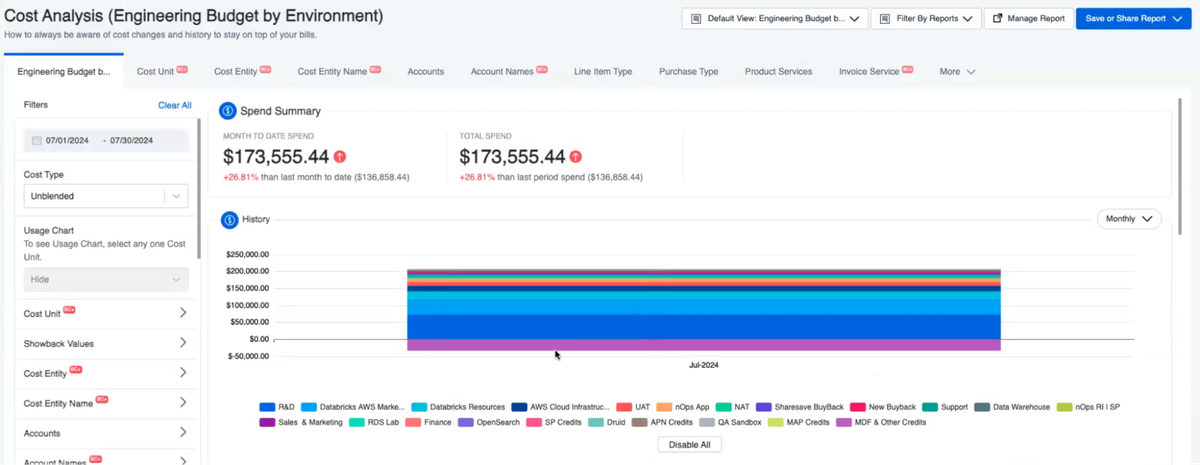
nOps is a cost optimization platform that helps users reduce their costs by up to 60% on autopilot. nOps makes it easy to allocate your multicloud costs and get complete visibility into spending. It also intelligently manages all your commitments and pricing discounts automatically so you get optimal performance and costs.
nOps was built to make it easy for engineers to take action on cloud optimization and was recently named #1 in G2’s cloud cost management category.
Key Feature Highlights:
- Visibility: understand 100% of your cloud costs with dashboards, reports, container cost allocation, budgets, forecasting, anomaly detection and more — covers GCP, Azure, Kubernetes, AI and third-party SaaS like Datadog, Databricks and Snowflake
- Commitment Management: get industry-leading savings rates (up to 55%) while minimizing your commitment lock-in risk. Customers save 20% on average when switching from competitors.
- Savings-First pricing model: nOps is results-based, meaning you pay nothing if you don’t get measurable results.
Pricing: Free to get started with a free savings analysis, then a percentage of savings.
Best for:
- Companies of all sizes that want to get autonomous savings for no manual effort
- FinOps, DevOps, and engineering leaders looking for real-time visibility and optimization in one platform
You can book a demo to try out these G2 5-star rated features with your own AWS account.
2. Apptio Cloudability - Best for Enterprise Multi-Cloud Governance
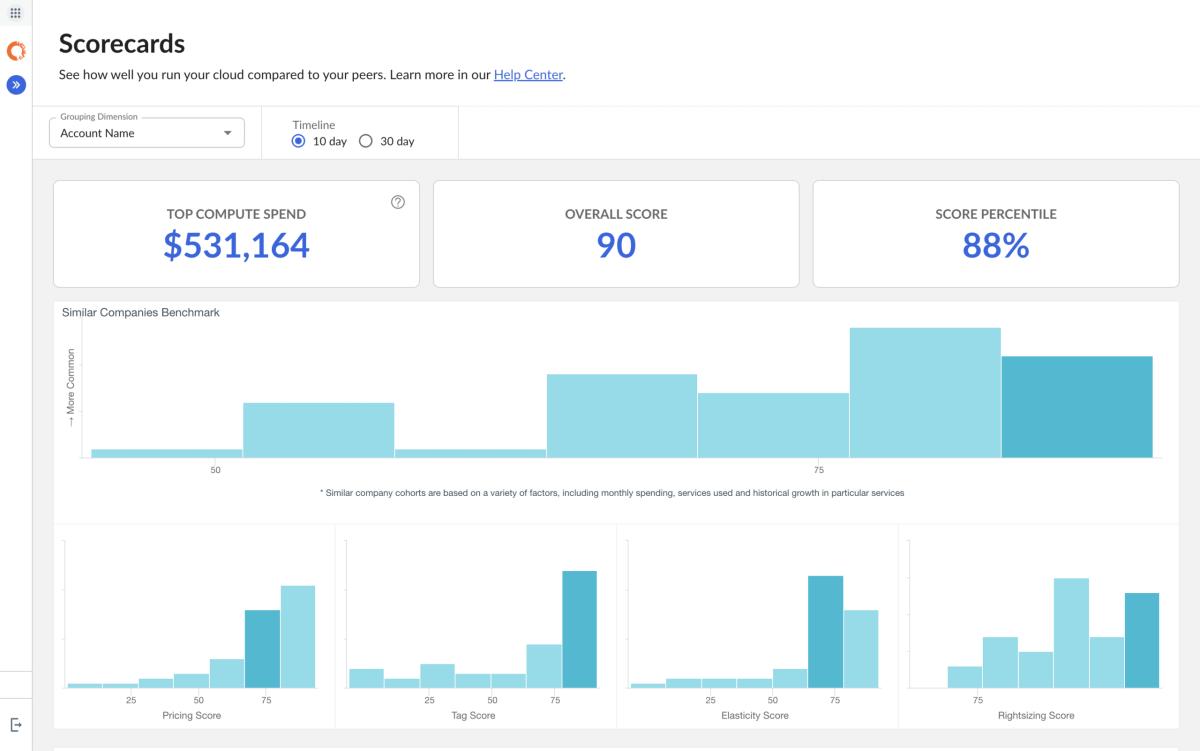
Apptio Cloudability is a multi-cloud financial management platform developed by Apptio (now part of IBM) that helps enterprises gain comprehensive insights into their cloud spending across Amazon Web Services (AWS), Microsoft Azure, and Google Cloud Platform. The platform offers powerful features designed to support FinOps teams, including cloud cost management automation, detailed dashboards and reports, budget forecasting, and cost anomaly detection.
Overview: The platform is particularly valuable for large enterprises with substantial cloud budgets and multi-cloud operations, enabling teams to track, analyze, and optimize cloud spend with advanced capabilities. Cloudability aims to drive financial accountability in cloud environments by providing tools to help engineering and finance collaborate effectively and maximize the value of their cloud investments through granular cost insights and optimization recommendations.
Pros:
- Enterprise-ready governance includes robust approval workflows, role-based access control, and audit logging for strict compliance requirements
- Deep multi-cloud coverage delivers consistent cost allocation across AWS, Azure, and GCP with unified taxonomy
- Mature reporting capabilities with extensive pre-built reports and custom report builder for executive stakeholders
- Native connectors to Tableau, Power BI, and other BI tools enable custom reporting
Cons:
- High complexity and steep learning curve typically require dedicated FinOps staff to manage effectively
- Expensive pricing—typically 1-3% of annual cloud spend—means a $5M/year bill costs $50K-$150K annually
- Implementation timeline can extend months for large enterprises with complex requirements
Pricing: Cloudability uses a percentage-of-spend model ranging from 1-3% of annual cloud spend depending on volume and contract terms. Pricing is tiered with graduated discounts for larger organizations.Best for: Large enterprises ($5M+ annual cloud spend) with multi-cloud environments, dedicated FinOps teams, and complex governance requirements. For alternatives, see our Cloudability alternatives guide and Cloudability pricing breakdown.
3. CloudZero - Best for Cloud Cost Intelligence & Unit Economics
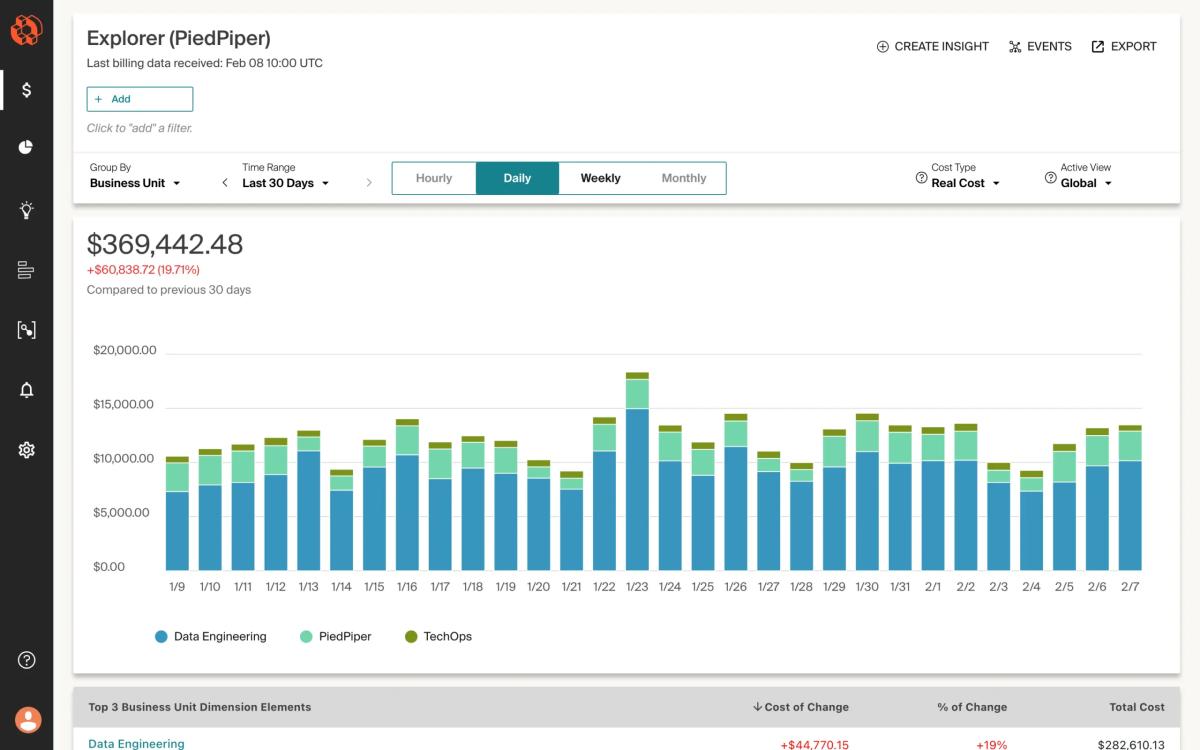
CloudZero is a cloud cost intelligence platform designed to provide comprehensive visibility into cloud spending across multiple providers, including AWS, GCP, Azure, and Kubernetes environments. The platform offers organizations a detailed view of their cloud expenditures, enabling teams to understand and analyze costs through its advanced tracking and reporting capabilities.
Pros:
- Engineering-friendly interface built for DevOps teams focuses on actionable insights rather than finance-centric reports
- Deep AWS integration provides accurate EKS and Lambda allocation that native tools struggle with
- Unit economics capabilities map costs to business metrics like cost per customer and cost per feature
- Unified multi-cloud support aggregates AWS, Azure, GCP, Snowflake, and Databricks in one dashboard
Cons:
- Higher cost for smaller teams—at $19 per $1000 of cloud spend, a $100K/month bill costs $1,900/month
- Limited commitment automation provides recommendations but doesn’t auto-purchase Savings Plans or RIs
Pricing: CloudZero charges $19 per $1000 of monthly cloud spend under management with no feature restrictions. Minimum contract term is 12 months.
Best for: Fast-growing SaaS companies and engineering-driven organizations with $100K+/month cloud spend who need cost per customer or cost per feature insights. See our CloudZero alternatives comparison for other options.
4. ProsperOps - Best for Autonomous Commitment Management
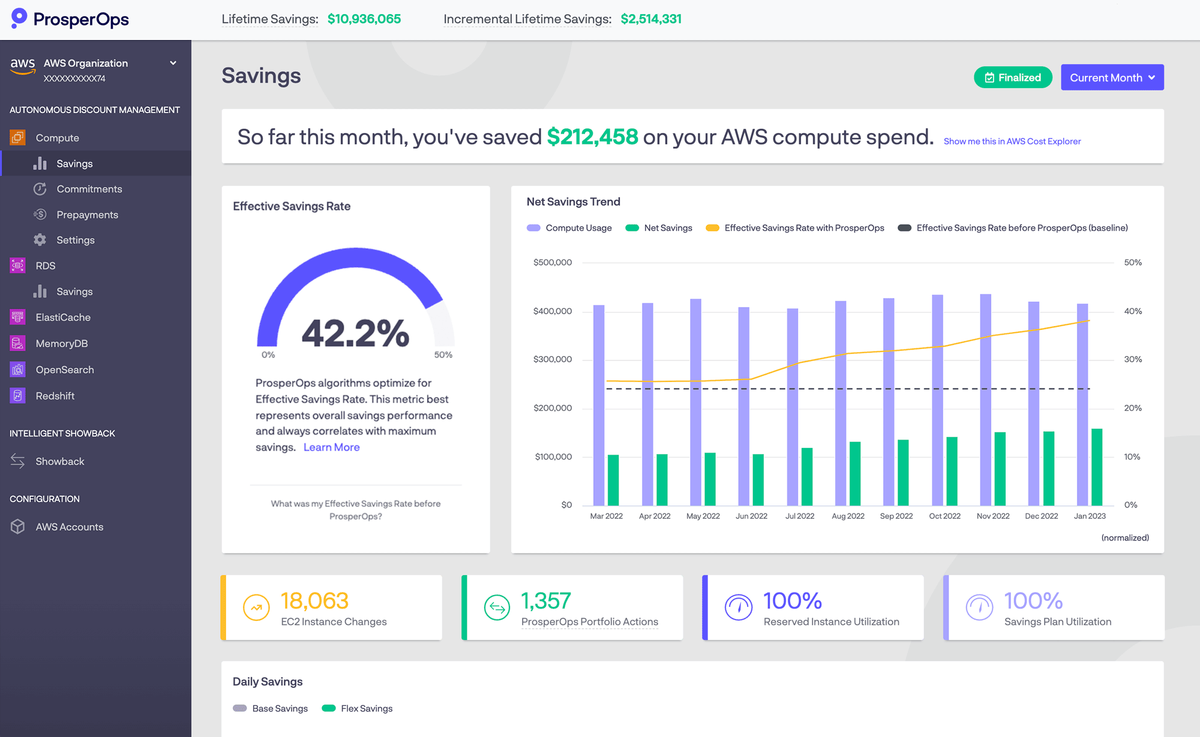
ProsperOps is a specialized commitment management platform focused exclusively on automating AWS, Azure, and Google Cloud discount instruments—Reserved Instances, Savings Plans, and Committed Use Discounts. Unlike full-featured FinOps platforms, ProsperOps does one thing: autonomously buy, manage, and optimize commitments to maximize savings while minimizing lock-in risk.
Pros:
- Set-and-forget automation requires zero ongoing management—connects once and runs autonomously
- Eliminates commitment risk by absorbing costs of unused commitments during downturns or migrations
- Proven results typically achieve 40-60% cost reduction on covered compute spend
- Multi-cloud support provides unified commitment strategy across AWS, Azure, and Google Cloud
Cons:
- Focus on rate optimization only—doesn’t identify idle resources, rightsizing opportunities, or architectural waste
- Higher cost than manual management—charges 20-35% of savings delivered
Pricing: ProsperOps uses a Savings Share model charging 20-35% of savings delivered through managed commitments. No upfront cost or minimum commitment.
Best for: Organizations with $100K+/month cloud spend across AWS, Azure, or GCP who want commitment savings without risk or ongoing management burden. See nOps vs ProsperOps comparison for detailed analysis.
5. Finout - Best for Organizations with Messy Tagging
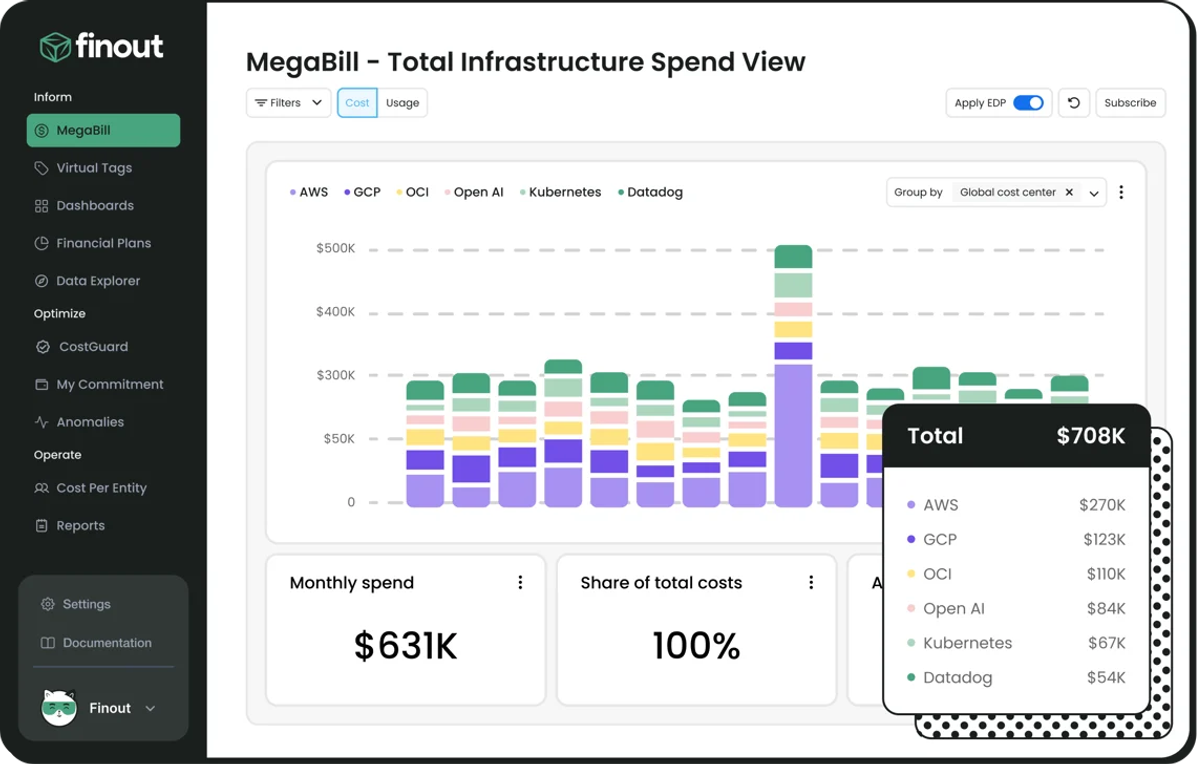
Finout is a cloud cost observability platform designed for organizations struggling with incomplete or inconsistent resource tagging. The platform’s signature feature is Virtual Tagging, which maps costs using rules based on metadata, account structure, or usage patterns without requiring clean tags on every resource.
Pros:
- Virtual Tagging solves cost allocation problems without requiring months of tag cleanup work
- Transparent fixed-pricing model—approximately 1% of annual cloud spend—eliminates usage-based surprises
- Strong multi-cloud support treats AWS, Azure, GCP, and data platforms as first-class citizens
- Real-time anomaly detection with sophisticated alerting and root cause analysis
Cons:
- No commitment automation—provides visibility and recommendations but doesn’t auto-purchase Savings Plans or RIs
- Limited third-party integrations compared to Cloudability for ITSM and ticketing systems
Pricing: Finout charges a fixed annual fee of approximately 1% of cloud spend locked in for the contract term. All features included with no tiers or add-ons.
Best for: Organizations with $1M+ annual cloud spend struggling with incomplete tagging or cost allocation accuracy. See our Finout alternatives guide for comparisons.
6. Densify - Best for ML-Powered Rightsizing
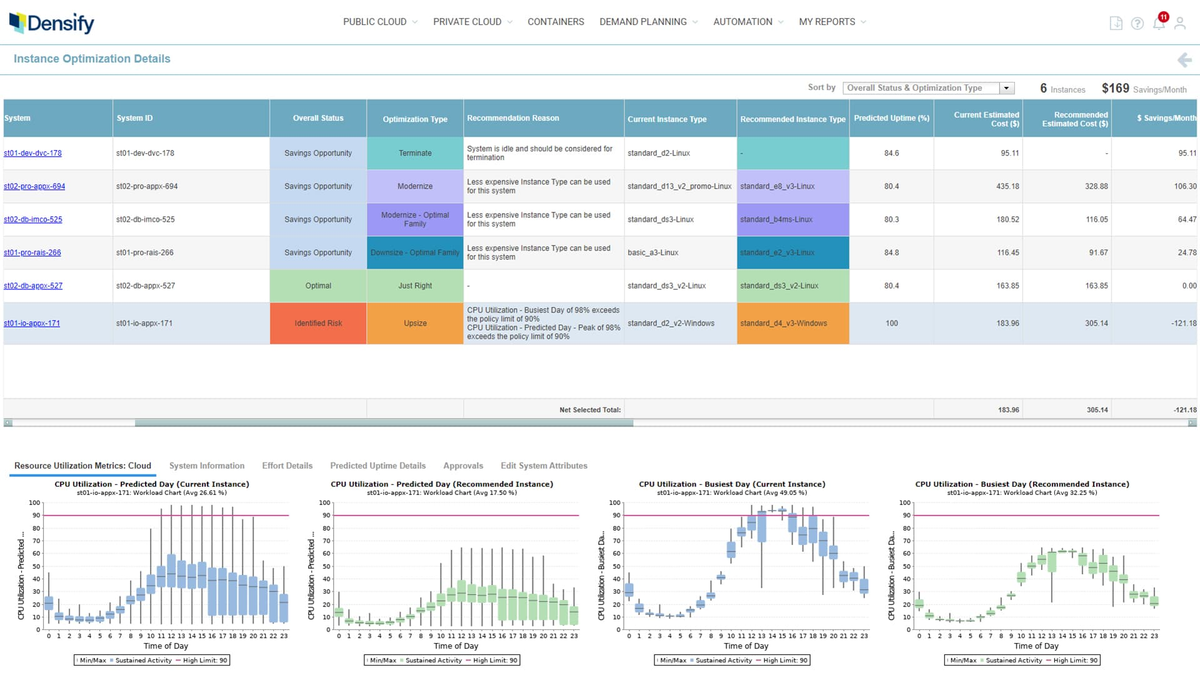
Densify is a cloud resource optimization platform that analyzes workload patterns across multiple cloud providers, including AWS, Azure, and Google Cloud, to automatically determine the ideal instance types and resource specifications for infrastructure. This approach aims to strike an optimal balance between performance and cost, reducing application stability issues while increasing resource utilization.
Pros:
- Highly accurate recommendations through predictive modeling reduce false positives compared to static analysis
- Strong Kubernetes support with container-level rightsizing for CPU and memory requests
- Quantified business impact provides clear ROI calculation for each recommendation
- Multi-dimensional rightsizing considers CPU, memory, disk I/O, network, and performance SLAs
Cons:
- Complex pricing model using per-vCPU or per-instance pricing can be expensive for large fleets
- Limited cost visibility features focus exclusively on optimization—lacks cost allocation and budgeting
Pricing: Densify uses consumption-based pricing at $3 per vCPU per month for cloud optimization or $2.50 per instance per month for container optimization, with volume discounts available.
Best for: Large enterprises ($500K+/month cloud spend) with complex workload performance requirements who need precise rightsizing backed by machine learning analysis.
7. Harness - Best for Non-Production Savings
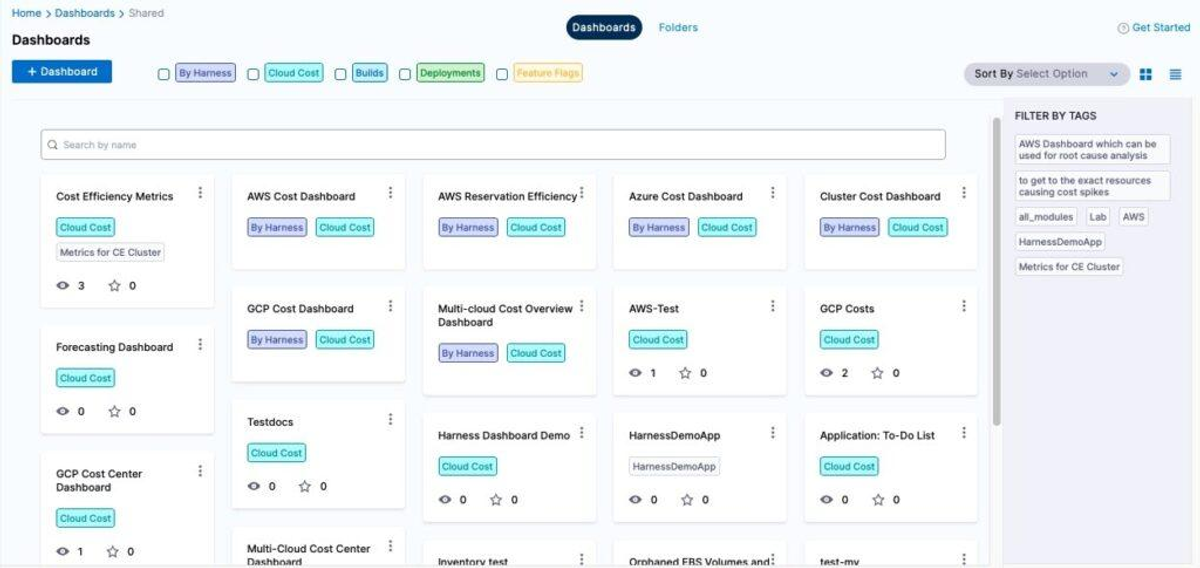
Harness is an advanced software delivery and cloud management platform that offers a comprehensive suite of tools for DevOps, FinOps, and DevSecOps teams. The platform provides capabilities for continuous integration and delivery (CI/CD), feature flag management, security and compliance, cloud cost management, and infrastructure-as-code across multiple cloud providers including AWS, Azure, and Google Cloud Platform.
Pros:
- AutoStopping consistently delivers 60-70% reduction in non-production costs with zero workflow disruption
- Developer-friendly interface built for engineering teams focuses on actionable recommendations
- Free tier available for small teams with paid tiers only required above $250K/year cloud spend
- Native Kubernetes visibility provides cost breakdown for EKS, GKE, and AKS
Cons:
- Limited commitment automation provides recommendations but doesn’t auto-purchase Savings Plans or RIs
- Harness ecosystem lock-in means less value if not using Harness for CI/CD
Pricing: Harness CCM uses tiered subscription pricing based on annual cloud spend. Free tier for basic features; Enterprise tier required above $250K/year with custom pricing.
Best for: Engineering-led organizations with significant non-production cloud spend ($50K+/month) who want automated cost reduction without policy enforcement.
8. Cast AI - Best for Automated Kubernetes Optimization
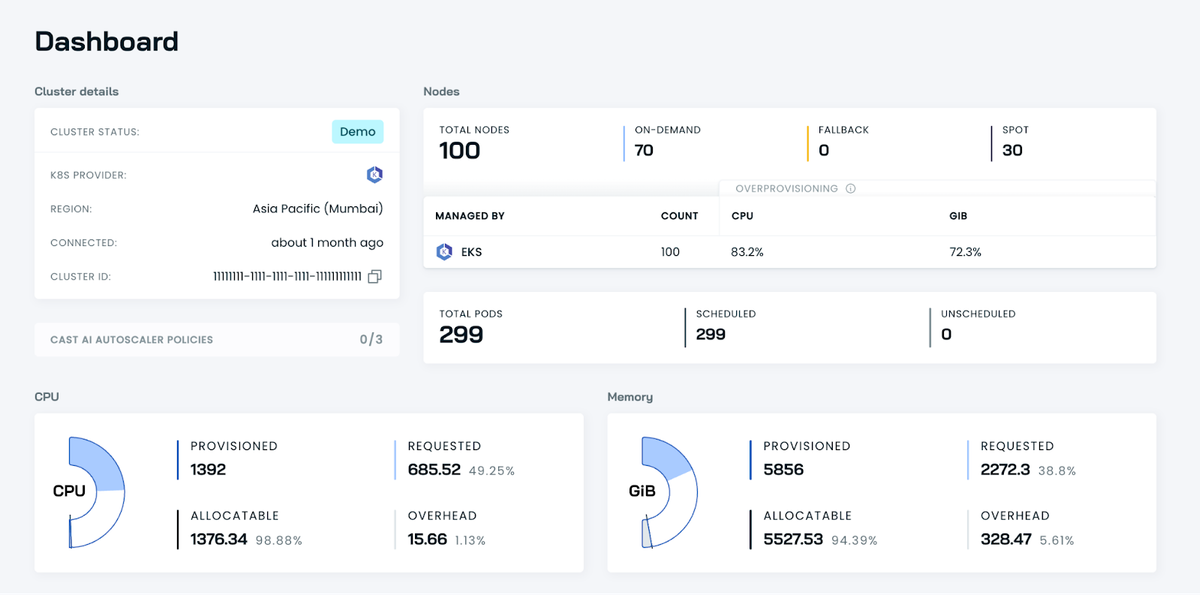
CAST AI is a cloud-native platform that specializes in automated analysis, monitoring, and optimization of Kubernetes environments across multiple cloud providers, including AWS, Azure, and Google Cloud Platform. The platform’s core strength lies in its AI-driven approach to cloud resource management, which aims to significantly reduce cloud costs while maintaining optimal performance for applications.
Pros:
- Fully automated platform actively manages Kubernetes infrastructure without human intervention
- Strong cost reduction typically achieves 50-70% savings on K8s compute
- Fast time-to-value allows teams to connect cluster and enable automation in under 30 minutes
- Built-in Kvisor security scans for vulnerabilities alongside cost optimization
Cons:
- Kubernetes-only focus does not optimize non-K8s resources like RDS, Lambda, or S3
- Limited multi-cluster visibility for reporting across dozens of clusters
Pricing: Cast AI charges 15-20% of savings delivered through cluster optimization. Free tier available for smaller clusters.
Best for: Organizations running Kubernetes workloads on AWS, Azure, or GCP who want automated cost optimization beyond native cluster autoscaling. See Cast AI alternatives for other options.
9. Spot by NetApp/Flexera - Best for Production-Grade Spot Instances
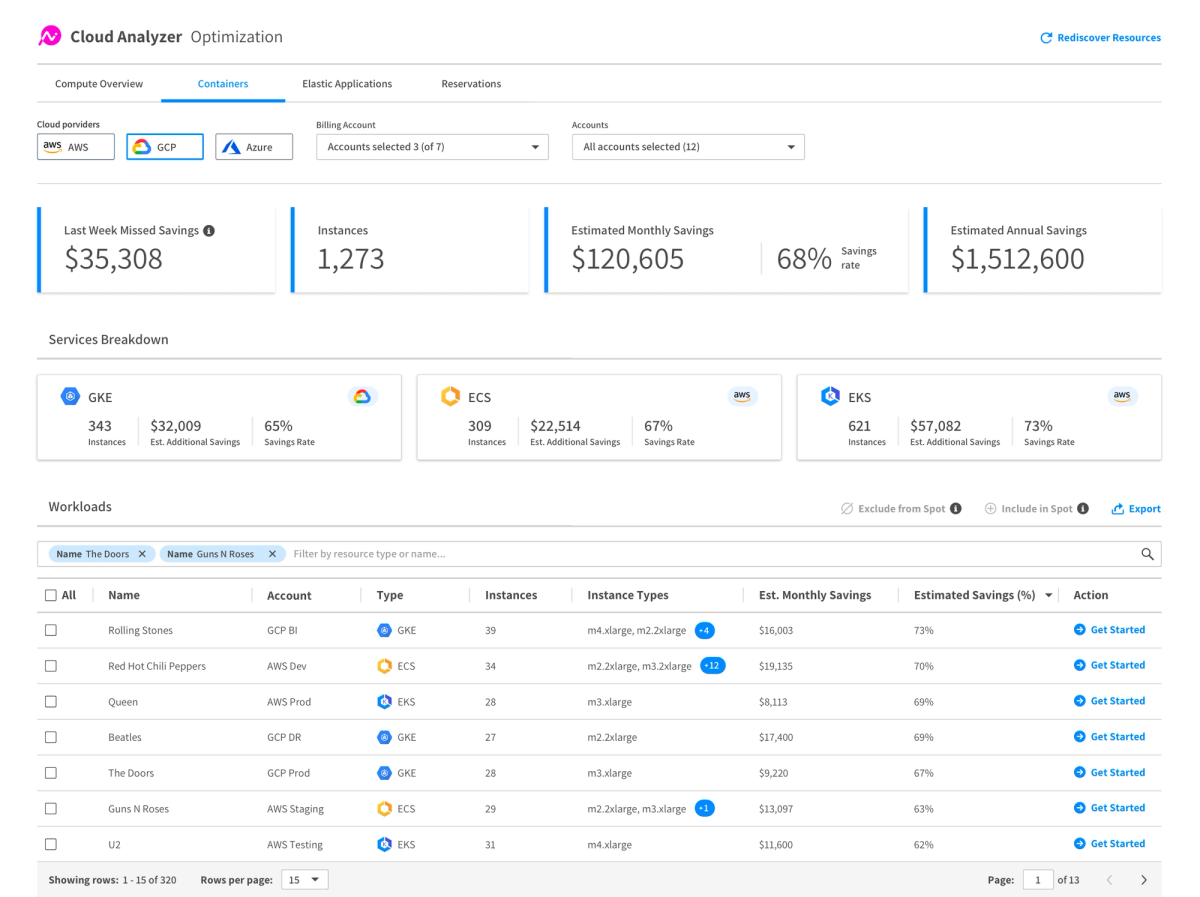
Spot by NetApp (recently acquired by Flexera) is a comprehensive cloud operations and cost management platform designed to optimize AWS environments. It offers a suite of tools for FinOps, infrastructure optimization, and AWS cost control, leveraging AI-driven algorithms to provide continuous infrastructure optimization across multiple cloud providers, including AWS, Azure, and Google Cloud Platform.
Pros:
- Eliminates Spot complexity by making Spot instances operationally viable for production workloads
- Strong Kubernetes support via Ocean product with per-pod cost visibility and automatic rightsizing
- Multi-cloud support delivers unified Spot management across AWS, Azure, and GCP
- Availability SLA guarantees workload availability through automatic On-Demand failover
Cons:
- Vendor lock-in risk means migrating away requires significant re-architecture
- Limited cost visibility focuses on optimization rather than cost allocation or budgeting
Pricing: Spot.io uses savings-based pricing charging 15-25% of savings delivered through Spot instance and commitment management.
Best for: Organizations with stateless or fault-tolerant workloads who want production-grade Spot instance usage without operational complexity. See Flexera pricing guide for more details on the Flexera portfolio.
AWS-Native Cost Management Tools
Third-party AWS cost management tools can make it easier to get deep visibility with automation features and advanced tools for tagging, allocating costs, budgeting, and reporting — particularly when you want to analyze your combined AWS, Azure, Kubernetes, and other third-party tool costs.
However, if you’re just getting started on your visibility journey, AWS-native tools can be a great way to get started managing AWS costs. Here are five tools to consider:
#10: AWS Cost Explorer
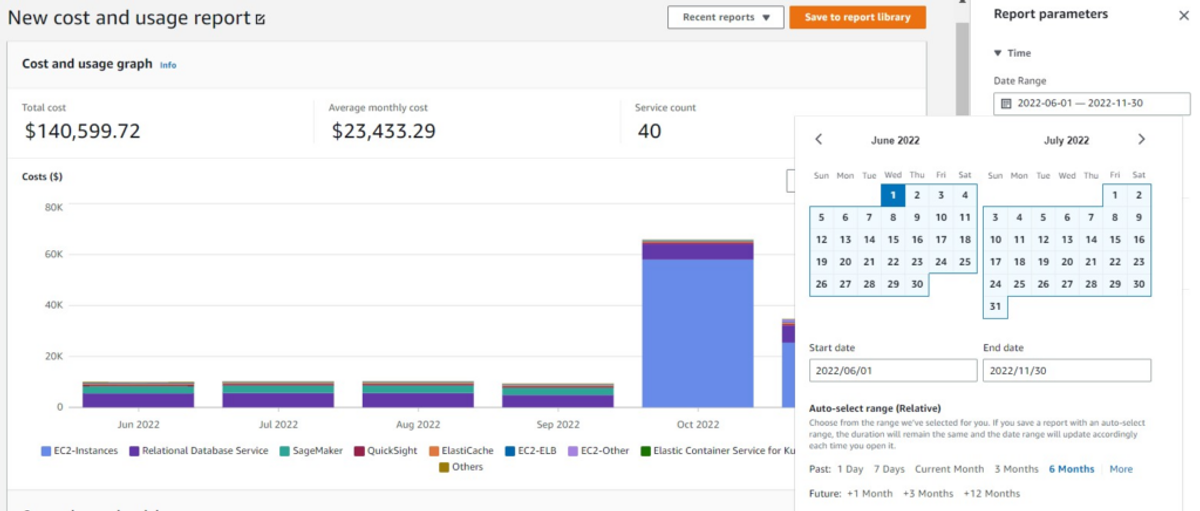
AWS Cost Explorer is a powerful tool for analyzing and visualizing AWS spending patterns over time. It provides detailed insights into cost and usage data, allowing users to identify trends and pinpoint cost drivers. With its interactive interface, users can create custom reports and dashboards, filter and group data by various dimensions, and access up to twelve months of historical data. AWS Cost Explorer also offers forecasting capabilities based on historical data, helping organizations predict future cloud expenses and adjust budgets accordingly.
AWS Cost Explorer’s comprehensive cost analysis features make it invaluable for organizations seeking to optimize their AWS usage and spending. However, it can require a higher level of expertise to use effectively and may have a steeper learning curve compared to other cost management tools.
#11: AWS Billing and Cost Management
AWS Billing and Cost Management provides a centralized interface for viewing invoices, managing payments, and accessing cost and usage reports. As the foundational tool for managing and understanding your AWS costs, the Cost Management Console offers essential features for financial visibility and control.
Users can enable consolidated billing for linked accounts, ensuring a clear overview of organizational expenses. The tool also supports the use of cost allocation tags, allowing users to categorize and track costs by project, department, or other custom dimensions. Additionally, it provides secure payment method management and access to detailed usage data through the AWS Cost and Usage Report (CUR).
#12: AWS Budgets
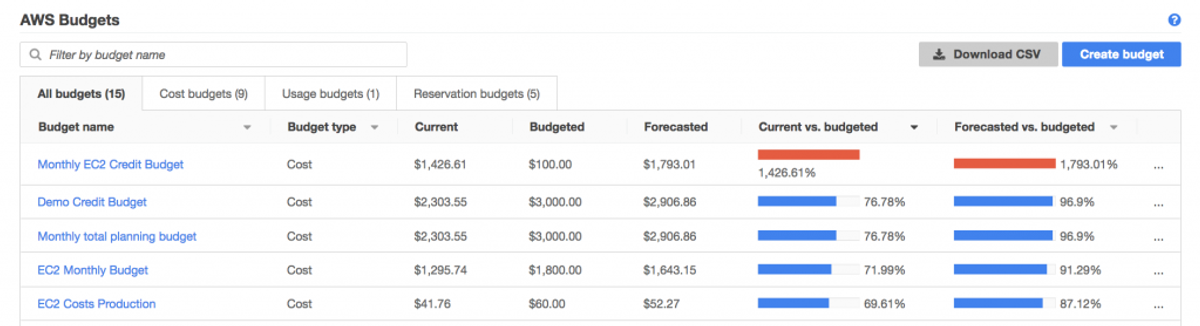
AWS Budgets is an essential tool for proactive financial management in AWS environments. It allows users to set custom cost and usage budgets, as well as receive alerts when spending exceeds defined thresholds. AWS Budgets offers various budget types, including cost budgets, usage budgets, and reserved instance utilization budgets, providing comprehensive monitoring across different dimensions of an AWS account.
It is possible to set up automated actions when budgets are breached, such as stopping or modifying AWS resources (note: this requires advanced configuration using AWS services like AWS Lambda or Service Catalog). This feature enables organizations to implement strict cost controls and maintain compliance with financial policies. AWS Budgets can be particularly useful if you need to adhere to strict budgets and require immediate action on potential overruns.
#13: AWS Cost Anomaly Detection
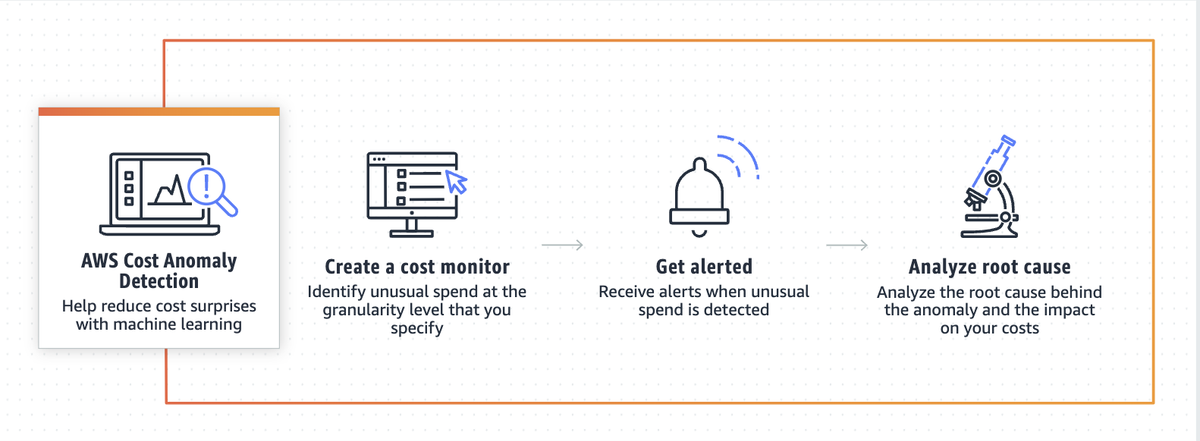
AWS Cost Anomaly Detection leverages machine learning to identify unusual changes in AWS spending patterns. This tool analyzes cost and usage data multiple times a day, enabling customers to quickly identify and respond to unexpected spending changes. It provides customizable alerts, allowing users to receive notifications about potential cost overruns based on specific criteria relevant to their operations.
By offering insights into the root causes of anomalies, AWS Cost Anomaly Detection enhances visibility into cost management and helps organizations avoid unexpected budget overruns. The service continuously improves its accuracy in detecting anomalies through its machine learning algorithms, reducing the likelihood of false positives over time.
However, it does require careful initial configuration and ongoing management to be effective, which can be time-consuming for complex environments.
#14: AWS Trusted Advisor
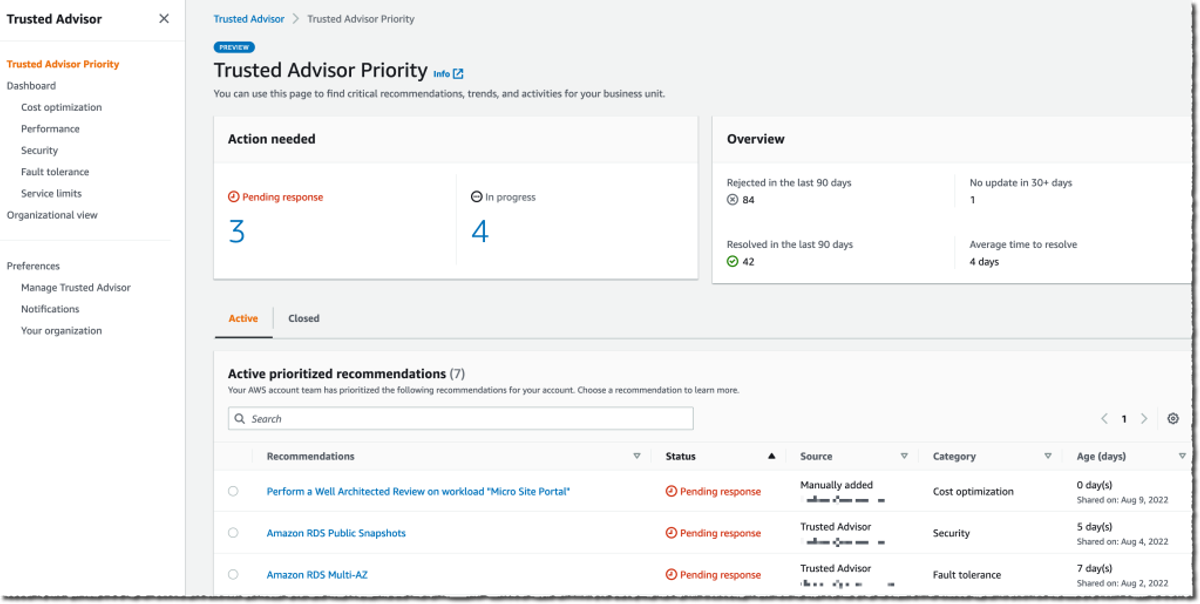
AWS Trusted Advisor is a comprehensive tool that helps optimize AWS environments by providing guidance across multiple categories. It continuously evaluates AWS environments using best practice checks in areas such as cost optimization, performance, security, resilience, and service limits.
AWS Trusted Advisor identifies deviations from AWS best practices and recommends actions to address them, helping organizations align with AWS standards and improve their cloud infrastructure. It also enables better collaboration across teams by offering greater visibility and tracking of recommendations.
#15. AWS Pricing Calculator
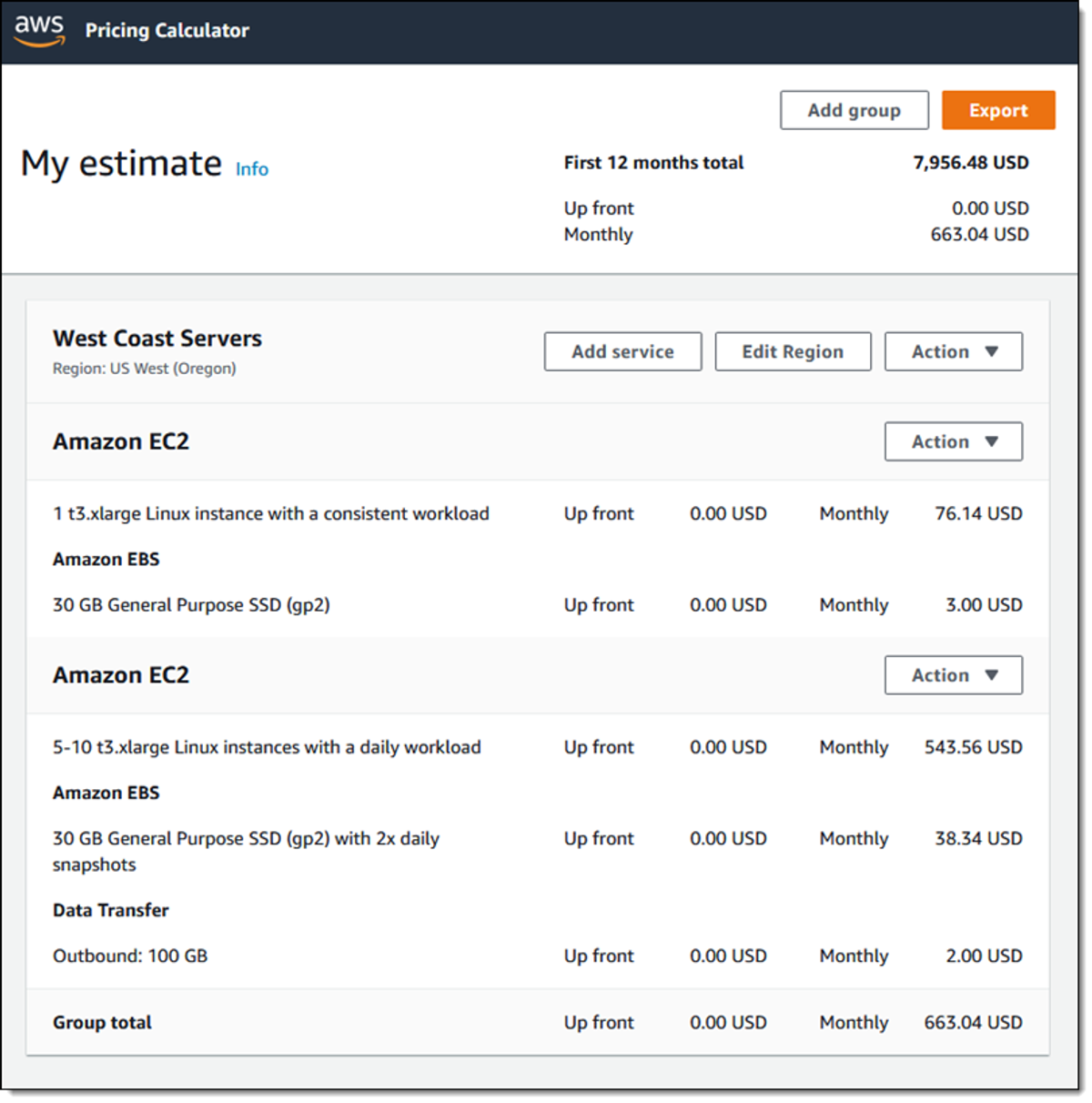
The AWS Pricing Calculator is an AWS tool designed to help users estimate the cost of AWS services based on specific use cases and configurations. It enables users to model different scenarios by selecting services, regions, instance types, and configurations, allowing for a detailed understanding of potential costs before deployment.
Users can input custom traffic, storage, and usage estimates to calculate costs for various workloads and generate comprehensive pricing reports. The tool provides granular pricing options, including the ability to specify contract terms, such as Reserved Instances or Savings Plans, for more accurate estimates.
Additionally, it supports the creation of shareable estimates, which can be exported for collaboration or integrated into broader financial planning.
#16. AWS Cost Optimization Hub
AWS Cost Optimization Hub is a centralized service that consolidates cost optimization recommendations from across AWS services into a single dashboard. Launched in 2023, the hub aggregates recommendations from Cost Explorer, Compute Optimizer, Trusted Advisor, and other AWS services to provide a unified view of potential savings opportunities.
The hub categorizes recommendations by resource type, estimated savings amount, and implementation effort, making it easier for teams to prioritize optimization actions. It provides filtering and sorting capabilities to help organizations focus on the highest-impact opportunities first. The service also tracks the status of recommendations, showing which have been implemented, dismissed, or are pending action.
Cost Optimization Hub is particularly valuable for organizations that find it challenging to navigate multiple AWS cost management tools and want a single source of truth for optimization opportunities. The service is included with AWS at no additional cost and integrates with AWS Organizations for multi-account visibility.
nOps is the Best AWS Cost Management Tool
At nOps, our mission is to make it easy for engineers to optimize costs. We help you save 50% or more on autopilot, so you can focus on building and innovating.
nOps manages $5 billion in AWS spend for our customers and is rated 5 stars on G2 — book a demo call with one of our AWS Experts to find out how much you can save today.
Demo
AI-Powered Cost Management Platform
Discover how much you can save in just 10 minutes!
Book a Demo
Frequently Asked Questions
Let’s dive into a few FAQ about AWS cost drivers and platforms for Amazon cost management.
What are the best AWS cost management tools in 2026?
The best tools depend on your needs: nOps for automated optimization, Apptio Cloudability for enterprise multi-cloud governance, CloudZero for unit economics, ProsperOps for commitment management, and Cast AI for Kubernetes. AWS-native tools like Cost Explorer work well for basic visibility.
What’s the difference between AWS-native and third-party cost management tools?
AWS-native tools (Cost Explorer, Budgets, Trusted Advisor) provide basic visibility and are included with AWS but lack advanced automation. Third-party tools offer deeper cost allocation, automated optimization, multi-cloud support, and features like commitment management and Kubernetes visibility.
Are AWS-native cost management tools free?
Most AWS-native tools are free: Cost Explorer, Cost Anomaly Detection, Trusted Advisor (basic tier), and Cost Optimization Hub. AWS Budgets costs $0.02 per budget per day after the first two free budgets. Trusted Advisor’s full feature set requires Business or Enterprise Support plans.
How do AWS cost management tools reduce cloud spend?
Tools reduce spend through automated commitment management (Savings Plans, Reserved Instances), rightsizing recommendations, idle resource detection, Spot instance automation, storage optimization, and scheduling non-production resources. The best tools deliver 30-60% savings through hands-off automation.
What should you look for in an AWS cost management tool?
Prioritize granular cost visibility with custom allocation, automated optimization capabilities, real-time anomaly detection, Kubernetes support (if relevant), strong integrations, and transparent pricing. Evaluate time-to-value—tools should onboard quickly and deliver measurable savings within the first week.