AWS Introduces G6f GPU Instances with Flexible GPU Partitioning
AWS has released a new generation of GPU instances: G6f, powered by NVIDIA L4 Tensor Core GPUs with GPU partitioning. These instances allow you to provision as little as one-eighth of a GPU, i.e. stop overpaying for ML or graphics workloads that don’t need the horsepower (or cost) of a full GPU.
Here’s what this launch means and how it fits into AWS’s evolving GPU portfolio.
A Brief Timeline of GPU Instance Evolution on AWS
AWS has been steadily evolving its GPU offerings over the years:
- 2017 (P3): Targeted at deep learning training with NVIDIA V100 GPUs.
- 2019 (G4): Designed for graphics workloads with T4 GPUs and a better price-performance ratio.
- 2022 (G5): Enhanced performance for game streaming and workstation workloads.
- 2024 (G6): Introduced NVIDIA L4-based instances for higher efficiency.
- 2025 — (G6f): Brings GPU partitioning to L4-powered instances, enabling fractional GPU access at a lower price point.
What’s New
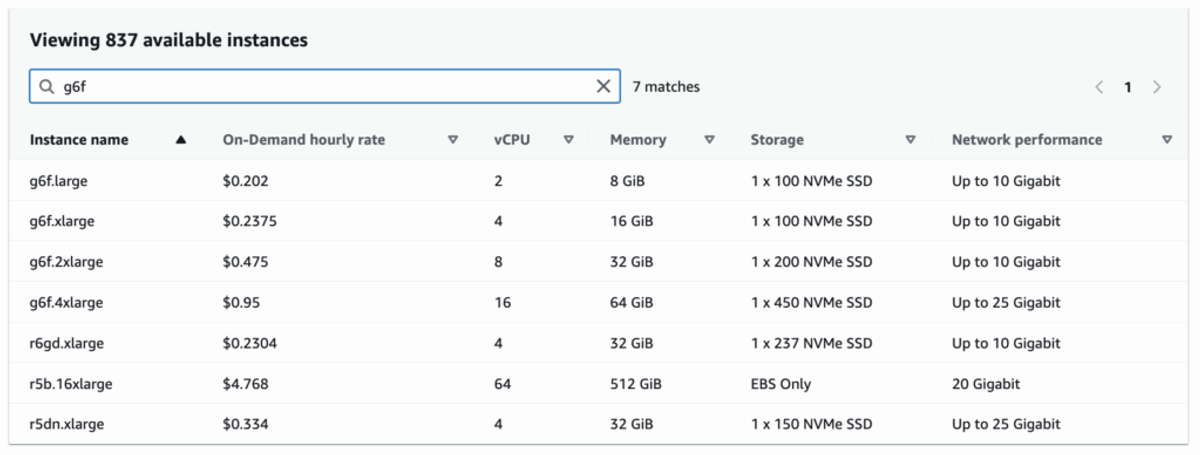
The G6f family introduces GPU partitioning, letting users spin up instances with as little as 1/8th of an NVIDIA L4 GPU (3 GB GPU memory). Customers can right-size their instances instead of overpaying for full-GPU capacity they don’t need. G6f is ideal for scenarios that require some GPU, but not a whole one.
Instance specs include:
- 1/8th, 1/4th, 1/2 GPU options
- Up to 12 GB GPU memory
- Up to 16 vCPUs with AMD EPYC Gen 3 CPUs
Available in On-Demand, Spot, and Savings Plans pricing models across 10 global regions.
Why It Matters
If your team is running GPU workloads that aren’t maxing out a full GPU, G6f could cut your costs significantly.
G6f is a good fit for companies working on early-stage AI or ML projects — whether that’s a dedicated AI startup or a more traditional business experimenting with new AI development. The team needs GPUs but doesn’t yet know how much or which type. In a world where companies are throwing money at AI, the goal is to be more conscious about what you actually need and avoid unnecessary waste. In that case, it makes sense to start with the smallest G6f option, like 1/4 of a GPU, and scale up only if usage demands it. If the smallest option is sufficient, there’s no need to pay for more.
G6f is also relevant for companies that already have a lot of GPU processing. These companies often have workloads that rely on GPUs, but when they look at usage versus allocation, it’s hard to tell how much is actually being used and how much is wasted. There’s no clear concept of rightsizing GPUs, which makes it difficult to optimize. G6f can help here too — fractional GPUs can be combined in a way that gets closer to full utilization and delivers better cost efficiency.
Some other common use cases include:
- Media & Entertainment teams building virtual workstations
- Engineering orgs running lightweight simulation or design workloads
- ML researchers and game developers doing inference, testing, or streaming at scale
It’s also a good fit for shared environments or multi-tenant platforms where GPU needs vary by user or session.
How to Get Started
You can deploy G6f instances today via the AWS Console, CLI, or SDKs. They support Amazon DCV for secure remote access and require NVIDIA GRID driver 18.4 or higher. For more details, visit the G6 instance page or review the Amazon DCV documentation.
GPU Optimization with nOps
GPU partitioning is only part of the savings story. With nOps, you can go further — especially if you’re running GPUs in EKS or shared environments.
Here’s how nOps helps optimize GPU workloads:
- GPU Visibility in EKS: Track GPU usage down to the container level. See which pods are actively consuming GPU vs. sitting idle, and identify over-provisioned resources instantly.
- Automatic Rightsizing Recommendations: If you’re using half a GPU but paying for a full one, nOps will surface better instance types (like G6f) or alternative configurations.
- Commitment Management: We analyze historical GPU usage and automatically put you on the optimal blend of Savings Plans, Reserved Instances, and optionally Spot discounts for maximum savings and minimum risk.
Ready to optimize GPU costs across your infrastructure? Book a demo with our team to see how much you can save on AWS.
nOps was recently ranked #1 with five stars in G2’s cloud cost management category, and we optimize $5 billion in cloud spend for our customers.
Demo
AI-Powered Cost Management Platform
Discover how much you can save in just 10 minutes!
Book a Demo