Introducing Clara Agent in Slack
Bring nOps’ specialized commitment management and cloud cost data to your harness of choice
nOps is a unified platform for cloud cost intelligence and commitment management. And with the introduction of the nOps MCP, that data layer is no longer limited to the nOps UI. You can now access nOps custom data sources from any harness that supports plugins or MCP servers.
Teams can now connect governed nOps datasets to MCP-compatible harnesses such as Claude Cowork, Cursor, Amazon Quick, and more. This makes cloud cost data easier to use wherever teams are reviewing infrastructure or building custom automation.
For customers, this means more flexibility: the same trusted cloud cost intelligence from nOps can now power a broader set of AI and engineering workflows while staying governed, structured, and connected to the nOps source of truth.
What’s New
MCP, or Model Context Protocol, is an open standard that lets AI applications connect to external tools and data sources. With the Clara (AI-Powered FinOps Agent) MCP Server, nOps customers can make Clara available as a tool that external assistants can call safely and repeatedly.
That means teams can get insights about the nOps commitment management solution, and ask cost and usage questions from the places where work is already happening, while Clara continues to manage the underlying datasets, permissions, and query behavior.
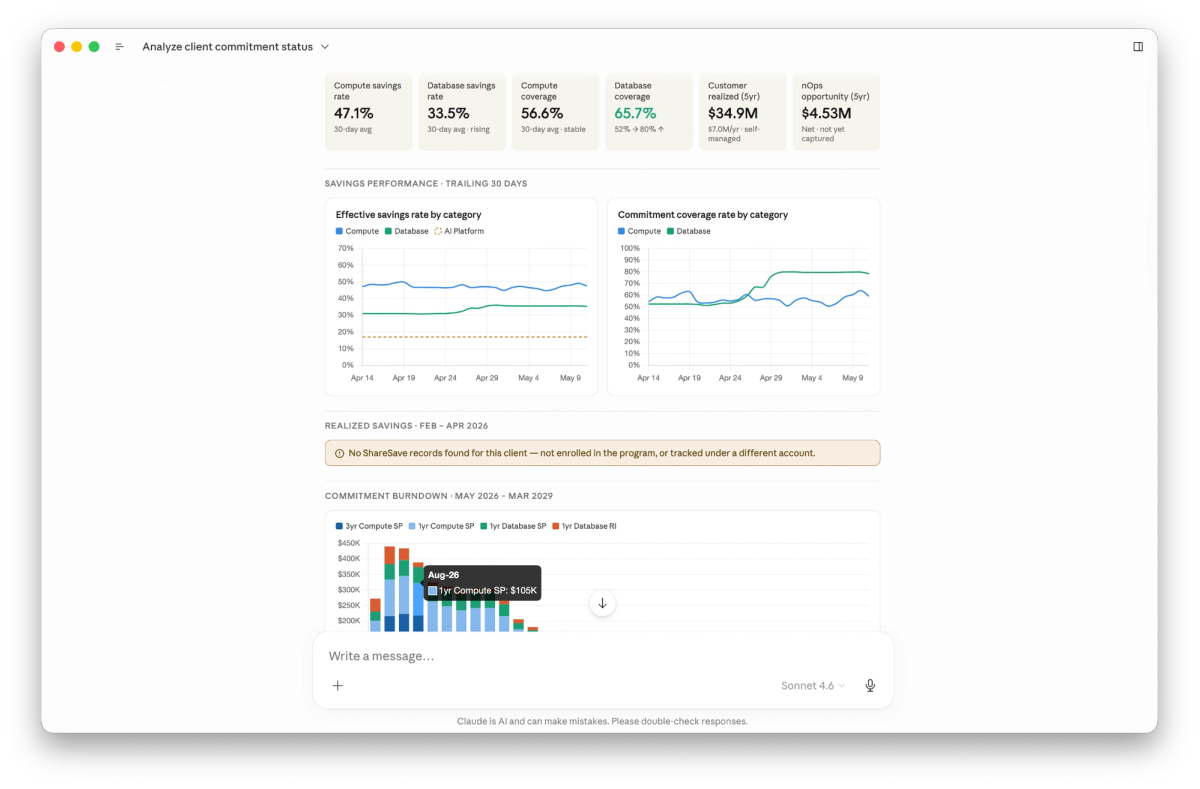
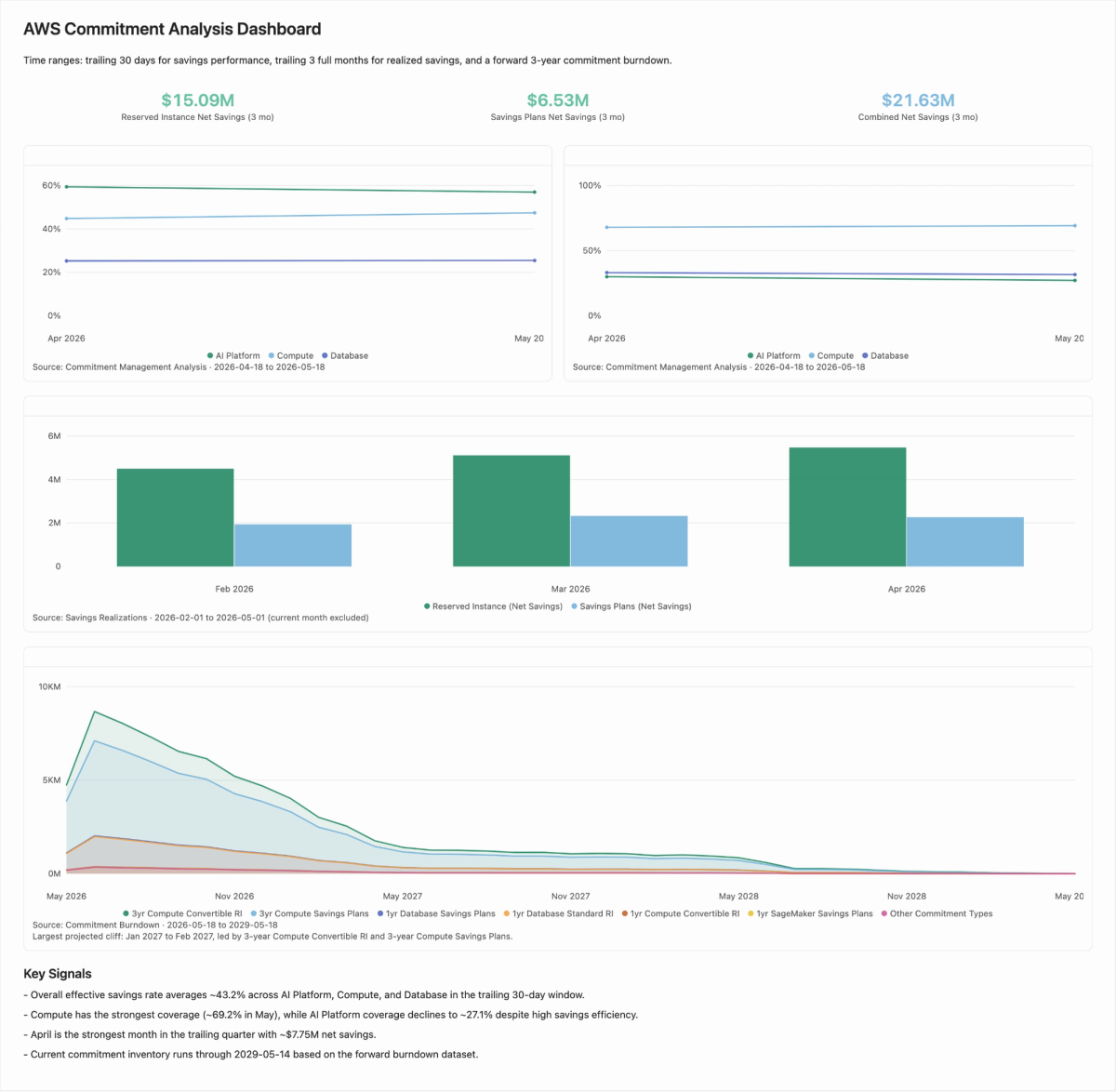
Claude and Cursor plugins include skills to ensure agents can quickly and efficiently query nOps data sources and provide visuals to offer a familiar experience to the nOps UI.
Try asking your model of choice to “Run a forecast on my services, taking seasonality into account,” “look for anomalies month to date,” or “investigate my monthly S3 spend”.
Accessible FinOps Data
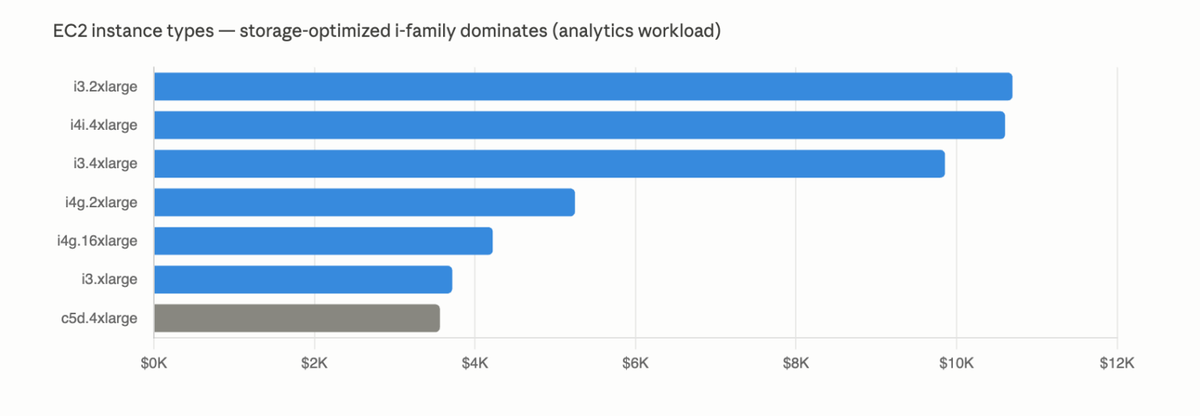
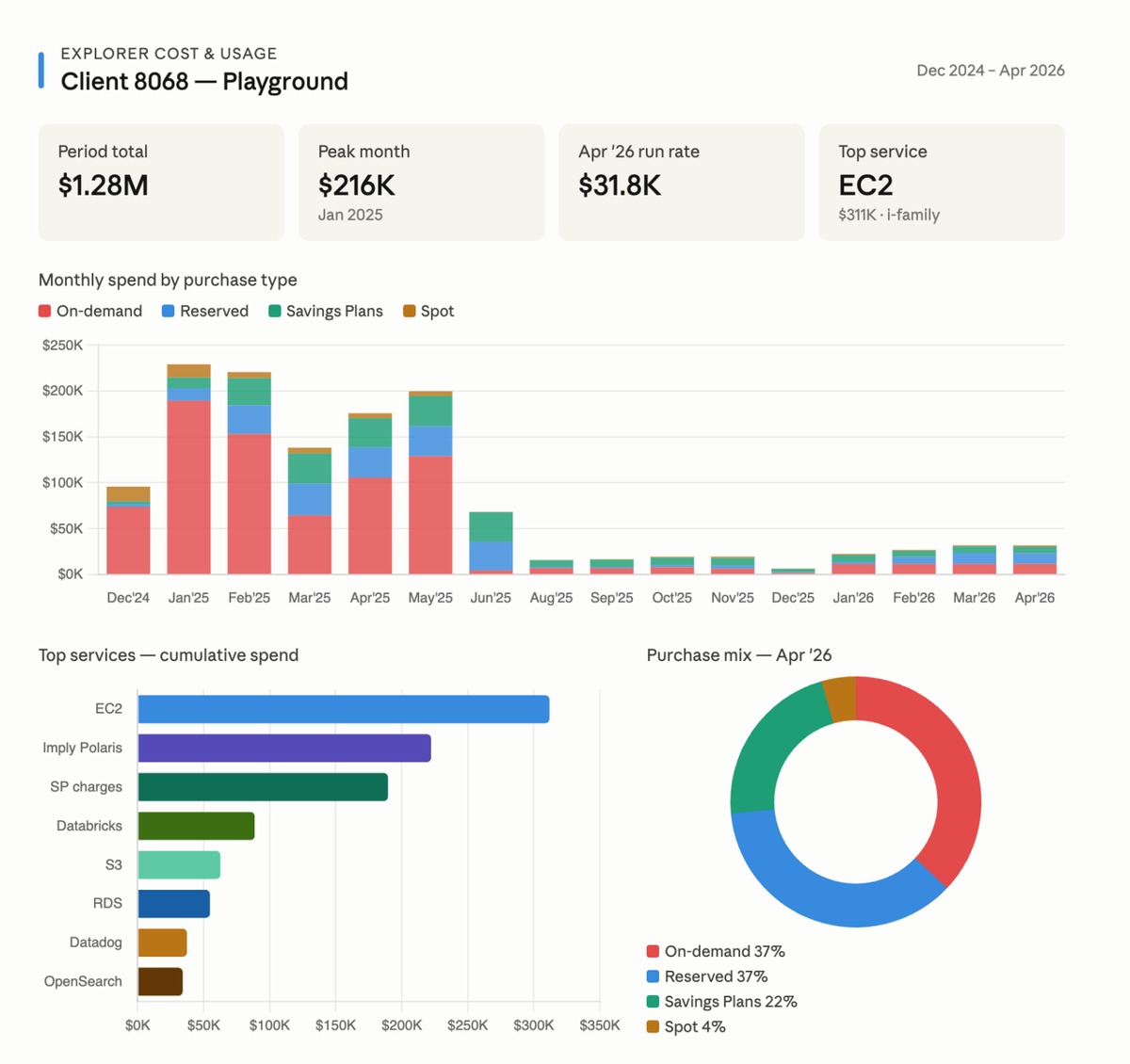
The Clara MCP Server makes nOps cost and usage data (such as on your AWS services) and commitment datasets available to MCP-compatible clients without creating a separate data pipeline. Now teams can use external tools to:
- Discover which Clara datasets are available, such as our well-known Explorer Cost & Usage data, Commitment Management recommendations, and a brand-new Commitment Management Analysis
- Query nOps for answers about your cost and usage data, and our advanced commitment analysis
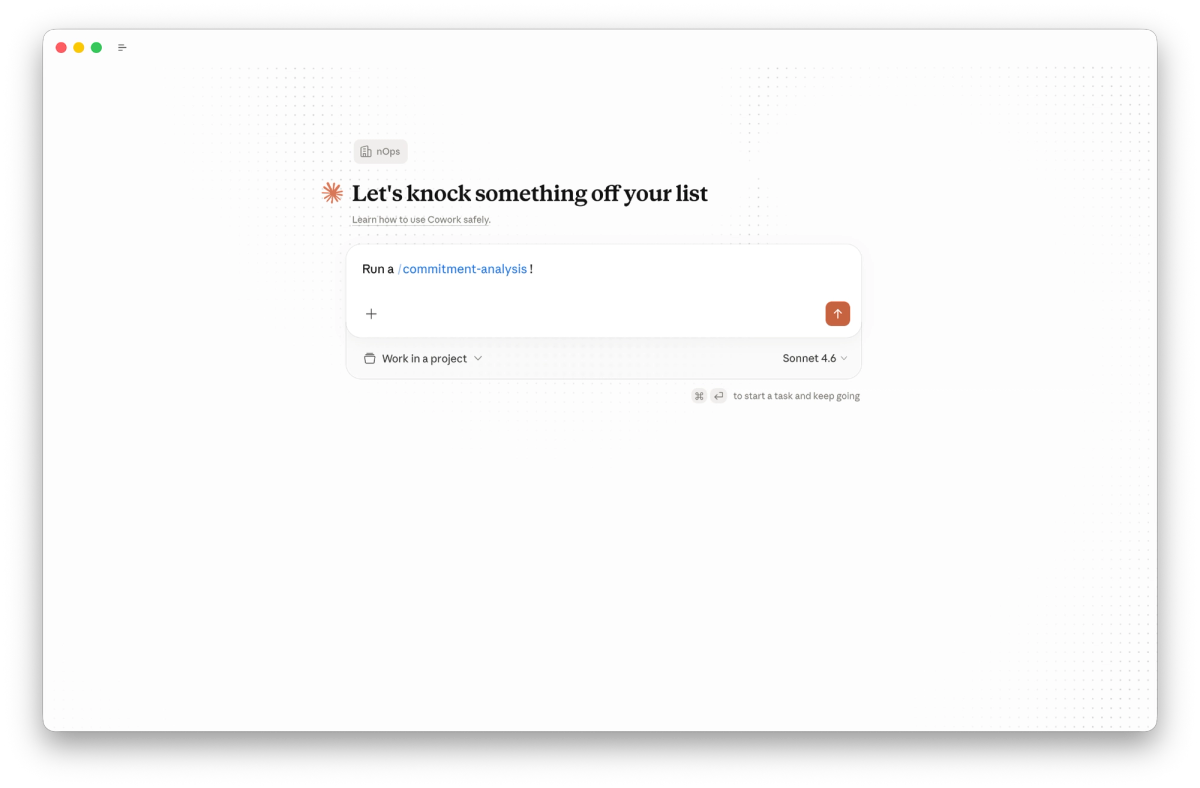
- Run new skills such as /commitment-analysis, or /anomaly-detection
- Consume governed results handled by the same authentication layer that powers our web application
For example, an engineer reviewing their Terraform deployment in an AI-enabled IDE could ask for spend or usage data tied to a service or account without leaving the editor. A FinOps practitioner could use a desktop assistant to investigate a spend change using the same Clara datasets available in nOps.
Built for AI Agents
Clara’s MCP Server is designed for the way AI tools actually work.
Instead of exposing raw SQL or requiring the client to guess how to query cloud cost data, Clara’s MCP leverages LLM-ready functions in the data layer, such as Discounted Effective Savings Rate. These functions return deterministic results rather than relying on an LLM to design and execute the query.
- List the available datasets (Commitment Analysis, Cost & Usage Data)
- Describe the selected dataset to inform context
- Query the dataset using a structured request, backed by deterministic functions
This order matters. It helps AI tools understand what data exists before they try to answer a question. Clara’s MCP also includes skills that guide compatible clients toward the intended sequence and query shape. This makes Clara more reliable in agentic environments.
Skill | Description |
|---|---|
/commitment-analysis | Run a detailed analysis of your Commitment Management strategy |
/commitment-recommendations | Get an overview of potential recommendations for ways nOps can save you more money on your usage by automating commitment management |
/query-clara | A generalized skill for being able to query your Cost & Usage Data as well as Commitment Management opportunities |
Secure, Governed Access
Clara’s MCP Server is backed by reliable and safe governance. Every request goes through Clara’s existing secure authentication path, providing the same level of data security as our web application.
If you are part of multiple organizations within nOps, when you authenticate through MCP, you’ll be prompted to choose which organization you want Clara to access.
Who Benefits Most
FinOps Teams
FinOps teams can make trusted cost data easier to access programmatically across the organization. This helps teams answer questions about spend, usage, commitments, anomalies, and recommendations faster.
Engineering and Platform Teams
Engineering and platform teams can bring cost context into technical workflows. When reviewing infrastructure, investigating a service or evaluating a change, teams can use an MCP-connected assistant to pull relevant cost or usage data from Clara.
Cloud Leaders and Operations Teams
Cloud leaders get a more scalable way to connect cost intelligence across tools. As more products support MCP, Clara MCP Server gives organizations a standard way to make governed FinOps data available across AI assistants, coding tools, inspection tools, and internal workflows without rebuilding the same integration repeatedly.
How It Works
Clara’s MCP Server exposes simple, governed workflows through skills. First, an MCP-compatible client connects to Clara using authenticated access. Clara resolves the identity to the correct nOps organization, so queries are scoped to the tenant of choice, ensuring users have appropriate access.
Next, the client can discover available datasets. A dataset is a curated view of cloud cost or usage data in Clara, with defined dimensions and measures. Dimensions are fields used for filtering or grouping, such as account, service, region, or time. Measures are specially created FinOps functions, focused on metrics such as Discounted Effective Savings Rate, Unused Commitments, and more.
This helps the assistant understand what questions the dataset can answer and choose the right dataset before querying it.
Finally, the client submits a structured query. A structured query is a defined request with selections, filters, and limits.
In practice, the workflow is:
- List available datasets
- Describe the selected dataset
- Run a structured query
- Return governed Clara results
This gives teams flexible access to Clara’s cost intelligence while keeping the source of truth, permissions, and query rules inside nOps.
[CAPTION: Cursor using canvases]How to Get Started
If you are not already a user of nOps, go to https://clara.nops.io and sign up today!
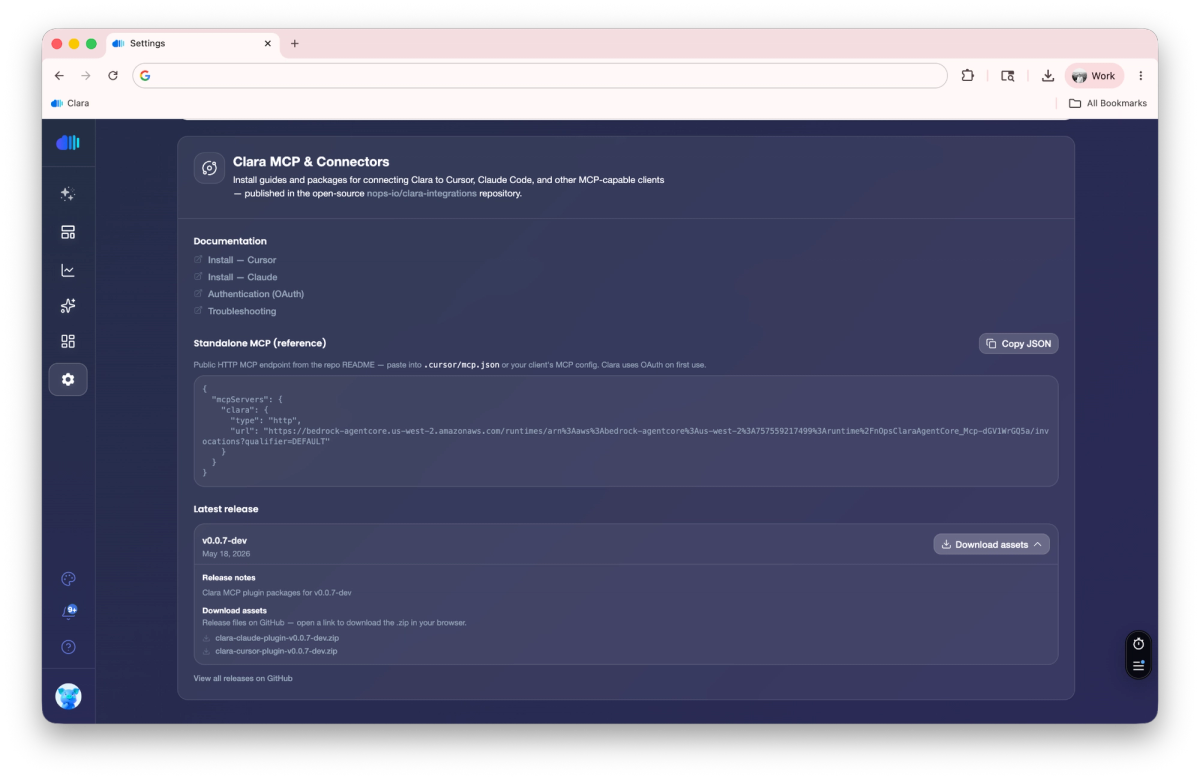
Once you are an active user, you may visit https://clara.nops.io/settings, and scroll to the bottom of the settings page to find instructions and links to download the package that fits your needs.
Clara’s MCP supports any harness of choice, including Cursor, Claude Desktop, and any other tool that supports adding custom MCP servers.
GitHub repository here: https://github.com/nops-io/clara-mcp
Public documentation here: https://clara.nops.io/docs/plugins/clara-mcp
If you’re already on nOps…
Have questions about the new feature? Need help getting started? Our dedicated support team is here for you. Simply reach out to your Customer Success Manager or visit our Help Center. If you’re not sure who your CSM is, send our Support Team a message.
If you’re new to nOps…
nOps was recently ranked #1 with five stars in G2’s cloud cost management category, and we optimize $5+ billion in cloud spend for our customers.
Join our customers using nOps to understand your cloud costs and leverage automation with complete confidence by booking a demo with one of our cloud experts.
Demo
AI-Powered Cost Management Platform
Discover how much you can save in just 10 minutes!
Book a Demo