Serverless vs. Classic Compute: How nOps Cut Databricks Costs by ~90%
We chased “simpler and cheaper,” got simpler but pricier, and ultimately cut our compute costs ~90% by doing what nOps does best: managing flexible commitments around changing workloads
TL;DR
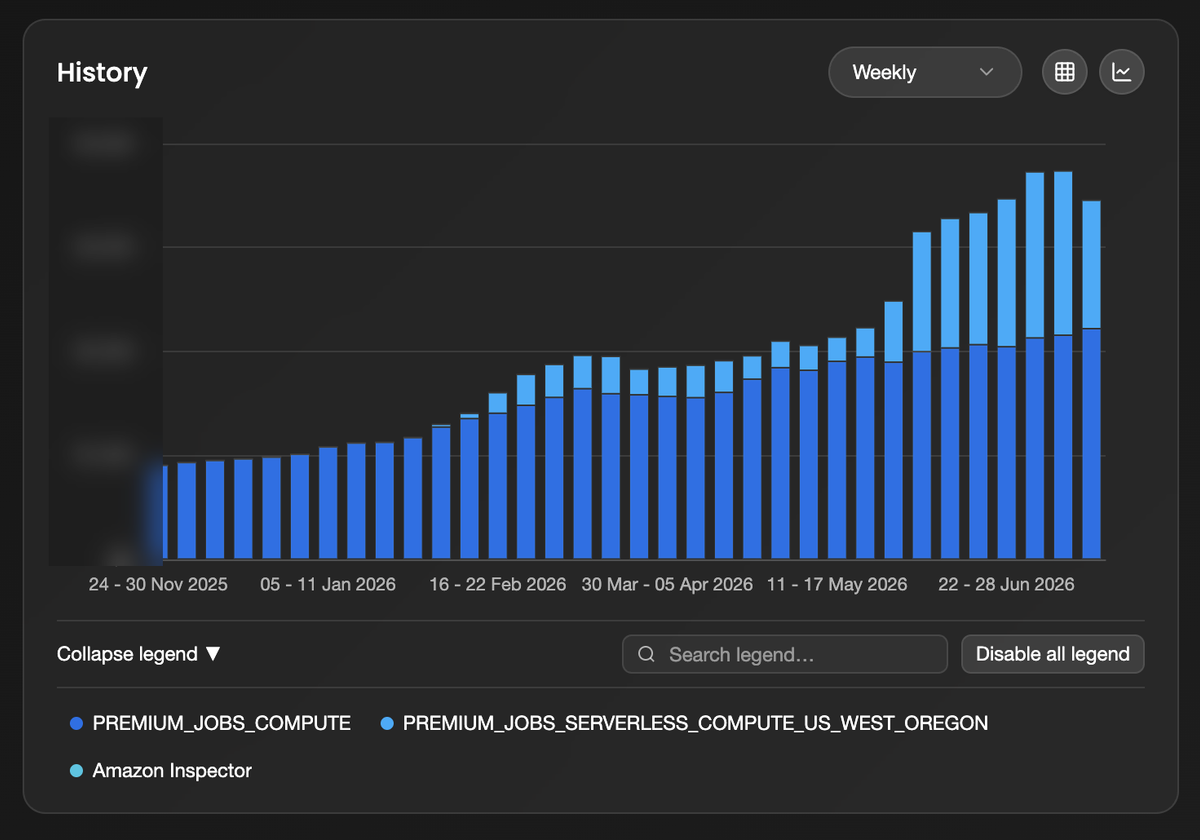
We moved a big scheduled batch pipeline from Databricks classic (jobs) compute to Serverless, expecting less babysitting and a smaller bill. Serverless is a good fit for workloads that benefit from elasticity, scale-to-zero, and not having to manage clusters. Ours just wasn’t one of them. It ran predictably every hour, which meant we were giving up one of the biggest cost levers available to us: commitments. The pipeline ballooned to ~38% of our DBU spend, serverless DBU cost was climbing faster than the classic DBUs it replaced, and one stage was quietly burning 16-43x more compute than the actual work needed, because of a pandas behavior that only surfaces on the serverless runtime.
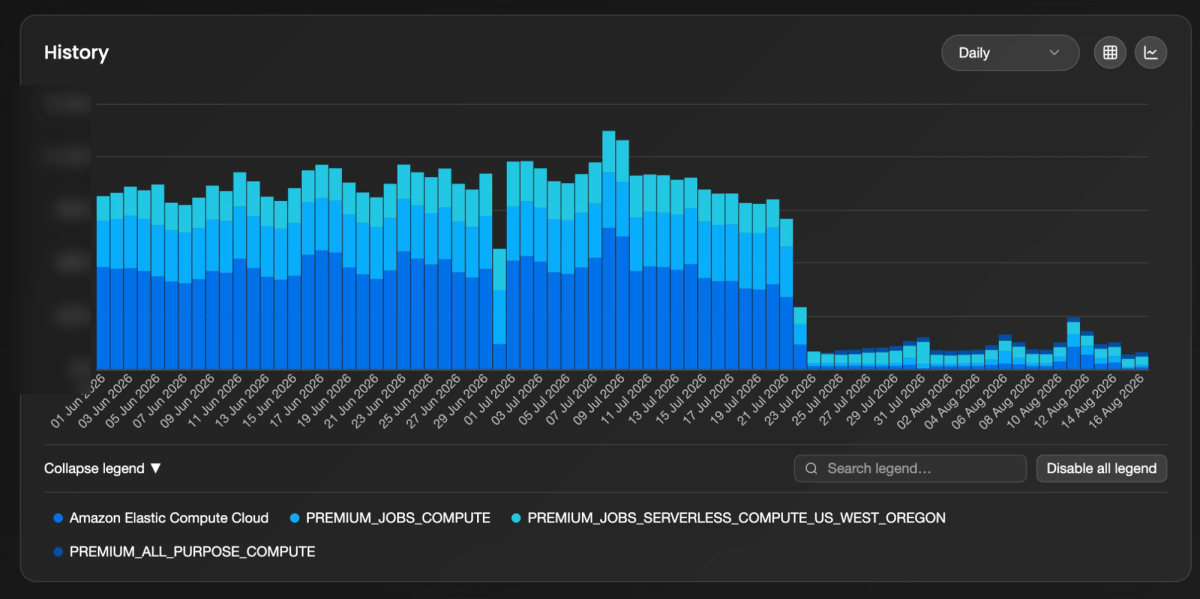
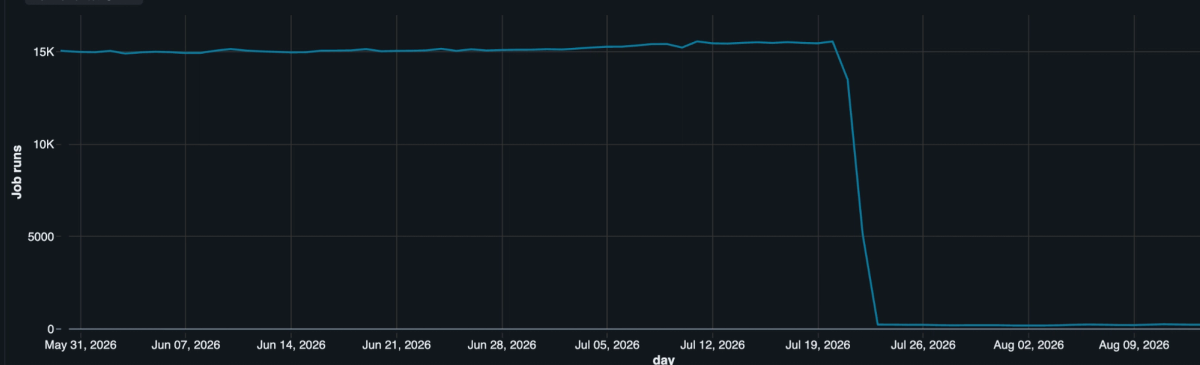
So we backed out: pulled serverless, consolidated and right-sized the jobs, fixed the hot paths, and put Reserved Instances back on the classic nodes. Daily compute run-rate fell ~90%:
And the part that sealed it: even after all that cleanup, moving the same steady hourly workload back to serverless would still cost more: serverless jobs list at over 2x the classic DBU rate, and you can't point a Reserved Instance at them.
Below: what serverless actually cost us, the bug that made it worse, why classic plus commitments won here, and the cases where serverless is genuinely the right answer. They exist.
The setup, and the bet
We run a swarm of small scheduled jobs on Databricks: one per customer, every hour, Python and pandas with Spark doing the heavy lifting. Independent jobs keep things clean, so one customer's run can't take down another's. Great for isolation, less great for the bill once the swarm got big.
Serverless looked like the obvious escape hatch: no clusters to babysit, no idle capacity to pay for, per-second billing that drops to zero between runs. For spiky or interactive work that is genuinely great. So we moved a major pipeline over. It looked fine for about a week. Then the bill climbed faster than the workload and just... kept climbing:
Backfire 1: you don't own the runtime, and there's a pandas cliff hiding in it
This is the expensive one, and the punchline is that it wasn't our code. It was the runtime.
On classic compute you pick an exact Databricks Runtime (say DBR 14.3 LTS) and sit on it as long as you like, pinning libraries yourself. Serverless doesn't work that way. You get a Databricks-curated "environment version": a bundled Python plus a fixed set of libraries. You can choose from a short list, but Databricks nudges you toward the newest ("Databricks recommends using the latest version"), and every version is on a three-year clock before it drops out of the UI and Databricks starts nagging about slow starts (Databricks serverless environment versions).
On paper, lovely: patches and performance land for free, nothing to maintain. In practice, for a job that moves real money and has to produce the same answer every hour, having your entire dependency tree advance on someone else's schedule is exactly the thing you want to say "no thanks" to. The specific gap that got us:
- Serverless environment v4 ships pandas 2.2.3
- Classic DBR 14.3 LTS ships pandas 1.5.3
Same code. Two pandas versions. That one gap was the whole fire.
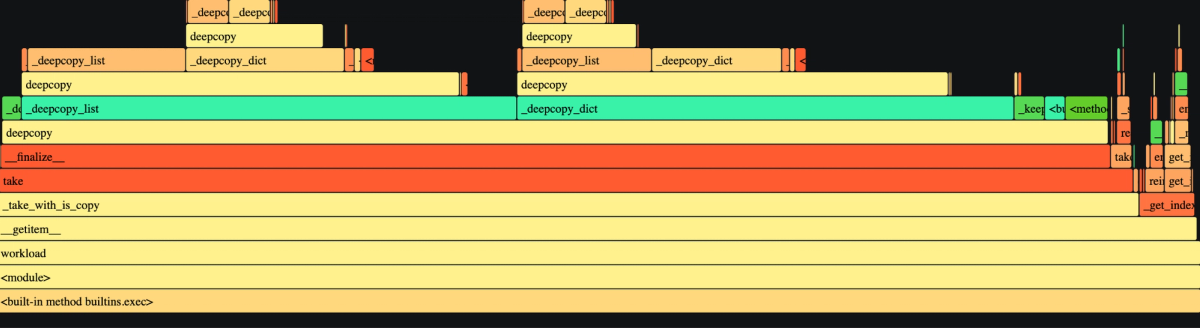
Here is the mechanism, because it's a good one. Call .toPandas() on serverless (which, like recent DBR, runs Spark Connect) and the DataFrame comes back with a nested Photon query-plan stuffed into df.attrs: about 16 KB of telemetry nothing in our code even reads. Harmless, right? Except pandas 2.2 changed how attrs propagates and now deep-copies that blob inside __finalize__ (pandas #55314), skipping it only when attrs is empty. And __finalize__ fires on basically every operation: df[col], arithmetic, a groupby. So the cost scales with how many pandas ops you do, not how much data you have. Every trivial column access recursively deep-copies 16 KB of query plan you never wanted. One heavy run racked up tens of millions of copy.deepcopy calls and spent most of its life in there, cloning metadata. Deleting that blob cut the stage's per-row cost 16-43x.
Three things made it a nightmare to catch:
- It's a version trap, not a "classic good, serverless bad" law. Our classic clusters dodged it because they pinned DBR 14.3 (pandas 1.5.3), not because they're classic. A classic cluster on a shiny new runtime would hit the same wall. Serverless even offers an older environment with pandas 1.5.3 if you go looking, but it's Python 3.10 and already on the 2027 deprecation runway, so "pin to safe" means freezing your whole stack just to keep one library still.
- It's invisible on your laptop. Pickling a DataFrame drops attrs, so replaying a captured production frame locally runs perfectly. It only misbehaves on the platform.
- There's no off switch. Someone else hit this too (pandas #60070): a 10x+ groupby regression purely from having attrs set, closed with no fix. Upstream's guidance is basically "keep that stuff out of pandas."
The fix was almost insultingly small once we understood it: strip attrs at the toPandas() boundary. It's telemetry nobody reads, so dropping it changes exactly one thing: the bill. Moral: a runtime you don't pin can drop a performance cliff between you and prod that you will never see from your laptop.
Backfire 2: on serverless, your commitment discounts evaporate
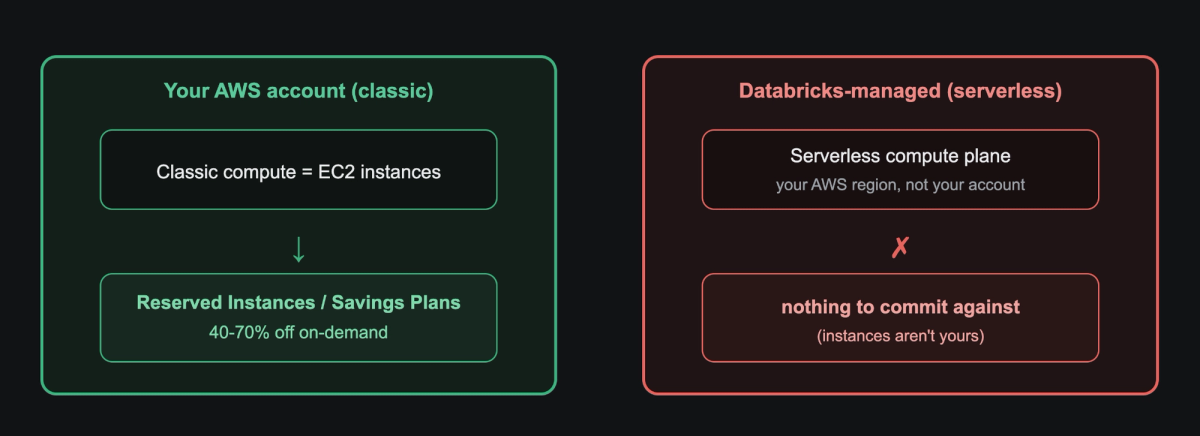
The attrs thing was a bug: annoying, fixable. This next one is structural, and it's what actually decided the architecture. The two Databricks compute models differ in a way that turns out to matter enormously: where the machines physically run.
- Classic runs the EC2 instances in your own AWS account, as part of the classic data plane (Databricks architecture).
- Serverless runs them in Databricks' managed compute plane. You pay an all-in DBU rate and never touch an instance.
That's the whole ballgame. Because classic nodes are your EC2 instances, you can put Reserved Instances and Savings Plans on them (RIs, Savings Plans) and pay 40-70% less than on-demand for steady usage. On serverless there is nothing to commit against; the instances aren't yours. So quietly moving a predictable, always-on workload to serverless throws away every commitment discount you already had. Something spiky and mostly idle? Fine, you'd have wasted the RI anyway. A job that runs like clockwork every single hour? Exactly backwards.
Backfire 3: the occasional startup spike
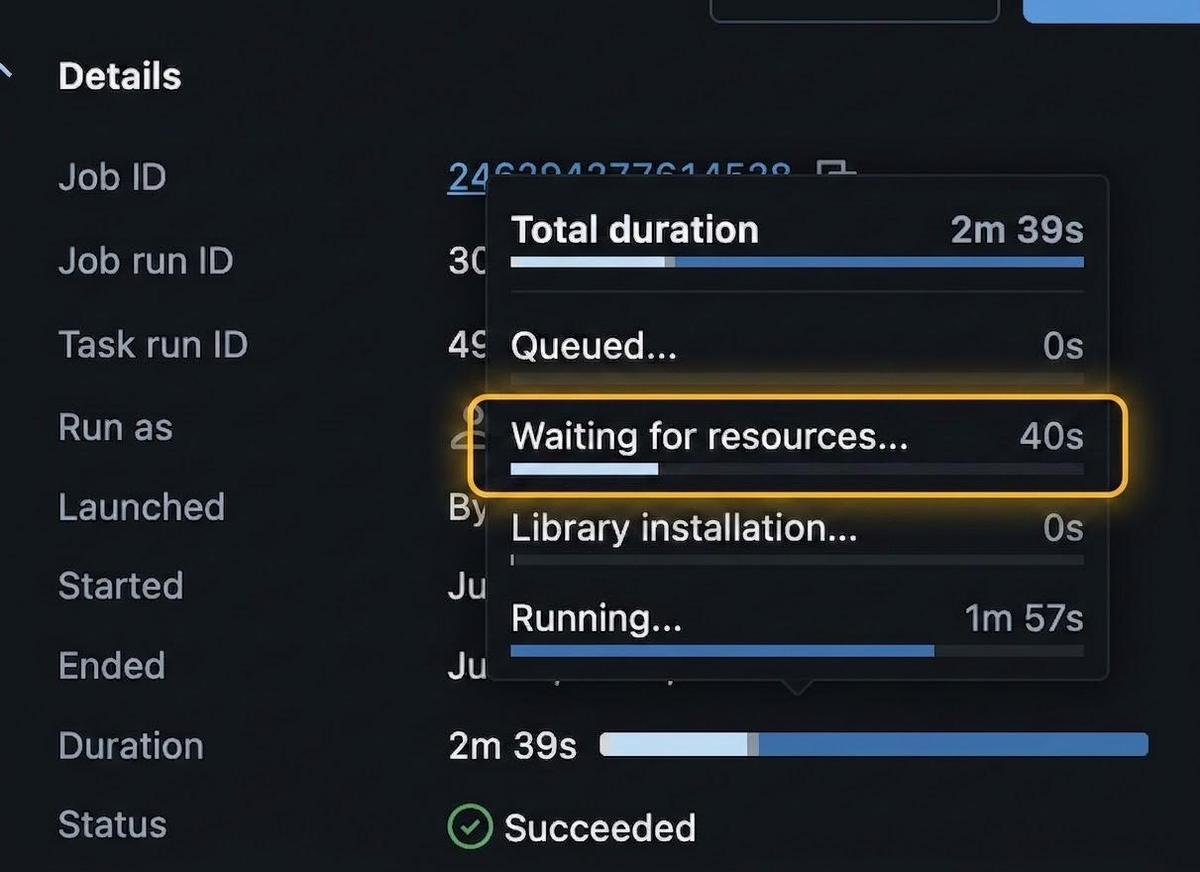
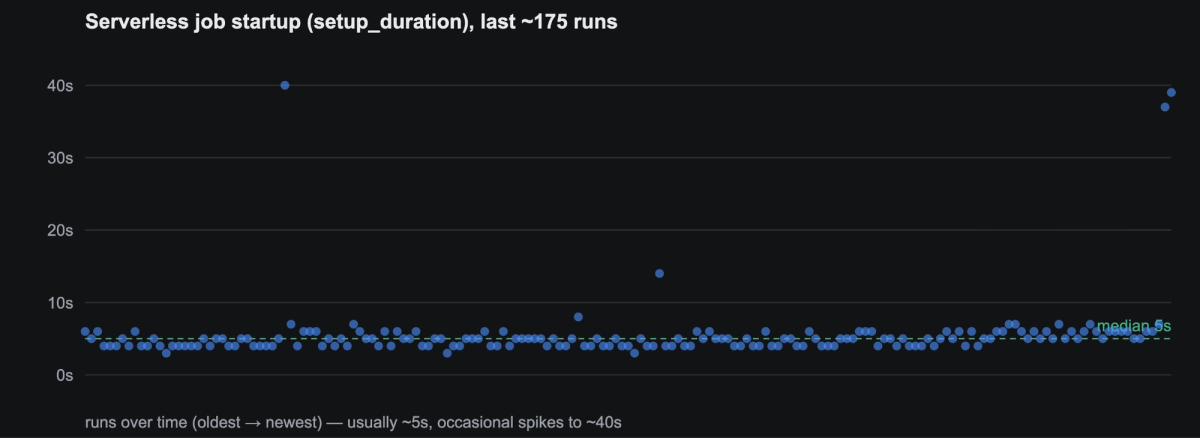
Smaller, but it stung: our jobs have to start and finish inside a narrow window. Serverless startup was usually quick, about 3 seconds, but every so often it spiked to ~40 seconds, and for a time-boxed run that jump would be enough to blow the window. On classic you can keep instances warm to bound cold starts (Databricks instance pools); on serverless that lever isn't yours.
The dig-out
We didn't just yank the serverless cord and call it a day. The bill was fat for several reasons at once, so we went after all of them:
- Killed the sprawl. We'd drifted into running way more independent jobs and clusters than the work needed. Consolidating them, and turning off the runaway creation of new per-run jobs, deleted a big pile of fixed startup and scheduling overhead.
- Right-sized. Several jobs ran with more workers than they ever used. Cutting them to the parallelism that actually existed saved money for zero runtime cost.
- Profiled and fixed the hot paths without breaking anything. Refactoring an engine that moves customer money means you cannot change the output, full stop. So we built a parity oracle: a frozen-input replay harness with a SHA-256 decision fingerprint that screams if any decision changes before vs after a refactor. We profiled with a lightweight sampler instead of cProfile (which lies about high-call-count workloads by over-charging the busiest functions). That got us the attrs guard plus wins like a 41x speedup on the optimizer's inner loop, which had been re-slicing a wide DataFrame ~85,000 times per run to read two rows (yes, really), along with hoisting lookups out of per-item loops and reading only the data ranges each run needed.
- Put the steady workload back on classic and covered the nodes with commitments.
Where nOps Convertible RIs come in
Reserved Instances have one obvious catch: a plain RI locks you to an instance family and type for one to three years, and real fleets drift. You re-architect, you change instance types, and suddenly you're paying for a commitment that no longer matches anything you run. That's the exact problem nOps Convertible RI automation exists to solve, and yes, we run it on our own fleet (cloud-cost company, heal thyself). Convertible RIs can be swapped as usage changes, and nOps keeps rebalancing the commitment to track the fleet you actually run, so you get the ~40% discount (up to ~50%+ stacked with Savings Plans) without gambling on next year's instance mix. On this workload, RIs and Savings Plans cover about 40% of our classic EC2 cost.
Two caveats, because they're the whole point: this only works because classic puts the EC2 in your account, which is precisely the lever serverless takes away; and it only pays off if you have a steady baseline worth committing to. Genuinely spiky? Don't commit, and serverless might be your better home.
Where it landed
Daily compute run-rate fell about 90%. No single hero; the gains stacked: consolidation and right-sizing, profiling (16-43x on the serverless hot path, 41x on the optimizer loop), pulling serverless back (killed both the premium and the attrs pathology), and Reserved Instances plus Convertible RIs (~40% off the classic EC2 that was left). We're quoting percentages, not our actual invoice, and the lower run-rate has stuck around, not a one-day dip for the screenshot.
When serverless is actually the right call
Serverless Databricks is the better choice when your workload is spiky or unpredictable (reserved capacity would just sit there), when it's interactive or ad-hoc like notebooks and exploratory SQL (instant scale-to-zero beats cluster wrangling), or when you have no steady baseline worth committing to. Our mistake wasn't using serverless. It was parking a predictable, steady, commitment-friendly workload on the one model that makes predictability worthless, and not watching closely enough to catch a platform-specific pathology until it was nearly 40% of the bill.
Takeaways
- Watch the compute model, not just the hours. Serverless can cost more per unit of work and take away your ability to discount it.
- Profile on the platform, not your laptop. Our worst bug was invisible locally because pickling quietly drops df.attrs.
- On managed Spark, strip df.attrs at the toPandas() boundary. pandas 2.2 deep-copies it on every operation, and you are not using it.
- Refactor behind a parity oracle. A frozen-input replay plus a decision fingerprint let us make a 41x change to a money-moving engine and prove nothing moved.
- Commitments need a home you own. Reserved and Convertible RIs only work on compute that runs in your account.
We build cloud-cost tooling for a living, and this was us applying the same playbook to our own infrastructure.
If you're weighing serverless vs. classic on Databricks, trying to get more out of your AWS commitments, or looking for other ways to reduce cloud costs, book a demo to see how nOps can help.
nOps manages more than $5 billion in cloud spend for our customers and was recently named #1 in G2’s Cloud Cost Management category.
Demo
AI-Powered Cost Management Platform
Discover how much you can save in just 10 minutes!
Book a Demo