How to Optimize Cloud Costs for Erratic, Spiky, and Event-Driven Workloads
Commitments are typically the biggest lever for reducing cloud compute costs. And traditional commitment strategies work seamlessly for predictable baselines. You analyze last month's steady-state usage, buy a Reserved Instance or Savings Plan to cover 80-90% of that baseline, and pocket the discount.
But what happens when your workload looks nothing like last month’s — or even last hour’s?
Event-driven architectures are designed to scale dynamically in response to triggers: incoming requests, queued jobs, scheduled tasks, or upstream data pipelines. That's what makes them efficient — they scale up when needed and scale down (often to zero) when demand drops. But it's also what makes commitment planning difficult.
For example, batch processing jobs run 10,000 Lambda invocations one day and zero the next. CI/CD runners might sit idle for 20 hours and then burn through 300 parallel builds during a release window. Kubernetes clusters managed by Karpenter scale from 50 to 400 nodes when traffic spikes. ML training consumes 96 vCPUs for a week, then nothing for a month. Data pipelines triggered by S3 events spin up hundreds of containers to process incoming files, then shut down minutes later.
These spiky, event-driven workloads create a commitment planning problem that many FinOps teams solve by defaulting to On-Demand, leaving 30-60% savings on the table.
This article breaks down why spiky workloads make commitment planning difficult and provides a practical framework for optimizing costs without choosing between wasted commitments and missed savings.
Why Spiky Workloads Break Traditional Commitment Planning
Here's why spiky workloads create a commitment dilemma:
Changing Baselines Lead to Wasted Commitments
Your "baseline" shifts constantly. A Kubernetes cluster running 100 pods today might run 300 tomorrow — not because of growth, but because of workload scheduling patterns. Commit to 100, and you miss savings on the other 200. Commit to 300, and you waste money when the cluster scales back down.
Workload Growth Creates New Peaks, Leaving Discounts Behind
When teams launch new features or migrate services, compute demand changes. The peak that looked like an anomaly three months ago is now the new normal. Traditional commitment strategies catch up slowly — usually at annual renewal — leaving savings on the table.
Infrastructure Migrations Strand Commitments
Moving from x86 to Graviton, or from general-purpose instances to compute-optimized families, renders existing commitments useless unless they're convertible. Many teams delay migrations because they don't want to orphan their RI commitments.
Spot Capacity Constraints Increase Fallback Costs
During peak usage windows, Spot instances can become scarce. If your cost optimization strategy relies on Spot for spiky workloads, you need on-demand or Reserved Instance capacity as a fallback — which means paying for headroom that sits unused most of the time.
Uncertainty Makes It Hard to Commit
The most common reason teams avoid commitments for variable workloads: they don't know what's safe to commit. If you commit too much, you eat the cost. If you commit too little, you miss the savings. Most teams choose option two — and pay 30-60% more than necessary.
Where Spiky Workloads Show Up
This isn't a niche problem. Multiple workload types create the same commitment challenge, and most engineering teams are running at least one of them.
Event-Driven Data Processing
Lambda functions, Step Functions, ECS Fargate tasks, and Kubernetes Jobs that respond to S3 events, SQS messages, or API Gateway requests are the canonical event-driven pattern. Usage is completely unpredictable: one file upload might trigger 50 concurrent workers, while the next hour sees zero activity.
According to AWS's event-driven architecture guidance, the key benefit of serverless and container-based event processing is that you only pay for what you use — but that same elasticity makes it impossible to commit to a fixed baseline. A typical pattern: an S3 bucket receives 10,000 objects during business hours, triggering Lambda invocations or Fargate tasks to transform and load data. Overnight, activity drops to near-zero. Commit to the peak, and you waste money during off-hours. Commit to the average, and every spike falls back to On-Demand pricing.
Batch Processing and Data Pipelines
ETL jobs, data transformations, analytics queries — these workloads run on a schedule or in response to upstream events. Usage is binary: either the job is running (100% utilization) or it's not (0% utilization).
A practitioner on r/devops described the problem: "You can run lean infrastructure and still be inefficient if you're paying high unit prices, running always-on resources for spiky workloads, or defaulting to on-demand despite stable baselines."
The challenge: batch jobs often run during specific time windows (e.g., overnight ETL). If the job runs for 6 hours every night, there may not be enough steady usage across the rest of the day to fully utilize a conventional commitment. But running entirely on-demand means missing 30-40% savings on the 6 hours you do use. The bottom line is that the workload may be perfectly predictable, but there still may not be enough continuous baseline usage to justify a conventional commitment strategy.
CI/CD Runners and Build Pipelines
GitHub Actions, GitLab CI, Jenkins agents — all of these scale compute on-demand when developers push commits or trigger deployments. A typical pattern: idle for 18 hours, then 50-100 parallel builds during business hours or a much larger spike during a major release.
That makes historical averages a poor basis for commitment planning. A fleet averaging 20 runners over the course of a day might still need 100 or more during release windows. Commit around the peak, and you risk paying for capacity that goes unused outside build periods. Commit around the average, and a large share of every burst falls back to On-Demand pricing.
One customer we spoke with recently had built out substantial CI/CD infrastructure for a major media company — then the customer churned, and the entire environment shut down. The RI commitments they'd purchased to cover that baseline became dead weight.
Kubernetes with Karpenter
Karpenter has become the autoscaling standard for EKS clusters because it provisions nodes on-demand based on pending pods — no manual capacity planning required. According to the AWS Containers blog, teams running partial-Spot configurations with Karpenter save an average of 59% on compute costs versus all-on-demand.
But Spot isn't 100% reliable. During high-demand windows, Spot availability drops. Real-world case: one team running 200+ node clusters cut their AWS bill from $80K/month to $41K by switching to Karpenter with Spot as the default — but they kept a small on-demand pool for critical workloads.
ML and AI Training Workloads
Model training is the ultimate spiky workload. Teams spin up dozens of GPU instances for hyperparameter tuning or distributed training, run for hours or days, then shut everything down. Inference workloads can be steadier — but even then, traffic patterns create demand spikes.
The challenge is that GPU instances are expensive. A p5.48xlarge costs $98.32/hour on-demand, $68.82/hour with a 1-year RI, and as little as $29.50/hour on Spot. But training jobs are unpredictable. Committing to a 1-year RI for a workload that might only run intermittently is a gamble.
The Commitment Strategy Framework for Variable Workloads
Here's the practical approach: layer your compute strategy by predictability. Use autoscaling and Spot for the variable layer, identify the true baseline underneath, and commit only to what's consistently there.
Step 1: Enable Autoscaling First
Before you think about commitments, make sure your infrastructure can scale down when demand drops. If you're running fixed-size fleets or always-on instances for workloads that could scale to zero, you're paying for capacity you don't need.
For Kubernetes, that means Karpenter or Cluster Autoscaler. For EC2 Auto Scaling Groups, it means setting min/desired/max correctly and using target tracking policies. For Lambda and Fargate, this is automatic.
Step 2: Default to Spot for Variable Demand
Spot instances are up to 90% cheaper than on-demand, and modern tools like Karpenter handle interruptions gracefully. The risk of interruption is real — but for stateless workloads (CI/CD, batch jobs, training runs), interruption just means the job retries.
Step 3: Identify Your True Baseline
Look at the last 90 days of usage. What's the minimum hourly usage you've seen — not the average, and definitely not the peak? That floor is your safe commitment target.
For example: a Kubernetes cluster scales from 50 to 400 nodes depending on traffic. But it *never* drops below 50 nodes, even during off-peak hours. That's your baseline. Commit to covering those 50 nodes. Run everything above that on Spot or on-demand.
This is the opposite of traditional RI guidance, which tells you to commit to 80-90% of average usage. For variable workloads, commit to 100% of the floor, not 80% of the average.
Step 4: Commit to Baseline Only — Leave Peaks on Spot or On-Demand
Once you've identified the baseline, lock in the discount. Use Savings Plans for flexibility across instance families and regions, or Reserved Instances if you know the exact instance type and location.
Avoid committing to the peak. A common mistake: teams see a spike (Prime Day, Black Friday, a one-time migration), extrapolate that as the new normal, and buy RIs to cover it. Then the spike ends, and they're stuck paying for unused capacity.
Step 5: Adjust Commitments Incrementally as Baselines Shift
Traditional RI strategies involve annual renewals. That doesn't work for variable workloads. Your baseline shifts — new services launch, old ones shut down, traffic patterns change.
The solution: commit incrementally. Reassess your floor at least weekly or monthly and add commitments in small increments as sustained usage grows. If the baseline shrinks, stop adding coverage and let older commitments expire rather than renewing them automatically.
The biggest mistake teams make with variable workloads: committing to a number that felt safe at one point, then watching usage drop below that level.
The antidote: smaller, shorter commitments. Buy 1-year Savings Plans or convertible RIs, not 3-year standard RIs. Give yourself flexibility to adjust as workloads change.
Commitment Strategy Comparison by Workload Type
| Workload Type | Baseline Strategy | Variable Layer Strategy | Commitment Approach |
| Event-Driven Processing | Minimum concurrent workers (Lambda provisioned concurrency, ECS min capacity) | Spot or on-demand for event bursts | 1-year Compute Savings Plan for baseline; pay-per-invocation for spikes |
| Batch Processing | Steady-state job frequency (nightly ETL) | Spot for ad-hoc jobs | 1-year Compute SP for nightly jobs; Spot for one-off runs |
| CI/CD Runners | Minimum concurrent build capacity (5-10 runners) | Spot for burst builds | 1-year Compute Savings Plan for baseline; Spot for peak parallelism |
| Kubernetes (Karpenter) | Minimum node count that never scales to zero | Spot for autoscaled nodes; on-demand fallback | RIs or Savings Plans for baseline nodes; Spot for variable layer |
| ML/AI Training | Inference baseline (if separate from training) | Spot for training runs | RIs for inference; Spot for training; no commitment for ephemeral GPU usage |
Additional Pitfalls to Avoid
Let’s look at a few additional mistakes we’ve seen cost teams beyond the core principles above: don’t commit to peaks, commit to the floor, maintain flexibility, and use Spot for variable demand.
Treating Convertible RIs as "Flexible Enough"
Convertible RIs let you exchange instance families — but they don't let you scale commitment *down*. If your baseline shrinks, you're still paying for the full commitment. Convertible is better than standard, but it's not a substitute for right-sizing your commitment in the first place.
Forgetting About Savings Plans for Cross-Region Workloads
If your architecture spans multiple regions (DR, multi-region apps, global CDN origins), Reserved Instances lock you into one region. Compute Savings Plans apply across regions automatically. For variable multi-region workloads, SPs are almost always the better choice.
Paying for Too Much Headroom
Some teams buy RIs to cover peak capacity just in case Spot isn't available. This is expensive insurance. A better approach: use Spot as the default, fall back to on-demand during interruptions, and commit only to the baseline that's always running.
Reviewing Commitments Too Infrequently
Variable workloads can shift faster than traditional If you only revisit commitments periodically, coverage can lag behind reality — either leaving savings on the table or increasing lock-in risk.
How nOps Handles Variable Workload Commitments
Here at nOps, we've helped dozens of customers solve this exact problem — teams running event-driven workloads, Kubernetes with Karpenter, CI/CD pipelines that scale unpredictably, and batch workloads that defy traditional RI strategies.
Here's how our platform handles it:
1. Minimize risk with intelligent layering for spiky workloads — nOps adjusts commitments in hourly increments as your usage changes. This granular, flexible approach allows you to save while reducing your lock-in risk, even if your workloads are dynamic.
2. Maximize savings effort-free — truly optimizing commitments requires evaluating 4+ million AWS pricing options and adjusting hourly. nOps does this automatically — we optimize, and you get the credit.
3. Results-based pricing model — customers save 20% on average by switching to nOps from other solutions. That’s why our pricing is results-based — you only pay when you get measurable savings.
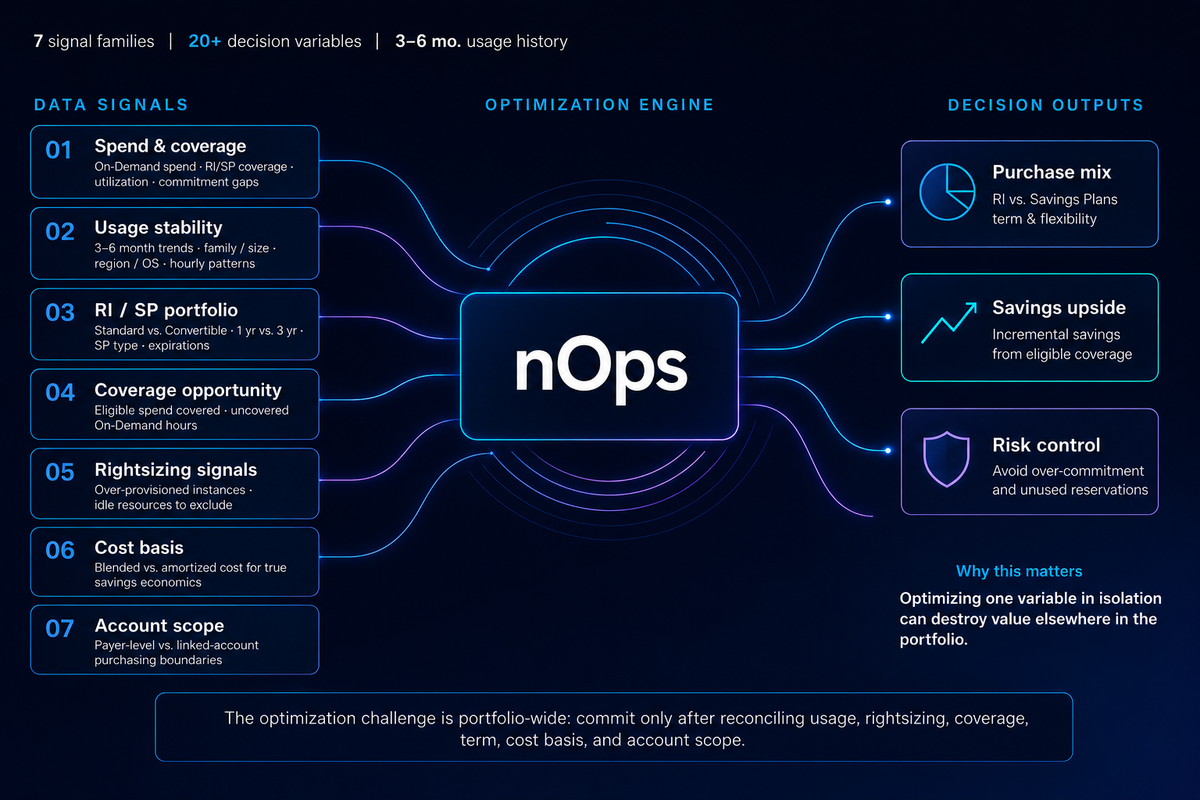
Interested? Get started with a 30-minute free savings analysis. Connect your account and we’ll analyze your usage, commitments, coverage, rightsizing, cost basis, and other key signals to give you a personalized savings report.
nOps manages $5 billion in cloud spending and was recently rated #1 in G2’s Cloud Cost Management category.
Demo
AI-Powered Cost Management Platform
Discover how much you can save in just 10 minutes!
Book a Demo
FAQ
I already have an internal team and a high ESR. Is nOps still relevant to me?
Yes. Some of our customers have already achieved 80-90%+ ESR with dedicated FinOps teams before coming to nOps. They leverage nOps’ expertise as an additional set of eyes to explore and uncover new incremental savings opportunities, detect coverage anomalies and redundancies, and independently validate that nothing is being left on the table. Since nOps is a share-of-savings model, you only pay if we find savings beyond what your team is already achieving.
Can’t my team just manage commitments in-house?
Yes — but replicating automated commitment management at scale means building a system that can evaluate more than 4 million AWS pricing options and make adjustments hourly. That takes dedicated engineers and always-on infrastructure to build, run, and maintain. nOps gives you that level of automation without the cost and overhead of operating the system yourself.
Can I report on commitment performance by team or environment?
Absolutely. nOps supports showback and chargeback by account, tag, or business unit — so you can allocate costs and savings where they belong. We also include executive-ready reporting on KPIs such as effective savings, realized savings, commitment utilization, and lock-in risk.
Is nOps compatible with Spot?
Yes. nOps is fully compatible with your existing Spot strategy, so you can use Spot for variable demand while nOps optimizes commitments around the usage you choose to cover.
How difficult is it to onboard to nOps?
Setup takes 5 minutes and no infrastructure changes are required.