Skip to content



Google Cloud Platform is scaling fast. Alphabet reported Google Cloud revenue up 32% year over year to $50B+ in annual run rate. With more workloads moving to Google Cloud, cloud bills are getting bigger and that puts cost optimization under the spotlight.
That’s where Google Cloud Committed Use Discounts (CUDs) come in. CUDs let you trade flexibility for lower rates by committing to a certain level of usage or spend. Done well, they can materially reduce baseline compute costs; done poorly, they can lock you into prepayments you never use.
In this guide, we’ll explain everything you need to know about CUDs and how to optimize them to maximize your savings and minimize risk over time.
What are GCP Committed Use Discounts (CUDs)?
Google Cloud Platform Committed Use Discounts (GCP CUDs) are Google Cloud’s built-in way to lower your unit costs when you’re willing to make a longer-term commitment. Instead of paying standard on-demand pricing for every hour of usage, you commit for a set term, most commonly one or three years and Google rewards that predictability with discounted rates on eligible usage.
In practice, CUDs are designed for the “always-on” part of your environment: the baseline compute and platform usage you expect to keep running month after month. They’re one of the most common levers organizations use to reduce recurring cloud spend without needing to refactor applications or change how teams build.
The tradeoff is that savings come with constraints. If your needs shift because you rightsized, migrated, changed regions, replatformed, or simply overestimated demand the commitment can stop lining up with what you actually use. So while CUDs can be a straightforward path to lower bills, they work best when you treat them as a deliberate purchase tied to real, stable usage patterns, not a blanket discount you apply everywhere.
How CUDs work
Once you purchase a Committed Use Discount (CUD), it’s attached to your Cloud Billing account and starts applying automatically to matching, qualifying usage—there’s nothing you need to change in your workloads.
Here’s the core mechanic:
- You make a time-based commitment (most commonly 1-year or 3-year) for eligible Google Cloud usage.
- As usage runs, Google evaluates it continuously against your active commitments.
- Eligible usage is discounted up to the committed amount.
- Any eligible usage above the commitment is billed normally at standard rates.
- If your eligible usage falls below your commitment, you can end up paying for commitment you don’t fully use—this is the fundamental “commitment risk.”
The important takeaway: CUDs are designed to discount the predictable baseline portion of cloud spend. The exact way commitments are defined and what they can cover varies by CUD type and service, which we’ll break down next.
Types of Google Cloud Platform CUDs
GCP has two main models, defined by what you’re committing to: spend vs level of resources.
Spend-based CUDs
With spend-based CUDs, you commit to a minimum hourly spend for qualifying usage. If your usage meets that baseline, Google applies discounted pricing automatically. In practice, teams use these when they can forecast a steady bill even if the underlying resources shift (machine shapes, projects, or usage patterns) because it’s a commitment to a spend floor, not a specific fleet.
Common forms include:
- Compute flexible commitments, which are designed to cover baseline compute spend across a broader set of compute usage rather than a single narrowly-scoped resource.
- Service-specific spend commitments, where the commitment is scoped to an individual Google Cloud service that supports spend-based CUDs.
(We’ll get specific about which services qualify in the “Eligible services and resources” section, since the list and rules vary.)
One nuance: Google has a “new and improved” spend-based CUD experience that applies if your first purchase was on or after July 15, 2025. The mechanics differ from the legacy model; we’ll cover the practical impact in “Recent program changes / what’s new.”
Resource-based CUDs (Compute Engine)
Resource-based CUDs are associated with Compute Engine. Instead of committing to dollars per hour, you commit to a minimum level of Compute Engine resources in a specific region, and receive discounted pricing when your VM usage matches what you committed to.
Think of this as “commit to a footprint.” If you run a stable VM baseline (same region, similar shapes, predictable capacity), it can reduce compute unit costs. But because the commitment is tied to what you run (not just what you spend), it’s typically less forgiving when infrastructure changes.
GCP Pricing Models Compared: When To Use On Demand vs CUD vs SUD
Most Google Cloud cost strategies are really about one question: how much uncertainty can you tolerate in exchange for savings? The more predictable your workload is, the more you can “trade flexibility for price.” Let’s compare each category of pricing (CUD, On-Demand and SUD) and discuss when each model is most suitable.
On-Demand (Pay-as-you-go)
On-Demand is Google Cloud’s default pricing: you pay standard rates for what you run, when you run it, with no upfront commitment. It maximizes flexibility but is the most expensive — meaning it’s best reserved for when you expect near-term architecture/region changes or have short-term spiky demand.
CUDs (Committed Use Discounts)
CUDs trade flexibility for price: you commit for a fixed term (typically 1 or 3 years) and receive discounted rates on eligible usage. They’re the “planned savings” lever for workloads you expect to keep running.
- Resource-based CUDs are best when your VM footprint is stable and you can predict little change in footprint/region.
- Spend-based CUDs are best when you can predict the bill more reliably than the exact resource mix, i.e. you have a steady baseline spend but usage mix might shift.
SUDs (Sustained Use Discounts)
SUDs are automatic discounts for certain compute usage that runs consistently over the month. There’s nothing to buy—Google applies them automatically—so they’re a low-effort way to reduce cost when you’re not ready to commit.
Let’s summarize:
Category | Name | Max Discount | When to use |
| On-Demand | On-demand (pay-as-you-go) | 0% | New/changing/migrating workloads; spiky or unpredictable demand |
| CUD | Resource-based CUD | up to ~55-70% off | Your VM footprint (vCPU/memory) is stable and you can predict little change in footprint/region for 1–3 years. |
| CUD | Spend-based CUD | up to ~50% off | You can predict baseline spend better than the exact resource mix (steady baseline $/hour, but usage mix may shift) over 1–3 years. |
| SUD | Sustained Use Discount (automatic) | up to ~30% off | You want no-commitment savings; workloads are running consistently in-month but you’re not ready to lock in long-term commitments yet (often while stabilizing post-migration/post-launch). |
Eligible services and resources
CUD eligibility depends on the commitment model—here’s what each type can cover, plus a quick scope check so you know where the discounts will apply.
Spend-based CUDs: what can be covered
Spend-based CUDs come in two buckets:
1) Compute flexible commitments (a single commitment that can cover eligible spend across multiple compute services):
- Compute Engine
- Google Kubernetes Engine
- Cloud Run
2) Service-specific spend-based commitments (you buy these per service; the CUD applies only within that service):
- AlloyDB for PostgreSQL
- Backup and DR Service
- Backup for GKE
- Bigtable
- Cloud Run
- Cloud SQL
- Dataflow
- Firestore
- Google Cloud NetApp Volumes
- Google Cloud VMware Engine
- Google Kubernetes Engine (Autopilot)
- Memorystore
- Spanner
Note: Even within “eligible” services, the exact SKUs/usage that count can vary by product (and sometimes by region), so it’s worth treating the list above as “supports CUDs,” not “every line item is discountable.”
Resource-based CUDs: what can be covered
Resource-based commitments are Compute Engine–only, and you can commit to the following hardware and software resources for 1 or 3 years:
- vCPUs
- Memory
- GPUs
- Local SSD disks
- Sole-tenant nodes
- Operating system (OS) licenses
Google also calls out an important nuance here: hardware commitments are separate from OS license commitments. You can purchase both for the same VM, but you can’t buy a single commitment that covers both categories.
How CUDs apply across projects and billing accounts
- Spend-based CUDs: apply to eligible usage across projects under the same billing account.
- Resource-based CUDs: are purchased in a project context by default, but can be shared across projects tied to the same billing account (if you enable sharing).
Benefits of using CUDs
CUDs are popular because they’re one of the most direct ways to reduce Google Cloud spend without changing architecture. You’re not refactoring services or rewriting workloads—you’re simply paying a lower rate for usage you already expect to run.
Lower unit costs on steady workloads
For predictable, always-on usage, CUDs can deliver meaningful discounts versus pay-as-you-go pricing—especially when you can confidently commit to a baseline for 1–3 years.
Budget predictability
Commitments turn part of your cloud bill into a more planned, forecastable spend line. That can help finance and engineering align on a baseline budget instead of treating all infrastructure cost as variable month to month.
Savings without operational complexity
Compared to approaches like Spot, CUD savings don’t require engineering around interruptions or changing how workloads run. Once purchased, discounts apply automatically to eligible usage.
Works well as a “baseline + burst” strategy
Many teams use CUDs to discount the predictable baseline, then rely on other approaches (like on-demand or Spot) for variable or interruptible demand. This lets you maximize savings while keeping flexibility where you need it.
More leverage as cloud spend grows
As your GCP usage scales, even small per-unit discounts compound quickly. CUDs provide a structured way to lock in lower rates on the portion of spend you’re confident will persist over time.
Tradeoffs and risks of commitments
CUDs can drive real savings—but only when the commitment matches how you actually use GCP over time. The main tradeoff is simple: you’re buying a discount by giving up flexibility.
Underutilization risk (paying for what you don’t use)
If your eligible usage drops below your commitment—because you rightsized, migrated, changed regions, decommissioned workloads, or demand softened—you can end up with unused commitment and weaker savings than expected.
Reduced ability to change plans
Commitments can make common changes feel “expensive,” even when they’re the right technical move:
- shifting workloads to a different service or platform
- changing machine families or deployment patterns
- consolidating regions or moving to a new architecture
Forecasting and ownership burden
CUDs work best when someone consistently owns:
- baseline forecasting
- purchase timing/sizing
- monitoring utilization
- adjusting strategy as workloads evolve
Without this, commitments often drift out of alignment.
Budget tradeoff: predictable doesn’t always mean cheaper
CUDs can make spend more predictable, but “predictable” can turn into “predictably wasted” if you commit too aggressively. The cheapest outcome is still the one that fits real usage.
Not a capacity guarantee
A CUD reduces price; it doesn’t automatically ensure you’ll have capacity available when you need it. If your goal is capacity assurance, you may need separate reservation or capacity planning approaches depending on the service.
Organizational risk: savings may not land where you expect
In multi-project orgs, commitment benefits can be shared across projects under a billing account. If you don’t have clear attribution and chargeback rules, teams may argue over who “got” the savings—or one team may fund commitments that mostly benefit another.
A brief history of GCP CUD Changes / What’s New
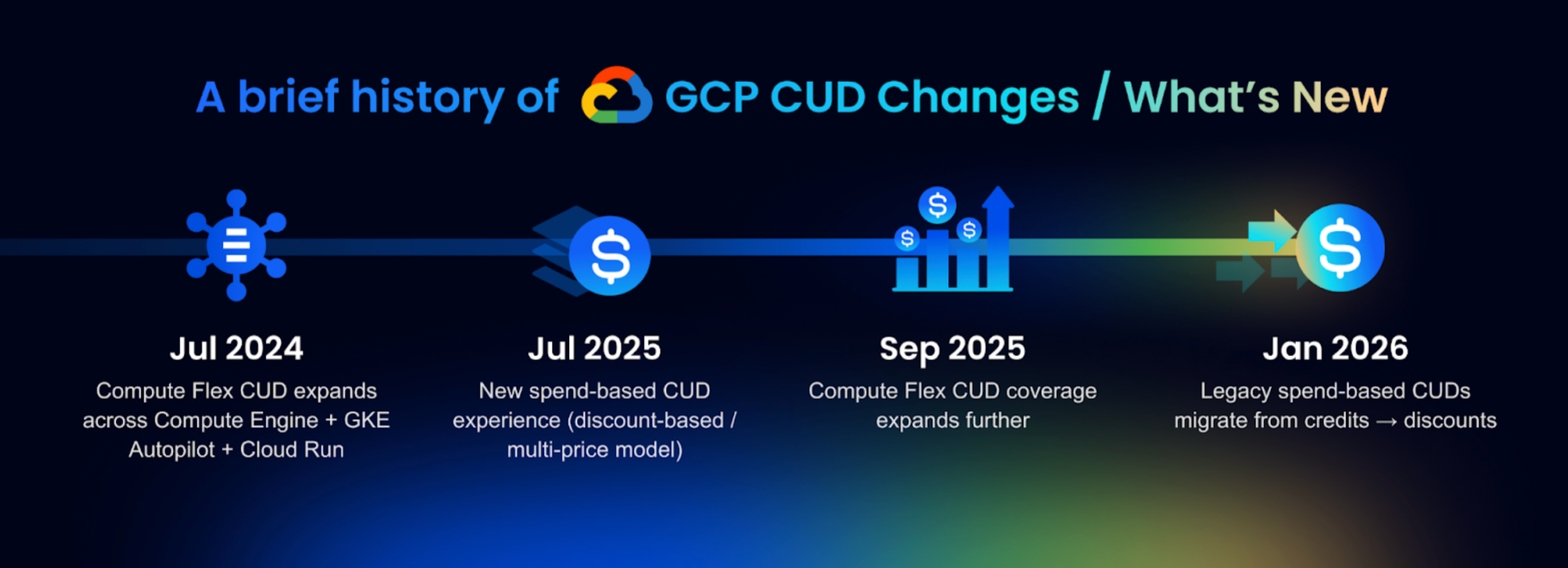
Google hasn’t changed the core CUD idea (commit for a discount), but they have meaningfully updated where CUDs apply and how spend-based CUD savings show up in billing over the last couple of years.
2024: Compute Flex CUDs got more “multi-platform” (GKE Autopilot + Cloud Run)
In mid-2024, Google expanded Compute Flexible CUDs so you no longer needed separate commitments to cover Compute Engine, GKE Autopilot, and Cloud Run usage. The stated goal was to reduce fragmentation—one commitment could cover more of a modern “VMs + containers + serverless” compute footprint.
2025: The “new and improved” spend-based CUD model (multi-price / discount-based) rolled in
Two big things happened in 2025:
- New spend-based CUD experience (effective July 15, 2025): Google introduced a “new and improved” model for spend-based CUDs that applies automatically to customers who purchase their first spend-based CUDs on/after July 15, 2025, with an opt-in path for others.
- Compute Flex CUD coverage expanded (Sept 5, 2025): Google announced broader coverage for Compute Flex CUDs—extending what your spend commitment can apply to (including additional VM families/services called out in Google’s announcement).
2026: Automatic migration from “credits” to “discounts” for legacy spend-based CUDs
If you’re on the older spend-based CUD model (where savings are reflected via credits), Google is migrating accounts to the newer discount-based presentation.
- Google’s docs describe an automatic migration from the legacy spend-based CUD model using credits to a new model using discounts, with Jan 21, 2026 called out as a key effective date (for impacted billing accounts), and an option to opt in earlier starting July 15, 2025.
- Alongside that shift, Google also documents Billing UI updates designed to make spend-based CUD impact more visible (e.g., surfacing savings vs “waste” in reports).
What this means in practice
- If your org bought spend-based CUDs at different times, you may have mixed “generations” of spend-based CUD behavior/reporting to account for.
- The biggest recent changes are less about “new discount percentages” and more about scope (what Flex CUDs can cover) and billing mechanics (credits → discounts + export/UI changes).
Best practices for maximizing CUD value
Maximizing CUD value is mostly about one thing: commit only to the baseline you’re highly confident will persist, then keep that baseline aligned as your environment evolves.
Start with a conservative baseline (don’t commit to peak)
Anchor commitments to your “always-on” floor, not seasonal spikes or short-lived projects. You can always add more commitment later; it’s much harder to recover from overcommitting.
Layer commitments: baseline first, then iterate
Treat CUDs like a portfolio:
- cover the most stable production workloads first
- wait a billing cycle or two to validate utilization
- then expand commitments in increments
Pick the CUD type that matches what you can actually predict
- If you can predict the VM footprint (stable fleet), resource-based can fit.
- If you can predict spend better than exact shapes/services (e.g., general purpose vs memory optimized), spend-based is usually safer.
(Choosing the wrong type is one of the fastest ways to create “waste.”)
Commit after (not before) rightsizing and modernization
Rightsize, remove idle resources, and stabilize architecture first—then commit. Buying commitments before optimization often locks in yesterday’s inefficiencies.
Align commitments to how teams deploy
If teams frequently shift workloads between projects, regions, or platforms, make sure your commitment strategy matches that behavior. The best commitment is the one your org can “naturally” consume without special rules.
Track utilization continuously (and treat drift as a signal)
Set a regular cadence to review:
- utilization / coverage (are you using what you bought?)
- changes in baseline (did usage move, shrink, or migrate?)
- upcoming expirations
When utilization drops, treat it as an early warning that your environment changed—not as a reporting artifact.
Coordinate ownership across engineering + finance
CUD success requires clear ownership for:
- forecasting and purchase decisions
- renewals/expirations
- reporting and chargeback/showback
Without that, commitments tend to sprawl and savings become hard to attribute.
Avoid “set and forget” renewals
Auto-renewal can be useful, but only if you actively validate that the baseline still exists. Many orgs get burned by silently renewing commitments that no longer match reality.
Monitoring, reporting, and cost attribution
CUDs aren’t “set and forget.” The difference between strong savings and quiet waste is whether you can answer three questions every month: (1) how much of my eligible usage is covered, (2) how much commitment is going unused, and (3) which teams/projects actually benefited.
What to monitor (the handful of metrics that matter)
- Coverage: How much of your eligible baseline is actually being discounted vs billed at on-demand rates (often a sign you’re under-committed).
- Utilization: Whether you’re consuming the commitments you purchased (low utilization is the most direct signal of waste).
- Waste / unused commitment: The portion of commitment cost that didn’t map to eligible usage (usually indicates overcommitment or a baseline shift).
- Trend lines: Coverage/utilization over time—drift is the early warning that workloads moved, shrank, or changed shape.
- Expiration calendar: Commitments expiring in the next 30–90 days, so renewals are intentional rather than accidental.
Where to see it (GCP-native views)
In Google Cloud Console, you can view commitments and performance at the Cloud Billing account level, including CUD lists and analysis views that help you understand utilization and savings. For teams that rely on data, the most flexible option is to use billing export (to BigQuery) so you can trend coverage and attribute savings over time with your own logic.
Cost attribution: who “gets” the benefit?
In multi-project environments, commitments often benefit whichever eligible usage happens to match—meaning the team paying for the commitment may not be the team receiving the discount. To prevent “FinOps drama,” decide upfront how you’ll attribute benefits:
- Centralized model: A shared platform/FinOps team owns commitments and treats savings as a shared service.
- Chargeback/showback model: Savings and commitment costs are allocated back to projects/teams using consistent rules (e.g., proportional to usage, prioritized to certain projects, or tracked via a tagging strategy).
- Hybrid: Central ownership with partial allocation—common when platform teams purchase commitments but want product teams to feel the incentive.
The key is consistency: the attribution model matters less than having one that stakeholders agree on and can verify.
How nOps Helps
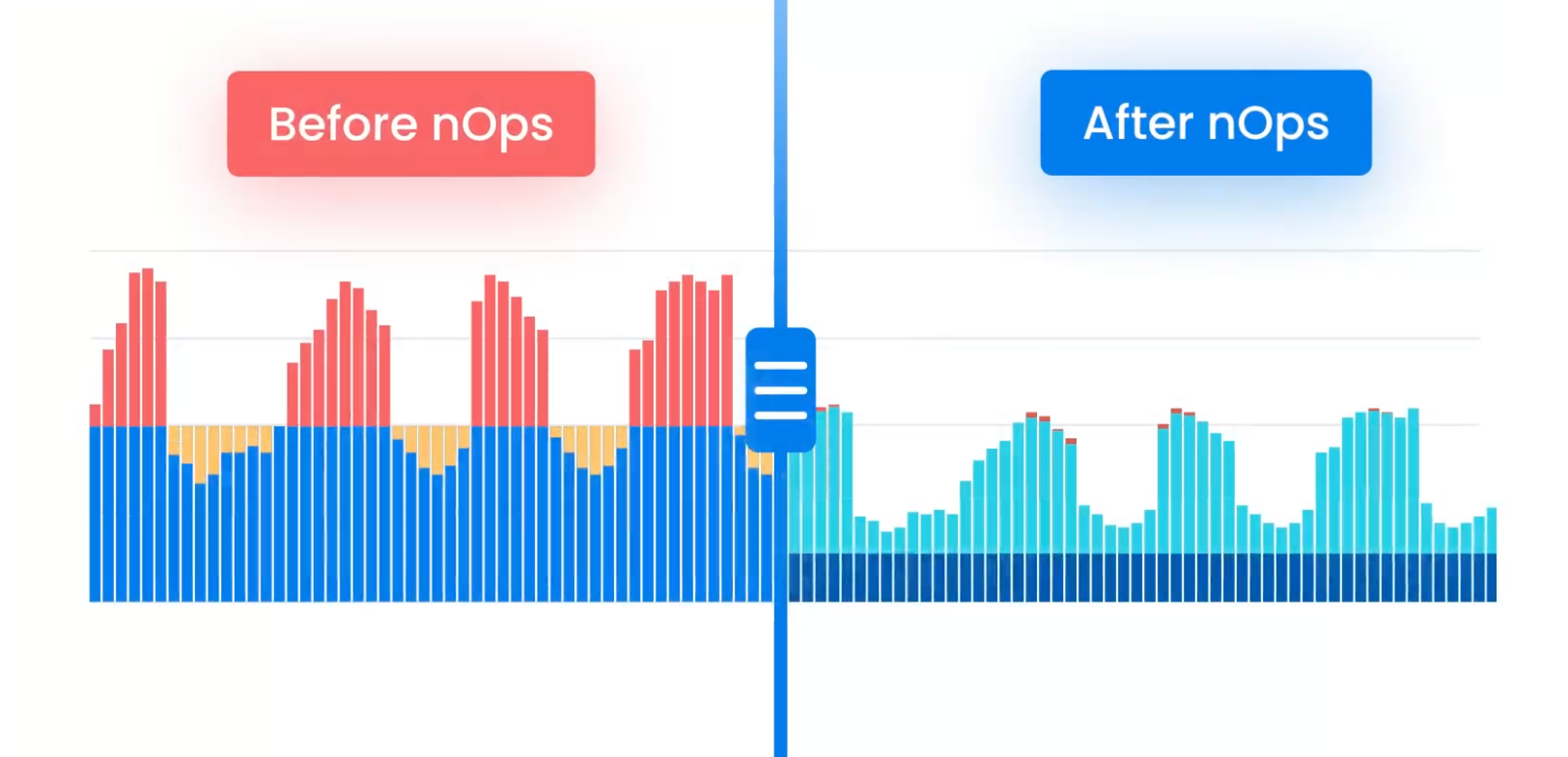
If you’re using Google Cloud at any real scale, CUDs quickly become a moving target. nOps takes all of the manual work and complexity out of commitments by automatically maximizing your savings.
Adaptive commitment laddering: maximize savings without lock-in
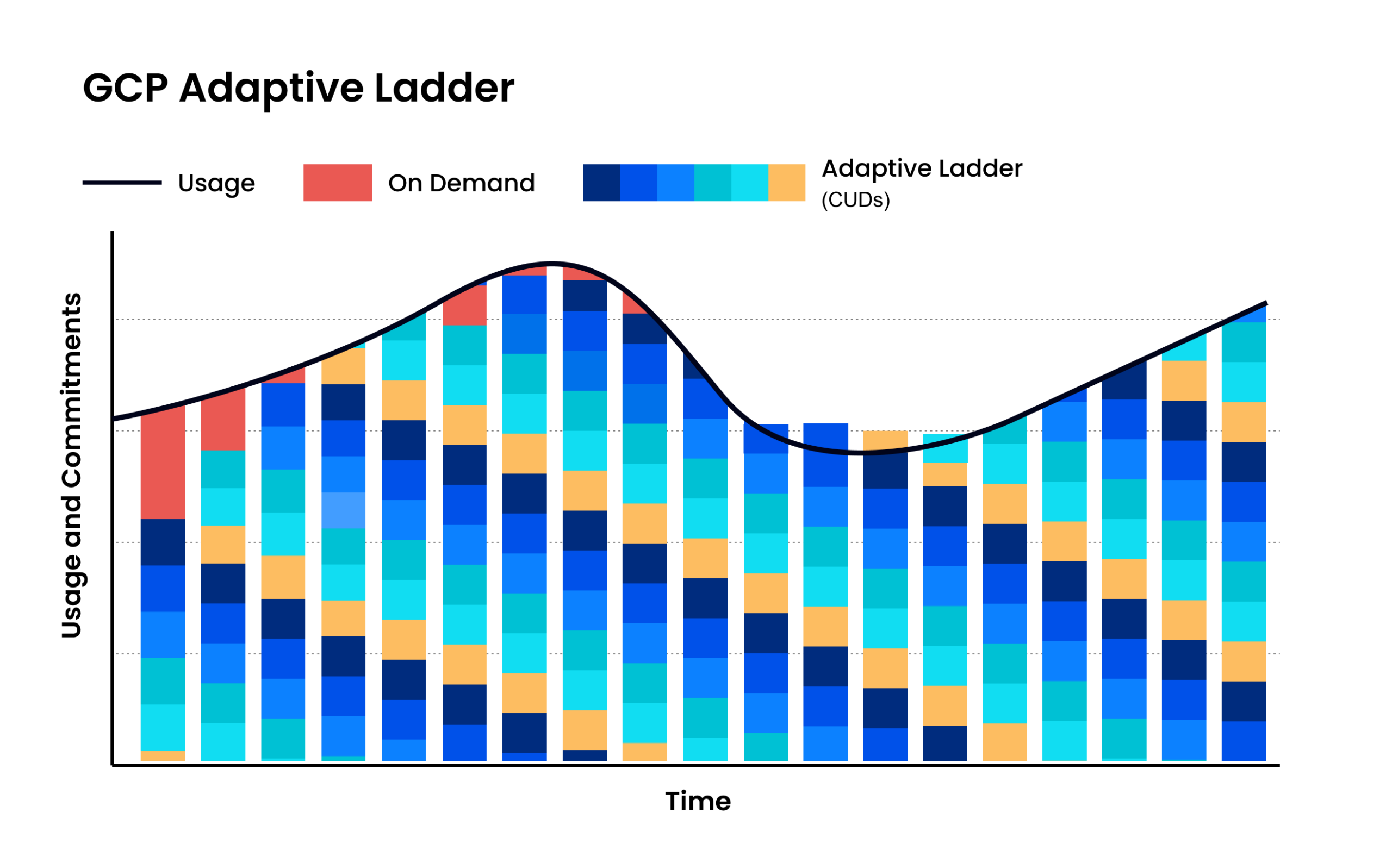
Instead of relying on infrequent, bulk CUD purchases, nOps uses adaptive commitment laddering—automatically committing in small, continual increments that align to your real usage. Coverage is recalculated and adjusted as demand changes, creating frequent expiration opportunities so commitments can flex up or down without sacrificing discounts. This approach extends savings beyond a static baseline, reduces long-term lock-in risk, and helps capture discounts across variable and spiky workloads with zero manual effort.
Savings-first pricing
nOps only gets paid after it saves you money. There’s no upfront cost, no long-term commitment, and no risk or downside — if nOps doesn’t deliver measurable savings, you don’t pay.
Complete visibility with automated cost allocation
In addition to visibility on your GCP commitments, nOps gives you full visibility into your cloud resources and spending with forecasting, budgets, anomaly detection, and reporting to spot issues early and validate commitment savings. That visibility flows directly into automated cost allocation, so you can instantly allocate costs across project, environment, team, application, service, and region without any manual tagging or effort.
Want to see it in practice? Book a demo to walk through CUD coverage, cost visibility, allocation, and anomaly protection in your GCP environment.
nOps manages $3B+ in cloud spend and was recently rated #1 in G2’s Cloud Cost Management category.
FAQ
What is a CUD in GCP?
A Committed Use Discount (CUD) is a Google Cloud pricing program that gives you discounted rates in exchange for a 1- or 3-year commitment term on qualifying usage or spend. It’s designed to lower costs for predictable, long-running workloads, but it reduces flexibility if your actual usage changes substantially over time.
What is resource-based CUD in GCP?
A resource-based CUD is a commitment for Compute Engine where you commit to specific resource usage (typically vCPU and memory, in a chosen region) for a 1 or 3 year commitment period. Google applies discounted pricing when your VM usage matches that committed footprint. It works best for stable fleets and steady baselines.
What is the Google commitments (CUDs)’s built-in flexibility?
CUD flexibility comes mainly from automatic application across qualifying usage under the billing account and, for some models, the ability for discounts to follow changing usage within scope. Spend-based CUDs are generally more flexible than resource-based because they commit to hourly spend, not fixed instance shapes.
What is the difference between resource based CUD and spend based CUD?
Resource-based CUDs commit you to specific Compute Engine resources (like vCPU/memory in a region) and discount matching VM usage. Spend-based CUDs commit you to a minimum hourly spend for eligible services and apply discounts as long as usage meets that spend level. Spend-based is typically more adaptable.
What are software license commitments in Google Cloud Platform?
A software (OS) license commitment is a type of resource-based CUD for Compute Engine that discounts the licensed software portion of a VM (such as paid operating system images), separate from the hardware commitment for vCPU and memory.