Introducing Spark Workload Optimization using nOps Compute Copilot Container Rightsizing
Optimize Apache Spark on Kubernetes with safe, automated container rightsizing — reducing waste & improving cluster efficiency without disrupting jobs
Kubernetes offers flexibility for Spark, but not predictability. Input volumes fluctuate daily, joins create data skew, and misjudging memory overheads can easily lead to overprovisioning. The result? Oversized executors, wasted compute, and inflated EKS bills. Traditional autoscaling tools can’t solve this — mid-run updates risk evictions, while manual tuning across pipelines simply doesn’t scale.
That’s why we built Spark Workload Optimization using Container Rightsizing in nOps Compute Copilot. It automatically sizes Spark pods at startup, aligning container resources with Spark runtime parameters so you save money without disrupting workloads.
What's New
We’re excited to unveil Spark Container Rightsizing, designed to help teams optimize Spark workloads on Kubernetes with precision and confidence. Starting today, you can enable it directly from your Container Rightsizing settings in nOps or through Infrastructure-as-Code annotations.
Spark-Aware Detection & Targeting
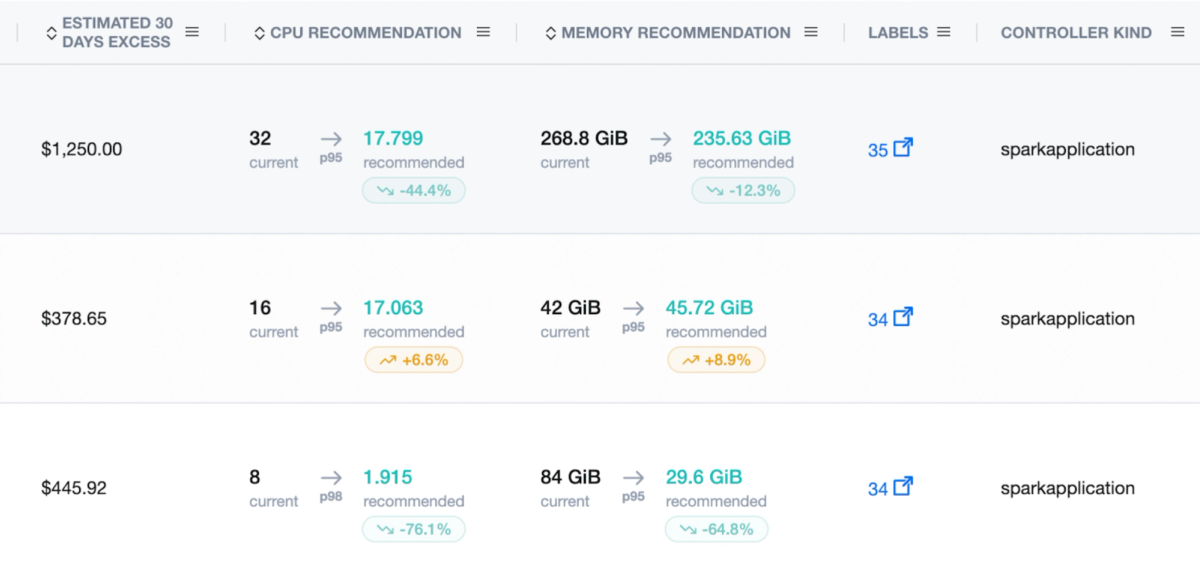
nOps Spark-aware detection automatically identifies SparkApplication resources (sparkoperator.k8s.io/v1beta2) and matches the driver and executor pods created by the Spark Operator while giving you recommendations in the container rightsizing page.
Now you can rightsize the right containers at the right time — ensuring accuracy and preserving your Spark Operator’s native configuration patterns.
This keeps your YAMLs clean and idiomatic, requiring no restructuring or workflow changes.
Startup-only VPA
The nOps Vertical Pod Autoscaler applies recommendations only once — at pod creation — to ensure no evictions or mid-run restarts. Now you can optimize Spark resource usage safely, with predictable stability even during long-running jobs.
Each SparkApplication receives a generated VPA using updateMode: Initial, guaranteeing stable, startup-only rightsizing aligned with Spark’s operational reality.
Executor Runtime Alignment
nOps automatically injects environment variables that synchronize Spark runtime settings with container allocations.
SPARK_EXECUTOR_CORES SPARK_EXECUTOR_MEMORYNow you can avoid mismatches between Spark runtime and Kubernetes allocations, ensuring your jobs use exactly what’s granted — no more wasted headroom or garbage collection stalls.
For smaller heaps, nOps also adds a small JVM buffer to maintain efficiency without unnecessary padding.
Who Benefits Most
Platform Engineers | DevOps & Infrastructure | Data Engineering |
|
|
|
How It Works
When a Spark job is submitted via the Spark Operator, the nOps admission webhook intercepts driver and executor pods at creation. It applies ML-driven CPU and memory recommendations, injects aligned environment variables, and ensures rightsizing happens safely before the job begins.
You can configure this behavior globally or per container using annotations such as:
nops-vpa/enabled: "true" nops-vpa/policy: "Dynamic" # Dynamic | Maximum savings | High AvailabilitySidecars can also be excluded from rightsizing with annotations like nops-vpa/container.monitoring-sidecar: “disabled”.
For the full breakdown of how it works, check out How We Made Spark on Kubernetes Cheaper (and Safer to Run).
How to Get Started
To start using Spark Container Rightsizing, check out the documentation.
If you're already on nOps...
Have questions or want to fine-tune policies? Our dedicated support team is here for you. Simply reach out to your Customer Success Manager or visit our Help Center. If you’re not sure who your CSM is, send our Support Team a message.
If you're not yet on nOps...
nOps was recently ranked #1 with five stars in G2’s cloud cost management category, and we optimize $5+ billion in cloud spend for our customers.
Join our customers using nOps to understand your cloud costs and leverage automation with complete confidence by booking a demo with one of our AWS experts.
Demo
AI-Powered Cost Management Platform
Discover how much you can save in just 10 minutes!
Book a Demo