New: Schedule Workload and Container Rightsizing
Automated rightsizing helps you improve efficiency and reduce cloud costs. With this new release, you now have full control over when those optimizations run. With the new scheduling feature, you can set specific days and time windows for workload and container optimization — for example, enable it during off-peak hours or weekends, and pause it during weekday peak traffic.
This gives your team greater control over automation timing, allowing you to coordinate optimizations with deployment cycles, compliance requirements, or organizational change windows — while maximizing both savings and stability. During scheduled off-hours, nOps automatically performs rightsizing actions and can roll resources back to their original state before peak usage resumes, ensuring you save money when utilization is low without impacting production performance.
What's New
We’re excited to introduce scheduling in nOps Container Rightsizing, designed to help teams coordinate optimization activities with precise scheduling and zero disruption.
Workload Rightsizing Scheduling
For compute-intensive or data-driven workloads — such as analytics, Spark, or batch processing — timing optimization can matter. The new workload scheduling capability lets you plan and execute rightsizing exactly when it makes sense for your environment.
- Define and manage optimization windows for any workload type.
- Run rightsizing at controlled times to ensure performance remains stable, and roll back automatically during different or peak usage periods.
- Test and roll out schedule changes with full reversibility.
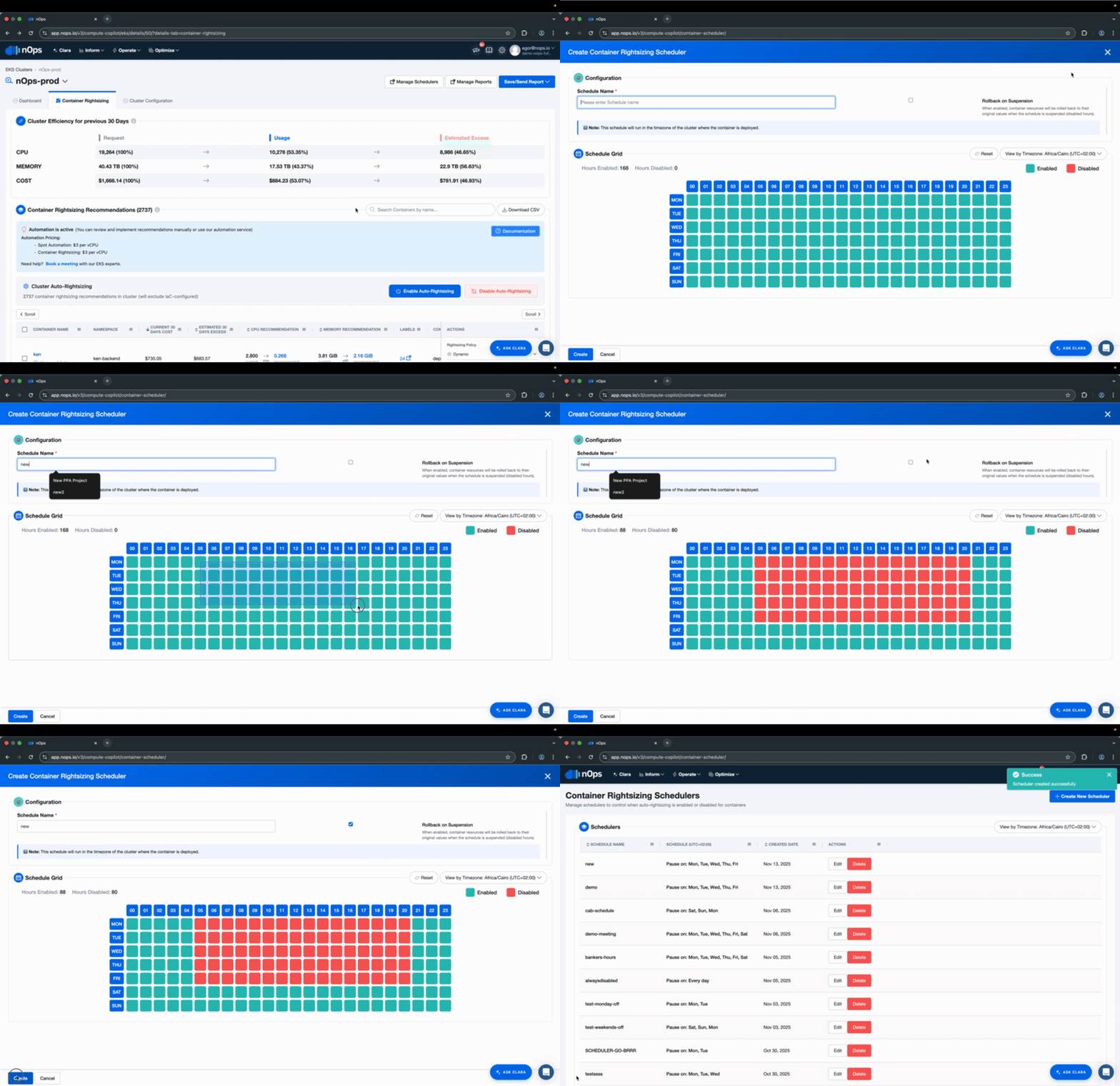
Container Rightsizing Scheduling
Containerized environments require careful coordination between scaling and optimization. The new container scheduling capability allows rightsizing to occur during predictable windows aligned with your traffic patterns. This ensures that container optimization never disrupts production workloads — and that autoscaling, resource allocation, and cluster health remain balanced throughout.
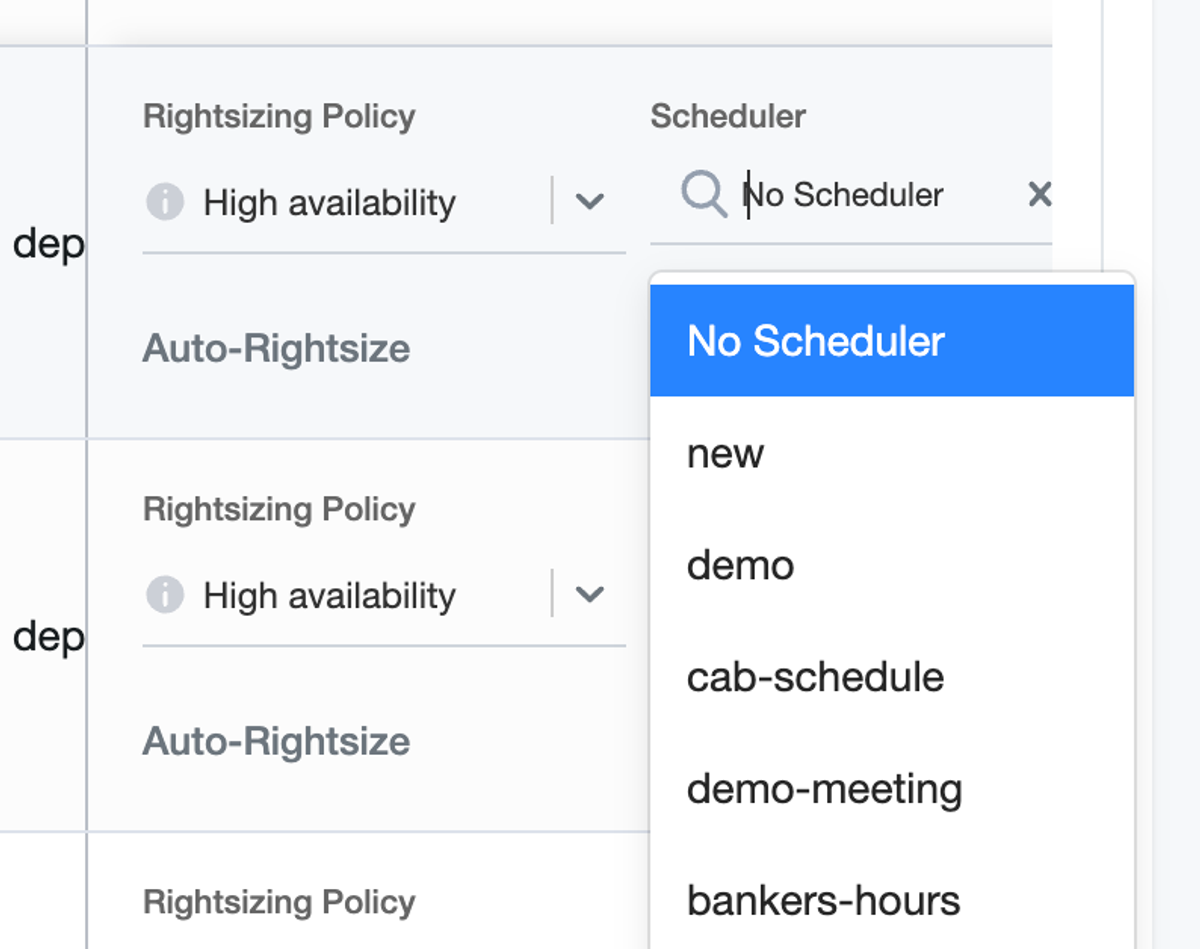
- Schedule container rightsizing across clusters, namespaces, deployments etc.
- Align optimization with workload activity and cluster behavior.
- Automate rightsizing safely during off-peak or maintenance periods.
- During off-hours, you can choose between two modes: either maintain current configuration (no new metric updates are applied) or roll back to original configuration. By default, nOps holds the environment in a steady state — no new updates are pushed — unless the “Rollback to original config during off-hours” option is selected.
Who Benefits Most
Cloud Operations Teams | FinOps & Cost Optimization Engineers | DevOps Engineers |
Gain fine-grained control over automation. Optimize workloads confidently without risking uptime during critical usage periods. | Schedule rightsizing across hundreds of workloads at scale, improving cost efficiency while preserving performance metrics. | Integrate automated rightsizing safely into CI/CD workflows, ensuring predictable behavior during releases and scaling events. |
How To Get Started
To start using Schedule Rightsizing, navigate to your nOps Optimization dashboard and select “Create Schedule.”
Want more details? Check out the documentation.
If you’re already on nOps…
Have questions about the new feature? Need help getting started? Our dedicated support team is here for you. Simply reach out to your Customer Success Manager or visit our Help Center. If you’re not sure who your CSM is, send our Support Team a message.
If you’re not yet on nOps…
nOps was recently ranked #1 with five stars in G2’s cloud cost management category, and we optimize $5+ billion in cloud spend for our customers.
Join our customers using nOps to understand your cloud costs and leverage automation with complete confidence by booking a demo with one of our AWS experts.
Demo
AI-Powered Cost Management Platform
Discover how much you can save in just 10 minutes!
Book a Demo