 Skip to content



The CDN market is still in high-growth mode. One recent forecast estimates it will expand from $31.52 billion in 2025 to $164.90 billion by 2033, driven by rising demand for streaming media, e-commerce performance, and cloud-based applications.
CloudFront is a popular choice for serving content fast and securely at global scale — but its pricing can be deceptively tricky. Your monthly total depends on where your users are, how much data you push, how many requests you handle, and whether you’re using extras like edge compute, logging, or advanced security features.
This guide walks through the CloudFront pricing model in plain terms (and how to reduce your CloudFront costs). First, let’s take a brief look at what CloudFront is and how it delivers content.
What Is Amazon CloudFront
Amazon CloudFront is AWS’s content delivery network (CDN). It speeds up delivery of websites, APIs, video, and static assets by caching content at a global network of edge locations so users retrieve it from a nearby point instead of your origin server. Today, AWS says CloudFront operates 750+ edge locations (PoPs) across 440+ locations globally.
How CloudFront delivers content
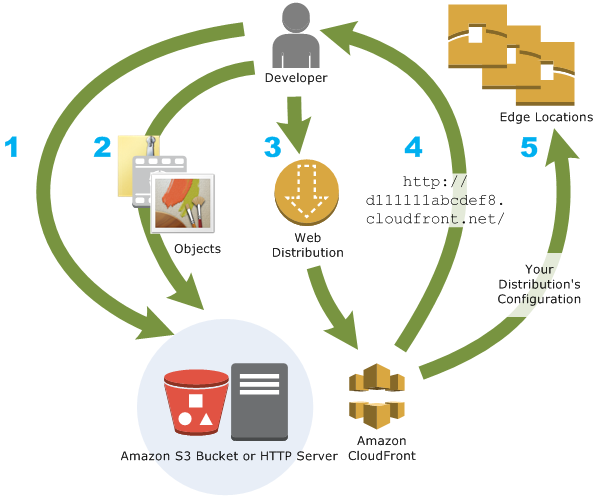
At a high level, CloudFront speeds delivery by serving cached content from AWS edge locations close to users, only reaching back to your origin when needed. Here’s the simple flow so the rest of the pricing breakdown (data transfer, requests, and edge features) makes sense.
- Edge locations and request routing: CloudFront routes each request to the nearest edge location (PoP) to reduce latency.
- Cache hits vs cache misses: If the content is already cached at the edge, it’s served immediately (hit). If not, CloudFront fetches it from your origin and caches it for next time (miss).
- Regional edge caches: CloudFront can use regional edge caches as an additional layer between edge locations and your origin server to reduce repeated origin fetches and improve performance.
- Edge compute options: CloudFront can also run logic at the edge to customize requests and responses. These come in two options: CloudFront Functions (for fast, simple changes, e.g. redirects, header rewrites, basic access controls, URL normalization) or Lambda@Edge (deeper, more customized behavior, e.g. tailoring responses by device, geography, cookies, or authentication logic).
Why Choose CloudFront
Teams choose CloudFront to optimize content delivery globally without pushing every request back to their origin server.
- It improves user experience by serving cached content from edge locations close to your users, reducing latency.
- It reduces pressure on your origin by offloading repeat requests to the cache instead of hitting S3/ALB/EC2 every time.
- It handles traffic spikes more gracefully because delivery is distributed across the edge network rather than concentrated on your origin.
- It’s easier to operate in AWS because it fits naturally into common IaC/CI/CD workflows and service integrations.
- It can strengthen security posture through HTTPS delivery and optional protections like AWS WAF and DDoS mitigation.
- It gives you better operational visibility via metrics and logs that help you troubleshoot issues and spot anomalies.
Amazon CloudFront Pricing Models
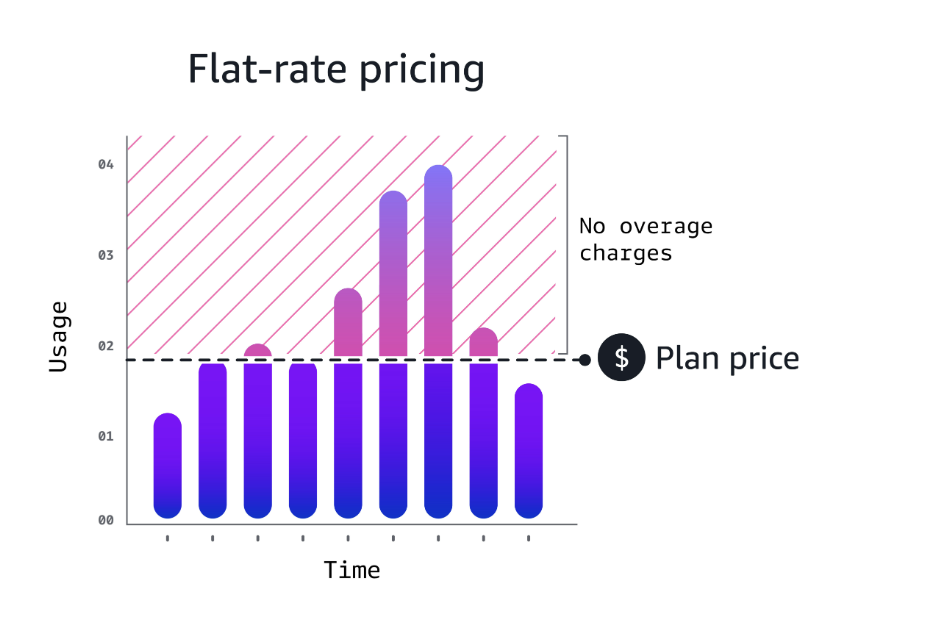
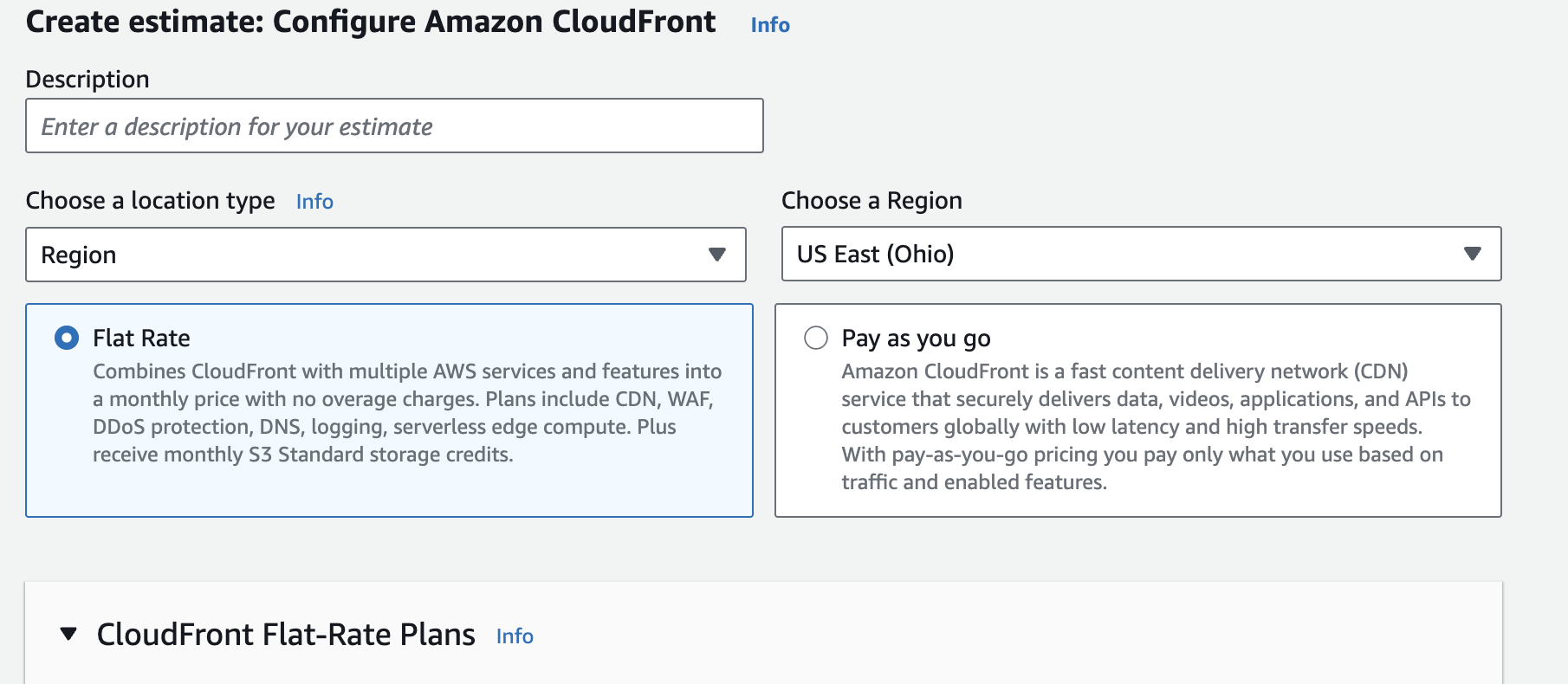
AWS CloudFront pricing generally comes in two flavors: pay-as-you-go usage-based billing and flat-rate plans with a monthly price and included allowances.
| Pricing model | What it means | What’s included / how it’s packaged |
|---|---|---|
| Pay-as-you-go | You’re billed based on what you use — primarily data transfer out, request volume, and additional paid features | CloudFront usage charges plus optional features like edge compute, real-time logs, or field-level encryption. |
| Flat-rate plans | You pay a fixed monthly fee that bundles CloudFront with a set of included features and usage allowances, designed to make costs more predictable. | CloudFront CDN plus bundled capabilities such as security (WAF/DDoS), DNS, logging, TLS, edge compute, and monthly allowances. |
When to choose flat-rate vs pay-as-you-go? Flat-rate can be useful when you want predictability and your baseline traffic fits the included allowances, while pay-as-you-go is typically better when usage is variable, lower, or you prefer to pay strictly for consumption.
What Determines Your CloudFront Cost
CloudFront costs are determined by several key factors. Here are the most important variables, starting with data transfer costs and HTTP(s) requests:
| Cost factor | What it is (in plain English) | Cost (how you’re charged) |
|---|---|---|
| Data transfer out (DTO) | The amount of data CloudFront delivers from edge locations to end users. This is typically the biggest driver for content-heavy apps (images, video, downloads) and it varies by where your traffic is served. | Charged per GB, region-dependent (example rates): US/Europe/Canada $0.085/GB Asia Pacific $0.120/GB; South America $0.170/GB |
| HTTP/HTTPS requests | The number of viewer requests CloudFront processes. Even when payloads are small, high-traffic sites can rack up significant request costs—especially if caching isn’t effective. | Charged per request volume, region-dependent (example rates): US/Europe/Canada HTTP $0.0075/10,000; HTTPS $0.0100/10,000; Asia Pacific HTTP $0.0090/10,000; HTTPS $0.0120/10,000 |
| Edge compute: CloudFront Functions | Lightweight code that runs at the edge to modify requests/responses (e.g., redirects, header rewrites, basic access checks). It’s inexpensive per run, but can add up if it runs on every request at scale. | Charged per invocation (rate varies by pricing page; billed per million invocations) |
| Edge compute: Lambda@Edge | More flexible edge compute for heavier logic (e.g., more advanced request/response customization). It can become a meaningful cost driver when invoked frequently or when execution time is high. | $0.60/million invocations + $0.00005001 per GB-second |
| Security add-on: Field-level encryption | Encrypts specific request fields for extra protection (common in highly regulated use cases). This adds an additional per-request charge on top of normal request fees. | $0.02 per 10,000 requests |
| Logging: Real-time logs | Detailed, near-real-time delivery logs that are useful for troubleshooting and analytics. The cost scales with how many log lines you generate, which can explode with high traffic. | $0.01 per 1,000,000 log lines |
| Cache invalidation | Purges cached objects before their TTL expires when you need changes to propagate quickly. Frequent invalidations can increase costs, so versioned assets are often a better pattern. | First 1,000 invalidations free, then $0.005 per request |
| Custom SSL certificates | Custom SSL/TLS for branded domains and specific SSL requirements. This can add recurring charges depending on the type of SSL setup you choose and how many certs you manage. | Additional monthly fees based on usage |
Pricing Controls That Affect Cost and Performance
Price Classes let you trade off cost vs. speed by limiting which CloudFront edge locations can serve your content.
| Price Class | Where CloudFront can serve from | When it’s a good fit | Example rates you’ll see |
|---|---|---|---|
| All | Global (all edge locations) | You serve users broadly across regions and want best possible delivery everywhere | DTO: ~$0.085–$0.170/GB (region-dependent) nRequests: ~$0.0075–$0.012 per 10k |
| 200 | Broad coverage, but not every region | You need reach beyond NA/EU, but don’t want the full global footprint | DTO: ~$0.085–$0.140/GB (region-dependent) nRequests: ~$0.0075–$0.010 per 10k |
| 100 | Limited to lower-cost regions (primarily North America + Europe) | Most of your traffic is concentrated in NA/EU and you’re optimizing for cost | DTO: ~$0.085/GB nRequests: ~$0.0075 per 10k |
You can choose a Price Class by audience geography: map your top traffic regions first, then pick the smallest class that covers them so you’re not paying higher regional rates for traffic you don’t have.
Free Tier and Included Allowances
AWS includes an Always Free CloudFront allowance you can use to test workloads or run smaller sites without racking up a bill. The big idea is simple: if your baseline traffic stays under these thresholds, your CDN costs can be close to $0—once you exceed them, standard CloudFront rates apply.
Here’s what the CloudFront Free Tier includes each month:
- 1 TB of data transfer out
- 10,000,000 HTTP or HTTPS requests
- 2,000,000 CloudFront Function invocations
(These CloudFront Free Tier allowances are not limited to your first 12 months, and they don’t apply to CloudFront locations in China.)
How To Estimate CloudFront Costs
The easiest place to start is the AWS Pricing Calculator, which lets you model CloudFront spend based on your expected data transfer, request volume, and where your traffic is served (since rates vary by region and configuration).
To sanity-check an estimate, you can also do a quick back-of-the-envelope calculation using the main cost drivers.
Example: HD streaming to North America + Europe (Price Class 100)
- Data transfer out: 10 TB per month = 10,000 GB × $0.085/GB ≈ $850
- HTTPS requests: 30 million requests = (30,000,000 / 10,000) × $0.0100 ≈ $30
- Real-time logs: 5 million log lines = (5,000,000 / 1,000,000) × $0.01 = $0.05
Estimated monthly CloudFront cost: $880.05
CloudFront Cost Optimization
CloudFront cost optimization comes down to a few controllable levers — here are some top ways to lower your spend, from cache efficiency to data transfer costs.
Improve cache efficiency
CloudFront savings usually come from one simple thing: fewer trips back to your origin. When CloudFront can serve content from the edge, pages load quickly and your backend stays quieter. When it can’t, CloudFront has to fetch from the origin more often, which increases work on your backend and pushes costs up through extra requests and data transfer.
The practical approach is to keep your most-requested, slow-changing assets cached at the edge and avoid creating lots of slightly different cached copies of the same file. Small request differences—like headers, cookies, or query strings—can cause CloudFront to treat responses as unique, which lowers your cache hit rate.
Reduce data transfer out
If CloudFront costs are climbing, shrinking what you send to users is often the most direct fix—because every unnecessary byte gets multiplied across traffic.
Quick ways to ship fewer bytes (without changing what users get):
- Serve smaller assets by default (compressed text, trimmed bundles, fewer heavyweight third-party scripts).
- Treat images as a budget line item (right-size to device, prefer modern formats, avoid shipping originals unless someone asks for them).
- Treat video as a throttle (adaptive bitrate, sensible defaults, avoid auto-playing high resolutions on mobile).
- Don’t pay premium regional rates by accident (use your traffic geo mix to decide how broad delivery needs to be, and tighten coverage if you don’t truly serve everywhere).
Reduce request volume and cost per request
Request charges climb when a single page view turns into a swarm of network calls. Even if each response is tiny, the math gets ugly fast at scale because you’re paying per request and you’re also increasing the chances of cache misses and retries. A good way to spot the problem is to look at “requests per page view” (or per session) for your highest-traffic routes. Pages that pull in lots of small assets—multiple JS chunks, many font files, icon sets, and third-party scripts—are common offenders. So are patterns that create “unique” URLs for the same content, which prevents reuse and forces CloudFront to treat repeat views as brand-new requests.
The fixes are usually straightforward: reduce the number of things the browser has to fetch, and make repeat views reuse what’s already been downloaded. Consolidating assets (where it doesn’t hurt performance), batching client calls, and trimming third-party tags can materially lower request volume.
Control edge compute spend
Edge compute is powerful, but it becomes expensive when it runs on high-volume paths or on multiple triggers across a distribution. The easiest way to keep it in check is to be deliberate about where code runs and which problems it’s solving.
CloudFront Functions are the right fit for lightweight request/response handling—redirects, header changes, and basic authorization-style checks—because they’re designed for fast execution on very large request volumes. Lambda@Edge is better when you need more complex logic, but it’s also where costs ramp faster if execution time grows or the function gets attached broadly.
Keep the scope narrow: attach edge logic only to the behaviors and paths that require it, and review invocation volume regularly so you can remove or refactor code that ends up running on most requests.
Manage invalidations efficiently
Invalidations are sometimes necessary, but doing them frequently could be a sign your cache strategy needs a better update path.
| Best practice | What it looks like | Why it helps |
|---|---|---|
| Versioned assets strategy | Change the filename/URL when an asset changes (app.abc123.js, image?v=42) so the “new” asset is a new object. | You stop purging caches just to push updates, and cache stays warm for everything else. |
| Targeted invalidation patterns | Invalidate only what changed (specific paths), not broad wildcards. | You avoid wiping useful cached content and keep miss rates from spiking. |
Protect against cost spikes with budgeting, forecasting, anomaly detection
nOps is a cloud cost optimization platform that makes it easy to understand and reduce your CloudFront spend with less manual work.
With nOps, you get:
Visibility into CloudFront cost drivers (data transfer + requests)
CloudFront bills are usually driven by data transfer out and request volume, but AWS-native reporting can be hard to translate into “what changed” and “where do we act.” nOps helps you break CloudFront spend down in a way that’s easier to operationalize—by account, environment, region, and other dimensions you use to run the business—so you can quickly spot which traffic patterns and delivery regions are responsible for the bill.
Cost allocation that makes ownership clear
CloudFront spend becomes hard to manage when it’s pooled and nobody can tell which product, team, or workload is responsible. nOps supports automated cost allocation so you can map CloudFront (and other AWS services) spend to the right owners and see unit cost trends over time.
Commitment management to keep discounts aligned as usage shifts
For organizations using AWS commitments to reduce unit cost, the work isn’t buying commitments—it’s keeping coverage and utilization healthy as usage changes. nOps Commitment Management extends coverage across commitment-eligible AWS services (including CloudFront commitment options) so you can track coverage, utilization, and savings performance in one workflow and reduce the time spent forecasting and rebalancing.
Want to see it in practice? Book a demo to walk through CloudFront cost visibility, allocation, and commitment coverage in your environment.
nOps manages $3 billion in AWS spend and was recently rated #1 in G2’s Cloud Cost Management category.
Frequently Asked Questions
Let’s dive into a few FAQ about CloudFront distribution, pricing and cost optimization.
Is Amazon CloudFront free to use?
Amazon CloudFront isn’t fully free, but AWS Free Tier benefits include monthly allowances (such as data transfer out, HTTP/HTTPS requests, and CloudFront Function invocations). If you stay under those limits, your Amazon CloudFront usage may cost little or nothing; beyond them, you pay standard usage-based rates that vary by region.
How much does CloudFront cost?
CloudFront pricing is pay-as-you-go for most customers, so total cost depends on how much data you deliver, how many requests you serve, where your users are located, and which features you enable (like logging, edge compute, or security add-ons). Some teams also choose flat-rate plans for more predictable monthly spending on AWS services.
How to reduce CloudFront costs?
To reduce CloudFront costs, improve cache efficiency to increase hit ratio, set sensible TTLs, compress and optimize assets to lower data transfer, and minimize unnecessary requests. Avoid frequent invalidations, be selective with real-time logs, and use edge compute only when it replaces origin work. For ongoing visibility, nOps helps you track Amazon CloudFront spend, allocate AWS costs, catch anomalies, and automatically manage commitments.

