Skip to content



AI Cost Optimization: Why Rate Optimization Is the Biggest Lever
Your AI infrastructure bill keeps going up. That part isn’t news to anyone.
What often catches people off guard is where the biggest savings actually live. It’s not right-sizing your GPUs, or shutting down idle SageMaker notebooks at 6pm. It’s rate optimization — committing to discounted pricing through Reserved Instances, Savings Plans, and Committed Use Discounts. In practice, that means reducing the price you pay per unit of compute, not just how much compute you use.
For AI workloads, the delta between what teams pay and what they could pay is staggering. In this article, we’ll talk about why AI cost optimization demands a rate-first mindset, what makes teams hesitate on commitments, and how to achieve meaningful cost reduction.
The State of AI Cost Optimization in 2026
AI workloads aren’t priced like traditional cloud compute. A single p5.48xlarge instance with NVIDIA H100 GPUs runs around $55/hour on-demand. Leave that running for a month and the bill lands around $40,000.
Scale that up across training runs, fine-tuning experiments, and production inference, and AI compute costs blow past seven figures fast.
The Flexera 2026 State of the Cloud Report confirms this is an industry-wide problem: GenAI surged to the third most widely used public cloud service in 2026, rising from 50% to 58% adoption. And 80% of organizations report that their AI spending has increased.
Meanwhile, NVIDIA’s 2026 State of AI Report found that 42% of respondents said optimizing AI workflows and production cycles was the top spending priority in 2026. Teams know costs are a problem. What’s less clear is where the biggest savings opportunity actually is.
How to Optimize AI Costs Effectively: Rightsizing vs Rate Optimization
Ask most teams what “AI cost optimization” means to them and you’ll hear:
Right-sizing GPU instances (do we really need a p5?)
Scheduling idle resources (shut down dev notebooks at night)
Spot instances for interruptible training jobs
Model optimization (quantization, distillation, smaller models)
All valid. But none of them are the biggest dollar lever you can pull.
Here’s the math that changes the conversation. AWS cut P4 and P5 GPU instance prices by up to 45% for customers who commit through Savings Plans. A three-year Compute Savings Plan on P5 instances chops your hourly rate roughly in half versus on-demand.
For a team burning $1M/year on GPU compute, that’s $350K–$450K back in your pocket. Compare that to right-sizing (maybe 10–20% savings) or scheduling (another 5–10%). Commitments dwarf everything else.
Yet most organizations aren’t there. The majority of organizations using commitments relied on infrequent batch purchases — buying once or twice a year rather than continuously managing their portfolio. This makes it easy to undercommit (missing out on discounts) or overcommit (overpaying for compute you don’t end up using).
Why Teams Hesitate to Commit
If the savings are that obvious, why aren’t people jumping on them? Because AI workloads make commitment management genuinely painful in ways that traditional compute doesn’t. We hear it constantly on customer calls.
Rapid cloud infrastructure changes
AI teams move fast and break their own commitments in the process. They switch instance types mid-experiment, jump from P4d to P5 when H100s become available, try out Trainium for a training run, then pivot back. Locking into a one-year or three-year commitment when the hardware landscape shifts quarterly might be a problem.
One VP of Engineering on a recent nOps call didn’t mince words: “We had a problem where we committed to a reserved instance. It was a three-year commitment… we switched instance types and now we’re wasting all that money on the reserved instance.” And then: “That’s my main worry, to be honest. The convertibility of these particular reserved instances.”
Three years is a LONG time when NVIDIA drops a new GPU generation every 18 months.
Unpredictable scaling
Training jobs don’t follow neat growth curves. They spike for two weeks, vanish, then come back at 3x the size. Inference traffic depends on product adoption — good luck forecasting that 12 months out.
A CTO told nOps the reality: “Some of our reservations are going to be expiring very soon. The team has already been notified that we’ll be switching onto on-demand and we’ll be incurring some costs, but the business has decided it’s better to take those costs.”
Read that again. They’d rather pay 50% more on-demand than risk a six-month commitment they might not need. But it makes sense when you consider it from the point of view of the decisionmaker whose head is on the chopping block if that hundred thousand dollar commitment goes wasted.
Not all commitments bend the same way
EC2 Reserved Instances can be resold on the marketplace in some cases, but most others can’t. One Director flagged it: “With these commitments, they’re not as flexible as compute. It’s not like with EC2, we can sell it in the marketplace. You don’t have that option.”
When a company is consolidating databases or migrating off legacy services, rigid commitments turn into dead weight on the balance sheet.
Growth makes it worse, not better
You’d think rapidly growing companies would commit aggressively — more compute means more discount potential. In practice, it’s not necessarily true. One CEO told nOps: “We’re in the process of expanding quite rapidly at the moment. I would imagine that our spend is going to be going up considerably.” Same breath: “I would worry that we might end up increasing infrastructure and then having all this commitment that we don’t need.” More spend, more risk of getting it wrong. It’s a cycle that keeps teams stuck on on-demand.
Four Pillars of AI Cost Optimization
AI cost optimization works when you layer strategies correctly. Start with the lever that moves the most dollars, then build from there.
1. Rate optimization (commitments and discounts) — the biggest lever
This is where the majority of savings come from for any organization with steady-state AI compute. The key instruments:
| Commitment Type | Flexibility | Discount Depth | Best For |
|---|---|---|---|
| Compute Savings Plans | High — applies across EC2, Fargate, Lambda | Up to 66% vs. on-demand | Broad compute portfolios with mixed instance types |
| EC2 Instance Savings Plans | Medium — locked to instance family and region | Up to 72% vs. on-demand | Stable workloads on known instance families |
| Reserved Instances (Standard) | Low — locked to specific instance type, AZ optional | Up to 72% vs. on-demand | Predictable, long-running workloads |
| Reserved Instances (Convertible) | Medium — can exchange for different instance types | Up to 66% vs. on-demand | AI workloads that may shift between GPU generations |
| EC2 Capacity Blocks for ML | High — short-term GPU capacity reservations | Varies by demand | Training jobs that need guaranteed GPU access |
The challenge is managing these various options continuously as workloads shift, instance types change, and new pricing on AI technology becomes available.
2. Usage optimization (right-sizing and scheduling)
Once rates are optimized, focus on usage efficiency:
Right-size GPU instances: Not every inference workload needs H100s. AWS Inferentia2 instances deliver up to 4x better price-performance for many inference tasks. Evaluate whether Trainium instances can handle your training workloads at lower cost.
Schedule non-production workloads: Dev and staging environments running GPU instances 24/7 are pure waste during off-hours. Automate start/stop schedules.
Use Spot instances for fault-tolerant training: Distributed training jobs with checkpointing can tolerate interruptions. Spot pricing for GPU instances can save 60–90% versus on-demand.
3. Architecture optimization
AI strategies for architecture cost efficiency include:
Disaggregate inference from training: Inference workloads are typically steady-state and commitment-friendly. Training is bursty. Separating them lets you commit aggressively on inference while using Spot or Capacity Blocks for training. This also improves data pipeline efficiency, ensuring training and inference workloads don’t compete for the same data processing resources.
Leverage cloud-provider native accelerators: For example, AWS Neuron now supports Dynamic Resource Allocation with Amazon EKS, bringing Kubernetes-native hardware-aware scheduling to Trainium instances. This means better GPU utilization without manual intervention.
SageMaker Training Plans: AWS recently added the ability to extend existing capacity commitments without workload reconfiguration. When training runs take longer than expected, you don’t lose your reserved capacity.
4. Model and workload optimization
To optimize AI costs in this area, focus on:
Quantization and distillation: Reduce model size to run on smaller, cheaper instances.
Batch inference: Aggregate requests to maximize GPU utilization per dollar.
Multi-model serving: Run multiple smaller models on a single GPU instance instead of dedicating one instance per model.
Why Quarterly Commitment Reviews Don't Work for AI
Here’s what “commitment management” looks like at most companies: a FinOps team pulls usage data once a quarter, eyeballs the stable baseline, buys a batch of Savings Plans, and walks away until next quarter.
For AI workloads, this process falls apart in three specific ways.
Problem 1: AI usage patterns change faster than quarterly review cycles. A team that was running 10 P4d instances for training in Q1 might migrate to P5 in Q2 when their workload qualifies for H100s. The Savings Plans purchased for P4d usage are now partially wasted.
Problem 2: The commitment portfolio gets stale. ProsperOps’ research found that 51% of organizations using commitments relied on infrequent batch purchases. For AI workloads that shift between instance types, regions, and even compute services (EC2 to SageMaker to Bedrock), a static portfolio leaks savings every week.
Problem 3: Risk aversion leads to under-commitment. When FinOps teams get burned — locked into instance types nobody uses six months later — they respond by committing to less. Median coverage across organizations is just 55%. That’s a lot of on-demand spend that could be discounted. A r/FinOps thread on moving beyond Cost Explorer nailed it: “The real bottleneck isn’t tooling, it’s process. Most teams don’t lack dashboards or recommendations. They lack financial accountability and a cost-aware engineering culture.”
How nOps makes Commitments Easy
nOps treats rate optimization as a continuous, automated process — not a quarterly checkbox.
Continuous automation powered by Machine Learning
nOps watches your actual compute usage — EC2, EKS, Fargate, Lambda, SageMaker, GPU instances, all of it — and purchases, adjusts, and swaps commitments as your workload mix changes. Team migrates from P4d to P5? The portfolio rebalances. No manual effort needed.
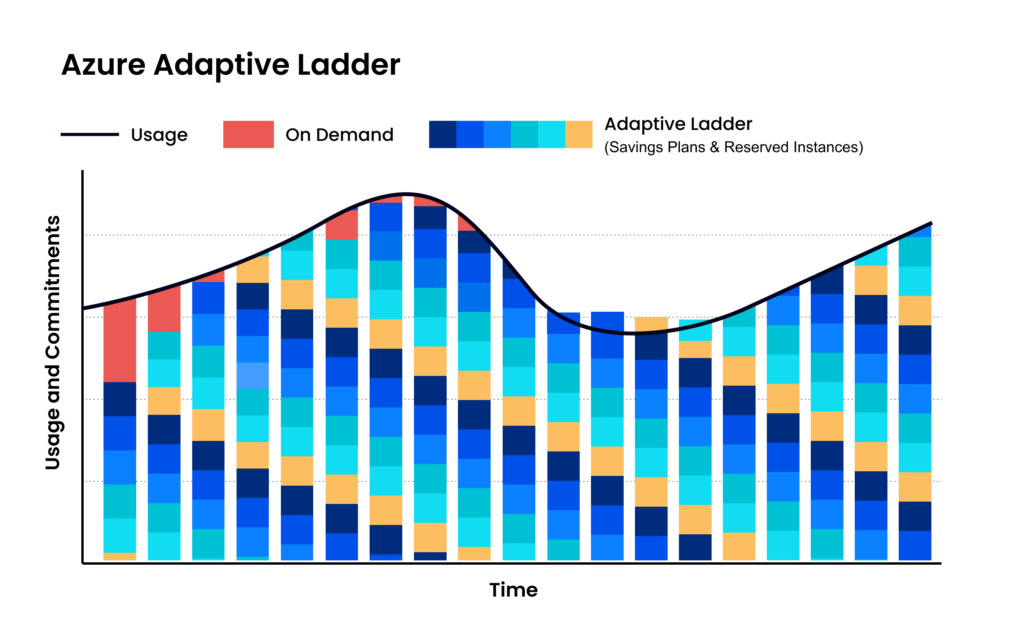
Maximize discounts AND flexibility
Instead of one big batch of 3-year Compute Savings Plans, nOps builds a mix, committing in small increments each hour and adjusting as needed. The result: teams slash their risk and commitment windows.
Savings-first model
nOps only gets paid if we save you money — meaning there’s no upfront cost or financial risk. Customers have described it as being like “picking $20 bills off the ground” — there’s no downside to seeing if you can reduce costs on AI with a free savings analysis.
nOps is entrusted with $3 billion in cloud spending and was recently rated #1 in G2’s Cloud Cost Management category.
Demo
AI-Powered Cost Management Platform
Discover how much you can save in just 10 minutes!
Frequently Asked Questions
Let’s dive into a few FAQ about optimizing AI project costs across various cloud service providers.
How to optimize costs for intermittent AI training jobs?
Use spot instances, schedule jobs during off-peak pricing, checkpoint progress to avoid restarts, and right-size GPUs. Cache datasets efficiently to reduce storage costs, use mixed precision training, and autoscale clusters. Shut down idle resources immediately and prioritize shorter runs with distributed training for efficiency overall.
How much does AI visibility optimization cost?
AI visibility optimization costs vary widely, from tooling subscriptions monthly to enterprise platforms costing thousands. Pricing depends on data sources, model monitoring depth, explainability features, and model complexity, with additional costs for consulting, setup, and ongoing model performance tuning services overall.
How to optimize AI service costs with usage-based billing?
For effective AI cost optimization strategies, adopt metering, align workloads to pricing tiers, and batch requests to reduce inference costs. Implement quotas, monitor usage in real time, and scale resources dynamically. Choose providers with transparent pricing and optimize model selection to avoid overpaying for unnecessary performance capacity.
How to optimize AI service costs?
Optimize AI service costs by right-sizing infrastructure, selecting efficient models, and minimizing idle usage. Use autoscaling, caching, and request batching for cost control for AI initiatives. Monitor cost metrics continuously, enforce budgets, and eliminate redundant workloads while negotiating pricing or switching providers for better performance-to-cost ratios.
How to optimize AI model costs?
Reduce AI model costs by choosing smaller models where possible, fine-tuning instead of overprovisioning, and improving inference efficiency. Techniques like pruning, quantization, and prompt optimization help realize significant savings. nOps covers this thoroughly in its Generative AI cost optimization essential guide.