 Skip to content




Trying to make sense of Amazon MemoryDB pricing? You’re not alone.
This guide breaks down how MemoryDB is priced, what drives your monthly bill, and the levers that actually move spend when you’re forecasting or trying to reduce costs. It’s written for engineering, finance, and FinOps teams who need a quick primer on how MemoryDB costs add up in real environments (plus tips to reduce associated costs).
What Is Amazon MemoryDB?
Amazon MemoryDB is a managed AWS in-memory database service designed for applications that need fast data access in real time, such as personalization, session management, live inventory, fraud detection, or operational metrics. It is compatible with Redis OSS and Valkey, and AWS operates the underlying infrastructure so teams do not have to manage servers, software updates, or availability on their own.
MemoryDB is typically used when Redis or Valkey is supporting important application data rather than acting as a temporary performance layer. Teams choose it when speed is critical, but they also want the service to remain available and retain data through infrastructure failures. From a functional standpoint, it fills the gap between short-lived caching systems and traditional databases that prioritize durability over latency.
Why MemoryDB Costs Behave Differently from Other AWS Databases
MemoryDB costs behave differently because it is delivered as a continuously running, capacity-based service. Instead of scaling up and down automatically with traffic or billing primarily per request, MemoryDB requires you to provision database capacity in advance and keep it online for your application to function.
That design creates a consistent baseline level of spend that exists even during periods of low usage. As a result, MemoryDB costs tend to be driven more by sizing decisions and long-term capacity planning than by short-term fluctuations in demand. For finance and engineering teams, this means MemoryDB spend often looks closer to infrastructure commitment than consumption-based database usage, which can make it harder to optimize through usage reduction alone.
How MemoryDB Pricing Works
This section explains the basic pricing structure behind Amazon MemoryDB. We’ll cover the core idea that MemoryDB is priced around provisioned nodes, how cluster structure (shards, primaries, replicas) affects the number of billable nodes, and why the service’s always-on design creates a persistent baseline cost.
MemoryDB Node-Based Pricing Model
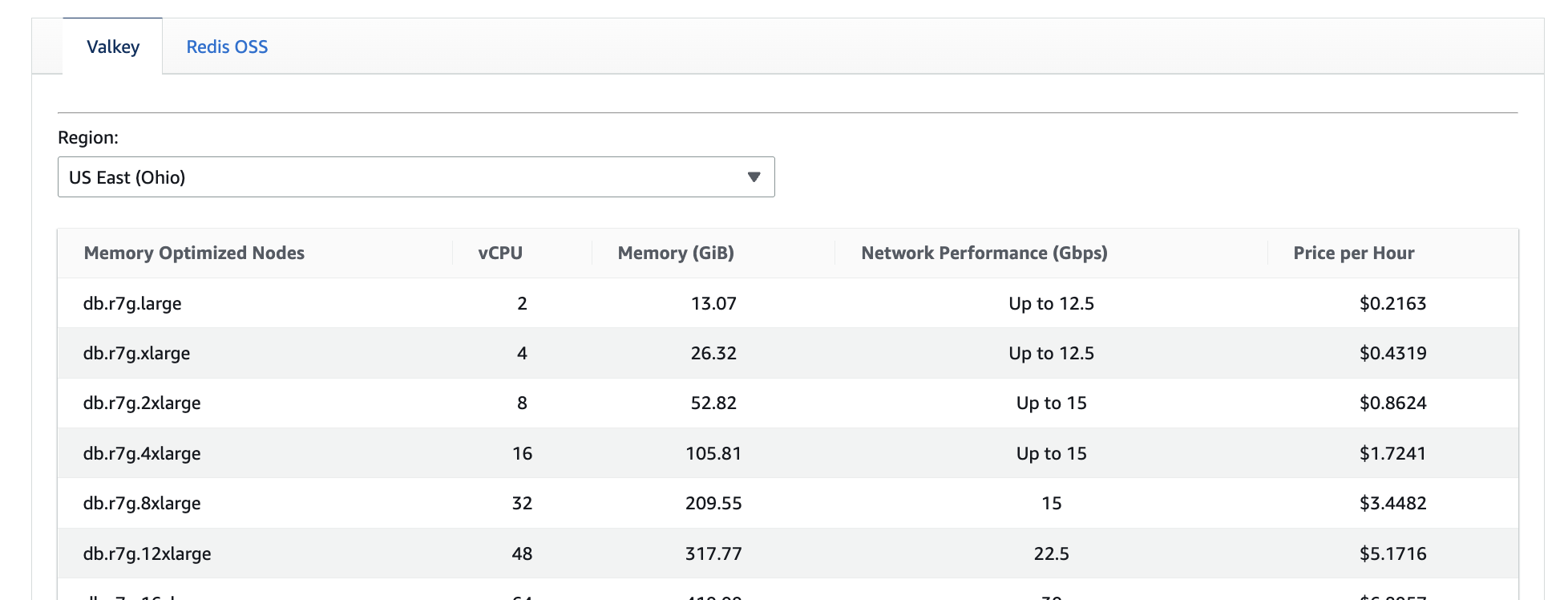
Amazon MemoryDB pricing starts with nodes. Each MemoryDB cluster is made up of one or more nodes, and AWS bills you for each node by the hour based on its instance type. The node type you choose determines how much memory, compute, and network throughput is available to your cluster.
For example, a db.r6g.xlarge node provides roughly 26 GiB of memory and is priced at a higher hourly rate than a db.t4g.medium node, which offers much less memory and throughput at a lower cost. If your dataset requires more memory than a single node can provide, you must either move to larger nodes or add more nodes — both of which increase your baseline spend.
Because MemoryDB nodes run continuously, node selection is one of the most important cost decisions you make. Once a node is provisioned, it contributes to your bill every hour it remains in the cluster, regardless of how heavily it is used.
Shards, Primaries, and Replicas
MemoryDB clusters are divided into shards to scale performance and capacity. Each shard contains one primary node and one or more replica nodes. All of these nodes are billable.
As a simple example, a cluster with two shards and one replica per shard requires four nodes total: two primaries and two replicas. If you increase replicas to improve availability or read performance, each additional replica increases the total node count and the hourly cost of the cluster.
This means MemoryDB costs grow not only with data size, but also with architectural choices. Adding shards to handle throughput, or replicas to improve resiliency, permanently increases the minimum cost of operating the cluster.
Always-On Architecture and Cost Implications
MemoryDB is designed to stay online at all times. There is no built-in ability to pause clusters, scale to zero, or pay only when traffic occurs. As long as a cluster exists, its nodes continue to run and accrue charges. In practice, this creates a fixed baseline level of spend. A production cluster that runs 24/7 will incur nearly the same monthly node cost whether it processes millions of requests per hour or sits mostly idle overnight. Similarly, development or staging clusters that are left running continuously can generate non-trivial monthly costs even with minimal usage.
Core MemoryDB Cost Components
MemoryDB billing is made up of a few core components. You’ll pay mainly for the nodes that run your cluster, plus smaller add-ons for durability and storage features, and data movement when applicable.
Compute (Node Hours)
Compute charges make up the largest portion of most MemoryDB bills. AWS charges for every node in your cluster by the hour, based on the node type you select.
For example, if your cluster consists of four db.r6g.xlarge nodes, you are billed for all four nodes every hour they are running. This cost does not change based on whether the cluster is under heavy load or mostly idle. As a result, node hours tend to form a steady baseline cost that repeats month after month.
In practice, this means most MemoryDB cost optimization starts with reducing unnecessary nodes, downsizing node types, or consolidating clusters rather than trying to reduce request volume.
Replication and Multi-AZ Architecture
MemoryDB clusters are typically deployed across multiple Availability Zones for high availability. This requires running replica nodes in addition to primary nodes, and each replica is billed the same way as a primary.
For example, a cluster with one shard and one replica already doubles the node-related compute cost compared to a single-node setup. Adding additional replicas further increases baseline spend, even if read traffic does not fully utilize them.
Multi-AZ deployments improve resilience and availability, but they also make MemoryDB inherently more expensive than single-instance or single-AZ databases. The cost impact comes from the extra nodes required to maintain redundancy, not from additional usage.
Data Tiering (Memory + SSD Nodes)
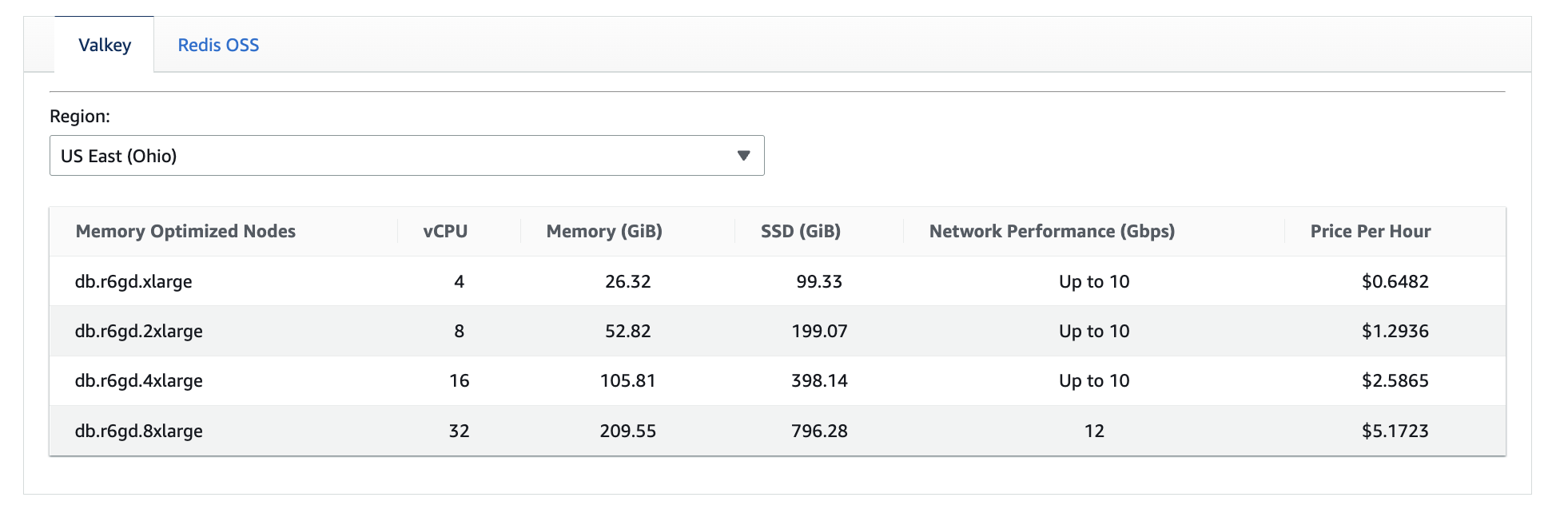
MemoryDB supports node types that combine in-memory storage with SSD-based data tiering. These nodes automatically move less frequently accessed data from memory to SSD to reduce the amount of expensive in-memory capacity required.
For example, if your application frequently accesses only a small portion of its total dataset, a data-tiered node can store older or less-used data on SSD while keeping hot data in memory. This allows you to support a larger overall dataset with fewer or smaller nodes than a fully in-memory configuration.
The tradeoff is slightly higher latency when cold data is accessed for the first time. From a cost perspective, data tiering can significantly reduce node-related spend when workloads have predictable access patterns.
Data Written (Write-Only Billing Model)
MemoryDB charges only for data written to the cluster, not for reads. Write charges are based on the volume of data written, including keys, values, and command overhead.
For example, a read-heavy workload with frequent lookups but infrequent updates may generate substantial traffic while incurring little to no data-written cost. By contrast, a write-heavy workload that continuously updates large values can incur noticeable write charges even if overall request volume is moderate.
This write-only billing model means MemoryDB costs are often driven more by data change rates than by total request counts.
Snapshot Storage
Snapshot storage charges apply to the automated and manual snapshots you retain for your MemoryDB clusters. AWS includes snapshot storage up to the size of your cluster when the snapshot retention period is short, but longer snapshot retention typically incurs additional snapshot storage costs.
For example, keeping multiple days of snapshots for a large cluster can add incremental monthly storage charges, even if the cluster size and node count remain unchanged. These snapshot storage space costs are typically small compared to compute, but they can become noticeable for large datasets with long retention requirements.
Snapshot costs are driven by retention policies rather than usage, making them easy to overlook when forecasting spend.
Data Transfer
MemoryDB does not charge for inbound data transfer or for data transfer within the same AWS Region. Charges apply primarily when data is transferred across Regions, such as in Multi-Region deployments.
For example, if you replicate a MemoryDB cluster across Regions for disaster recovery, data written in the primary Region is transferred to secondary Regions and billed as inter-Region data transfer. These charges scale with write volume and can become material in write-heavy, Multi-Region architectures.
In single-Region deployments, data transfer costs are usually minimal. In Multi-Region setups, they become an important part of the overall cost model.
MemoryDB Purchase and Discount Options
Because MemoryDB runs as always-on, provisioned capacity, purchasing decisions play a big role in long-term cost. Understanding how on-demand usage and Reserved Nodes work — and when each makes sense — is critical to avoiding both overcommitment and persistent on-demand spend.
On-Demand Pricing
With on-demand pricing, you pay the full hourly rate per instance hour for each MemoryDB node with no long-term commitment. On demand node charges provide maximum flexibility: clusters can be resized, re-architected, or removed without being tied to a contract. And because there are no long-term commitments or upfront fees, on-demand pricing helps shift what are commonly large fixed costs into much smaller variable costs.
On-demand pricing is well suited for development environments, early-stage workloads, or production systems that are still changing rapidly. The tradeoff is cost efficiency. Because MemoryDB nodes run continuously, long-lived production clusters left on-demand can accumulate significant spend over time, even if utilization is stable and predictable.
In practice, on-demand pricing is often intended as a temporary state — but many teams end up leaving clusters running on-demand longer than intended.
MemoryDB Reserved Nodes
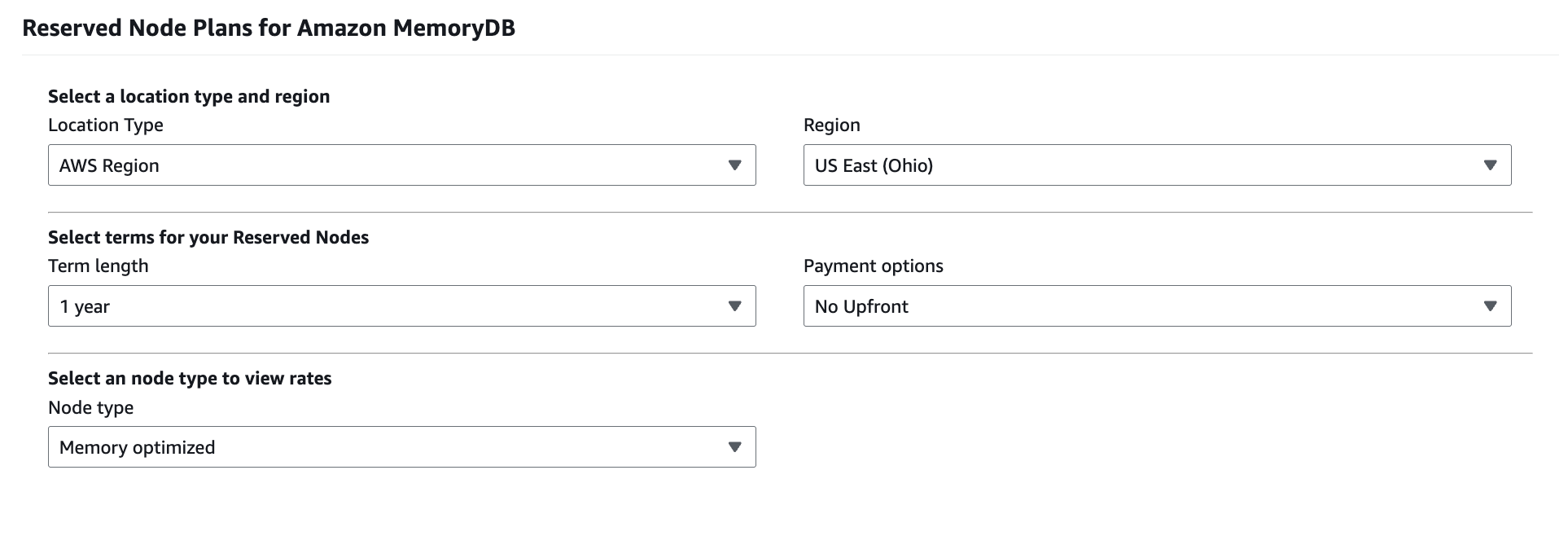
Reserved Nodes allow you to commit to a specific amount of MemoryDB capacity for a one-year or three-year term in exchange for a discount on your ongoing hourly usage rate. The commitment applies regardless of whether the node is actively used, and charges continue for the full duration of the reservation.
From a commitment-management perspective, Reserved Nodes convert a variable-looking service into a fixed infrastructure obligation. This can significantly reduce cost for stable workloads, but it also introduces risk if cluster sizes change or workloads are retired before the reservation term ends.
Reserved Nodes offer size flexibility within a node family and Region, which helps mitigate some risk. However, they are still tied to MemoryDB specifically, and cannot be applied to other database services or compute usage.
One-Year vs Three-Year Commitments
One-year Reserved Nodes are typically used when teams have moderate confidence in workload stability but want to preserve some flexibility. They offer meaningful discounts over on-demand pricing while limiting long-term exposure if architectures evolve.
Three-year Reserved Nodes provide deeper discounts, but they require a high degree of confidence that MemoryDB usage will remain stable over a longer horizon. In practice, these commitments work best for mature, business-critical systems where MemoryDB has become embedded as core infrastructure.
The challenge many organizations face is timing. Committing too early increases the risk of unused reservations, while committing too late leaves significant savings unrealized. This tension is amplified in environments where MemoryDB usage grows unevenly across teams, accounts, or Regions.
MemoryDB and Database Savings Plans
Amazon MemoryDB is not eligible for AWS Database Savings Plans, so you can’t use a shared Savings Plan commitment to discount MemoryDB spend. Instead, MemoryDB savings come from service-specific Reserved Nodes, which means it has to be planned and managed separately from DSP-eligible databases. The practical implication is commitment fragmentation: your team may cover RDS, Aurora, or DynamoDB with Savings Plans while MemoryDB remains on-demand (or is reserved independently). As MemoryDB usage grows, this makes it easier to miss savings opportunities or take on avoidable risk by committing without full visibility into how MemoryDB fits into your overall AWS commitment portfolio.
This is also where nOps can help by automating commitment management for MemoryDB alongside the rest of your AWS commitments.
Cost Optimization Challenges with MemoryDB
The top challenges when it comes to optimizing your MemoryDB costs include:
Predicting Long-Term Capacity Needs
Predicting long-term capacity for MemoryDB is difficult because cost is driven by provisioned infrastructure rather than usage alone. Early sizing decisions are often made with generous headroom to avoid performance risk, but those assumptions don’t always hold as applications mature and access patterns stabilize.
Unlike usage-based databases, MemoryDB doesn’t naturally shrink when demand softens. If capacity is overestimated early on, that excess tends to persist unless teams actively revisit cluster design. This makes MemoryDB especially sensitive to forecasting errors, where conservative planning can quietly translate into long-term overspend.
Risk of Overcommitment
Reserved Nodes can significantly reduce MemoryDB costs for stable workloads, but they also introduce commitment risk. Because reservations are service-specific and always billed, committing before usage has truly stabilized can lock teams into paying for capacity they no longer need.
This risk is amplified when MemoryDB architectures change — for example, when shard counts are adjusted, replicas are removed, or workloads are consolidated. In those cases, reservations may no longer align with actual usage, turning discounts into stranded commitments rather than savings.
Underutilization in Mature Environments
In mature environments, MemoryDB clusters often become “set and forget” infrastructure. Performance is stable, incidents are rare, and clusters are left untouched for long periods of time. While operationally convenient, this can hide significant underutilization.
Over time, improvements in application efficiency, changes in access patterns, or shifting business requirements can reduce actual capacity needs. Without regular review, teams may continue paying for node sizes or replica counts that are no longer justified by real usage.
Managing MemoryDB Costs at Scale
As MemoryDB usage expands across teams, accounts, and Regions, cost management becomes less about individual clusters and more about coordination and visibility. Manual approaches that work for one or two clusters break down quickly at scale.
This is where platforms like nOps help teams move from reactive optimization to continuous, coordinated cost management for MemoryDB. With nOps, you get:
- Visibility across accounts and Regions, so teams can understand where MemoryDB capacity is running and which workloads are truly stable
- Coordination between Reserved Nodes and other AWS commitments, to avoid optimizing MemoryDB in isolation from the rest of the environment
- Automation over manual commitment management, reducing reliance on spreadsheets and one-off reviews as environments grow. nOps manages commitments for all AWS services.
Want to try it out with your own AWS account or learn more? You can join our customers using nOps to understand your cloud costs and leverage automation with complete confidence by booking a demo today!
nOps was recently ranked #1 in G2’s cloud cost management category, and we optimize $2 billion in cloud spend for our startup and enterprise customers.
Frequently Asked Questions About MemoryDB Pricing
Let’s dive into a few FAQ about MemoryDB pricing.
How much does MemoryDB cost?
Amazon MemoryDB pricing depends primarily on the number and type of nodes you run, since clusters are always on and billed per node-hour. There are no upfront costs for on-demand usage, while Reserved Nodes let you pay low hourly charges in exchange for one- or three-year commitments with optional upfront payment or partial upfront payment. Additional costs can include data written, snapshot storage, and cross-Region data transfer.
Who primarily uses Amazon MemoryDB?
Amazon MemoryDB is most commonly used by companies building latency-sensitive, real-time applications where in-memory performance matters and the data can’t be treated as disposable. Examples of typical adopters include: consumer apps and marketplaces (sessions, personalization, carts), fintech and trading platforms (real-time risk and pricing), media and entertainment company (leaderboards, live engagement), SaaS and B2B platform (rate limiting, tenant-aware caching/state), regional logistics company (live availability and ETA calculations).
Valkey vs Redis OSS: what’s the difference for MemoryDB pricing?
Amazon MemoryDB is compatible with both Redis OSS and Valkey, and the pricing model is the same regardless of engine: you pay primarily for always-on nodes, plus applicable storage and data transfer costs. In practice, the choice between Valkey and Redis OSS as your primary database is usually driven by compatibility and ecosystem considerations rather than billing mechanics, since the underlying MemoryDB pricing structure does not change.
