AWS Pricing: The Ultimate Guide for 2026
AWS is built for flexibility — but that flexibility can be a double-edged sword when it comes to pricing. With so many options like On-Demand, Reserved Instances, Savings Plans, and Spot Instances, layered across dozens of services with their own pricing dimensions, it's easy to overspend if you don't understand how the pieces fit together.
This guide breaks down how AWS pricing actually works: the five core pricing models available across the platform, and a category-by-category breakdown of how pricing works for roughly 40 of the most commonly used AWS services — from compute and storage through databases, networking, analytics, AI/ML, application integration, and security.
5 AWS Pricing Models
Here is how the five different pricing models work and why you should or should not choose them:
On-Demand
On-Demand pricing is the default model for most AWS users — and for good reason. You only pay for the compute you use, billed by the second or hour, with no upfront commitments. It's great for getting started, experimenting, or handling unpredictable workloads.
But while it offers maximum flexibility, it can also be the most expensive option if used long-term or at scale. Without any commitment, you miss out on significant discounts — and costs can add up quickly if instances aren't right-sized or properly managed.
Spot Instances
Spot Instances offer the deepest discounts on AWS — up to 90% compared to On-Demand pricing. They're ideal for stateless, fault-tolerant workloads like CI/CD pipelines, batch jobs, or loosely coupled web servers that can handle interruptions. The trade-off? Spot capacity isn't guaranteed. AWS can reclaim your instance at any time with just a two-minute warning, so it's not a fit for anything that can't tolerate disruption.
For teams running containerized workloads in EKS or Auto Scaling Groups, intelligent workload placement tools can automatically blend Spot with On-Demand capacity to maximize savings while maintaining reliability. This approach removes the manual effort of managing Spot interruptions.
Reserved Instances
Reserved Instances (RIs) offer up to 72% savings compared to On-Demand pricing — but in exchange for a 1- or 3-year commitment. You can choose to pay nothing upfront, partially upfront, or all upfront. RIs are easier to manage than Spot Instances and don't come with interruption risks. But they're rigid: once you commit, you're paying for that capacity whether you use it or not, which can lead to wasted spend if your needs change.
RIs provide discounted pricing for matching EC2 usage. Regional RIs provide a billing discount, while Zonal RIs also reserve capacity in a specific Availability Zone. That makes them ideal if you have predictable, steady-state workloads — but it also means they don't adapt well to workload changes, migrations, or architectural shifts.
Savings Plans
Savings Plans offer discounted rates in exchange for a 1- or 3-year commitment to a consistent dollar-per-hour spend, which AWS automatically applies across compatible usage — rather than locking you into a specific instance type or region the way Reserved Instances do. This makes them more flexible than RIs and often easier to manage.
AWS offers four types of Savings Plans, each covering a different slice of your infrastructure and trading flexibility for discount depth:
- Compute Savings Plans: Apply across EC2, Fargate, and Lambda, for up to 66% off On-Demand. They offer the most flexibility because they work regardless of instance family, size, region, OS, or tenancy — if you change instance types or move workloads across regions, your discount follows.
- EC2 Instance Savings Plans: Apply only to EC2 instances within a specific instance family (e.g., M5, C6g) in a chosen region, for up to 72% off On-Demand — the deepest discount available, in exchange for the least flexibility. If you change instance families or regions, your savings don't transfer.
- SageMaker Savings Plans: Apply to Amazon SageMaker usage — training jobs, real-time inference, Studio notebooks, and processing jobs — for up to 64% off On-Demand, regardless of instance family, size, or region.
- Database Savings Plans: Apply across a broad set of managed database services — Aurora, RDS, DynamoDB, ElastiCache, DocumentDB, Neptune, Keyspaces, Timestream, and DMS — for up to 35% off On-Demand.
Unlike RIs, which reserve capacity for specific instance types, Savings Plans are more like a commitment to spend — with coverage applying across whichever services each plan type supports. But just like RIs, if you exceed your committed hourly spend, the extra usage is billed at On-Demand rates. That means you still need to track usage patterns carefully or risk surprise overages. Learn more about optimizing Savings Plans and Reserved Instances.
Dedicated Hosts
Dedicated Hosts give you access to an entire physical server, which can help meet compliance, licensing, or security requirements that demand hardware isolation. AWS handles the infrastructure management, so you still avoid the operational overhead of traditional on-prem. While they're significantly more expensive than other pricing models, Dedicated Hosts are often used by large enterprises that need control over instance placement, bring-your-own-license (BYOL) scenarios, or consistent hardware allocation.
How AWS Pricing Varies by Region
AWS pricing isn't uniform across the globe — the same instance, storage volume, or database can cost meaningfully more or less depending on which region you deploy it in. That variance comes down to local costs AWS absorbs in each location: electricity, real estate, connectivity, and taxes all differ by region, and AWS passes some of that through to customers.
US regions are generally the cheapest across most services, with US East (N. Virginia) typically at or near the floor. Emerging or lower-demand regions can carry a real premium: an m5.large EC2 instance costs about 59% more in São Paulo than the identical instance in N. Virginia, and even US West (N. California) runs about 17% higher than US East. Data transfer out to the internet follows the same pattern — roughly $150 per TB from São Paulo versus about $90 per TB from N. Virginia.
Region choice isn't purely a cost decision — latency to your users, data residency and compliance requirements, and which services and instance types are even available in a given region all factor in. But if your workload can run anywhere, it's worth checking whether a lower-cost region still meets your latency and compliance requirements, since the same architecture can cost meaningfully more or less depending on where it runs.
AWS Pricing by Service
AWS pricing varies widely by service and depends on factors like usage type, region, storage class, and data transfer. The tables below break down how pricing works across roughly 40 of the most commonly used AWS services, organized by category, with representative On-Demand rates for US East (N. Virginia) — rates vary by region, so treat these as a starting point and confirm specifics in the AWS Pricing Calculator before budgeting. Where a dedicated pricing guide exists, it's linked for a deeper breakdown; a few newer or less commonly discussed services don't have one yet.
A Closer Look at Four High-Traffic Services
EC2, S3, RDS, and Lambda drive the largest share of most AWS bills, so it's worth seeing how their pricing plays out with real numbers before diving into the full category tables.
EC2
A general-purpose m5.large instance (2 vCPUs, 8 GB RAM) running Linux costs $0.096/hour on-demand in US East (N. Virginia) — about $70/month run continuously. A 1-year Compute Savings Plan typically brings that down by roughly 35%, with commitment discounts reaching AWS's advertised maximum of 72% for longer terms with more upfront payment. Ten of those instances running 24/7 with no commitment costs about $700/month; the same footprint at 80% Savings Plan coverage runs closer to $500/month — about $2,350/year saved from the pricing model alone, with no change to the instances themselves.
S3
S3 Standard pricing is tiered by volume: $0.023/GB-month for the first 50 TB, $0.022/GB for the next 450 TB, and $0.021/GB beyond 500 TB. Storing 10 TB of frequently accessed data costs about $230/month in Standard storage alone. Add request charges ($0.005 per 1,000 PUT/COPY/POST/LIST requests, $0.0004 per 1,000 GET requests) and the roughly $0.09/GB charged for the first 10 TB of data transferred out to the internet each month, and a modest web application serving that data can easily double its storage-only cost in transfer and request fees.
RDS
A production PostgreSQL database on a db.m5.large instance (2 vCPUs, 8 GB RAM) costs $0.178/hour on-demand in Single-AZ — about $130/month for compute alone in US East. Add 100 GB of gp3 storage at $0.115/GB-month (~$11.50/month) and the total lands around $141/month before backups or data transfer. Enabling Multi-AZ for production failover roughly doubles both compute and storage, pushing that same configuration to about $280/month; a 1-year Reserved Instance can offset a meaningful share of that increase, typically cutting compute by around 29-35%.
Lambda
Lambda charges $0.20 per million requests plus a duration charge based on memory allocated and execution time, measured in GB-seconds. A function allocated 512 MB running 1 million times a month at an average 200ms per invocation uses 100,000 GB-seconds and 1 million requests — both fall entirely within Lambda's always-free tier (1 million requests and 400,000 GB-seconds per month), so that workload costs $0. Scale the same function to 50 million invocations a month and the math changes: 4.6 million billable GB-seconds costs about $77 at the x86 rate of $0.0000166667/GB-second, plus about $9.80 for 49 million billable requests — roughly $87/month total. Switching that function to Arm/Graviton2 cuts the duration charge by about 20%.
Compute
Service | Pricing basis | Example rate (US East) |
|---|---|---|
Instance family/size, region, OS, pricing model | Varies by instance and region; Spot up to 90% off On-Demand, RIs/Savings Plans up to 72% off | |
Requests, execution duration (GB-seconds), memory, architecture | $0.20 per 1M requests; $0.0000166667/GB-second (x86), ~20% less on Arm/Graviton2 | |
Runs on top of EC2 or Fargate — no separate Batch service fee | Billed at the underlying EC2 or Fargate rate |
Containers
Service | Pricing basis | Example rate (US East) |
|---|---|---|
No ECS service fee — pay only for the EC2 or Fargate capacity behind it | Billed at EC2 or Fargate rates | |
Cluster control-plane fee, worker compute (EC2/Fargate), attached storage | $0.10/hour per cluster (control plane) + EC2/Fargate compute | |
vCPU and memory requested (not just used), per second | ~$1,150/month for 20 tasks at 1 vCPU/2GB in US East (illustrative) |
Storage
Service | Pricing basis | Example rate (US East) |
|---|---|---|
Storage class, volume stored, request type/volume, data transfer out | Standard: $0.023/GB-month (first 50TB), tiering down to $0.021/GB above 500TB | |
Volume type, provisioned size, IOPS, throughput, snapshots | gp3: $0.08/GB-month, 3,000 IOPS/125MB/s included, then $0.005/IOPS and $0.04/MB/s | |
Amazon EFS | Storage class, throughput mode, cross-AZ access | Standard: $0.30/GB-month; Infrequent Access: $0.016/GB-month |
Amazon FSx | File system type (Windows/Lustre/ONTAP/OpenZFS), storage capacity, throughput | FSx for Windows SSD: $0.130/GB-month (Single-AZ) |
AWS Backup | Backup storage per resource type, restore requests | ~$0.05/GB-month for warm backup storage (typical across resource types) |
Database
Service | Pricing basis | Example rate (US East) |
|---|---|---|
Database engine, instance class, storage type, Multi-AZ, I/O | gp3 storage ~$0.115/GB-month with 3,000 IOPS/125MB/s baseline included | |
Compute (instance-hours) separate from storage+I/O, or bundled under I/O-Optimized | Example: compute ~$3.00/hr + storage ~$0.10/GB-month | |
Capacity mode (on-demand/provisioned), storage, optional features | On-demand: $0.625/M write request units, $0.125/M read request units | |
Node type, node count, region, on-demand vs. reserved | Node-hour based; varies by instance family (M/R series) | |
Node type/count, or Serverless RPU-hours | Varies by cluster size; Serverless bills per RPU-hour | |
Instance hours + storage + I/O | Similar cost structure to RDS/Aurora | |
Amazon Neptune | Instance hours + storage + I/O (or I/O-Optimized) | db.r5.large: $0.348/hour on-demand (US East) |
On-demand or provisioned capacity + storage | Similar capacity-unit model to DynamoDB |
Migration & Transfer
Service | Pricing basis | Example rate (US East) |
|---|---|---|
Replication instance hours + data transfer | Typically $1,000-$5,000/month during active migration windows |
Networking & Content Delivery
Service | Pricing basis | Example rate (US East) |
|---|---|---|
Data transfer out, HTTP(S) request volume/type, Price Class | ~$0.085/GB data transfer + ~$0.01 per 10,000 HTTPS requests (Price Class 100) | |
Hourly charge per gateway + data processed | $0.045/hour + $0.045/GB processed | |
Destination: internet egress, cross-AZ, or cross-region | $0.09/GB internet egress (first 10TB); $0.01-0.02/GB cross-AZ | |
Amazon Route 53 | Hosted zones + query volume/type | $0.50/hosted zone/month + $0.40/M standard queries (first 1B) |
AWS Direct Connect | Port-hour (by capacity) + data transfer out | ~$0.30/hour for a 1 Gbps port + $0.02/GB DTO |
Analytics & Big Data
Service | Pricing basis | Example rate (US East) |
|---|---|---|
AWS Glue | DPU-hours, job type, crawler runs, Data Catalog storage | $0.44/DPU-hour, billed per second (1-minute minimum) |
Underlying EC2 charges + EMR service fee | EMR adds roughly 25-30% on top of the underlying EC2 cost | |
Amazon Athena | Data scanned per query | $5.00 per TB scanned (10MB minimum per query) |
Amazon Kinesis Data Streams | Shard-hours (provisioned) or GB in/out (on-demand) | On-demand Advantage: $0.032/GB data-in, $0.016/GB data-out |
Amazon OpenSearch Service | Instance-hours + EBS/UltraWarm storage | Storage example: $0.135/GB-month (EBS-backed data nodes) |
Amazon QuickSight | Per-author or per-reader monthly fee | Standard: $24/month per Author |
AI/ML
Service | Pricing basis | Example rate (US East) |
|---|---|---|
Input/output tokens, model, region, access method | Example (Nova Micro): $0.035/1M input tokens, $0.14/1M output tokens | |
Instance-hours across training, inference, notebooks | Example: ml.g5.12xlarge at $5.672/hour (US East) | |
Amazon Rekognition | Per image or per minute of video, by API type | ~$0.001 per image (Group 2 detection APIs, Tier 1) |
Amazon Transcribe | Per minute of audio processed | $0.006/minute, standard batch transcription |
Application Integration
Service | Pricing basis | Example rate (US East) |
|---|---|---|
Amazon API Gateway | API calls, data transfer out, API type (REST/HTTP/WebSocket) | REST: $3.50/M calls (first tier); HTTP: $1.00/M calls (first tier) |
Amazon SQS | Requests, queue type (Standard/FIFO) | $0.40 per million requests (Standard queues) |
Amazon SNS | Publishes + delivery endpoint type | $0.50 per million requests (Standard topics) |
AWS Step Functions | State transitions (Standard) or duration+requests (Express) | $0.000025 per state transition (Standard workflows) |
Amazon EventBridge | Events ingested/published, by event type | $1.00 per million custom events published |
Security & Management
Service | Pricing basis | Example rate (US East) |
|---|---|---|
AWS KMS | Number of keys + API requests | $1/month per key + $0.03 per 10,000 requests |
AWS Secrets Manager | Number of secrets + API calls | $0.40/secret/month + $0.05 per 10,000 API calls |
AWS WAF | Web ACLs + rules + requests processed | $5/Web ACL/month + $1/rule/month + $0.60/M requests |
AWS CloudTrail | Event type (management/data/network) + volume | First copy of management events free; data events $0.10/100K |
AWS Config | Configuration items recorded + rule evaluations | $0.003 per configuration item + $0.001 per rule evaluation |
Amazon GuardDuty | CloudTrail events analyzed + VPC Flow Log/DNS volume | $4.00/M management events + $1.00/GB (first 500GB) for Flow Logs/DNS |
AWS Cost Management Tools
AWS offers a suite of tools designed to help organizations monitor, manage, and optimize their cloud costs. Here are the five most important and how they can help:
1. Billing and Cost Management Console
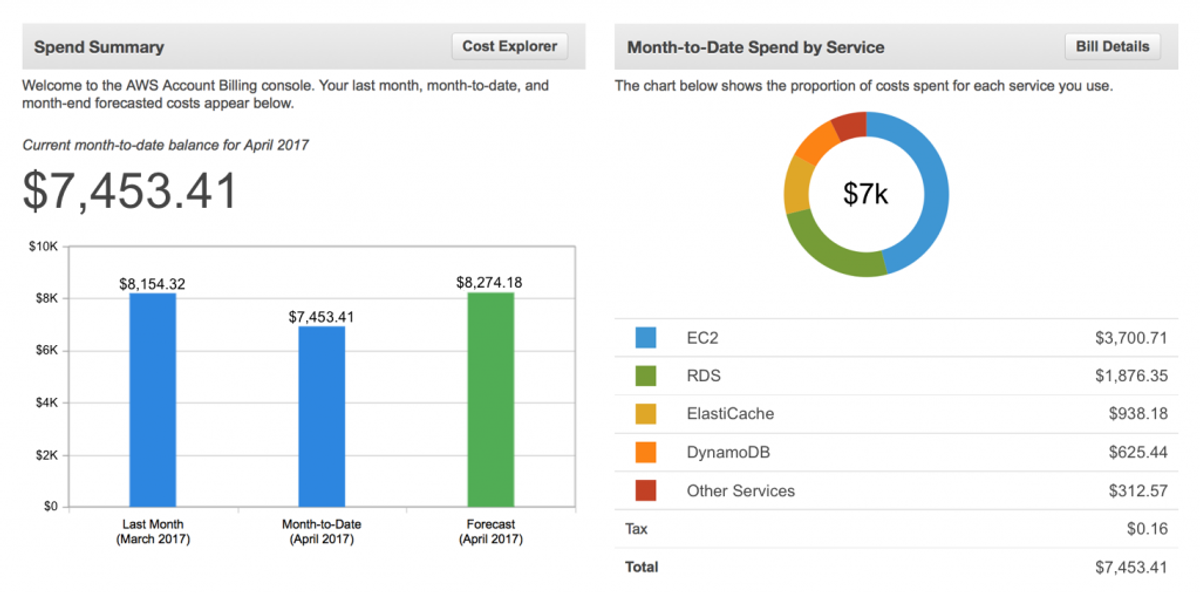
Purpose: This is your main dashboard for understanding how much you're spending and why. It gives you access to current and historical billing data, invoices, and consolidated billing across accounts.
Key Features:
- View and download monthly invoices
- Set up consolidated billing for multiple AWS accounts
- Access and export the AWS Cost and Usage Report (CUR)
- Manage tax settings and payment methods
- View forecasted vs actual charges for the current month
2. AWS Budgets
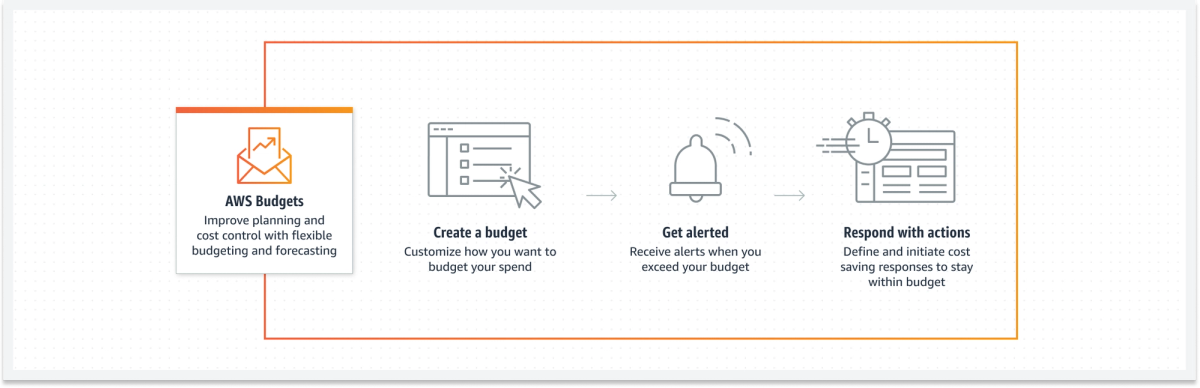
Purpose: AWS Budgets lets you define spending thresholds and monitor your AWS usage against custom limits, helping prevent budget overruns and enabling more disciplined cloud governance.
Key Features:
- Set monthly, quarterly, or annual budgets by cost, usage, or RI/SP coverage
- Get automated alerts via email or Amazon SNS when budgets are breached
- Track actual vs forecasted usage or spend
- Apply budgets to linked accounts, services, or cost allocation tags
- Integrate with AWS Chatbot for budget alerts in Slack or Microsoft Teams
3. AWS Trusted Advisor
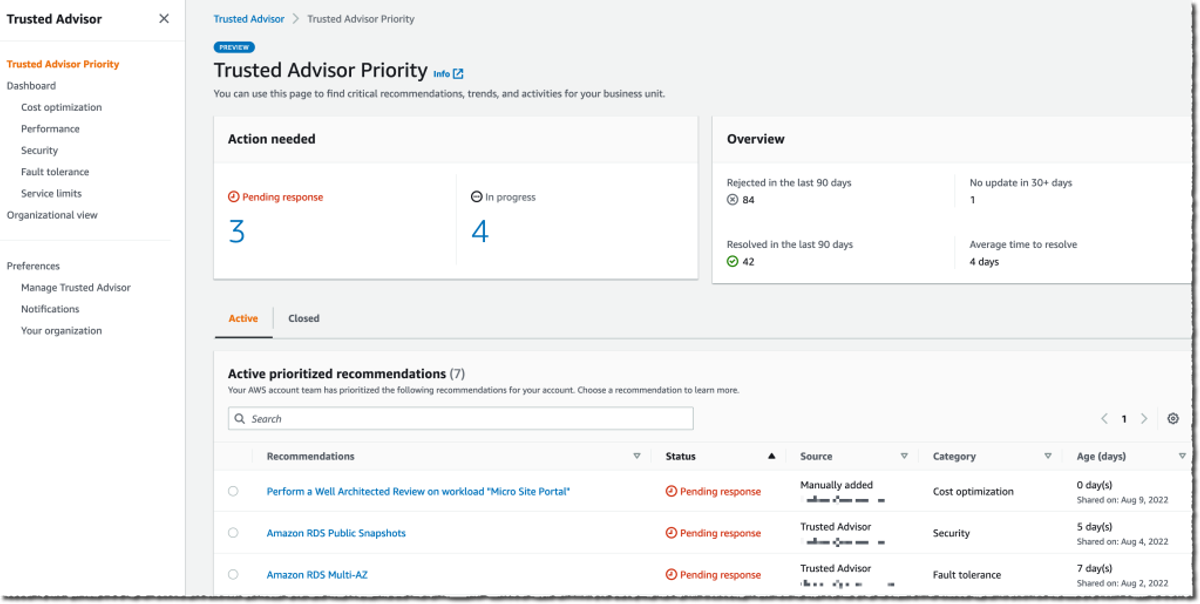
Purpose: Trusted Advisor offers real-time guidance based on AWS best practices. It helps you identify misconfigurations, underused resources, and security risks — with specific checks aimed at reducing unnecessary costs.
Key Features:
- Cost optimization checks (e.g., underutilized EC2, idle load balancers)
- Recommendations to improve performance, fault tolerance, and security
- Priority support customers get access to all Trusted Advisor checks
- Exportable reports for compliance or FinOps reviews
- Works across all linked accounts in AWS Organizations
4. AWS Cost Explorer
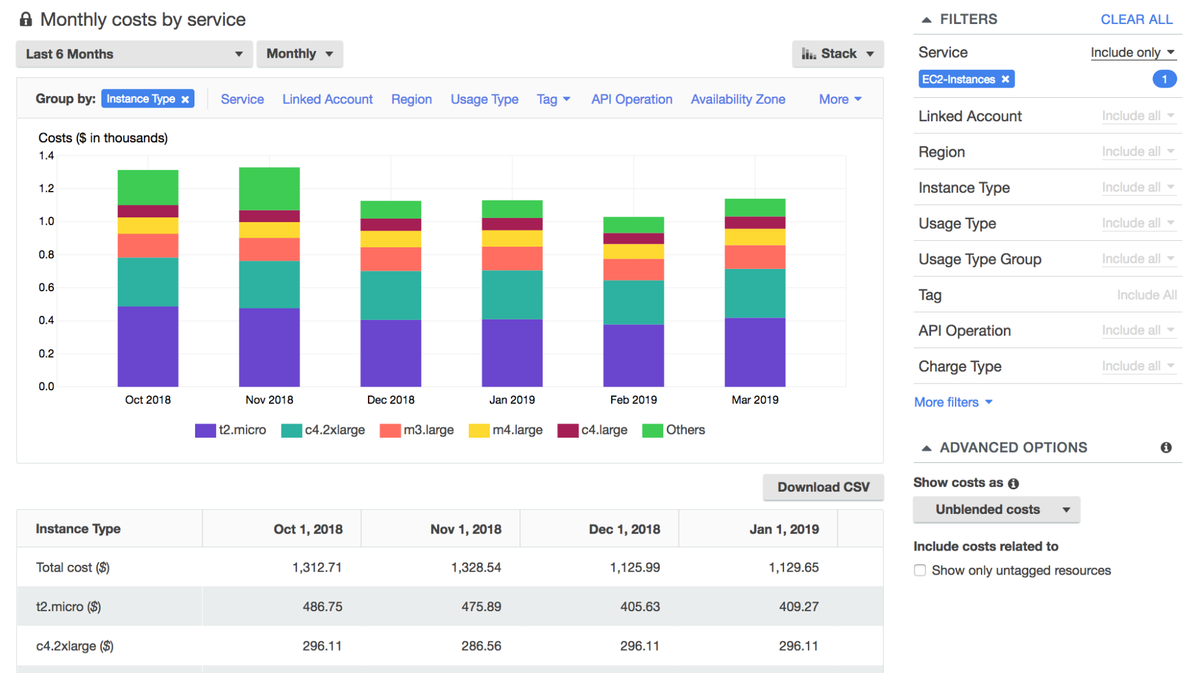
Purpose: Cost Explorer provides detailed visualizations and filtering tools to analyze and forecast AWS costs over time. It helps you understand usage patterns, track cost trends, and optimize resource allocation.
Key Features:
- Interactive dashboards for cost and usage analytics
- Granular filters by service, account, tag, or region
- 13 months of historical usage data
- Forecasting based on historical trends
- View Reserved Instance and Savings Plans utilization and coverage
5. Amazon CloudWatch
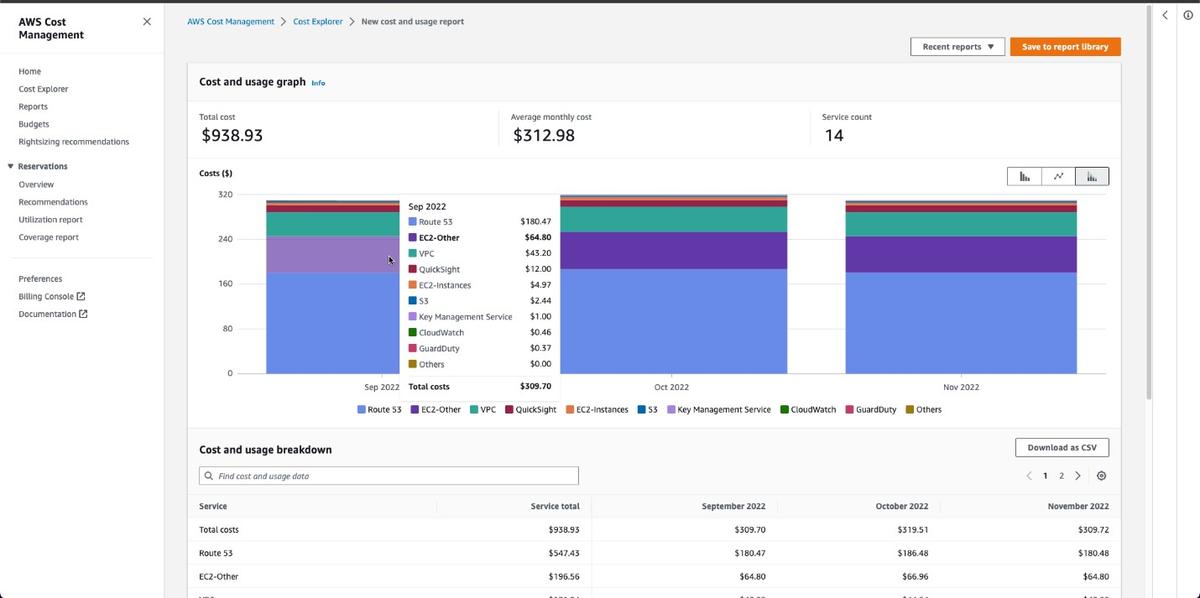
Purpose: While known for monitoring system performance, CloudWatch can also help control costs by tracking custom metrics like resource utilization and triggering automated actions to reduce waste.
Key Features:
- Set alarms on metrics like CPU, memory, and disk I/O to detect over-provisioning
- Use dashboards to visualize trends and anomalies in resource usage
- Automatically shut down or scale resources via CloudWatch Events and Lambda
- Monitor custom cost metrics using embedded billing or usage data
- Integrate with Auto Scaling for performance-cost optimization
Optimize AWS Pricing with nOps
Knowing the pricing models and rates is the easy part — applying the right one to every workload, and keeping that match current as usage shifts across dozens of services, is what most teams don't have the bandwidth to do manually.
If you're not sure whether you're actually on the right pricing model for your workloads, nOps offers a free savings analysis to quantify the benefit you could get by automating your cost visibility and optimization.
- Unified visibility: Get all of your spending from AWS, GCP, Azure, AI, and SaaS in one place, with cost allocation by application, customer, team, or business unit to understand what's driving spend and where optimization will have the greatest impact.
- Commitment Management: Automatically maximize discounts and minimize commitment risk across eligible cloud infrastructure. Customers typically save ~20% by switching to nOps — and with results-based pricing, you pay only when you get better results.
nOps manages $5B+ in cloud spend and was recently rated #1 in G2's Cloud Cost Management category.
Demo
AI-Powered Cost Management Platform
Discover how much you can save in just 10 minutes!
Book a Demo
Frequently Asked Questions
Let's dive into some common questions regarding your AWS pricing strategy and AWS cloud cost drivers.
What are the AWS pricing models?
AWS offers five core pricing models: On-Demand, Reserved Instances, Savings Plans, Spot Instances, and Dedicated Hosts. On-Demand gives full flexibility with no long-term commitment. Reserved Instances and Savings Plans offer significant discounts in exchange for time-based commitments. Spot Instances let you access spare capacity at steep discounts if your workload can tolerate interruptions. Dedicated Hosts provide hardware isolation for compliance or licensing needs.
Which types of pricing policies does AWS offer?
AWS pricing policies support a range of billing strategies — pay-as-you-go, volume discounts, tiered pricing, and a free tier for entry-level usage. These models help businesses scale cost-effectively while only paying for what they use. Tiered and volume pricing apply to services like S3 and CloudFront, while the free tier offers limited resources for testing or new users.
What are the 3 main pricing options with EC2?
EC2 pricing is often summarized as three main options — On-Demand, Reserved Instances, and Spot Instances — but that shorthand leaves out Savings Plans, which are just as commonly used in practice. On-Demand is ideal for short-term or unpredictable workloads. Reserved Instances provide a lower hourly rate in exchange for a 1- or 3-year commitment to a specific instance configuration. Savings Plans offer comparable or better discounts with more flexibility, committing to a dollar-per-hour spend rather than a specific instance type. Spot Instances offer the deepest savings for fault-tolerant workloads that can handle interruptions.
How many types of EC2 are based on pricing models?
There are four EC2 purchasing options based on AWS cloud computing pricing: On-Demand, Reserved Instances, Spot Instances, and Dedicated Hosts or Instances. Each offers a different balance of cost, flexibility, and isolation. On-Demand is best for flexibility, Reserved for long-term savings, Spot for budget-conscious batch or test workloads, and Dedicated for compliance or licensing needs.
What are the different types of AWS Savings Plans?
AWS offers four types of Savings Plans, each trading flexibility for discount depth. Compute Savings Plans apply across EC2, Fargate, and Lambda regardless of instance family, size, region, OS, or tenancy, for up to 66% off — the most flexible option. EC2 Instance Savings Plans apply only within a specific instance family and region, for up to 72% off — the deepest discount, but the least flexibility. SageMaker Savings Plans apply to SageMaker training, inference, and notebook usage for up to 64% off. Database Savings Plans apply across Aurora, RDS, DynamoDB, ElastiCache, DocumentDB, Neptune, Keyspaces, Timestream, and DMS for up to 35% off. Choose Compute for maximum adaptability across compute services, EC2 Instance if your workloads are stable and concentrated in a single family, and SageMaker or Database Savings Plans if those specific services make up a meaningful share of your bill.
AWS Pricing: 5 Models and 10 Popular AWS Services