Top 10 Cloud Cost Allocation Tools for FinOps & SaaS Teams (2026)
Today’s cloud environments span multiple providers, hundreds of services, and thousands of containers — making cost allocation one of the most challenging aspects of cloud financial management.
If you’re struggling to answer “what’s driving our cloud costs?” or “how much does each customer cost us?” — you’re not alone. This guide examines the leading cloud cost allocation tools that can transform your cloud spending from a black box into actionable insights.
What Is Cloud Cost Allocation?
Cloud cost allocation distributes your cloud expenses across different business dimensions. Think of it as breaking down your grocery receipt by family member — except instead of groceries, it’s compute instances, and instead of family members, it’s engineering teams, product features, or customer segments.
The traditional approach relies on tagging resources. You label each EC2 instance, S3 bucket, and RDS database with metadata like “Team: Platform” or “Product: API”. But here’s the reality: most organizations achieve 40-60% tag coverage at best. And that’s before considering Kubernetes pods, auto-scaling groups, and shared resources that resist simple labeling.
Modern allocation tools tackle this differently. They combine multiple data sources — tags, naming conventions, CloudFormation stacks, Kubernetes labels — to automatically categorize costs. The best ones can achieve 100% allocation without requiring perfect tagging hygiene.
Why Cloud Cost Allocation Matters in 2026
Cost allocation is more important than ever in 2026, thanks to a few factors in particular:
FinOps Adoption
Organizations now expect engineering teams to own both the performance and cost efficiency of their services. Engineers make architectural decisions that impact spending — choosing instance types, designing data flows, implementing caching strategies. When they can see the cost impact of these decisions in real-time, they make better choices.
SaaS Unit Economics
For SaaS companies, cloud costs often represent 30-50% of operating expenses. Understanding cost-per-customer is essential for pricing decisions, profitability analysis, and investor conversations. One enterprise customer might drive 10x the infrastructure costs of another, but without proper allocation, you’re flying blind.
Multi-Cloud Complexity
Running workloads across AWS, Azure, and Google Cloud isn’t just technically complex — it’s a financial nightmare. Each provider uses different pricing models, discount mechanisms, and billing structures. A t3.medium in AWS doesn’t map cleanly to a B2s in Azure. Without unified allocation, you’re comparing apples to oranges to whatever Google calls their fruit.
How We Evaluated These Cloud Cost Allocation Tools
We assessed each tool across five dimensions that align with what FinOps practitioners and engineering teams need from a cost allocation platform.
Granular & Accurate Allocation (by Team, Product, Customer)
First and foremost: can the tool allocate 100% of your cloud spend? We tested each platform with real-world scenarios including untagged resources, shared services, spot instances, reserved capacity, marketplace purchases, and data transfer costs. Tools that left significant portions as “unallocated” failed this test.
Automated Tagging & Labeling Support
While we prioritize tools that work without perfect tagging, good tag support still matters. We evaluated how each tool ingests existing tags, handles tag conflicts, provides tag governance, and fills gaps in tag coverage. The best tools treat tags as one data source among many, not the only source.
Kubernetes Cost Allocation
Container cost allocation has become non-negotiable. We tested each tool’s ability to break down costs by namespace, deployment, service, pod, and container. Advanced scenarios included over-provisioned clusters, node inefficiencies, and system overhead allocation. Tools that only provided node-level costs didn’t make the cut.
Multi-Cloud Support
We evaluated multi-cloud capabilities across three dimensions: coverage (which clouds are supported), normalization (how costs are made comparable), and unification (single pane of glass vs. separate interfaces). Tools that required different setups for each cloud provider scored lower.
Real-Time Cost Visibility & Reporting
Evaluate visibility capabilities including:
- Role-based dashboards (engineering vs. finance vs. executive views)
- Anomaly detection that actually catches issues
- Budget tracking with intelligent forecasting
- Showback and chargeback integration with financial systems
- A wide breadth of integrations
Top Cloud Cost Allocation Tools in 2026
The best tools for cost allocation in 2026 include:
nOps (Best Overall)
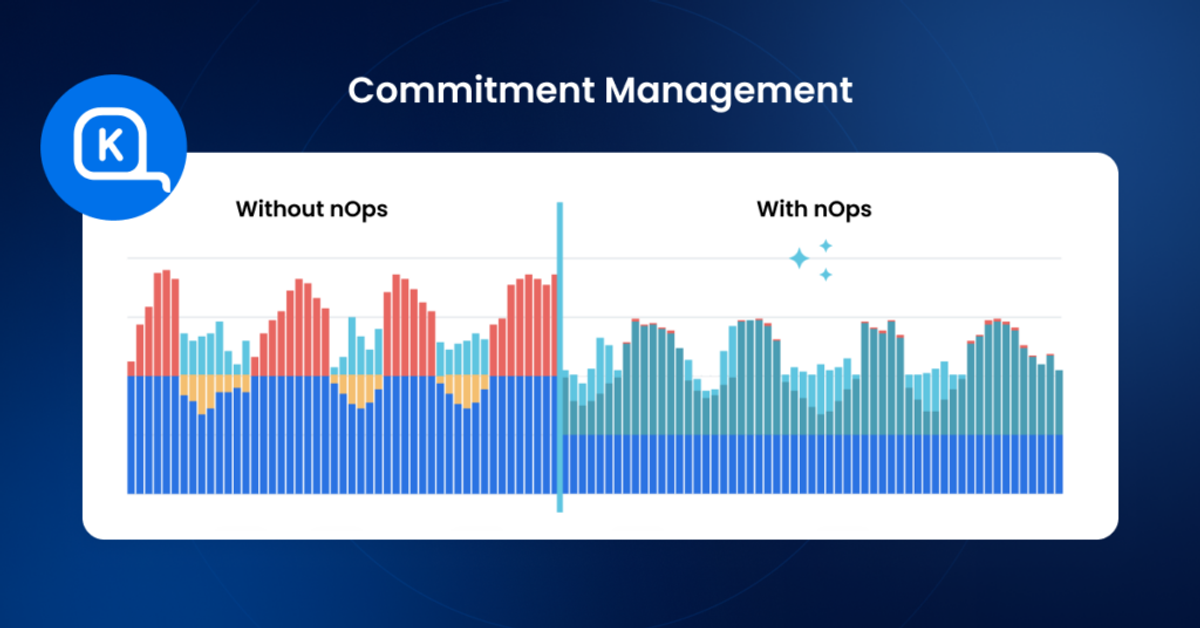
nOps takes a different approach to cost allocation — it’s not just about visibility, but about using that visibility to automatically reduce costs. The platform combines comprehensive allocation with automated optimization, making it ideal for teams that want insights to drive immediate action.
Cost Allocation Capabilities
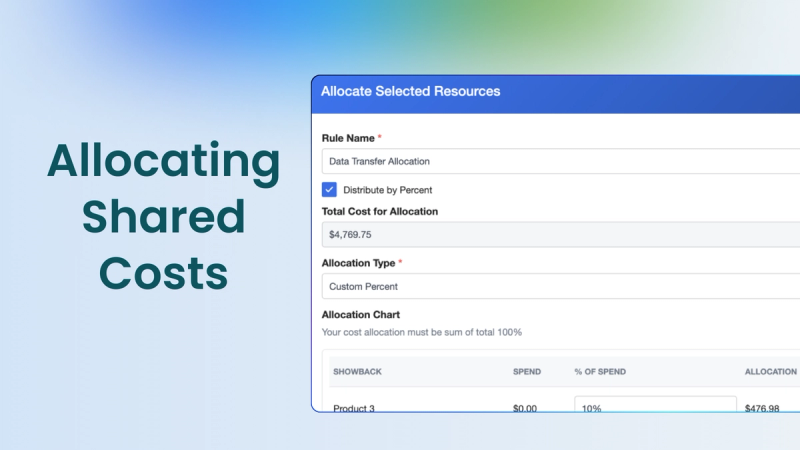
nOps achieves 100% cost allocation without depending on manual tagging .It automatically maps many resources using signals such as CloudFormation metadata, resource naming patterns, and account structure, then lets teams apply allocation rules for shared infrastructure. For Kubernetes and other supported scenarios, nOps can use usage-based signals. For complex scenarios like shared databases or load balancers, nOps provides flexible allocation rules. You can split costs by actual usage metrics, not just arbitrary percentages.
Kubernetes Support
nOps delivers pod-level cost allocation. The platform tracks actual CPU and memory usage, not just requests, identifying where pods are over-provisioned. It surfaces idle capacity in your clusters — those nodes running at 30% utilization because pods requested more resources than they need.
Multi-Cloud Support
Currently, nOps provides full allocation capabilities for AWS, with rate optimization for Azure and Google Cloud.
Best For
Organizations that want cost visibility to drive automated optimization. Particularly valuable for:
- AWS-heavy environments with growing costs
- Teams running significant Kubernetes workloads
- Companies wanting to reduce costs without manual effort
Pros & Cons
Pros:
- Achieves 100% allocation without perfect tagging
- Integrates allocation with automated optimization
- Provides granular container cost visibility
- Reduces costs by 50-60% on average
Cons:
- Full allocation features currently AWS-focused
- Best value comes from using optimization features
Pricing Model
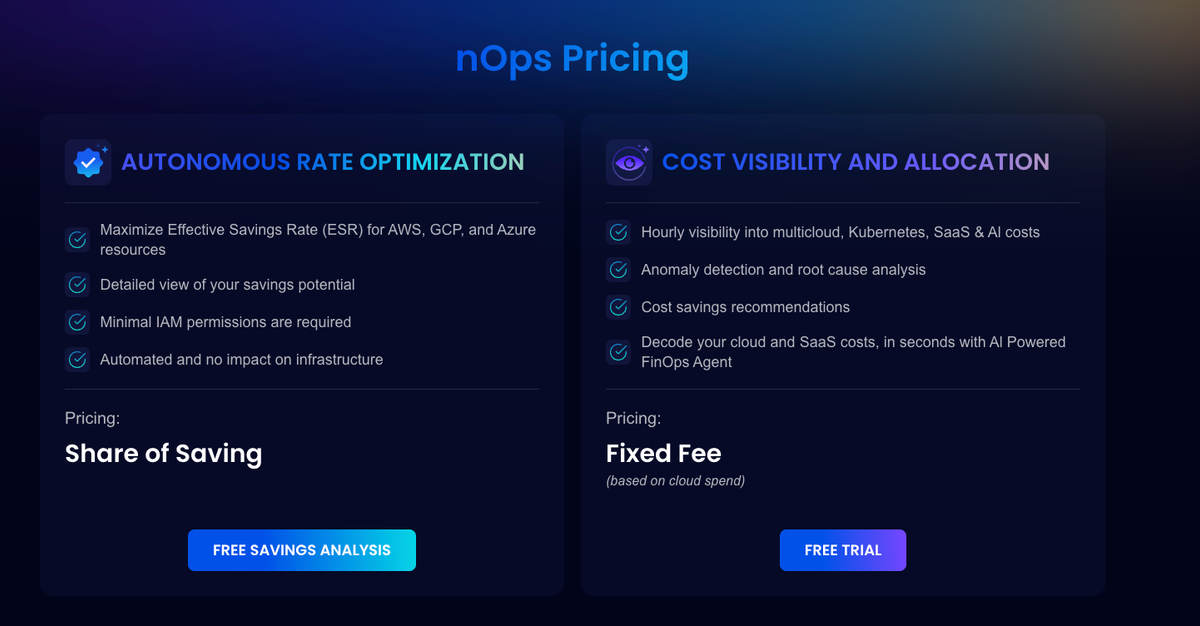
For cost allocation, nOps uses a predictable fixed fee model.
ProsperOps

ProsperOps automates commitment management — purchasing, modifying, and selling RIs and SPs to maximize discount coverage. Its algorithms continuously adjust your commitment portfolio based on usage changes.
Allocation Capabilities
Provides spend allocation reporting showing how commitments are distributed across accounts. However, its primary strength is commitment optimization, not granular cost allocation. Teams needing per-team breakdowns will need a separate tool.
Kubernetes Support
Limited. ProsperOps focuses on compute commitment optimization rather than container-level cost breakdowns.
Multi-Cloud Support
Covers AWS, Azure, and GCP for commitment management, though AWS has the most mature support.
Best For
Teams that want automated commitment management with minimal effort and already have a separate tool for granular allocation.
Pros and Cons
Pros:
- Hands-off RI/SP optimization that adapts to usage changes
- Performance-based pricing aligns incentives with your outcomes
Cons:
- Not a full allocation tool — no container visibility, anomaly detection, or resource optimization
- Limited reporting depth compared to full FinOps platforms
Pricing Model
Savings share — you pay a percentage of the savings generated.
CloudZero
CloudZero positions itself as a cloud cost intelligence platform. Its CostFormation technology uses a code-based allocation model — think Infrastructure as Code, but for cost — to attribute 100% of spend regardless of tag quality.
Allocation Capabilities
CostFormation lets you define allocation rules programmatically, mapping spend to business dimensions without perfect tagging. You can track cost per customer, per feature, or per deployment.
Kubernetes Support
Breaks down costs at the namespace and workload level, including shared infrastructure attribution.
Multi-Cloud Support
AWS is the primary focus. Azure and GCP support exists but is more limited in scope.
Best For
Engineering teams needing unit economics and developer-friendly allocation without depending on clean tags — primarily on AWS.
Pros and Cons
Pros:
- CostFormation allocates 100% of spend without perfect tags
- Unit economics reporting connects cloud costs to business metrics
Cons:
- No native commitment management or other optimization features
- Pricing scales with cloud spend, which gets expensive at volume
Pricing Model
Percentage of monitored cloud spend.
IBM Apptio Cloudability

Now part of IBM, Apptio Cloudability is an enterprise FinOps platform rooted in Technology Business Management (TBM). The 2024 Kubecost acquisition positions it as part of a broader cost management ecosystem spanning Kubernetes monitoring to enterprise IT financial management.
Allocation Capabilities
Cloudability’s TBM-based allocation engine handles complex cost hierarchies — business units, cost centers, shared services — with unit economics and financial planning. The recently launched Report Studio offers faster custom allocation views.
Kubernetes Support
With Kubecost integrated, Container Insights maps cluster resources back to billing data. You can explore usage through nodes, workloads, and containers.
Multi-Cloud Support
Full support for AWS, Azure, and GCP with normalized billing. The platform was built for multi-cloud from the start.
Best For
Large enterprises with complex multi-cloud environments needing TBM-aligned allocation and financial planning — with the budget and implementation time to match.
Pros and Cons
Pros:
- Deep TBM-based allocation for complex enterprise hierarchies
- Strong multi-cloud normalization
- Kubecost integration adds granular Kubernetes visibility
Cons:
- Onboarding takes weeks to months — not a quick deployment
- The IBM ecosystem feels heavy for smaller teams
- Commitment management is recommendations-based, not automated
Pricing Model
Tiered enterprise subscription. Contact IBM/Apptio for pricing.
Harness

Harness CCM is part of the broader Harness software delivery platform, designed to fit into CI/CD workflows. It offers hourly cost visibility, Kubernetes allocation, anomaly detection, and AutoStopping for idle resources.
Allocation Capabilities
Cost Categories define custom allocation rules mapping spend to teams or workloads even with inconsistent tagging. Cost Perspectives provide visual breakdowns by any dimension.
Kubernetes Support
Strong. Cluster, namespace, and workload-level cost visibility with rightsizing recommendations. Integrates directly into Harness deployment workflows.
Multi-Cloud Support
Supports AWS, Azure, and GCP with unified cost views.
Best For
DevOps teams already using Harness for software delivery who want cost management integrated into CI/CD — especially with significant Kubernetes workloads.
Pros and Cons
Pros:
- Free Forever tier supports up to $250K/year in cloud spend
- AutoStopping for non-production environments delivers quick wins
- Strong Kubernetes allocation with rightsizing
Cons:
- Full value requires buying into the broader Harness ecosystem
- Commitment management is limited to recommendations — no automated purchasing
Pricing Model
Free tier for up to $250K/year. Paid tiers scale with spend volume.
Kubecost
Kubecost — now part of IBM following the September 2024 acquisition — is the most widely adopted Kubernetes-specific cost monitoring tool, built on OpenCost, the CNCF open-source project.
Allocation Capabilities
Excels at Kubernetes cost allocation by namespace, label, annotation, or any Kubernetes metadata. Tracks idle resources and sets budgets per team. Doesn’t allocate non-Kubernetes cloud costs — databases, storage, and networking remain outside its scope.
Kubernetes Support
Pod-level visibility, real-time monitoring, rightsizing recommendations, and network cost allocation. OpenCost provides free basic monitoring; enterprise adds multi-cluster support and SAML.
Multi-Cloud Support
Primarily AWS for deep integration. Supports Azure AKS and GCP GKE at the Kubernetes layer, but doesn’t normalize non-Kubernetes spend across providers.
Best For
Platform engineering teams running Kubernetes at scale needing deep pod-level cost visibility — comfortable using a separate tool for non-Kubernetes costs.
Pros and Cons
Pros:
- Deepest Kubernetes cost allocation available — pod-level
- Free OpenCost core; free EKS access through AWS partnership
Cons:
- Kubernetes-only — no coverage for databases, storage, or networking
- No commitment management or RI/SP optimization
- IBM acquisition raises open-source direction concerns
Pricing Model
Free (OpenCost). Enterprise subscription — contact IBM/Apptio for pricing.
Finout
Finout leans heavily on its Virtual Tagging technology — allocating 100% of cloud spend instantly, even for untagged resources. Its MegaBill feature unifies costs from AWS, Azure, GCP, Kubernetes, Databricks, and Snowflake into a single dashboard.
Allocation Capabilities
Virtual Tagging maps spend using rules that reference metadata, account structure, or usage patterns — no clean tags required. On r/FinOps, practitioners note Finout is “really strong when tagging is messy.” Handles shared cost reallocation and unit economics.
Kubernetes Support
Namespace-level allocation integrated with MegaBill. Doesn’t offer pod-level granularity.
Multi-Cloud Support
Covers AWS, Azure, GCP, plus Databricks, Snowflake, Datadog, and other SaaS platforms — broader than most competitors.
Best For
Multi-cloud organizations with messy tagging that need to allocate costs across cloud providers and data platforms quickly.
Pros and Cons
Pros:
- Virtual Tagging allocates spend without clean resource tags
- MegaBill unifies cloud and data platform costs
- Broad SaaS coverage beyond the big three providers
Cons:
- No native commitment management
- Pricing scales with spend, which gets significant at enterprise volumes
- Namespace-level K8s support lacks pod-level depth
Pricing Model
Percentage of managed cloud spend. Contact sales for rates.
CloudHealth by VMware

CloudHealth (now under Broadcom following the VMware acquisition) is one of the longest-running cloud management platforms, using “Perspectives” — customizable views that organize costs by team, project, or environment.
Allocation Capabilities
Perspectives create flexible cost views using tag-based rules and account mappings. The policy engine enforces tagging standards and flags untagged resources. Solid for organizations with mature tagging — but unlike newer tools with virtual tagging, CloudHealth struggles when tags are missing.
Kubernetes Support
Limited. Container cost support lags behind dedicated tools and newer FinOps platforms.
Multi-Cloud Support
Full support for AWS, Azure, and GCP — historically one of CloudHealth’s strengths.
Best For
Large enterprises with mature tagging that need multi-cloud governance — especially those already in the VMware/Broadcom ecosystem.
Pros and Cons
Pros:
- Mature multi-cloud support across all three major providers
- Policy engine enforces governance and tagging standards
Cons:
- Broadcom ownership has created uncertainty around pricing and feature investment
- Heavy tag dependency creates allocation gaps for untagged resources
- Limited Kubernetes support; commitment management is recommendations-only
Pricing Model
Tiered subscription. Contact Broadcom/VMware for pricing.
Vantage
Vantage emphasizes integration breadth — supporting 15+ cloud and SaaS providers including AWS, Azure, GCP, Datadog, Snowflake, MongoDB, and more. Targets engineering-led FinOps teams wanting unified visibility without enterprise complexity.
Allocation Capabilities
Segment-based allocation groups costs by team, environment, or product across connected providers. Handles shared costs, Kubernetes resources, and untagged resources. Chargeback and showback reporting is built in.
Kubernetes Support
Strong. Cluster, namespace, and pod-level cost visibility with rightsizing recommendations. Combines in-cluster and out-of-cluster costs for a complete picture.
Multi-Cloud Support
Primary differentiator — native integrations to the big three plus SaaS platforms like Datadog, Snowflake, New Relic, MongoDB, and Confluent.
Best For
Engineering-led teams in multi-cloud and SaaS-heavy environments needing unified cost visibility with a developer-friendly interface.
Pros and Cons
Pros:
- Broadest provider integration — 15+ cloud and SaaS connectors
- Free tier available; developer-friendly API and Terraform integration
- Pod-level Kubernetes visibility
Cons:
- No native commitment management
- SaaS integration depth is shallower than primary cloud providers on some connectors
- Newer platform with smaller customer base than enterprise incumbents
Pricing Model
Free tier for basic usage. Paid tiers are usage-based. Available on AWS Marketplace.
Densify
Densify uses machine learning to analyze 60+ days of workload patterns and generate rightsizing recommendations with performance buffers. Originally a VM optimization tool, it’s expanded to cover containers and cloud resources across hybrid environments.
Allocation Capabilities
Densify focuses on optimization recommendations that reduce costs before they’re incurred — rather than allocating costs after the fact. It provides cost visibility by resource group and team but isn’t built as a primary showback/chargeback tool.
Kubernetes Support
Container rightsizing recommendations — analyzing resource requests and limits to identify over-provisioned containers. More about optimization than allocation.
Multi-Cloud Support
Covers AWS, Azure, GCP, plus on-premises VMware. Hybrid support makes it relevant for organizations still running significant on-prem workloads.
Best For
Enterprise IT ops teams managing hybrid environments (VMs + containers + cloud) needing ML-driven rightsizing — especially with on-premises VMware infrastructure.
Pros and Cons
Pros:
- ML-based recommendations with performance buffers prevent service degradation
- Hybrid environment support spans cloud and on-prem VMware
Cons:
- Recommendations are advisory only — no automated execution
- Not a cost allocation or chargeback tool
- Interface designed for IT ops rather than FinOps practitioners
- Best features gated behind enterprise contracts
Pricing Model
Enterprise subscription. Contact Densify for pricing.
Native Cloud Tools vs Third-Party Allocation Platforms
Let's say a quick word about when you can get by with a native tool versus a third party platform.
When Native Tools Are Enough
For simple architectures with clear resource ownership, native tools can work:
Small teams with straightforward setups benefit from AWS Cost Explorer, Azure Cost Management, or Google Cloud Billing reports. If you have 50 resources with consistent tags, native tools provide adequate visibility.
Basic tagging needs work when you only need department or environment-level allocation. Native tools handle standard tag propagation and can generate simple reports.
But here’s the reality: most organizations quickly outgrow native tools. As soon as you add containers, multiple accounts, or shared services, native tools show their limitations.
When Third-Party Tools Add Value
Third-party platforms become essential for real-world cloud environments:
Complex SaaS environments need customer-level unit economics that correlate infrastructure costs with application metrics. Native tools can’t bridge this gap.
Multi-cloud setups require normalized costs and unified reporting. You can’t make informed decisions comparing AWS Cost Explorer with Azure Cost Management reports side by side.
Granular allocation needs like container costs, shared service distribution, and untagged resource categorization demand sophisticated logic that native tools lack.
How to Choose the Right Cloud Cost Allocation Tool
Consider the following criteria:
Tagging Maturity Level
Be honest about your tagging reality. If you're below 70% coverage, choose tools with strong automated allocation. nOps and CloudZero excel here. High tag coverage? Traditional tools can leverage your investment, though consider whether maintaining those tags is worth the effort.
Kubernetes-Heavy vs Traditional Workloads
Running significant container workloads? Pod-level visibility is non-negotiable. Kubecost, Harness, and specialized Kubernetes cost tools provide the granularity you need. Still primarily on VMs? Most platforms handle traditional workloads adequately.
Finance vs Engineering Needs
Finance teams prioritize budgeting, forecasting, and chargeback capabilities. CloudHealth and Cloudability excel at financial workflows. Engineering teams need real-time visibility and actionable insights. Harness better serves developer workflows.
The Bottom Line
Perfect cost allocation remains elusive, but modern tools get you close enough to drive real accountability and optimization. The key is choosing a platform that matches your organization's reality — not your aspirations.
For most organizations, nOps provides the best balance of comprehensive allocation and actionable optimization. Its ability to achieve 100% allocation without perfect tagging, combined with automated cost reduction, solves both the visibility and optimization challenges.
You can book a free savings analysis to find out if nOps can help you get more value out of your cloud investments.
nOps manages $5B+ in cloud spend and was recently rated #1 in G2’s Cloud Cost Management category.
Demo
AI-Powered Cost Management Platform
Discover how much you can save in just 10 minutes!
Book a Demo
Frequently Asked Questions
What are cloud cost allocation tools?
Cloud cost allocation tools distribute your cloud provider bills across business dimensions — teams, products, customers, or any grouping that matters to your organization. They transform unified provider invoices into granular spending insights that drive accountability and optimization.
Why is cloud cost allocation important?
Without allocation, cloud costs remain a corporate mystery. Teams can’t take ownership of expenses they can’t see. Products get priced without understanding their true infrastructure costs. Optimization efforts target the wrong areas. Cost allocation enables data-driven decisions and organizational accountability.
What is the difference between tagging and cost allocation?
Tagging is the act of labeling cloud resources with metadata. Cost allocation is the process of using those tags (and other data) to assign costs to business entities. Modern allocation goes beyond tags, using automation to categorize costs regardless of tagging completeness.
Can cloud cost allocation tools work without tags?
Yes, modern platforms like nOps use resource naming patterns, CloudFormation metadata, account structures, and machine learning to automatically allocate costs. While tags remain useful for business context, they’re no longer a hard requirement for effective allocation.