Advanced Azure Commitment Management Strategies
Azure commitments in 2026 aren’t “set it and forget it” anymore. Between EA pricing changes, MCA migration, the uncertainty around reservation exchanges, and the rise of AI commitments, the old playbook can quickly turn into a cost trap.
Most FinOps teams feel this tension. Overcommit, and you’re locked into infrastructure decisions you can’t easily unwind. Stay flexible, and you leave meaningful savings on the table.
In a recent breakdown, we explored how teams are adapting — and the practical strategies emerging as Azure commitment management shifts from a periodic exercise to a continuous optimization problem.
1. The Old Playbook Broke — Here's Why
Three structural changes hit Azure commitment economics within the same window. Any strategy predating them needs a serious revisit.
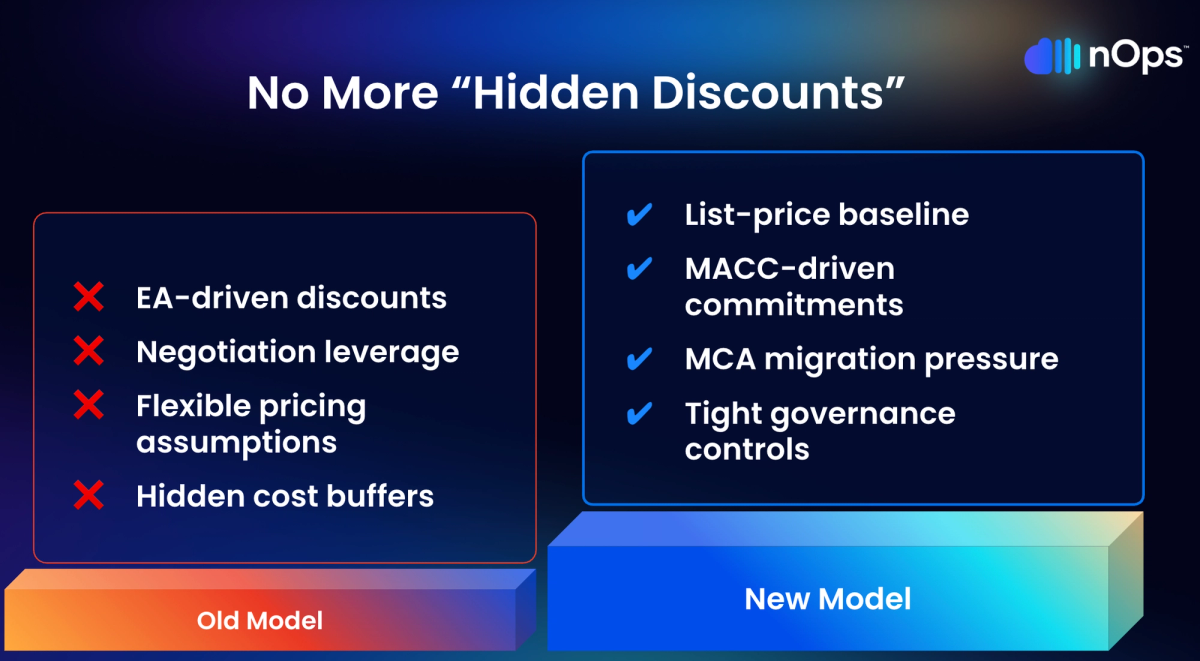
Volume discounts no longer work the same way. Starting in early 2025, Microsoft began moving enterprise customers off EA and onto MCA-E. Under MCA-E, MACC tracks via Azure Plan — not the old monetary commitment model. Teams that assumed discounts would scale naturally with enterprise spend are now working from a baseline that’s lower than they think. Building commitments on top of an inflated baseline creates waste that compounds month over month.
The transition timing matters too. Costs can get stranded on the EA during a period that technically falls within your MACC burn-down window. So any existing reservation or savings plan portfolio needs hands-on review during migration — not just at renewal.
Exchange flexibility lives in limbo. The reservation exchange policy — swap compute reservations across VM series and regions — has been extended “until further notice” as of March 2026. Originally supposed to end in January 2024. Two years of extensions later, nobody can confidently build a multi-year strategy that depends on exchanges being available. That uncertainty alone pushes organizations toward savings plans even when reservations would deliver a better discount — which is its own form of suboptimal behavior.
Bottom line: don’t build any commitment plan that assumes future exchange availability as a fallback. If exchanges vanish while you’re holding three-year reservations you planned to swap, the loss is real and immediate.
New instruments, new complexity. Azure database savings plans allow spend-based commitments across database services — genuine flexibility for teams migrating between database engines or scaling unpredictably. But maximum discounts run lower than reservations, and managing yet another instrument type alongside everything else increases the operational surface. Flexibility isn’t free, and knowing when that flexibility is worth the discount tradeoff requires data most teams don’t have.
2. Match Instruments to Workload Behavior With a Layered Model
Trying to cover all Azure spend with one commitment type is like buying one insurance policy for your car, house, and health. Each risk profile demands a different product. Same logic applies here.
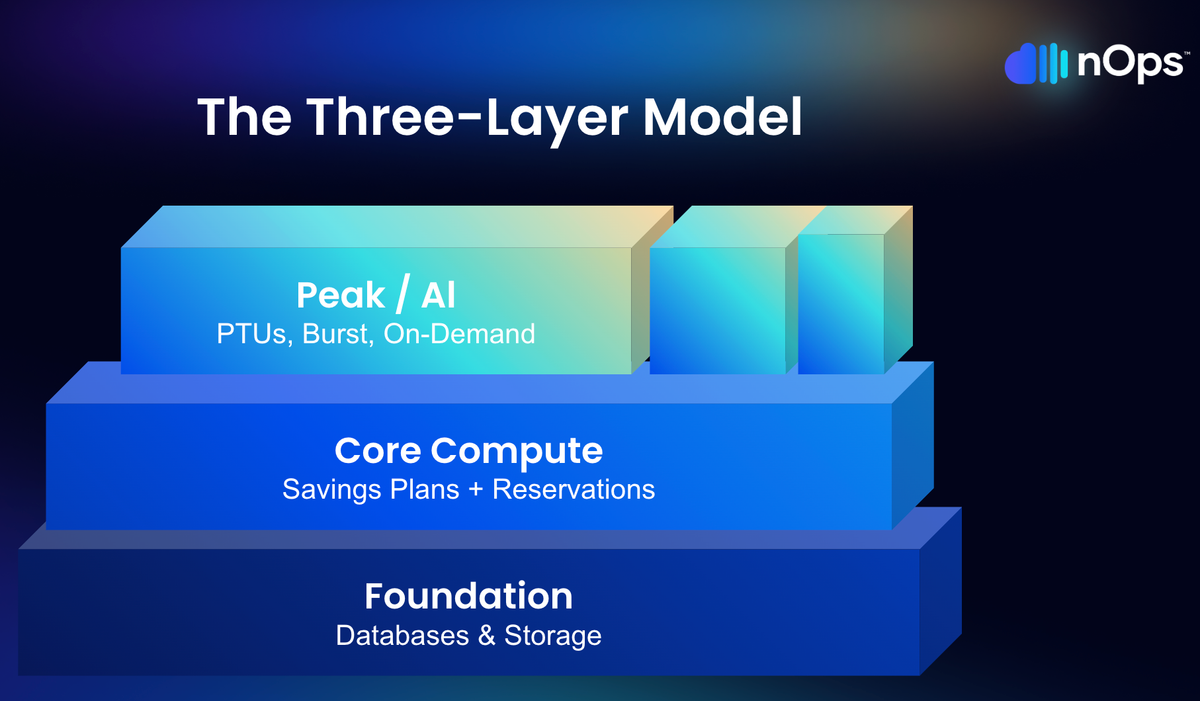
Layer 1 — Databases and storage. Typically the most genuinely stable resources in any Azure environment. SQL Managed Instance running the same tier in the same region for a year? Cosmos DB with predictable throughput? These belong on reserved instances — deepest discounts available, up to 72% on three-year terms. Risk is low because the usage pattern is established.
For teams still evaluating database engines or mid-migration, the new database savings plans buy flexibility to shift across database services within a single commitment. Discount runs lower, but coverage doesn’t break if the underlying technology changes. Decision comes down to stability: know the workload? Reserve it. Still figuring it out? Database savings plan buys time at better-than-on-demand rates.
Layer 2 — Core compute. Your VM fleet, AKS clusters, app services — infrastructure that runs daily but changes shape as teams modernize. Azure savings plans for compute flex across VM families and regions. When engineering swaps out infrastructure (and they will), coverage doesn’t break. Discount rate is lower (typically 15-40%), but the flexibility absorbs infrastructure churn that would make reservations risky.
Layer 3 — Peak, AI/GPU, and on-demand. Burst capacity, experimental GPU deployments, seasonal spikes. Leave this layer uncommitted or use spot instances. Utilization patterns are too volatile for fixed commitments, and the cost of an underutilized GPU reservation dwarfs paying on-demand for a few extra hours per week.
3. Layer Commitments — Stop Letting Everything Expire at Once
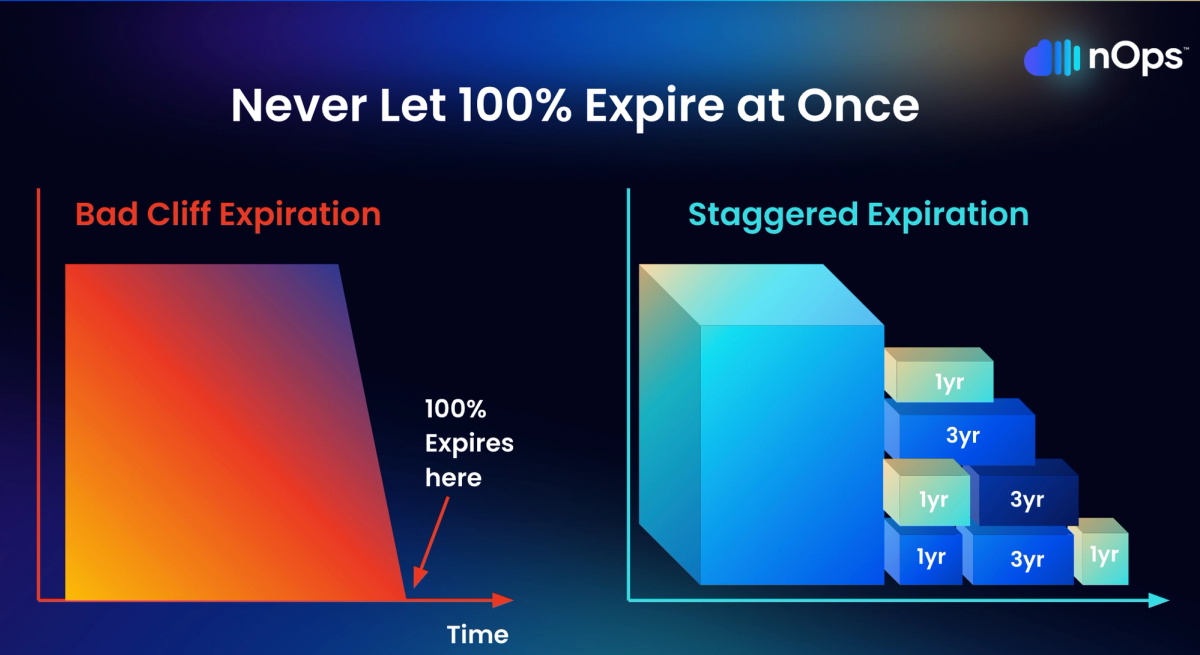
Here’s a scenario that plays out at enterprise organizations more often than anyone admits. The team buys a $10/hour savings plan — sounds modest enough. Monthly, that’s roughly $7,200 committed. Over three years? Approximately $260,000 in total obligation. When it expires, the entire amount drops off at once. The team scrambles to evaluate current usage, get stakeholder buy-in, run analysis, and make a new purchase decision. That process takes four to six weeks at many organizations. Meanwhile, every dollar of compute covered by that expired plan reverts to full on-demand pricing.
Layering eliminates this cliff. Instead of one bulk purchase, commitments get bought in smaller increments — monthly or quarterly — each right-sized to current usage rather than projections that started drifting the day they were created.
Why this works:
- Multiple decision points per year instead of one high-stakes annual bet
- Each purchase reflects the latest actual usage — not a forecast from six months ago
- Natural adjustment mechanism — when demand drops, the expiring slice simply doesn’t get renewed
- Lower exposure per decision — a miscalculation on one monthly tranche costs a fraction of what a misjudged annual purchase costs
The tradeoff is operational overhead. Layering requires continuous monitoring and more frequent purchasing cycles, which is straightforward with automation but unrealistic to do manually.
4. Automate Commitment Management — Manual Processes Can’t Keep Pace
Azure has over thirty products eligible for commitment discounts. Each carries different terms, savings rates, and flexibility profiles. Layer in varying usage across accounts, layer expiration schedules, the EA-to-MCA transition, and an exchange policy on borrowed time — and the sheer data volume required for sound decisions exceeds what periodic manual reviews can process.
Here’s the real issue though: manual processes don’t just slow you down. They produce worse decisions. A quarterly review works from usage snapshots that are already weeks old by the time anyone looks at them. Between cycles, migrations happen. Teams adopt new services. Workloads move regions. An AI pilot quietly turns into a production deployment. By the time the next review catches up, you’ve been overcommitted or undercommitted for weeks — and the money is already gone.
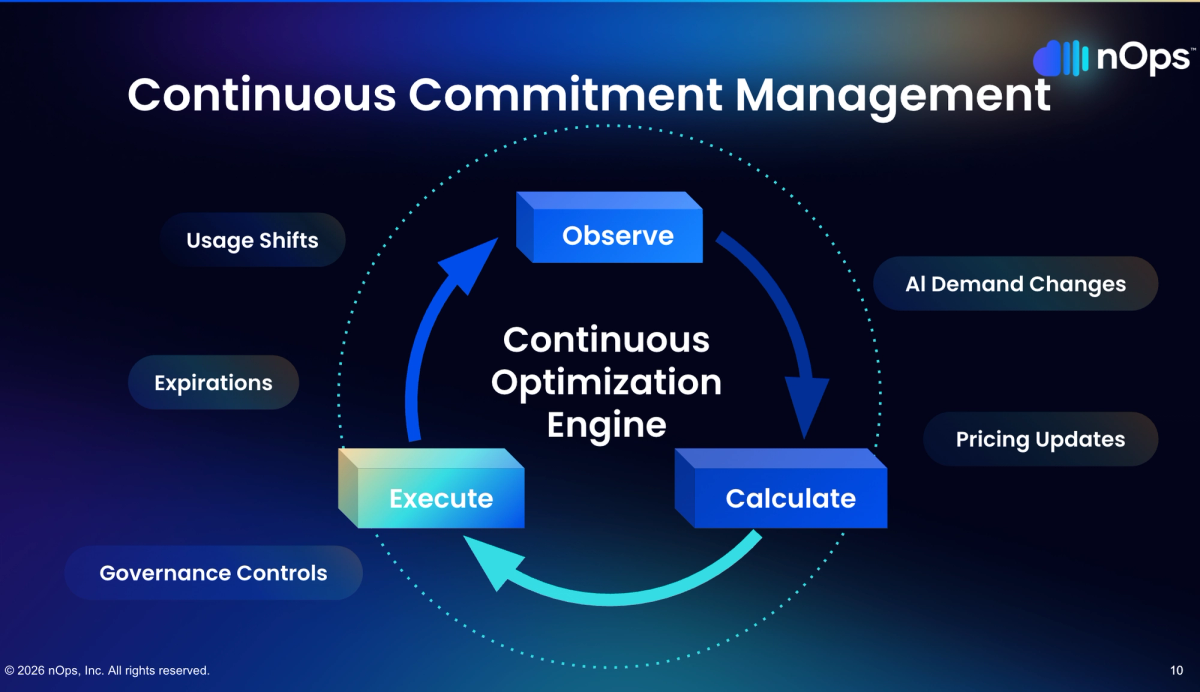
What effective commitment automation actually looks like is a tight observe-calculate-execute loop running continuously: track real-time usage across the Azure environment, compute optimal allocation against existing commitments and their expiration schedules, then execute adjustments before inefficiencies pile up. Daily minimum.
Two places where the gap between automated and manual management shows up clearly. First, effective savings rate — automated systems close coverage gaps faster between commitment expirations and renewals, meaning less time bleeding on-demand rates. Second, risk containment — automated systems catch utilization drops and can trigger exchanges or let commitments expire before waste accumulates. Manual teams typically discover these problems a month or two after the dollars have walked out the door.
AWS recently launched AI-powered cost analysis in Cost Explorer — a sign that the whole industry recognizes this complexity problem. Azure’s native tools offer reservation recommendations and cost analysis, but the distance between what native tooling surfaces and what a mature commitment practice actually needs is where dedicated platforms earn their keep.
5. Stop Treating Delay as a Low-Risk Option
If a savings plan covering $100,000 in monthly compute was delivering 30% savings, and that plan expires while the team spends four weeks deciding on the replacement, the organization gives up roughly $30,000. One month of indecision on a single commitment. Scale that across a portfolio with multiple expirations and the numbers get uncomfortable fast.
The most common commitment management failure is not a bad purchase. It is the absence of any purchase. Teams wait for perfect visibility into their environment. They wait for the migration to finish. They wait for one more month of usage data. They wait for alignment across finance, engineering, and procurement. And while they wait, every hour of compute runs at full on-demand pricing.
Microsoft’s guidance acknowledges this dynamic, recommending that organizations trade in underutilized reservations for savings plans rather than letting coverage lapse during evaluation periods.
The layering model addresses this anxiety directly. Nobody is asking for a commitment to 100% of spend on day one. Start with the stable baseline — workloads that have been consistent for three or more months. Cover Layer 1 first, then the predictable portion of Layer 2. Build upward as usage patterns clarify. A slightly conservative initial commitment captures most of the available savings while leaving room to adjust. No commitment at all captures zero.
6. Handle AI and GPU Workloads Differently
AI spend is a new commitment category that most organizations are still figuring out. GPU instances are among the most expensive resources in any Azure environment, and the usual commitment logic does not transfer cleanly.
The key distinction: inference workloads and training workloads have fundamentally different commitment profiles.
Production inference — models running 24/7 serving predictions — is steady-state by nature. This is Layer 1 behavior. Reserve the proven baseline with one-year commitments (or three-year if the model and infrastructure are locked in).
Training workloads are inherently bursty. Two-week sprints, weekend batch jobs, experimental runs that may never repeat. Committing to GPU capacity for training before accumulating several months of utilization data is a gamble with expensive downside. The breakeven on GPU reserved instances typically occurs around 60-70% utilization — below that, on-demand is cheaper.
Practical approach for AI commitments:
- Separate inference and training in cost analysis — do not lump them together
- Reserve proven inference baselines with one-year terms
- Keep training on-demand until you have six-plus months of consistent utilization data
- Monitor GPU utilization closely — underutilized GPU reservations are among the most expensive waste in cloud environments
- Account for hardware evolution — if the team might shift GPU families, reservations tied to specific SKUs carry migration risk
How nOps Manages Azure Commitments
We built our Azure Commitment Management around the same principles outlined in this article — automated layering, blended resource-based and Savings Plans, and hourly observe-calculate-execute cycles.
- Hourly automated layering. We purchase commitments in small, right-sized increments based on real-time usage — not quarterly reviews or annual forecasts. Commitments expire on a rolling basis, creating continuous adjustment points without manual intervention.
- Blended coverage. Our platform maps workloads to optimal commitment types — resource-based for stable workloads, flex for dynamic compute — maximizing the blended savings rate across the entire Azure environment.
- Proactive risk management. We adjust the layering before waste happens, not after. When usage patterns shift, coverage adjusts automatically — no fire drills, no renewal cliffs, no blocker conversations with engineering.
In 2026, “good enough” means you’re likely leaving money on the table. The target: capture 90th-percentile savings rates while keeping average commitment lock-in under six months. We’ve talked to companies that can save millions on their cloud bills by switching to nOps from competitors.
There’s no risk to book a free savings analysis to find out if nOps can help you get more value out of your cloud investments.
nOps manages $5B+ in cloud spend and was recently rated #1 in G2’s Cloud Cost Management category.
Demo
AI-Powered Cost Management Platform
Discover how much you can save in just 10 minutes!
Book a Demo