

AWS Pricing: 5 Models and 10 Popular AWS Services
AWS is built for flexibility — but that flexibility can be a double-edged sword when it comes to pricing. With so many options like On-Demand, Reserved Instances, Savings Plans, and Spot Instances, it's easy to overspend if you don't pick the right model for your workloads.
This guide breaks down how AWS pricing actually works, the trade-offs between the main models, and how to choose the right combination — based on your workloads, how mature your cloud practices are, whether you have FinOps support, and how much time your engineering team can realistically invest in optimization.
5 AWS Pricing Models
Here is how the five different pricing models work and why you should or should not choose them:
On-Demand
On-Demand pricing is the default model for most AWS users — and for good reason. You only pay for the compute you use, billed by the second or hour, with no upfront commitments. It's great for getting started, experimenting, or handling unpredictable workloads.
But while it offers maximum flexibility, it can also be the most expensive option if used long-term or at scale. Without any commitment, you miss out on significant discounts — and costs can add up quickly if instances aren't right-sized or properly managed.
Spot Instances
Spot Instances offer the deepest discounts on AWS — up to 90% compared to On-Demand pricing. They're ideal for stateless, fault-tolerant workloads like CI/CD pipelines, batch jobs, or loosely coupled web servers that can handle interruptions. The trade-off? Spot capacity isn't guaranteed. AWS can reclaim your instance at any time with just a two-minute warning, so it's not a fit for anything that can't tolerate disruption.
For teams running containerized workloads in EKS or Auto Scaling Groups, intelligent workload placement tools can automatically blend Spot with On-Demand capacity to maximize savings while maintaining reliability. This approach removes the manual effort of managing Spot interruptions.
Reserved Instances
Reserved Instances (RIs) offer up to 72% savings compared to On-Demand pricing — but in exchange for a 1- or 3-year commitment. You can choose to pay nothing upfront, partially upfront, or all upfront. RIs are easier to manage than Spot Instances and don't come with interruption risks. But they're rigid: once you commit, you're paying for that capacity whether you use it or not, which can lead to wasted spend if your needs change.
RIs provide discounted pricing for matching EC2 usage. Regional RIs provide a billing discount, while Zonal RIs also reserve capacity in a specific Availability Zone. That makes them ideal if you have predictable, steady-state workloads — but it also means they don't adapt well to workload changes, migrations, or architectural shifts.
Savings Plans
Savings Plans offer similar discounts to Reserved Instances — up to 72% — in exchange for a 1- or 3-year commitment. But instead of locking into a specific instance type or region, you commit to a consistent dollar-per-hour spend, which AWS automatically applies across compatible services. This makes them more flexible than RIs and often easier to manage.
There are two types of Savings Plans:
- Compute Savings Plans: Apply across EC2, Fargate, and Lambda. They offer the most flexibility because they work regardless of instance family, size, region, OS, or tenancy. If you change instance types or move workloads across regions, your discount follows.
- EC2 Instance Savings Plans: Apply only to EC2 instances within a specific instance family (e.g., M5, C6g) in a chosen region. They offer slightly higher discounts than Compute Savings Plans, but with less flexibility. If you change instance families or regions, your savings don't transfer.
Unlike RIs, which reserve capacity for specific instance types, Savings Plans are more like a commitment to spend — with coverage applying across compute services. But just like RIs, if you exceed your committed hourly spend, the extra usage is billed at On-Demand rates. That means you still need to track usage patterns carefully or risk surprise overages. Learn more about optimizing Savings Plans and Reserved Instances.
Dedicated Hosts
Dedicated Hosts give you access to an entire physical server, which can help meet compliance, licensing, or security requirements that demand hardware isolation. AWS handles the infrastructure management, so you still avoid the operational overhead of traditional on-prem. While they're significantly more expensive than other pricing models, Dedicated Hosts are often used by large enterprises that need control over instance placement, bring-your-own-license (BYOL) scenarios, or consistent hardware allocation.
AWS Pricing for Top 10 AWS Services
AWS pricing varies widely by service and depends on factors like usage type, region, storage class, data transfer, and more. While it's not practical to cover every variable, here's a breakdown of how pricing works for ten of the most commonly used AWS services — and what to watch out for when estimating costs.
1. Amazon Simple Storage Service (S3)
S3 pricing depends on several factors: the AWS region, the storage class (e.g., Standard, Infrequent Access, Intelligent-Tiering, Glacier), the volume of data stored (per GB per month), the number and type of requests (PUT, GET, etc.), and the amount of data transferred out of AWS. Costs can add up quickly with high request rates or cross-region transfers.
For long-term storage optimization, consider S3 Intelligent-Tiering or lifecycle policies that automatically move objects to cheaper storage classes when access patterns change. Read our comprehensive guide to AWS S3 cost optimization for more best practices.
2. Amazon EC2 (Elastic Compute Cloud)
The most used service is definitely Amazon EC2. Its pricing is premised on compute instance types (General Purpose, Compute Optimized, Memory Optimized, Accelerated Computing, and Storage Optimized), the number of seconds instance is being run, and operating systems for Windows instances. The pricing models involve On-Demand, Reserved Instance, Spot Instance, and Savings Plans.
EC2 is where commitment discounts (RIs and Savings Plans) have the biggest impact. Teams that combine intelligent workload placement with adaptive commitment strategies typically see 50%+ savings on compute. Learn more in our ultimate guide to Amazon EC2 pricing.
3. Amazon EBS (Elastic Block Store)
Amazon EBS works a bit differently. The cost varies according to the amount and duration of storage used (GB per month), snapshots storage that is priced separately, amount of data to be transferred outside EC2, type of EBS volume to be employed (General Purpose SSD, Provisioned IOPS SSD, HDD) and for high performance provisioned IOPS volume (I/O Operations Per Second (IOPS)).
Unused or orphaned EBS volumes are a common source of waste. Make sure you're regularly auditing and deleting volumes no longer attached to running instances.
4. Amazon RDS (Relational Database Service)
RDS is amongst the essentials that major businesses have been utilizing for years. And, the factors affecting its pricing are the database engine (MySQL, PostgreSQL, MariaDB, Oracle, SQL Server), availability zone for deployment, instance types (General Purpose and Memory Optimized), data units to be transferred, and availability of a backup.
RDS instances qualify for Reserved Instance pricing, which can provide significant savings if you have long-running production databases with predictable usage.
5. AWS Lambda
Lambda charges are based on the number of invocations, the duration of each function (measured in GB-seconds), the amount of memory allocated, and any provisioned concurrency. It's a cost-effective option for event-driven workloads — but frequent executions or large memory allocations can drive up costs.
Compute Savings Plans apply to Lambda, making them a good fit if you have consistent serverless workloads alongside EC2 usage. Explore our Lambda cost optimization guide to learn how to cut serverless costs by 30-60%.
6. Amazon CloudFront
CloudFront is AWS's content delivery network (CDN). Pricing is based on data transfer out to the internet, number of HTTP/HTTPS requests, region-specific transfer rates, and optional features like real-time logs or dedicated IP SSL. The more geographically distributed your users, the more variance you'll see in cost.
7. Amazon DynamoDB
DynamoDB pricing depends on the read/write capacity mode you choose — on-demand or provisioned. You'll also pay for data storage (per GB), data transfer out, optional features like DynamoDB Streams, backups, and global table replication. On-demand mode is easier to manage, but can be more expensive under heavy or predictable loads.
8. Amazon EKS (Elastic Kubernetes Service)
EKS charges a flat fee per cluster per hour, plus the cost of the EC2 instances or Fargate pods running your workloads. You'll also incur standard data transfer and storage charges for attached services like EBS or S3. Pricing complexity increases with the number of nodes, worker types, and managed add-ons.
Container workloads benefit significantly from intelligent workload placement strategies that blend Spot and On-Demand capacity while maintaining uptime. Check out our guide to mastering Spot in EKS.
9. AWS Glue
Glue is AWS's serverless data integration and ETL service. You're charged per Data Processing Unit (DPU) hour, billed per second. Costs are also tied to the number of crawlers, data catalog storage, and the type of job (e.g., streaming vs batch). Large-scale data processing jobs can accumulate significant runtime costs.
10. Amazon API Gateway
API Gateway pricing is based on the number of API calls (requests), data transfer out, and whether you use REST, HTTP, or WebSocket APIs. Additional charges apply for caching, custom domain names, and private API endpoints. Costs can grow quickly with high-volume workloads or chatty microservices.
AWS Cost Management Tools
AWS offers a suite of tools designed to help organizations monitor, manage, and optimize their cloud costs. Here are the five most important and how they can help:
1. Billing and Cost Management Console
Purpose:
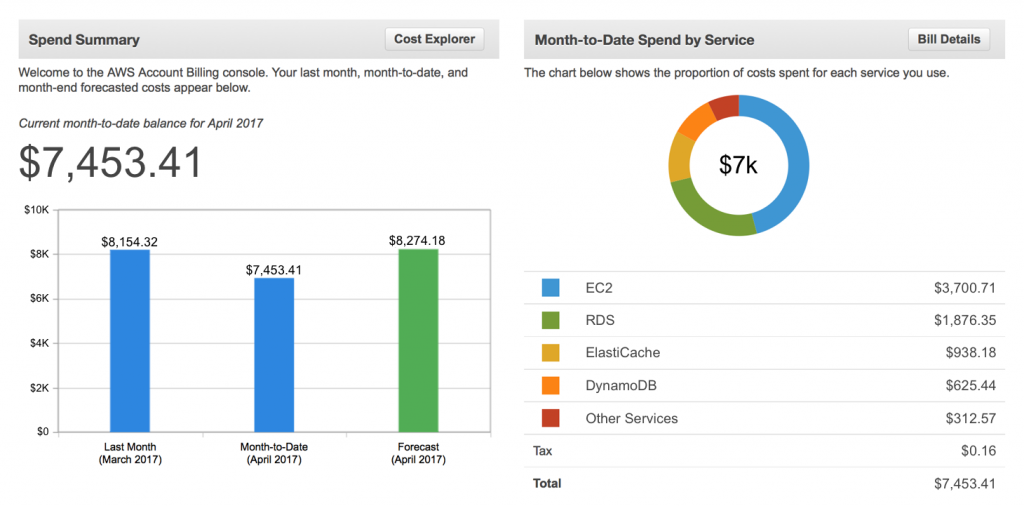
This is your main dashboard for understanding how much you’re spending and why. It gives you access to current and historical billing data, invoices, and consolidated billing across accounts.
Key Features:
- View and download monthly invoices
- Set up consolidated billing for multiple AWS accounts
- Access and export the AWS Cost and Usage Report (CUR)
- Manage tax settings and payment methods
- View forecasted vs actual charges for the current month
2. AWS Budgets
Purpose:
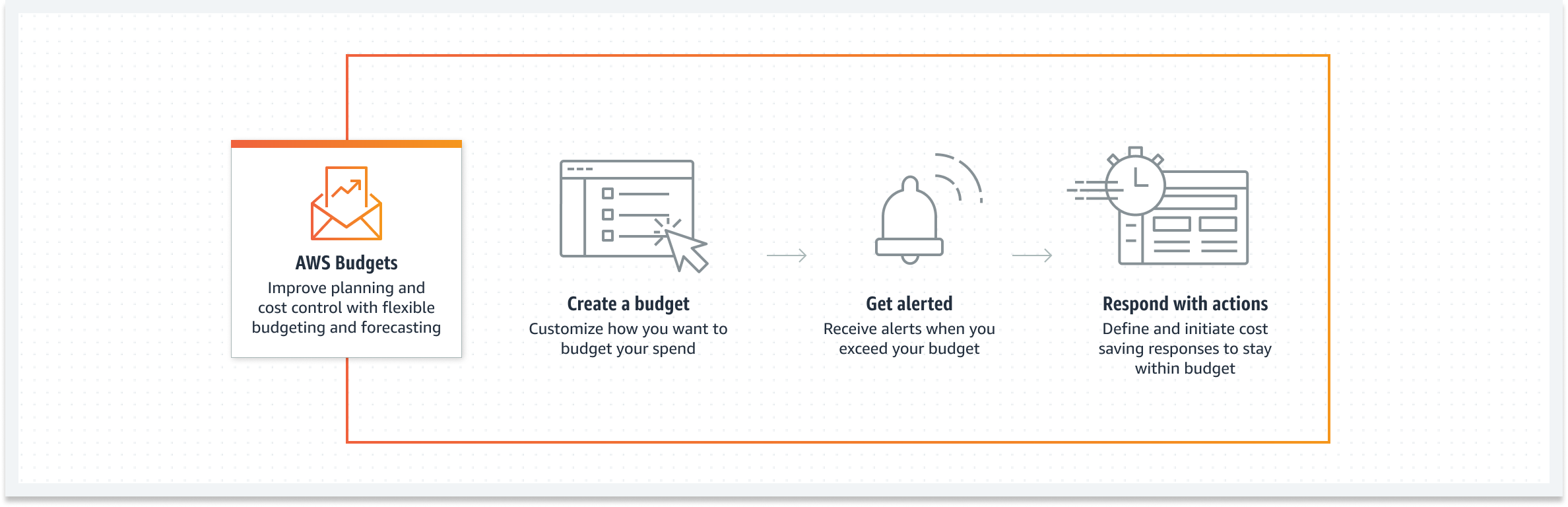
AWS Budgets lets you define spending thresholds and monitor your AWS usage against custom limits, helping prevent budget overruns and enabling more disciplined cloud governance.
Key Features:
- Set monthly, quarterly, or annual budgets by cost, usage, or RI/SP coverage
- Get automated alerts via email or Amazon SNS when budgets are breached
- Track actual vs forecasted usage or spend
- Apply budgets to linked accounts, services, or cost allocation tags
- Integrate with AWS Chatbot for budget alerts in Slack or Microsoft Teams
3. AWS Trusted Advisor
Purpose:
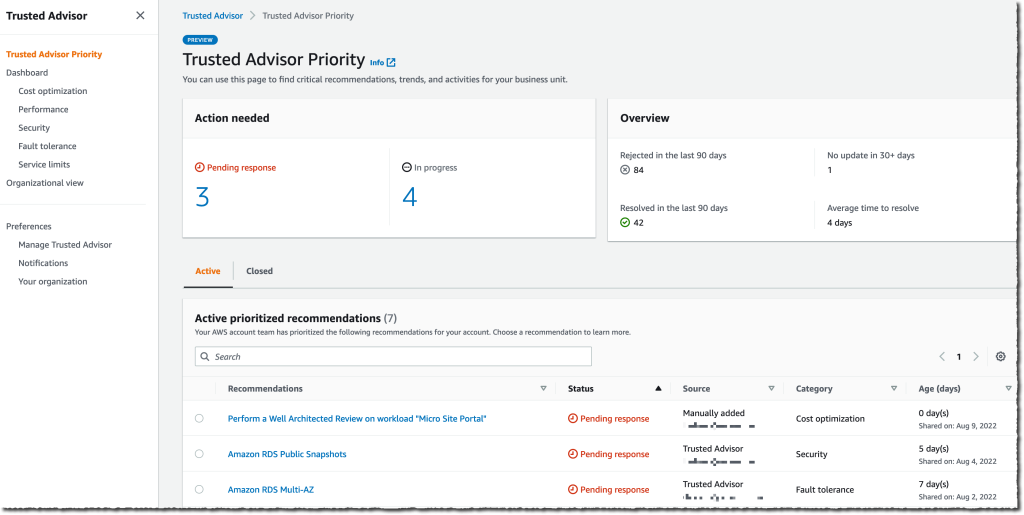
Trusted Advisor offers real-time guidance based on AWS best practices. It helps you identify misconfigurations, underused resources, and security risks — with specific checks aimed at reducing unnecessary costs.
Key Features:
- Cost optimization checks (e.g., underutilized EC2, idle load balancers)
- Recommendations to improve performance, fault tolerance, and security
- Priority support customers get access to all Trusted Advisor checks
- Exportable reports for compliance or FinOps reviews
- Works across all linked accounts in AWS Organizations
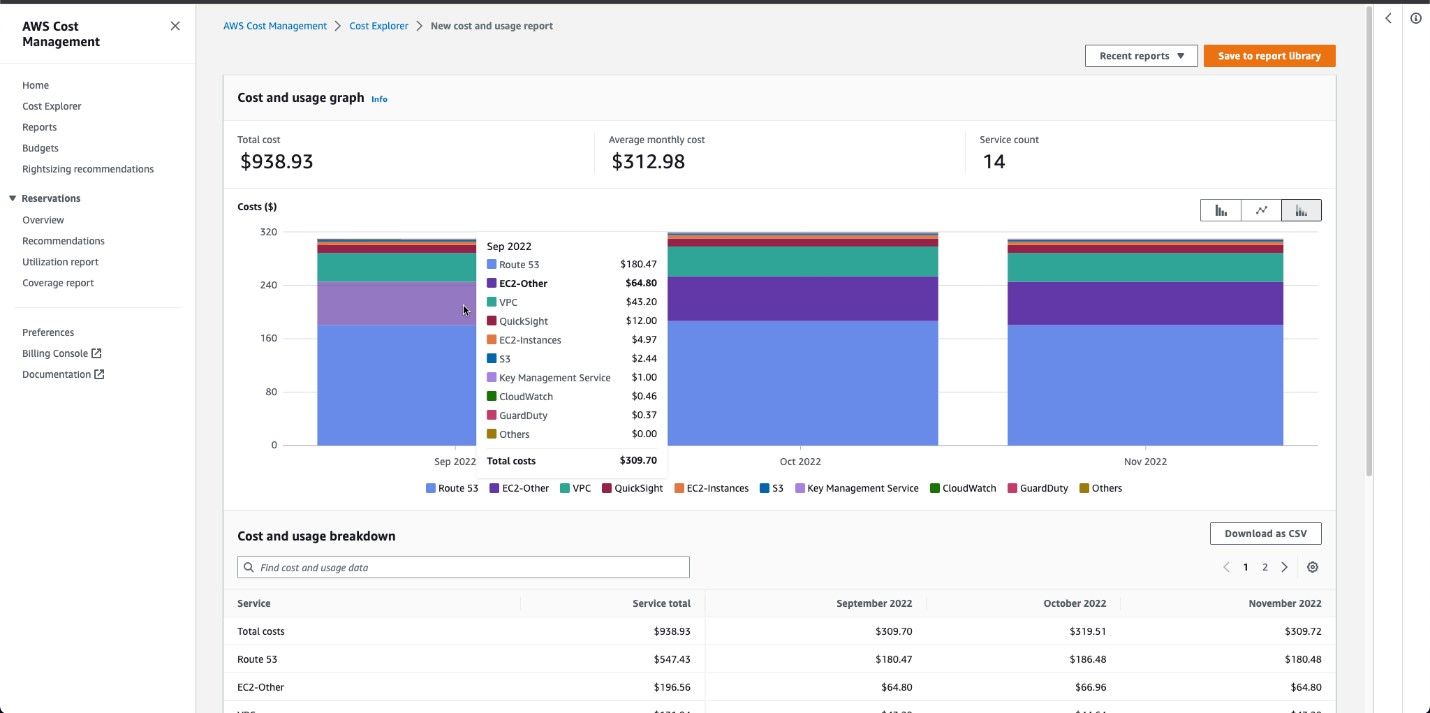
4. AWS Cost Explorer
Purpose:
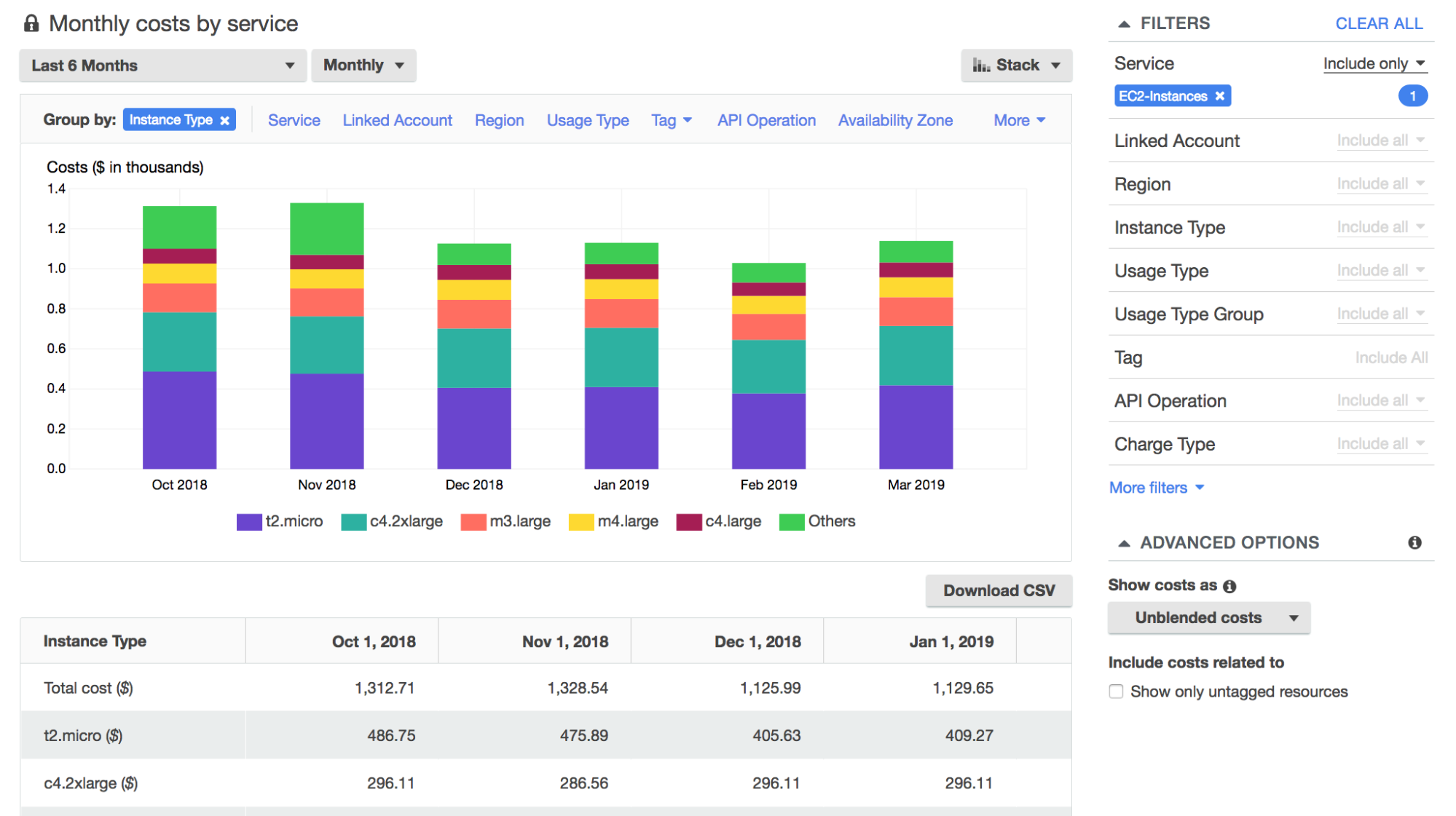
Cost Explorer provides detailed visualizations and filtering tools to analyze and forecast AWS costs over time. It helps you understand usage patterns, track cost trends, and optimize resource allocation.
Key Features:
- Interactive dashboards for cost and usage analytics
- Granular filters by service, account, tag, or region
- 13 months of historical usage data
- Forecasting based on historical trends
- View Reserved Instance and Savings Plans utilization and coverage
5. Amazon CloudWatch
Purpose:
While known for monitoring system performance, CloudWatch can also help control costs by tracking custom metrics like resource utilization and triggering automated actions to reduce waste.
Key Features:
- Set alarms on metrics like CPU, memory, and disk I/O to detect over-provisioning
- Use dashboards to visualize trends and anomalies in resource usage
- Automatically shut down or scale resources via CloudWatch Events and Lambda
- Monitor custom cost metrics using embedded billing or usage data
- Integrate with Auto Scaling for performance-cost optimization
How to Optimize Your AWS Pricing Strategy
Choosing the right AWS pricing model isn't a one-time decision — it's an ongoing process that evolves with your workloads and business needs. Here's how to build an effective strategy:
Start with visibility
Before you can optimize, you need to understand where your money is going. Use AWS Cost Explorer and cost allocation tags to identify your biggest cost drivers by service, account, and environment. Most organizations find that 80% of their spend comes from EC2, RDS, and data transfer.
Right-size your resources
On-Demand flexibility comes at a premium, so make sure you're not overpaying for oversized instances. Review CPU, memory, and disk utilization in CloudWatch and right-size instances before layering in commitments. Even a 10% reduction in instance size can deliver meaningful savings.
Layer in commitments strategically
Don't buy commitments upfront in bulk. Start with your most stable workloads — databases, always-on application servers, and production environments with predictable usage. Use Compute Savings Plans if your workloads span EC2, Lambda, and Fargate. Use EC2 Instance Savings Plans if you have steady-state compute in a single instance family.
The best commitment strategies are adaptive: they adjust incrementally as usage patterns shift, rather than locking in large, static purchases that create risk.
Leverage Spot for fault-tolerant workloads
Batch jobs, CI/CD pipelines, and stateless services are great candidates for Spot Instances. For EKS or Auto Scaling Groups, intelligent workload placement can automate the blend of Spot and On-Demand capacity, so you get the savings without the operational overhead.
Monitor and adjust continuously
AWS pricing evolves, and so do your workloads. Set up budget alerts, track commitment utilization, and review your strategy quarterly. Organizations that treat cost optimization as a continuous practice — not a one-time project — see sustained savings over time.
Optimize AWS Pricing with nOps
If you're trying to choose the right AWS pricing model — or avoid overspending on the wrong one — nOps helps you optimize smarter and manage commitments automatically. From selecting the right mix of On-Demand, Reserved Instances, and Spot to tracking commitment coverage and optimizing in real time, nOps makes it easy for engineering and finance teams to reduce cloud costs.
At nOps, we’ve also built Commitment Management to make it easy to reduce your AWS spending through continuous, automated adjustment.
- Reduce risk with adaptive layering automation. We implement commitment layering at a granularity no human team can replicate. Dozens of small commitments, each sized to current usage, each expiring on its own schedule. The result? More incremental savings (up to 55%), with far less risk of overcommitment.
- Results-based pricing model: Customers typically save ~20% by switching to nOps — and you pay only when you get better results.
- Free Savings Analysis: Quantify exactly how much more you can save for no work on your part. We optimize, and you get the credit.
We’ve talked to companies that can save millions on their cloud bills by switching to nOps from competitors. Book a free savings analysis to find out if nOps can help you get more value out of your cloud investments.
nOps manages $4B+ in cloud spend and was recently rated #1 in G2’s Cloud Cost Management category.
Demo
AI-Powered Cost Management Platform
Discover how much you can save in just 10 minutes!
Book a Demo
Frequently Asked Questions
Let’s dive into some common questions regarding your AWS pricing strategy and AWS cloud cost drivers.
What are the AWS pricing models?
AWS offers five core pricing models: On-Demand, Reserved Instances, Savings Plans, Spot Instances, and Dedicated Hosts. On-Demand gives full flexibility with no long-term commitment. Reserved Instances and Savings Plans offer significant discounts in exchange for time-based commitments. Spot Instances let you access spare capacity at steep discounts if your workload can tolerate interruptions. Dedicated Hosts provide hardware isolation for compliance or licensing needs.
Which types of pricing policies does AWS offer?
AWS pricing policies support a range of billing strategies — pay-as-you-go, volume discounts, tiered pricing, and a free tier for entry-level usage. These models help businesses scale cost-effectively while only paying for what they use. Tiered and volume pricing apply to services like S3 and CloudFront, while the free tier offers limited resources for testing or new users.
What are the 3 main pricing options with EC2?
EC2 offers three main pricing options: On-Demand, Reserved Instances, and Spot Instances. On-Demand is ideal for short-term or unpredictable workloads. Reserved Instances provide a lower hourly rate when you commit to one or three years. Spot Instances offer deep savings for fault-tolerant workloads that can handle interruptions.
How many types of EC2 are based on pricing models?
There are four EC2 purchasing options based on AWS cloud computing pricing: On-Demand, Reserved Instances, Spot Instances, and Dedicated Hosts or Instances. Each offers a different balance of cost, flexibility, and isolation. On-Demand is best for flexibility, Reserved for long-term savings, Spot for budget-conscious batch or test workloads, and Dedicated for compliance or licensing needs.
What's the difference between Compute Savings Plans and EC2 Instance Savings Plans?
Compute Savings Plans apply across EC2, Fargate, and Lambda, and work regardless of instance family, size, region, OS, or tenancy. They offer the most flexibility when workloads change. EC2 Instance Savings Plans apply only to EC2 instances within a specific instance family and region, offering slightly higher discounts but with less flexibility. Choose Compute for maximum adaptability; choose EC2 Instance if your workloads are stable and concentrated in a single instance family.
AWS Pricing: 5 Models and 10 Popular AWS Services