
GCP Committed Use Discount vs Sustained Use Discount (GCP CUD vs SUD)
Google Cloud offers several discount models to help reduce compute spend: Committed Use Discounts (CUDs), Sustained Use Discounts (SUDs), Spot VMs, and (for larger orgs) custom agreements. Each of these models can deliver significant savings under the right circumstances — but each is suited to different usage patterns and time horizons.
The opportunity is when you understand how those models map to your actual usage (and how it’s likely to change), you can get a lot more leverage out of every dollar you spend on GCP. The right choice of discounts can significantly improve your effective cost rate over time.
This guide breaks down how CUDs and SUDs work and how they differ — so you can maximize your discounts and pay less for what you use on GCP.
What are Committed Use Discounts (CUDS)
Committed Use Discounts (CUDs) are Google Cloud’s way of rewarding predictable, long-term usage. In exchange for committing to a baseline level of Compute Engine usage—or spend—for a fixed term, Google Cloud offers significantly discounted rates compared to on-demand pricing.
At a high level, CUDs trade flexibility for deeper savings. They’re most effective when you have confidence in a steady workload that you expect to run for months or years, and less ideal when usage is volatile or still evolving.
Resource-Based CUDs
With resource-based CUDs, you commit to using a minimum amount of specific Compute Engine resources—primarily vCPUs and memory (and optionally GPUs, Local SSD, sole-tenant nodes, and some OS licenses, depending on what you purchase). These commitments are scoped to a specific project and region, and they only apply to matching usage in that same project/region.
In return, Google Cloud offers discounted pricing on those Compute Engine resources. Discounts can be up to ~70% for memory-optimized machine series and up to ~55% for other machine series
Compute Flexible Commitments (Spend-Based CUDs)
With compute flexible commitments, you’re not committing to specific resources. Instead, you commit to a minimum hourly spend (dollars per hour) at the Cloud Billing account level. That commitment is applied against your total on-demand spend for eligible services across projects and regions within the same billing account. Spend-based CUDs are more flexible than resource-based CUDs, but the discount is lower (~28% for 1-year commitments to ~46% for 3-year commitments).
Note: As of January 21, 2026, Google will automatically migrate eligible billing accounts from the legacy credit-based spend-based CUD model to the new direct-discount model (unless you opt in earlier).
What are Sustained Use Discounts (SUDS)
Sustained Use Discounts (SUDs) are Google Cloud’s automatic, usage-based discount for Compute Engine. You don’t purchase anything up front—discounts apply when eligible resources run for a significant portion of the month.
SUDs start once a resource is used for more than 25% of a billing month and increase in tiers as usage grows. Depending on the machine type, the discount can reach a maximum of 20% or 30% when usage approaches a full month.
SUDs are the “set it and forget it” savings option—easy to benefit from, but typically a smaller discount than CUDs in exchange for avoiding long-term commitments.
Google Cloud CUDs and SUDs Compared
Having laid out the basics of how CUDs and SUDs work, let’s dive into some of the key differences and how they impact your cost optimization strategy.
Cost Saving Potential
When you look at savings potential across Google Cloud discounts, the pattern is pretty consistent: the more commitment you can give Google about future usage, the more discount you will unlock. SUDs sit on the flexible end of the spectrum—no commitment, smaller ceiling. CUDs sit on the committed end—less flexibility, but materially higher savings when you can reliably predict baseline usage or spend.
To make that tradeoff concrete, the table below compares on-demand pricing with the effective pricing under SUDs and CUDs, using an example on-demand price of $0.10/hour.
Effective hourly pricing comparison
Scenario | On-demand price | Effective discount | Effective hourly cost | Savings level |
|---|---|---|---|---|
Baseline (No discount) | $0.10 | 0% | $0.10 | 🔴 |
SUDs: 25–50% of month | $0.10 | ~10% | ~$0.09 | 🔴 |
SUDs: 50–75% of month | $0.10 | ~20% | ~$0.08 | 🟡 |
SUDs: 75–100% of month (max) | $0.10 | ~30% | ~$0.07 | 🟡 |
CUDs: Compute flexible (1-year) | $0.10 | ~28% | ~$0.072 | 🟡 |
CUDs: Compute flexible (3-year) | $0.10 | ~46% | ~$0.054 | 🟢 |
CUDs: Resource-based (most machine types) | $0.10 | up to ~55% | ~$0.045 | 🟢 |
CUDs: Resource-based (memory-optimized) | $0.10 | up to ~70% | ~$0.030 | 🟢 |
Commitment Flexibility & Risk
From a commitment standpoint, SUDs and CUDs sit at opposite ends of the spectrum. SUDs reset every month and never lock you in. CUDs require an explicit commitment that lasts one or three years, and you’re billed for that commitment regardless of how your usage changes. From a risk standpoint, SUDs are much more advantageous than CUDs, particularly if you anticipate any meaningful volatility in usage.
The table below lays out exactly what you’re committing to, for how long, and what happens if usage drops.
Dimension | Sustained Use Discounts (SUDs) | Committed Use Discounts (CUDs) |
|---|---|---|
Upfront action required | None | Purchase required |
Commitment length | None (discounts reset monthly) | 1 year or 3 years |
What you commit to | N/A | Specific resources (resource-based) or hourly spend (compute flexible) |
Billing obligation if usage drops | None | You still pay the full commitment |
Ability to cancel or resize | N/A | Not possible after purchase |
Risk if workloads are removed or downsized | None | High if usage falls below commitment |
Financial exposure window | One billing month | 12 or 36 months |
Overall flexibility level | 🟢 | 🔴 |
Ease of Use
SUDs are simpler operationally because they’re automatic: eligible Google Cloud usage accrues discounts as the month progresses, and credits are applied at the end of the billing cycle. CUDs take more effort because you have to proactively purchase a commitment and then manage utilization over time.
How SUDs work (hands-off)
- Run eligible Compute Engine resources during the month.
- Once usage exceeds 25% of the month, discounts begin to accrue and increase at usage thresholds (25% / 50% / 75% / 100%).
- At month-end, Google issues SUDs as monthly credits based on sustained usage time, and those credits offset your bill for that month.
How CUDs work (opt-in)
- Purchase a commitment (resource-based or compute flexible) for a 1-year or 3-year term.
- The commitment becomes active (resource-based commitments start the next day; compute flexible commitments activate shortly after purchase).
- Once active, eligible usage receives discounted pricing (or is offset by the commitment fee) until the commitment is fully utilized.
- You track utilization over time to ensure the commitment matches real usage—otherwise you can end up paying for unused commitment or additional on-demand overage.
Scope (What's Covered)
SUDs are intentionally narrow. They apply only to eligible Compute Engine resources and only when that usage isn’t already covered by another discount. The model is designed to reward long-running, consistent VM usage, not to provide blanket coverage across services or machine families.
CUDs are broader, but more segmented. Resource-based CUDs apply to specific resources in a specific project and region, while compute flexible CUDs can span multiple projects and regions within a billing account.
Here’s exactly what’s covered by each:
Sustained Use Discounts: What's Eligible
According to Google, the following resources are eligible to receive sustained use discounts:
- The vCPUs and memory for general-purpose N1, N2, and N2D custom and predefined machine types
- The vCPUs and memory for compute-optimized C2 machine types
- The vCPUs and memory for memory-optimized M1 and M2 machine types
- The vCPUs and memory for sole-tenant nodes
- The premium cost for sole-tenant nodes, even if the vCPUs and memory in those nodes are covered by CUDs
- GPU types that are attached to N1 general-purpose machines. However, sustained use discounts don’t apply to any GPUs that are available with the accelerator-optimized machines.
Compute Engine offers a maximum monthly SUD percentage of either 20% or 30% depending on the resource and machine types. The following table shows the list of resources that are eligible for each SUD percentage:
Maximum of 20% monthly SUDs | Maximum of 30% monthly SUDs |
|---|---|
|
|
Committed Use Discounts: What's Eligible
Resource-based commitments are available for the following resources:
- vCPUs
- Memory
- GPUs
- Local SSD disks
- Sole-tenant nodes
- Operating system (OS) licenses.
How they are applied
Google applies discounts in a specific order, and discounts don’t stack on the same usage. CUDs are manually purchased in the Google Cloud Console, whereas SUDs are automatically applied. Application of both is automatic, but CUDs are applied before SUDs:
Order of discount application:
- Resource-based CUDs cover eligible hourly usage first.
- Compute flexible CUDs cover eligible hourly usage not already covered by resource-based CUDs (and may also cover eligible GKE/Cloud Run usage).
- Any remaining usage is billed at on-demand rates.
- That remaining on-demand usage may then be eligible for SUDs (if it’s eligible and sustained enough).
- If usage is covered by a CUD, it does not receive SUDs.
SUDs vs CUDs: What's Right for You?
To sum it up, the basic rule is to choose between CUDs and SUDs based on how predictable (or volatile) your usage actually is.
SUDs work best when you have variable or evolving workloads and don’t want to lock in assumptions about future usage. They have a lower discount, but are easy to apply and not risky if your spend goes down.
CUDs make sense when you have a stable, long-running baseline you expect to keep for at least a year and want to maximize discounts. Also, they apply to a lot more services than SUDs (such as Compute Engine, Google Kubernetes Engine (GKE), and Cloud Run).
In practice, many teams use both: CUDs to lock in savings on their known baseline, and SUDs to automatically discount everything else that doesn’t justify a long-term commitment. Combining multiple discounts is often where the biggest gains show up.
Maximize Savings on Google Cloud Services with nOps
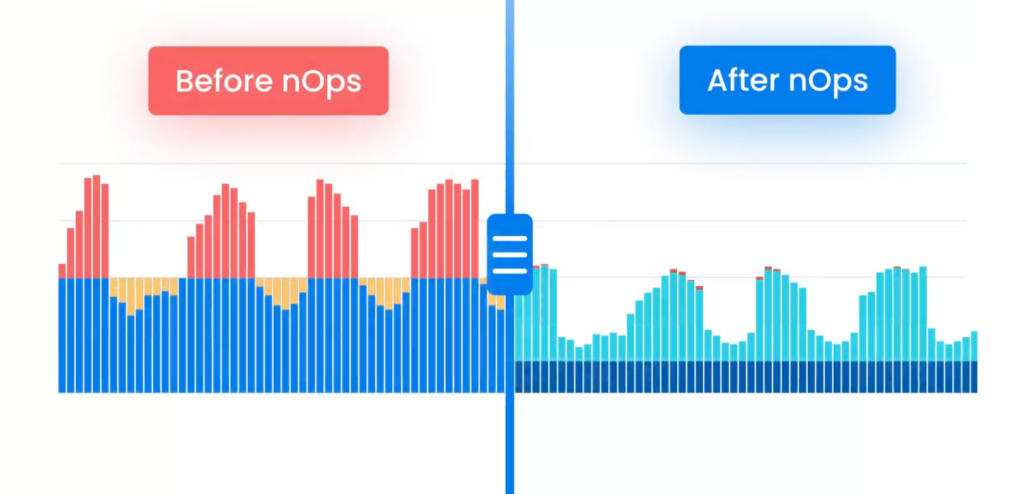
If you’re using Google Cloud at any real scale, commitments quickly become a moving target. nOps takes all of the manual work and complexity out of commitments by automatically maximizing your savings.
Adaptive commitment layering: maximize savings without lock-in
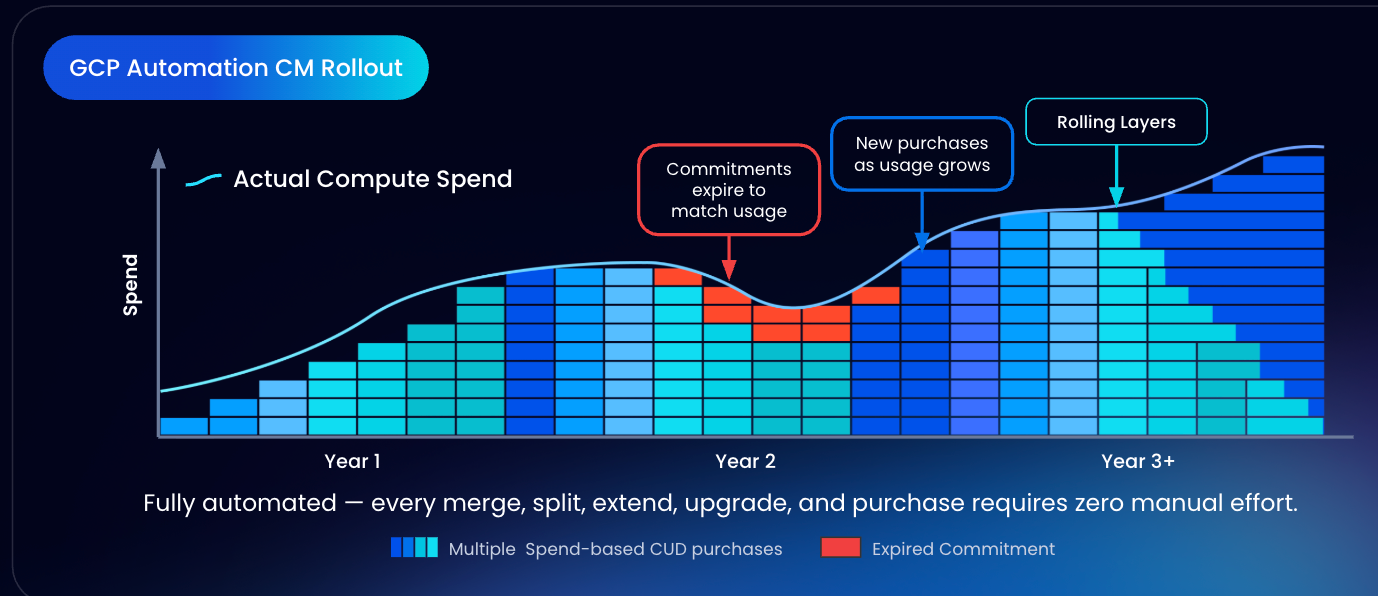
Instead of relying on infrequent, bulk CUD purchases, nOps uses adaptive commitment layering — automatically committing in small, continual increments that align to your real usage. Coverage is recalculated and adjusted as demand changes, creating frequent expiration opportunities so commitments can flex up or down without sacrificing discounts. This approach extends savings beyond a static baseline, reduces long-term lock-in risk, and helps capture discounts across variable and spiky workloads with zero manual effort.
Savings-first pricing
nOps only gets paid after it saves you money. There’s no upfront cost, no long-term commitment, and no risk or downside — if nOps doesn’t deliver measurable savings, you don’t pay.
Complete visibility with automated cost allocation
In addition to visibility on your GCP commitments, nOps gives you full visibility into your cloud resources and spending with forecasting, budgets, anomaly detection, and reporting to spot issues early and validate commitment savings. That visibility flows directly into automated cost allocation, so you can instantly allocate costs across project, environment, team, application, service, and region without any manual tagging or effort.
Want to see it in practice? Book a demo to walk through CUD coverage, cost visibility, allocation, and anomaly protection in your Google Cloud Platform environment.
nOps manages $3B+ in cloud spend and was recently rated #1 in G2’s Cloud Cost Management category.
Demo
AI-Powered Cost Management Platform
Discover how much you can save in just 10 minutes!
Book a Demo
Frequently Asked Questions
Let’s dive into a few FAQ about GCP resource usage and discount types.
Do Committed Use Discounts or Sustained Use Discounts apply to Cloud SQL?
No. Cloud SQL does not use Compute Engine Sustained Use Discounts and is not covered by Compute Engine CUDs. Cloud SQL has its own service-specific committed use discounts with different terms and pricing. As a result, Cloud SQL optimization must be handled separately from VM-based CUDs and SUDs.
What are software license commitments, and how do they relate to CUDs?
These are a type of resource-based CUD that apply specifically to licensed operating systems, not compute resources. They cover OS costs like RHEL or SLES, are purchased separately from hardware CUDs, and apply only to those licenses.