Snowflake Cortex Cost: How to Track and Control AI Spend (2026)
Snowflake bills Cortex in AI Credits, a separate currency from the Platform Credits that pay for warehouses, and each Cortex service meters usage a different way: per token, per message, per gigabyte of indexed data, or per page. A single workload can produce charges in both currencies, which is why Cortex spend is hard to forecast and harder to attribute to the team that caused it.
This guide covers how each Cortex service bills, what Snowflake provides to monitor and cap the spend, how to allocate it to teams, and the changes that reduce it.
What Is Snowflake Cortex and How Is It Billed?
Snowflake Cortex is the set of AI services that run inside a Snowflake account: SQL functions that call language models, agents that plan work across data sources, a natural-language interface for querying tables, search over documents, and coding assistants. Inference runs inside Snowflake's security perimeter, so data stays within the account's governance boundary. Each service bills differently, starting with the two credit types.
AI Credits vs Platform Credits
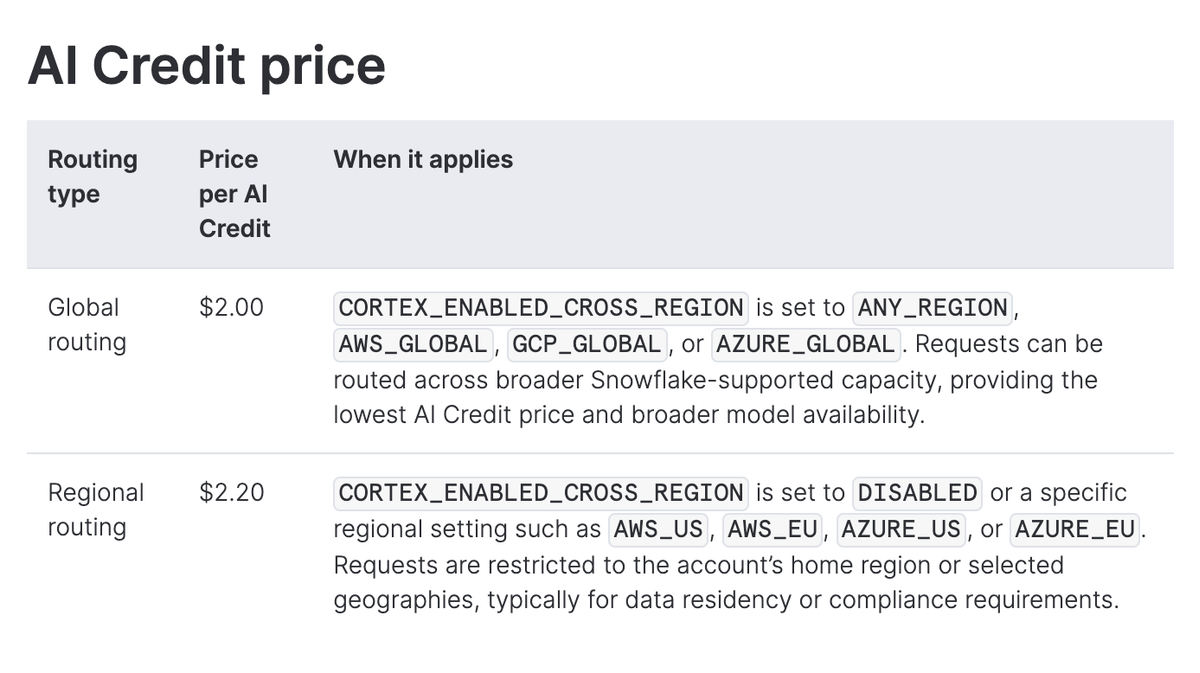
Snowflake prices its AI features in AI Credits and everything else in Platform Credits. An AI Credit costs $2.00 with global routing, which lets Snowflake process a request in any region with capacity, and $2.20 with regional routing, which keeps processing in the account's home region or selected geographies. The price is the same on every edition. Platform Credits, which pay for warehouses, storage and data transfer, vary by edition and region.
Capacity discounts apply to Platform Credits but not to AI Credits, which carry their own automatic discounts based on annual contract value.
AI Functions, Cortex Agents, Cortex Search, the Cortex REST API, Cortex Code and Snowflake CoWork bill in AI Credits. Cortex Fine-tuning and the standalone Cortex Analyst API still bill in Platform Credits.
AI Functions
AI Functions such as AI_COMPLETE, AI_CLASSIFY, AI_EXTRACT and AI_EMBED bill per million tokens processed, and most functions count both input and output tokens, while AI_EMBED bills a single per-token rate. The rate depends on the model the function calls, and every function and model rate is listed in Snowflake's Service Consumption Table.
A function that runs over a table bills for every row it touches, so cost scales with row count, text length and model size together. One batch query over a large table can run up a large bill in a single run. AI_PARSE_DOCUMENT bills on a different unit, per 1,000 pages at a rate set by parsing mode.
Cortex Agents and Snowflake CoWork
Cortex Agents bill per million tokens, at a rate set by the model that orchestrates the agent. An agent plans a task, calls tools such as Cortex Analyst and Cortex Search, and reads the results, and its bill includes every service it invokes.
Snowflake CoWork, the interface for business users that is built on the same agents and was formerly called Snowflake Intelligence, bills the same way, with usage reported per agent.
Cortex Analyst
Cortex Analyst turns a natural-language question into SQL. Snowflake recommends calling it through Cortex Agents, where it bills by token like any agent call. Called directly through the standalone Analyst API, it bills per 1,000 messages in Platform Credits. Either way, the SQL it generates runs on a warehouse and bills as ordinary warehouse compute.
Cortex Search
Cortex Search has more billing components than any other Cortex service. Serving compute bills per gigabyte per month of indexed data, including the vector embeddings, for as long as the service is resumed, whether or not anyone queries it. Embedding bills per token whenever a row is inserted or updated, and only for new or changed rows. A warehouse handles indexing and refreshes and bills in Platform Credits only when the source data has changed. Storage and cloud services add smaller charges.
Cortex Batch Search bills per gigabyte per hour of indexed data, and only for the duration of a batch job, so it avoids the continuous serving charge.
Document Parsing and Fine-Tuning
Document processing now runs as AI Functions, so AI_PARSE_DOCUMENT and AI_EXTRACT usage is recorded in the AI Functions usage view, and the older document processing view is being phased out.
Cortex Fine-tuning bills in Platform Credits and is measured in fine-tuning time rather than tokens.
Why Cortex Costs Are Hard to Predict
Most Cortex overruns come from usage that compounds: an agent that calls several services for one request, or a warehouse that runs underneath every AI call.
Agents Multiply Costs Across Services
A single agent request can trigger a planning step, several tool calls and a final response, and each step consumes tokens. Costs are additive across the services the agent uses, so one question to an agent that calls both Cortex Analyst and Cortex Search pays for the orchestrating model, the Analyst call and the Search retrieval.
Conversation history adds to this. When the REST API powers a chat experience, every earlier prompt and response is processed again to generate each new reply, so a long session costs more per message than a short one.
Warehouse Compute Runs Alongside AI Spend
AI Credits cover the AI processing and not the SQL around it. The warehouse that runs a query calling an AI function still bills Platform Credits, Cortex Analyst's generated SQL runs on a warehouse, and Cortex Search indexing uses one as well. The AI Functions usage view excludes warehouse credits by design, and Snowflake's guidance is to join usage on query ID, warehouse ID and user ID to get the total cost of an operation. A forecast built on AI Credits alone undercounts the workload.
How to Monitor and Control Cortex Spend in Snowflake
Snowflake publishes more than a dozen account usage views for Cortex, and its AI cost controls differ in what they cover and how quickly they act. The views report spend. Budgets, quotas and the AI Gateway are the tools that limit it.
Usage Views by Service
Each Cortex service reports through its own view, in its own unit. The table lists the views Snowflake designates for total AI cost reporting.
| Service | Usage view | Billing unit |
| AI Functions | CORTEX_AI_FUNCTIONS_USAGE_HISTORY | Tokens or pages |
| Cortex Agents | CORTEX_AGENT_USAGE_HISTORY | Tokens, tool calls |
| Snowflake CoWork | SNOWFLAKE_COWORK_USAGE_HISTORY | Tokens, tool calls |
| Cortex Analyst | CORTEX_ANALYST_USAGE_HISTORY | Messages |
| Cortex Search | CORTEX_SEARCH_DAILY_USAGE_HISTORY | Serving time, tokens |
| Cortex REST API | CORTEX_REST_API_USAGE_HISTORY | Tokens |
| Cortex Code | CORTEX_CODE_CLI_USAGE_HISTORY, CORTEX_CODE_SNOWSIGHT_USAGE_HISTORY | Tokens, tool calls |
| Cortex Fine-tuning | CORTEX_FINE_TUNING_USAGE_HISTORY | Fine-tuning time |
| Provisioned Throughput | CORTEX_PROVISIONED_THROUGHPUT_USAGE_HISTORY | PTU hours |
| AI Gateway (preview) | AI_GATEWAY_USAGE_HISTORY | Tokens |
Two cautions apply when combining them. The Cortex Search daily view includes embedding credits that also appear in the AI Functions view, so embeddings have to be excluded from combined totals. The older CORTEX_FUNCTIONS_USAGE_HISTORY and CORTEX_FUNCTIONS_QUERY_USAGE_HISTORY views stopped receiving data in November 2025 and are slated for deprecation, so dashboards built on them need to move to the AI Functions view.
Tracking Spend by User, Model and Function
The AI Functions view records credits for each function call along with the function, model, user, roles and query tag. Rows cover one-hour windows, so a long-running query spans several rows and has to be summed by query ID. The view begins at January 5, 2026, and user, role and query tag attribution is populated only for data after February 16, 2026.
To see where the credits go, group them by user, model and function over a 30-day window, and add the query tag to see spend by application or team. Join the user ID to the users view to get readable names. To find the most expensive individual queries, sum credits by query ID over the past week and sort from the top.
Multiply credits by the AI Credit price to convert to dollars. These figures exclude warehouse credits. The Agents, CoWork and REST API views follow the same pattern, and the REST API view reports input and output token counts for each request.
Tracking Cortex Search Serving Costs
The Cortex Search daily view splits each service's credits into serving, embedding and batch consumption, which separates the continuous serving charge from refresh activity. It excludes the warehouse credits used for indexing, which have to come from warehouse metering.
To see what drives the bill, group credits by service name and consumption type over the past 30 days. Serving, embedding and batch consumption show up as separate lines, and the embedding line is the one that also appears in the AI Functions view, so leave it out of combined totals.
A service with steady serving credits and little real usage is a candidate for suspension, covered in the cost reduction section below.
Budgets and Per-User Quotas
A budget sets a monthly credit limit for an account or a custom group of objects. It sends a notification when spend is projected to exceed the limit, and it can run a stored procedure at a threshold based on projected or actual consumption. Budgets are evaluated periodically, so an action can take up to eight hours to apply, or up to two hours with the latency-optimized option.
A per-user quota sets a credit limit for each user individually and can block AI Functions, Cortex Agents, Cortex Code, CoWork and AI Gateway requests without a stored procedure of your own. Quotas are the only AI cost control with built-in enforcement, and blocks land within minutes of the limit being reached. Some overshoot is expected, and limits are never pooled: a 100-credit quota across 10 users permits up to 1,000 credits in total. Use a budget for a shared ceiling and a quota for a per-user hard stop.
Agent and Shared Resource Budgets
A resource budget sets a monthly credit limit on one tagged object: a Cortex Agent, a Snowflake CoWork agent or a Cortex Search service. Threshold actions run through stored procedures, for example an alert to a team lead at 80% of the limit and a revoked grant at 100%.
A shared resource budget works at the user level instead. It tracks AI Functions, Cortex Agents, Cortex Code, CoWork and AI Gateway usage by tagged users, so two teams that call the same agent or function each get an independent limit. Like any budget, it only blocks usage if a stored procedure you attach revokes access at the threshold.
Cortex AI Gateway
The Cortex AI Gateway gives AI clients such as coding agents and SDKs a single endpoint for model requests. It records traces with token counts and attributes the spend to teams and users, with budgets and per-user quotas applied to it. It is a preview feature, and it governs requests sent through its endpoint rather than acting as a cost dashboard for every Cortex service. Its usage is recorded in the AI_GATEWAY_USAGE_HISTORY view.
Warehouse Resource Monitors and AI Function Alerts
Resource monitors suspend warehouses when they reach a credit threshold, and they govern warehouses only, so they have no effect on AI Credits. The AI controls above leave gaps of their own. Budgets act on a periodic cycle, quotas apply per user, and usage can pass a limit before enforcement takes effect. Snowflake's budget features do not cover Cortex Analyst or Cortex Fine-tuning at all, and no support is planned.
Teams fill the gap with Snowflake alerts that query the usage views on a schedule, for example flagging any query that consumed more than a set number of credits in the past hour, and notify a channel.
Allocating Cortex Costs to Teams
Allocation assigns each dollar of Cortex spend to a team, product or customer. Snowflake supports part of that natively, and the remainder depends on data that lives outside Snowflake.
Where Native Attribution Stops
Inside Snowflake, the attribution fields exist. The AI Functions view carries user, role and query tag, shared resource budgets group tagged users into teams, and the AI Gateway attributes the traffic that passes through it.
What native tooling can't do is put a team's Cortex spend next to the same team's Anthropic and OpenAI API bills, Cursor seats and cloud infrastructure. Each usage view also reports in its own unit, whether tokens, messages, serving time or PTU hours, so a cross-service view means joining tables that don't share a schema. And cost per customer or per feature requires matching Snowflake usage to application data that Snowflake doesn't hold.
Tagging and Budgets by Team
Allocation depends on tags that exist before the spend happens. Snowflake records the query tag, user and roles on each AI Function call, and both resource budgets and shared resource budgets assign spend through object and user tags. Set a query tag for each application or team at the session level, tag agents and Search services when they are created, and tag users to teams or cost centers. Spend that runs without a tag can't be assigned automatically and has to be reconciled by hand at month end.
Showback and Chargeback for AI Spend
Showback reports each team's spend to the team without billing it, and chargeback moves the cost into the team's budget. Both need the same input: every credit assigned to an owner. Tools that ingest Snowflake billing data can apply either across the whole bill. nOps ingests Snowflake billing data daily, breaks it down by account, warehouse, region, usage type and custom metadata, and applies showbacks and chargebacks alongside AWS, Azure and other costs.
How to Reduce Cortex Costs
Most Cortex savings come from four places: the model that runs, the amount of data sent to it, context that gets processed repeatedly, and services left running.
Match the Model to the Task
Token rates depend on the model, and the spread is wide. The smallest models list at a few cents per million input tokens, while the largest frontier models list at $24 or more. Classification, sentiment and extraction rarely need a frontier model, and a smaller model runs them at a fraction of the cost. Reserve the largest models for reasoning-heavy work, and check each model's rate in the Service Consumption Table before choosing.
Filter Data Before It Reaches AI Functions
Every token sent to an AI Function is billed, so filter rows and trim text before the call. Restrict the query to the rows that need processing, remove boilerplate, and skip documents above a length cap. Write results to a table instead of re-running the function on the same rows, since each run bills again. Before a full run, use COUNT_TOKENS on a representative sample to estimate token volume.
Use Prompt Caching With the REST API
Prompt caching reuses previously processed context, such as a long system prompt or a document, across requests. In the Cortex REST API it works differently by model. OpenAI models cache automatically for prompts of 1,024 tokens or more. Claude models cache only the content you mark with cache_control, with a five-minute lifetime and up to four cache breakpoints per request. Cache reads bill at a reduced rate.
Caching helps most when many requests share a long fixed prefix, as in a chat application with a large system prompt or repeated questions over one document.
Tune Cortex Search Services
Cortex Search is the one service where idle time and refresh behavior drive cost. Snowflake's cost guide recommends the following:
- Suspend serving manually when a service sits idle, such as in development, and set AUTO_SUSPEND for services with intermittent traffic so serving pauses after inactivity and resumes on the next query.
- Set target lag to what the business needs. If the source updates every five minutes but the service is queried hourly, an hourly lag avoids most refreshes.
- Define primary keys, which enable an optimized refresh path and cut both indexing cost and latency.
- Bundle changes into fewer, larger updates, since each update carries a fixed cost and any change to a row re-embeds its search column.
- Avoid schema changes and CREATE OR REPLACE on the source table, both of which trigger a full refresh and re-embed every row. Update the source incrementally with MERGE INTO instead.
- Use a MEDIUM or LARGE warehouse for indexing, since embedding does not speed up beyond that, and test a new service on a dedicated warehouse to isolate its cost.
Choose How to Call Cortex Analyst
Snowflake recommends calling Cortex Analyst through Cortex Agents, where it bills by token. The standalone Analyst API bills a flat rate per message regardless of how many tokens the exchange uses, so short questions cost the same as long ones. Which route is cheaper depends on message size and volume, and the comparison is worth running on a sample of real questions. The generated SQL bills warehouse compute on either route, so it is also worth reviewing how much data those queries scan.
Understand Cortex Costs & Save with nOps
Snowflake's usage views, budgets and quotas cover Snowflake. Most teams running Cortex also pay for Anthropic and OpenAI APIs, coding tools such as Cursor, and cloud infrastructure, and one team's spend is split across all of them in different units. Allocating it, budgeting it and catching a spike in one place takes a tool that ingests all of it.
nOps was built to solve this with:
- Unified visibility: Get all of your spending from Azure, AWS, GCP, AI and SaaS all in one place, with cost allocation by model, application, customer, or business unit to understand what is driving spend and where optimization will have the greatest impact.
- Showback and chargeback that assign every dollar of AI and cloud spend to the team, product or customer behind it.
- Anomaly detection that flags unexpected spikes across all of it, so a runaway query or agent loop is caught before the invoice arrives.
Teams running Cortex alongside other AI vendors use nOps to see all of that spend in one place. Book a free savings analysis to set up your Snowflake cost monitoring dashboard and see where your Cortex and AI spend is going.
nOps manages $5B+ in AI and cloud spend and was recently rated #1 in G2's Cloud Cost Management category.
Demo
AI-Powered Cost Management Platform
Discover how much you can save in just 10 minutes!
Book a Demo
FAQ
How is Snowflake Cortex billed?
Most Cortex features bill in AI Credits, at $2.00 per credit with global routing and $2.20 with regional routing. The unit depends on the service: tokens for AI Functions, agents and the REST API, messages for the standalone Analyst API, gigabytes of indexed data per month for Search serving, and pages for document parsing. Warehouse compute around those calls bills separately in Platform Credits.
What is a Snowflake AI Credit?
An AI Credit is the billing currency for Snowflake's AI features. It costs the same on every edition and is not eligible for capacity discounts, though Snowflake applies separate automatic discounts based on annual contract value. Platform Credits continue to pay for warehouses, storage and data transfer.
Which Cortex services bill by token?
AI Functions, Cortex Agents, Snowflake CoWork and the Cortex REST API bill by token, and Cortex Search bills embedding by token when rows are added or updated. The standalone Analyst API bills per message, and document parsing bills per page.
Why is my Cortex Search service charging when nobody is using it?
Cortex Search bills serving compute per gigabyte per month of indexed data for as long as the service is resumed, whether or not anyone queries it. Suspend services that sit idle, and set AUTO_SUSPEND on services with intermittent traffic.
Does Snowflake have resource monitors for Cortex?
Resource monitors apply to warehouses only. For AI spend, Snowflake offers budgets, per-user quotas, and resource budgets for agents, CoWork and Cortex Search. None of its budget features cover Cortex Analyst or Cortex Fine-tuning.
How do I track Cortex costs by user or team?
The AI Functions, Cortex Agents, CoWork and REST API usage views record the user, and the AI Functions view also carries role and query tag. Shared resource budgets group tagged users into teams. Combining Snowflake spend with other AI vendors and cloud costs has to happen outside Snowflake.
How can I reduce Snowflake Cortex costs?
Use smaller models for simple tasks, filter data before it reaches AI Functions, cache repeated prompt context on the REST API, suspend idle Search services, and compare the two ways of calling Cortex Analyst.
Is Snowflake Cortex cheaper than calling OpenAI or Anthropic directly?
Not on token price. For Claude Sonnet 4.5, Snowflake's rates work out to about 20% above Anthropic's list price at global routing. The case for Cortex is the work it removes: no data movement out of Snowflake, no separate API keys, and Snowflake's governance and cost controls, with inference running inside Snowflake's security perimeter.
Do Cortex costs show up on my regular Snowflake bill?
Yes. Cortex charges appear on the same Snowflake invoice as warehouses and storage, with AI Credits and Platform Credits priced separately and totaled together.