
The Ultimate Guide to AWS Cloud Cost Allocation in 2026
According to a report by Flexera, 73% of enterprises have exceeded their cloud budget at least once, and over 33% have exceeded their budget by more than 10%. Another report found that over 35% of cloud spending is wasted due to idle or unused resources.
Cloud cost allocation can be a vital link between cloud spend and business value. As people in the organization become more aware of their actions and how they affect cloud spending, it will lead to more awareness and a leaner culture. AWS cloud cost allocation can also accurately predict future spending, enable forecasting and increase profits.
Let’s take a look at everything you should know about cloud cost allocation:
What Is Cloud Cost Allocation?
Cloud cost allocation is the process of analyzing, aggregating, and carefully allocating cloud spend across different departments and business units. So instead of allocating cloud spend to the services you may be using, you allocate it according to the usage of different departments.
Better visibility into your organization’s cloud spend can improve accountability and help you understand where you are spending the most money. Most importantly, it makes business units accountable and answerable for their own cloud usage.
What Are The Benefits Of Cloud Cost Allocation?
Implementing cost allocation can have several benefits for your organization, including:
Improved accountability: Cost allocation involves adopting chargeback or showback models where business units are either charged or shown their cloud usage and the associated costs. When every business unit becomes aware of its own consumption, they become more responsible and accountable. It also boosts cost awareness and financial responsibility.
Granular reporting: Cloud bills can be extremely difficult to interpret and understand. It’s really easy to go down the complex rabbit hole. Exhaustive cost allocation tagging can tell you which departments are spending the most money and allow you to create granular reports for greater visibility into cloud spending.
Financial transparency: You can better understand how much cloud costs are generated by each business unit, department or project. Cost allocation reports can help determine the true costs of running the applications and services.
Decreased cloud costs: When you know exactly how much each department, project, resource, and business unit is spending on cloud usage, you can better optimize your cloud costs by creating a budget that perfectly aligns with your cloud requirements.
Better decision-making: Cost allocation reports can help companies improve cloud investment strategies. Organizations can make more informed decisions about which resources should be allocated to which departments and how much budget each department should get.
Resource optimization: Identifying underutilized/ idle resources and optimizing their usage effectively becomes easier. You can reallocate underutilized resources to areas with a higher demand to further reduce cloud costs.
Related Content
AWS Cloud Cost Allocation: The Complete Guide
How to tag and allocate every dollar of your AWS spend
Download Now
Understanding AWS Cost Allocation Tags
Cost allocation tags are labels that can be assigned to any AWS resource. The tags can then be used for creating in-depth AWS cost usage reports–chargeback or showback.
Each cost allocation tag has a key and a unique value associated with it.
There are two types of cost allocation tags that can help you categorize and track AWS costs:
AWS-Generated Tags
AWS-generated tags are automatically created and managed by AWS, and these tags are available only in the Billing Console. These are ‘createdBy’ tags that track who created a particular resource. These tags don’t count toward your total quota.
User-Defined Tags
User-defined tags can be created, modified, and applied to AWS resources by users. These cost allocation tags start appearing in the AWS console after enabling Budgets, Cost Explorer, and AWS Cost and Usage Reports (CURs). These tags are not automatically applied to resources created before the tags themselves were created. They also count towards your total quota.
AWS Tag Editor can be used to create and modify user-defined tags, and AWS Management Console can be used to tag resources.
Once you have your resources appropriately tagged, you can then use them to create an exhaustive AWS Cost and Usage Report (CUR) for breaking down AWS costs.
For every report, you will find tags in each column and costs in the respective rows which can help you further drill down resource usage.
Also, note that an AWS cost allocation report is generated as a CSV file, and they are usually very lengthy and complex, with thousands of rows in them. You may have to use a third-party tool to make sense of all the data.
You can explore the details about AWS tags and CUR at Understanding Chargeback Tagging And The Best Practices. Additionally, learning how to visualize cost allocation reports can dramatically improve insights and decision-making.
Approaches To Allocate Cloud Cost – Showback And Chargeback
Showback
Showback is a cloud cost allocation strategy where the total cost of cloud usage by a particular business unit is shared with the unit so they can review how they have been using cloud resources.
Showback focuses on increasing visibility into cloud spending and usage. Compared to its counterpart, chargeback, showbacks are more palatable for internal teams. They can also be better for reducing friction between IT and business units.
A document similar to a billing statement is shared with the department to show the cost of their departmental usage. But the department isn’t actually required to pay for it.
Some of the many benefits of showback include:
- Increased visibility and awareness about cloud spending
- Encourages people to make changes in their resource usage to cut down costs further
- Allows organizations to compare different vendor solutions with actual department needs
- Improves transparency across the organization
- No extra accounting processes are required for the implementation
Chargeback
Chargeback involves billing each department for their resource usage. The goal of the chargeback is to create more accountability and ensure all the departments stick to a budget.
When chargebacks occur, departments get an invoice that must be paid based on the budget. While chargebacks can be paid with real money, most organizations maintain a ledger where the usage costs get deducted from the remaining department budget.
But chargebacks can easily be controversial since you essentially charge departments directly.
Here are some of the disadvantages of using IT chargebacks
- Creates conflict and tension among departments
- Requires business units to perform financial tasks on an ongoing basis, which isn’t their expertise or responsibility
- Complications can arise as chargebacks have to be integrated with existing financial processes.
- High risk of failure due to resistance
Showbacks are the safest cost allocation strategy. They can make teams more aware of their cloud usage and associated costs without causing any conflicts. Since no accounting processes are involved, showbacks are easier to implement and can increase visibility across the organization.
Learn more about the difference between chargeback and showback.
What Are The Challenges Of AWS Cost Allocation?
Here are the top challenges associated with AWS cost allocation:
Tag creation can be time-consuming: Your cost allocation strategy can only be as effective as your tagging policy and structure. If your tags aren’t placed correctly, there is no way you can get accurate cost allocation reports. Moreover, cost allocation tags need to be applied to resources at the time of creation. Establishing a tagging policy and adding tags can be incredibly time-consuming and complex.
Confusing resource ownership: It can be difficult to determine how departments use shared resources. Without clear ownership policies for shared resources, you may be unable to assign the right costs to the appropriate departments.
Exhaustive cost allocation reports: While cost allocation reports may sound like a good idea in principle, it can be extremely difficult to make sense of these lengthy CSV files. In fact, it’s impossible to analyze rows of data without using a third-party reporting tool or spending hours filtering out the data.
How And When To Use AWS Cost Allocation Tags?
Use cost allocation tags as early as possible—ideally at resource creation—so every dollar has an owner from day one. Start by defining a small, mandatory tag set that maps to how your business runs (for example: Team, Application, Environment, CostCenter, Customer). Apply these across compute, storage, databases, and networking, including anything “shared” like EKS clusters or VPCs, so those costs don’t turn into a catch-all bucket later.
After tagging, activate the tags in the Billing console so they flow into Cost Explorer, Budgets, and CUR. Then standardize values (e.g., always prod, not Prod/production) to avoid fragmented reporting. Automation helps a lot here: enforce tags with IAM policies, Service Control Policies (SCPs), CloudFormation/Terraform defaults, or tag-on-create rules.
| Step / Moment | What to do | Why it matters |
|---|---|---|
| Before rollout | Define a small required tag set and naming rules | Prevents chaos and mismatched values later |
| Resource creation | Enforce tag-on-create via IaC, policies, or guardrails | Ensures costs are attributable from day one |
| Immediately after | Activate tags in Billing | Makes tags usable in Cost Explorer/Budgets/CUR |
| Ongoing operations | Standardize and validate tag values | Keeps reports clean and consistent |
| Monthly close | Audit for missing/mis-tagged resources | Avoids “unowned” spend and reporting gaps |
| Shared platforms | Use tooling (e.g., CUR + nOps) to allocate shared costs | Tags alone can’t fairly split cluster/VPC overhead |
AWS Cloud Cost Allocation Tags Best Practices
Once you’ve covered the fundamentals (two tag types, activation, showback/chargeback, and common challenges), let’s talk about some cloud cost allocation strategies you can use to move to the next level.
- Design a taxonomy that matches reporting hierarchies. Use tags that roll up cleanly (e.g.,
Org,Team,Service,Env) so you can aggregate AWS cloud spend from resource → app → business unit without hand-built joins. - Separate “ownership” tags from “context” tags. Ownership tags drive allocation (
Team,CostCenter,Customer); context tags inform optimization (Lifecycle,Criticality,DataClass). This keeps chargeback stable while still enabling engineering insights. - Map tags into Cost Categories for rule-based rollups. Use Cost Categories to normalize messy values (Prod/production/prod) and create business views that persist even when raw tags drift.
- Track tag coverage as a KPI, not a cleanup task. Measure % of spend with required tags, by account/service/team. Set thresholds and alerts so gaps are caught in-week, not at close.
- Build exception paths for untaggable or legacy resources. Some services/resources won’t tag well; define fallback allocation rules (account-based, usage-based, or Cost Category rules) so “untaggable” doesn’t mean “unallocated.”
- Allocate commitment-based discounts by the same dimensions. Make sure RI/Savings Plans amortization is split using tags (or Cost Categories) so owners see true net cost, not distorted on-demand charges.
- Handle shared platforms with explicit allocation layers. For EKS, data lakes, or network hubs, pair tags with CUR-based allocation (e.g., split by namespace/label, traffic, or usage metrics) so overhead isn’t dumped on one team.
- Automate remediation, not just detection. When noncompliance is found, auto-tag from known context (account, OU, stack, namespace) or quarantine resources until fixed—reduces manual chasing.
- Version your tagging policy with change management. Treat tag keys/allowed values like an API: deprecate slowly, maintain mappings, and communicate changes so trends don’t break and teams don’t fork conventions.
nOps Is A Better Alternative To AWS Cloud Cost Allocation
If your setup is like most teams, your tags are probably inconsistent, shared costs are hard to untangle, and fast-moving environments (like Kubernetes and GenAI) don’t fit neatly into a tag-first model. Even with strong policies, cost allocation ends up fragile: a few missed tags or messy values and your showback breaks.
The good news: you don’t need perfect tagging to get accurate, granular cloud cost visibility.
nOps pulls in your cloud cost and usage data (including tags, accounts, Kubernetes, and other metadata) and brings it into a single, unified view. From there, it automatically normalizes inconsistencies, allocates shared spend, and assigns costs to the right teams, projects, or customers—so your reports stay trustworthy even when real-world tagging isn’t.
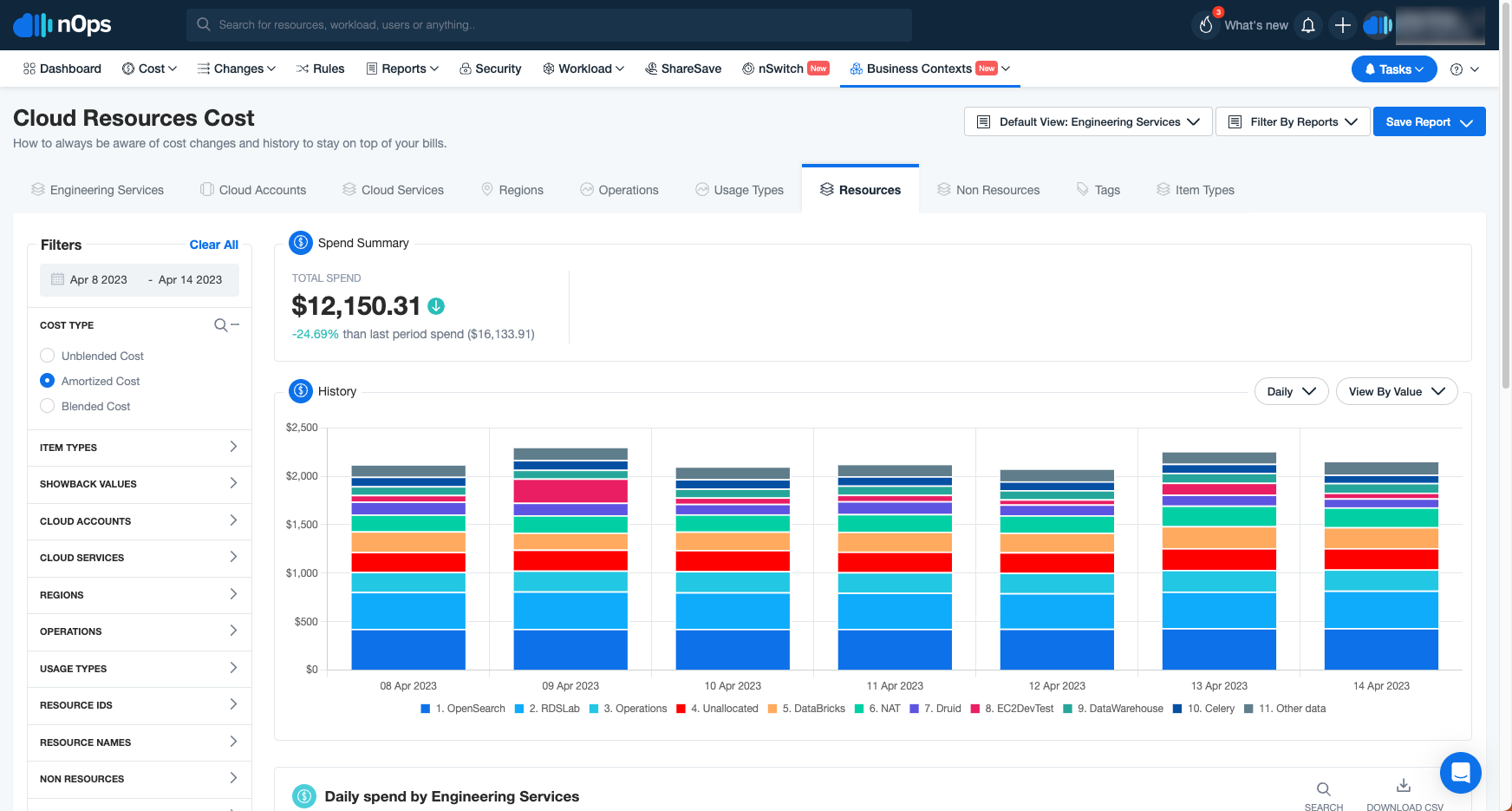
In other words, it doesn’t matter if your org has five variations of the same tag, or if shared infrastructure makes ownership unclear. nOps stitches the data together behind the scenes and allocates costs the way your business actually runs—so you can move straight to insight and action instead of cleanup.
You can too — schedule a demo to see the nOps cloud cost allocation for AWS in action.
nOps is rated 5 stars on G2 and is trusted with over $4 billion in cloud spend.
Demo
AI-Powered Cost Management Platform
Discover how much you can save in just 10 minutes!
Book a Demo
Frequently Asked Questions
Let’s talk about some FAQ about cloud cost allocation services and strategies.
Is There A Better Alternative To AWS Cost Allocation Tags?
Yes—we may be biased, but we think nOps is the best cloud cost allocation solution for AWS. nOps ingests CUR data and uses automation plus ML to allocate costs by Kubernetes, shared services, and business metrics even when tags are missing or inconsistent. You still can use tags, but nOps reduces manual tagging overhead.
What are the types of AWS cost allocation tags?
AWS has two kinds: user-defined tags you add to resources, and AWS-generated tags created by services (for example aws:createdBy or eks:cluster-name). For billing, you activate selected tags as cost allocation tags in the Billing console. Activated tags then surface in Cost Explorer and CUR for reporting and downstream analytics tools.
Why AWS Cloud Cost Allocation Tags matter?
Cost allocation tags tie spend to teams, apps, environments, or customers, turning one bill into accountable line items. They support chargeback/showback, budgets, anomaly detection, and rightsizing by owner. Without consistent tags, shared costs become ‘unowned,’ forecasting degrades, and FinOps optimizations are harder to validate over time and across multiple accounts.
The Ultimate Guide to AWS Cloud Cost Allocation in 2026