Amazon ElastiCache is a high-adoption AWS service with real economic weight. Across mature AWS environments, ElastiCache commonly runs 24/7 across dozens or hundreds of nodes, translating into thousands of node-hours per day and six-figure annual spend in larger production accounts. Because caches are designed to be overprovisioned for reliability, ElastiCache usage tends to grow steadily—and rarely shrinks on its own. That steady growth is what makes ElastiCache pricing difficult to manage. Costs don’t come from a single lever, but from a combination of node types, replication, Multi-AZ architecture, data tiering, backups, and purchase options. Small, incremental decisions—adding replicas, upsizing nodes, or committing to Reserved Nodes—compound over time, often without triggering immediate cost scrutiny. This guide explains how Amazon ElastiCache pricing works across Redis, Memcached, and Valkey. We break down each cost component, compare various pricing models and discounts, and discuss practical strategies for controlling and reducing ElasticCache costs.
What is Amazon ElastiCache
Amazon ElastiCache is a fully managed AWS service for running in-memory data stores alongside your applications. It’s built for situations where the same data is requested repeatedly, and pulling it from a primary database or external system every time would add avoidable latency and load. By keeping frequently accessed or short-lived data in memory, ElastiCache lets applications retrieve what they need quickly while reserving backend databases for the work they’re best suited for: durable storage and transactional consistency. In most environments, ElastiCache runs as an always-on supporting layer, which means costs tend to scale with the capacity you provision rather than fluctuating neatly with request volume. That’s why understanding how ElastiCache nodes, replication, and deployment choices translate into monthly spend matters as usage grows.
ElastiCache Pricing Model
The biggest driver of ElastiCache spend is engine choice. Because of how each engine handles availability and scaling, Redis-based ElastiCache deployments are typically the most expensive, Memcached the least, with Valkey generally landing between the two. Let’s give a quick engine-by-engine view to compare how spend is calculated.
ElastiCache for Redis
Redis is an in-memory key-value store commonly used for caching and shared application state, and it supports built-in replication and high availability patterns.
How Redis changes the pricing model Redis changes cost primarily by increasing required node count through primaries + replicas (and often multiple shards). That means architecture decisions (shards, replicas) shape the bill as much as raw capacity.
Quick pricing example (provisioned, 24/7) Monthly ≈
NodeRate × [Shards × (1 + Replicas)] × Hours Example:
$0.30 × [3 × (1 + 1)] × 730 ≈ $1,314/mo ElastiCache for Memcached
Memcached is a simple in-memory cache used to store frequently accessed data, without built-in replication or persistence.
How Memcached changes the pricing model Memcached keeps the cost surface small (mostly node-hours). When you need high availability, it’s commonly achieved by duplicating clusters at the application level, which scales cost by cluster count.
Quick pricing example (provisioned, 24/7) Monthly ≈
NodeRate × (NodesPerCluster × ClusterCount) × Hours Example:
$0.30 × (3 × 2) × 730 ≈ $1,314/mo ElastiCache for Valkey
Valkey is a Redis-compatible in-memory key-value store used for caching and shared application state.
How Valkey changes the pricing model Valkey usually follows the same cost shape as Redis (shards + replicas drive node count), but with a lower per-node baseline price—so the same architecture often costs less.
Quick pricing example (provisioned, 24/7) Monthly ≈
NodeRate × [Shards × (1 + Replicas)] × Hours Example:
($0.30 × 0.80) × [3 × (1 + 1)] × 730 ≈ $1,051/mo ElastiCache Cost Components
ElastiCache costs are driven by the resources you provision and the features you enable. Some charges are predictable (like always-on node-hours), while others show up based on architecture and traffic patterns (like cross-AZ data transfer or backups). The sections below break down what each component is and how it translates into monthly spend.

Compute
Compute is the baseline cost of running ElastiCache. In provisioned deployments, you’re billed for the ElastiCache
node(s) you run (node type × node count × hours). For most environments, compute is the largest and most consistent part of the bill because clusters run 24/7. The biggest compute multipliers are architectural: adding shards increases primaries, adding replicas increases total nodes, and high availability designs often expand node count even if your dataset size stays the same.
Storage
Compute is the baseline cost of running ElastiCache. In provisioned deployments, you’re billed for the
nodes you run (node type × node count × hours). For most environments, compute is the largest and most consistent part of the bill because clusters run 24/7. The biggest compute multipliers are architectural: adding shards increases primaries, adding replicas increases total nodes, and high availability designs often expand node count even if your dataset size stays the same.
Data Tiering
Data tiering (when supported) changes how your bill scales by allowing a portion of cached data to live on a lower-cost tier instead of in memory. The practical impact is that tiering can reduce the amount of memory-heavy capacity you need to provision for large datasets, but it introduces a tradeoff: you may pay for additional tiered capacity and you may see different performance characteristics for data that isn’t kept hot in memory. From a billing standpoint, the key question is whether tiering lets you move to smaller memory footprints (fewer or smaller nodes) without increasing operational complexity.
Data Transfer
Data transfer charges are often overlooked because they don’t always appear as “ElastiCache” line items. The main driver is
where your clients run relative to your cache nodes. Same-AZ traffic is typically the simplest and cheapest model. Costs increase when traffic crosses AZ boundaries (for example, if your application instances are spread across AZs but your cache is not aligned, or if your architecture causes frequent cross-AZ reads/writes). For high-throughput caches, cross-AZ transfer can become a meaningful percentage of total spend, so client placement and Multi-AZ design decisions matter.
Backups and Snapshots
Backups and snapshots add a separate recurring cost because they store cache data outside the running nodes. This cost scales with the amount of backup data retained and how long you keep it. The key pricing lever is retention: frequent snapshots with long retention windows accumulate storage charges over time. This is one of the few ElastiCache cost components that can quietly grow even if your node footprint stays flat, especially in environments that treat backups as “set and forget.”
Replication and Multi-AZ
Replication and Multi-AZ are major cost multipliers because they increase required capacity. Replication typically means running additional nodes (replicas) alongside primaries, which raises compute costs directly. Multi-AZ designs can also increase data transfer costs if replication traffic or client traffic crosses AZ boundaries. The key takeaway is that availability is rarely “free” in ElastiCache: improving resilience generally increases node-hours, and the specific topology you choose determines whether you also introduce cross-AZ networking charges.
Extended Support (Redis only)
For some older Redis major versions that AWS no longer supports under normal maintenance windows, AWS offers Extended Support — a paid support contract that continues patching and security updates beyond the official end-of-life. When enabled, Extended Support adds a recurring hourly premium on top of your node charges for each affected instance. This is a relatively uncommon monthly cost component, but it can be material for long-lived environments that haven’t yet migrated to a newer Redis version.
Monitoring and Add-On Features
Basic monitoring is included, but some advanced capabilities can add cost depending on what you enable and how you consume telemetry. The practical billing impact usually shows up through adjacent services rather than as a simple “monitoring fee”—for example, higher volumes of metrics, logs, or longer retention can increase downstream monitoring costs. The key lever here is scope: collecting everything at high frequency across many always-on nodes scales observability spend quickly, so it’s worth aligning monitoring depth with operational needs. Let’s summarize:
| Cost component | What drives the cost | When it spikes | Primary control lever |
| Compute | Node type × node count × hours | Adding shards/replicas; always-on clusters | Right-size nodes; minimize shard/replica count to requirements |
| Storage | Mostly indirect (backups/tiering), not “disk attached to nodes” | Long retention or large datasets with backups | Reduce retention; limit backup scope; choose tiering only when it reduces node size/count |
| Data tiering | Amount of data moved off memory + tiering-enabled node choices | Large datasets that would otherwise force memory-heavy nodes | Use tiering to lower memory footprint; validate it actually reduces nodes |
| Data transfer | Cross-AZ / cross-region traffic patterns | Clients in multiple AZs hitting a cache not aligned by AZ; heavy replication traffic | Align clients and cache within AZ; design Multi-AZ topology intentionally |
| Backups & snapshots | Backup size × retention period | Frequent snapshots + long retention | Shorten retention; snapshot less often; cap backup storage growth |
| Replication & Multi-AZ | Extra nodes + potential cross-AZ transfer | Adding replicas, enabling Multi-AZ, HA-by-default | Set HA to match SLOs; avoid “extra replicas just in case” |
| Monitoring & add-ons | Volume of metrics/logs and retention (often in adjacent services) | High-frequency collection across many nodes | Reduce metric granularity; tune log/metric retention; collect only what’s used |
ElastiCache Pricing by Purchase Option
How you purchase ElastiCache capacity matters almost as much as how you architect it. Different purchase options optimize for different priorities—flexibility, predictability, or operational simplicity—and choosing the wrong one can lock in unnecessary spend for months.
On-Demand
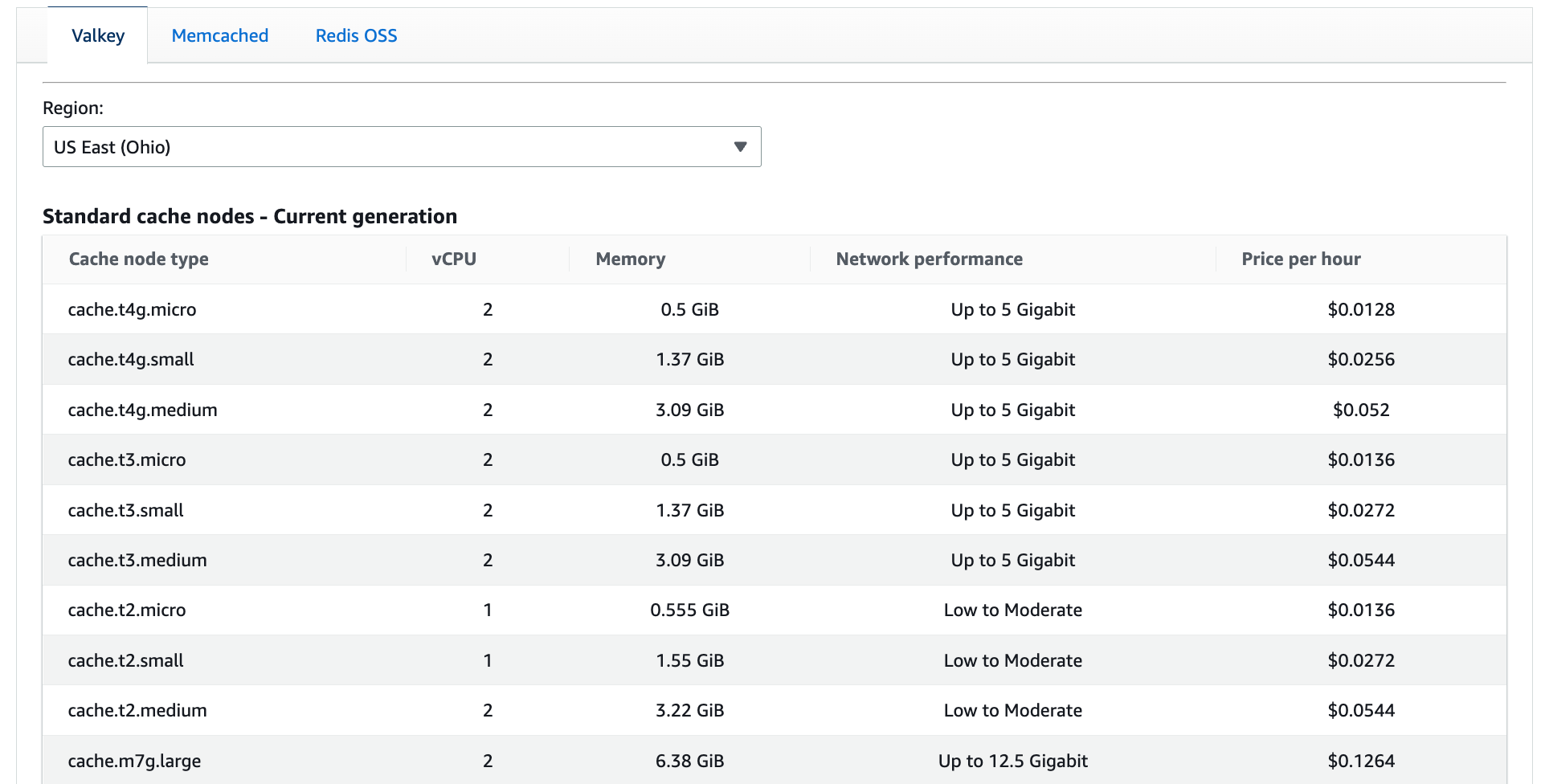
On-Demand is the simplest and most flexible way to run ElastiCache: you pay an hourly rate for the capacity you provision, with no commitment. That flexibility is valuable when cache requirements are changing, when you’re iterating on architecture, or when you want the option to resize or redesign without financial lock-in. The tradeoff is straightforward: On-Demand is the most expensive way to run ElastiCache.
Reserved Nodes
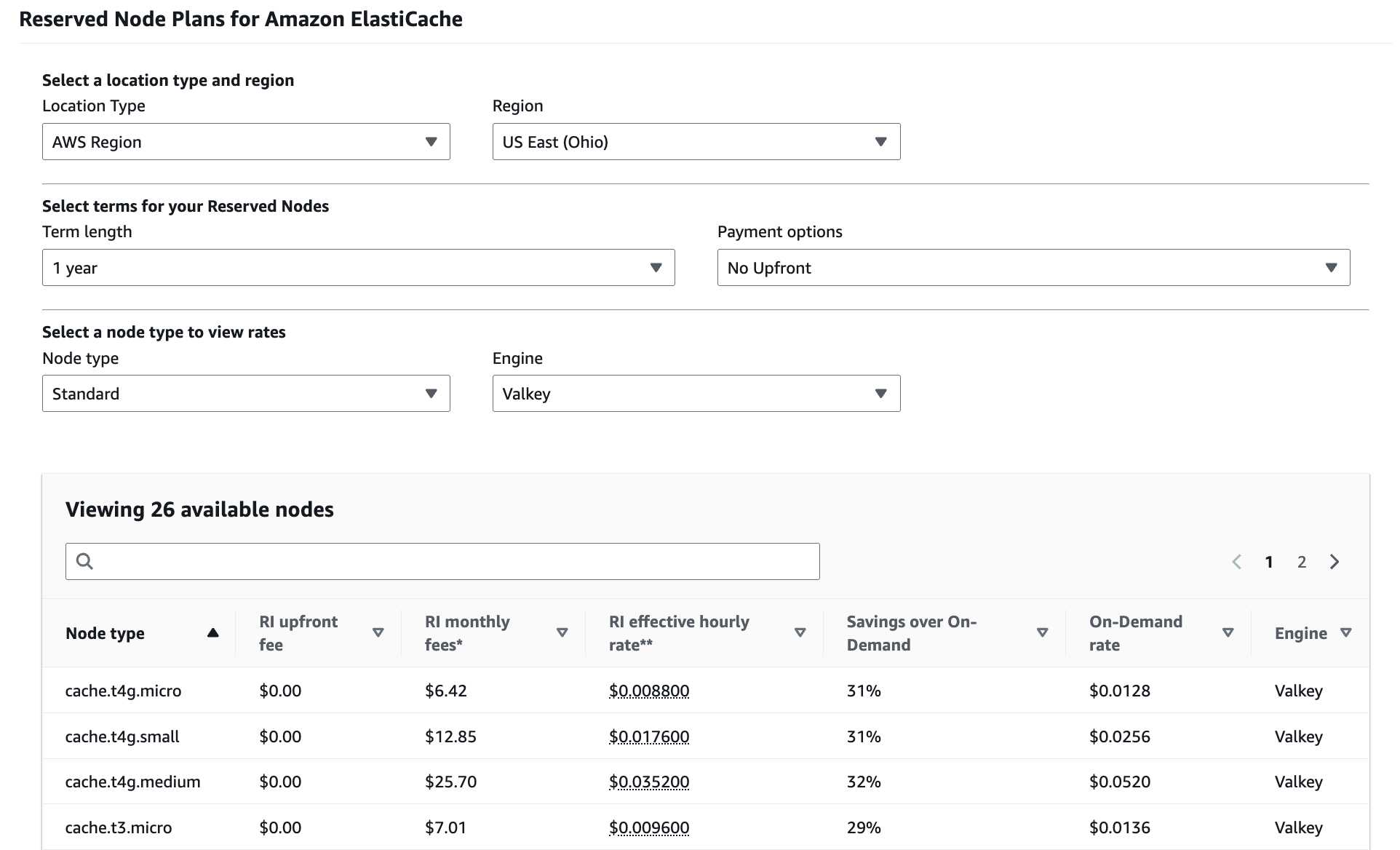
Reserved Nodes reduce ElastiCache costs by exchanging flexibility for a lower effective rate. You commit to a specific amount of provisioned capacity for one or three years, and in return, AWS charges less per node-hour. Reserved Node pricing includes
all upfront, partial upfront, or no upfront payment options. The tradeoff is risk and complexity. To use Reserved Nodes effectively, you have to predict how much ElastiCache capacity you’ll need, where it will run, and how long you’ll need it. If those assumptions hold, Reserved Nodes can significantly lower costs for always-on caches. If they don’t, you can end up paying for capacity you no longer need or can’t fully use.
Serverless
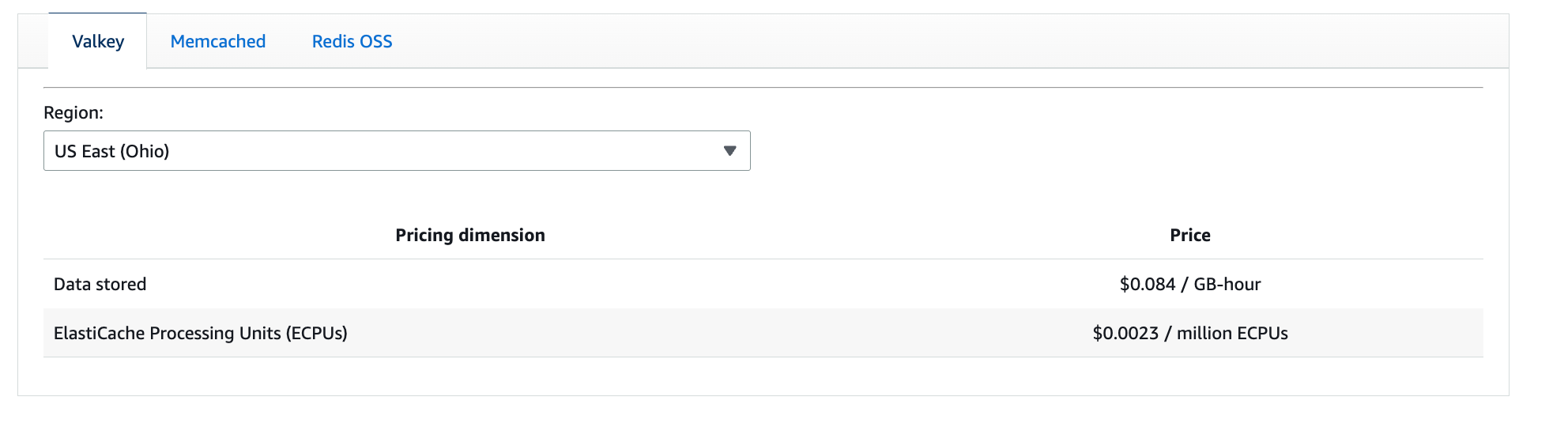
Serverless ElastiCache removes the need to provision nodes by charging based on usage instead of fixed capacity. Rather than committing to always-on infrastructure, you pay for stored data (GB-hours) and request processing measured in ElastiCache Processing Units (ECPUs) as it occurs. The tradeoff is cost predictability versus operational simplicity. Serverless works well when usage is variable or hard to forecast, and when teams want to avoid managing capacity directly. For steady, high-throughput caches that run continuously, Serverless may cost more than provisioned capacity, but it can still be attractive if reducing operational overhead matters more than minimizing unit cost.
ElastiCache on AWS Outposts
ElastiCache on Outposts runs on capacity deployed in your own data center instead of AWS regions. Pricing is tied to the Outposts infrastructure you’ve already purchased or leased, rather than purely to consumption in the cloud. The tradeoff is elasticity. Outposts can make sense when low latency, data residency, or tight on-prem integration is required. From a cost perspective, the key factor is utilization: unused Outposts capacity is still paid for, whether ElastiCache uses it or not. If you don’t need ElastiCache close to on-prem systems, regional AWS deployments are usually simpler and more cost-efficient.
How to Reduce ElastiCache Costs
As you’ve seen, Amazon ElastiCache pricing is complex. Even when teams understand how pricing works, translating that knowledge into immediate and sustained cost reduction is difficult—especially for always-on services like ElastiCache, where spend accumulates quietly over time. If this feels familiar, you’re not alone. The first step is visibility and waste identification. To optimize ElastiCache effectively, you need a clear view of where spend is coming from across accounts, regions, environments, and clusters, and the ability to see where capacity is underutilized. nOps provides complete cost visibility into ElastiCache usage, making it easy to understand which nodes are driving spend, how capacity is being used, and how to cut waste—without relying on perfect tagging or manual analysis. nOps also automates one of the hardest parts of ElastiCache cost optimization: commitment management. Because ElastiCache clusters often run continuously, Reserved capacity can deliver significant savings—but only if commitments are sized correctly and adjusted over time. nOps automates commitment planning and management across all AWS services, including ElastiCache, so teams can capture savings without taking on the risk and operational overhead of manual forecasting. nOps was recently ranked #1 in G2’s cloud cost management category, and we optimize $2 billion in cloud spend for our startup and enterprise customers. Join our customers using nOps to understand your cloud costs and leverage automation with complete confidence by
booking a demo today!
Frequently Asked Questions
Let’s dive into some FAQ about ElastiCache pricing, Reserved Instances, and cost management tools that can help.
Is ElastiCache free in AWS?
No, Amazon ElastiCache is not free beyond the AWS Free Tier. The Free Tier offers limited usage for small cache nodes for 12 months. After that, you pay for node instance hours, data transfer, backups, and optional features like Multi-AZ or Global Datastore, depending on region, engine, and selected configuration.
How much does ElastiCache cost?
ElastiCache pricing depends on engine, node type, region, and usage. Costs are primarily based on hourly node pricing, with additional charges for data transfer, backups beyond free limits, Global Datastore replication, and reserved nodes offering discounts for one- or three-year commitments through upfront or partial upfront payment options available today.
How to reduce ElastiCache cost?
To reduce ElastiCache costs, right-size node types, use reserved nodes for steady workloads, and eliminate idle or oversized clusters. Reduce replicas where safe, tune TTLs/eviction, and monitor utilization. Tools like nOps can help you continuously detect waste, recommend instance and commitment optimizations, and track savings across teams with governance.
Are Redis and ElastiCache the same?
Redis and Amazon ElastiCache are not the same, but closely related. Redis is an open-source in-memory data store engine. Amazon ElastiCache is a fully managed AWS service that supports Redis, handling provisioning, scaling, patching, backups, and high availability for production workloads with monitoring, security controls, and operational automation included natively.
How are data transfer costs calculated between Amazon EC2 and ElastiCache?
Data transfer is free between EC2 and ElastiCache within the same Availability Zone. Data transfer fees only apply for cross-AZ or cross-region traffic.
 Skip to content




