 Skip to content



AWS Lambda is AWS’s serverless compute service that runs your code in response to events without you managing servers. But Lambda costs can be tricky because pricing is driven by various factors that compound quickly as traffic and integrations scale.
This guide breaks down how pricing works for AWS Lambda, when AWS Savings Plans help, and the practical steps you can take to reduce cost without hurting performance.
What does AWS Lambda do?
AWS Lambda lets you run code for apps and backend services without provisioning or managing servers. You package your code as a function, upload it, and AWS handles the infrastructure behind it—execution, scaling, and availability.
Lambda is event-driven, meaning functions run when something happens: an API call hits Amazon API Gateway, a file lands in Amazon S3, a message arrives in SQS, or an event is published in EventBridge. This is why Lambda is often grouped under serverless or Function-as-a-Service (FaaS): you focus on the code and triggers, while AWS runs it on demand.
Each invocation runs in an isolated execution environment with its own allocated resources (like memory and temporary storage), which is part of why Lambda can scale from “a few runs a day” to “thousands per second” without you resizing fleets.
Common Lambda use cases include:
- Spiky or intermittent workloads (jobs that run in bursts with long idle gaps)
- Real-time stream processing (for example, with Kinesis)
- Event-driven automation and integrations across AWS services
- Serverless APIs and web backends
- File and data transformations triggered by uploads or pipeline events
Next: how AWS Lambda charges for all of that—and what actually shows up on your bill.
Lambda Billing Explained
AWS Lambda bills you based on what you actually run: the number of function requests and the compute time it takes your code to execute (measured by duration and influenced by the memory/CPU you allocate). If your function isn’t running, you generally aren’t paying for compute.
After you deploy your code as Lambda functions, AWS invokes them only when they’re triggered—by an event, a schedule, or an API call—and automatically scales to match demand. That means Lambda can handle anything from occasional background jobs to high-throughput, always-on traffic without you provisioning servers.
Primary Factors That Affect Pricing
Pricing seems simple at first, but your bill is shaped by a handful of meters that compound as traffic grows and architectures get more event-driven.
Free Tier and Minimum Charges
Lambda’s free tier gives you a baseline of usage at no cost each month, and anything above that is billed normally. The free tier includes:
- 1 million free requests per month
- 400,000 GB-seconds of compute time per month (shared across x86 and Arm functions)
Requests Pricing
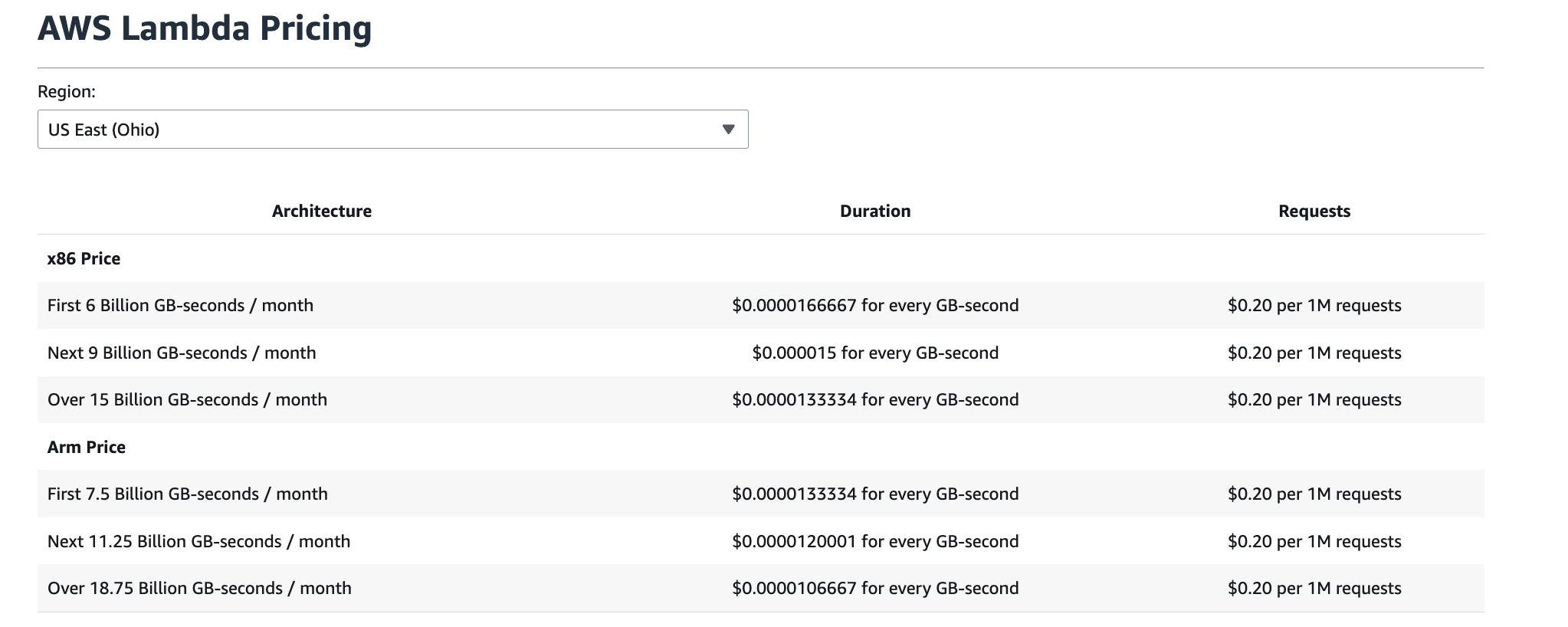
A request is counted each time Lambda starts executing your function—whether it’s triggered by an AWS service (like S3, SNS, or EventBridge) or invoked directly (API Gateway, SDK, console). After the free tier, requests are priced at $0.20 per 1 million requests.
Duration and GB-Seconds
Duration is metered from when your code begins executing until it returns or is terminated, billed in 1 ms increments. AWS converts runtime into GB-seconds, which means the duration rate depends on the memory you configured (and your architecture), and pricing can also be tiered at higher monthly usage levels.
Memory and CPU Allocation
You set memory from 128 MB to 10,240 MB (in 1 MB increments). This setting affects the price because Lambda allocates compute resources proportionally—more memory increases the per-ms rate and also increases available CPU, which is why memory is effectively part of the pricing model, not just a performance dial.
Architecture Pricing: x86 vs Arm
Lambda supports both x86 and Arm (AWS Graviton) architectures, with different published rates for each. Arm is typically priced lower for duration, but exact pricing depends on region and usage tier.
Ephemeral Storage
Each function includes 512 MB of ephemeral storage by default. You can increase it up to 10,240 MB, and you pay for the additional ephemeral storage you configure, billed as GB-seconds (amount of storage × execution time).
Data Transfer and Service Integration Costs
Lambda almost always triggers costs outside Lambda itself. You may see additional charges for data transfer (especially cross-region or internet egress) and for services in the request path—common ones include API Gateway, EventBridge, SQS, Kinesis, DynamoDB, and S3.
Additional Pricing Features (When They Apply)
Depending on your use case, these additional features may be relevant:
SnapStart
SnapStart is a performance feature (primarily for supported Java runtimes) that reduces cold start latency by snapshotting and reusing an initialized execution state. Pricing is separate from standard requests/duration and includes charges to cache snapshots over time and to restore snapshots when environments start from that cached state.
HTTP response streaming (Function URLs / InvokeWithResponseStream)
HTTP response streaming lets Lambda send response data progressively (useful for improving time-to-first-byte and handling larger payloads). You can stream the first 6 MB per request at no charge; beyond that, you’re billed for the number of GB written to the response stream.
Event source mapping provisioned mode (EPUs)
Provisioned mode for event source mappings (for example, SQS and Kafka/MSK sources) adds a separate pricing unit for the polling layer. You’re billed for Event Poller Units (EPUs) based on the number and duration of pollers provisioned/consumed (measured in EPU-hours), plus any applicable data transfer.
Lambda@Edge
Lambda@Edge runs code at CloudFront edge locations, and it uses its own pricing model. You’re charged for requests and duration (GB-seconds) at Lambda@Edge rates (different from regional Lambda), and requests are counted globally based on CloudFront events.
Lambda Managed Instances
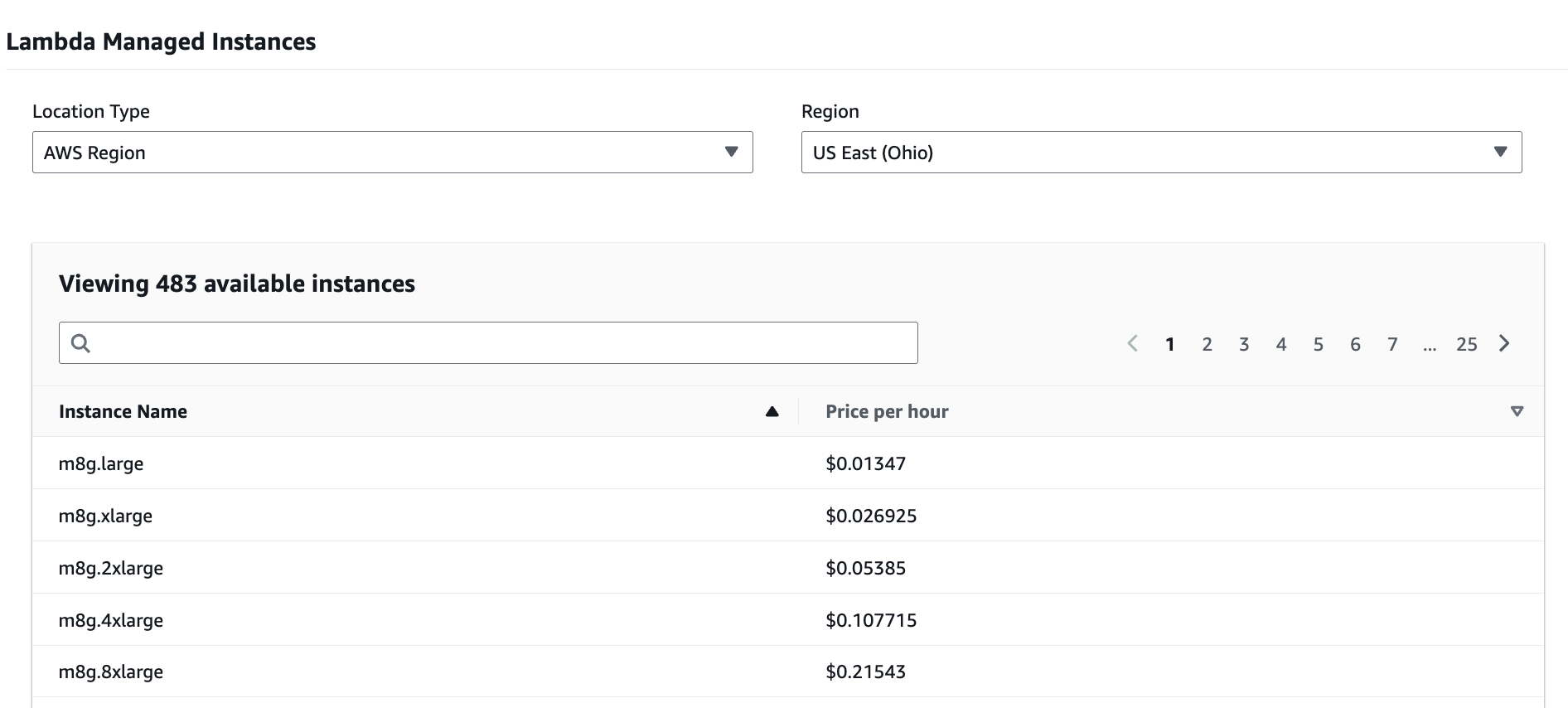
Lambda Managed Instances lets you run Lambda functions on fully managed EC2 instances inside your VPC. You can choose the underlying EC2 instance type or instance family to match your workload needs. Pricing shifts from per-invocation duration to three components: standard Lambda request charges, a compute management fee (a premium on the underlying EC2 on-demand price), and the EC2 instance charges themselves—where EC2 pricing options like Savings Plans or Reserved Instances can apply.
Lambda Savings Plans vs On Demand Pricing
With Lambda, the core tradeoff is simple: On-Demand keeps maximum flexibility, but it doesn’t come with any discounts, Savings Plan Commitments can lower your effective cost significantly — but there are pitfalls. Let’s look at your options and the key differences.
On Demand Pricing
On-demand is the default model AWS publishes for Lambda: you’re billed for requests and execution duration. Requests are priced at $0.20 per 1M requests (after the free tier), and a request is counted each time Lambda starts executing your function—whether it’s triggered by services like SNS/EventBridge or invoked through API Gateway/SDK/Console. One gotcha: some asynchronous events can effectively count as more than one request when payloads exceed size thresholds.
Duration is billed in GB-seconds, measured from when your code begins executing until it returns or terminates, rounded to 1 ms. It’s awesome to use because it’s pure pay-as-you-go and scales automatically with your actual usage; but, you don’t get any discounts on it.
Compute Savings Plans
Compute Savings Plans lower the effective rate you pay in exchange for a commitment to a consistent $ / hour spend for a 1- or 3-year term. For Lambda, Savings Plans can apply to duration (GB-seconds)—and if you use it, Provisioned Concurrency is also eligible—so they’re essentially a way to discount the “compute time” portion of your Lambda bill without changing how you deploy or run functions.
The key narrative: on-demand is perfect when compute usage patterns are unknown; Lambda Savings Plans are for when you’ve found a predictable baseline and want to stop paying list price for it. The tradeoff is commitment risk: if your usage drops below committed hourly spend, you still pay for the commitment.
Payment note: Savings Plans can be purchased with no upfront (pay-as-you-go), partial upfront, or all upfront payment options. The more you pay upfront, the higher the effective discount, but coverage and how Savings Plans apply to usage stays the same.
Provisioned Concurrency
Provisioned Concurrency (PC) changes Lambda from purely on-demand execution to a model where you also pay for readiness. When enabled, AWS keeps a configured number of execution environments initialized so invocations can start without waiting for initialization.
Here’s the takeaway: PC makes sense when you can’t tolerate cold starts (user-facing, latency-sensitive paths), but it’s easy to overspend if you treat it as a default setting. You’re billed for the concurrency you configure over the time it’s enabled (rounded up in billing increments), and the price scales with the memory size you choose. When the function executes, you still pay regular requests and duration, and if traffic bursts above the provisioned level, the overflow runs at standard on-demand rates—so you can end up with a blended bill. Also note: the Lambda free tier doesn’t apply to functions using PC, so even “light usage” can produce a surprisingly non-zero monthly cost once PC is turned on.
AWS Lambda Cost Optimization: 7 Practical Tips
There are a few key principles to keep in mind as you aim to maximize savings and pay the least for your Lambda usage:
1. Right-Size Memory
Memory drives cost because duration is billed in GB-seconds; right-sizing is about finding the memory setting that produces the lowest total GB-seconds for real traffic.
2. Reduce Dependency Latency
Time spent waiting on databases, APIs, and queues still counts as billed duration, so slow downstream calls are a direct Lambda cost multiplier.
3. Control Retries
Retries don’t just repeat work—they multiply requests and duration, especially in event-driven pipelines where failures can cascade.
4. Choose Arm When Possible
Arm (Graviton) often has lower duration pricing than x86, so switching compatible functions can improve price/performance without changing architecture patterns.
5. Set Concurrency Controls
Concurrency settings shape how hard Lambda can hit downstream systems; unmanaged bursts can trigger throttling, timeouts, and retry-driven spend.
6. Optimize Logging
CloudWatch logging can become a meaningful line item at scale; high-volume functions can generate surprising ingest and retention costs.
7. Make the Right Commitments
If you’re running AWS Lambda at any real scale, nOps takes commitments off your plate. nOps Commitment Management helps teams select the right AWS commitment approach for Lambda-eligible usage and keeps coverage aligned as your footprint changes—so you capture Savings Plan discounts without spending time modeling options, purchasing plans, or continually rebalancing coverage.
nOps is a cloud cost optimization platform that helps you understand, control, and reduce Amazon Lambda spend with no manual effort.
Visibility into Lambda cost drivers
nOps breaks Lambda spend down into any useful engineering or finance dimension—such as by account, environment, team, application, and region—so you can quickly answer: Which function changed? What changed about it? And what should we do next? It also includes cost anomaly detection, forecasting, budgeting, reporting, and all the other features you need.
Cost allocation that makes ownership obvious
nOps automates tagging and cost allocation, so you can break down spending by team, customer, product, or any other cost center.
Want to see it in practice? Book a demo to walk through Lambda commitment coverage, cost visibility, allocation, and spike protection in your environment.
nOps manages $3 billion in AWS spend and was recently rated #1 in G2’s Cloud Cost Management category.
Frequently Asked Questions
What is Amazon Lambda pricing?
This is the cost model for running serverless functions on AWS. You’re billed primarily for how many times AWS Lambda functions run (requests) and how long they run (execution duration), with rates influenced by memory/CPU configuration and architecture. Optional features like Provisioned Concurrency can add separate charges.
How does Lambda pricing work?
Lambda charges per request and per millisecond of execution time, converted into GB-seconds based on the memory you allocate. Higher memory can cost more per ms but may finish faster. Costs also depend on region and architecture (x86 vs Arm). You can use the AWS pricing calculator to estimate costs, or tools like nOps can help track coverage and savings automatically.
Are Lambda Function URLs free pricing?
Function URLs themselves don’t carry an extra “URL fee,” but invoking a function through a Function URL still generates normal Lambda charges (requests + duration). If you use HTTP response streaming with Function URLs, you may also pay for streamed response bytes beyond the included free amount.
Are there Reserved Instances or EC2 Savings Plans for Lambda?
Not for standard pricing. Reserved Instances and EC2 Instance Savings Plans apply to EC2 capacity, so they don’t discount typical Lambda request and duration charges. If you want to maximize discounts for Lambda with commitments, Compute Savings Plans are the model that applies. (If you use Lambda Managed Instances, EC2 pricing options can apply because the underlying capacity is EC2.)

