 Skip to content



New AI-Powered Cost Savings Recommendations
Filter through the noise of automated recommendations. Get insightful recommendations, easy wins, and personalized how-to’s to tackle your recommendations with ease
Discovering and acting on cloud cost optimization recommendations has always required manual effort. FinOps and DevOps teams spend hours sifting through recommendations, struggle to track which optimizations have been implemented, research on the appropriate process for rectifying, and have no clear way to see their savings progress as they take action.
We rebuilt the Cost Savings Recommendations experience from the ground up to make cost optimization effortless. nOps now proactively surfaces and prioritizes the most impactful opportunities automatically, tracks your realized savings over time, and teaches you how to implement with practical steps so you can maximize savings for minimal effort
What's New
We’re excited to unveil the new Recommendations experience. Starting today, you can access these features from your Cost Savings Recommendations dashboard and your Clara (FinOps AI Assistant) Feed in the nOps platform.
Recommendations page, re-architected & re-thought
The updated Recommendations page now features an AI-powered dashboard that automatically analyzes your recommendations and highlights the most impactful cost optimization opportunities.
Now you get:
- AI-generated insights highlighting key savings opportunities by category, effort level, and potential impact
- Custom How-To-Implement details powered by Clara, unique to your environment.
- All-in-one overview with Savings Summary, Recommendations by Effort, and the new Savings Achieved card
- Visualization of your optimization journey with the new Savings History timeline
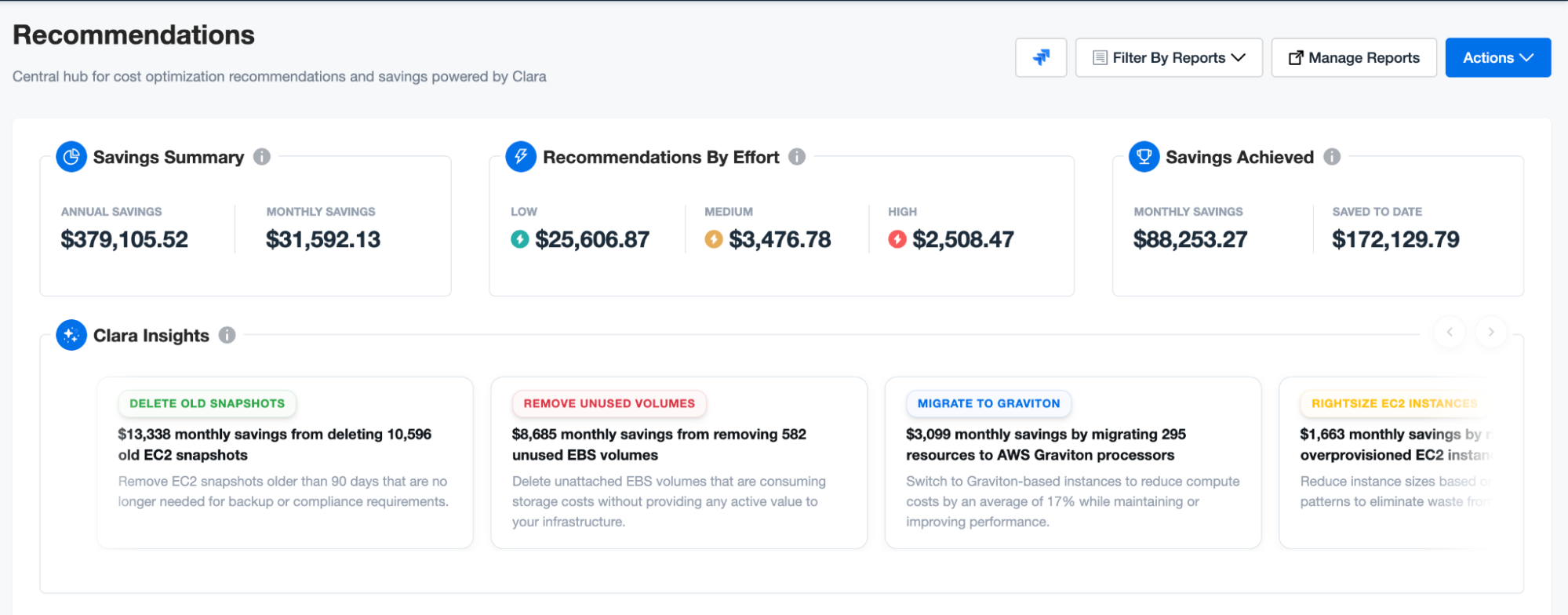
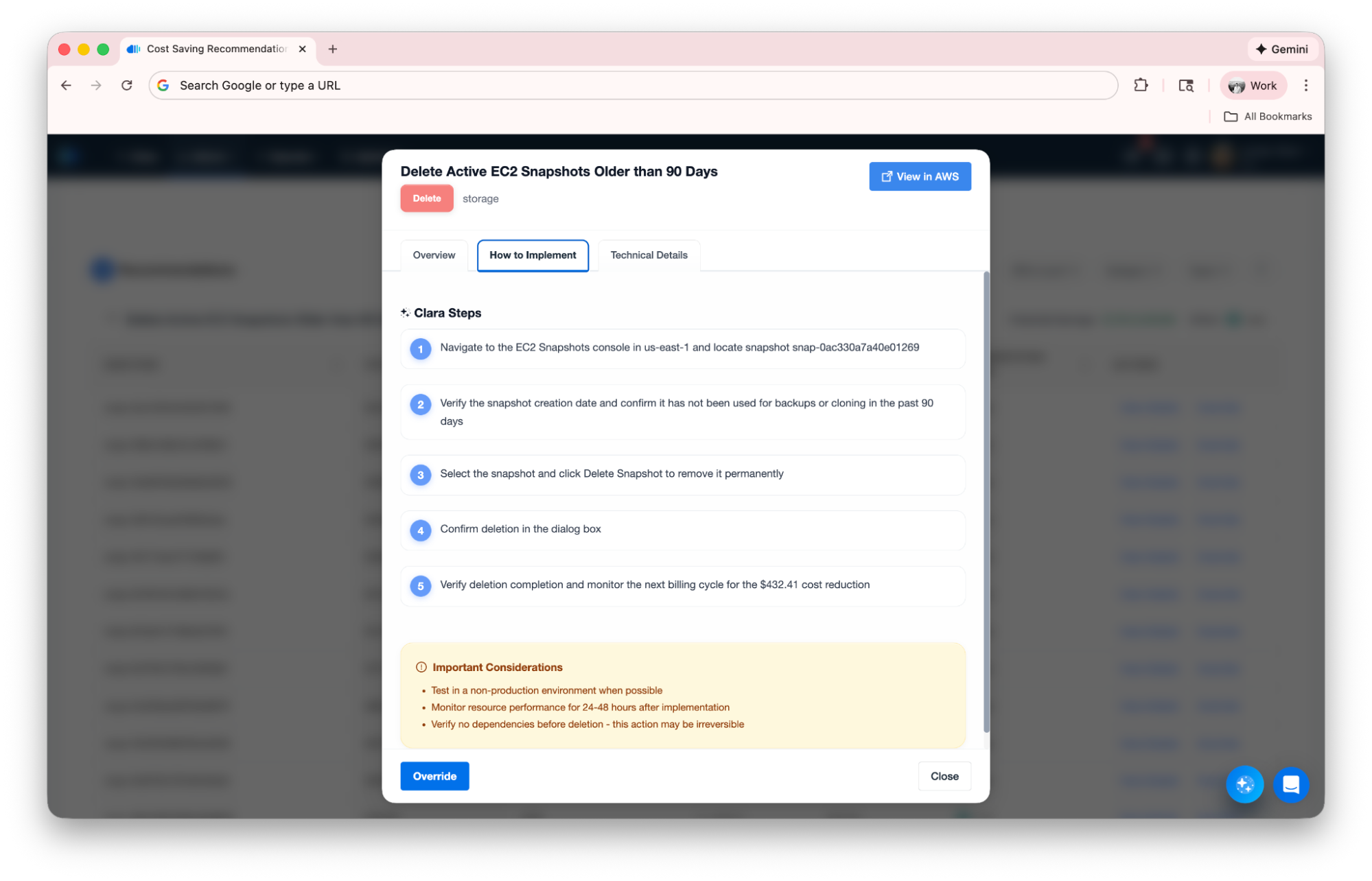
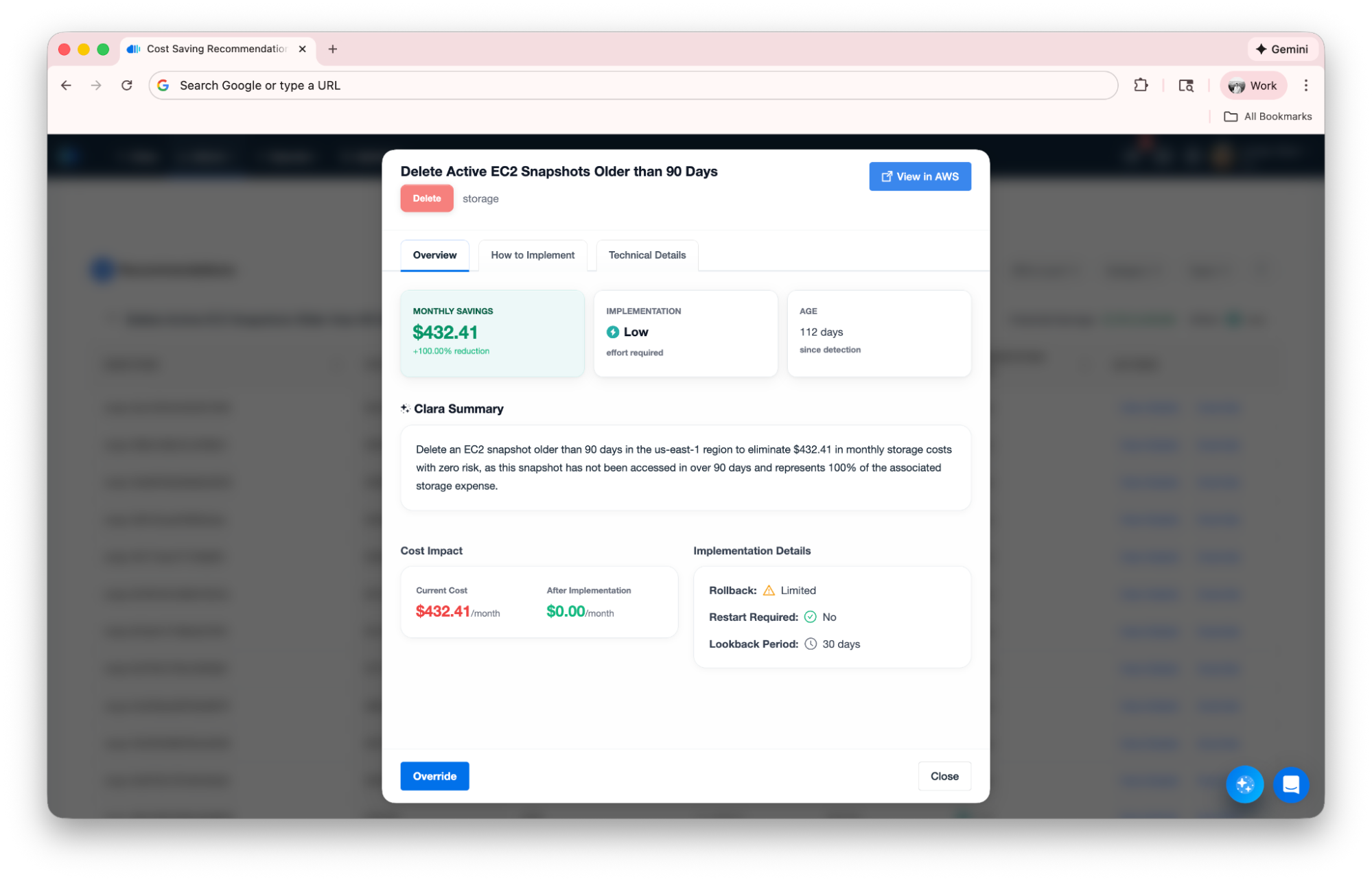
You don’t have to go hunting for savings. The Clara AI Agent proactively surfaces the highest-impact opportunities and notifies you weekly as your data updates with insights like “You have 12 high-impact Compute recommendations worth $5,000/month in potential savings” or “3 low-effort Storage optimizations can save $1,200/month with minimal implementation work.”
Savings Achieved
Savings Achieved is a new tracking capability that shows your monthly savings rate and total savings to date from implemented recommendations. Created to provide instant visibility into your optimization ROI, it includes both a summary and an interactive Savings History timeline.
Now you can:
- View your current Monthly Savings rate from all implemented optimizations
- Track cumulative Saved to Date across your entire optimization history
- Visualize savings trends with the Savings History chart (configurable from 7 days to all time)
- Switch between Spend view (savings in dollars) and Count view (recommendation activity)
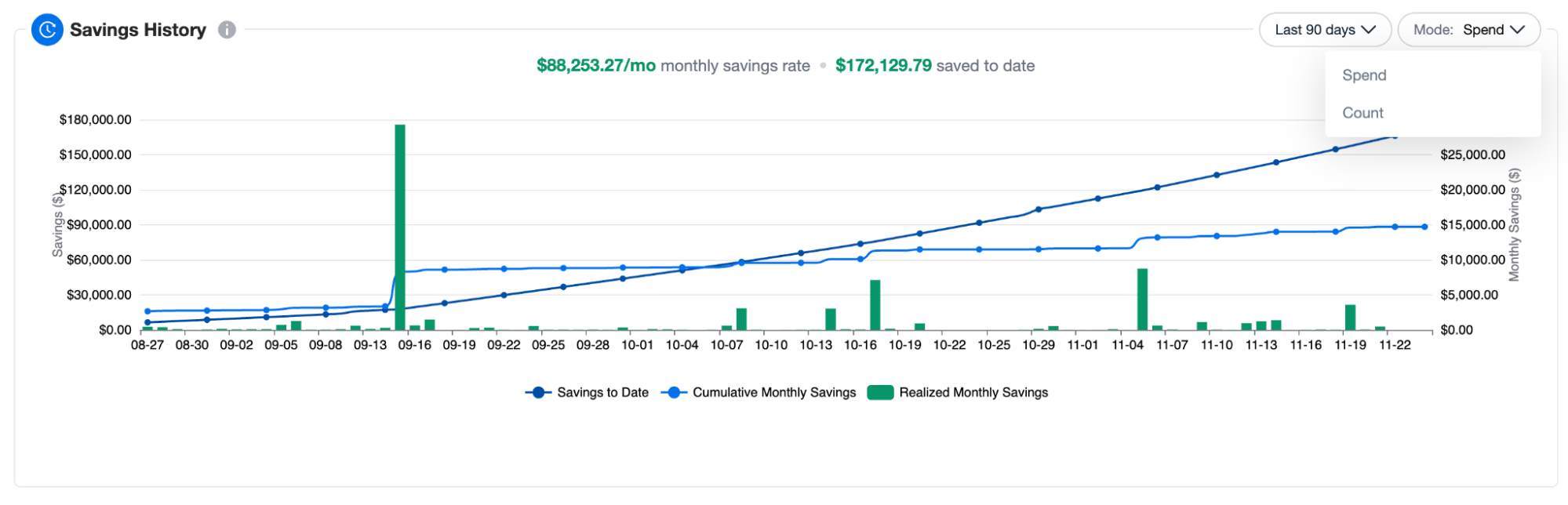
As recommendations are resolved, the system automatically calculates realized savings and updates your metrics. The Savings History timeline shows new recommendations, resolved recommendations, and total active recommendations over time.
AI Insights brought to My Feed
Weekly Recommendation Insights from Clara brings optimization updates directly into your daily workflow. Created to ensure you never miss important savings opportunities, the Feed now displays a dedicated Weekly Recommendation Insights section.
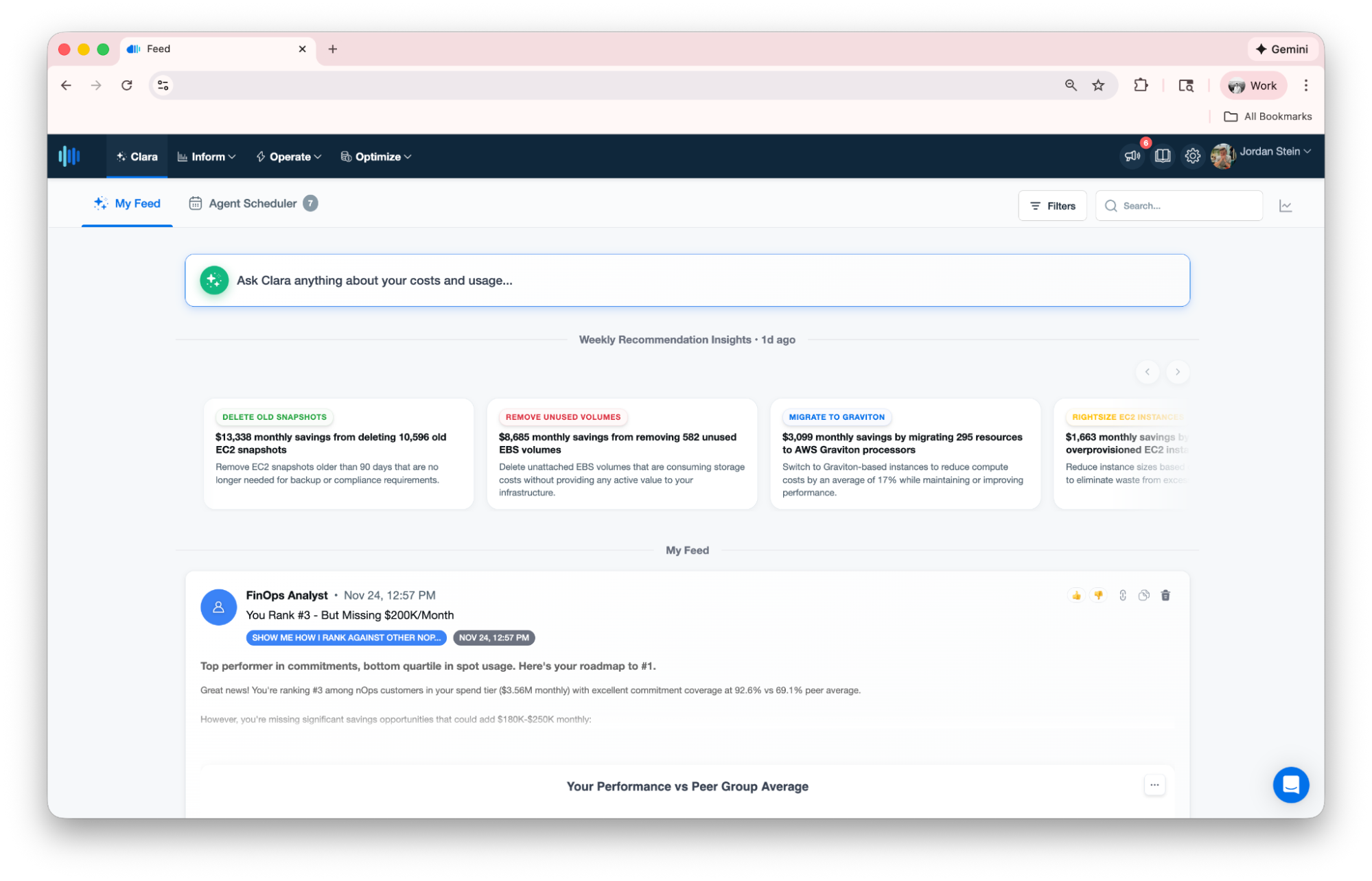
The Weekly Recommendation Insights section appears prominently in your Feed, keeping cost optimization top of mind alongside your other tasks and conversations.
Who Benefits Most
| FinOps Practitioners | Engineering Managers | Finance & Business Analysts |
| The updated Recommendations page helps eliminate hours of manual analysis by automatically surfacing high-impact opportunities. Savings Achieved provides accurate metrics for executive reporting, while Weekly Insights on the Feed ensures you catch every easy win! | Get instant visibility into which optimizations will deliver the most value with the least implementation effort. Track your team’s progress with Savings History and stay informed about new opportunities directly from your Feed without disrupting your workflow. | Access near real-time savings data for budgeting and forecasting. Savings Achieved delivers concrete ROI metrics, while the historical trends help with financial planning and demonstrating the value of tackling our recommendations. |
How It Works
Clara (FinOps AI Assistant) Insights and our AI-powered Resource Details page take advantage of nOps’ robust multi-agent AI architecture that powers all of Clara today. Clara automatically analyzes your recommendations in the background, identifying patterns by category, effort level, and savings potential, and generates insights, highlighting the most impactful opportunities for your teams to tackle. Recommendations can be overwhelming. Clara can help you filter through the noise.
Savings tracking is powered by our recommendation system. As recommendations are marked as resolved (implemented), or removed from the list, the system calculates realized savings based on the estimated monthly savings for each recommendation. These values accumulate over time, providing historical tracking.
- Clara analyzes your recommendations and generates insights automatically
- View insights on the Recommendations page or catch them in your Feed
- Click any insight to filter recommendations matching that criteria
- Click on View Details to get custom How-To steps, letting you know how to safely implement the changes
- As you implement recommendations, savings are tracked in Savings Achieved
- Savings History visualizes your progress with interactive charts
How to Get Started
Clara is already in the process of analyzing your recommendations. Visit our Recommendations dashboard or visit your Feed to get started today!
If you're already on nOps...
Have questions about the new feature? Need help getting started? Our dedicated support team is here for you. Simply reach out to your Customer Success Manager or visit our Help Center. If you’re not sure who your CSM is, send our Support Team a message.
If you’re new to nOps…
nOps was recently ranked #1 with five stars in G2’s cloud cost management category, and we optimize $2+ billion in cloud spend for our customers.
Try out the platform for yourself in the nOps playground — or join our customers using nOps to understand your cloud costs and leverage automation with complete confidence by booking a demo with one of our AWS experts.

