 Skip to content



Cloud bills are getting so big that even small inefficiencies turn into real money fast. Gartner forecasts worldwide public cloud end-user spending will hit $723.4B in 2025 (up from $595.7B in 2024). And various cloud optimization reports from companies like Harness and Datadog report waste of 20-40% or even higher.
It’s no surprise, then, that teams are prioritizing automation even more in the 2025 State of FinOps survey: as scope expands (cloud plus SaaS and AI spend) and teams remain resource-constrained, organizations risk being “stretched thin” without time-saving automation platforms.
That’s why we wrote this guide: to cover what FinOps automation is, why teams are investing in it now, the advantages and challenges, and how to choose the right platform.
What is FinOps Automation?
FinOps automation refers to the use of software-driven processes to reduce the manual effort required to understand and optimize cloud spend at scale.
At its core, FinOps automation exists to help organizations keep pace with the complexity of modern cloud environments. As usage patterns, pricing models, and business demands multiply, automation allows FinOps teams to monitor costs and identify savings opportunities in a more consistent and proactive way.
Why do you need FinOps Automation?
FinOps automation exists to close the gap between how fast cloud changes and how fast teams can respond.
- Cloud usage data updates constantly, making periodic reviews too slow to catch issues early
- Pricing models and discount instruments change frequently, increasing the cost of inattention
- FinOps teams are expected to manage more scope (cloud, SaaS, AI) without more headcount
- Engineers don’t have time to continuously monitor, optimize, and govern spend manually,
- Savings opportunities decay quickly when action depends on tickets, approvals, spreadsheets, manual processes, and sporadic fire drills.
How does FinOps Automation work?
Let’s go over the key areas covered by cloud cost management automation for today’s complex cloud environments:
Visibility
FinOps automation starts with making cloud cost data accessible, timely, and usable across the organization. That requires cost and usage data that is current, accurate, and available at the level of detail needed to support day-to-day decisions. Automation enables this by continuously ingesting and processing cloud cost data as it becomes available, rather than relying on delayed, manual reporting cycles. Today, organizations typically need visibility over their multicloud cloud providers (AWS, Azure, GCP), Kubernetes, third party SaaS tools, as well as AI costs.
Anomaly Detection & Cost Analysis
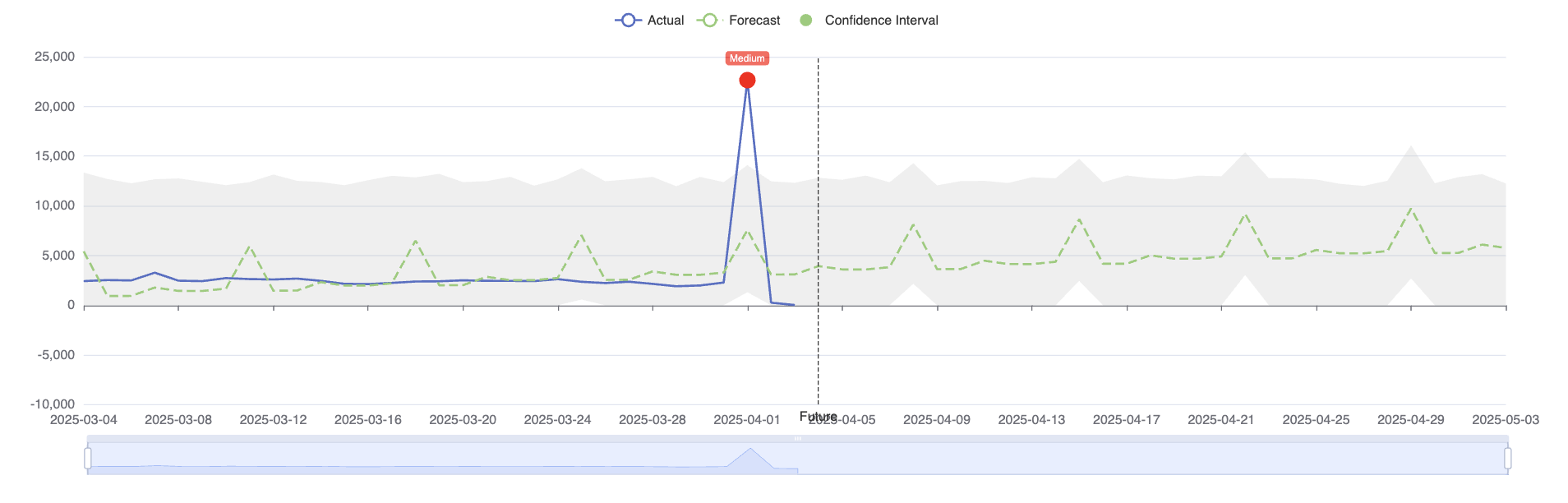
Once you have reliable visibility, the next layer is catching unusual spend as early as possible—before it becomes a week-end or month-end surprise. Anomaly detection automation monitors cost and usage continuously, looks for changes that don’t match normal patterns, and flags the specific dimensions that matter (service, account, workload, team, environment, region) so teams can quickly trace what changed and where to start investigating.
Budgeting & Forecasting
Budgeting and forecasting automation turns raw spend and usage signals into forward-looking guidance that stays current as your environment changes. Instead of building forecasts once per month (and watching them drift), automated forecasting updates projections as new usage data arrives, highlights variance against cloud budgets, and makes it easier to answer questions like “are we trending over?” and “what’s driving the gap?” across teams, services, and environments. This is especially useful when growth is uneven, workloads are seasonal, or new products and AI usage introduce sudden shifts that break static planning models.
Cost Allocation & Reporting
Cost allocation and reporting automation focuses on making cloud spend understandable and attributable, not just visible. Automation applies consistent allocation logic across accounts, services, and environments, using signals like tags, labels, namespaces, and ownership metadata to map cloud costs to teams, products, or business units. Automated reporting then turns that allocated data into repeatable views for different audiences—engineering, finance, and leadership—without requiring manual reconciliation.
Resource Optimization
Cloud resource optimization automation focuses on continuously matching infrastructure to real usage across different layers of the stack. This includes rightsizing compute resources like EC2 instances and managed services, identifying idle or overprovisioned storage, and optimizing Kubernetes workloads at the pod and container level where misconfigured requests and limits often drive hidden waste.
Autoscaling Optimization
Autoscaling optimization focuses on how workloads grow and shrink in response to demand—and how efficiently that scaling happens. Automation works alongside tools like Cluster Autoscaler, Karpenter, Horizontal Pod Autoscaler (HPA), and Vertical Pod Autoscaler (VPA) to evaluate whether scaling behavior is actually cost-effective. This includes identifying oversized nodes, poorly tuned scaling policies, containers with misaligned requests and limits, and situations where scaling reacts too slowly or too aggressively.
Pricing Optimization / Commitment Management
Automated pricing optimization aims to reduce the per-unit cost of cloud services by continuously choosing and managing the most cost-effective pricing options for your actual consumption. It uses usage history and forward-looking projections to evaluate discount instruments across providers—such as AWS Savings Plans and Reserved Instances, Azure Reservations, and Google Cloud CUDs—so teams can decide what to commit to (and for how long) based on real demand, not guesswork.
FinOps automation platforms like nOps take this further by managing commitments as an ongoing system: continuously analyzing usage patterns, recommending commitment actions, and helping teams execute and maintain an optimized commitment posture over time. The result is less manual overhead, fewer missed discount opportunities, and better alignment between commitments and evolving infrastructure needs.
Benefits of FinOps Automation
The benefits of automated cloud cost management for cloud operations include:
Faster, Real-Time Cost Visibility
Hourly (or near real-time) visibility is only practical with automation, and that granularity is critical for understanding why spend changes. Cost spikes often map to short-lived events—deployments, autoscaling behavior, traffic bursts, misconfigurations—that disappear when data is rolled up daily or monthly. Without fine-grained data, teams can see that spend went up but not what caused it. Automation preserves that detail and makes it possible to trace spikes back to specific services, workloads, or changes before the signal is lost.
Reduced Manual Effort for FinOps & Engineering
Automation removes a lot of the repetitive work (pulling reports, cleaning data, validating allocation) so teams don’t burn cycles on maintenance tasks. Just as importantly, it keeps engineers focused on building and innovating—not memorizing pricing plans, interpreting discount rules, or chasing incremental savings across hundreds of small resource changes.
Continuous, Automated Optimization
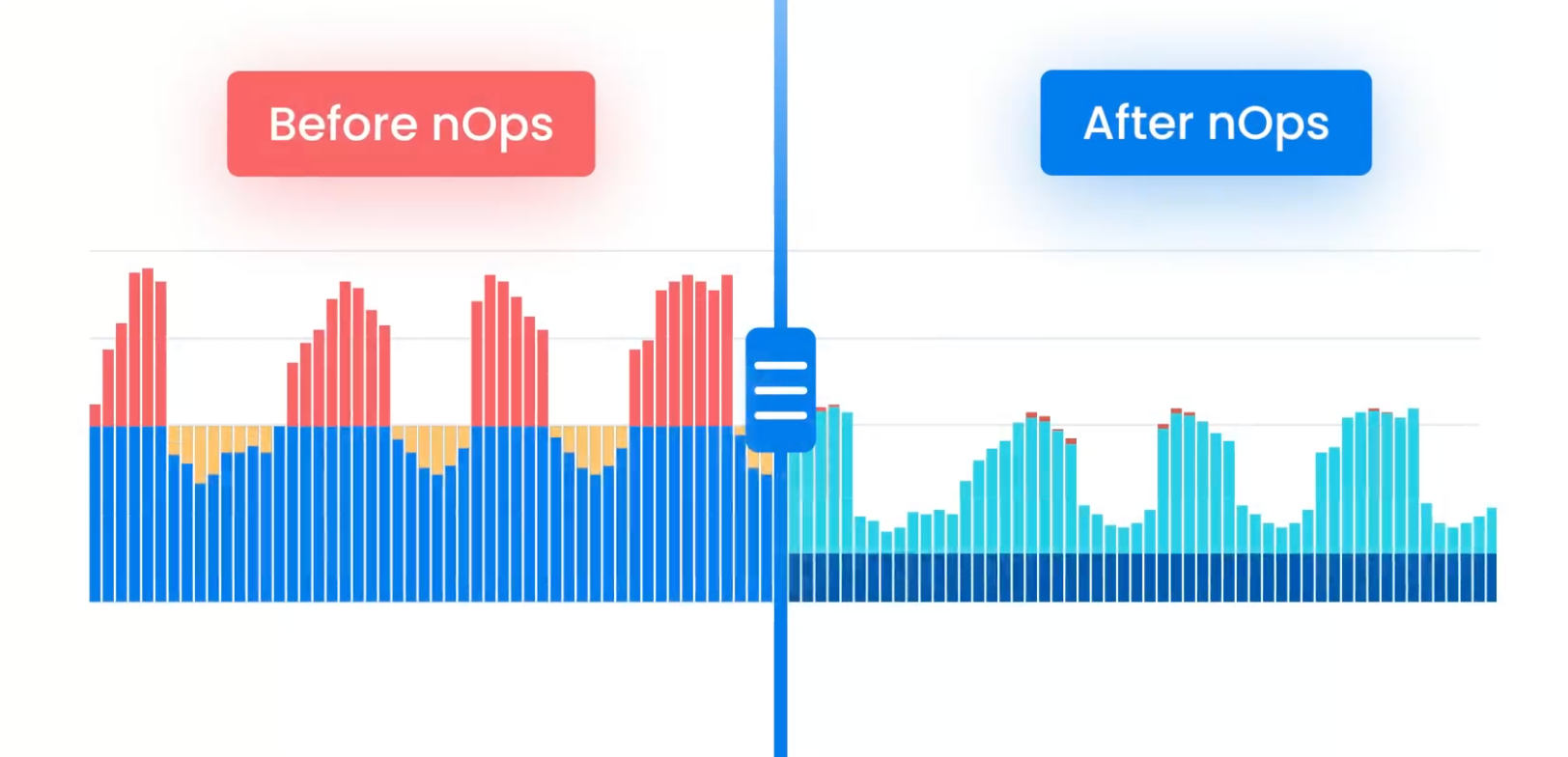
Cloud optimization isn’t one lever—it’s a stack. You may need container rightsizing, node scaling, scheduling, storage tuning, and discount mechanisms working together to keep cloud costs in check as demand changes. Automation lets optimization run continuously across these layers, 24 x 7.
Reduce risk
Manual cost work is easy to get wrong: a missed tag, a spreadsheet mistake, a stale report, a change that slips through. Automation reduces that human error and makes results more predictable. Many automation platforms also commit to measurable outcomes (for example, specific targets around discount coverage, commitment utilization, or sustained savings), which gives teams a clear KPI to track.
Limitations / Challenges of FinOps Automation
Let’s talk about some of the drawbacks of automated cloud cost optimization for your cloud investments.
Engineers don’t trust automation
If automation can change infrastructure, engineers will worry about performance, reliability, and surprise changes. Trust drops fast when cost saving tools don’t explain why they’re recommending an action, can’t show impact, or can’t be scoped with clear rules (what’s allowed, what’s excluded, and when humans must approve).
Too many tools (causing expense, inconsistent data, etc.)
FinOps often ends up split across dashboards, anomaly tools, tagging tools, Kubernetes tools, and commitment platforms. That can get expensive, but the bigger problem is inconsistency: different tools calculate cost and savings differently, refresh on different schedules, and tell conflicting stories—creating confusion and alert fatigue.
Recommendations without true automation
Many tools stop at visibility and recommendations only. That still leaves teams to prioritize, get approvals, and implement changes manually—so savings depend on tickets and available time.
Vendor lock-in
Automation often becomes deeply integrated into reporting, allocation logic, and optimization workflows. Switching later can be painful if your FinOps processes depend on proprietary dashboards, custom rules, or commitments managed inside a single platform—especially if the platform doesn’t make it easy to export data, document logic, or maintain portability.
Automate FinOps with nOps
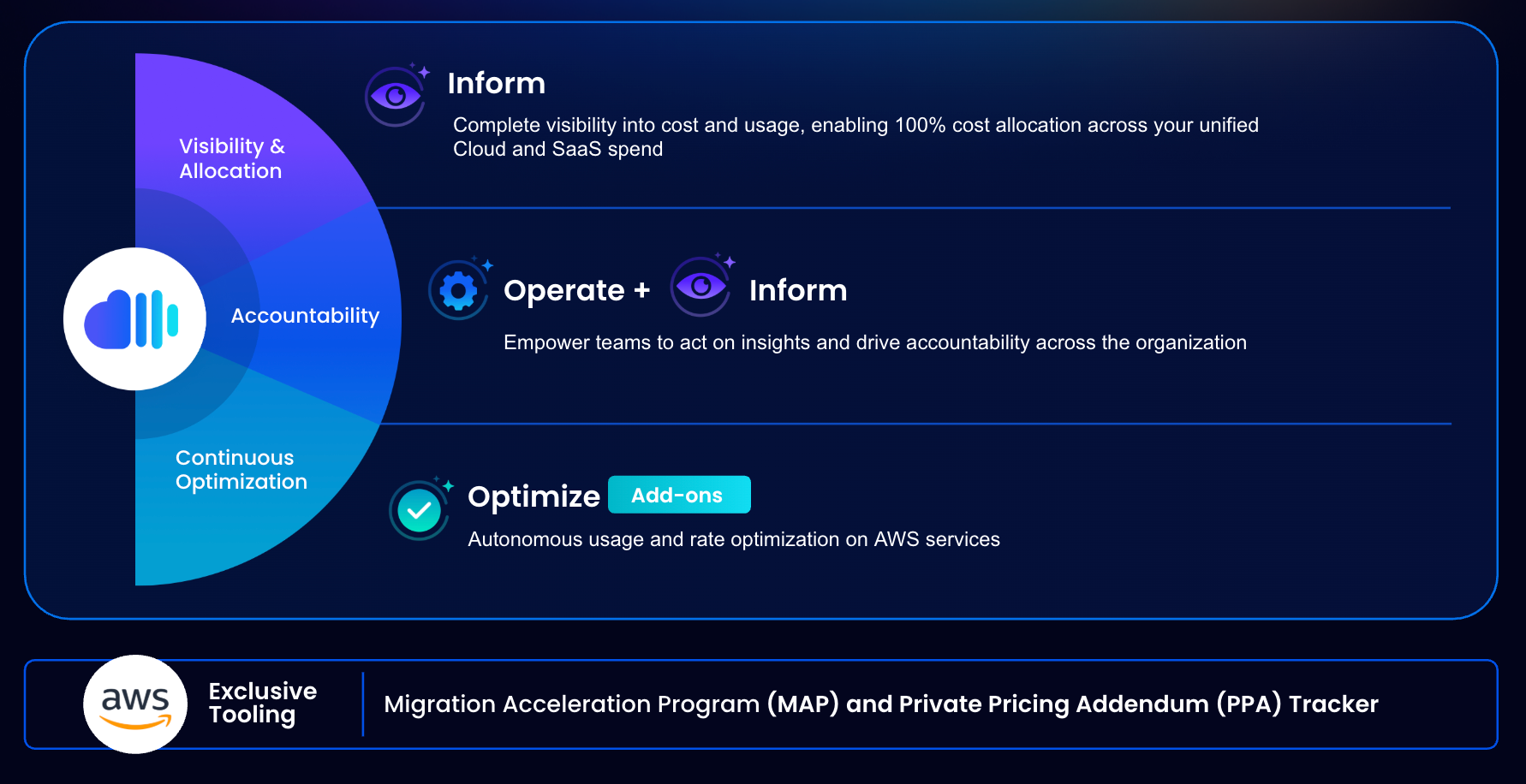
Many cloud cost tools focus on surfacing insights or recommendations. While useful, this approach still leaves teams responsible for validating data, coordinating across tools, and manually implementing changes—introducing delay, inconsistency, and fatigue as environments scale.
nOps is built as an end-to-end FinOps automation platform designed to address these gaps. It brings together visibility, continuous optimization, and commitment management in a single system, eliminating the need to stitch together multiple point solutions with conflicting data models and refresh cycles.
Where recommendation-driven tools stop short, nOps emphasizes continuous execution. This includes automated management of cloud discount instruments—such as AWS Savings Plans and Reserved Instances—using real usage signals and ongoing optimization strategies, as well as Kubernetes cost optimization at the container level that works alongside existing autoscaling tools and workflows (so you can plug in and unplug at any time with no lock in).
nOps was recently ranked #1 in G2’s cloud cost management category, and we optimize $2 billion in cloud spend for our startup and enterprise customers.
Join our customers using nOps to understand your cloud costs and leverage automation with complete confidence by booking a demo today!
Frequently Asked Questions
Let’s dive into a few Frequently Asked Questions regarding managing cloud costs effectively with automation tools.
How does automation help FinOps?
Automation helps FinOps by continuously collecting cost and usage data, detecting anomalies, updating forecasts, and identifying optimization opportunities without manual effort. This allows teams to respond to changes faster, reduce reliance on spreadsheets, minimize human error, and scale cost control as cloud infrastructure grows in complexity.
What is Cloud Financial Management?
Cloud Financial Management (often called FinOps) is the practice of understanding, managing, and optimizing cloud spend while balancing cost, performance, and business value. It brings financial operations, engineering, and business teams together to make data-driven decisions and maintain accountability for cloud usage and cost efficiency.
What is proactive cost management vs reactive cost management?
Proactive cost management focuses on real time cost monitoring trends, forecasting spend, and optimizing cloud costs continuously before issues occur. Reactive cost management responds after overspend or surprises happen, often through audits or cleanups. Proactive approaches rely heavily on automation to keep pace with constant cloud changes and enhance operational efficiency.

