Top 9 Kubecost Alternatives For Kubernetes Cost Management
Understanding your cloud costs has become increasingly complex within high-growth, cloud-native environments running Kubernetes at scale.
Kubecost has become a popular choice for Kubernetes cost visibility and insights. But for organizations managing multiple clusters, costs (especially post-IBM acquisition) can quickly spiral up — prompting many to search for alternatives.
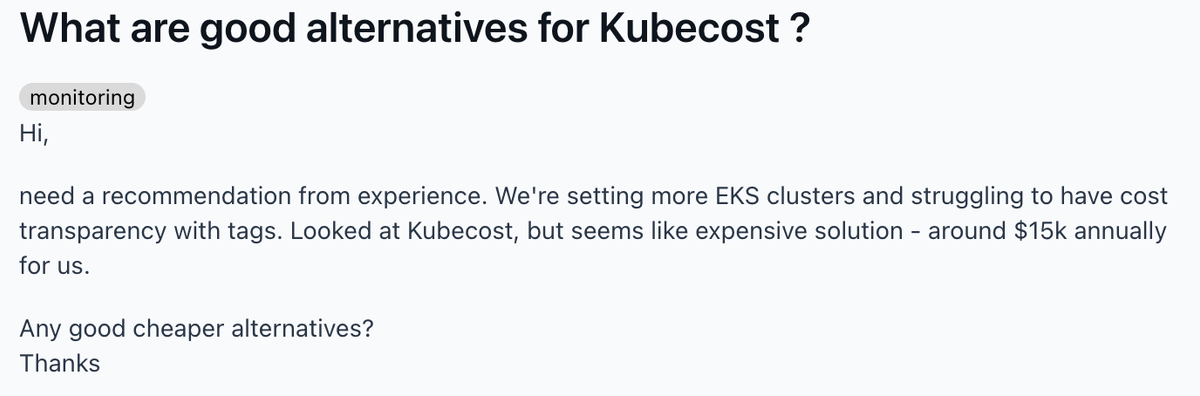

In this article, we'll deconstruct all of the industry-leading Kubernetes cost management solutions currently available on the market, so you can evaluate the tool that best fits your organization's needs AND budget.
Kubecost Alternatives at a Glance
Here's how the tools in this guide compare on the dimensions that matter most: how deep the Kubernetes support goes, whether it extends to the rest of your cloud and AI spend, whether it automates savings or just shows you where they are, and how it's priced.
Tool | Kubernetes Focus | Multicloud / SaaS / AI Visibility | Automated Optimization | Pricing Model |
|---|---|---|---|---|
Kubecost (baseline) | Kubernetes-first, purpose-built | Supports cloud-provider cost data (AWS/Azure/GCP/on-prem), but not broad cloud/SaaS/AI cost management | No — visibility only | Contact Kubecost/IBM; rises with cluster count and infrastructure monitored |
nOps | Yes — K8s cost allocation and waste visibility | Yes — AWS, Azure, GCP, Kubernetes, AI, and SaaS in one platform | Yes — automated commitment management | Savings-first: free to start, then % of savings |
OpenCost | Yes — CNCF, K8s-native | Partial — AWS/Azure/GCP/on-prem visibility, no SaaS/AI | No — visibility & allocation only | Free (open source) |
Datadog Cloud Cost Mgmt | No — broader observability + cost | Yes — multicloud cost data | No | $5–$10 per $1,000 spend/mo (Pro/Enterprise, billed annually) |
Harness.io | Yes — Kubernetes allocation and automated cluster optimization | Yes — broader cloud and AI cost management | Yes — commitment management, AutoStopping, Kubernetes rightsizing and more | Free Forever (<$250K/yr), then Enterprise — contact sales |
Yotascale | No — multicloud-first | Yes — team/app/resource-level allocation | Partial — predictive recommendations | Custom, usage-based (not % of spend) — contact sales |
Apptio Cloudability | Partial — container cost allocation | Yes — multicloud, Finance-oriented | Partial — limited automation (EBS cleanup, ASG scheduling) | Custom, tiered (Essentials/Standard/Premium) — free trial available |
Finout | Yes — via Prometheus/Datadog integration | Yes — broad multicloud + Kubernetes | No — lacks commitment management | Flat fee by committed spend tier — contact sales, free trial available |
Cast.ai | Yes — K8s-only automation | Kubernetes across multiple clouds; not general cloud/SaaS/AI cost management | Yes — instance selection, rightsizing, rebalancing | Custom quote based on your Kubernetes environment |
Anodot | Yes — deep K8s allocation | Yes — multicloud allocation | No — visibility-focused, needs added tools to act | Custom pricing; not publicly listed — contact sales |
What Is Kubecost?
Kubecost is designed to provide real-time visibility and control over Kubernetes spending. It is an open-source platform tightly integrated with open-source cloud-native projects like Kubernetes and Prometheus.
Its core features include Kubernetes cost allocation across all native Kubernetes concepts (pod, container, node, namespace…) as well as unified cloud cost monitoring across various platforms and deployment options (AWS, Azure, Google, on-premises) with real-time alerts, reporting and cost optimization recommendations.
While Kubecost provides robust tools for cost analysis and management within Kubernetes clusters, it has a few limitations:
- Expensive. Pricing can quickly climb for organizations with multiple clusters. In one case, an engineering team reported spending over $72,000 per year to monitor just three clusters. And all of this spend was for visibility alone.
- No automated cost optimization tools. Kubecost is great for understanding your Kubernetes costs, but it's not intended to be a full cost optimization platform. That means unless you invest in another tool, implementing cost-saving measures still requires time-consuming manual intervention.
- Kubernetes-focused. Kubecost is primarily designed around Kubernetes cost management rather than unified cost management across your entire cloud, AI, and SaaS environment. These insights aren't integrated with the rest of your cloud spend, which makes it difficult and complicated to reconcile costs with your overall engineering budget and AWS bill. Plus, adding additional tools to gain visibility into your non-Kubernetes resources leads to increased management overhead and data inconsistencies.
Top Kubecost Alternatives
If these challenges sound familiar to you, let's take a look at some Kubecost alternatives that can help.
#1. nOps — Best for Automated Kubernetes and Multicloud Cost Optimization
nOps is a FinOps and cost optimization platform built to monitor and optimize your Kubernetes costs alongside the rest of your cloud environment. It offers an all-in-one set of solutions, including Kubernetes cost visibility and allocation, automated commitment management, and unified visibility across AWS, Azure, GCP, Kubernetes, AI, and third-party SaaS spend — all compatible with whatever Kubernetes-native optimization (rightsizing, autoscaling, compute selection) you already have running via Karpenter, Cast.ai, or similar.
And with an ultra-lightweight EKS agent, customers report spending orders of magnitude less than with Kubecost.
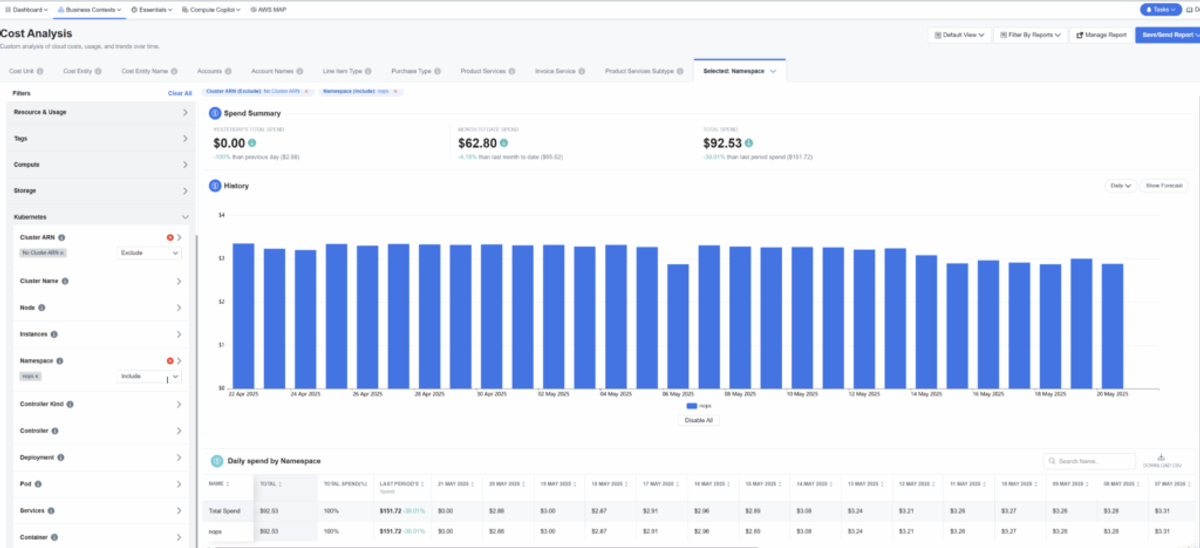
Break down costs by any Kubernetes concept, including deployment, service, namespace label, pod, container and more. You can associate these costs with any relevant dimension — workload, environment, resource type, team, pricing type, and more. Intuitive filters make it easy for engineering, finance, and business leaders to gain spending insights, whether it's pinpointing the workload spiking your EC2 bill or fairly splitting shared costs.
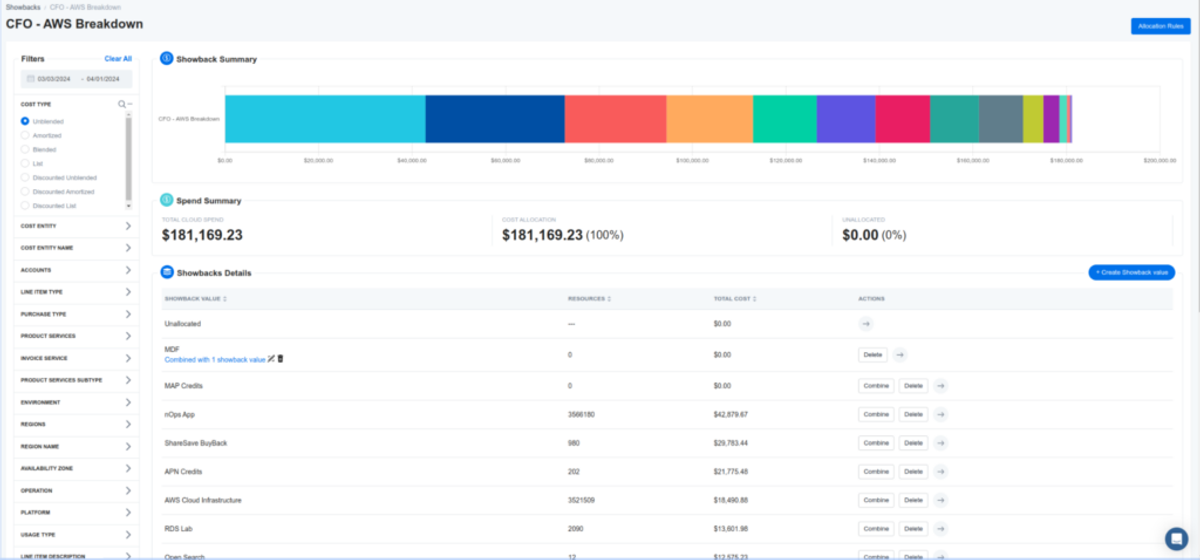
nOps surfaces cloud waste for you based on CPU and/or GPU and memory metrics, so you know exactly where to rightsize — whether through your existing Kubernetes-native tooling or manually — and can start saving immediately.
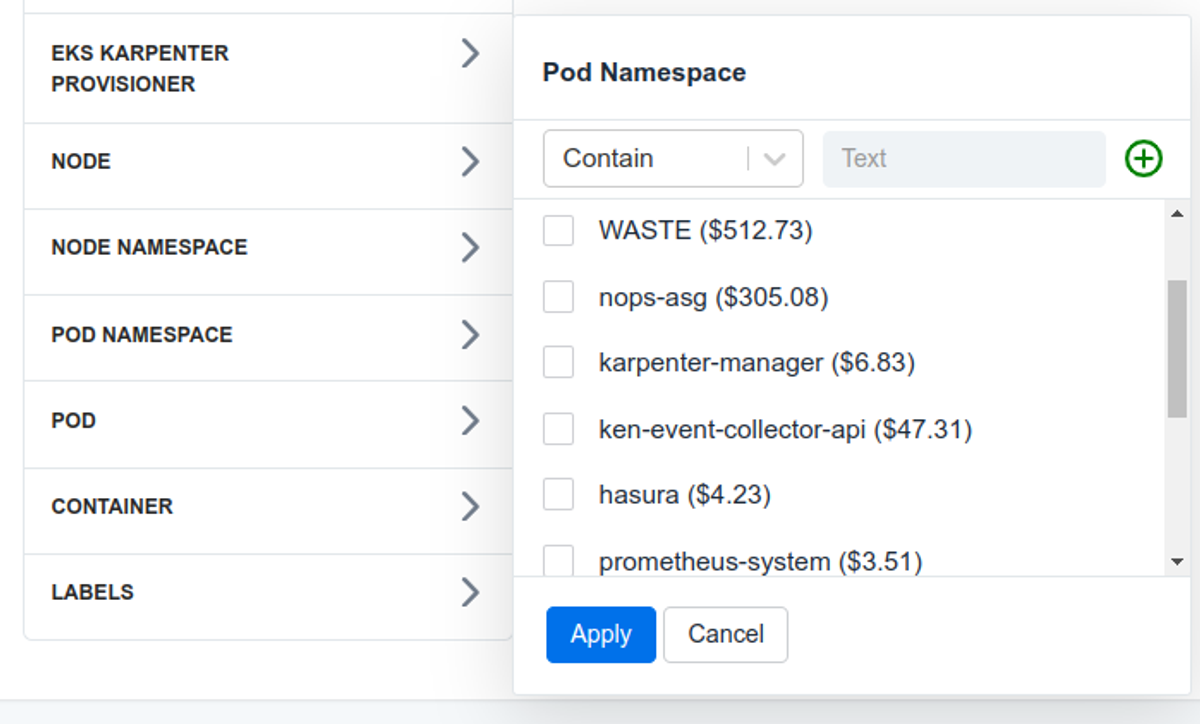
nOps is fully aware of your organization-wide commitments, automatically applying Reserved Instances and Savings Plans across your EC2 and EKS footprint to capture savings with minimal lock-in risk. That's the primary lever nOps uses to bring down your effective Kubernetes compute costs — and it works alongside whatever Kubernetes-native optimization tooling (Karpenter, Cast.ai, etc.) you already use for rightsizing, autoscaling, and compute selection, rather than replacing it.
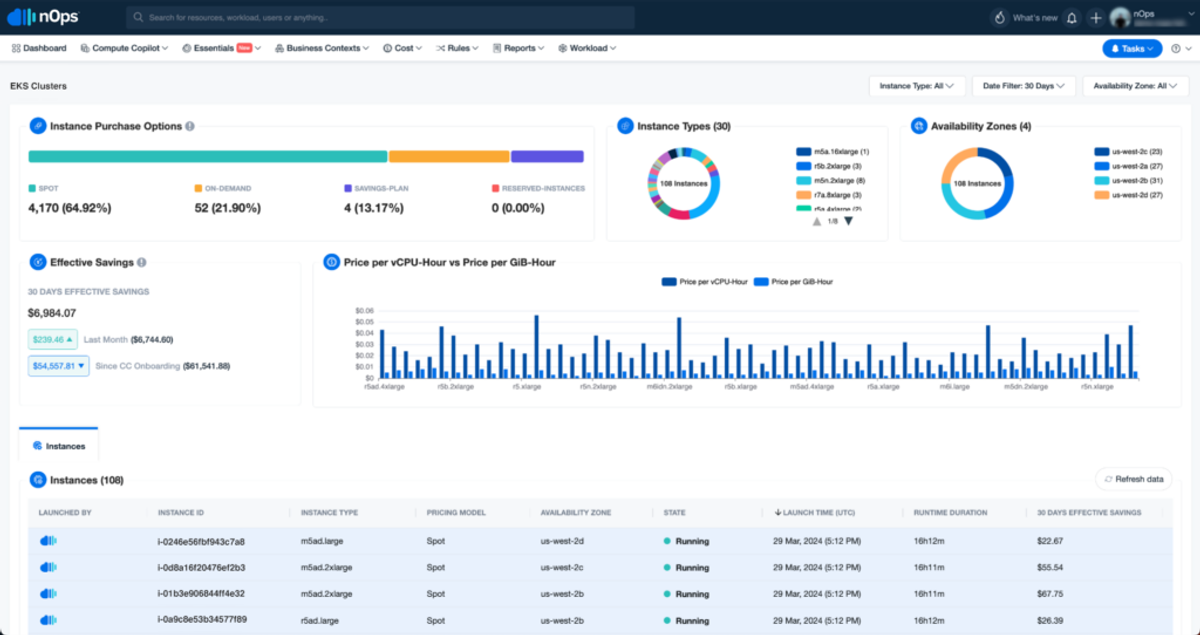
Navigating the AWS console to gather comprehensive information about your cloud resources often requires clicks and calculations for potentially hundreds or thousands of clusters. The nOps dashboard consolidates all the essential information into one page, so you can instantaneously see exactly what's going on in any EKS cluster or ASG. View at a glance:
- How optimized for pricing discounts am I?
- What is my real price per vCPU-hour or price per GB-Hour?
- How much did I save through nOps, over any period?
To find out more about using nOps to understand your Kubernetes spend and get better performance at lower costs, you can take an interactive demo here.
Pros
- Unified visibility across AWS, Azure, GCP, Kubernetes, AI, and third-party SaaS costs in one platform
- Automated commitment management (Savings Plans/RIs) as the primary lever for reducing Kubernetes compute costs — compatible with existing Kubernetes-native optimization tools
- Container-level cost allocation down to pod, namespace, and deployment
- Automated waste detection down to CPU/GPU and memory level, so you know exactly where to rightsize
- Savings-first pricing: you pay nothing if you don't get measurable results
- Recently named #1 in G2's Cloud Cost Management category
Cons
- Broader platform than a Kubernetes-only point tool — teams wanting something narrowly scoped to Kubernetes alone may find nOps's scope larger than they need
- Getting full commitment-management automation requires connecting your AWS (and optionally Azure/GCP) accounts, which is more setup than a pure observability tool
Pricing
Free to get started with a free savings analysis, then a percentage of savings (results-based — you don't pay if you don't save).
Best For
- Companies of all sizes that want autonomous Kubernetes and cloud savings with minimal manual effort
- FinOps, DevOps, and engineering leaders who want unified visibility across multicloud, Kubernetes, AI, and SaaS spend plus automated commitment management in one platform
#2. OpenCost
OpenCost is a notable alternative to Kubecost for Kubernetes cost monitoring. As a free open-source project hosted by the Cloud Native Computing Foundation (CNCF), OpenCost offers real-time cost monitoring and optimization specifically for Kubernetes environments. It supports dynamic pricing models by integrating directly with cloud provider APIs, which allows it to monitor both in-cluster and certain external Kubernetes costs.
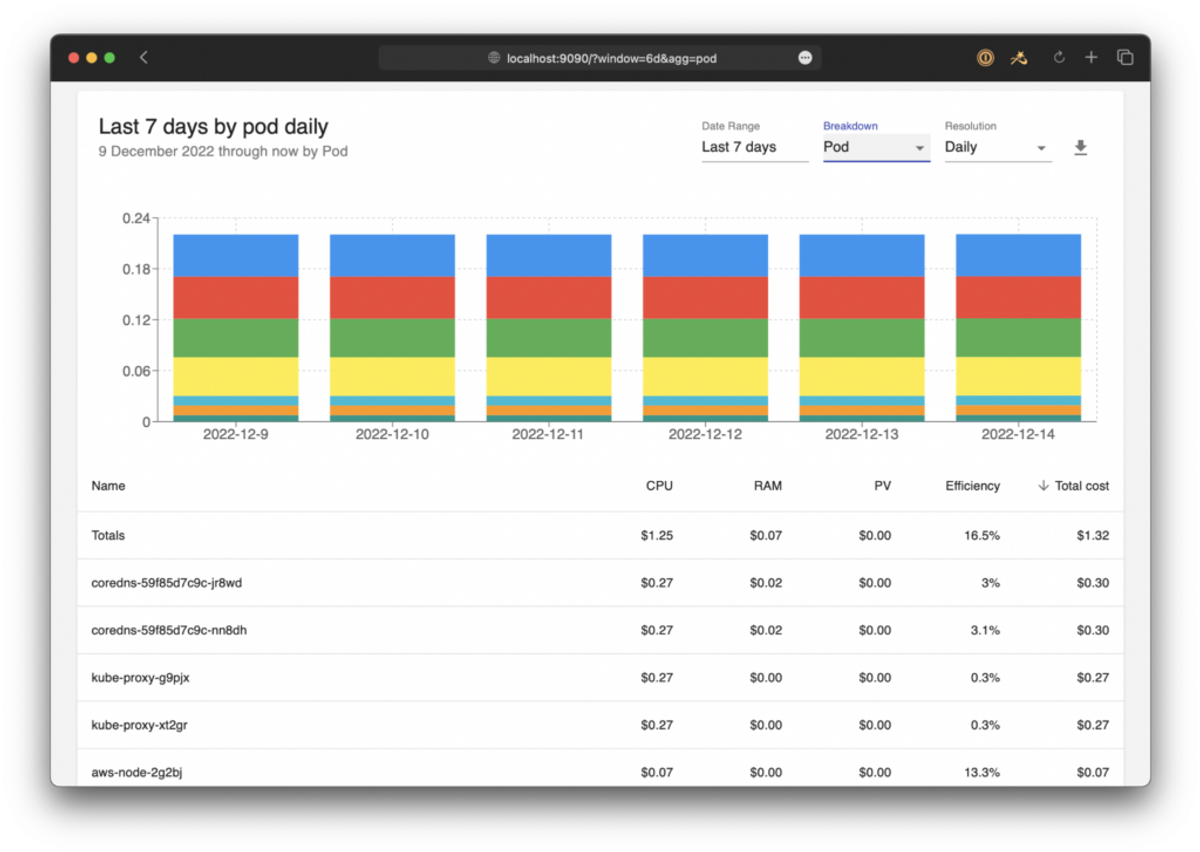
The platform provides detailed cost data collection, analysis, and reporting capabilities, akin to what Kubecost offers but with a focus on being a foundational tool that other applications can build upon. As such, it aims to be the "Prometheus of cloud cost monitoring".
OpenCost's functionality includes real-time allocation of costs based on Kubernetes services, deployments, and other constructs, and supports environments ranging from cloud providers like AWS, Azure, and Google Cloud to on-premises deployments.
If you're looking for an open-source, vendor-neutral solution for Kubernetes cost management that supports a broader range of platforms and customizations to build upon, OpenCost is a great choice. In contrast, if you want out-of-the-box features built and maintained by a dedicated team (as well as customer support), OpenCost might not be the best fit.
Pros
- Free and open source
- CNCF-hosted and vendor-neutral
- Extensible foundation other tools can build on
- Supports AWS, Azure, Google Cloud, and on-premises
Cons
- Visibility and allocation only — no automated optimization
- No dedicated vendor support or customer success team
- Requires engineering investment to build out beyond the basics
Pricing
Free (open source).
Best For
- Teams wanting an open-source, customizable Kubernetes cost visibility layer
- Organizations that don't need automated optimization or vendor support
#3. Datadog Cloud Cost Management
Datadog Cloud Cost Management offers a comprehensive approach to monitoring and optimizing Kubernetes costs alongside other cloud expenditures. Designed to integrate with its existing suite of observability tools, Datadog provides a unified platform for both performance metrics and cost analysis.
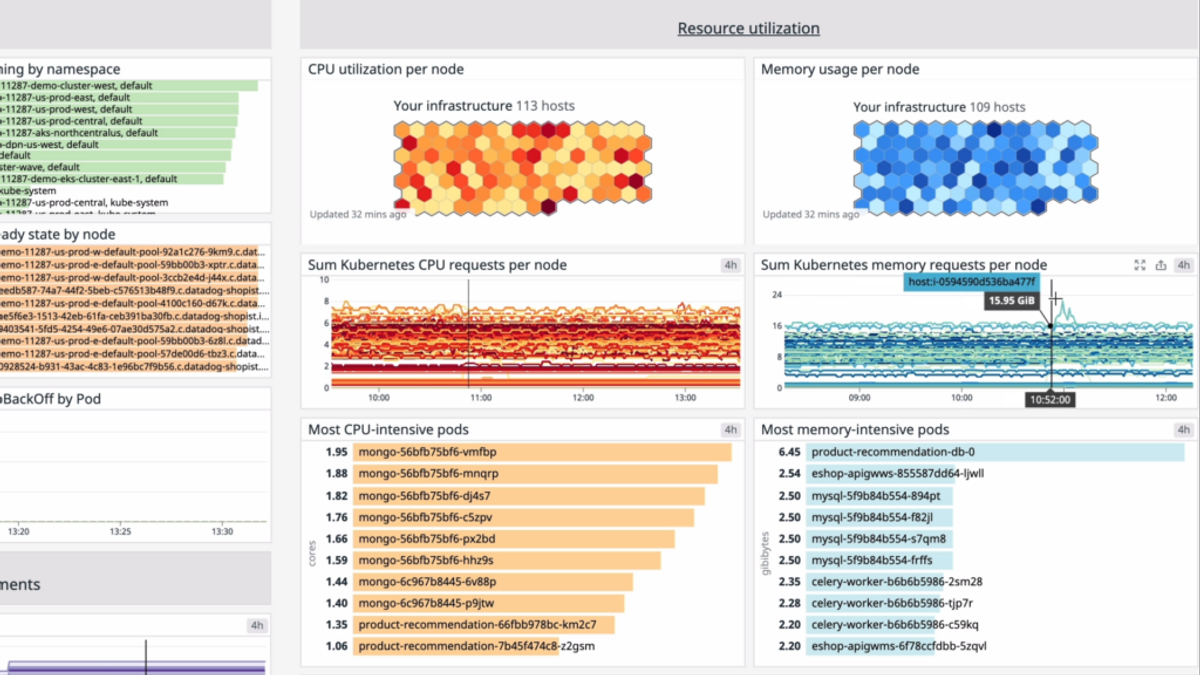
One of the key features of Datadog Cloud Cost Management is its ability to provide detailed insights into resource allocation and utilization. It does this by correlating cost data with operational metrics, such as CPU and memory usage, helping teams identify inefficiencies and optimize spending. For instance, Datadog can highlight underutilized cloud resources that could be downscaled to save costs or pinpoint areas where performance improvements could lead to cost reductions.
In contrast to Kubecost, which focuses more specifically on Kubernetes cost management, Datadog offers a broader range of cost management features that cover multiple cloud platforms and services.
One consideration is that Datadog Cloud Cost Management is priced as a percentage of the cloud and SaaS spend it monitors (not per host, as some comparisons assume — that's a separate Datadog product), which can add up quickly at scale. And, like Kubecost, it includes no automated cost optimization tools for realizing cost savings.
Pros
- Correlates cost data with performance metrics (CPU, memory) already in Datadog
- Broader than Kubernetes — covers multiple cloud platforms and services
- Unified platform if you're already using Datadog for observability
Cons
- Priced as a percentage of monitored spend, so cost rises directly with cloud/SaaS spend, not just infrastructure size
- No automated cost optimization tools — visibility only, like Kubecost
Pricing
Cloud Cost Management Pro starts at $5 per $1,000 of cloud/SaaS spend per month on annual pricing; Enterprise starts at $10 per $1,000.
Best For
- Teams already standardized on Datadog for observability who want cost data alongside performance metrics
#4. Harness.io
Harness Cloud & AI Cost Management has moved well past being just a deployment-cost tool. Alongside real-time visibility into the costs of specific deployments and microservices, it now automates a full set of optimization actions: Commitment Orchestration (automated Reserved Instance and Savings Plan purchasing, renewal, and coverage optimization across every cloud provider), AutoStopping (automatically stopping and restarting idle non-production workloads), and a Cluster Orchestrator that handles Kubernetes node autoscaling, Spot instance orchestration, and bin-packing.
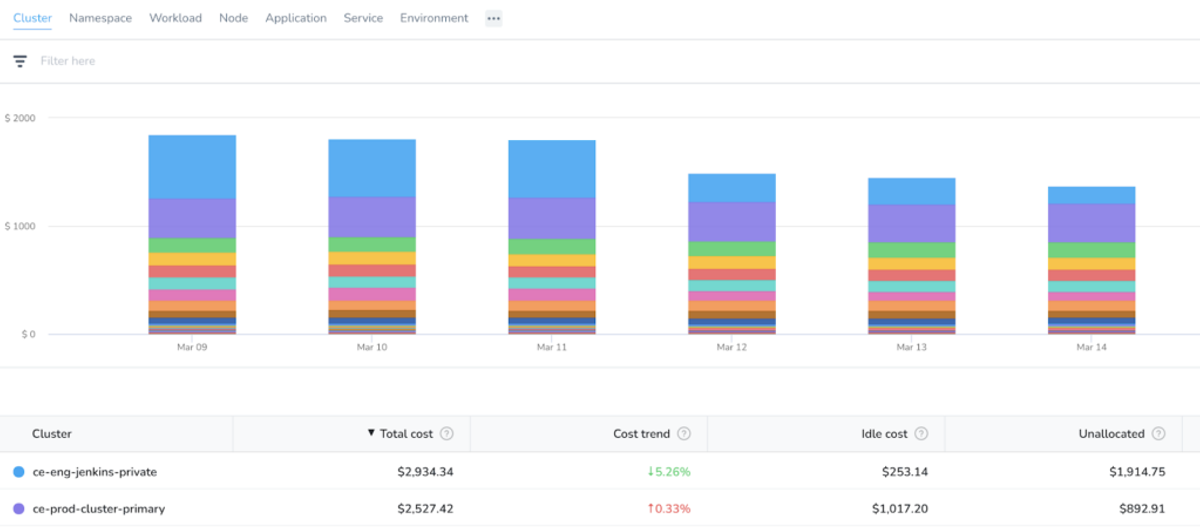
These capabilities sit alongside a broader suite of DevOps tools and FinOps tools, including budgeting, alerts, natural-language policy guardrails, and anomaly detection. For teams also deeply integrated into the continuous integration and deployment (CI/CD) lifecycle, cost visibility sits right next to the deployment choices that drive it.
Compared to Kubecost, which focuses specifically on Kubernetes visibility, Harness now pairs that visibility with automated action across Kubernetes, multicloud, and AI spend — making it a broader commitment-management and cost-optimization platform rather than just a CI/CD add-on.
Pros
- Automated commitment management: Reserved Instance and Savings Plan purchasing, renewal, and coverage optimization across every cloud provider
- AutoStopping automatically stops and restarts idle non-production workloads
- Cluster Orchestrator automates Kubernetes node autoscaling, Spot instance orchestration, and bin-packing
- Extends cost visibility to AI/agent spend alongside cloud
- Ties cost data directly to CI/CD deployments and microservices for teams already on Harness
Cons
- Full Cloud & AI Cost Management automation is bundled with Harness's broader DevOps platform, a bigger commitment than a standalone cost tool
- Free tier is capped at under $250K/year in cloud spend; the full automation suite requires the Enterprise plan
Pricing
Free Forever plan for organizations under $250K/year in cloud spend. Full Cloud & AI Cost Management automation (Commitment Orchestration, AutoStopping, Cluster Orchestrator) requires the Enterprise plan — contact sales for pricing.
Best For
- Teams wanting automated commitment management, idle-resource elimination, and Kubernetes cluster optimization in one platform
- Organizations already running CI/CD on Harness who want cost visibility tied directly to deployment decisions
#5. Yotascale
Yotascale offers a cloud cost management solution specifically engineered for dynamic and complex multi-cloud environments. It provides granular insights into cloud spend, attributed down to the team, application, and resource levels.
Among other features, the platform's key features include automated cost allocation, rightsizing recommendations, cost anomaly detection, as well as cloud budgeting reconciliation and forecasting.
A standout feature of Yotascale's cloud management solution is its predictive analytics capabilities, which analyze current spending patterns and forecast future expenses. Yotascale's machine learning algorithms help identify anomalous spending patterns and offer recommendations for cost optimization, which can be critical for maintaining budget control and reducing wastage.
Recently, it announced Yota Copilot, a Gen-AI assistant to help you more easily understand and manage cloud costs.
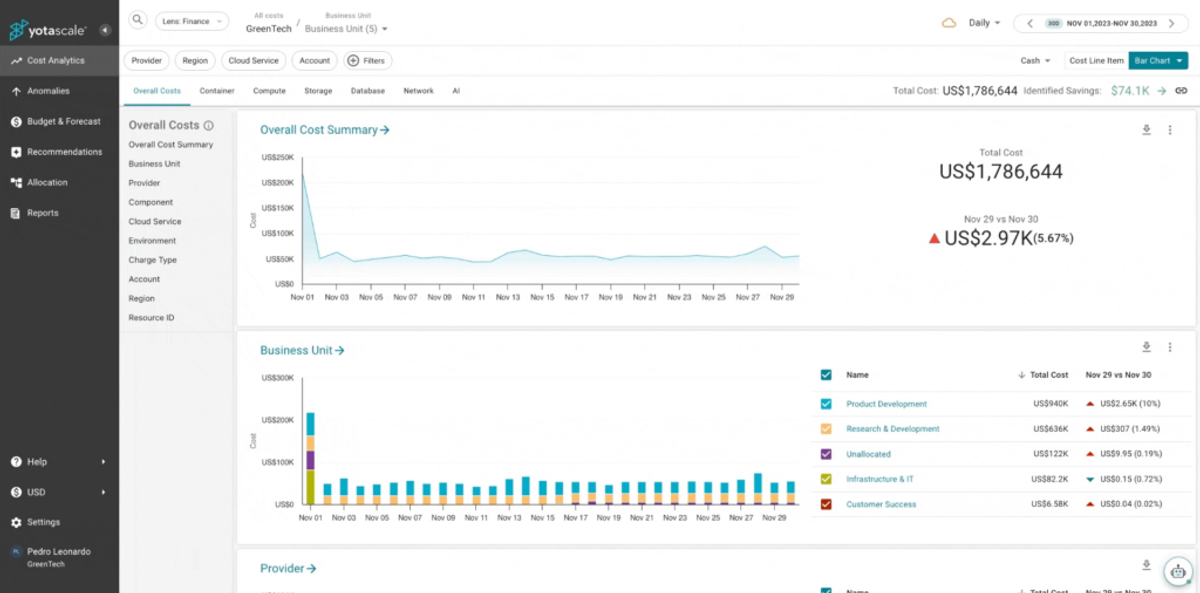
Yotascale also offers collaboration and reporting tools designed to enhance communication between finance, operations, and engineering teams.
Like many other entries on this list, Yotascale is less Kubernetes-focused than Kubecost, which may be an advantage or disadvantage depending on your organization's specific infrastructure needs.
Pros
- Granular allocation down to team, application, and resource
- Predictive analytics and anomaly detection
- Gen-AI assistant (Yota Copilot) for understanding and managing costs
- Strong collaboration and reporting tools across finance, ops, and engineering
Cons
- Less Kubernetes-specific than Kubecost — a plus or minus depending on your priorities
Pricing
Custom pricing based on cloud usage — not a percentage of spend — with flat, usage-based quotes tailored to your environment. Contact sales for a quote.
Best For
- Multi-cloud organizations wanting predictive spend forecasting and cross-team collaboration tools
#6. Apptio Cloudability
Apptio Cloudability is primarily tailored for Finance and FinOps teams, offering robust tools for cost monitoring, allocating, and evaluating public cloud expenditures. The platform is adept at helping teams control cloud spending through budgeting and forecasting features. Users can set budgets for specific contexts and receive alerts if spending approaches or exceeds these thresholds.
Cloudability also offers anomaly detection capabilities, which notify users of cost spikes based on predefined thresholds, and for its ability to generate rightsizing recommendations based on the last 10 to 30 days of data usage. These features assist in creating consistent budgets and baselines for future forecasting.
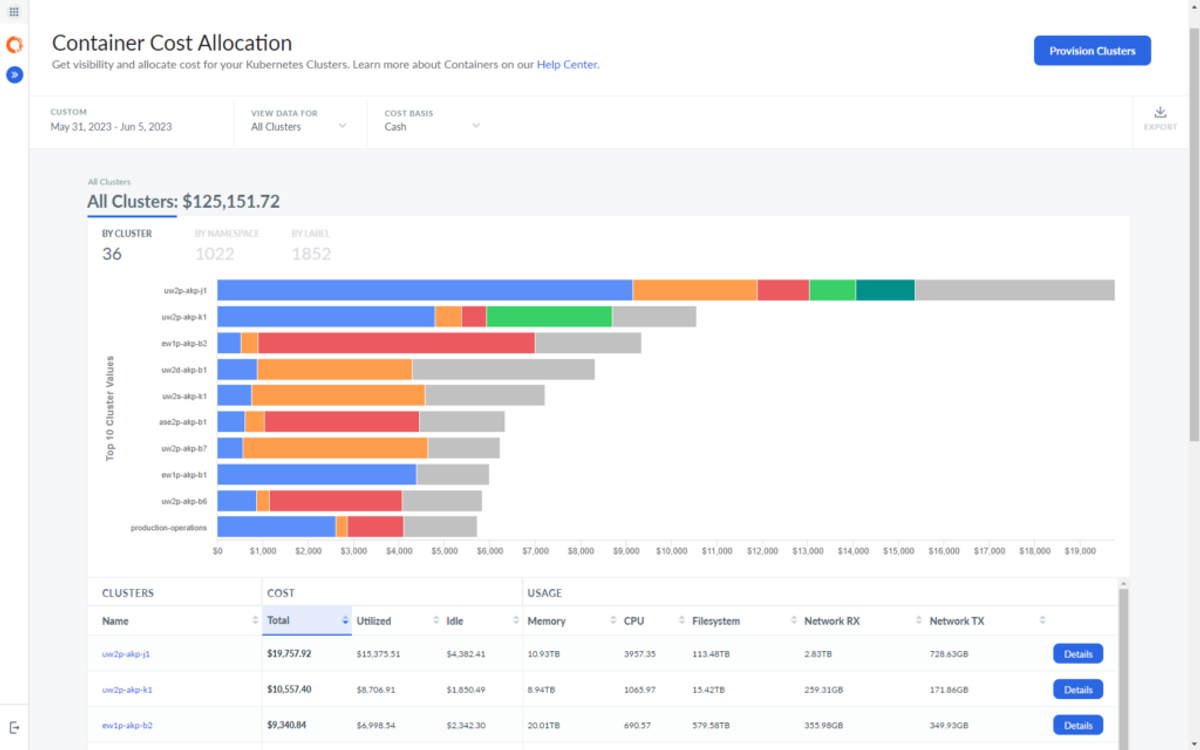
When it comes to Kubernetes costs, Cloudability offers features like container cost allocation so you can understand the costs of your Kubernetes cluster and their underlying resource consumption.
In terms of automation, Cloudability offers some functionalities like scheduling daily cleanups of disconnected EBS volumes and automating the scaling of Auto Scaling Groups (ASGs) or the management of EC2 and RDS instances during low utilization periods.
However, these features are somewhat limited compared to other platforms, potentially restricting its effectiveness in multi-cloud optimization and automation scenarios. And, the platform is often considered to be potentially expensive, with fees increasing quickly as usage scales.
Pros
- Strong Finance/FinOps focus with budgeting and forecasting
- Container cost allocation for Kubernetes clusters
- Some automation: EBS volume cleanup, ASG scaling, EC2/RDS management during low utilization
Cons
- Automation is limited compared to other platforms
- Can get expensive as usage scales
Pricing
Custom enterprise pricing across Essentials, Standard, and Premium packages, scaled to managed cloud spend; a free trial is available, but there's no permanent free plan.
Best For
- Finance-led FinOps teams prioritizing budgeting and forecasting over deep automation
#7. Finout
Finout is a cloud management platform that positions itself as the "Swiss Army Knife" of cloud cost management tools, emphasizing its versatility and comprehensive coverage across multiple cloud platforms and Kubernetes environments.
In contrast to Kubecost, which primarily focuses on Kubernetes cost management, Finout also offers broader capabilities that include detailed support for non-Kubernetes resources. You can use it to manage, allocate and optimize across multiple cloud providers in one unified platform.
One key benefit of the tool is visibility into your Kubernetes clusters. It integrates with your Prometheus DB using its open-source cronjob or with your Datadog account API to provide access to your Kubernetes cluster metrics. Finout offers Kubernetes insights like cost per pod, deployment, namespace, cron job, StatefulSet, and cluster, with dashboards and reporting tools.
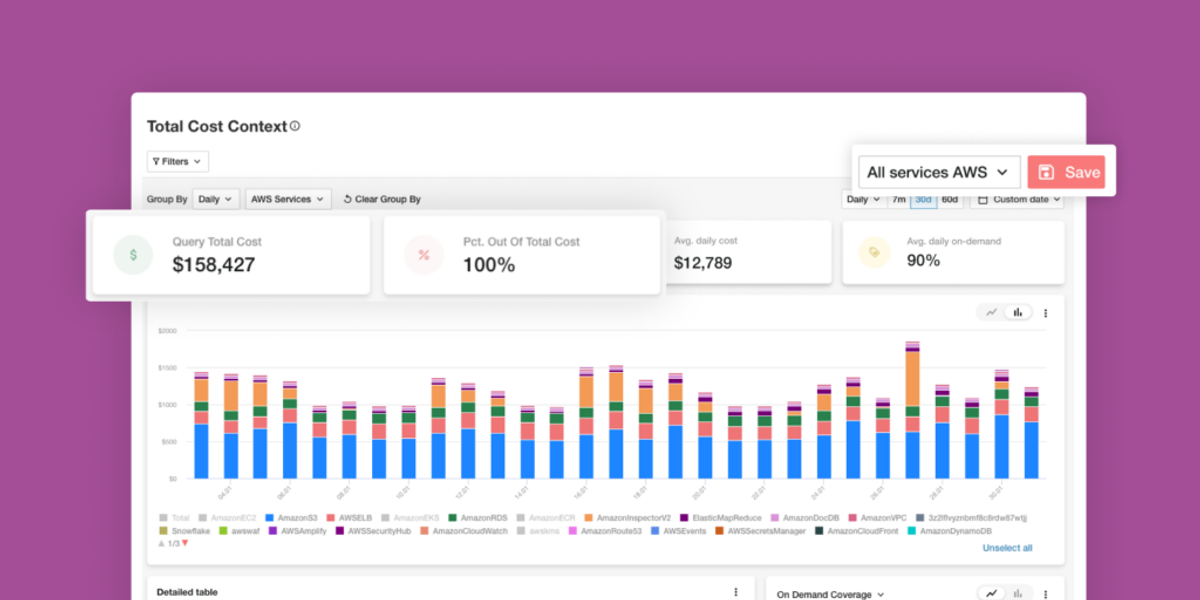
Finout also offers an anomaly detection system, which actively monitors spending patterns and immediately alerts teams to unusual activity. However, it lacks other important cloud cost optimization features such as commitment management.
Pros
- Broad multicloud + Kubernetes visibility in one platform
- Kubernetes insights via Prometheus or Datadog integration (pod, deployment, namespace, cron job, StatefulSet, cluster)
- Active anomaly detection
Cons
- Lacks commitment management
Pricing
Flat annual fee tiered by committed (forecasted) cloud spend — not a percentage of actual monthly usage or per seat. Three plans (Business, Pro, Enterprise), each quote-only; a free trial is available.
Best For
- Teams wanting one platform for both Kubernetes and non-Kubernetes cost visibility, without needing automated commitment management
#8. Cast.ai
CAST AI is a Kubernetes management platform that leverages automation to optimize cloud resource usage. Unlike Kubecost, which primarily offers monitoring and straightforward optimization, CAST AI offers tools for implementing cost-saving strategies for K8s clusters like instance selection, rightsizing, and dynamic rebalancing.
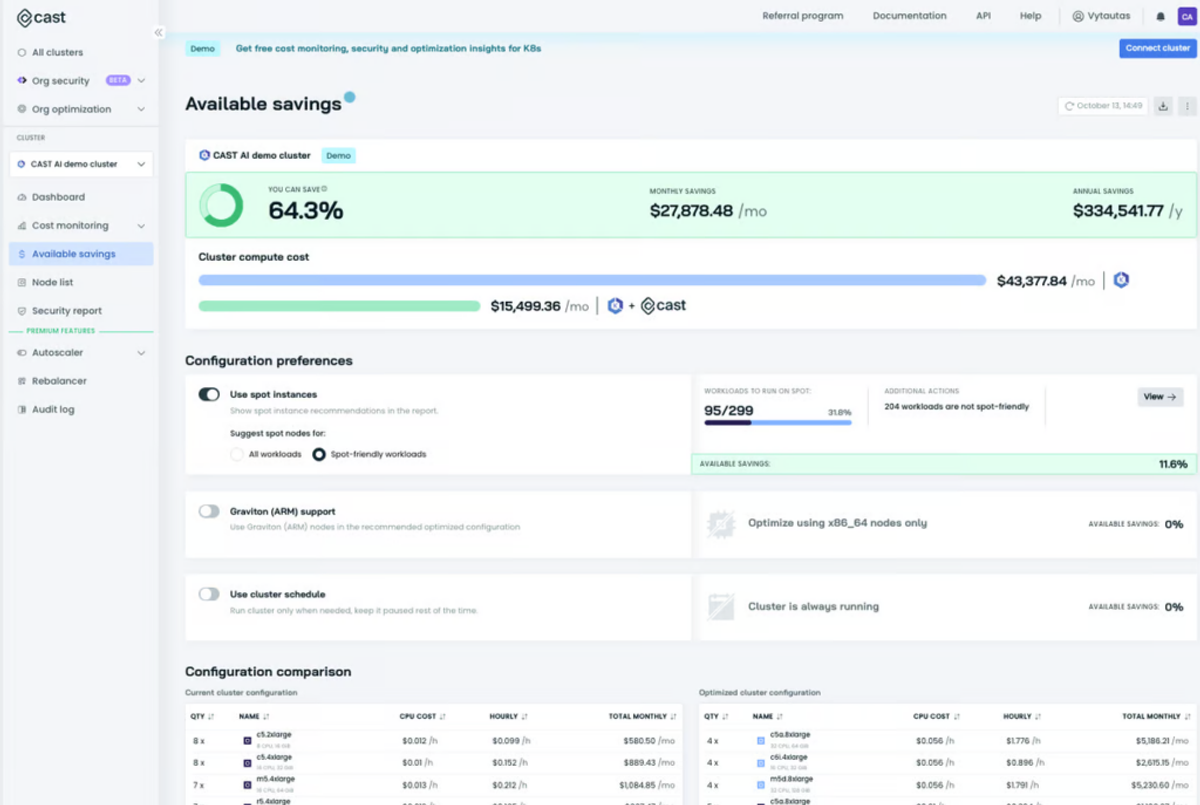
CAST AI helps make adjustments in resource allocation based on workload demands to better optimize cloud costs. It helps dynamically scale resources down during low usage or switch to more cost-effective options automatically.
This platform is particularly effective for Kubernetes deployments across various cloud services such as AWS's EKS, Azure's AKS, Google's GKE, KOps, and OpenShift. It integrates with these various environments. Additionally, CAST AI offers a security dimension by providing complimentary scans against recognized standards like the CIS benchmark and the NSA-CISA framework, to enhance both cost management and security posture.
Like Kubecost, Cast.ai is only for Kubernetes costs, making it difficult to fully account for costs in the engineering budget and reconcile spending with your full AWS bill.
Pros
- Automated Kubernetes optimization: instance selection, rightsizing, dynamic rebalancing
- Supports EKS, AKS, GKE, KOps, and OpenShift
- Includes complimentary security scanning (CIS benchmark, NSA-CISA framework)
Cons
- Kubernetes-only — same reconciliation challenge as Kubecost for tying K8s costs to your full cloud bill
Pricing
Custom pricing based on your Kubernetes environment; CAST AI's pricing page is quote-only — contact sales for a quote.
Best For
- Kubernetes-only teams wanting automated cluster optimization plus a built-in security dimension
#9. Anodot
Anodot offers detailed insights into Kubernetes cost management, catering specifically to the needs of FinOps teams. The platform excels in providing deep visibility into Kubernetes deployments, tracking and analyzing expenditures across clusters, nodes, and pods. It employs advanced algorithms and multidimensional filters to identify areas of resource underutilization and overprovisioning, which enables precise resource optimization.
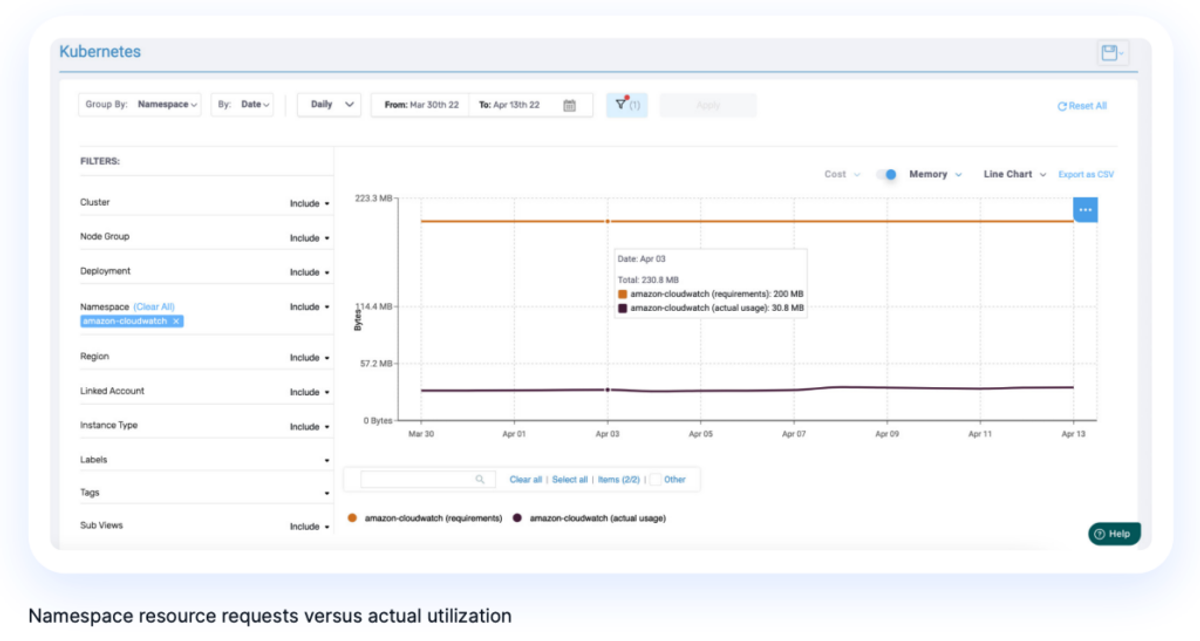
The tool is designed to manage complex multicloud environments effectively. It allows for accurate allocation of shared Kubernetes costs, including compute, storage, data transfer, and waste. Anodot supports various cost allocation models, such as requests, limits, or actual usage, helping teams adapt to the specific financial governance of their projects.
Moreover, Anodot integrates containerized and non-containerized costs, offering a comprehensive view of expenses associated with running Kubernetes applications. This integration aids FinOps teams in establishing robust processes for managing container spending in line with traditional cloud expenses. Automated alerting and detailed reporting capabilities further enable engineering teams to understand and manage the cost implications of their operational choices.
Anodot is particularly useful for cost visibility environments where Kubernetes' complexity and shared resource usage pose significant challenges in cost allocation and optimization. However, it focuses on visibility more than optimization — meaning that you'll need to sign up for additional tools in order to act on cloud savings opportunities.
Pros
- Deep Kubernetes visibility across clusters, nodes, and pods
- Supports multiple allocation models: requests, limits, or actual usage
- Integrates containerized and non-containerized costs into one view
- Strong anomaly detection and alerting
Cons
- Visibility-focused — you'll need additional tools to act on savings opportunities
Pricing
Custom pricing; Anodot does not currently publish standard list pricing. Contact sales for a quote based on your environment and usage.
Best For
- FinOps teams in complex multicloud environments prioritizing allocation accuracy and anomaly detection over built-in automation
What It Really Costs to Run Kubecost
Let's break down what it really costs to run Kubecost.
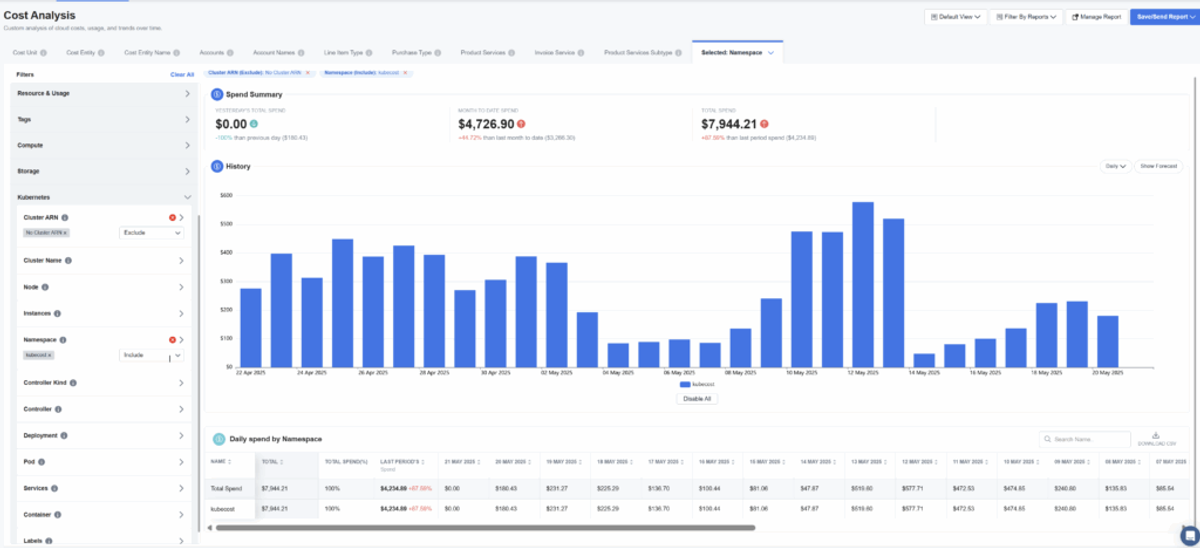
One engineering team we spoke with was paying $72,000 a year for visibility into just three production clusters — before layering on the annual enterprise contract, which pushed their total to ~$100,000 per year. All for Kubernetes visibility only, and that doesn't include the operations overhead of managing Kubecost's agent.
In contrast, nOps ran across all of its clusters for just $182 using its own Prometheus in the past 30 days. And with nOps, you get full automation in addition to visibility — commitment orchestration, scheduling, waste visibility, and more.
The punchline is that nOps gives you the same thing as Kubecost (+ way more) for a tiny fraction of the cost.
Finding The Right Kubecost Alternative For Kubernetes Cost Optimization
While Kubecost provides robust tools for cost analysis and management within Kubernetes clusters, it also has limitations.
You'll need additional tools to see your non-containerized costs — including multicloud, GenAI, SaaS integrations, reports, dashboards, budgets, forecasting, and cost allocation. You'll also need separate tools to automate cost-saving actions like workload, commitment, and waste management.
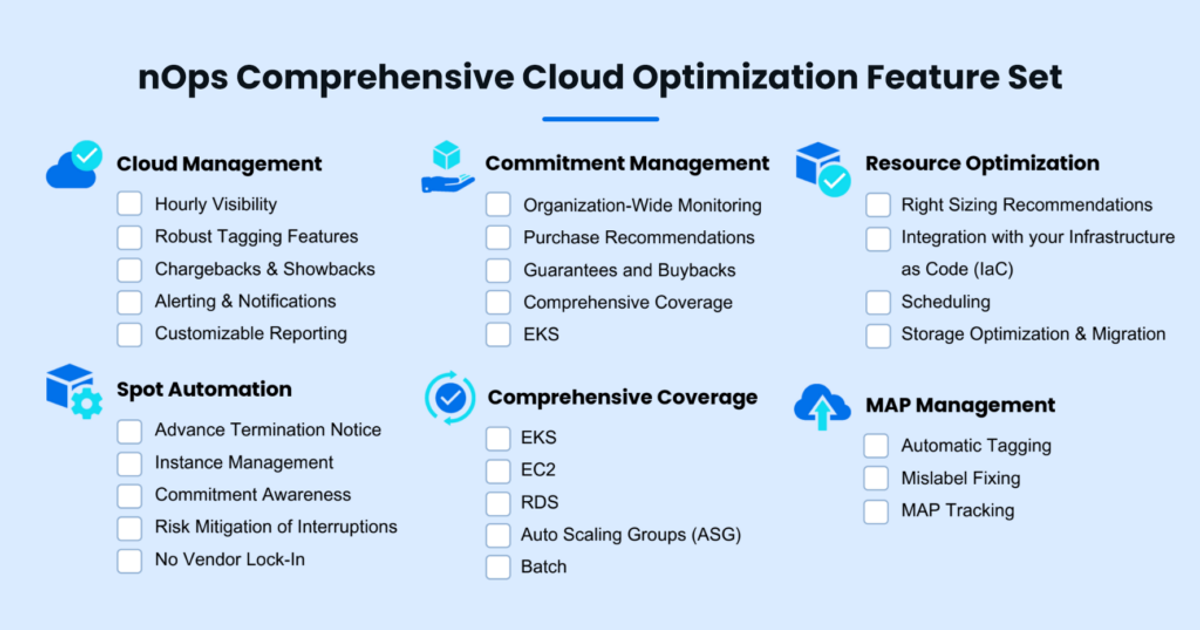
While various Kubecost alternatives check a few of these boxes, a comprehensive cloud optimization platform like nOps covers them all — with one contract, one source of truth, unified data across cloud & Kubernetes, & coordinated automation to compound savings.
The All-in-One nOps Feature Set
- Unified visibility: understand and allocate AWS, Azure, GCP, Kubernetes, AI, and third-party SaaS costs in one platform
- Cost allocation: allocate 100% of your AWS bill down to the container level with automated tagging, showbacks, chargebacks
- Commitment management: automated management with 100% utilization guarantee
- Storage migration: one-click EBS volume migration
- Resource scheduling: automatically schedule and pause idle resources
nOps was recently ranked #1 with five stars in G2's cloud cost management category, and we optimize $5 billion in cloud spend for our customers.
Understand your Kubernetes costs and leverage automation with complete confidence by booking a demo today!
Demo
AI-Powered Cost Management Platform
Discover how much you can save in just 10 minutes!
Book a Demo