Skip to content



- Blog
- Commitment Management
- Azure Reservations: The Ultimate Guide
Azure Reservations: The Ultimate Guide
Microsoft Azure is scaling fast. Microsoft reported that Azure surpassed $75B in annual revenue for the first time, up 34% year over year. With more workloads moving to Azure, cloud bills are getting bigger—and that puts cost optimization under the spotlight.
That’s where Azure’s commitment-based discounts come in. Azure Reservations and Azure Savings Plans let you trade flexibility for lower rates by committing to a certain level of resources or compute spend. Done well, they can materially reduce baseline infrastructure costs; done poorly, they can lock you into commitments you never fully use.
In this guide, we’ll explain everything you need to know about Azure commitments and how to optimize them to maximize your savings and minimize risk over time.
What are Azure Reservations?
Azure Reservations are Microsoft Azure’s built-in way to lower unit costs when you’re willing to make a longer-term commitment to specific cloud resources. Instead of paying standard pay-as-you-go rates for every hour of usage, you commit to a defined resource configuration—most commonly for one or three years—and Azure rewards that predictability with discounted pricing on matching usage.
In practice, Azure Reservations are designed for the “always-on” portion of your environment: stable virtual machines, databases, and other infrastructure you expect to keep running month after month. They’re one of the most common levers organizations use to reduce recurring Azure spend without refactoring applications, changing architectures, or altering how engineering teams deploy workloads.
The tradeoff is that savings come with constraints. Because Reservations are tied to specific attributes—such as resource type, size, and region—changes like rightsizing, migrating workloads, consolidating regions, or shifting to different services can cause the commitment to stop aligning with actual usage. As a result, while Azure Reservations can be a straightforward path to lower cloud bills, they work best when treated as a deliberate purchase tied to genuinely stable usage patterns, not as a blanket discount applied everywhere.
How Azure Reservations Work
Here’s the core mechanic:
- You make a time-based commitment (most commonly 1-year or 3-year) for a specific Azure resource (for example, a VM size in a region, or a database/service tier).
- You can pay for a Reservation all upfront or spread the cost into monthly payments—either way, the reservation discount applies the same; the difference is cash flow, not the rate.
- Azure continuously checks your running usage for matches based on the reservation’s attributes (resource type, region, size/family, and scope).
- Matching usage receives the reserved rate up to the quantity you purchased.
- Any matching usage above what you reserved is billed at pay-as-you-go rates.
- If your matching usage falls below what you reserved, the unused portion doesn’t roll forward—reservations are effectively use-it-or-lose-it, and that gap becomes waste / commitment risk.
The important takeaway: Azure Reservations are designed to discount the predictable baseline portion of cloud spend. The exact way a reservation is defined—and what it can cover—depends on the service, the reservation type, and how you scope it, which we’ll break down next.
Types of Azure commitment models
Azure has two primary commitment models, defined by what you’re committing to: a spend level vs specific resources.
Azure Savings Plans for Compute (Spend-Based)
With Azure Savings Plans, you commit to a minimum hourly spend ($/hour) on eligible compute usage. As long as your usage meets that spend baseline, Azure automatically applies discounted pricing.
Savings Plans are designed to follow usage as it shifts across:
- VM sizes and families
- Regions
- Compute services covered by the plan
Azure Reservations (Resource-Based)
Azure Reservations are resource-based commitments. Instead of committing to dollars per hour, you commit to a specific resource configuration—such as a VM size in a particular region—for a one- or three-year term. Azure applies discounted pricing when your running usage matches those attributes.
If you run a stable baseline—same service, same region, similar sizing—Reservations can deliver the deepest unit-cost discounts.
Azure Pricing Models Compared: When to Use Pay-As-You-Go vs Reservations vs Savings Plans
Pay-as-you-go
Azure Savings Plans
Savings Plans trade some flexibility for discounts by committing to a fixed hourly spend over a 1- or 3-year term (but not the specific resources).
Savings Plans are best when you can predict your baseline compute bill more reliably than the exact mix of resources behind it. In other words, you know roughly how much compute you’ll consume, but VM families, sizes, regions or deployment patterns may change over time. Because the commitment is to spend—not a specific resource shape—Savings Plans tend to absorb infrastructure change better than Reservations.
Azure Reservations
Compared to Savings Plans, Azure Reservations trade even more flexibility for discounts, because you are committing not just to a certain level of spend but the specific resources.
Reservations are best when your workload configuration itself is stable, not just the bill. If you can predict little change in service, region, or sizing over 1–3 years, Reservations deliver the strongest unit-cost savings. But because the commitment is tied directly to what you run (not just what you spend), they’re less forgiving when infrastructure changes due to rightsizing, regional consolidation, re-platforming, or architectural evolution.
Azure Spot Virtual Machines
Azure Spot VMs are very flexible, but not as reliable as the first three Azure pricing models.
They offer a way to achieve significant savings without a long-term commitment by using spare Azure compute capacity at discounted rates. The tradeoff is that Spot capacity can be reclaimed by Microsoft Azure at any time, so workloads must tolerate interruption or eviction.
Spot VMs are best suited for fault-tolerant, interruptible, or batch workloads—such as CI jobs, data processing, or background tasks—not for steady, always-on production systems. Because of that, Spot is typically used as a supplement to Pay-as-you-go, Savings Plans, or Reservations, rather than a replacement for baseline capacity.
| Features | Why It Matters |
|---|---|
| Reporting & dashboards | Pre-built and customizable reports for finance, engineering, and leadership ensure stakeholders see relevant cost views without manual spreadsheet work. |
| Filters for finance | Views by cost center, business unit, customer/project, budget owner, and billing account. |
| Filters for engineering | Views by service, workload, cluster/namespace (Kubernetes), environment (prod/dev), region, and usage type. |
| Forecasting | Time-series forecasting helps predict month-end and future spend, so teams can correct course before overruns occur. |
| Budgets & alerts | Proactive notifications prevent surprises and enforce cost guardrails across teams. |
| Automated tagging & cost allocation | Allocate spend by team, application, or environment—even when tagging isn’t perfect. Essential for showback and chargeback. |
Eligible services and resources
Azure Savings Plans: what can be covered
Azure Savings Plans apply to eligible compute usage, not to a specific service instance. A single Savings Plan commitment can cover discounted usage across multiple compute services, as long as the usage qualifies and falls within the plan’s scope.
Commonly covered services include:
- Azure Virtual Machines
- Azure Virtual Machine Scale Sets
- Azure Kubernetes Service (AKS) worker nodes
- Azure App Service (compute portion)
- Azure Functions (Premium plan compute)
Savings Plans are designed to follow compute usage as it shifts across VM sizes, families, and regions, making them well-suited for environments where the compute layer is steady, even if the way it’s consumed changes over time.
Note: Savings Plans apply only to eligible compute charges. Networking, storage, data transfer, and many managed-service add-ons are excluded. Coverage can also vary by service and region, so it’s best to treat this as “supports Savings Plans,” not “every line item is discounted.”
Azure Reservations: what can be covered
Azure Reservations are resource-specific and service-dependent. You commit to a defined configuration for a specific service and receive discounted rates when usage matches that reservation.
Common reservation-eligible services include:
- Virtual Machines
- Azure SQL Database and SQL Managed Instance
- Azure Cosmos DB
- Azure App Service
- Azure Synapse Analytics
- Azure Storage (certain capacity-based reservations)
For compute-focused reservations (e.g., Virtual Machines), the reservation is typically defined by:
- VM family and size (or size flexibility within a family)
- Region
- Term (1 year or 3 years)
- Quantity
Unlike Savings Plans, Reservations only apply when usage matches the reservation’s attributes, which is why they deliver higher savings but require more stability.
Important nuance: Some reservations separate infrastructure from software licensing. For example, compute reservations and OS or database licensing (often combined with Azure Hybrid Benefit) are treated as distinct components. You can layer them together, but a single reservation does not automatically cover both infrastructure and license costs.
How Azure Commitments apply across subscriptions and billing scopes
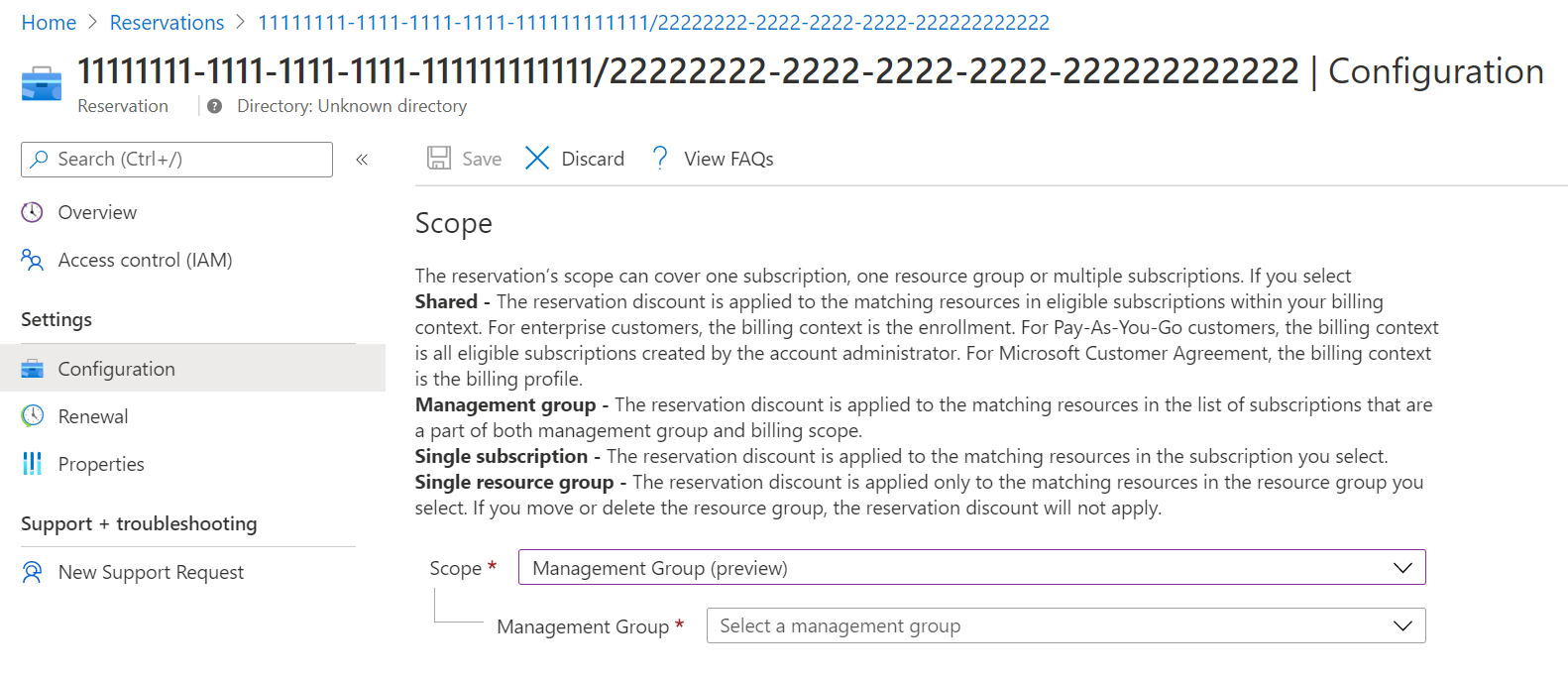
Azure Savings Plans: apply to eligible usage within the scope you set (for example, a single resource group, subscription, management group, or “shared” scope). Azure applies Savings Plan benefits in a defined order—resource group first, then subscription, then management group, then shared—and you can update the scope after purchase.
Azure Reservations: are purchased with a scope as well (resource group, subscription, or shared). If you choose shared scope, the reservation discount can apply to matching resources across eligible subscriptions within your billing context, and you can change the scope after purchase (and even split reservations to assign different portions to different scopes).
Splitting, rescoping, exchanging and canceling Azure reservations
Splitting and rescoping Azure Reservations
Exchanging Azure Reservations
Canceling Azure Reservations
A brief history of Azure commitment changes / What’s New
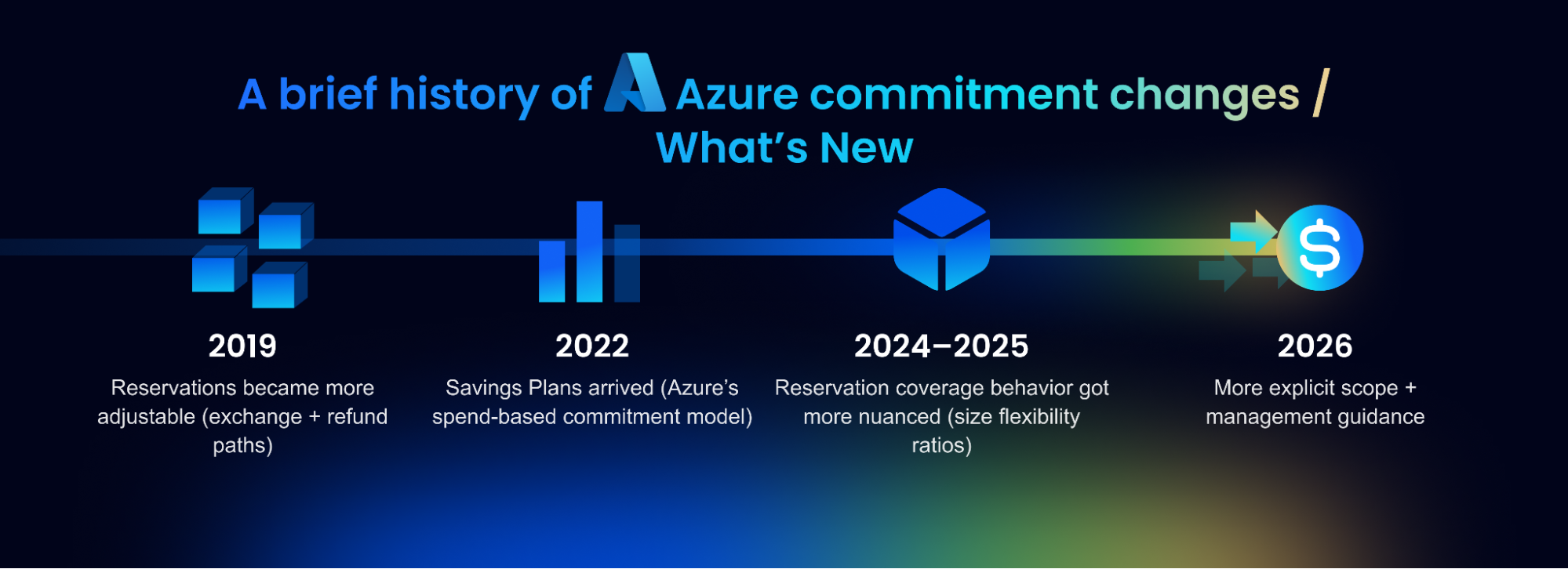
Microsoft hasn’t changed the core idea (commit for a discount), but Azure’s commitment programs have evolved in what they cover, how flexible they are to manage, and what can impact utilization over the last few years.
2019: Reservations became more adjustable (exchange + refund paths)
Azure introduced self-service exchange and refund options for Reservations—important because it established the “commit, but with guardrails” model (with eligibility rules and limits).
2022: Savings Plans arrived (Azure’s spend-based commitment model)
Azure launched Savings Plans for Compute (hourly spend commitment for 1 or 3 years), giving teams a more flexible alternative to configuration-specific reservations when usage mix changes.
2024–2025: Reservation coverage behavior got more nuanced (size flexibility ratios)
Azure has continued to refine how Reserved VM Instances apply when you enable instance size flexibility. Microsoft has specifically called out that changes to flexibility ratios can affect how much of your fleet a reservation covers (even when pricing doesn’t change), which matters for utilization and “surprise” coverage shifts.
2026: More explicit scope + management guidance
Recent Azure documentation updates have made scope behavior and management clearer—especially how Savings Plan benefits are applied in a defined order (resource group → subscription → management group → shared) and what can/can’t be changed post-purchase.
What this means in practice
If your org adopted commitments at different times (Reservations-first vs Savings Plans-first, different scope conventions, different size flexibility settings), you can end up with mixed behaviors that change how savings show up and how easy it is to course-correct. The biggest recent changes aren’t about “new discount percentages”—they’re about flexibility, scope mechanics, and utilization/coverage behavior as environments evolve.
Benefits of using Azure Commitments
Lower unit costs on steady workloads
Make spend easier to plan
Get savings without architectural changes
Pair commitments with flexible capacity
Bigger impact as Azure usage grows
As Azure usage scales, even modest per-unit discounts compound quickly. Commitments provide a structured way to lock in lower rates on the portion of spend you’re confident will persist over time.
Tradeoffs and risks of commitments
Paying for discounts you don’t consume
Commitments can slow down change
When discounts are tied to a term, everyday optimization decisions can start to feel “expensive,” even when they’re technically correct:
- moving workloads to a different service or platform
- switching VM families/sizes or changing deployment patterns
- consolidating regions or adopting a new architecture
Someone has to own the commitment lifecycle
Commitments work best when there’s consistent ownership for:
- baseline forecasting
- purchase timing and sizing
- ongoing checks that coverage/utilization still make sense
- adjustments as workloads evolve
Without an owner, commitments tend to drift out of alignment quickly—and the waste is easy to miss.
Commitment mechanics add operational complexity
Even when the math works, Azure commitments can be hard to manage manually because the “savings outcome” depends on a lot of moving parts: hourly burn behavior (especially for Savings Plans), how scope is set and changed over time, how benefits apply across subscriptions/resources, and what flexibility you actually have to exchange, cancel, or course-correct when usage shifts.
That complexity creates real operational overhead—someone has to continuously connect forecasting, purchasing, and real usage behavior—otherwise commitments can look fine on paper while savings erode through drift, mis-scoping, and hard-to-explain variance month to month.
Best practices for maximizing Azure Reservation value
Start with the most durable baseline, not peak usage
Use Savings Plans first, then layer in Reservations
Commit after rightsizing and modernization—not before
Prefer smaller, incremental purchases over big bets
Assign clear ownership across finance and engineering
Avoid “set-and-forget” renewals
How nOps Helps
If you’re using Azure at any real scale, commitments quickly become a moving target. Between Savings Plans vs Reservations, scope decisions, and constantly shifting usage patterns, the “right” commitment mix changes over time. nOps takes the manual work and complexity out of commitment management.
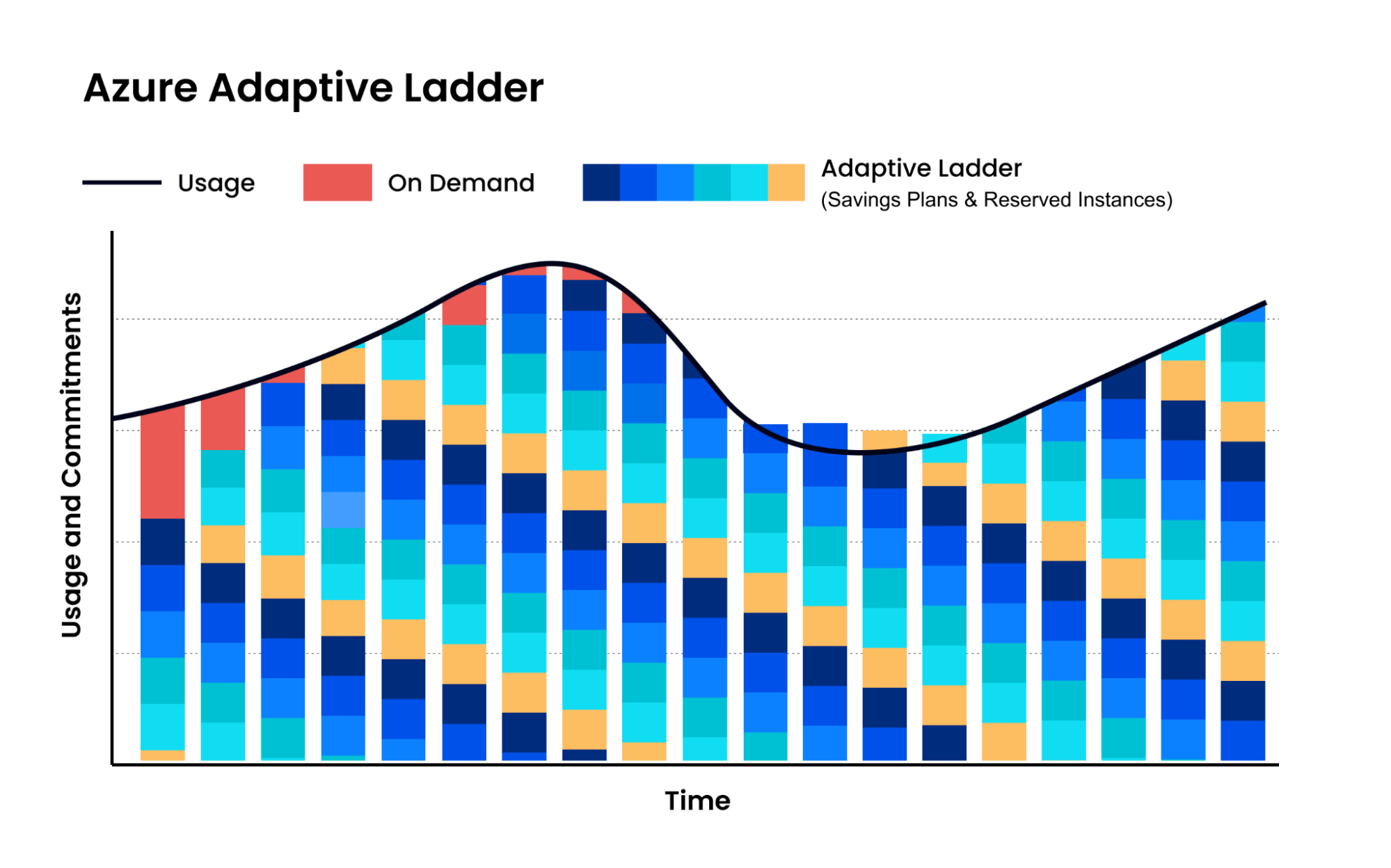
Adaptive commitment laddering: maximize savings without lock-in
Instead of relying on infrequent, bulk reservation purchases, nOps uses adaptive commitment laddering—automatically committing in small, continual increments that align to your real usage. Coverage is recalculated and adjusted as demand changes, creating frequent expiration opportunities so commitments can flex up or down without sacrificing discounts. This approach extends savings beyond a static baseline, reduces long-term lock-in risk, and helps capture discounts across variable and spiky workloads with zero manual effort.
Savings-first pricing
nOps only gets paid after it saves you money. There’s no upfront cost, no long-term commitment, and no risk or downside — if nOps doesn’t deliver measurable savings, you don’t pay.
Complete visibility with automated cost allocation
In addition to visibility on your Azure commitments, nOps gives you full visibility into your multicloud spending with forecasting, budgets, anomaly detection, and reporting to spot issues early and validate commitment savings. That visibility flows directly into automated cost allocation, so you can instantly allocate costs across project, environment, team, application, service, and region without any manual tagging or effort.
Want to see it in practice? Book a demo to walk through commitment coverage, cost visibility, allocation, and anomaly protection in your Azure environment.
nOps manages $3B+ in cloud spend and was recently rated #1 in G2’s Cloud Cost Management category.
FAQ
What are Azure Reserved Instances?
Azure Reserved Instances are a pricing option that lets you commit to specific Azure resources—most commonly virtual machines—for a 1- or 3-year term in exchange for lower rates. They’re designed for stable, always-on workloads where the resource configuration (service, region, size) is unlikely to change significantly over time.
How do I buy Azure Reservations?
You buy Azure Reservations through the Azure Portal under Cost Management + Billing. During purchase, you select the service, region, term length, quantity, scope, and payment option (upfront or monthly). Discounts apply automatically once the reservation is active and matching usage is detected.
How do I manage Azure Reservations?
Azure Reservations are managed in the Azure Portal using role-based access control (RBAC). Authorized users can view utilization, change scope, enable instance size flexibility, exchange or cancel reservations within limits, and track coverage over time. Platforms like nOps automate utilization tracking and adjustments to reduce waste and manual effort.
What is the difference between Azure Savings Plans and Reservations?
Can Azure Reserved Instances be applied to existing virtual machines?

Last Updated: February 16, 2026, Commitment Management