Skip to content



- Blog
- Commitment Management
- Azure Savings Plans vs. Reserved Instances: Which One To Choose?
Azure Savings Plans vs. Reserved Instances: Which One To Choose?
Microsoft Azure offers several discount models to help reduce your cloud spend: Azure Savings Plans, Azure Reserved Instances, Spot VMs, and (for larger orgs) custom agreements. Each of these instruments can deliver significant cost savings under the right circumstances — but each is suited to different usage patterns, timelines and risk tolerance.
When you understand how those models align to your actual usage and needs, you can get a lot more value out of every dollar you spend on Azure. The right choice of discounts can significantly improve your effective cost rate over time.
This guide explains how Savings Plans and Reserved Instances work and how they compare — so you can maximize your discounts and pay less on Microsoft Azure.
Azure Savings Plans
How Azure Savings Plans work
| Key feature | How it works |
|---|---|
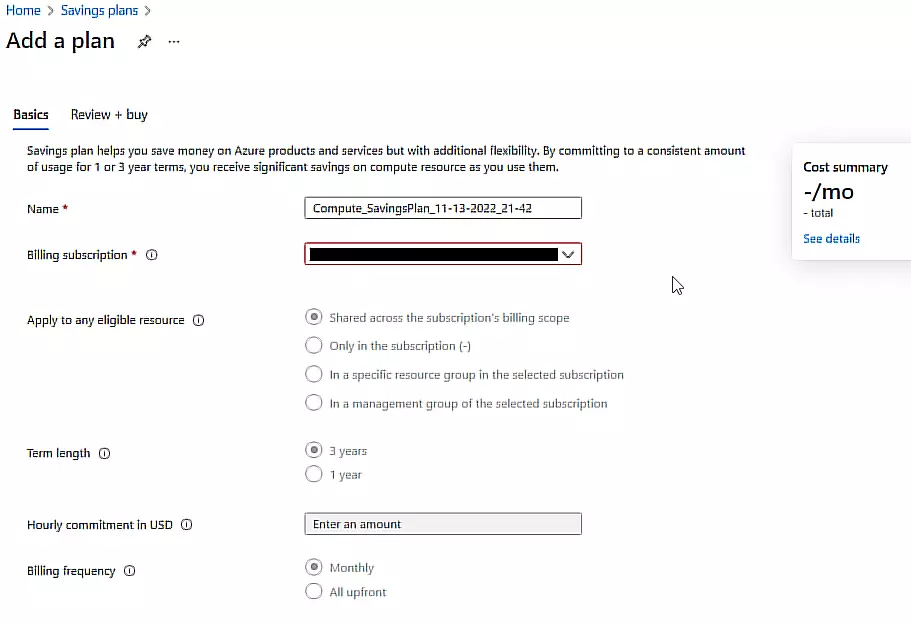
| Commitment model | You buy a fixed hourly spend commitment amount ($/hour), not a specific VM size or instance count. Azure applies discounts to eligible compute usage each hour up to that commitment. |
| Term length | You can choose a 1-year or 3-year term, and the longer term generally delivers a higher discount. |
| Payment Options | Upfront or monthly |
| Eligible services | Commonly includes Azure Virtual Machines, Azure Dedicated Host, Azure App Service, Azure Functions Premium Plan, and Container Instances (eligibility can vary by offer/service). |
| What it applies to | Savings Plans cover eligible compute usage, but they don’t discount non-compute charges like storage or networking. |
| Flexibility | Because the commitment is spend-based, the discount can follow your compute usage as it shifts across VM sizes, families, operating systems, and regions (as long as the usage is eligible and within scope). |
| How discounts are applied | After purchase, Azure applies the discount automatically to eligible usage, so you don’t have to manually assign the plan to specific instances. |
| What happens if you exceed the commitment | Any eligible usage above the hourly commitment is billed at standard pay-as-you-go rates. |
| What happens if you don’t use the full commitment | Unused commitment in a given hour doesn’t roll over, so if eligible usage is lower than your commitment, the unused portion is forfeited. |
| Scope | You can set the plan’s scope to cover a narrower or broader part of your Azure footprint, which determines where the discount can be used. |
| Cancellation and changes | Savings Plans generally can’t be cancelled or modified mid-term, so the commitment level needs to be sized carefully. |
Azure Savings Plans Benefits
Azure Savings Plans are designed to help teams reduce compute costs while avoiding the rigidity of committing to specific VM configurations. By committing to a fixed hourly spend rather than a particular VM size or specific Azure region, Savings Plans can continue to deliver discounts even as your compute footprint changes over time.
This flexibility makes Savings Plans especially useful for organizations with evolving architectures, frequent scaling events, or workloads that move across Virtual Machine families, operating systems, or regions. As long as usage stays within eligible compute services, the discount can still apply without requiring changes to the commitment itself.
Savings Plans also simplify operational management. Discounts are applied automatically, which means engineering teams don’t need to worry about placing workloads on the “right” instances to consume a reservation. This reduces coordination overhead between finance, FinOps, and engineering teams.
Finally, Savings Plans can be used alongside other Azure discount instruments. When both RIs and Azure Savings Plans apply to the same usage, Azure applies the Reserved Instance first, then the Savings Plan. This allows teams to layer commitments and increase overall discount coverage across their compute spend.
Azure Savings Plans Limitations
While Azure Savings Plans offer flexibility, they still require careful planning. Because the commitment is based on a fixed hourly spend, the primary risk is choosing the wrong commitment level. If your baseline compute usage drops, unused commitment is forfeited. If usage consistently exceeds the commitment, the excess is billed at standard pay-as-you-go rates.
Savings Plans also only apply to compute usage. Costs related to storage, networking, and other non-compute services remain unaffected, which can limit the overall impact on your total Azure bill.
Another important consideration is that you can’t cancel, modify or exchange Savings Plans once purchased. This makes forecasting especially important, as organizational changes such as migrations, re-architecting efforts, or product sunsets can reduce the value of an existing commitment.
For teams with highly predictable, long-lived workloads, Savings Plans may not deliver the maximum possible savings. In those cases, resource-specific RIs can often achieve deeper discounts—at the cost of reduced flexibility.
Azure Reserved Instances (Virtual Machine Reserved Instances)
Key Components
| Key feature | How it works |
|---|---|
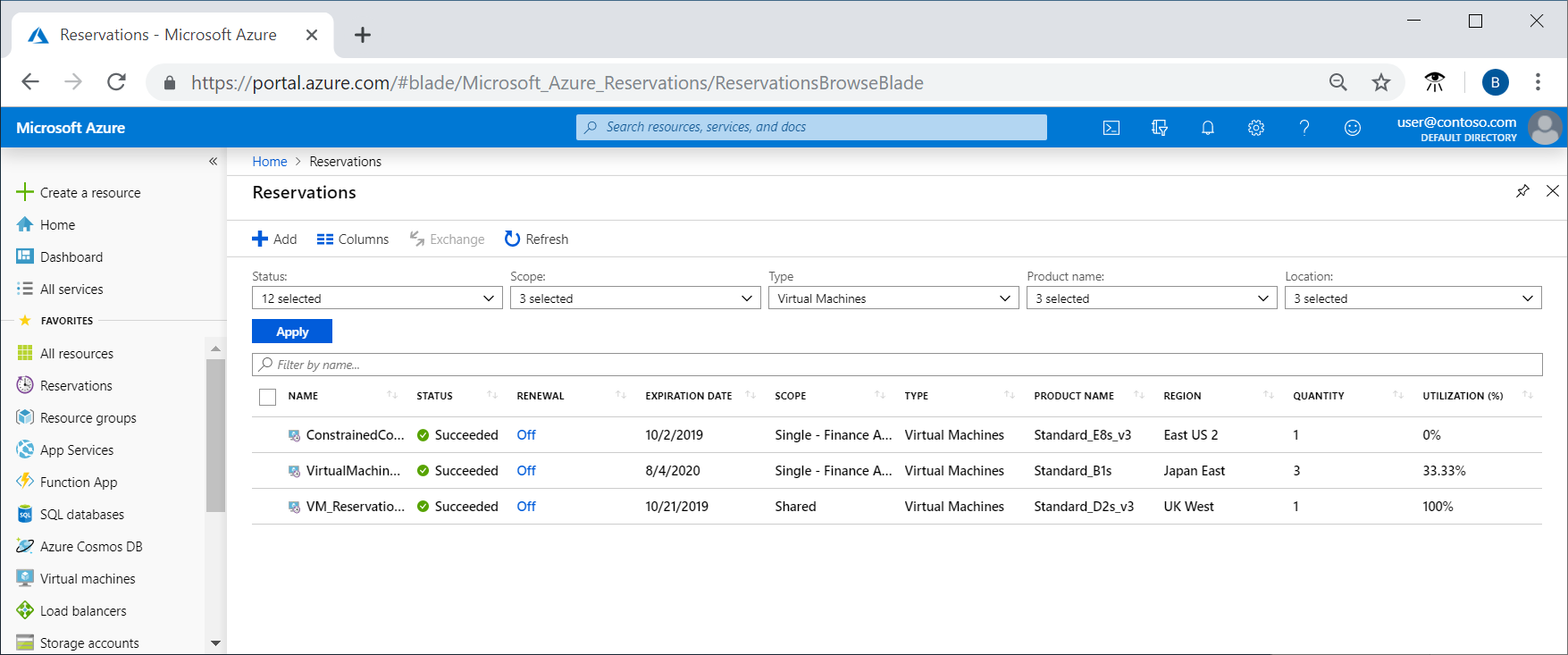
| Commitment model | You commit to a specific VM configuration (the VM family/size and region), not a $/hour spend amount. The reservation discount applies only when your running usage matches what you reserved. |
| Term length | You can choose a 1-year or 3-year term, and the longer term generally delivers a higher discount. |
| Payment Options | Upfront or Monthly |
| What it applies to | RIs apply to the specific resource you reserved (for example, a VM configuration) and discount the matching compute portion, not unrelated charges like storage or networking. |
| Flexibility | Because the commitment is resource-based, the discount is less flexible than a spend-based plan. If workloads shift to different VM types/sizes or move regions, the reservation may no longer match and savings can drop. |
| How discounts are applied | After purchase, Azure applies the reservation discount automatically to matching usage, so you don’t manually attach it to a specific VM instance. |
| What happens if you exceed the commitment | Any usage beyond what’s covered by the reservation is billed at standard pay-as-you-go rates. |
| What happens if you don’t use the full commitment | Unused reserved capacity doesn’t roll over, so if matching usage is lower than what you reserved, the unused portion is forfeited. |
| Scope | You can set the reservation scope so the discount can be consumed within a defined part of your Azure footprint (for example, within a subscription or shared across a broader scope), but it still only applies where matching usage exists. |
| Cancellation and changes | RIs can have options for exchange/cancellation depending on policy, but they’re still a long-term commitment and changes are more constrained than with Savings Plans. |
Reserved Instance Benefits
RIs allow organizations to significantly reduce compute costs by committing to a specific virtual machine configuration for a one- or three-year term. Because the reservation is tied to a defined VM size, family, and region, RIs can deliver the biggest discounts compared to more flexible discount models like Savings Plans, making them a strong choice for steady, long-running workloads.
These commitments work best when usage is predictable and unlikely to change materially over the commitment period. In those scenarios, RIs provide stable, discounted pricing that simplifies budgeting and cost forecasting. Teams know what they will pay for a given workload month over month, which can be especially valuable for production systems with consistent demand.
While RIs are less flexible than Savings Plans, Azure does allow limited adjustments in certain cases, such as exchanging reservations within the same category or canceling within defined limits. This provides some ability to respond to change, though it is not intended to support frequent reconfiguration.
Azure Reserved Instance Limitations
The primary limitation of RIs is their rigidity. Because the commitment is tied to a specific VM configuration and region, any meaningful change in workload requirements can reduce or eliminate the value of the reservation. If workloads are resized, migrated, or decommissioned, the reserved capacity may go unused.
RIs also carry a higher risk of wasted spend when usage declines unexpectedly. If matching usage drops below the reserved amount, the unused portion is forfeited. At the same time, any usage beyond the reservation is billed at standard pay-as-you-go rates, which can lead to higher-than-expected costs if demand grows beyond forecasts.
Another consideration is that RIs are a pricing discount, not a capacity guarantee. While Azure may prioritize capacity for reserved workloads, availability is not guaranteed. Workloads that require strict capacity assurances must use separate capacity reservation mechanisms.
Finally, although Azure allows cancellations and refunds, they are limited by policy and subject to caps. This means RIs still represent a long-term commitment, and inaccurate forecasting or organizational changes can introduce both financial and operational risk.
Azure Reservations vs Savings Plans Compared
Flexibility
Azure Savings Plans prioritize flexibility. Because the commitment is based on hourly spend rather than a specific VM configuration, the discount can continue to apply as workloads scale, resize, or move across VM families, operating systems, and regions. This makes Savings Plans well suited for environments where change is expected.
RIs are less flexible by design. They require a commitment to a specific VM configuration in a specific region. When usage stays stable, this can produce strong savings—but when usage changes, that reduced flexibility becomes a constraint.
Maximum Discount
Ease of Management
Savings Plans generally require less day-to-day operational involvement. Once purchased, discounts apply automatically to eligible compute usage, and teams don’t need to actively manage where workloads run to consume the commitment. Planning focuses mainly on setting the right overall commitment level.
RIs demand more ongoing attention. Because the discount only applies when usage matches the reserved configuration, teams need to monitor utilization, track changes in demand, and adjust strategy when workloads are resized, migrated, or retired. The management burden is higher, especially in fast-moving environments.
Typical Use Case
Savings Plans tend to work best for workloads with variable demand, frequent scaling, or ongoing architectural change. They’re often used to cover a broad baseline of compute spend that shifts over time.
RIs are better suited for stable production workloads with consistent sizing and long-term demand, where maximizing the discount outweighs the risk of lock-in.
Savings Plans versus Reserved Instances: The Comparison Table
| Dimension | Azure Savings Plans (for Compute) | Azure RIs (Reserved VM Instances) |
|---|---|---|
| Commitment type | Spend-based: commit to a fixed $/hour | Resource-based: commit to a specific VM configuration (size/family) in a region |
| Term | 1-year or 3-year | 1-year or 3-year |
| Max advertised savings | Up to 65% on eligible compute | Up to 72% (and up to 80% in some Windows scenarios when combined with Azure Hybrid Benefit) |
| Flexibility | Higher: discount can apply across eligible compute within scope even as workloads shift | Lower: discount applies when usage matches the reserved VM attributes (configuration/region) |
| What it covers | Compute-only (eligible compute services; not storage/networking) | Reserved VM Instances cover VM compute; reservations also exist for other Azure services (separate products) |
| Scope options | Can be applied at different scopes (for example, resource group, subscription, management group, or shared scope) | Can be applied at different scopes (for example, resource group, subscription, or shared scope), but still bound to the reserved VM attributes |
| Cancel / change | No cancellation or modification mid-term (you can only buy additional plans) | Limited cancellation/exchange options depending on policy; cancellations are capped (e.g., $50K per 12-month rolling window for a billing profile/enrollment) |
| Best fit (in one line) | Flexible coverage for compute that changes over time | Maximum savings for a stable, predictable VM baseline |
Azure SPs vs RIs: Which is Right for You?
If your priority is staying flexible as your compute footprint changes, Savings Plans are usually the safer starting point. If your priority is squeezing the most savings out of a stable, predictable VM baseline, RIs are typically the better fit.
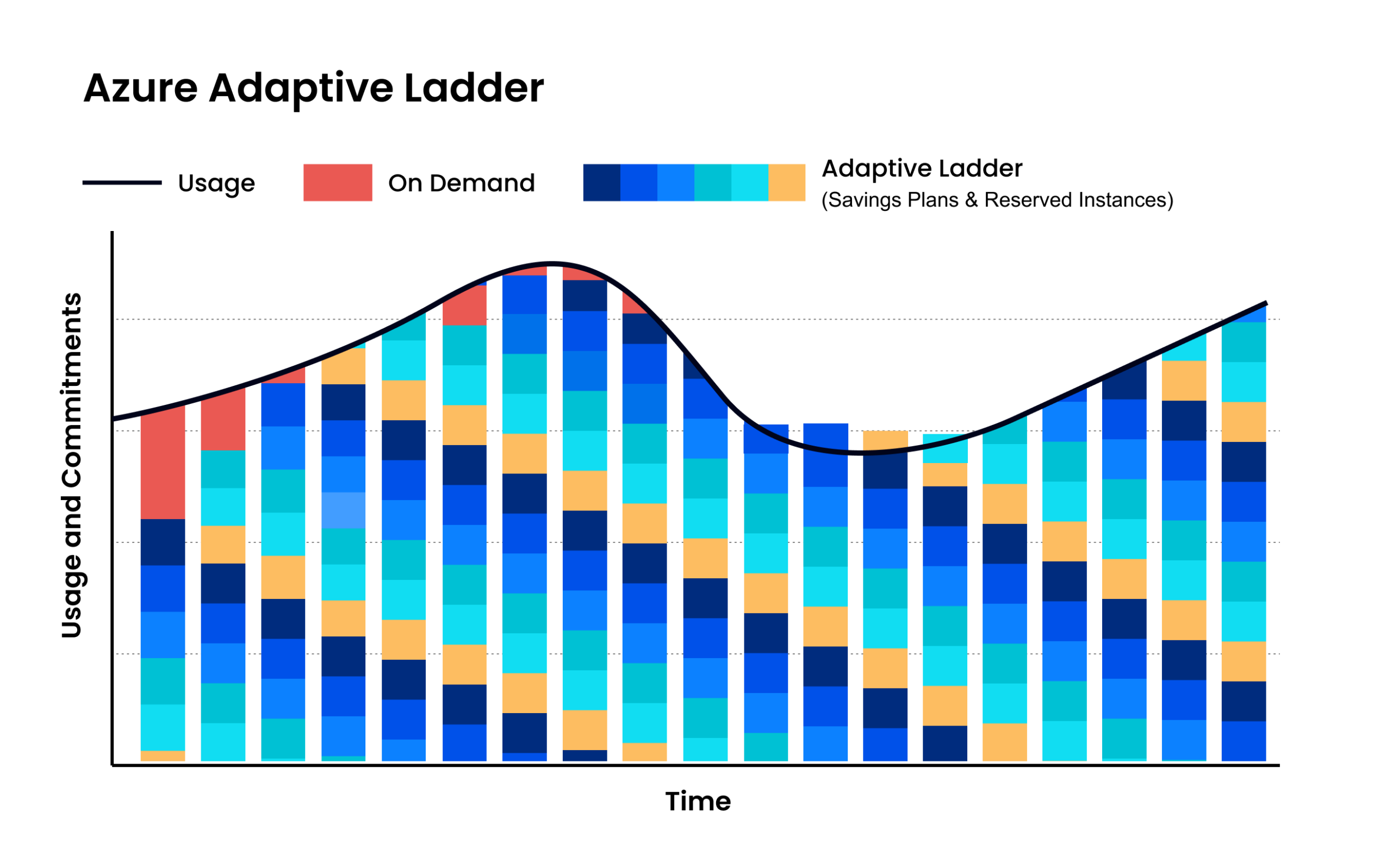
In practice, many teams use both: cover the most predictable “always-on” portion of usage with RIs, then use Savings Plans to extend discounts across the remaining eligible compute that shifts over time. When both apply, RIs are applied first, with Savings Plans picking up additional eligible usage afterward.
What makes this decision challenging is the operational complexity behind it. Azure commitments are applied at an hourly level, usage patterns change constantly, and large environments can involve thousands of overlapping RIs and Savings Plans across regions, services, and scopes.
Getting the mix right—and keeping it right as usage evolves—quickly becomes difficult to manage manually, which is why many organizations struggle to consistently capture the full savings these discounts can offer without automation.
Maximize Azure Savings with nOps
If you’re using Microsoft Azure at any real scale, commitments quickly become a moving target. nOps takes all of the manual work and complexity out of commitments by automatically maximizing your savings.
Adaptive commitment laddering: maximize savings without lock-in
Savings-first pricing
Complete visibility with automated cost allocation
In addition to visibility on your Azure hourly commitments, nOps gives you full visibility into your compute resources and spending with forecasting, budgets, anomaly detection, and reporting to spot issues early and validate commitment savings. That visibility flows directly into automated cost allocation, so you can instantly allocate costs across project, environment, team, application, service, and region without any manual tagging or effort.
Want to see it in practice? Book a demo to walk through Savings Plan coverage, cost visibility, allocation, and anomaly protection in your Azure environment.
nOps manages $3B+ in cloud spend and was recently rated #1 in G2’s Cloud Cost Management category.

Last Updated: February 10, 2026, Commitment Management