Skip to content



- Blog
- Commitment Management
- GCP Cost Optimization: Tools & Best Practices
GCP Cost Optimization: Tools & Best Practices
Google Cloud (GCP) offers a broad set of services—from simple app hosting to advanced analytics, data platforms, and AI/ML—so organizations can build and scale quickly without heavy upfront infrastructure work.
The challenge is that these services charge based on data processed, queries run, models trained, and pipelines triggered—so costs are tied to usage patterns that can change daily and are often spread across multiple managed services.
This article discusses best practices for controlling and reducing GCP costs, as well as the best tools to help with managing cloud costs, from native to multi-cloud.
Best practices for GCP Cost Optimization
1. Understand GCP pricing models
Pay-as-you-go model
GCP pricing is usage-based by default — you’re charged for the compute, storage, data processing, and network resources you actually consume. This gives you elasticity, but it also means your bill directly reflects workload behavior. If usage spikes, costs spike.
Sustained-use discounts (SUDs)
Committed use discounts (CUDs)
Free Trial
Google Cloud’s free trial gives new accounts free credits to use across many GCP services for 90 days, so you can experiment and run proof-of-concepts before paying out of pocket.
- $300 credit balance to apply toward eligible GCP usage
- 90-day window (unused credits expire)
- No charges unless you upgrade to a paid billing account
For more details, you can check out the full guide to GCP CUD vs SUD or the GCP Pricing Calculator here.
2. Track the right KPIs
Before investing in a cost optimization tool, ensure you’re tracking the metrics that actually indicate efficiency, risk, and accountability.
- Total cloud costs (daily + monthly run rate): You need visibility into both current spend and projected month-end spend. Daily tracking shows burn rate; monthly run rate tells you whether you’re trending above or below budget.
- Cost by service: Understand which services (Compute Engine, BigQuery, GKE, Cloud Storage, networking, etc.) are driving your bill. This quickly reveals whether your primary cost drivers are compute-heavy, data-heavy, or network-driven.
- Cost by team, project, or environment: Cloud costs must map to ownership. If you can’t allocate spend to teams, applications, or environments (prod vs. dev), you can’t enforce accountability or drive behavior change.
- Utilization vs. provisioned capacity ($ per vCPU): For compute and Kubernetes, track how much capacity you provision versus how much is actually used. Persistent gaps here signal overprovisioning and wasted spend.
- Discount coverage and commitment utilization: If you’re using CUDs, measure how much of your eligible spend is covered and how fully your commitments are utilized. Underutilized commitments mean you’re paying for unused discounts; uncovered baseline means you’re leaving savings on the table.
- Cost per unit of business value: Mature organizations go beyond infrastructure metrics and track cost per customer, per transaction, per workload, or per revenue dollar. This ties cloud efficiency directly to business outcomes.
3. Get visibility and allocate Google Cloud costs
| Feature | Why It Matters |
|---|---|
| Reporting & dashboards | Pre-built and customizable reports for finance, engineering, and leadership ensure stakeholders see relevant cost views without manual spreadsheet work. |
| Filters for finance | Views by cost center, business unit, customer/project, budget owner, and billing account |
| Filters for engineering | Views by service, workload, cluster/namespace (Kubernetes), environment (prod/dev), region, and usage type |
| Forecasting | Time-series forecasting helps predict month-end and future spend, so teams can correct course before overruns occur. |
| Budgets & alerts | Proactive notifications prevent surprises and enforce cost guardrails across teams. |
| Automated tagging & cost allocation | Allocate spend by team, application, or environment—even when tagging isn’t perfect. Essential for showback and chargeback. |
| Cost recommendations | Surface prioritized savings opportunities with clear next steps to reduce waste. |
4. Optimize resources (Use Less)
GCP cost optimization usually comes down to three levers: use less, scale better, and pay less for what you use — in that order. If you don’t first eliminate waste in your baseline environment, any later work on autoscaling or discounts just makes you more efficient at paying for resources you don’t need. This section covers the first lever: optimizing the resources you’re already running.
- Rightsizing core resources: Resize Compute Engine VMs, GKE node pools, and managed databases so capacity matches actual usage, not worst-case assumptions.
- Removing idle or orphaned resources: Clean up unused disks, snapshots, static IPs, stale dev/test environments, and other Google cloud resources that continue billing long after they stop delivering value.
- Tuning storage classes and performance settings: Move objects and volumes to the right storage class, right-size disks, and avoid paying for IOPS/performance tiers you don’t need.
- Fixing obvious overprovisioning: Identify workloads where CPU or memory is consistently underutilized and reduce allocated capacity so spend reflects real demand.
5. Optimize autoscaling (Use Less, Part II)
Once you’ve optimized the underlying resources, the next step is to ensure you’re not scaling past what you actually need, i.e. overprovisioning.
In many GCP environments, workloads are sized for peak traffic and then left running at that capacity 24/7. Even if utilization averages 30–40%, teams often accept that inefficiency as the cost of reliability. Proper autoscaling changes that equation by letting infrastructure follow demand.
For Kubernetes workloads on GKE, that means implementing Horizontal Pod Autoscaling (HPA) and, where appropriate, Vertical Pod Autoscaling (VPA) so pods adjust to real CPU and memory usage. At the cluster layer, enabling Cluster Autoscaler and node auto-provisioning ensures that node pools scale up when workloads grow and scale down when demand drops.
For more predictable workloads—such as batch jobs, internal tools, or business-hour traffic—scheduled scaling can eliminate unnecessary overnight or weekend capacity.
6. Optimize pricing (Pay Less for What You Use)
Once your cloud resources are right-sized and scaling properly, the final lever is pricing. At this stage, the question isn’t how much capacity you need — it’s how cheaply you can buy the capacity you know you’ll use.
The basic rule is simple: choose your pricing model based on how predictable (or interruptible) your workloads are.
Sustained Use Discounts (SUDs) work best when you have steady monthly usage but don’t want to commit long term. They apply automatically, require no purchase, and carry no lock-in risk. The tradeoff is a lower discount ceiling.
Committed Use Discounts (CUDs) make sense when you have a stable, long-running baseline you expect to keep for at least a year. In exchange for committing to usage or spend for 1 or 3 years, you unlock significantly deeper discounts. The tradeoff is financial obligation — you pay for the commitment whether you use it fully or not.
Spot / Preemptible VMs are ideal for workloads that can tolerate interruption. Batch jobs, stateless workers, CI/CD pipelines, and certain data processing tasks can often run on discounted, interruptible capacity at substantial savings. The tradeoff is reliability — these instances can be reclaimed by Google at any time.
In practice, most teams use a mix:
- Spot for interruptible workloads
- CUDs for predictable baseline usage
- SUDs to automatically discount everything else
The largest savings typically come not from choosing one model, but from layering them correctly — after you’ve ensured your baseline demand is accurate and your scaling behavior is efficient.
7. How to choose the right Google Cloud Cost Optimization Tool
To find the right GCP cost optimization tool for your need, consider the following factors:
- Cost and ROI. The pricing model should be transparent and aligned with value. Whether the tool charges a percentage of savings, a flat platform fee, or tiered pricing, you should be able to clearly estimate ROI relative to your current cloud costs.
- Automation level. Some tools provide visibility only; others automate rightsizing, commitment management, and scaling decisions. If your goal is active cost reduction (not just reporting), automation is critical.
- Security and compliance. The tool will access sensitive billing and infrastructure metadata. Ensure it follows strong security standards (e.g., least-privilege IAM access, encryption in transit and at rest, audit logs).
- Reporting and customization. Different stakeholders need different views. Finance may require cost center reporting and forecasting, while engineering needs workload-level breakdowns. The tool should allow custom dashboards, filters, and alerts.
- Depth of optimization. Some tools stop at cost reporting. Others provide detailed recommendations for compute, Kubernetes, commitments, storage, and networking. Make sure the optimization scope matches your largest cost drivers.
- Scalability. The platform should handle growth in accounts, projects, regions, clusters, and workloads without performance degradation or manual reconfiguration.
- Integration capabilities. Strong API support and integrations (e.g., BigQuery exports, ticketing systems, Slack, CI/CD workflows) make cost management part of your operational process instead of a separate reporting exercise.
- Multi-cloud or single-cloud focus. If you operate across AWS, Azure, and GCP, a unified view may be valuable. If you’re primarily GCP-first, depth of Google-native optimization may matter more than broad coverage.
- Ease of adoption. Implementation time, onboarding complexity, and learning curve all impact how quickly the tool delivers value. A technically powerful platform that no one uses won’t reduce spend.
8 Top GCP Cost Optimization Tools
1. nOps
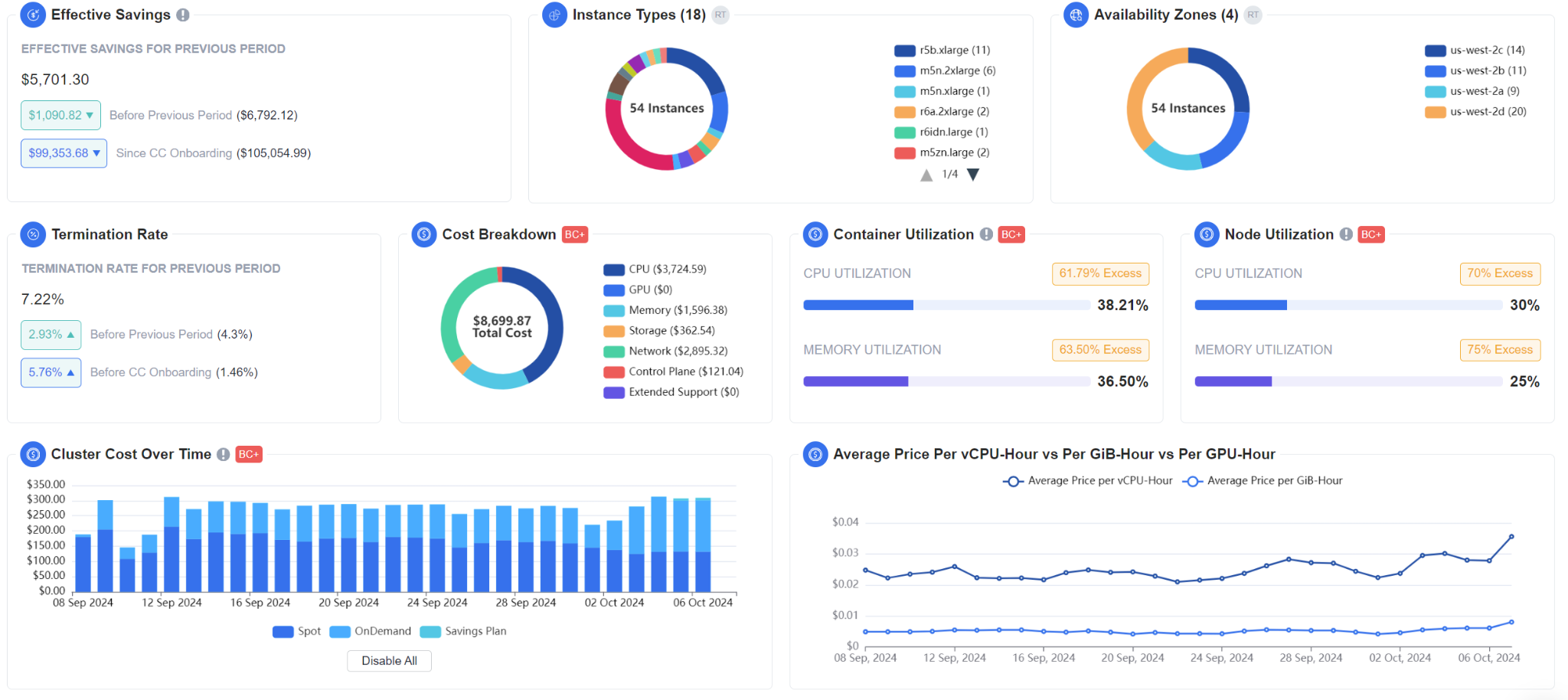
nOps is an end-to-end GCP cost optimization platform that enables organizations to maximize cloud value by optimizing cost efficiency, financial accountability, and cloud performance—without manual intervention. It’s an all-in-one solution that helps teams achieve up to 60% cost reduction while aligning cloud investments with business objectives. Features include:
- Commitment Management: autonomous hourly optimization of your GCP CUDs and SUDs for the biggest discounts and maximum flexibility
- nOps Visibility: understand 100% of your GCP costs with automated dashboards, reports, container cost allocation, budgets & cost tracking
- EKS Optimization: automatically optimizes your compute resources end-to-end, reducing waste at the container, node and pricing level with complete Kubernetes visibility
- FinOps AI Agent: pose any of your cloud-related questions to nOps AI — it is trained on your data to give you instant answers, executive-ready reports, or executable scripts to take action on recommendations.
2. Google Cloud Billing (Cost Management suite)
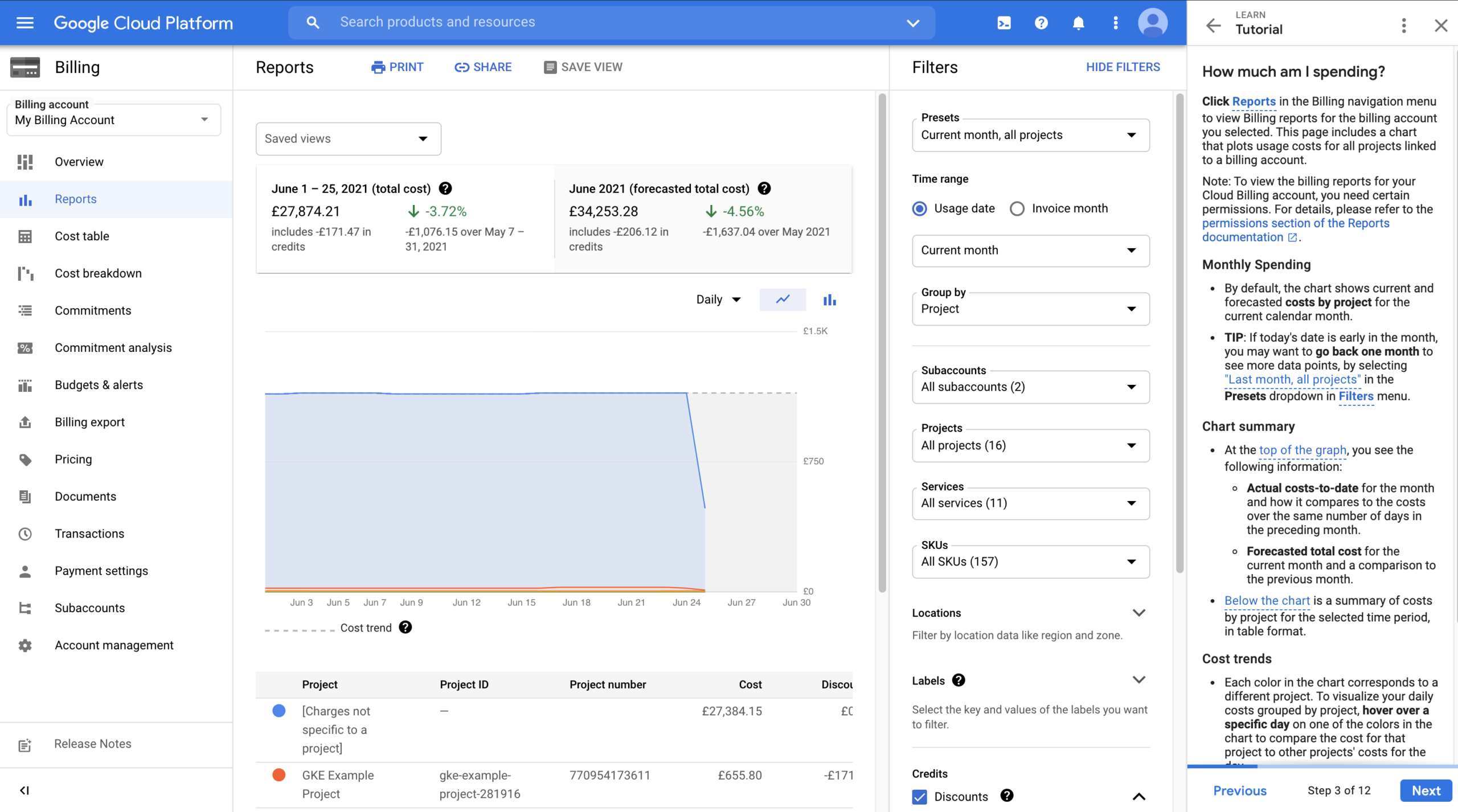
This is GCP’s native set of tools for visibility into cloud spend. It includes Billing Reports, Cost Tables, Budgets & Alerts, Billing Export to BigQuery, and cost allocation features such as labels and tags. Because it is built directly into the GCP console, it gets you visibility into your usage and spending without requiring third-party integration.
Its primary differentiation lies in its native integration and data fidelity. Google Cloud Billing provides authoritative, near-real-time cost data directly from GCP’s billing systems, along with granular SKU-level breakdowns and export into BigQuery for custom reporting. For organizations operating primarily within GCP, this tight coupling helps you get granular visibility with minimal operational overhead.
The tradeoff is that GCB descriptive rather than prescriptive. As a result, it serves as more of a foundational layer for GCP cost transparency — to take action on recommendations, you need to add FinOps practices or other automation tools.
3. Google Active Assist (Recommender)
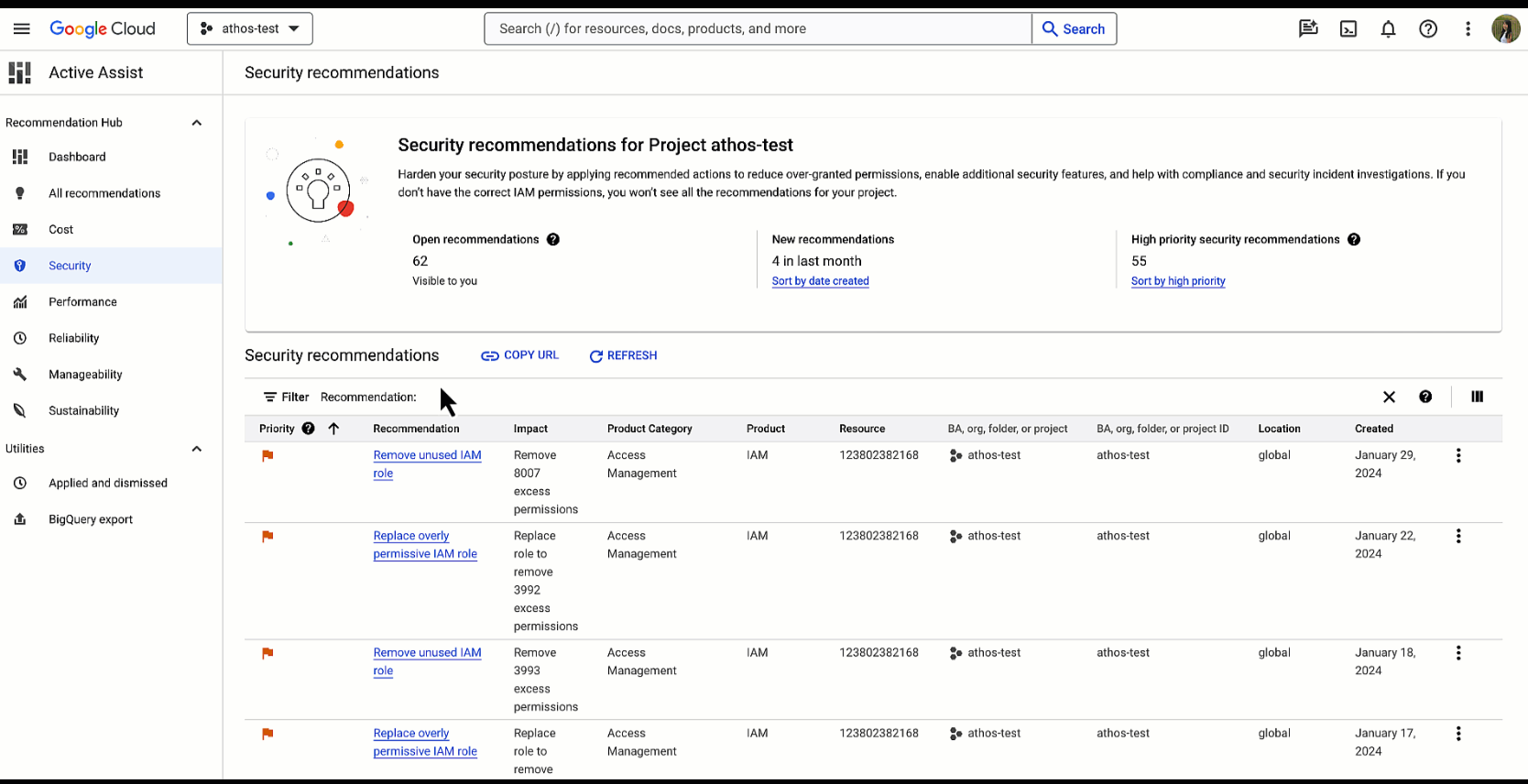
Google Active Assist is Google Cloud’s built-in recommendation layer for cost and performance optimization. Powered by the Recommender service, it analyzes how your resources are provisioned and used, then suggests changes like rightsizing VMs, deleting idle resources, adjusting provisioning, and adopting more cost-effective configurations. Recommendations appear directly in the console and are tied to the specific projects and resources generating spend.
Google Active Assist is most effective for teams that want quick wins from common inefficiencies—like oversized compute, underused disks, or idle IPs—without building a custom analytics pipeline.
The main limitation is that Active Assist doesn’t close the loop. It can recommend changes, but it generally won’t enforce policies, automate remediation end-to-end, or ensure recommendations stay implemented over time across complex org structures. It also focuses on what GCP can directly observe at the resource level, which means it’s less effective for unit economics, business-context allocation, and continuous optimization workflows.
4. Apptio Cloudability
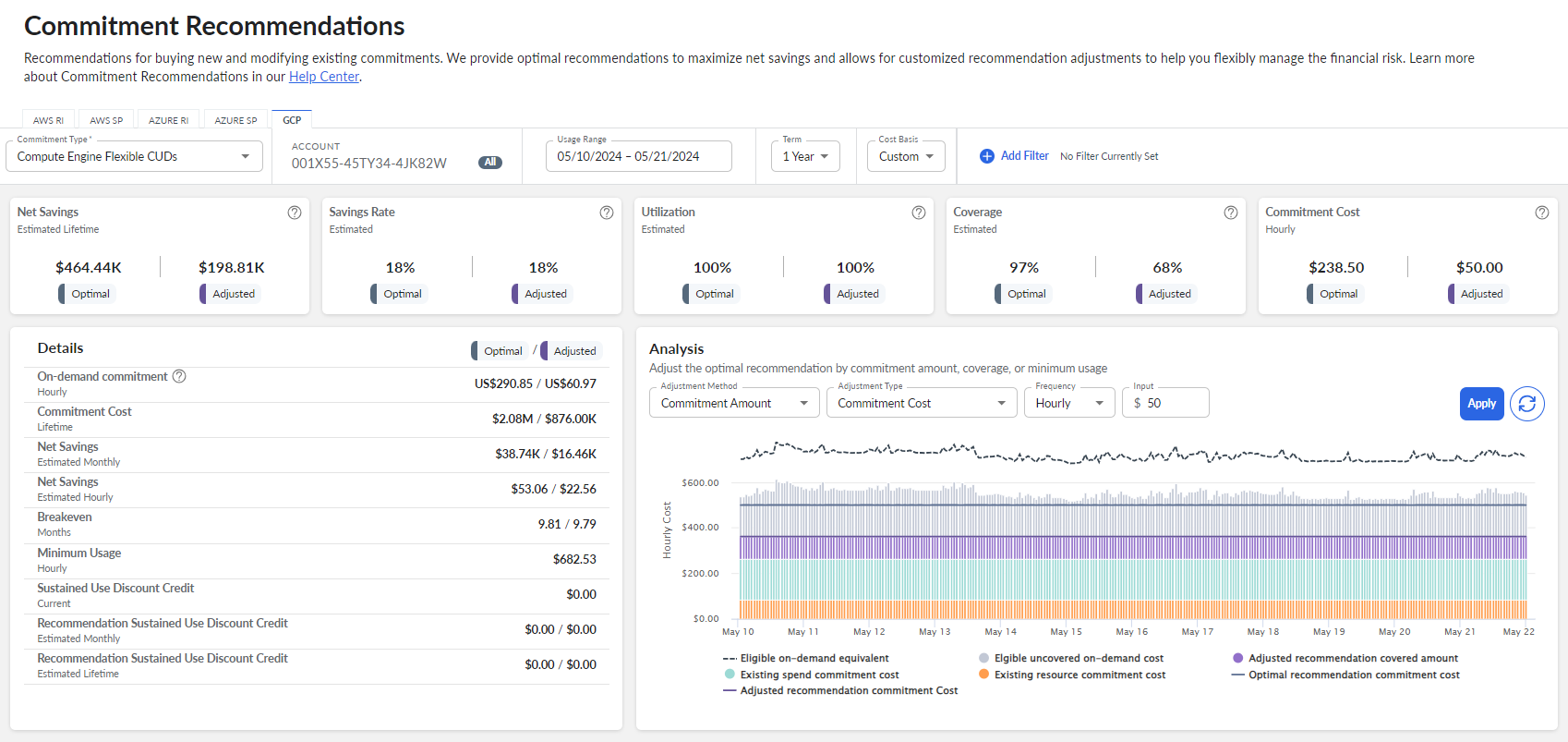
Apptio Cloudability is a FinOps platform that helps organizations manage and allocate cloud spend across providers, including Google Cloud. It ingests billing and usage data, normalizes it, and then supports chargeback/showback, cloud budgets, forecasting, and unit cost reporting—so GCP costs can be viewed in business terms like teams, applications, and environments, not just projects and SKUs.
Cloudability is built for governance at scale. Its designed for enterprises that need standardized allocation rules, consistent reporting, and repeatable FinOps workflows across large GCP estates and multicloud.
However, Cloudability is typically enterprise-priced and operationally heavy. It depends on mature tagging strategies and ongoing cost model maintenance, and it does not directly execute infrastructure optimizations inside GCP. For organizations whose primary objective is optimizing cloud costs through automation rather than building financial reporting frameworks, other optimization-focused platforms may be better aligned.
5. VMware Tanzu CloudHealth
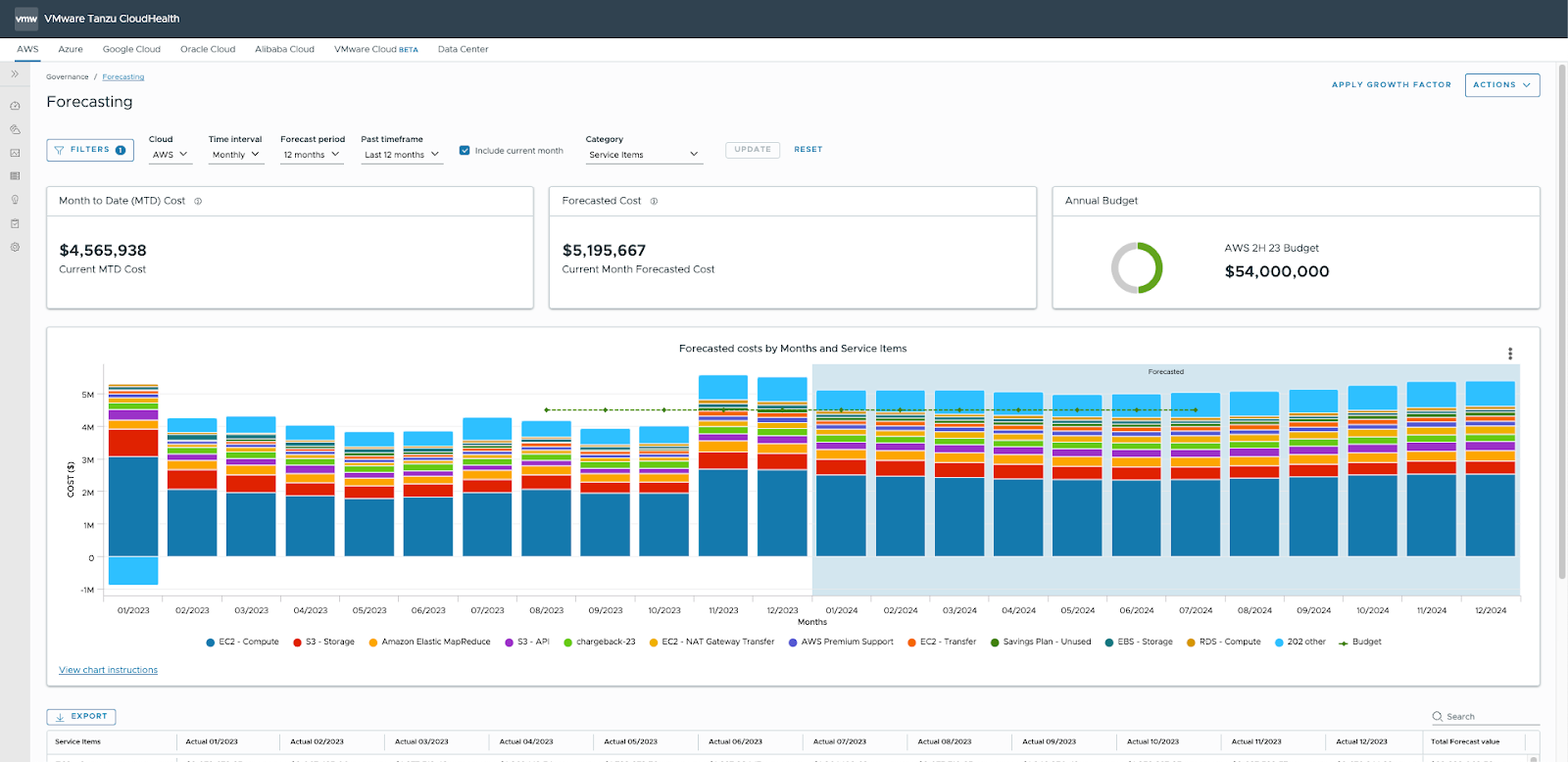
VMware Tanzu CloudHealth is a cloud management platform that includes cost management across AWS, Azure, and Google Cloud. In GCP environments, it pulls in billing data to provide reporting, policy controls, and optimization recommendations across projects and organizations. It is frequently adopted by enterprises that already use VMware tooling and want a single control plane across hybrid and multi-cloud estates.
Its differentiation is heritage and ecosystem alignment. CloudHealth originated as an independent cloud cost platform and was later acquired by VMware, then folded into the Tanzu portfolio. For organizations deeply invested in VMware infrastructure—especially those running hybrid environments—CloudHealth can fit naturally into existing operational workflows. However, that same acquisition path can introduce complexity in product direction and roadmap alignment, particularly for teams that are GCP-first rather than VMware-first.
The tradeoffs are both structural and strategic. CloudHealth is designed to abstract across clouds, which means it may not go as deep into GCP-specific services, pricing nuances, or rapidly evolving Google-native features. It can also be enterprise-priced and bundled within broader VMware agreements, which may limit flexibility.
6. Kubecost
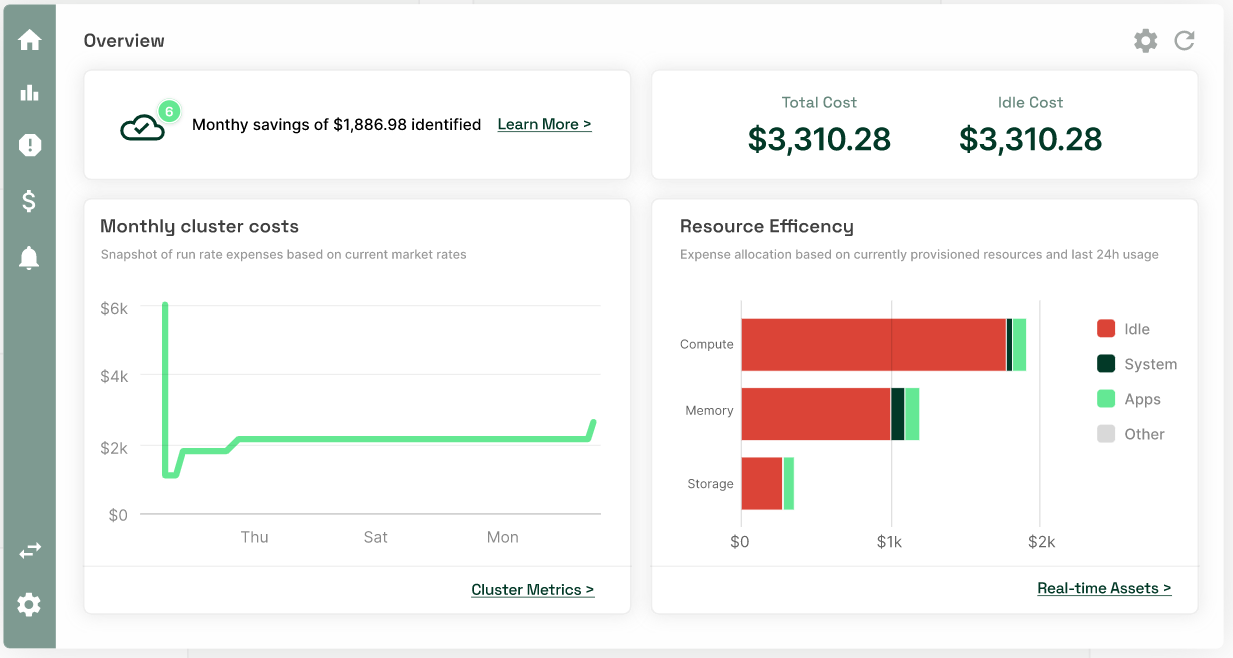
Kubecost is a Kubernetes cost monitoring and allocation tool that helps teams understand, attribute, and optimize spending for containerized workloads—whether you run them on Google Kubernetes Engine (GKE) or other Kubernetes platforms. In GCP, Kubecost is most commonly used to break down GKE-related costs (compute, node pools, namespaces, pods, deployments) and translate shared cluster spend into team/app-level views, which is something native cloud billing tools don’t naturally express in Kubernetes terms.
The open-source core also makes it approachable for teams that want to start small, validate value, and expand without committing to a large enterprise suite upfront.
The main limitation is scope: Kubecost optimizes Kubernetes spend, not overall GCP spend. It won’t cover BigQuery, Cloud Storage, Cloud SQL, Dataflow, networking, or broader discount strategy in the same way a full cloud cost optimization platform would.
7. Spot by NetApp / Flexera`
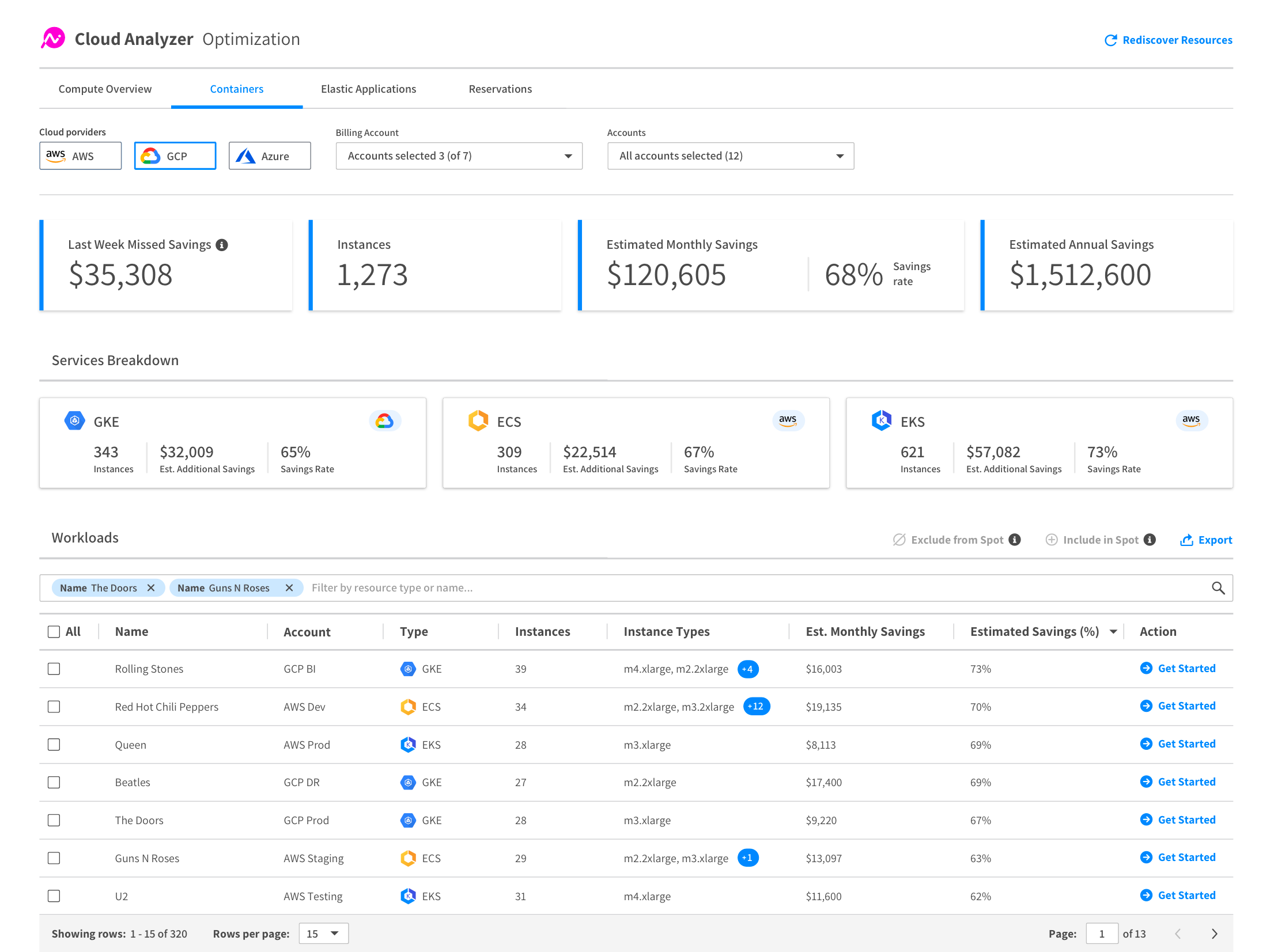
Spot (the Spot by NetApp portfolio, now owned by Flexera) is an automation platform focused on reducing compute and Kubernetes infrastructure costs, including in Google Cloud. In GCP, it’s commonly used to optimize GKE cluster capacity and compute consumption by continuously adjusting infrastructure to match workload demand and selecting the “best mix” of capacity types (e.g., Spot, committed/discounted, and on-demand).
The tradeoff is fit and scope: it’s strongest when a large share of your Google Cloud bill is compute/GKE-driven and your workloads can benefit from capacity automation.
As part of Flexera’s broader acquisition strategy in the FinOps space, Spot now sits within a portfolio built from multiple acquired products, which can make the overall platform feel less unified than single-origin tools. Products like Ocean for GKE automate capacity decisions for containers, while Eco (now branded as Cloud Commitment Management) focuses on commitment strategy/management across clouds, including GCP services.
8. IBM Turbonomic
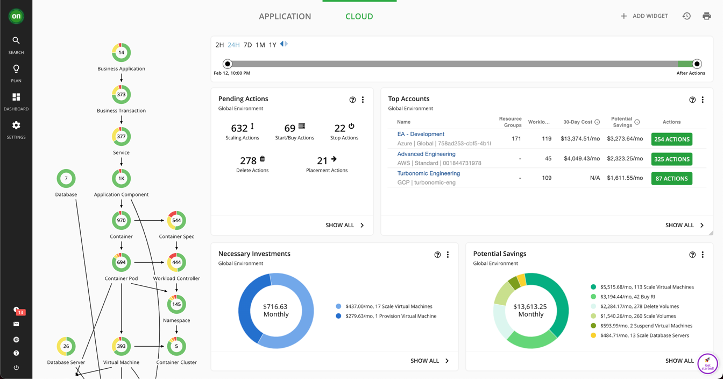
IBM Turbonomic is an application resource management platform that automates resourcing decisions to keep applications performant while eliminating wasted resources across hybrid and multi-cloud—including Google Cloud and GKE. In GCP, it focuses on continuously matching compute and Kubernetes capacity to real workload demand, so teams don’t have to rely on periodic rightsizing projects to stay efficient.
Its differentiation is performance-aware automation. Turbonomic emphasizes dependency modeling and “safe” actions—optimizing resources in a way that aims to protect application outcomes (like latency or throughput) while reducing overprovisioning. That makes it attractive for organizations where cost optimization can’t come at the expense of reliability.
The tradeoff is scope and fit: Turbonomic is strongest for ongoing compute/GKE resourcing, not broader GCP cost drivers like BigQuery, storage, or network egress. It’s also typically positioned as an enterprise operations platform, which can be heavier than tools that start with billing data and FinOps reporting.
Why nOps is the best GCP Cost Management Tool
Adaptive commitment laddering: maximize savings without lock-in
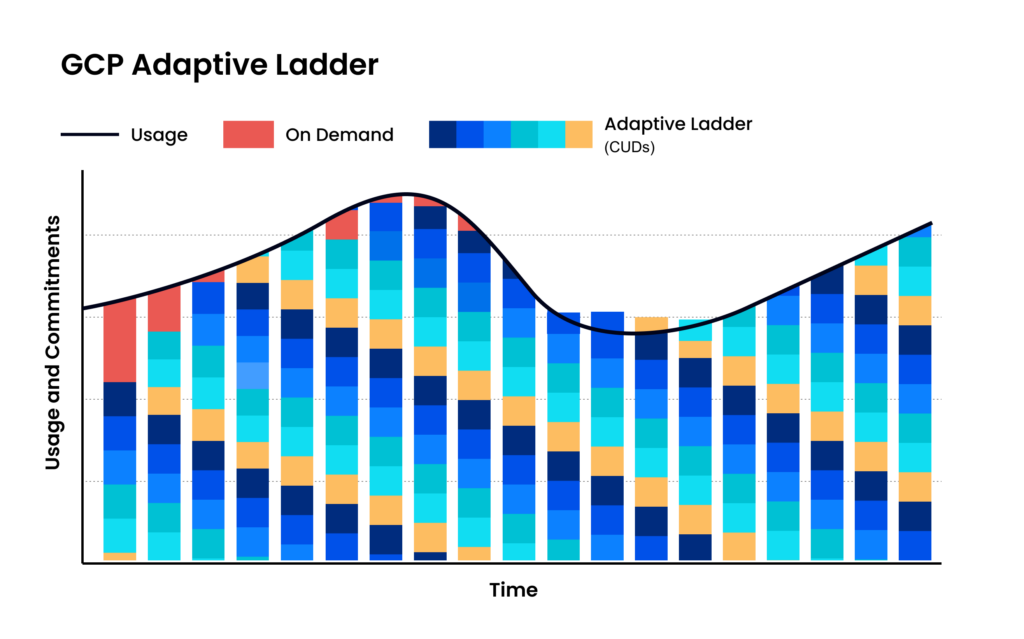
Instead of relying on infrequent, bulk CUD purchases, nOps uses adaptive commitment laddering—automatically committing in small, continual increments that align to your real usage. Coverage is recalculated and adjusted as demand changes, creating frequent expiration opportunities so commitments can flex up or down without sacrificing discounts. This approach extends savings beyond a static baseline, reduces long-term lock-in risk, and helps capture discounts across variable and spiky workloads with zero manual effort.
Savings-first pricing
nOps only gets paid after it saves you money. There’s no upfront cost, no long-term commitment, and no risk or downside — if nOps doesn’t deliver measurable savings, you don’t pay.
Complete visibility with automated cost allocation
In addition to visibility on your GCP cloud expenses, nOps gives you full visibility into your resources and spending across other cloud providers with forecasting, budgets, anomaly detection, and reporting to spot issues early and validate commitment savings. That visibility flows directly into automated cost allocation, so you can instantly allocate costs across project, environment, team, application, service, and region without any manual tagging or effort.
Want to see it in practice? Book a demo to walk through CUD coverage, cost visibility, allocation, and anomaly protection in your Google Cloud Platform environment.
nOps manages $3B+ in cloud spend and was recently rated #1 in G2’s Cloud Cost Management category.
Frequently Asked Questions
Let’s dive into a few FAQ about GCP cost optimization and cost savings.
Which GCP cost-management software is best?
The best option depends on your needs. Google Cloud Cost Management works well for native visibility and basic cloud monitoring. For deeper FinOps automation and multi-cloud cost intelligence, nOps provides centralized reporting, allocation, and automated savings optimization. Kubecost is strong for Kubernetes-level cost visibility in GKE environments.
How to cost-optimize GCP?
How do Managed Instance Groups and Cloud Functions impact GCP costs?
Start with detailed budgets and alerts. Right-size compute, eliminate idle resources, and use autoscaling to save money. Commit predictable workloads to Committed Use Discounts, leverage sustained use discounts, and use Spot VMs where appropriate. Continuously monitor Recommender insights and FinOps tooling to align cloud computing spend directly with business value.

Last Updated: March 10, 2026, Commitment Management
Tags
Last Updated: March 10, 2026, Commitment Management