Skip to content



If you’re an AWS customer, you might be considering an AWS Enterprise Discount Program (EDP) as a potential way to save on your AWS costs. We’ll talk about the advantages and disadvantages, how to know if the program is right for you, and strategies for maximizing your AWS EDP discounts.
What is the AWS Enterprise Discount Program (EDP)?
The AWS Enterprise Discount Program (EDP), is a savings program designed for enterprise cloud users who have a demonstrated history of significant AWS cloud usage, typically $1 million per year or more. It offers a discount on total AWS billing, calibrated to increase based on total spend and the length of the commitment period, typically 1-5 years. (The exact discount is negotiable and tailored to individual agreements).
These discounts are designed to reward long-term, high-volume use of AWS resources and foster enduring partnerships between AWS and its enterprise customers, encouraging deeper engagement with AWS’s ecosystem through incentivized pricing structures.
The biggest advantage of an Enterprise Discount Program is that it allows companies with large-scale, high-volume usage to realize greater cost savings for the AWS services that they are already using (EDPs provide consistent discounts across almost all AWS services and AWS regions).
What are the AWS EDP requirements?
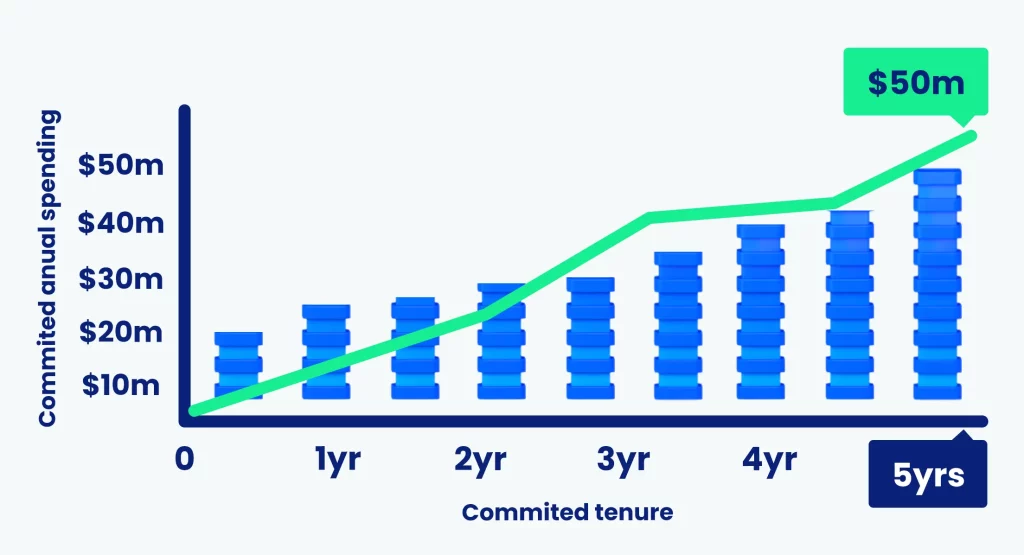
Standard eligibility for the EDP is primarily based on a customer’s historical or projected AWS spending ($1 million annually or more). Keep the following considerations in mind:
-
AWS requires that your annual commitment not be lower than the commitment of the previous year. For example, if you committed to $2 million in 2024, you wouldn’t be able to reduce your commitments to $1.75 million in 2025.
-
EDP discounts don’t count as part of your total annual commitment. For example, if you’re spending $2 million and but receive $200,000 in benefits, your annual commitment would be $1.8 million.
-
Purchases of products and services from ISVs through the AWS Marketplace can offset up to 25% of the annual AWS EDP commitment.
-
AWS also requires that organizations participating in the AWS EDP program sign up for AWS Enterprise Support, which significantly increase AWS user fees.
It’s important to note that exact requirements vary based on geography, company type and industry, negotiation, and other factors.
Am I ready to join the AWS EDP?

If you meet the above prerequisites, you can likely join the program — but should you? Here are the key questions to answer first.
Can I predict my annual AWS cloud spend with a high degree of confidence?
AWS usage is extremely complex, with usage patterns and services varying across users, teams, and departments. To take full advantage of an EDP, it’s crucial that engineering and finance work together to accurately forecast your AWS spend to avoid overcommitting or undercommitting.
Some best practices include ensuring your spend predictions are realistic and building in a certain amount of buffer in the amount that you commit to.
Am I cost-optimized?
You should ensure that your cloud spend is optimized before you join the AWS EDP — otherwise, you might end up not being able to meet your commitment. (In that case, the shortfall will be charged back to you at the end of the year — this is why not predicting your AWS cloud requirements accurately can be so costly).
AWS Enterprise Agreement Negotiations: Strategies & Tips
If you’re looking to join the EDP AWS discount program, here’s some practical advice to set yourself up well during AWS EDP negotiations to make the most out of your agreement.
-
Forecast your compute usage, spending, and growth. Review the historical data on your past AWS expenses, and analyze the variables that may impact your trajectory. Understand that joining the AWS EDP program means that you’ll have to increase your commitment each year — does that fit in with long-term business goals?
-
Understand your AWS marketplace usage. What ISVs are you currently purchasing from — is there an opportunity to route purchases through the AWS marketplace, as these purchases will count towards your total commitment (with a cap of 25%)?
-
Look to consolidate spending. If you’re able to consolidate your AWS budget with any additional AWS cloud users such as a parent organization or subsidiary, you can achieve a higher discount rate (since discounts increase with spending).
-
Prepare a negotiation strategy. Formulate a plan that outlines your desired renewal terms, pricing, and specific conditions to ensure your organization secures an agreement that aligns with its financial and operational objectives.
AWS EDP Discount vs…
Let’s outline the differences between AWS EDP and a few other programs often discussed in the same breath.
AWS Partner Opportunity Acceleration Program
The AWS EDP targets large enterprises, offering discounts in exchange for a commitment to a predefined spending level over time. On the other hand, the AWS POA program is aimed at AWS Partner Network members, providing them with resources like funding and technical AWS support to accelerate their business growth and expand their AWS-based solutions and AWS services.
AWS Migration Acceleration Program (MAP):

The AWS Migration Acceleration Program (MAP) incentivizes migration to AWS from on-premises or other clouds by offering discounts and credits. The EDP complements this by providing discounts for committed AWS spending, optimizing post-migration cloud expenses. Organizations often transition from MAP to EDP as their AWS usage increases, leveraging MAP for migration support and EDP for cost management.
Other AWS Programs and Discounts:
AWS offers numerous payment pricing models for cost savings that are premised on frequency, volume, and commitment tenure. Here are some common ones:
Reserved Instances (RI) offer a substantial discount (up to 75% off On-Demand), but the least flexibility. Standard RIs require a commitment to a specific type of compute (instance family, region, operating system…).
Savings Plans (SP) offer discounts (up to 72% off On-Demand) in exchange for a commitment to using a certain amount of compute over 1 or 3 year periods. They offer additional flexibility compared to RIs, and are automatically applied by AWS to the spend that will result in the greatest discount.
Spot instances are spare AWS capacity that users can purchase at a heavy discount. The trick is that AWS may need the capacity back at any time — potentially disrupting workloads if not managed properly.
For a detailed breakdown and comparison of AWS discounts, you can check out the Ultimate Guide to AWS Commitments.
How can nOps help you with AWS EDP?
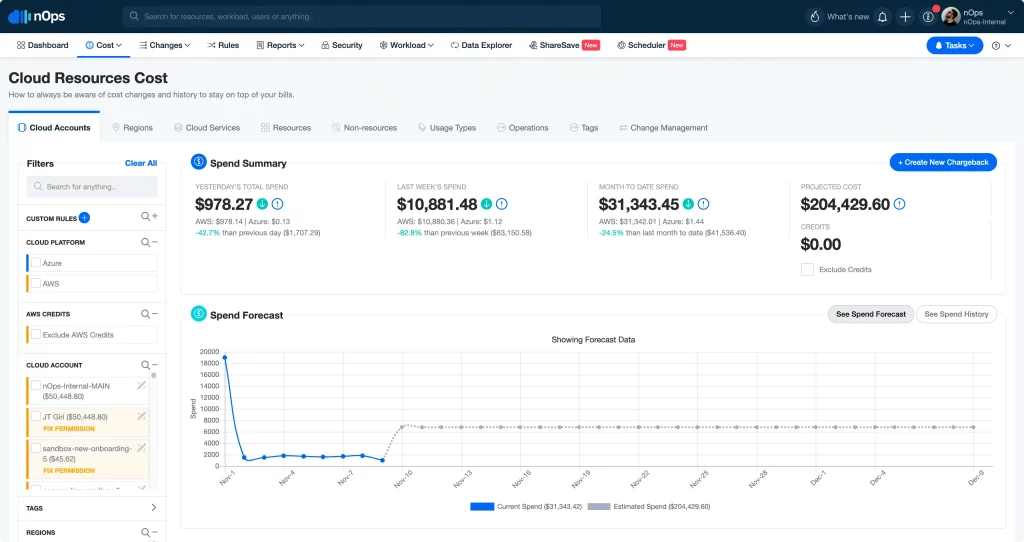
Understanding your cloud usage is a key prerequisite to joining the AWS Enterprise Discount Program. But if you’ve ever had to export a multi-gigabyte spreadsheet file to understand your AWS usage and spending, you know how hard it can be to understand your cloud costs.
That’s why we built Business Contexts and its suite of features that make it easy to transform your cloud data into the who, what, when and why of cloud spend.
Maximize the value of your AWS EDP
The nOps PPA & EDP Tracker gives you a live, decision-ready view of commitment vs. drawdown across your whole AWS org. This complimentary tool includes:
-
Commitment progress visualization: Monthly actuals vs. targets with overage/shortfall and recovery trendlines, plus historical + forecast views.
-
Multiple PPAs/EDPs in one dashboard: Track separate agreements or scenarios side-by-side so you can compare ramps and outcomes.
-
Service-specific budgeting: Filter spend by AWS service (EC2, S3, RDS, etc.) to see what’s driving drawdown and model growth where it matters.
-
Automated compliance alerts: Continuous validation of your trajectory against deal terms, with early risk flags.
nOps was recently ranked #1 in G2’s cloud cost management category, and we optimize $2 billion in cloud spend for our startup and enterprise customers.
Join our customers using nOps to understand your cloud costs and leverage automation with complete confidence by booking a demo today!