Prompt Caching: How It Works and What It Actually Saves You
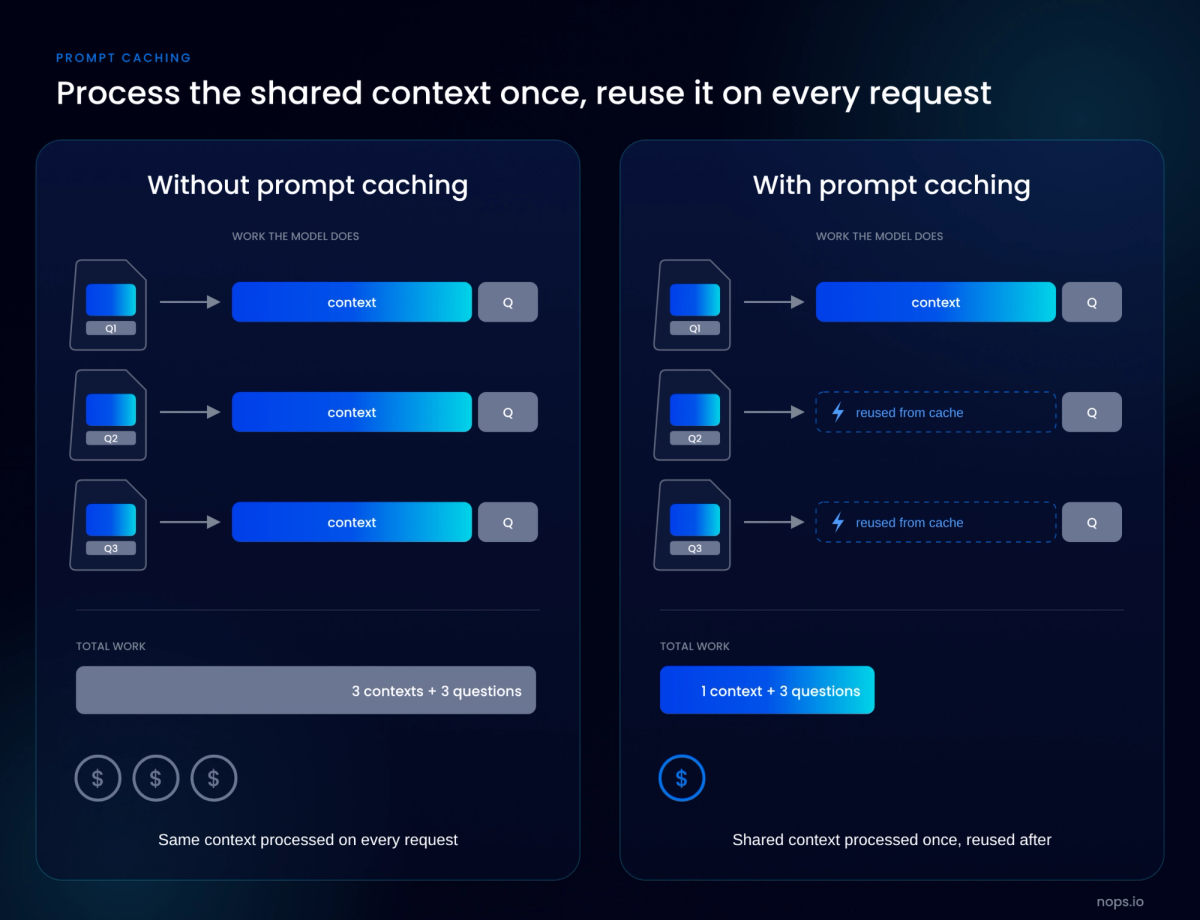
Most AI applications send the same long block of text with every request: instructions, tool definitions and reference documents. Without caching, the model reprocesses that block from scratch each time, and it is billed at the full input price each time.
Prompt caching saves the model's work on the repeated block the first time and reuses it on later requests, so that part of the prompt is billed at a fraction of the normal rate, a tenth or less on Anthropic's current models.
This guide covers how prompt caching works, how the major providers differ, what it saves in practice, and the reasons the savings often fail to appear on the bill.
What Is Prompt Caching?
Prompt caching is a provider-side feature that stores the model's computed state for the beginning of a prompt, so later requests that start with the same content skip reprocessing it. The reused tokens are billed at a reduced cached-input rate, and the model still generates a fresh response rather than reusing a previous answer.
How prefix matching works
When a model processes input tokens, it computes intermediate key-value states, the KV cache, that let it refer back to earlier tokens. Prompt caching saves those states for a prefix, the unchanged tokens at the start of a prompt. A later request with the same prefix reuses the saved state and only processes the new input that follows it.
A cache hit requires the entire prefix to match exactly. Providers cache the whole request in a fixed order, including tool definitions, system instructions and earlier conversation turns, so a change at any point in the prefix means everything after that point is processed again at the full rate.
Implicit vs explicit caching
With implicit caching, the provider decides where to cache and the developer changes nothing in the request. OpenAI turns it on by default for supported models. With explicit caching, the developer marks breakpoints that show where a reusable prefix ends. Anthropic works this way, through a cache control marker that can sit on up to four content blocks, and it also offers automatic caching through one top-level field that moves the breakpoint forward as a conversation grows. OpenAI's newer models (GPT-5.6 and later) support both.
The practical difference is control over what gets written. Cache writes can carry a charge, so marking only the stable part of a prompt avoids paying to store content that will not be reused. With OpenAI prompt caching on newer models, implicit mode places its breakpoint at the end of the latest user message. That means every request also writes its changing final message to the cache at the write rate, which is why OpenAI recommends explicit-only mode when the end of the prompt changes on every request.
Cache lifetime (TTL) and refresh behavior
Prompt cache entries expire, and lifetimes range from about five minutes to 24 hours depending on the provider, the model and the retention option chosen. With Anthropic prompt caching, an entry lasts five minutes by default, and the clock restarts at no extra cost each time the entry is read. The lifetime is measured from the start of the request that wrote or read the entry, not from the end of its response. So a long response uses up part of the window before the next request begins.
Longer retention costs more to write, at about two to two and a half times the base input price on the extended options from Anthropic and OpenAI. Those options make sense for prefixes that are reused less often than the default window but often enough to be read again before the longer one expires.
Minimum token thresholds
When a prompt prefix is shorter than the minimum length, it cannot be cached. Shorter prefixes are processed normally and no error is returned, so a request can be marked for caching and still pay the full input rate. The minimum differs by provider and model. Across Anthropic's models it runs from 512 to 4,096 tokens, and OpenAI's is 1,024 tokens on its newer models, with older models varying by request settings. When a prompt falls below the minimum, Anthropic's response reports zero cache writes and zero cache reads.
Prompt Caching Across Providers
All five platforms below reuse a matching prefix at a reduced rate, but they set different rules for when caching applies, how long an entry lasts and what a write costs. Cache reads cost about a tenth of the base input price on most current models, while writes range from free on OpenAI's older models and Google's implicit caching to two and a half times the base price for OpenAI's 12-hour retention. Those differences decide whether the same workload caches well on one provider and poorly on another. Multipliers in the table are relative to each model's base input price.
Provider | How caching is turned on | Minimum prompt | Default lifetime | Cache read price | Cache write price |
|---|---|---|---|---|---|
Explicit breakpoints (up to 4) or one automatic caching field | 512 to 4,096 tokens, by model | 5 minutes, refreshed on each hit; 1-hour option | 0.1x (0.05x or 0.025x on the newest models) | 1.25x for 5 minutes, 2x for 1 hour | |
Implicit by default; explicit breakpoints on GPT-5.6 and later | 1,024 tokens on GPT-5.6 and later; varies on earlier models | At least 30 minutes on GPT-5.6 and later, 12-hour option; about 5 to 10 minutes idle on earlier models, up to 24 hours with extended retention | 0.1x on GPT-5.6 and later (0.05x on some newer models); model-specific rate on earlier models | 1.25x for 30 minutes, 2.5x for 12 hours on GPT-5.6 and later; no write fee on earlier models | |
Explicit cache checkpoints for Claude; implicit for OpenAI and Nova models | 512 to 4,096 tokens for Claude, by model; 1,024 for OpenAI and Nova | 5 minutes for Claude, 1-hour option; 30 minutes for GPT-5.6 and later | 0.1x for most Claude models, lower on the newest; model-specific for others | 1.25x for Claude's 5-minute cache, more for 1 hour; 1.25x on GPT-5.6 and later | |
Implicit by default on GPT-4o and newer | 1,024 tokens, and the first 1,024 must be identical | Cleared after 5 to 10 minutes idle, always within 1 hour; up to 24 hours with extended retention; 30 minutes on GPT-5.6 and later | Discounted on Standard deployments; cached tokens don't use PTU capacity on provisioned deployments before GPT-6 | Separate 30-minute and 12-hour write rates on GPT-5.6 and later; no write fee on earlier models | |
Implicit by default on Gemini 2.5 and newer; explicit context caches on supported models | 2,048 to 6,144 tokens, by model | Implicit entries expire within 24 hours; explicit caches default to 60 minutes | 0.1x | No write fee for implicit caching; hourly storage fee for explicit caches |
Claude models keep Anthropic's caching mechanics on Bedrock, Google Cloud and Microsoft Foundry, with a few platform differences. Prompt caching on Bedrock doesn't apply to Claude requests that carry no cache checkpoints, and on Bedrock and Google Cloud the cache is shared across the whole organization rather than isolated per workspace. Per-model rates are in the nOps guides to Claude API pricing and OpenAI API pricing, and platform-specific tactics are in the guides to Azure OpenAI cost optimization and Vertex AI cost optimization.
What Prompt Caching Actually Saves
The three examples below use Anthropic's standard rates, where writing to the cache costs 1.25 times the normal input price and reading from it costs a tenth. They count input costs only, because caching only reduces input token costs.
A RAG application with a large static context
A support assistant sends the same instructions and product documentation with every request, then adds a few retrieved passages and the user's question, which change each time. About 87% of each prompt is identical from one request to the next. With 95% of requests reading that shared part from the cache, the monthly input bill falls by 73%, from $6,900 to $1,845.
The retrieved passages are why the savings stop short of 90%. They come after the cached part, so they pay full price on every request, and the more a pipeline retrieves, the less of the prompt caching can touch.
An agent loop with a long system prompt and tool definitions
An agent starts each task with a long set of instructions and tool definitions, then works through 10 steps, adding each step's tool calls and results to the history it resends. Each step reads everything already sent from the cache and pays the write rate only for what's new, which cuts the input cost of a task by about 74%.
Steps that run in parallel don't share the benefit. On Anthropic, a cache entry becomes available only after the first response starts, so calls sent at the same moment each write their own copy.
A long multi-turn chat session
A chat assistant resends its instructions and the whole conversation on every turn. If the user replies within the cache lifetime each time, every turn reads the history from the cache and writes only the newest exchange, and a 30-turn session costs 83% less in input.
The catch is how long people take to reply. With a five-minute lifetime, a user who steps away before each reply makes every turn rewrite the whole history at the higher write rate, and the session costs 25% more than with no caching at all. The one-hour lifetime costs more to write but survives ordinary pauses, and the same session still comes out 79% cheaper.
Where the 90% headline discount holds, and where it does not
The 90% discount applies to each cached token, and it reaches the bill in full only for the part of the prompt read from the cache. Everything after the last cached position pays the full input rate, writes add a premium on providers that charge for them, and output tokens are untouched. Across the three examples, prompt caching cost savings came to 73% to 83% of input cost:
Scenario | Change |
|---|---|
RAG application | 73% lower |
Agent loop | 74% lower |
30-turn chat, every reply within 5 minutes | 83% lower |
30-turn chat, every reply after 5 minutes | 25% higher |
30-turn chat with the 1-hour cache | 79% lower |
Output tokens cost several times more than input tokens on most models, and caching doesn't touch them. So the bigger a workload's output share, the less caching moves the total bill. Caching does the most for workloads with long, stable prompts and short responses, such as classification, extraction and agent steps that return a tool call. It does the least for long-form generation from a short prompt.
Why Your Caching Savings Are Not Showing Up
A request that misses the cache returns a normal response and no error, so the only signs of a problem are in the usage fields and on the invoice. These are the usual reasons a team that turned caching on sees little change in the bill.
Cache writes can cost more than ordinary input tokens
On Anthropic and OpenAI's newer models, a cache write costs more than ordinary input, and Google's explicit caches add an hourly storage fee; the table above has the rates. A write pays off only when the entry is read again before it expires. On Anthropic's five-minute cache, a single read covers the extra cost of the write. A prefix that is written and never read costs 25% more than it would with caching off.
Writes also accumulate in normal use. Each new turn in a conversation or agent loop writes its newest content, and each expiry writes the whole prefix again. A high ratio of written to read tokens in the usage data means the cache is being rebuilt more often than it is used.
A single dynamic token at the top of the prompt invalidates everything
A timestamp at the top of the system prompt breaks caching completely. If the first line reads "Current time: 2026-11-17 14:32:07", the prefix changes every second and no request ever matches an earlier one. With caching enabled on Anthropic, every request writes a new entry at 1.25 times the base price, so the application pays 25% more for input than it would with caching off, and nothing in the response signals a problem.
A request ID, user name, session ID, A/B test flag or retrieved document near the top of the prompt has the same effect. Matching runs from the first token forward, so a value that changes anywhere in the prefix invalidates everything after it.
TTL expiry between sparse requests
A cache entry that expires before the next matching request is rewritten instead of read. On a five-minute lifetime, a prefix used every three minutes stays warm indefinitely because each read restarts the clock, while the same prefix used every six minutes is written on every request and never read. Low-traffic features, scheduled jobs, internal tools used a few times an hour and chat sessions where users pause all fall into this pattern.
Longer retention is the usual fix, at a higher write price or with a storage fee. Anthropic's one-hour cache, written at twice the base price, comes out ahead of no caching once the prefix is read twice within the hour; the longer options on other providers are in the table above. For periodic work, sending the requests in one burst keeps them inside a single lifetime.
Traffic volume too low to sustain hits
Caching needs repetition within the lifetime of an entry. Each distinct prefix has to be written once before it can be read, so a feature with light traffic spread across many tenants, each with its own prompt, may never send the same prefix twice in five minutes. The hit rate stays near zero no matter how well the prompts are structured.
Before working on prompt structure, count how many requests share each prefix within the cache lifetime. If the answer is one or two, the options are longer retention, moving tenant-specific content later in the prompt so that every tenant shares one cached prefix, or accepting that the workload won't cache.
Prompt restructuring that silently broke the prefix
Prompts change with ordinary engineering work, and many of those changes break the prefix without anyone noticing. Adding a tool, reordering tool definitions, editing a line near the top of the system prompt or moving to a new model version all start the cache over, since each entry belongs to one exact prefix on one model. On Anthropic, changing tool_choice or adding an image invalidates the cached message history. Code that serializes tool definitions as JSON with an unstable key order, which can happen in Go and Swift, produces a different prefix on every request with no change in content.
A one-time miss after a deliberate prompt change is expected. The costly case is a change that makes the prefix unstable for good, such as a template that now injects a variable into the system prompt. The hit rate falls after the deploy and stays low, which is why tracking it by release finds the cause fastest.
Caching enabled but never verified
Several common setups leave caching configured but inactive, and none of them returns an error:
- Prompts below the model's minimum length are processed normally and never cached.
- On Amazon Bedrock, Claude requests without cache checkpoints aren't cached at all.
- A breakpoint placed after content that changes per request writes a new entry every time.
- Parallel requests sent before the first response has started all miss the cache.
The check is the usage data on each response. Anthropic reports cache_read_input_tokens and cache_creation_input_tokens, OpenAI reports cached_tokens (and cache_write_tokens on newer models), and Bedrock's Converse API reports cacheReadInputTokens and cacheWriteInputTokens. If reads stay at zero after the first few requests, caching isn't working, whatever the configuration says.
Cache Hit Rate as a FinOps Metric
Cache hit rate is the share of input tokens served from the cache. It belongs next to cost per request and spend by model in AI cost reporting because it moves the input bill directly, and it can drop overnight after a deploy with no change in traffic.
How to measure it from API usage responses
Every major provider returns cache figures in the usage object of each response, so hit rate can be calculated from data the application already receives. For cost, the token-weighted version is the one to track:
Cache hit rate = cache read tokens ÷ (cache read tokens + cache write tokens + uncached input tokens)
Field conventions differ. Anthropic splits input into input_tokens, cache_creation_input_tokens and cache_read_input_tokens, and the three add up to total input. OpenAI's input_tokens already includes cached tokens, with cached_tokens reported inside input_tokens_details. Combining the two conventions in one report without normalizing them counts some tokens twice.
A request-level rate, the share of requests with any cache read, is simpler but hides partial hits. A request that reads 1,000 tokens from cache and pays full price for 30,000 more counts as a hit.
What a healthy hit rate looks like by workload type
No single number counts as good, because the highest possible hit rate depends on how much of each prompt can be cached. In the examples earlier in this guide, about 87% of the RAG prompt can be cached, against more than 90% for the long chat session. So a RAG pipeline at 80% is close to its limit, while a chat assistant at 80% is losing savings to expiries.
That makes cache efficiency a better target than raw hit rate: actual cache reads divided by the reads that would have happened if every request after the first had hit. When efficiency is close to 100%, the remaining input cost comes from the uncached part of the prompt, and only trimming context will reduce it further. When it is well below, one of the causes in the previous section is usually responsible.
Tracking it over time and alerting when it drops
Hit rate is most useful as a daily series broken down by application, feature and model, since a company-wide figure averages a broken feature away. Two alerts are worth setting: a drop beyond a set threshold against the trailing average for a feature, and a rise in the ratio of written to read tokens, which signals expiries or an unstable prefix. Marking deploys on the same chart shows when a prompt change caused a drop.
Provider consoles help within one account. OpenAI offers a prompt caching dashboard and a diagnostics tool for misses, but neither covers traffic on other providers or ties the rate to a team or product. That breakdown needs the same attribution used for the rest of AI spend, with cached and uncached token usage reported by model, project and team across every provider.
Tying hit rate back to the bill
Hit rate becomes a dollar figure through the provider's multipliers. On Anthropic's five-minute cache, savings for a period equal cache read tokens times 0.9 of the base input price, minus cache write tokens times 0.25 of the base price. A negative result means caching cost more than it saved.
The effective input rate, total input spend divided by total input tokens, shows the same thing at a glance. Without caching it equals the list price, and with caching working well it falls toward the cache-read price. Tracked by model and feature next to hit rate, it shows which workloads are getting the discount and which are paying list price or more. The same change shows up in cost per request and cost per customer.
Structuring Prompts for Cacheability
A prompt caches well when it is assembled in the same order on every request, with the content that never changes at the start. Most of the changes below concern the order of content and where breakpoints go.
Static content first, dynamic content last
Order content by how often it changes: fixed instructions and reference material first, then content that changes per user or session, then the current request. Everything before the first changing token can be cached, so a prompt built this way caches as much as its content allows.
In RAG applications, retrieved passages go after the fixed instructions, never inside them. In multi-tenant applications, shared instructions come before tenant-specific ones so that every tenant reads the same cached prefix, and the tenant-specific part can be cached separately when it repeats often enough.
Where to place tool definitions and system instructions
Anthropic builds the cacheable prefix in a fixed order: tool definitions, then the system prompt, then messages. A change to tools invalidates everything after it, so tool definitions should be the most stable part of the request. Send the same set of tools on every call, in the same order and with deterministic serialization, rather than adding or removing tools per request. If an agent needs different tools in different phases, sending the full set every time often costs less than breaking the cache at each switch.
OpenAI caches the request in the order it is sent, so the same rule applies there: tools and instructions first, then conversation history, then the new input.
Handling timestamps, session IDs and user context correctly
Values that change per request belong at the end of the prompt. The current date and time, user names, account details and session IDs can go in the latest user message or in a short block after the last breakpoint, where they change without touching the cached prefix.
Where a value has to appear in the system prompt, reduce how often it changes. A date that updates once a day breaks the cache once a day, while a timestamp with seconds breaks it on every request. Request and trace IDs don't need to be in the prompt at all and can travel in request metadata or headers. Per-user context such as a profile or preferences goes after the shared instructions, which keeps the shared part cached across all users while the per-user part caches on its own during active sessions.
Cache breakpoint placement on providers that support it
On providers with explicit caching, a breakpoint marks the end of a prefix to cache. Anthropic allows up to four per request, and OpenAI's newer models allow up to four cache writes. A common layout is one breakpoint after the tool definitions and system prompt, one after any large reference documents and one at the end of the conversation history that moves forward each turn. Anthropic's automatic caching handles that last one without manual placement.
A breakpoint should never sit after content that changes per request. On Anthropic, the system checks at most 20 positions back from each breakpoint for a match, so conversations that add many blocks between requests need an extra breakpoint closer to the new content. When one-hour and five-minute entries are mixed, the one-hour entries must come first.
When Prompt Caching Is Not Worth It
Three questions decide whether caching will pay for a workload: how often the same prefix repeats within the cache lifetime, how much of each prompt stays the same, and whether the prompt clears the provider's minimum. Where writes are free, as with Google's implicit caching and OpenAI's older models, a poor fit costs nothing. On Anthropic and OpenAI's newer models, it raises the bill.
Low or bursty request volume
Some prefixes are rarely requested twice within their lifetime, such as features that get a handful of requests an hour or overnight jobs that touch each document once. Leave caching off for these on providers that charge for writes, or use longer retention only where reads will follow. For true batch work, batch processing is usually the bigger discount, at 50% off both input and output on Anthropic and OpenAI, and it stacks with caching when the batch shares a prefix.
Highly variable prompts
Prompts that share little from one request to the next have little to cache. One-off document summarization, where each request is a different document behind a short instruction, is the typical case: almost nothing in the prompt repeats. Caching starts to pay when the same large content is reused, such as a user asking several follow-up questions about one contract, so the deciding factor is reuse of the document, not the instruction.
Prompts below the minimum threshold
Prompts under the provider's minimum, listed in the table above, are never cached whatever the volume, and many classification, routing and extraction prompts fall under it. For a high-volume prompt just under the line, adding stable content such as more examples to cross the minimum can lower cost, because the cached longer prompt can cost less per request than the uncached short one. For the rest, a smaller or cheaper model does more for cost than caching can.
When semantic caching or model routing is the better lever
Prompt caching only discounts repeated input, and the model still runs on every request. Semantic caching, another form of LLM caching, goes further for repeated questions: the application stores responses and returns a stored answer when a new query is similar enough to an earlier one, skipping the model call and its output tokens entirely. It suits support and FAQ traffic where many users ask the same thing in different words, at the cost of sometimes returning an answer that doesn't quite fit the new question.
Model routing works on the other side of the bill. Sending simple requests to a cheaper model cuts both input and output cost for those requests, which matters most when output dominates or prompts are too short to cache. Both combine with prompt caching, which keeps working on whichever model handles a request as long as each model's prefix is reused often enough to stay warm.
Caching in the Wider AI Cost Picture
Prompt caching is one of several ways to reduce AI costs, alongside choosing the right model, batching work that isn't time-sensitive and trimming the context each request sends.
nOps makes it easy to see where those savings are and act on them:
- All of your AI spend in one view, across every model provider, broken down by team, product and customer with reporting, allocation, budgets, wallets and anomaly detection.
- Recommendations to switch models, fix caching and trim context, each with its estimated savings and the evidence behind it. Make the change yourself from the generated commands, open a Jira or Linear ticket, or hand it to AI to implement.
Book a free savings analysis to see where your AI and cloud spend can be optimized.
nOps manages $5B+ in cloud spend and was recently rated #1 in G2's Cloud Cost Management category.
Frequently Asked Questions
What is prompt caching?
Prompt caching is a provider-side feature that reuses the model's computed state for the start of a prompt when a later request begins with the same content. The reused tokens are billed at a reduced rate, usually about a tenth of the base input price, and the response is generated fresh.
How much does prompt caching save?
Cached read tokens cost about 90% less than standard input on most current models from Anthropic, OpenAI and Google, and more on some of the newest models. The saving on the input bill is lower because part of every prompt changes and writes can carry a premium; the worked examples in this guide land between 73% and 83% of input cost. Output tokens aren't affected.
How does prompt caching work?
The provider saves the key-value states the model computes for a prompt prefix. When a new request starts with exactly the same tokens in the same order, the model reuses that saved state and only processes the new content after it. Any difference in the prefix ends the match at that point.
What is the difference between implicit and explicit caching?
Implicit caching happens automatically with no change to the request, as on OpenAI, Azure OpenAI and Google Gemini. Explicit caching requires the developer to mark where the cacheable prefix ends, as on Anthropic and for Claude on Bedrock, which gives control over what gets written and billed.
How long does a prompt cache last?
It depends on the provider and settings. Anthropic's default is five minutes, refreshed on each hit, with a one-hour option. OpenAI's newer models keep entries for at least 30 minutes by default, with a 12-hour option, while older models keep in-memory entries for about 5 to 10 minutes of inactivity or up to 24 hours with extended retention. Google's implicit caches expire within 24 hours, and explicit caches default to 60 minutes.
Is there a minimum prompt length for caching?
Yes. Anthropic requires 512 to 4,096 tokens depending on the model, OpenAI requires 1,024 tokens on its newer models, and Google requires 2,048 to 6,144 depending on the model. Shorter prompts are processed normally, without caching and without an error.
Why am I not seeing savings from prompt caching?
The usual causes are a value that changes near the top of the prompt, such as a timestamp; cache entries expiring between requests; too little repeated traffic; a prompt change that broke the prefix; or caching that was never active, for example because the prompt is under the minimum. The usage fields on each response show cache reads and writes and are the first place to check.
Do cache writes cost extra?
On some providers. Anthropic charges 1.25 times the base input price for five-minute writes and twice the base price for one-hour writes, and OpenAI's newer models charge 1.25 or 2.5 times depending on retention. OpenAI's older models and Google's implicit caching charge nothing extra for writes, while Google's explicit caches add an hourly storage fee.
What is a good cache hit rate?
It depends on how much of the prompt can be cached. Compare the token-weighted hit rate with the static share of the prompt: a RAG application whose prompt is 87% static is doing well at 80%, while a long chat session with a ceiling above 90% that sits at 80% is losing savings to expiries or prefix breaks.
When should you not use prompt caching?
Caching adds little or costs more for low or bursty traffic where entries expire before reuse, prompts that change from the start on every request and prompts under the provider's minimum length. In those cases batch processing, semantic caching or routing to a smaller model usually does more for cost.