Skip to content



With the increasing complexity of managing cloud, Kubernetes, AI and 3rd party tool spend, cost management is getting tougher: 94% of IT leaders say they struggle to manage and optimize cloud spend, according to Crayon.
In response, Cloud FinOps teams are zeroing in on the most practical levers first: (1) seeing costs fast enough to act, (2) allocating spend to the teams/apps creating it, and (3) automating savings wherever possible—rightsizing compute, eliminating idle resources, and using Savings Plans/Reserved Instances intelligently.
The good news: Deloitte estimates that organizations with mature FinOps can cut costs by up to 40%.
Tools are what make that scale, especially in multi-account AWS environments. But how do you choose the right FinOps tool? In this blog, we’ll break down how the leading tools compare on strengths, tradeoffs, features, and pricing.
What is AWS FinOps?
FinOps is a cloud financial management practice that aligns engineering, finance, and product teams to continuously control costs and maximize the business value of cloud spend.
Think of FinOps as the cost side of DevOps. DevOps optimizes how you build and ship software; FinOps optimizes how you pay for and scale it. Teams use FinOps to understand what they’re spending, tie costs to the services and people creating them, and continuously optimize—rightsizing resources, eliminating waste, and using commitments like Savings Plans and Reserved Instances effectively.
FinOps is becoming increasingly popular amid skyrocketing cloud and GenAI spend — A recent industry analysis found about 59% of organizations have a FinOps team doing some or all cloud cost-optimization tasks, with the number growing each year.
What are AWS FinOps Tools?
AWS FinOps tools are software platforms that operationalize cloud financial management. They connect AWS billing data to engineering workflows so teams can see cost in context, act on optimization opportunities as workloads change, and maintain accountability for spend without slowing delivery. Both AWS-native services and third-party platforms fall into this category.
Why is FinOps Important?
The FinOps Framework helps organizations manage cloud costs effectively. Let’s take a quick look at the FinOps best practices and why they matter.

Credit: FinOps Foundation
-
Teams need to collaborate – Cross-functional teams work together in near real-time, ensuring cloud costs are optimized dynamically rather than in hindsight.
-
Decisions are driven by business value of cloud – Cloud spending is assessed through unit economics, enabling teams to make strategic trade-offs between cost, quality, and speed.
-
Everyone takes ownership for their cloud usage – Engineers and product teams are accountable for cloud costs, driving more cost-efficient architectures and reducing unnecessary waste.
-
FinOps data should be accessible and timely – Real-time visibility into cloud spend enables teams to proactively adjust usage, improve forecasting, and optimize costs before overruns occur.
-
A centralized team drives FinOps – A dedicated FinOps function sets best practices, negotiates savings at scale, and enables decentralized teams to focus on cost-efficient cloud usage.
-
Take advantage of the variable cost model of the cloud – Cloud’s flexibility should be leveraged to optimize spend dynamically, avoiding rigid long-term commitments that limit innovation.
Why Is AWS Great For FinOps?
AWS is great for FinOps because cost and usage management are built into how AWS works: the platform continuously records granular spend and consumption data, supports clear ownership of that spend across teams and services, and offers native paths to keep optimizing over time.
As a result, the FinOps lifecycle—inform, optimize, operate—can run directly on AWS. Key benefits for FinOps include:
Cloud Cost Control
AWS provides built-in visibility and control mechanisms that help teams track spend, detect drift early, and stay aligned to budgets without slowing delivery. Some examples of cloud cost control on AWS include:
- Ability to set budgets and define spend thresholds for accounts, teams, or projects, and get notified before costs exceed targets (AWS Budgets).
- Ability to monitor spend trends and isolate sudden spikes by service or account while workloads are still running (AWS Cost Explorer/Cost & Usage Report).
- Ability to structure ownership through separate accounts and consistent tagging, so spend naturally rolls up to the right team or environment (AWS Organizations, accounts, tags).
Cloud Cost Optimization
Cloud cost optimization is the ongoing work of reducing your AWS cost per workload or outcome without sacrificing performance. AWS supports this by offering flexible pricing and purchase options. For example, teams can lower unit costs by shifting from pure On-Demand to the right mix of discounted commitments and flexible capacity, or by aligning storage choices to access needs.
As environments scale, many organizations extend these native pricing levers with automation platforms like nOps, which sit on top of AWS cost data to continuously capture savings and keep discount strategies optimized without manual effort.
Resource Optimization
Resource optimization is the practice of matching AWS resources to real workload needs so you’re not running (or paying for) excess capacity. AWS has built-in recommendations or you can leverage third party tools for additional benefits like prioritization by cost and effort, one-click apply, etc.
Examples include:
-
Rightsize EC2 and RDS based on actual CPU/memory/utilization trends.
-
Shut down or schedule non-prod resources outside business hours.
-
Remove idle or orphaned assets like unused EBS volumes, snapshots, and load balancers.
-
Use Auto Scaling to keep capacity aligned with demand instead of overprovisioning.
-
Move infrequently accessed S3 data to lower-cost tiers with lifecycle policies.
Financial Accountability
AWS enables processes that make cloud spending clearly owned and explainable across teams. When costs are attributed correctly, engineering decisions naturally include financial impact, and finance can forecast with confidence.
For example, teams can break down spend by application or owner using tags and account structures, then review cost trends alongside usage to understand what’s driving change. With consistent tagging and shared reporting, accountability becomes built into daily operations — so you can ensure you’re getting value out of every dollar you spend on AWS.
Business Agility
The 20 Best AWS FinOps Tools in 2026
Cloud cost management tools can help align finance and operations in a language they both understand. But with so many options on the market, it can be overwhelming to choose — that’s why we put together this guide comparing the top cloud FinOps tools on the market.

nOps is a cost optimization platform that helps users reduce their costs by up to 60% on autopilot. nOps makes it easy to allocate your multicloud costs and get complete visibility into spending. It also intelligently manages all your commitments and pricing discounts automatically so you get optimal performance and costs.
nOps was built to make it easy for engineers to take action on cloud optimization and was recently named #1 in G2’s cloud cost management category.
Key Feature Highlights:
- Visibility: understand 100% of your cloud costs with dashboards, reports, container cost allocation, budgets, forecasting, anomaly detection and more — covers GCP, Azure, Kubernetes, AI and third-party SaaS like Datadog, Databricks and Snowflake
- Commitment Management: get industry-leading savings rates (up to 55%) while minimizing your commitment lock-in risk. Customers save 20% on average when switching from competitors.
- Savings-First pricing model: nOps is results-based, meaning you pay nothing if you don’t get measurable results.
Pricing: Free to get started with a free savings analysis, then a percentage of savings.
Best for:
- Companies of all sizes that want to get autonomous savings for no manual effort
- FinOps, DevOps, and engineering leaders looking for real-time visibility, optimization, and accountability in one platform
2. CloudZero – Cloud Cost Intelligence & Unit Economics
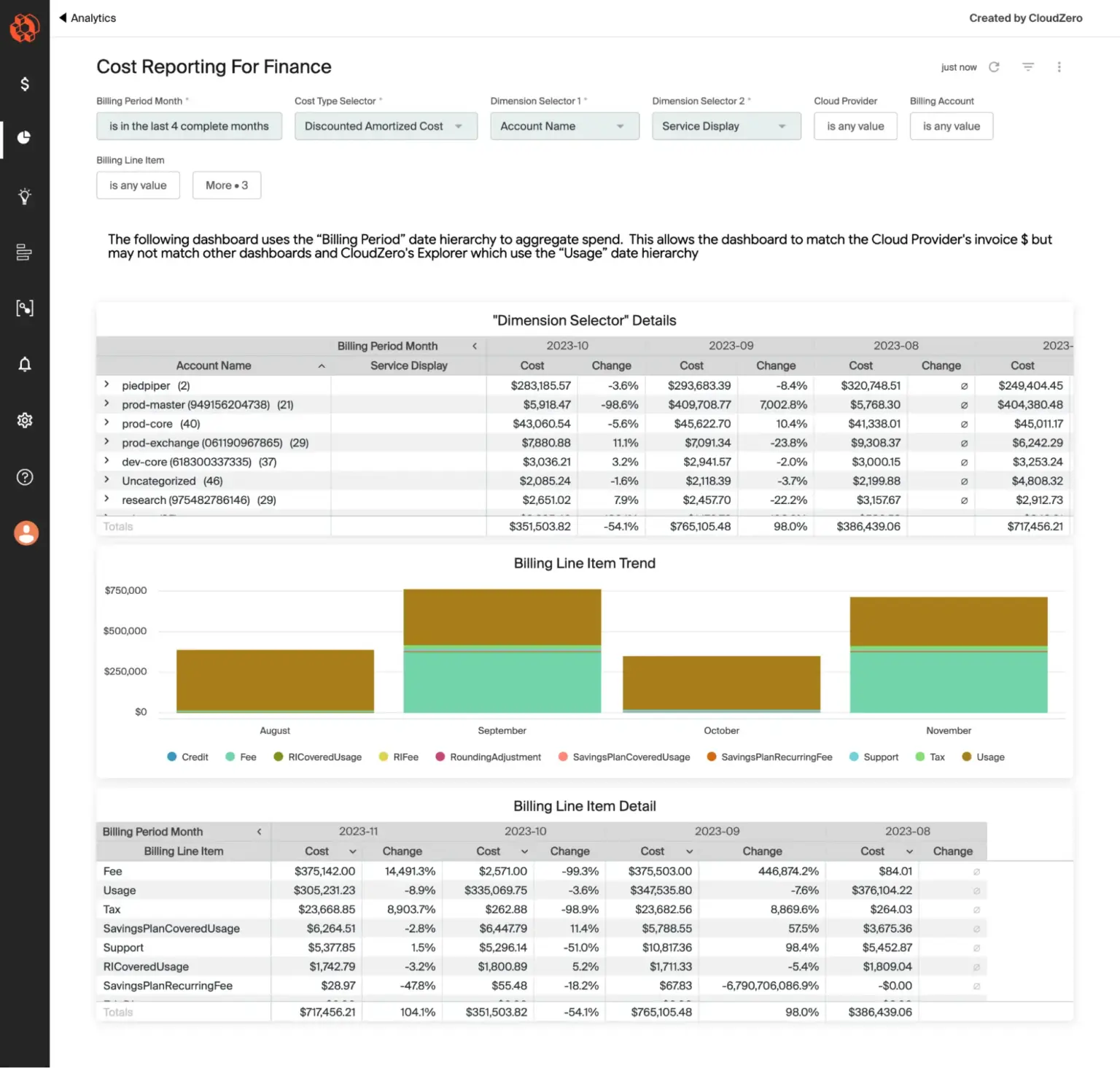
CloudZero is a cloud cost intelligence platform designed for engineering-led organizations that need to map infrastructure costs to business metrics. Rather than tracking spend by service or account, CloudZero allocates costs to custom dimensions like cost per customer, cost per feature, and cost per team. The platform targets SaaS companies and tech-forward enterprises where understanding the relationship between infrastructure costs and revenue drives product pricing and business strategy.
Pros:
- Engineering-friendly interface built for DevOps and platform teams focuses on actionable insights rather than finance-centric accounting reports
- Deep AWS integration provides accurate EKS and Lambda allocation that native Cost Explorer struggles with
- Unified multi-cloud support aggregates AWS, Azure, GCP, Snowflake, Databricks, and Datadog costs in a single dashboard with normalized metrics
- Machine learning-based anomaly detection identifies unusual spending patterns with root cause analysis and recommended remediation
Cons:
- Higher cost for smaller teams—at $19 per $1000 of cloud spend, a $100K/month bill costs $1,900/month for the platform
- Limited commitment automation provides recommendations but doesn’t auto-purchase Savings Plans or RIs like specialized tools
Pricing: CloudZero charges $19 per $1000 of monthly cloud spend under management with no feature restrictions. A company with $200K/month cloud spend pays approximately $3,800/month. Minimum contract term is 12 months.
Best for: Fast-growing SaaS companies and engineering-driven organizations with $100K+/month cloud spend who need to understand cost per customer or cost per feature for product pricing decisions.
3. Apptio Cloudability – Enterprise Multi-Cloud Governance
Apptio Cloudability is an enterprise-grade cloud cost management platform acquired by IBM in 2023, designed for large multi-cloud environments with complex governance requirements. The platform provides comprehensive visibility, allocation, optimization, and governance across AWS, Azure, GCP, and other cloud services. Cloudability targets centralized FinOps teams managing cloud spend across hundreds or thousands of accounts with strict compliance and approval workflows.
Pros:
- Enterprise-ready governance includes robust approval workflows, role-based access control, and audit logging for organizations with strict compliance requirements
- Deep multi-cloud coverage delivers consistent cost allocation across AWS, Azure, and GCP environments with unified taxonomy
- Mature reporting capabilities offer extensive pre-built reports and custom report builder for finance, procurement, and executive stakeholders
- Native connectors to Tableau, Power BI, and other BI tools enable custom reporting and executive dashboards
Cons:
- High complexity and steep learning curve typically require dedicated FinOps staff to configure and manage effectively
- Expensive pricing—typically 1-3% of annual cloud spend—means a $5M/year cloud bill costs $50K-$150K annually
- Implementation timeline can extend months for large enterprises with complex requirements
Pricing: Cloudability uses a percentage-of-spend model ranging from 1-3% of annual cloud spend under management depending on total volume, contract term, and feature set. Pricing is tiered with graduated discounts for larger organizations.
Best for: Large enterprises ($5M+ annual cloud spend) with multi-cloud environments, dedicated FinOps teams, and complex governance requirements where cloud cost management is a centralized function with strict compliance processes.
4. Finout – Organizations with Messy Tagging
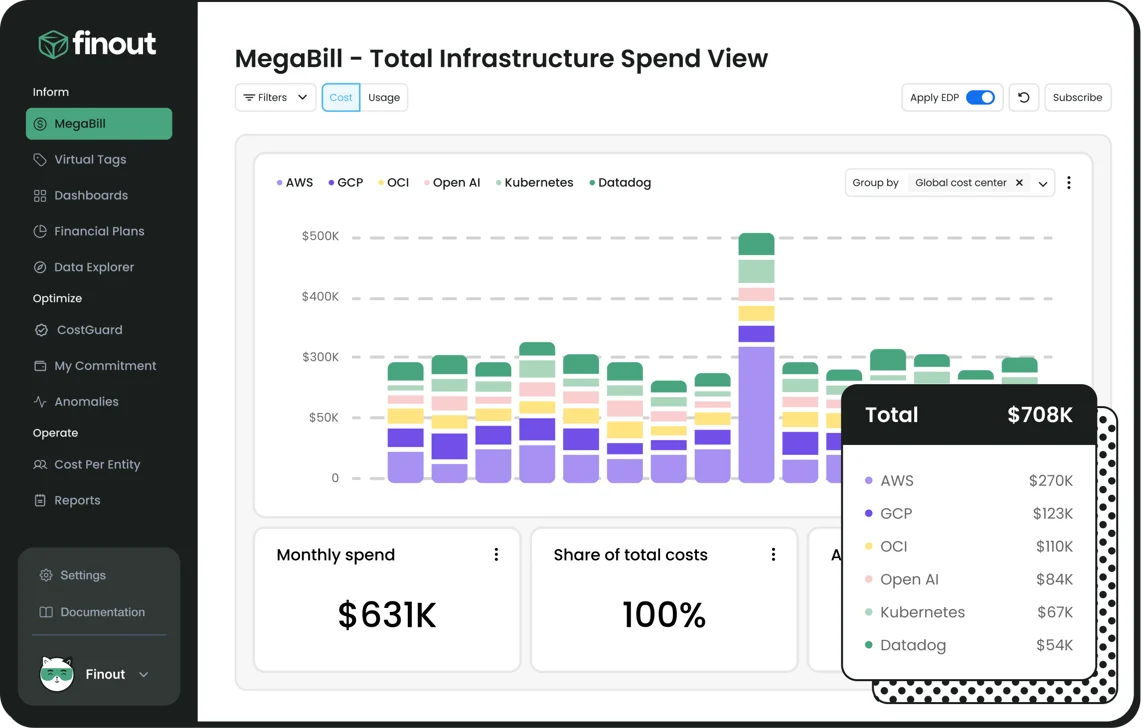
Finout is a cloud cost observability platform designed for organizations struggling with incomplete or inconsistent resource tagging. The platform’s signature feature is Virtual Tagging, which maps costs using rules based on metadata, account structure, or usage patterns without requiring clean tags on every resource. Finout aggregates spend from AWS, Azure, GCP, Kubernetes, Databricks, and Snowflake into a unified MegaBill dashboard for centralized visibility.
Pros:
- Virtual Tagging solves cost allocation problems without requiring months of tag cleanup work across thousands of resources
- Transparent fixed-pricing model—approximately 1% of annual cloud spend locked in for the contract term—eliminates usage-based surprises
- Strong multi-cloud support treats AWS, Azure, GCP, and data platforms as first-class citizens rather than bolting Azure and GCP onto an AWS-first product
- Real-time anomaly detection sends alerts for unusual spending via Slack and Teams integration
Cons:
- No commitment automation—platform provides visibility and recommendations but doesn’t auto-purchase Savings Plans or RIs
- Limited third-party integrations compared to Cloudability or CloudHealth for ITSM, ticketing, and approval systems
Pricing: Finout charges a fixed annual fee of approximately 1% of cloud spend locked in for the contract term regardless of usage fluctuations. For example, $3M annual cloud spend costs approximately $30K/year with all features included.
Best for: Organizations with $1M+ annual cloud spend struggling with incomplete tagging or cost allocation accuracy. Strong fit for multi-cloud environments running Kubernetes, Snowflake, or Databricks who need a single source of truth without months of tag remediation.
5. ProsperOps – Autonomous Commitment Management
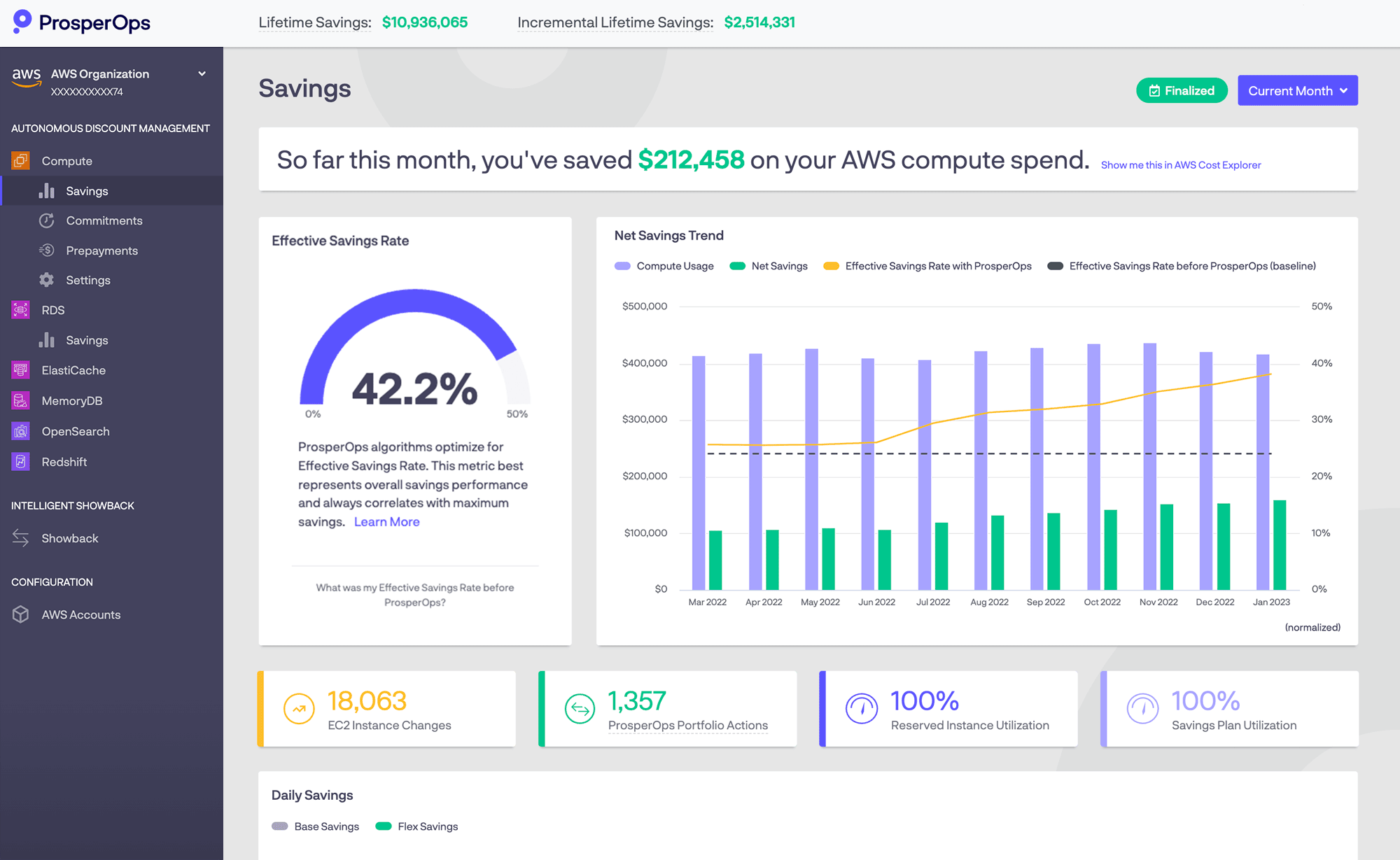
ProsperOps is a specialized commitment management platform focused exclusively on automating AWS, Azure, and Google Cloud discount instruments—Reserved Instances, Savings Plans, and Committed Use Discounts. Unlike full-featured FinOps platforms, ProsperOps does one thing: autonomously buy, manage, and optimize commitments to maximize savings while minimizing lock-in risk. The platform operates continuously without human intervention, adjusting commitment portfolios based on real-time usage.
Pros:
- Set-and-forget automation requires zero ongoing management—connects once and runs autonomously with no manual RI or Savings Plan purchasing decisions
- Eliminates commitment risk by absorbing costs of unused commitments during downturns or migrations—customers only pay for realized savings
- Proven results typically achieve 40-60% cost reduction on covered compute spend through optimal blending of commitment types and terms
- Multi-cloud support provides unified commitment strategy across AWS, Azure, and Google Cloud on a single platform
Cons:
- Focus on rate optimization only—doesn’t identify idle resources, rightsizing opportunities, or architectural waste
- Higher cost than manual management—charges 20-35% of savings delivered, which is more expensive than self-managing commitments if you have dedicated staff
Pricing: ProsperOps uses a Savings Share model charging 20-35% of savings delivered through managed commitments. For example, if ProsperOps delivers $10K/month in savings, the monthly fee is $2K-$3.5K.
Best for: Organizations with $100K+/month cloud spend across AWS, Azure, or GCP who want commitment savings without risk, complexity, or ongoing management burden. Ideal for companies without dedicated FinOps staff.
6. Harness Cloud Cost Management – Non-Production Savings

Harness Cloud Cost Management is a cloud cost optimization module within the broader Harness platform focused on automating non-production cost reduction. The platform’s signature feature is AutoStopping, which automatically detects, shuts down, and restarts idle development, test, and staging resources based on actual usage patterns. Harness positions CCM as a developer-friendly tool that reduces cloud waste without requiring manual intervention or policy enforcement.
Pros:
- AutoStopping consistently delivers 60-70% reduction in non-production costs with zero workflow disruption for developers
- Developer-friendly interface built for engineering teams rather than finance focuses on actionable recommendations over accounting reports
- Free tier available for small teams and projects with paid tiers only required above $250K/year cloud spend
- Native Kubernetes visibility provides cost breakdown for EKS, GKE, and AKS with per-namespace, per-workload, and per-pod allocation
Cons:
- Limited commitment automation provides recommendations but doesn’t auto-purchase Savings Plans or RIs like specialized tools
- Harness ecosystem lock-in means CCM is deeply integrated with the Harness platform—less value if not using Harness for CI/CD
Pricing: Harness CCM uses tiered subscription pricing based on annual cloud spend. The Free tier covers unlimited users but includes basic features only. The Enterprise tier (required above $250K/year spend) includes unlimited clusters, extended data retention, and advanced analytics with custom pricing.
Best for: Engineering-led organizations with significant non-production cloud spend ($50K+/month) who want automated cost reduction without policy enforcement. Strong fit for teams already using Harness for CI/CD.
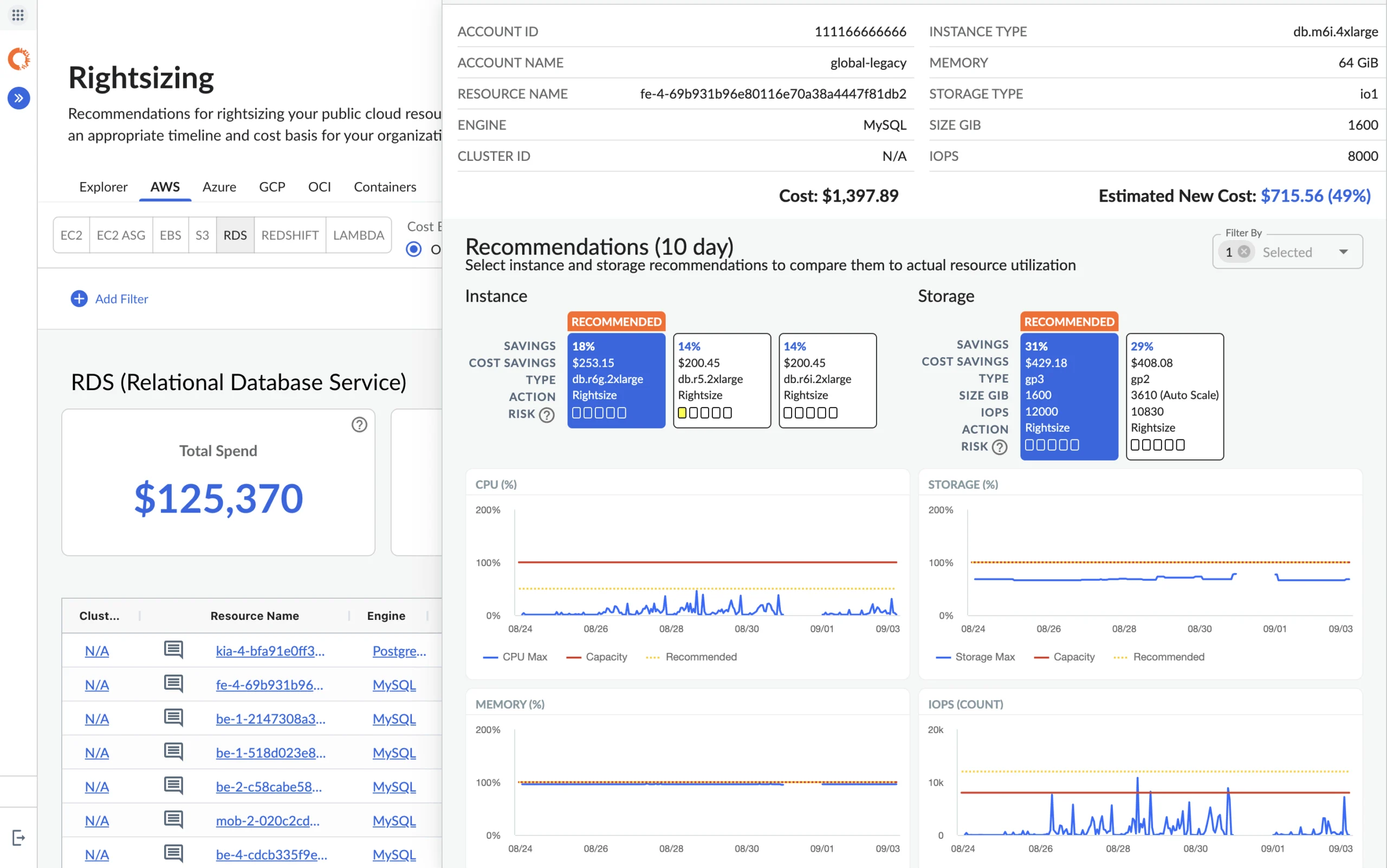
7. Densify – ML-Powered Rightsizing
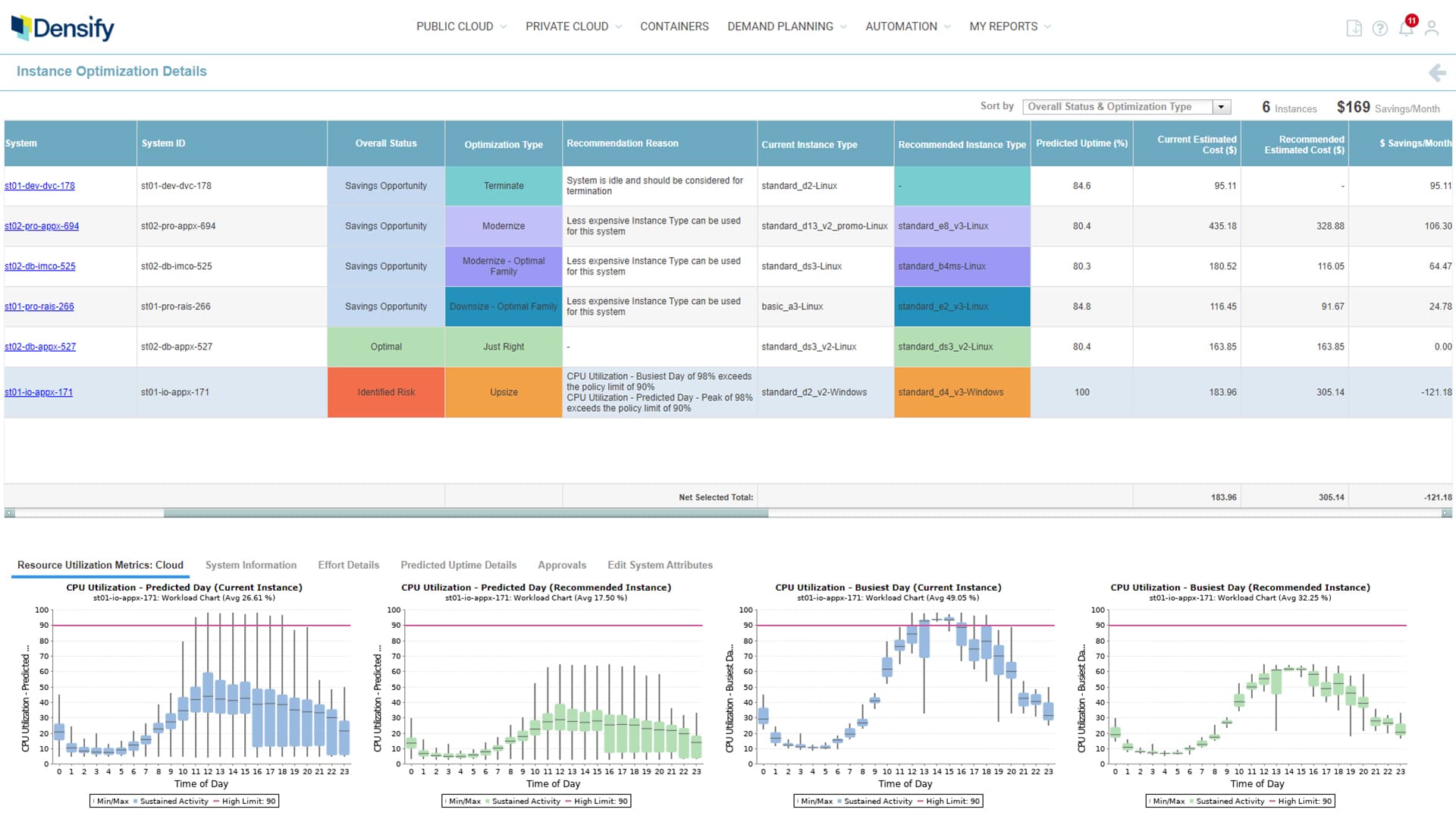
Densify is a cloud and container optimization platform that uses patented machine learning to analyze workload patterns and provide precise rightsizing recommendations. Unlike basic tools that suggest downsizing based on average utilization, Densify’s predictive analytics model workload variability, performance requirements, and risk tolerance to recommend optimal instance types and sizes. The platform focuses on “realizable gains”—recommendations that can be safely implemented without performance degradation.
Pros:
- Highly accurate recommendations through predictive modeling reduce false positives compared to static analysis tools—recommendations are consistently safe to implement
- Strong Kubernetes support delivers container-level rightsizing for CPU and memory requests and limits with awareness of pod scheduling and cluster autoscaling
- Quantified business impact provides clear ROI calculation for each recommendation with estimated savings, performance impact, and implementation effort
- Multi-dimensional rightsizing considers CPU, memory, disk I/O, network, and performance SLAs simultaneously
Cons:
- Complex pricing model using per-vCPU or per-instance pricing can be confusing and expensive for large fleets—requires volume discounts to be competitive
- Limited cost visibility features focus exclusively on optimization—lacks cost allocation, showback, budgeting, and anomaly detection
Pricing: Densify uses consumption-based pricing at $3 per vCPU per month for cloud optimization or $2.50 per instance per month for container optimization. For example, a 1000-vCPU environment costs approximately $3K/month with volume discounts available.
Best for: Large enterprises ($500K+/month cloud spend) with complex workload performance requirements who need precise rightsizing recommendations backed by machine learning analysis where performance and availability are paramount.
8. CloudCheckr – MSPs & Multi-Tenant Management
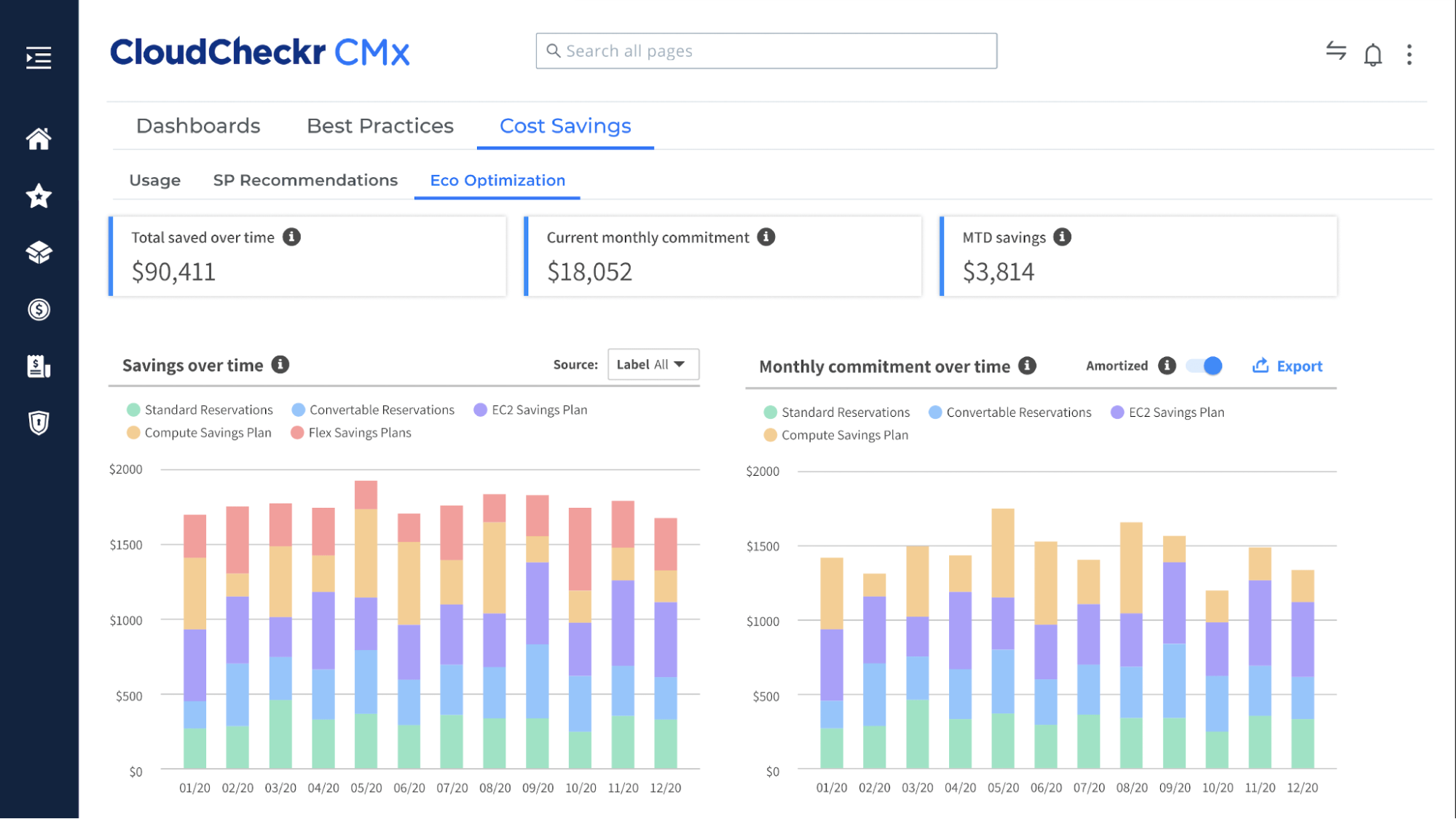
CloudCheckr is an enterprise cloud management platform acquired by Flexera in 2018, designed for managed service providers and enterprises managing multi-tenant cloud environments. The platform combines cost management, security posture management, compliance reporting, and inventory tracking in a single solution. CloudCheckr is particularly strong for MSPs who need to manage billing, chargeback, and cost optimization across dozens or hundreds of customer accounts.
Pros:
- MSP powerhouse delivers customer-specific pricing, branding, and white-label reports for service providers managing client environments
- All-in-one platform combines cost, security, compliance, and inventory management in one tool to reduce vendor sprawl
- Deep AWS coverage developed over 10+ years provides comprehensive support for both legacy and new AWS services
- Automated remediation uses policy-based auto-remediation for cost, security, and compliance violations
Cons:
- Outdated interface feels dated compared to modern alternatives like Vantage or CloudZero with a steeper learning curve for new users
- High cost with enterprise-tier pricing ($50K+/year typical) makes it expensive for mid-size organizations
Pricing: CloudCheckr uses custom enterprise pricing based on cloud spend, number of accounts, and feature set required. Typical pricing follows a percentage-of-spend model (1-3% of annual cloud bill) or flat annual subscription. MSPs often receive volume discounts.
Best for: Managed service providers and enterprises managing cloud environments for multiple customers or business units. Ideal for organizations needing combined cost, security, and compliance management.
9. Kubecost – Kubernetes Cost Allocation
Kubecost is a Kubernetes-native cost monitoring and optimization platform acquired by IBM in 2024 as part of the Apptio acquisition. The tool provides real-time cost allocation for Kubernetes clusters, breaking down spend by namespace, deployment, pod, label, and custom dimensions. Kubecost uses Prometheus metrics to track resource usage and applies cloud provider pricing to calculate accurate per-workload costs including shared cluster overhead.
Pros:
- Kubernetes-native design built specifically for K8s environments understands pod scheduling, resource quotas, and cluster autoscaling unlike generic cost tools
- Open-source core via OpenCost CNCF project provides free core functionality with paid enterprise features for larger deployments
- Fast deployment via Helm chart installs in minutes with minimal configuration—start seeing cost data within hours
- Multi-cluster visibility provides unified views across EKS, GKE, AKS, and self-managed clusters with federated cost rollup
Cons:
- Kubernetes-only platform does not track non-K8s costs like RDS, S3, or Lambda—requires separate tools for full cloud visibility
- IBM acquisition uncertainty raises questions about product roadmap, pricing changes, and continued open-source commitment
Pricing: Kubecost offers a free tier for clusters under 20 nodes with core cost allocation features (see nOps Kubecost pricing analysis for more details). Paid tiers start at approximately $25/month per cluster for the Business plan. The open-source OpenCost project provides free core functionality indefinitely.
Best for: Organizations running Kubernetes workloads on EKS, GKE, AKS, or self-managed clusters who need pod-level cost visibility for chargeback or showback. Ideal for platform teams managing multi-tenant clusters.
10. Spot.io – Production-Grade Spot Instances
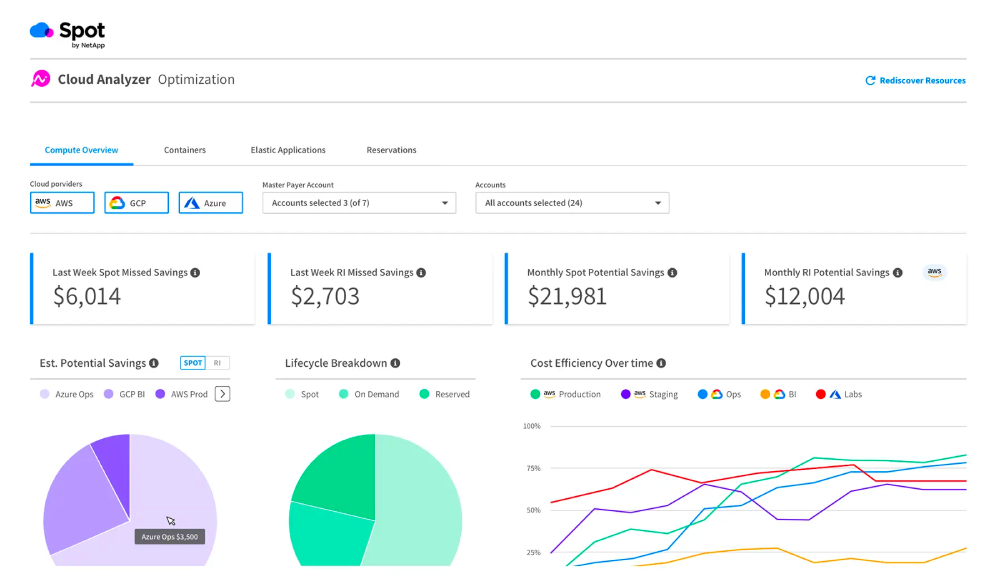
Spot.io is a cloud optimization platform focused on automating Spot instance management and commitment purchasing across AWS, Azure, and Google Cloud. Acquired by NetApp in 2020 and integrated into Flexera in 2024, Spot.io’s core value is eliminating the operational complexity of using Spot instances while guaranteeing availability and performance. The platform uses ML-powered predictive algorithms to select optimal Spot instance types and automatically fail over before interruptions occur.
Pros:
- Eliminates Spot complexity by making Spot instances operationally viable for production workloads through automated management and failover
- Strong Kubernetes support via Ocean product provides native K8s integration with per-pod cost visibility and automatic rightsizing
- Multi-cloud support delivers unified Spot management across AWS, Azure, and GCP rather than cloud-specific tools
- Availability SLA guarantees workload availability even during Spot capacity shortages through automatic On-Demand failover
Cons:
- Vendor lock-in risk means migrating away from Spot.io requires significant re-architecture since it manages core infrastructure provisioning
- Limited cost visibility focuses on optimization rather than cost allocation, showback, or budgeting features
Pricing: Spot.io uses savings-based pricing charging 15-25% of savings delivered through Spot instance and commitment management. For example, if Spot.io saves $10K/month, the fee is $1.5K-$2.5K/month.
Best for: Organizations with stateless or fault-tolerant workloads (web servers, batch processing, CI/CD) who want production-grade Spot instance usage without operational complexity. Strong fit for Kubernetes users on EKS, GKE, or AKS.
11. Cast AI – Automated Kubernetes Optimization
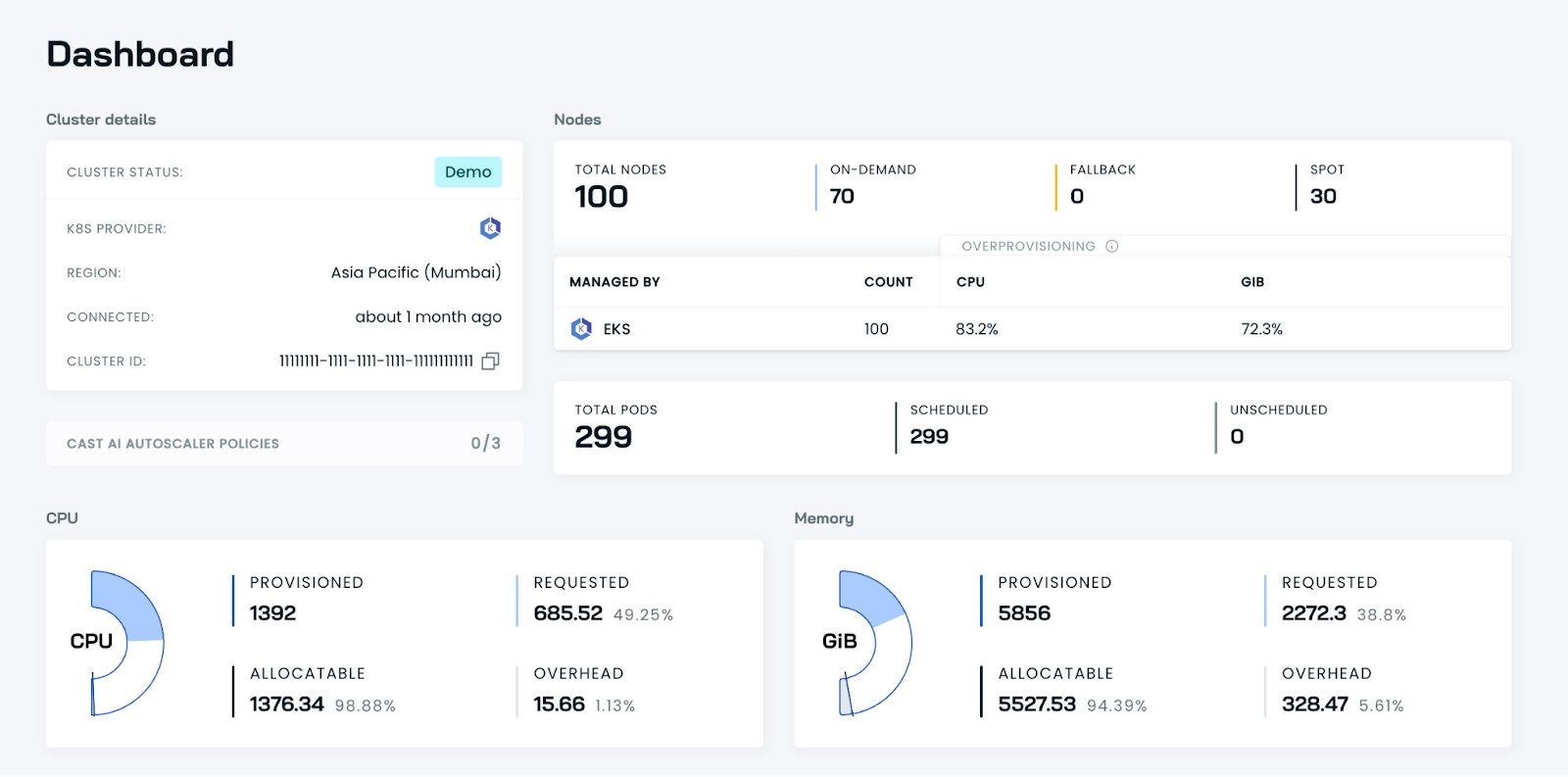
Cast AI is a Kubernetes-focused optimization platform that automates cluster rightsizing, node provisioning, and Spot instance management across AWS, Azure, and Google Cloud. Unlike tools that only provide recommendations, Cast AI actively manages Kubernetes infrastructure continuously through its proprietary AI engine trained on millions of real-world cluster workloads. The platform adjusts cluster configuration based on actual resource usage, traffic patterns, and performance requirements.
Pros:
- Fully automated platform actively manages Kubernetes infrastructure without human intervention—not just recommendations that sit unimplemented
- Strong cost reduction typically achieves 50-70% savings on K8s compute through optimal instance selection and Spot usage
- Fast time-to-value allows teams to connect cluster and enable automation in under 30 minutes with immediate savings
- Built-in Kvisor security scans for container vulnerabilities and compliance violations alongside cost optimization
Cons:
- Kubernetes-only focus does not optimize non-K8s resources like RDS, Lambda, or S3—requires separate tools for full cloud coverage
- Limited multi-cluster visibility for reporting and cost aggregation across dozens of clusters is less mature than Kubecost
Pricing: Cast AI charges 15-20% of savings delivered through cluster optimization. For example, if Cast AI reduces monthly K8s costs from $20K to $10K, the monthly fee is $1.5K-$2K. Free tier available for smaller clusters.
Best for: Organizations running Kubernetes workloads on AWS, Azure, or GCP who want automated cost optimization beyond what native cluster autoscaling provides. Ideal for teams without dedicated platform engineering staff.
12. Zesty – Real-Time Auto-Scaling
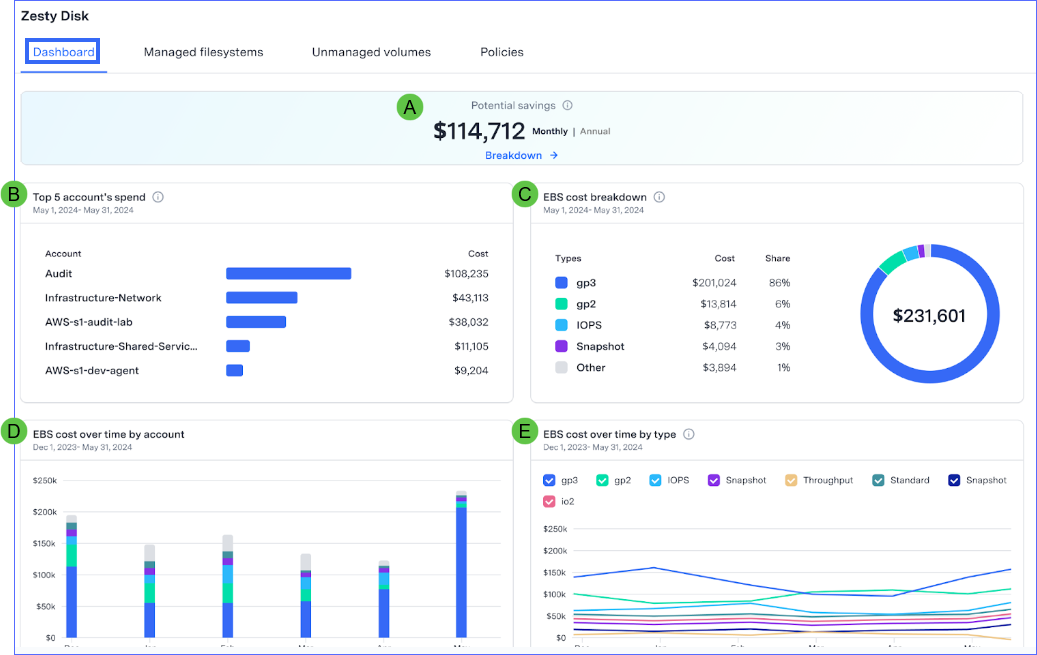
Zesty is a cloud cost optimization platform focused on automating AWS and Azure resource rightsizing and commitment purchasing. The platform’s signature technology is its real-time auto-scaling engine that continuously adjusts compute, storage, and database resources based on actual demand patterns. Zesty claims customers can scale down to actual usage rather than provisioning for peak load, combining usage optimization with automated commitment management.
Pros:
- True auto-scaling adjusts resources continuously based on real-time demand rather than scheduled scaling—handles unpredictable traffic patterns
- Broad AWS coverage optimizes EC2, RDS, EBS, and other core services rather than Kubernetes-only like some alternatives
- Minimal configuration connects via IAM role and begins optimizing automatically without extensive policy setup
- Dynamic disk optimization scales EBS volume size and provisioned IOPS based on actual usage patterns
Cons:
- Limited cloud support covers AWS and Azure only—does not support GCP or other clouds
- Risk of over-optimization through aggressive auto-scaling can cause performance issues if guardrails are not properly configured
Pricing: Zesty uses hybrid pricing with a minimum monthly base fee (approximately $99/month) for Insights module access plus usage-based fees for optimization and success-based percentage (typically 20-30% of savings) for Commitment Manager).
Best for: Organizations with $50K+/month AWS or Azure spend running variable workloads where manual rightsizing is impractical. Strong fit for companies with unpredictable traffic patterns who need continuous resource adjustment.
13. Vantage – Developer-Friendly Visibility
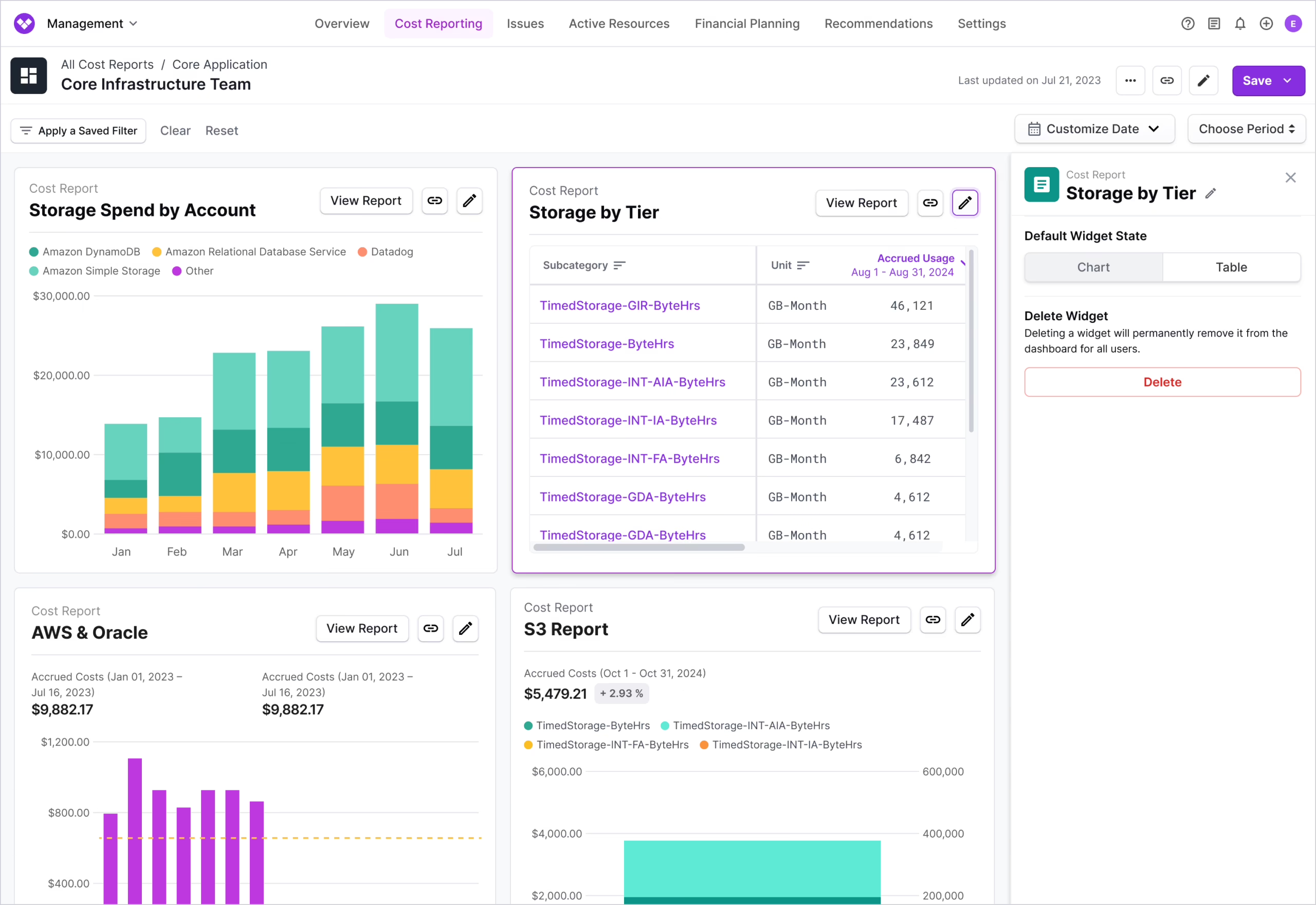
Vantage is a modern cloud cost visibility platform designed for developers and engineering teams who want self-service cost insights without finance-centric complexity. The platform focuses on clean UI/UX, fast onboarding, and actionable cost breakdowns rather than enterprise governance features. Vantage aggregates costs from AWS, Azure, GCP, Kubernetes, Snowflake, Datadog, and 20+ other services into unified dashboards with cost-saving recommendations.
Pros:
- Modern, intuitive interface with clean design that developers actually use rather than finance-heavy tools that sit ignored
- Fast onboarding connects cloud accounts in minutes and starts showing cost data immediately without complex setup
- Transparent pricing uses simple 1% of tracked cloud costs model with unlimited users and no hidden fees
- Unified multi-cloud visibility provides a single dashboard for AWS, Azure, GCP, Kubernetes, and data services with normalized metrics
Cons:
- No commitment automation provides recommendations but doesn’t auto-purchase Savings Plans or RIs like specialized tools
- Limited enterprise features lack advanced governance, approval workflows, and multi-tenant support of enterprise platforms
Pricing: Vantage charges 1% of monthly tracked cloud costs with graduated discounts based on volume. For example, $100K/month cloud spend costs $1K/month for Vantage. Free tier available for individuals and small teams.
Best for: Engineering teams and startups with $50K-$500K/month cloud spend who want cost visibility without enterprise complexity. Ideal for developer-led organizations where engineers own cost optimization.
AWS-Native FinOps Tools
It’s also worth briefly exploring some tools native to AWS for cost control.
14. AWS Budgets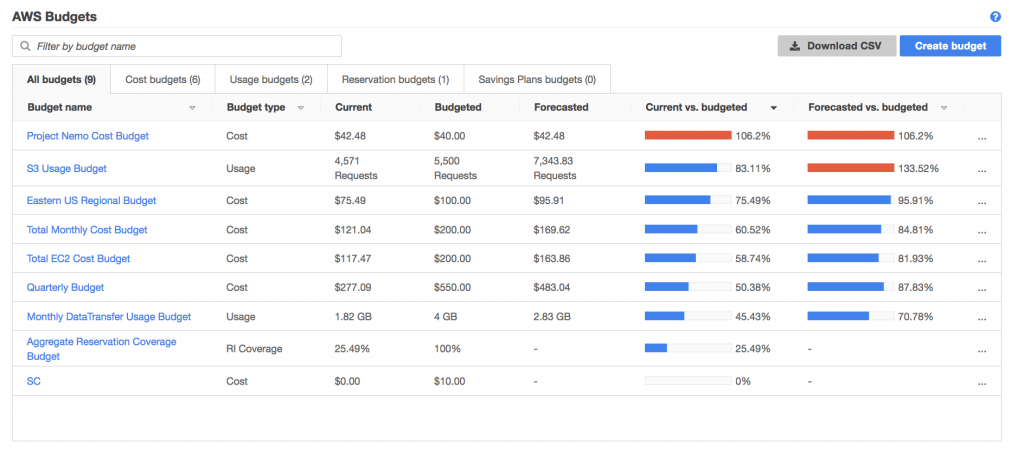
AWS Budgets enables your organization to set custom budgets and limits for AWS spending so teams can track costs against targets instead of reacting after the bill lands. You can create budgets for cost and usage, set fixed or variable thresholds, and scope them by account, service, tag, or cost category.
AWS Budgets also supports commitment-focused budgets, including Reserved Instances utilization/coverage and Savings Plans utilization/coverage, which is useful for FinOps teams watching discount performance over time. Once budgets are in place, you can receive alerts when actual or forecasted spend is approaching or exceeding limits.
15. AWS Compute Optimizer
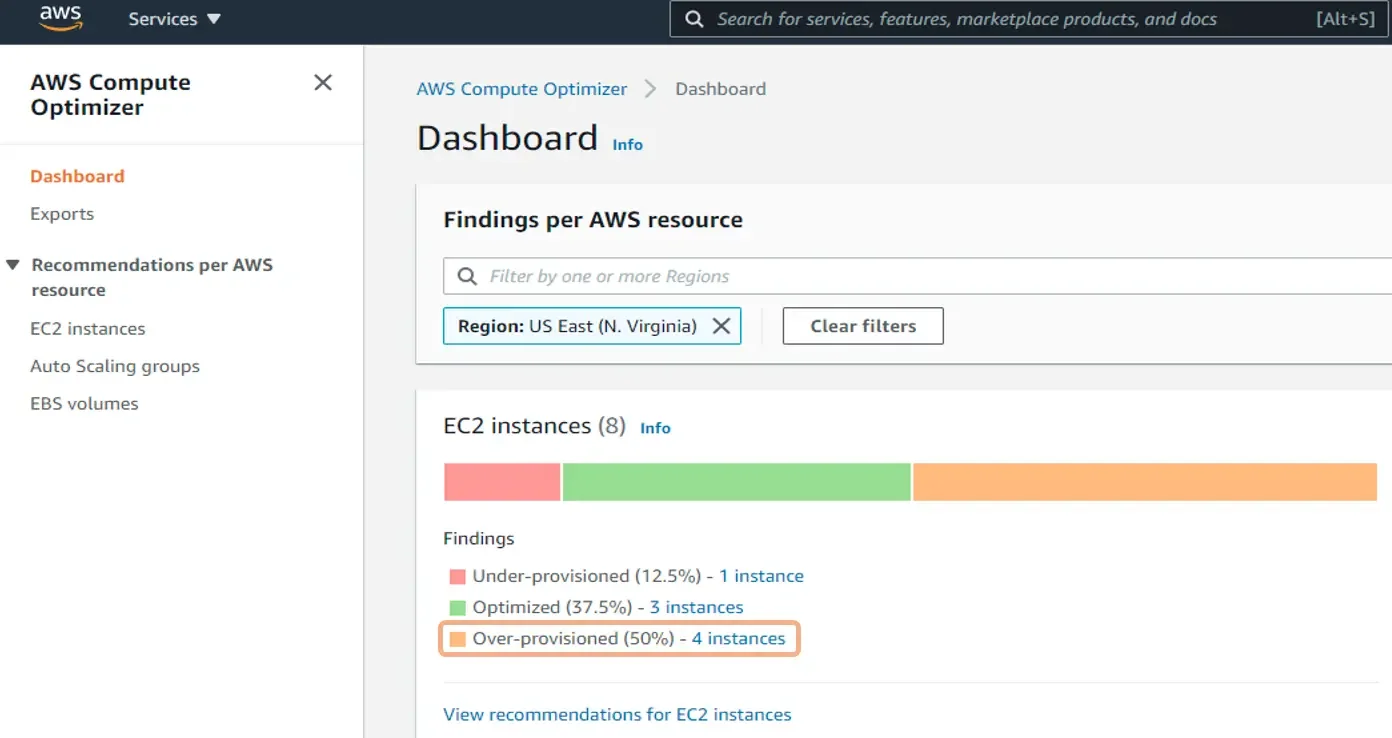
AWS Compute Optimizer is a machine learning–driven recommendations engine that analyzes resource consumption and suggests better configurations for services like EC2, Auto Scaling groups, EBS, Lambda, and selected databases. It looks at real utilization patterns—CPU, memory, network, and storage—to identify resources that are oversized, undersized, or idle.
From a FinOps perspective, Compute Optimizer helps quantify efficiency opportunities and gives teams concrete actions to balance performance and cost.
16. AWS Cost and Usage Reports
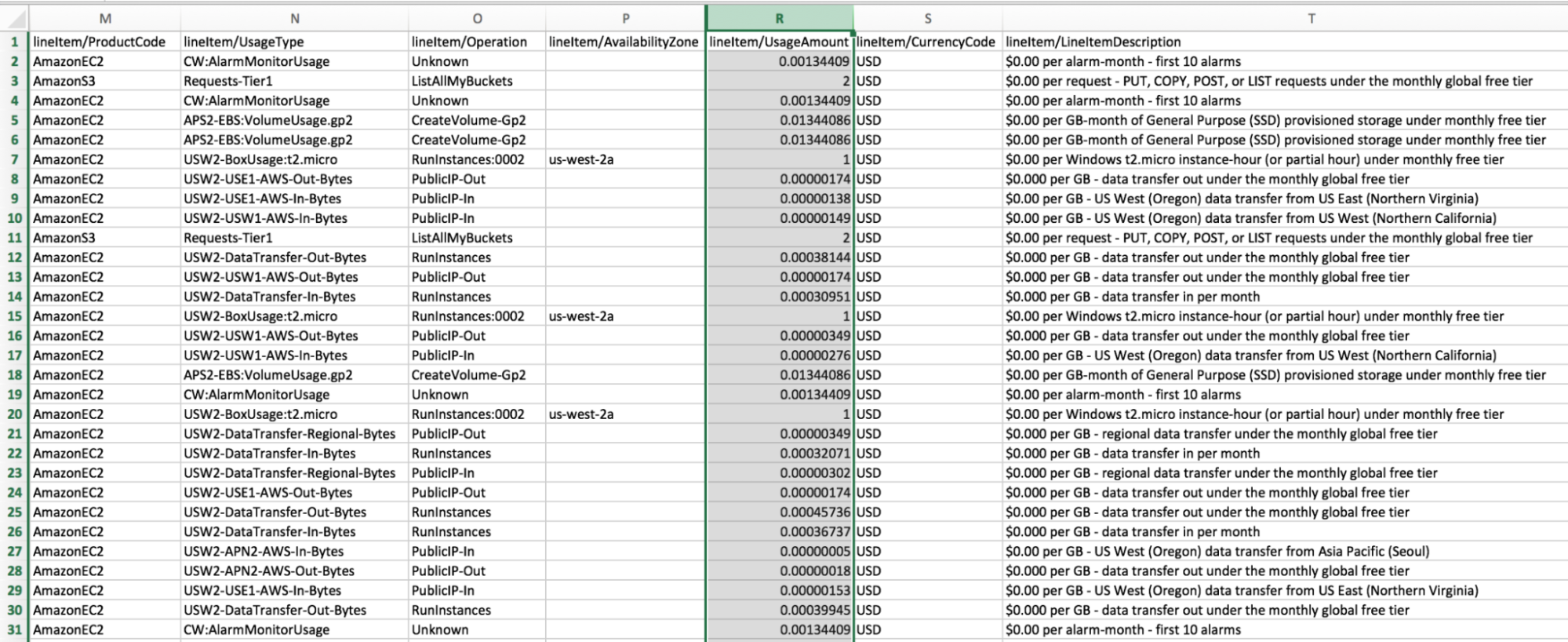
AWS Cost and Usage Reports (CUR) provide the most detailed view of AWS billing and usage available. The report includes line-item cost and usage data by hour, day, or month, and can be broken down by AWS Region, service, resource, and custom tags.
Because CUR exports raw data to S3 (typically in CSV or Parquet), FinOps teams use it as the source of truth / base data for deep analysis, chargeback/showback, and building dashboards in BI tools or third party FinOps platforms.
17. AWS Cost Anomaly Detection
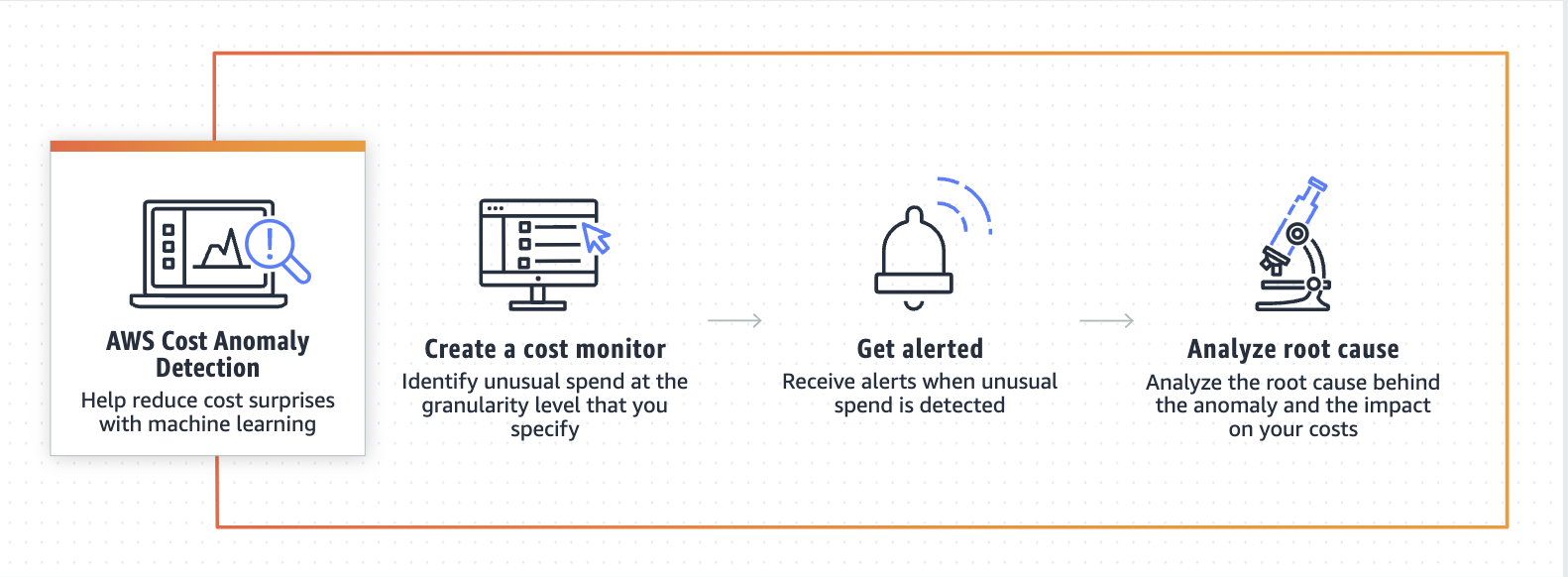
AWS Cost Anomaly Detection uses machine learning to establish a baseline of normal spending patterns, then flags unusual cost spikes as they happen. You set up anomaly monitors around the areas you care about most—by account, service, tag, or cost category—and AWS alerts you when spend deviates from expected behavior.
In FinOps, this is a practical early-warning system. Instead of discovering an issue at month-end, teams can investigate anomalies in-cycle, trace the root cause (like a misconfigured service or runaway workload), and fix it before it impacts budgets.
18. AWS Cost Explorer
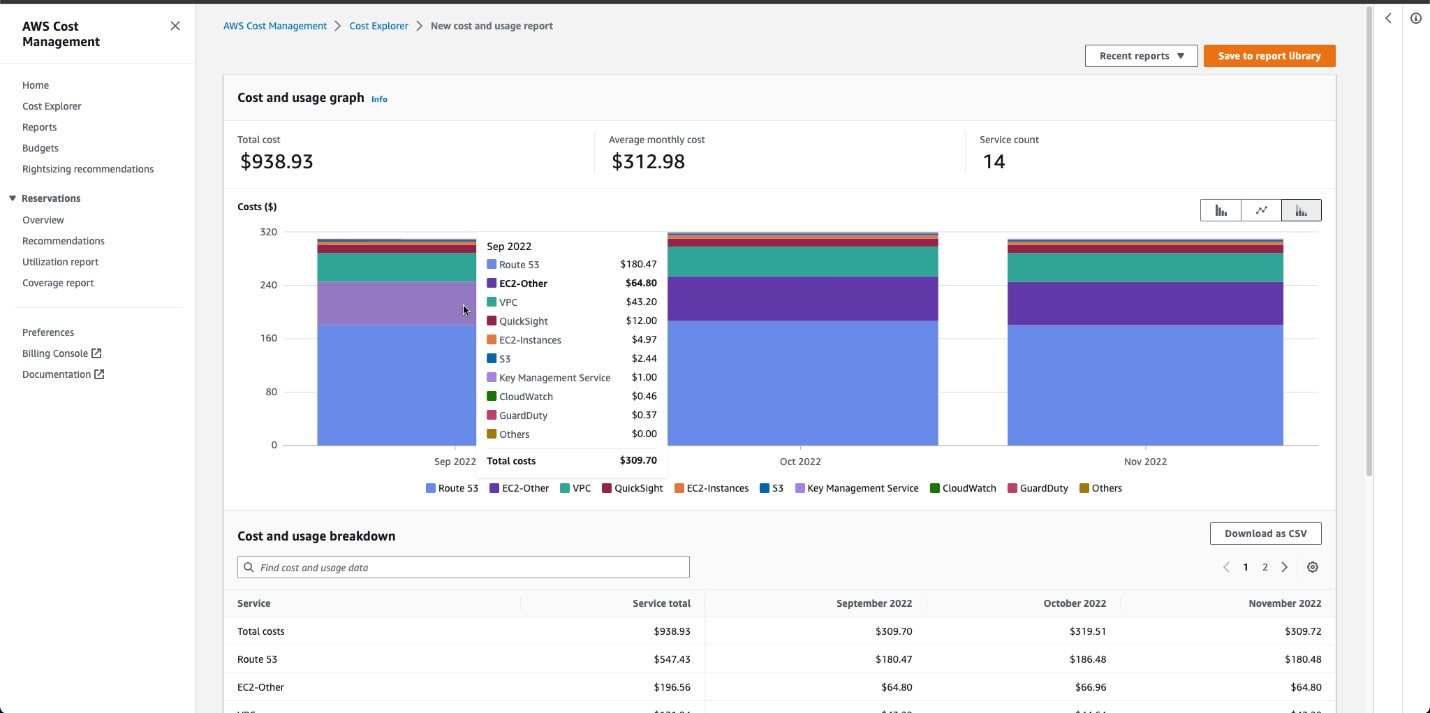
AWS Cost Explorer is a basic tool for getting visibility into your spending, with a visual, user-friendly interface to explore AWS costs and usage over time. Unlike CUR, which is raw export data, Cost Explorer is built for interactive analysis—helping teams quickly see what changed, where it changed, and what services or accounts drove the shift.
It supports historical views and forecasting, plus filters and groupings (accounts, services, tags, regions, and cost categories) so you can break down spend by team, product, or environment. Cost Explorer also includes native savings recommendations, which FinOps teams can use to prioritize optimization work.
19. AWS Trusted Advisor
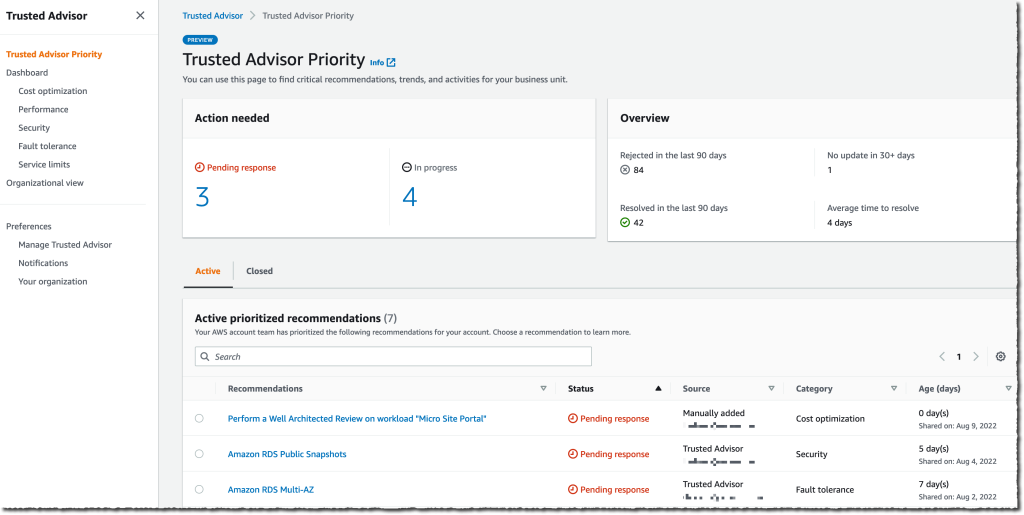
AWS Trusted Advisor acts like an automated cloud consultant, continuously scanning your environment against AWS best practices. It produces recommendations across cost optimization, performance, security, fault tolerance, and service limits.
For FinOps, Trusted Advisor is a steady pipeline of cost-saving opportunities. It can highlight idle resources, underutilized instances, and other inefficiencies that teams can fix quickly. Because checks run continuously, it supports the “operate” phase of FinOps by keeping optimization opportunities visible over time.
20. Amazon QuickSight
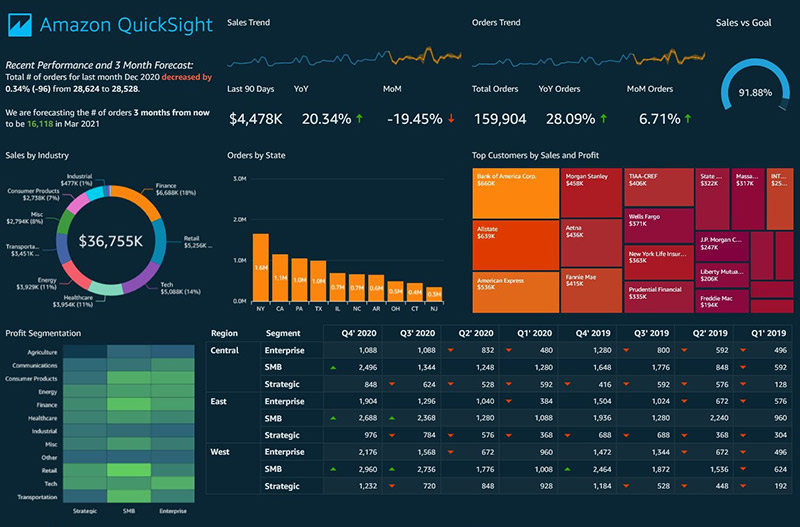 Amazon QuickSight is AWS’s BI and dashboarding service, often used to turn billing data into shareable FinOps reporting. Many teams feed CUR or Cost Explorer exports into QuickSight to create interactive dashboards showing spend trends, allocation views, and optimization progress.
QuickSight makes FinOps insights accessible beyond the AWS console. Finance, engineering, and product leaders can explore costs by service, account, region, or business dimension without needing to build custom reporting pipelines. It’s especially useful for stakeholder-friendly rollups and ongoing KPI tracking.
Why nOps Is The Best FinOps Tool Your Business Needs?
If you need a single place to manage, control, and continuously optimize your AWS spend, nOps can help.
Our mission is to make it easy to do FinOps — we help you save 50% or more on autopilot, so you can focus on building and innovating.
Want to see what it looks like in your environment? Book a demo call with one of our FinOps Experts to find out how much you can save today.
nOps manages $4 billion in cloud spend for our customers and is rated 5 stars on G2.