CFO Dashboard Examples and Key Metrics (2026)
A CFO dashboard has to pull from systems that don't share a format: the accounting system, the billing platform, the CRM, and increasingly the cloud and AI bills, which finance teams often rely on engineers to explain. When the numbers live in separate places, questions from the board turn into data requests, and the answers arrive after the meeting.
This guide shows seven CFO dashboard examples, the metrics worth tracking on them, how to build one, and the tools to build it in.
What Is a CFO Dashboard
A CFO dashboard is an interactive view that pulls financial data from the company's source systems and shows the critical metrics a finance leader checks most often, each against a target or a prior period.
It replaces the spreadsheet or slide deck that gets rebuilt before every review. The figures refresh from the source systems on a schedule, so the CFO, the board and the finance team read the same numbers, and a click on any total shows what sits behind it. Most are built in a BI tool such as Power BI, Tableau or Looker Studio, or in a spreadsheet. Many companies keep several focused dashboards, one per question, with a one-page summary on top.
CFO Dashboard Examples
The seven dashboards below cover the questions a CFO is asked most often: whether cash is on track, whether the business is profitable, whether revenue is hitting plan, and whether spending is within budget. Each one answers a single question. The last three use nOps screenshots and show cloud spend, but the same layouts work for any cost line.
Cash Flow Dashboard
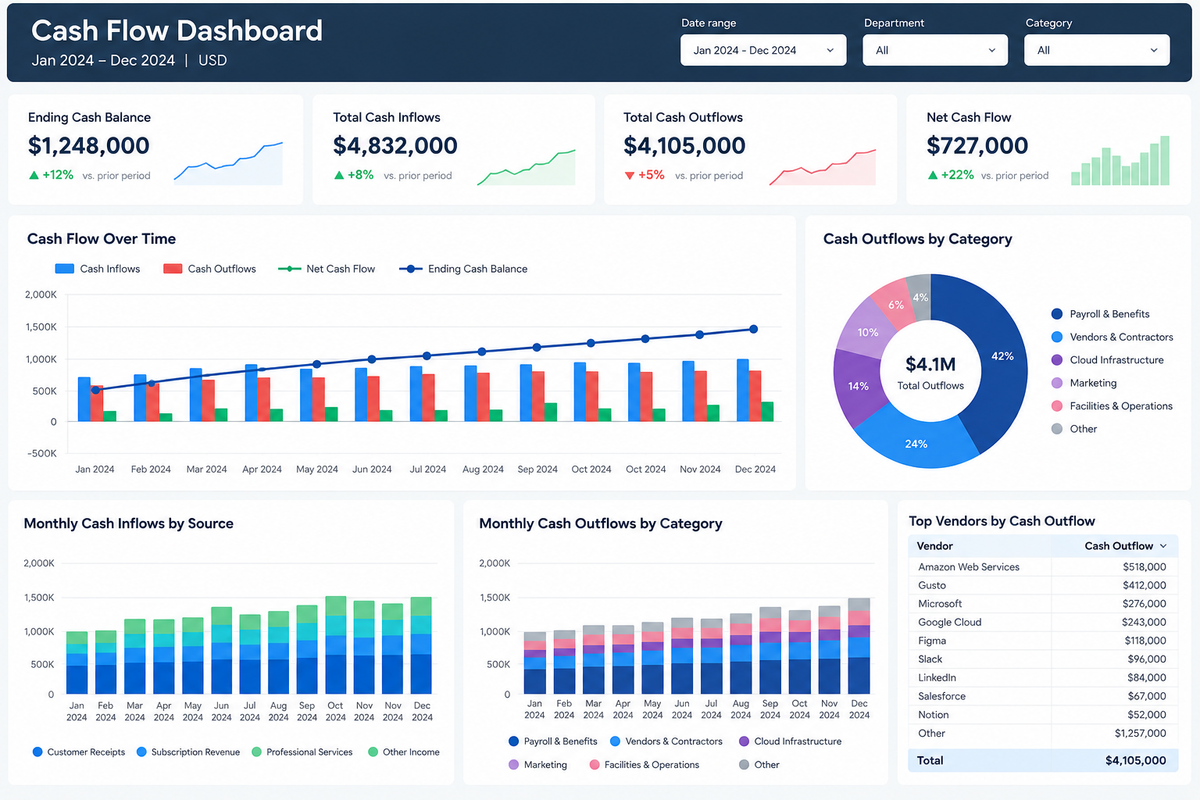
The cash flow dashboard answers whether the company can cover the next few months. It plots cash in against cash out over time, with the net position underneath and a projected balance ahead. Accounts receivable and payable sit beside it, because late customer payments and early supplier bills are the usual reasons cash and profit diverge. Companies that are burning cash add runway, the number of months left at the current burn rate.
Looker Studio is a common tool for this view because it connects directly to Google Sheets and BigQuery, where many teams keep their bank and billing exports.
P&L Dashboard
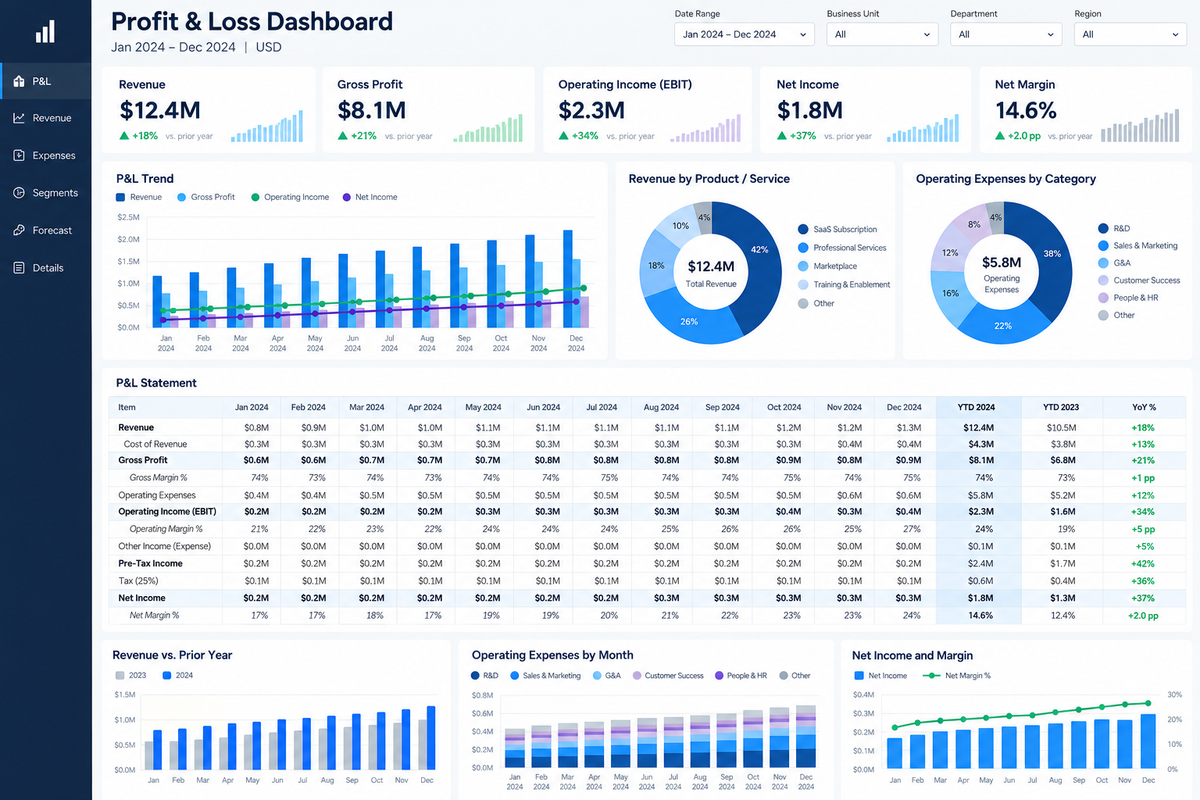
The P&L dashboard shows whether the business is profitable and where the margin is going. It lists revenue, cost of goods sold, gross profit, operating expenses and net income for the period, next to budget and the prior period. Totals alone prompt the question of why, so the useful version breaks each line down by department, product or business unit and lets the reader click into any line to see what moved it. For software companies, hosting and AI inference costs are typically part of cost of goods sold, so a rise in either lowers gross margin.
Power BI connects to Excel, SQL Server and Dynamics 365, among others, which makes it a frequent choice for this view.
Revenue and Sales Dashboard
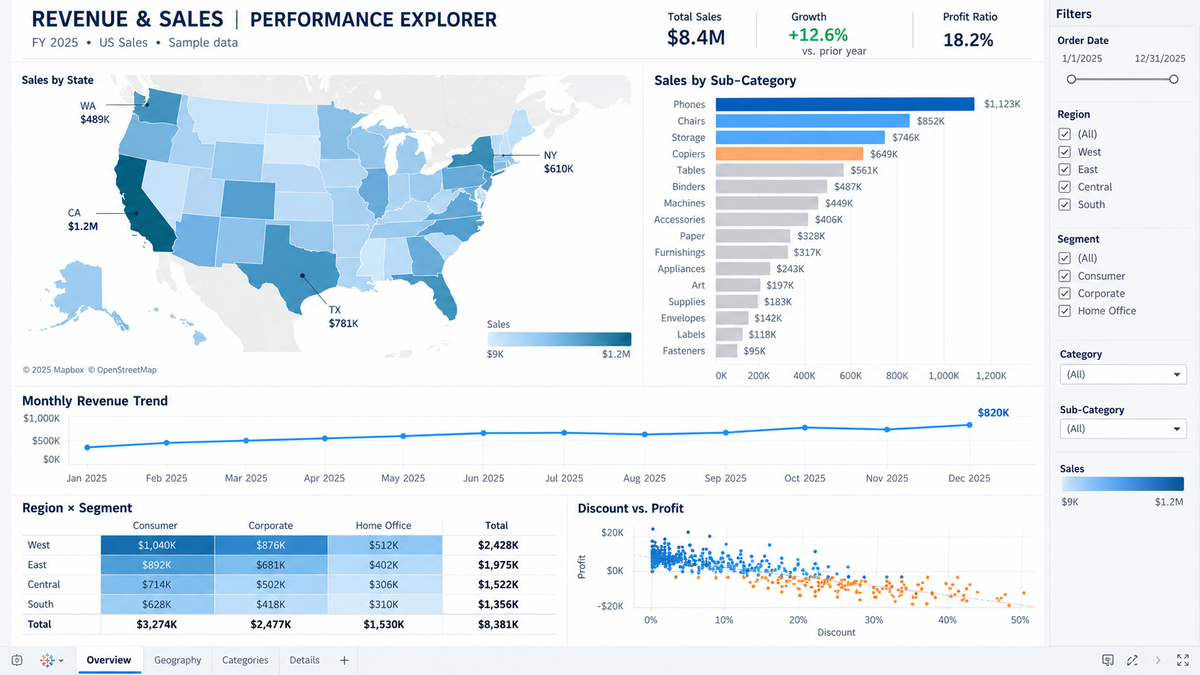
This dashboard tracks revenue against plan and shows where it comes from. The core panels are revenue to date against target, new bookings, pipeline by stage, win rate, and revenue split by region, product line and customer segment. The pipeline view matters most to a CFO, since weighted pipeline is a leading indicator of next quarter's revenue.
Tableau handles large CRM exports and lets the reader filter by region, product or segment without rebuilding the report.
KPI Overview Dashboard
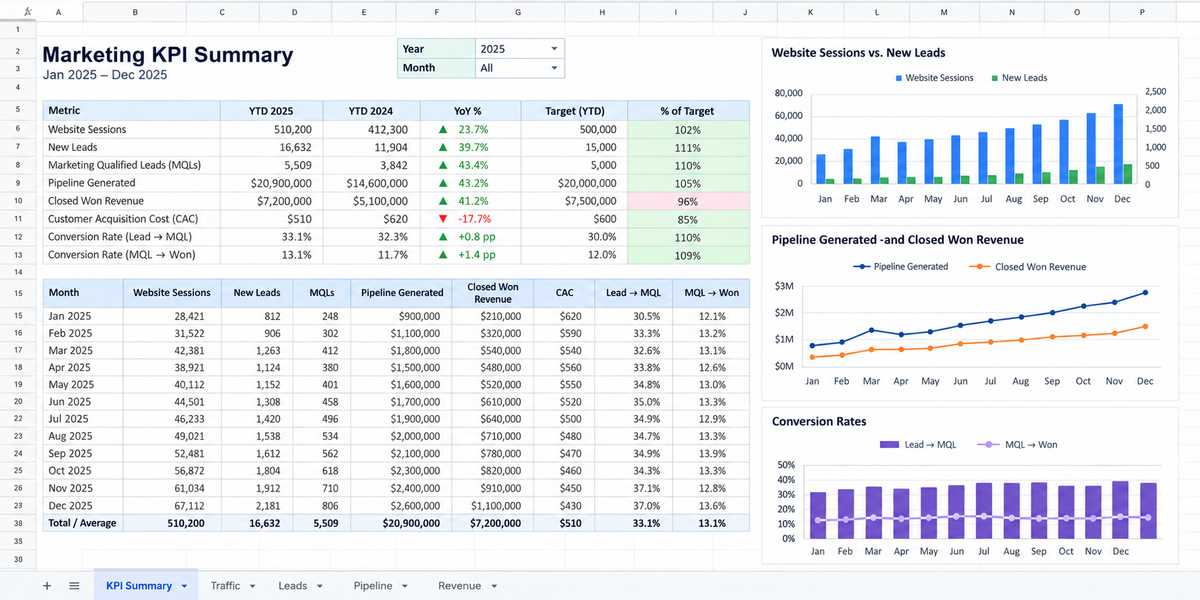
The KPI overview is a single page with the dozen or so numbers the CFO checks first, usually revenue, gross margin, operating income, cash and headcount. Each one shows its target, its prior period and a red, yellow or green status. It works as the front page for the other financial dashboards, with each number linking to the detailed view behind it.
A spreadsheet is enough here, because the page summarizes figures that already exist on other tabs. Many finance teams build this one first, before any of the data is connected live. For the cloud-cost KPIs to put on it, see cloud metrics for SaaS and FinOps teams.
Expense and Budget vs. Actuals Dashboard
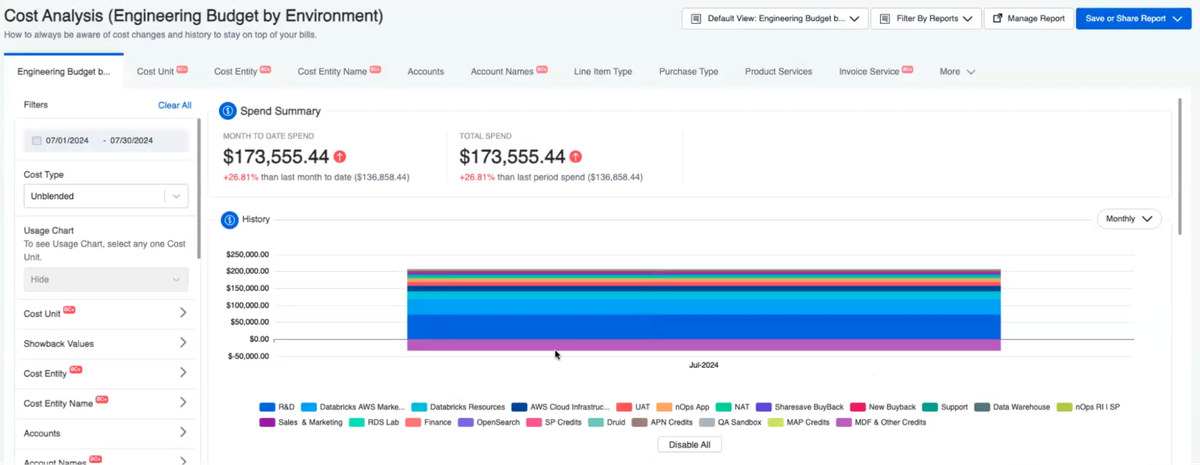
This dashboard shows whether spending is on plan. Each budget line sits next to actual spend, with the variance and a projection for the rest of the period, grouped by department, team or cost center, so an overrun shows up while there is still time to act.
In nOps, a target line runs across the tracking period over the actual spend chart in Explorer, and when the period extends into future months, a semi-opaque bar projects forward from past months' spend. Budgets can be set from existing spend data or entered manually, and spend is grouped by team, feature, product, customer or environment, so the owner of any variance is visible. For the budgeting process behind this view, see the cloud budgeting guide. To assign spend to owners, see the AWS cloud cost allocation guide and chargeback vs. showback.
Forecast Dashboard
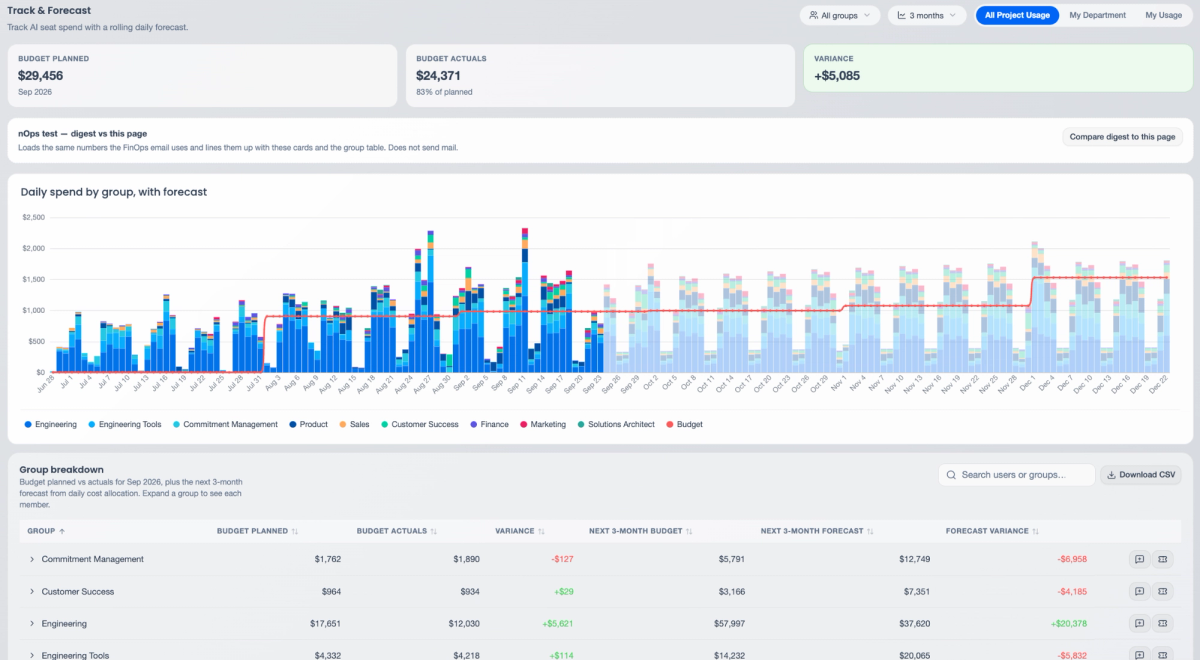
A forecast dashboard shows where revenue, expenses and cash are heading, and how far the current plan has drifted from that projection. A forecast with no range or drivers is hard to trust, so the useful version shows trend direction, seasonality and the previous period next to the projection.
nOps applies the same approach to cloud spend. Time-series machine learning on historical usage produces a projected spend trajectory, with trend direction and strength, daily and weekly seasonality, and a comparison of the projected next 30 days against the last 30. Forecasts can be broken out by project, team or client, and anomalies are flagged with a severity rating when spend moves away from the forecast. The forecasting and anomaly detection post covers the feature, and the AWS forecasting guide explains the methods behind it.
Cloud and AI Spend Dashboard
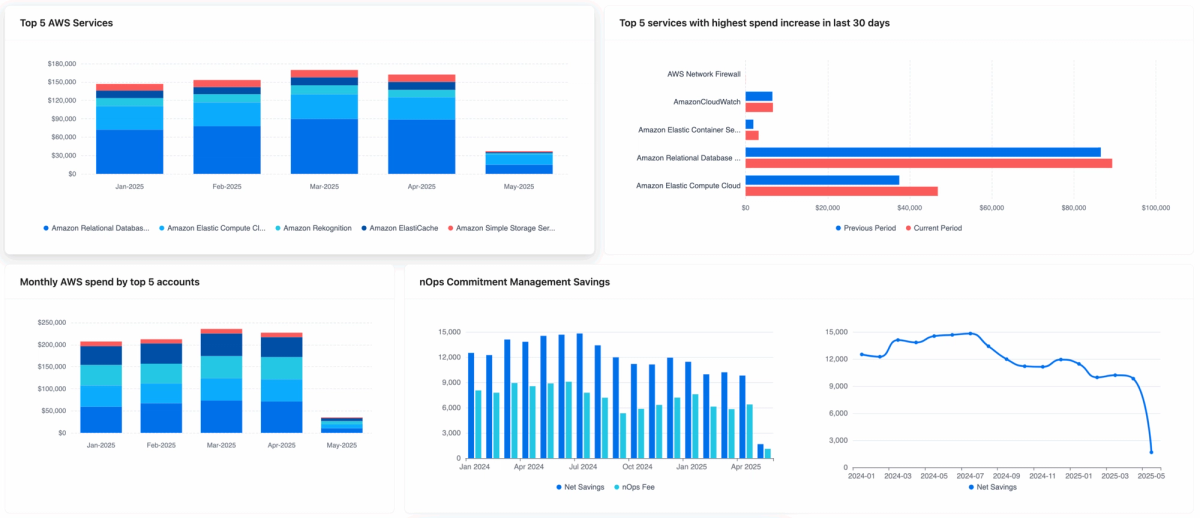
Finance teams often rely on engineers to explain cloud costs, so this dashboard has to be readable without that translation. It needs to answer what the company spent, what drove the change, and whether commitments are being used.
The nOps CFO Dashboard puts ROI, total cloud spend, budget against actual, the largest spend increases and workload-level anomalies on one page. A commitment tracker shows burn-down for AWS commitments such as EDPs and PPAs, along with third-party SaaS contracts such as Datadog, Snowflake, MongoDB and OpenAI, so a shortfall or overage shows up early.
AI spend belongs on the same view. nOps attributes AI spend to the model, account, team, customer and feature behind it, by the hour, which is what turns a monthly token bill into cost per customer and cost per feature. For how to calculate those figures, see AI unit economics and AI spend forecasting. For the value side, see AI ROI metrics and FinOps for AI.
CFO Dashboard Metrics to Track
These are the most important metrics a Chief Financial Officer dashboard should carry, grouped by the question each answers. Pick the few in each group the board actually asks about. The tables give each definition so the dashboard and the finance team calculate every metric the same way.
Revenue Metrics
Metric | What it shows | How it is calculated |
|---|---|---|
ARR / MRR | Recurring revenue run rate | Monthly recurring revenue; ARR = MRR × 12 |
Revenue vs. plan | Whether the top line is on target | Actual revenue ÷ planned revenue |
Revenue growth | Pace of growth | (Current period − prior period) ÷ prior period |
Growth from existing customers | (Starting recurring revenue + expansion − contraction − churn) ÷ starting recurring revenue | |
Weighted pipeline | Leading indicator of next quarter | Deal value × stage win probability, summed |
Profitability Metrics
Metric | What it shows | How it is calculated |
|---|---|---|
Gross margin | Profit after direct costs, including cloud hosting and AI inference | (Revenue − COGS) ÷ revenue |
Operating margin | Profit from core operations | Operating income ÷ revenue |
Operating profit before financing costs, taxes and non-cash charges | Earnings before interest, taxes, depreciation and amortization | |
Net margin | Bottom-line profitability | Net income ÷ revenue |
Whether overhead is scaling with sales | Operating expenses ÷ revenue |
Cash and Liquidity Metrics
Metric | What it shows | How it is calculated |
|---|---|---|
Cash balance | Cash on hand today | Sum of bank account balances |
Net burn | How fast cash is declining | Cash out − cash in, per month |
Runway | How long cash lasts | Cash balance ÷ net burn |
How quickly customers pay | Accounts receivable ÷ credit sales × days in period | |
Short-term financial health | Current assets − current liabilities |
Unit Economics Metrics
Metric | What it shows | How it is calculated |
|---|---|---|
CAC | Cost to win a customer | Sales and marketing spend ÷ new customers |
Lifetime value of a customer | Average revenue per account × gross margin ÷ churn rate | |
LTV:CAC | Return on acquisition spend | LTV ÷ CAC |
Months to recover acquisition cost | CAC ÷ (monthly revenue per customer × gross margin) | |
Cash burned per dollar of new ARR | Net burn ÷ net new ARR |
Technology Spend Metrics
Metric | What it shows | How it is calculated |
|---|---|---|
Whether technology spend is on plan | Actual spend ÷ budget | |
How far spend has drifted from forecast | (Actual − forecast) ÷ forecast | |
Whether AWS and SaaS commitments will be used | Spend to date against the commitment, over the contract term | |
Savings realized | Dollars saved by commitments and optimization | On-demand baseline − actual cost |
Whether infrastructure scales with the business | Cloud spend ÷ revenue | |
What AI features cost to serve | AI spend attributed to a customer, per period | |
Share of eligible usage covered by commitments | Usage covered by commitments ÷ eligible usage | |
Commitment utilization | How much of purchased commitments is used | Commitment used ÷ commitment purchased |
The same savings as a share of on-demand cost | (On-demand cost − actual cost) ÷ on-demand cost |
How to Build a CFO Dashboard
The steps below run in order, from deciding what the dashboard should answer to deciding how often it refreshes.
1. Start From the Board's Questions
Write down the five to ten critical questions the CFO and board ask every quarter, such as whether cash covers the next 12 months or whether gross margin is holding. Each panel should answer one of them. A metric that answers none stays off the first page. The table below maps six common board questions to the dashboards and metrics above.
Board question | Dashboard | Essential Metrics |
|---|---|---|
Do we have enough cash for the next 12 months? | Cash Flow Dashboard | Cash balance, net burn, runway |
Are we on plan for the year? | Revenue and Sales Dashboard | Revenue vs. plan, weighted pipeline |
Is the business profitable, and is margin holding? | P&L Dashboard | Gross margin, operating margin |
Are we spending within budget? | Expense and Budget vs. Actuals Dashboard | Spend vs. budget, forecast variance |
Is growth efficient? | KPI Overview Dashboard | CAC payback, LTV:CAC, burn multiple |
Is cloud and AI spend under control? | Cloud and AI Spend Dashboard | Cloud cost as % of revenue, commitment burn-down, AI cost per customer |
2. Define Each Metric First
Before building anything, write down four things for each metric. "Revenue" can mean billed, recognized or booked, and the three rarely match.
- Formula: exactly how it is calculated.
- Source: the system the number comes from.
- Owner: who answers for it.
- Period: calendar or fiscal.
3. Reconcile to the Books
Tie every total to the general ledger before the dashboard is shared. If dashboard revenue differs from the closed books, the first meeting goes to the discrepancy. Re-check at each close and note any known timing differences on the page.
4. Lead With the Top-Line Numbers
Put the four to six headline figures at the top, usually revenue, gross margin, cash, runway and spend against budget. Detail goes below, so the page answers the first question without scrolling. Pair lagging figures like revenue and cash with at least one forward-looking measure, such as weighted pipeline or forecast variance.
5. Show Targets and Trends
Show each metric against its target and the prior period, with a trend line or sparkline, so a figure reads as ahead of or behind plan rather than as a bare number. Label forecast periods clearly, for example with a lighter bar or a dotted line, so projected months are not read as closed results.
6. Use Thresholds Defined in Advance
Agree on green, yellow and red cutoffs with the CFO before launch, for example yellow when spend runs 5% over budget and red at 10%. Cutoffs set after the numbers come in tend to be argued over.
7. Limit the Number of Metrics
Keep the summary page to about 10 to 15 metrics. If a number wouldn't change a decision, move it to a drill-down page.
8. Separate Summary and Drill-Down Views
Use two layers, with every summary number linking to its detail.
- Summary: headline figures and status colors, built for the board.
- Drill-down: breakdowns by department, product, entity or cost center, for the finance team.
9. Set Refresh Rates by Metric
Refresh each metric at the pace the decision needs, and show a "last refreshed" time on the page.
- Daily: cash balance, burn, cloud spend.
- Weekly: revenue, pipeline.
- Monthly, after close: P&L, margins, budget vs. actuals.
CFO Dashboard Tools
A CFO dashboard is usually built in a spreadsheet, a BI tool or an FP&A platform, with the accounting system, billing platform and CRM feeding it. NetSuite and QuickBooks are the typical accounting sources. Choosing the right chart type is crucial for effective data visualization. The table below covers the tools finance teams use most often. For BI tools built around cloud cost data, see the nOps cloud business intelligence tools roundup.
Tool | Type | Connects to and where it fits |
|---|---|---|
Excel | Spreadsheet | Files, databases and Power Query connectors. Common for KPI summaries and the first version of most CFO dashboards. |
Google Sheets | Spreadsheet | Imported exports and files, and a data source for Looker Studio. Suits teams already on Google Workspace. |
Power BI | BI tool | Excel, SQL Server, Dynamics 365, Salesforce, Snowflake and BigQuery. Microsoft's connector list has no native NetSuite or QuickBooks entry, so those come in through a database, ODBC or a third-party connector. |
Tableau | BI tool | Files, databases and cloud sources such as Salesforce and Amazon Redshift, plus a Tableau Cloud starter for QuickBooks Online. Suited to large sales and CRM data with interactive filtering. |
Looker Studio | BI tool | Google Sheets, BigQuery, Excel, SQL Server, PostgreSQL and Amazon Redshift, plus community connectors. Suits data that already lives in Google. |
Anaplan | FP&A platform | Scenario planning and analysis platform used by large enterprises. |
Workday Adaptive Planning | FP&A platform | Enterprise planning for budgets, projections, reporting and what-if modeling across finance, workforce, sales and operations. |
Planful | FP&A platform | Connects planning, close, consolidation and reporting in one financial performance management platform. |
Vena | FP&A platform | Microsoft-native FP&A platform built for Excel, covering planning, reporting and close. |
Datarails | FP&A platform | Links finance data from many sources into automated reporting while teams keep working in Excel. |
Cube | FP&A platform | Works with Excel and Google Sheets, syncing actuals into spreadsheet models and writing edits back to Cube. |
Cloud and AI cost view | Budget vs. actual, spend trends and commitment burn-down for cloud and AI spend. |
How nOps Helps
For a CFO, cloud and AI costs matter because they land in cost of goods sold, so every usage spike shows up in gross margin. They are billed by usage across AWS, GCP, Azure and model providers and they move daily, which means a forecast, a budget variance or a cost-per-customer figure usually takes an engineer to produce.
That's where nOps comes in: giving finance leaders cloud and AI numbers they can take to the board without an engineering translation layer, and bringing the bill itself down.
- The nOps CFO Dashboard shows ROI, spend trends and budget against actual from the AWS Cost and Usage Report with no tagging, and tracks EDP and commitment burn-down in the same view.
- AI cost attribution and Business Unit Economics turn cloud and AI bills into cost per customer, product and feature, which finance can set against revenue.
- nOps Commitment Management handles AWS commitments for you. Customers typically save ~20% by switching to nOps, and with results-based pricing, you pay only when you get better results.
We've talked to companies that can save millions on their cloud bills by switching to nOps from competitors. Book a free savings analysis and see what that looks like against your own cloud and AI budget.
nOps manages $5B+ in cloud spend and was recently rated #1 in G2's Cloud Cost Management category.
Frequently Asked Questions
Let's dive into a few FAQ about CFO dashboard solutions to help improve your organization's financial health.
How do you choose the right CFO dashboard software?
The best CFO dashboard software depends on where your financial data lives and what you need to do with it. A BI tool is a good fit for reporting and visualization, while a dedicated FP&A platform is better suited to complex financial modeling and scenario planning. Before choosing, check whether the software can connect to your existing systems, maintain consistent metric definitions, support role-based permissions and other key features, and preserve historical data when numbers change.
What's the difference between an accounting dashboard and a CFO dashboard?
An accounting dashboard focuses on the accuracy and day-to-day management of financial records. It typically helps accounting teams monitor outstanding invoices, overdue payments, unreconciled transactions, and the month-end close. For example, it might track accounts payable turnover, accounts receivable turnover, and other financial metrics. A CFO dashboard uses financial and operational data to support broader decisions about profitability, liquidity, growth, and investment. The accounting dashboard helps establish whether the numbers are correct; the CFO dashboard helps leadership decide what to do with them.
How is a financial reporting dashboard different from a management dashboard?
A financial reporting dashboard emphasizes results for defined reporting periods, typically using reconciled real time financial data. A management dashboard can incorporate preliminary figures, operational key indicators, and forward-looking estimates to support decisions before the books close. Companies often need both. The important distinction is to label preliminary and finalized results clearly, especially when executives use current-month figures alongside officially reported results.
Which CFO KPIs matter most at different stages of business growth?
CFO KPIs should evolve with the company's financial priorities. Early-stage companies often emphasize operating cash flow, burn rate, current ratio and liquidity. Growing companies pay closer attention to customer acquisition efficiency, retention, and unit economics. More mature businesses typically place greater emphasis on operating margins, cash conversion, equity ratio and returns on invested capital. Industry matters too: a SaaS company's financial priorities differ considerably from those of a manufacturer or retailer.
Can you build a CFO dashboard using a financial dashboard template?
Yes. Financial dashboard templates in Excel, Google Sheets, and BI tools can provide a starting point without designing every chart from scratch. However, a template only supplies the structure and basic dashboard design principles. You'll still need to map its fields to your financial data, check the formulas, and define how different reporting periods are handled. For more complex situations data visualization tools become necessary.