Top Vantage Alternatives for Cloud Cost Management
If you're evaluating Vantage alternatives, you're likely in one of two situations: you've outgrown Vantage's visibility-first approach and need a platform that actually acts on optimization opportunities, or you're comparing options before committing and want to understand where each tool draws the line between showing you data and doing something about it.
Vantage has carved out a strong position as a developer-friendly cost visibility platform. But visibility alone doesn't reduce your cloud bill. The gap between "here's what you're spending" and "here's what we've automatically saved you" is where most FinOps tools diverge — and where the alternatives in this guide differentiate themselves.
This comparison evaluates seven Vantage alternatives across the dimensions that matter most to FinOps practitioners: automation depth, optimization capabilities, multi-cloud coverage, and pricing transparency.
What Is Vantage?
Vantage is a self-service cloud cost management platform designed primarily for engineering teams. Founded in 2020, the company focuses on cost visibility, reporting, and allocation across AWS, Azure, GCP, and 20+ additional providers including Datadog, Snowflake, and OpenAI.
Key Vantage capabilities include:
- Cost reporting and dashboards with virtual tagging for retroactive cost allocation
- Autopilot for automated AWS Savings Plan purchases
- Kubernetes cost reporting via the Vantage K8s Agent for namespace and label-level breakdowns
- Anomaly detection and custom budget alerts
- Network Flow Reports for identifying costly cross-AZ data transfers
- Terraform provider and MCP Server for infrastructure-as-code and AI agent integration
Vantage uses fixed-rate pricing based on total monthly tracked cloud spend, with a permanent free tier covering up to $2,500 in monthly spend. The Pro tier starts at $30/month for up to $7,500 in tracked spend, Business at $200/month for $20,000, and Enterprise pricing is custom with unlimited tracked spend and unlimited users.
Why Look for Vantage Alternatives?
Vantage is strong at what it does — cost visibility and reporting for engineering teams. But several common scenarios push teams toward alternatives:
- Visibility-heavy approach. If your team already knows where the waste is but needs a platform that eliminates it automatically, Vantage leaves a gap. The visibility layer is useful, but insufficient when you need optimization workflows that execute without human intervention.
- Limited automation beyond Savings Plans. Vantage's Autopilot handles Savings Plan purchases, but it doesn't automate resource rightsizing, scheduling, storage optimization, or Spot instance management. You get recommendations; you execute manually.
- No commitment management for RIs. Autopilot covers Savings Plans only. Teams managing Reserved Instance portfolios — or needing hourly commitment lifecycle management — won't find that capability here.
- Scaling challenges at enterprise spend levels. Vantage's fixed-rate pricing is transparent, but the platform's self-service orientation means less white-glove support for complex multi-account organizations with $10M+ in annual cloud spend.
These aren't failures — they're design choices. Vantage optimizes for a developer-centric experience at the visibility layer. If you need deeper automation, the alternatives below fill that gap.
How We Evaluated Vantage Alternatives
We assessed each platform across six criteria that map directly to what FinOps teams tell us matters most:
Cost Visibility
Can the platform ingest, normalize, and display cost data across all your cloud providers and SaaS tools? Does it handle container-level granularity?
Cost Allocation
How does the tool attribute shared costs? Does it support virtual tagging, showback/chargeback, and business-level cost groupings without requiring perfect resource tagging?
Automation Depth
This is where tools diverge most. Does the platform only recommend actions, or does it execute? How frequently — daily, hourly, continuously? Does automation cover commitments, compute placement, rightsizing, and scheduling?
Optimization Capabilities
Beyond commitments, can the tool optimize Spot instance placement, rightsize containers, schedule idle resources, and manage storage? Does it guarantee outcomes?
Multi-Cloud Support
Does the platform provide consistent depth across AWS, Azure, and GCP — or is one cloud a first-class citizen while others get basic dashboards?
Ease of Use
How quickly can a team get value? Does setup require infrastructure changes, lengthy professional services engagements, or can you connect an account and see savings projections within hours?
Top Vantage Alternatives in 2026
nOps — Best Overall Alternative
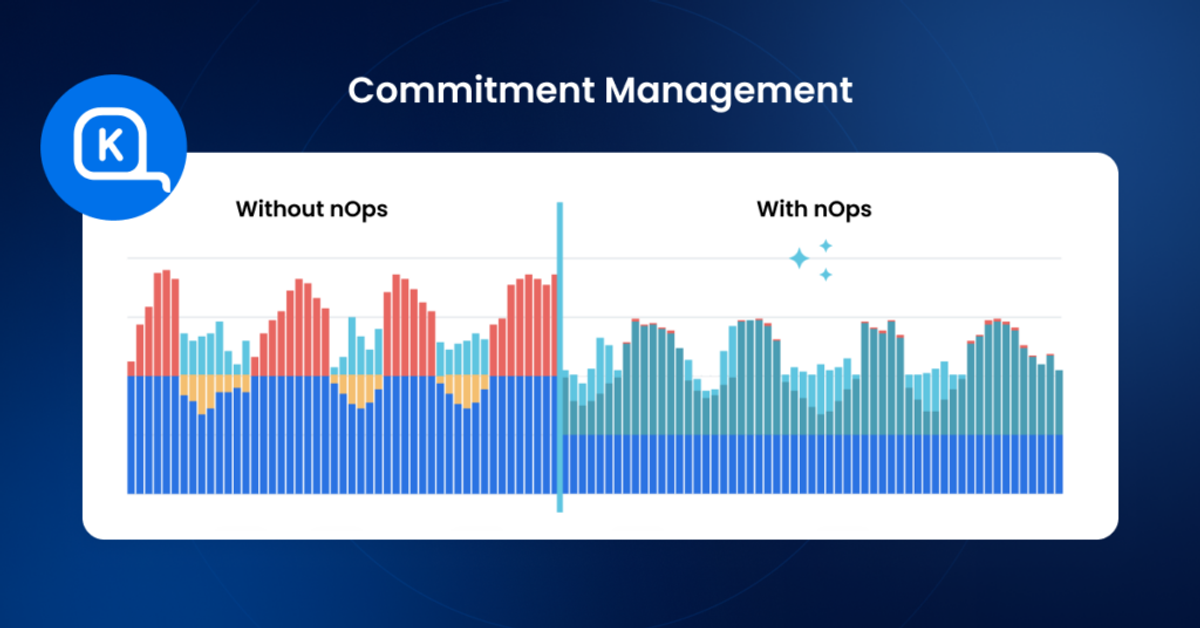
nOps manages over $5B in annual cloud spend and is rated 4.8 stars on G2. Unlike visibility-first platforms, nOps was built around continuous, autonomous optimization — the platform doesn't just show you waste, it eliminates it.
Key Capabilities
Autonomous commitment management that continually adjusts AWS, Azure, Google Cloud and AI portfolios across compute and non-compute. Extensive cost visibility with hourly granularity for multicloud, SaaS, AI and Kubernetes.
Automation Depth
nOps operates on full autopilot. Commitments are purchased, exchanged, and renewed automatically based on real-time usage data. It leverages adaptive layering and seeding/squishing of convertible RIs to eke out often 20%+ more incremental savings than competitors, while reducing the risk of committing (even for volatile workloads).
Multi-Cloud Support
Full coverage across AWS, Azure, and GCP, including compute, non-compute, Kubernetes, and GenAI workloads.
Best For
Organizations that want hands-off commitment optimization with full visibility. Particularly strong for teams running volatile or rapidly changing workloads — nOps manages the risky commitments you don’t want to touch, while your team gets credit for the increased savings.
Pros
- Savings-first pricing: you only pay after nOps delivers measurable savings
- Continuous, hourly optimization — not one-time recommendations
- Lightweight setup with no infrastructure changes
- Industry-leading savings rates that often reach 20% higher than competitors
- Full visibility with reports, budgets, forecasting, anomaly detection, cost allocation
Cons
- Doesn’t focus on Spot or Kubernetes optimization
- Less suited for teams that only want visibility without automation
Pricing
nOps charges a percentage of the savings it generates. You pay only when you save. You can book a free savings analysis to see if your team can benefit.
CloudZero
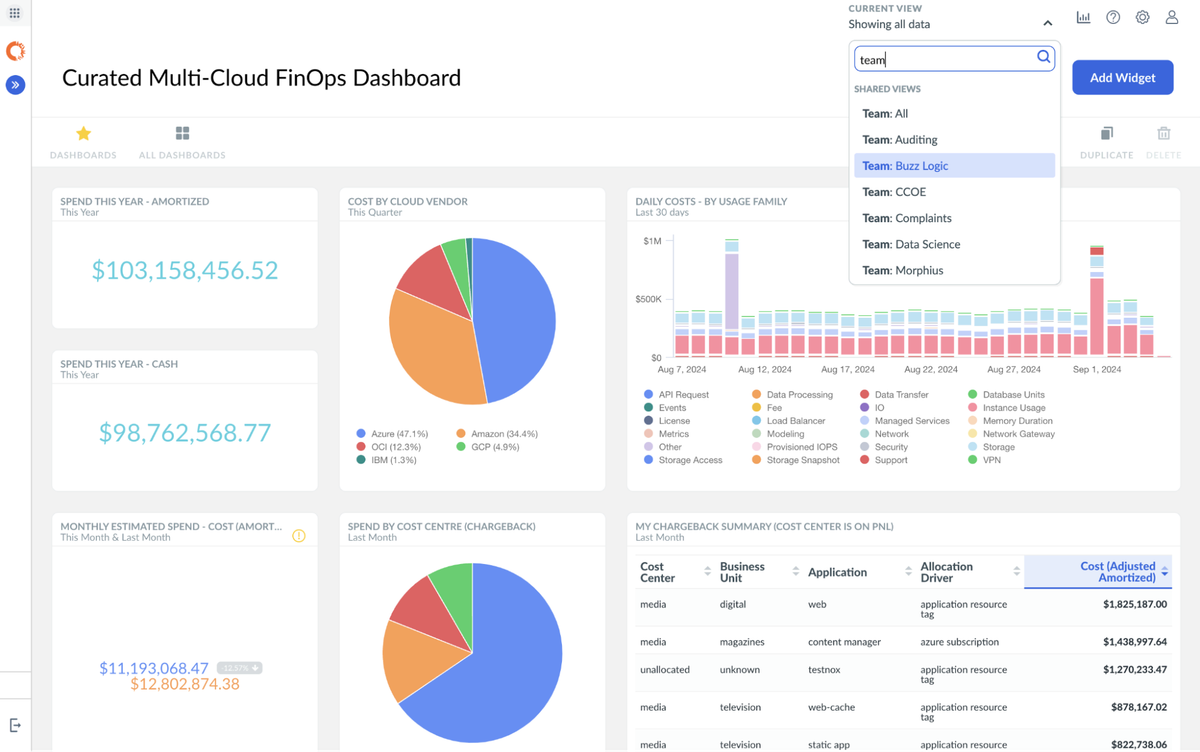
CloudZero positions itself as a cloud cost intelligence platform, emphasizing cost allocation by product, feature, and team rather than by infrastructure resource. It's designed for engineering and finance collaboration.
Key Capabilities
- Granular cost allocation by business dimensions (product, feature, customer, team)
- Anomaly detection with root cause analysis
- Unit economics tracking (cost per customer, cost per transaction)
- Kubernetes cost visibility
- Budget alerts and forecasting
Automation Depth
Limited. CloudZero focuses on intelligence and allocation rather than automated optimization. You'll see where money is going with precision, but the platform won't purchase commitments or rightsize resources for you.
Multi-Cloud Support
AWS, Azure, and GCP with varying depth. Strongest on AWS.
Best For
Engineering-led organizations that need precise cost attribution by business dimension — especially SaaS companies tracking unit economics across products or customers.
Pros
- Exceptional cost allocation granularity
- Strong unit economics and per-customer cost tracking
- Clean interface designed for engineering teams
Cons
- No automated commitment management or purchasing
- No automated resource optimization
- Pricing can scale quickly based on monitored spend
Pricing
Custom pricing based on cloud spend under management. Contact for quotes. You can read our dedicated breakdown of Vantage vs CloudZero here.
Cloudability
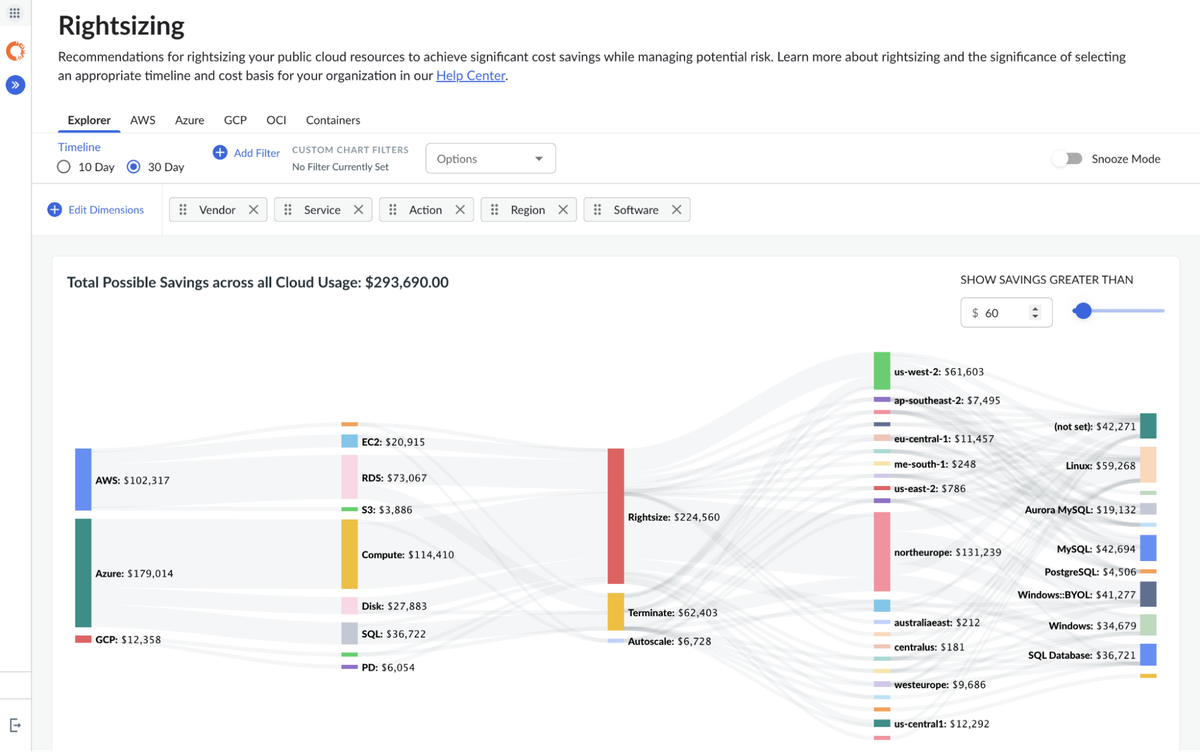
Cloudability is an enterprise-grade FinOps platform with deep cost allocation, showback/chargeback, and governance capabilities. It's a legacy player with broad multi-cloud coverage.
Key Capabilities
- Multi-cloud cost visibility across AWS, Azure, and GCP
- Advanced showback and chargeback with business mapping
- Commitment automation add-on (RI and Savings Plan)
- Forecasting and budgeting
- Kubernetes cost visibility via Kubecost integration (IBM acquired Kubecost in 2024)
Automation Depth
Moderate. Cloudability provides commitment recommendations and some automated purchasing through its acquisition of Cloudwiry, but execution frequency and scope trail platforms purpose-built for continuous optimization. Automated rightsizing and Spot management are not core capabilities.
Multi-Cloud Support
Strong across AWS, Azure, and GCP. The IBM ecosystem integration adds depth for large enterprises already using Apptio for IT financial management.
Best For
Large enterprises needing mature showback/chargeback workflows, governance policies, and integration with broader IT financial management tooling.
Pros
- Mature enterprise FinOps capabilities
- Strong cost allocation and chargeback
- Good multi-cloud coverage
- Part of IBM's broader IT management suite
Cons
- Steeper learning curve noted by users on Reddit
- Limited automation depth for resource optimization
- Enterprise pricing with higher minimums (estimated $30K+/year)
- Can feel heavyweight for mid-market teams
Pricing
Percentage of monitored spend, tiered pricing. Starts around $30K/year for mid-market. Commitment management may carry additional fees.
CloudHealth by VMware (Broadcom)
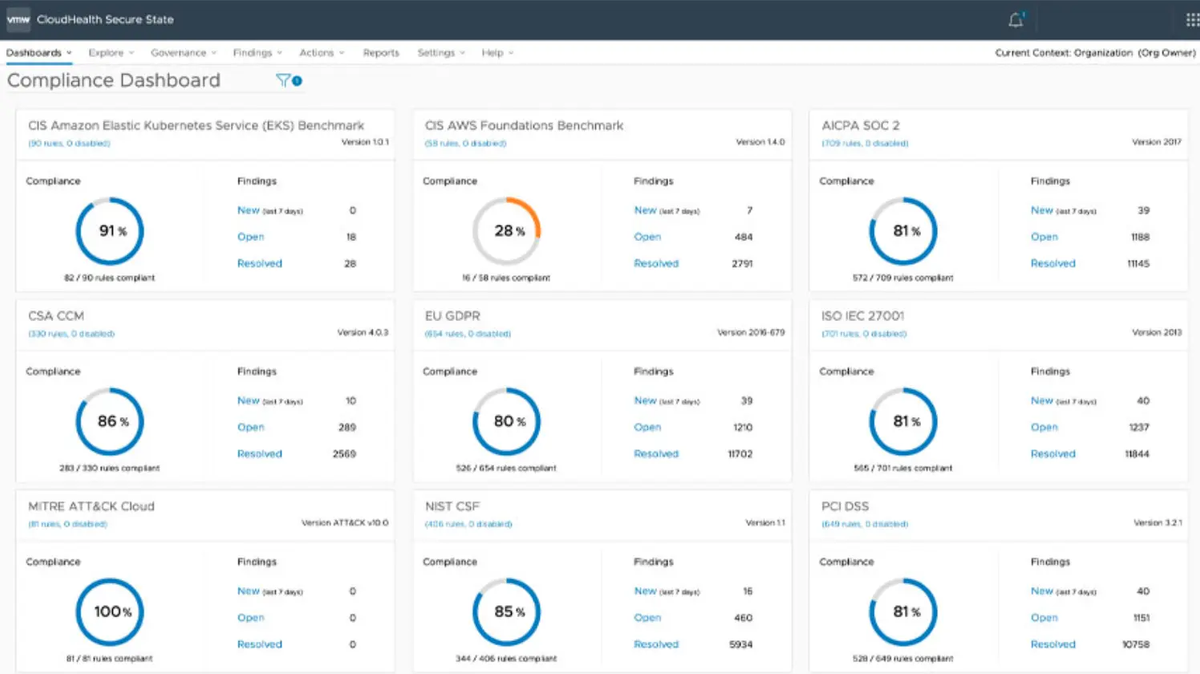
CloudHealth has been a FinOps mainstay since 2012, offering multi-cloud cost management, governance, and security posture. Following VMware's acquisition by Broadcom in 2023, its future product direction has introduced some uncertainty in the market.
Key Capabilities
- Multi-cloud dashboards across AWS, Azure, GCP, OCI, and Alibaba Cloud
- Policy-based governance and automated actions
- RI and Savings Plan tracking with recommendations
- Tag-based allocation with retroactive tagging
- Security and compliance posture management
Automation Depth
Policy-based governance allows automated actions (shutting down tagged resources, enforcing instance types), but it requires configuration. Commitment management is primarily advisory — recommendations, not autonomous purchasing. Resource-level optimization is manual.
Multi-Cloud Support
Broad multi-cloud support for visibility: AWS, Azure, GCP, Oracle Cloud, and Alibaba Cloud.
Best For
Enterprises needing broad multi-cloud governance and security posture alongside cost management — particularly those already in the Broadcom/VMware ecosystem.
Pros
- Widest multi-cloud coverage (5 providers)
- Combined cost + governance + security platform
- Mature, well-established product
- Policy-based automation for governance
Cons
- Broadcom acquisition creates product roadmap uncertainty
- Enterprise complexity — typically requires dedicated FinOps resources
- Limited Kubernetes-native support
- Commitment management is advisory, not autonomous
Pricing
Enterprise licensing, custom pricing. Typically starts at $50K+ annually for mid-market organizations.
Finout
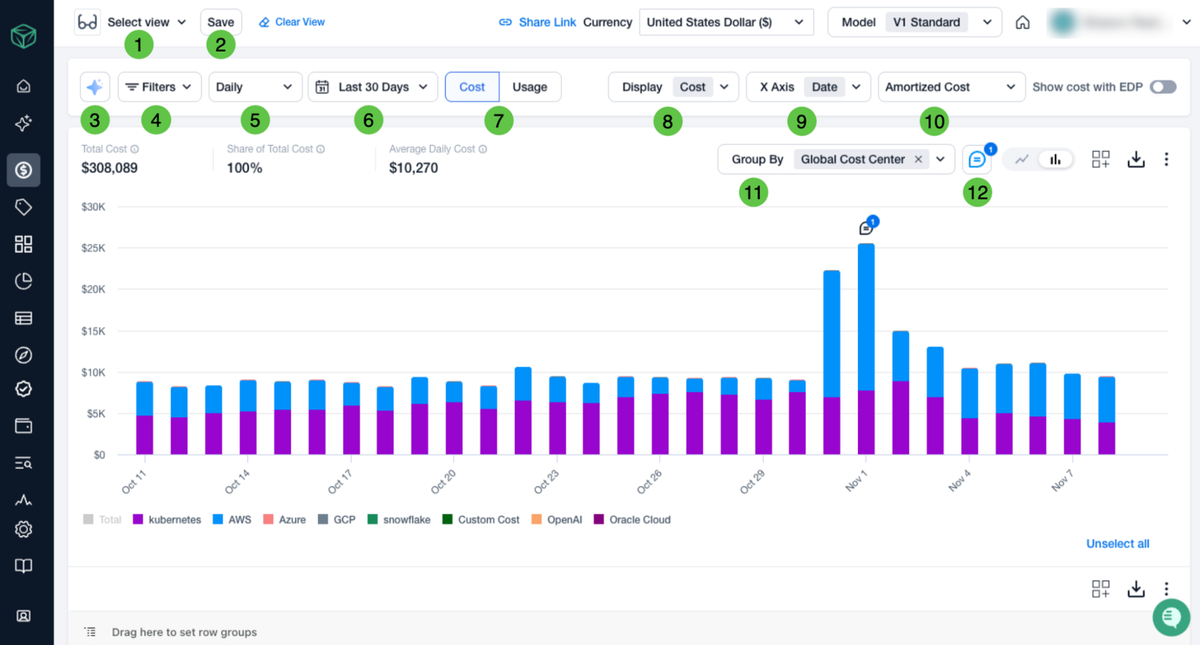
Finout is a cloud cost observability platform that differentiates through its MegaBill technology — unifying cost data from cloud providers, Kubernetes, and SaaS tools into a single normalized view without requiring code changes.
Key Capabilities
- Unified cost data ingestion (cloud + Kubernetes + SaaS)
- Virtual tagging and cost allocation without engineering changes
- Anomaly detection and cost alerts
- Unit economics tracking
- Kubernetes cost visibility at the pod level
Automation Depth
Primarily a visibility and allocation platform. Finout excels at normalizing and presenting cost data but does not automate commitment purchases, resource rightsizing, or workload placement.
Multi-Cloud Support
AWS, Azure, and GCP with unified data normalization. Strong SaaS cost tracking for tools like Datadog, Snowflake, and Databricks.
Best For
Teams needing a unified cost view across cloud, Kubernetes, and SaaS without re-engineering their tagging strategy. Strong fit for organizations with complex, distributed cost data.
Pros
- Rapid deployment without code changes
- Strong virtual tagging eliminates tagging debt
- Unified view of cloud + SaaS + Kubernetes costs
- Good anomaly detection
Cons
- No automated optimization or commitment management
- Visibility-focused like Vantage — doesn't close the automation gap
- Smaller ecosystem and community compared to established players
Pricing
Based on monthly cloud spend under management. Free tier available for smaller footprints. Contact for enterprise pricing.
Harness Cloud Cost Management
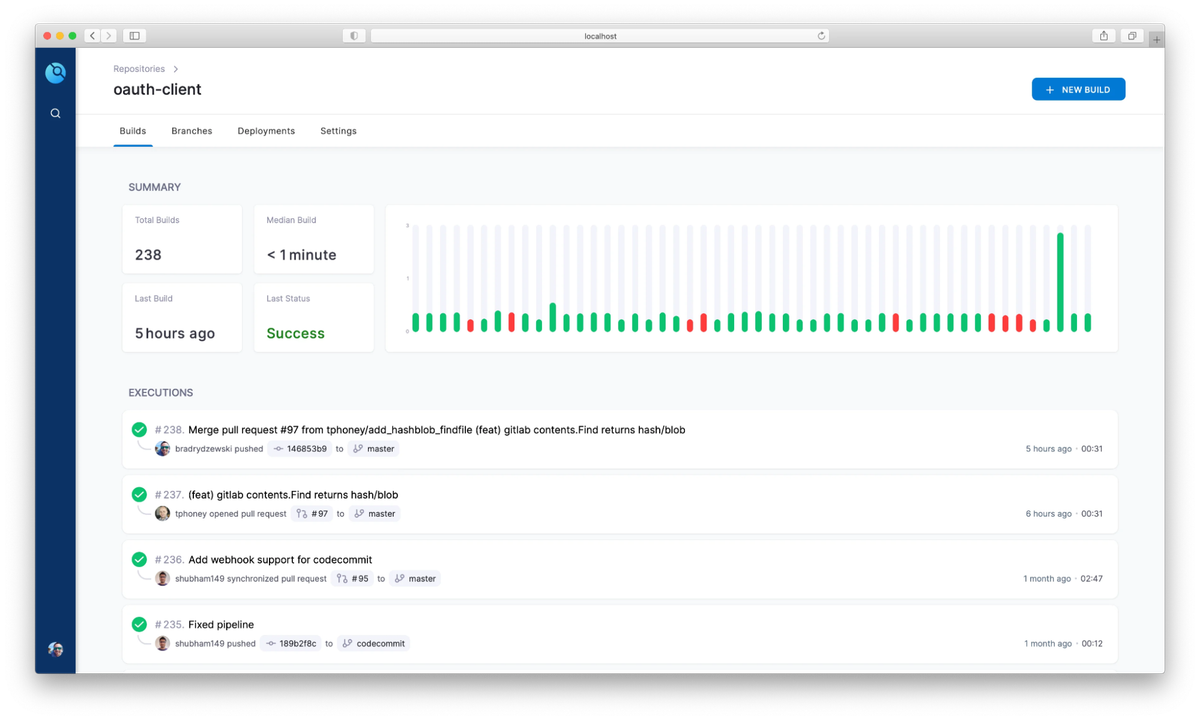
Harness Cloud Cost Management is part of the broader Harness software delivery platform. It offers cost visibility, governance, and some automation — particularly for teams already using Harness for CI/CD.
Key Capabilities
- Cloud cost visibility and allocation across AWS, Azure, and GCP
- Auto-stopping rules for non-production workloads
- Commitment recommendations (RI and Savings Plan)
- Kubernetes cost management with cluster-level recommendations
- Budget tracking and alerts
Automation Depth
Moderate, with a specific strength in auto-stopping non-production environments. Commitment management provides recommendations but automation is limited compared to purpose-built optimization platforms. Rightsizing remains recommendation-based.
Multi-Cloud Support
AWS, Azure, and GCP with consistent coverage across the three major providers.
Best For
Organizations already using the Harness platform for software delivery that want integrated cost management without adding another vendor.
Pros
- Integrated with Harness CI/CD for dev team adoption
- Auto-stopping for non-production environments saves immediately
- Solid Kubernetes cost visibility
- Multi-cloud coverage
Cons
- Less depth than standalone FinOps platforms
- Commitment automation is limited
- Full value requires adoption of the broader Harness platform
- Smaller FinOps community presence
Pricing
Part of the Harness platform; pricing varies based on modules adopted. Free tier available for smaller teams. Enterprise pricing is custom.
Kubecost
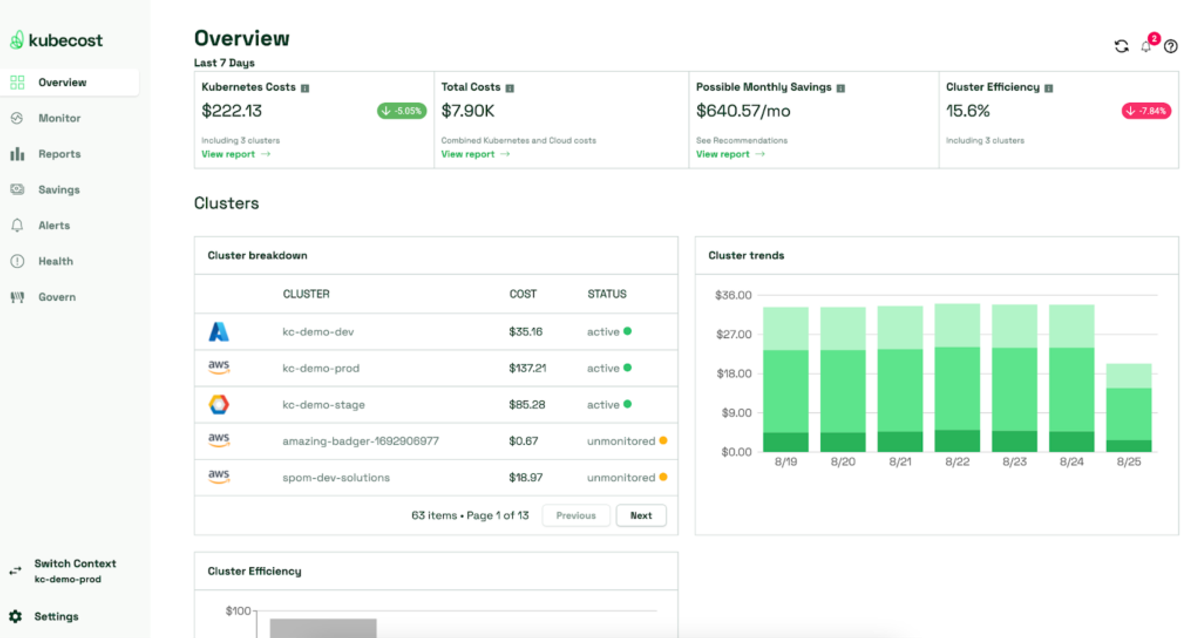
Kubecost — now part of IBM following its acquisition in 2024 — specializes in Kubernetes cost monitoring and optimization. If your primary cost challenge is Kubernetes cluster efficiency, Kubecost provides the deepest container-level visibility.
Key Capabilities
- Real-time Kubernetes cost monitoring by namespace, deployment, label, and pod
- Cluster rightsizing recommendations
- Network cost visibility within clusters
- Savings recommendations for over-provisioned workloads
- OpenCost integration (CNCF project)
Automation Depth
Primarily recommendation-based. Kubecost shows you where Kubernetes waste exists — over-provisioned pods, idle clusters, expensive node types — but execution is manual. As one Reddit user noted, implementing Kubecost's recommendations often requires significant engineering review: "Kubecost suggests 20 optimizations, Platform team spends 30 hours analyzing feasibility."
Multi-Cloud Support
Kubernetes-only. Works wherever Kubernetes runs (AWS EKS, Azure AKS, GCP GKE, on-prem) but provides no visibility into non-Kubernetes cloud spend. You'll need a separate tool for your full cloud bill.
Best For
Teams with large Kubernetes footprints needing deep container-level cost attribution and optimization recommendations — especially those already using OpenCost.
Pros
- Deepest Kubernetes cost visibility available
- Free tier via OpenCost for basic monitoring
- Works across any Kubernetes environment
- Strong community and open-source foundation
Cons
- Kubernetes only — no general cloud cost management
- Recommendations require manual implementation
- IBM acquisition introduces enterprise upsell pressure
- No commitment management or non-container optimization
Pricing
Free tier via OpenCost for basic cost monitoring. Kubecost Enterprise pricing is custom based on cluster count and node count.
Vantage vs nOps: Key Differences
Vantage and nOps serve different FinOps needs.
Vantage excels at: Developer-friendly cost visibility, broad provider coverage (20+ integrations), Terraform-native workflows, and fixed-rate pricing transparency. If your team needs a clean reporting layer that integrates with engineering workflows and you're comfortable executing optimizations manually, Vantage is a strong choice.
nOps excels at: Autonomous optimization that delivers measurable savings without manual intervention. Here at nOps, we built the platform the principle that cost optimization should run continuously, take zero effort on your part, and cost you nothing unless it saves you something.
The practical differences come down to three areas:
1. Automated Savings: Vantage Autopilot handles Savings Plans. We automatically manage both RIs and Savings Plans hourly, using adaptive layering that adjusts to actual usage patterns — for industry-leading savings rates of up to 55%.
2. Risk reduction: With Vantage, you can get recommendations, but your team still carries the lock-in risk: how much to commit, how long to commit, and what happens if usage drops later. nOps manages that risk automatically on your behalf with adaptive commitment layering.
3. Pricing model: Unlike the fixed rates offered by Vantage, we operate on savings-first pricing — if we don't save you money, you don't pay. That alignment means our incentives match yours.
See how much nOps can save on your cloud bill →. We optimize, you get the credit.
nOps manages $5B+ in cloud spend and was recently rated #1 in G2’s Cloud Cost Management category.
Demo
AI-Powered Cost Management Platform
Discover how much you can save in just 10 minutes!
Book a Demo
FAQ
Is Vantage a good cloud cost tool?
Vantage is a solid cloud cost visibility tool, especially for teams that need multi-cloud support across AWS, Azure, GCP, Snowflake, Datadog, and others. Its interface is clean and reports are easy to build. Where it falls short is on the optimization side — Vantage shows you what you are spending but does not actively reduce costs. Teams that need automated commitment management, rightsizing execution, or workload scheduling typically outgrow Vantage once they move past the visibility stage. As one FinOps practitioner on Reddit noted, “Vantage is great for dashboards but you still need something else to actually save money.”
Are there free alternatives to Vantage?
Yes, but with trade-offs. AWS Cost Explorer is free and covers basic cost reporting for AWS-only environments. Infracost (open-source) estimates costs pre-deployment in Terraform workflows. OpenCost provides Kubernetes cost allocation at no charge. Vantage itself offers a free tier for accounts under $2,500/month in cloud spend. The gap with free tools is automation — none of them handle commitment purchases, rightsizing execution, or scheduling on their own, so teams with $50K+ monthly spend usually find the manual overhead unsustainable.
Why do companies look for Vantage alternatives?
The most common reasons from FinOps teams: (1) They need active optimization, not just visibility — Vantage reports costs but does not execute savings. One engineering manager we spoke with said he “spent a few hours on a couple of afternoons” trying to get rightsizing recommendations from a tool and gave up. Teams want tools that act, not just inform. (2) Pricing scales with cloud spend — Vantage charges 0.25% of monitored spend at higher tiers, which means a $5M annual AWS bill costs over $12,000/year just for the reporting tool. (3) They need commitment management automation — mid-market teams lack dedicated FinOps headcount and cannot manually manage savings plans, reserved instances, and spiky workloads across accounts.
What are the best Vantage alternatives?
The top alternatives depend on what gap you are filling. nOps is best for teams that want full automation — commitment management, rightsizing, and scheduling — with guaranteed savings and no manual upkeep. CloudHealth (VMware Aria) suits enterprises needing governance and policy enforcement across large multi-cloud estates. Cloudability (Apptio/IBM) focuses on FinOps reporting and unit economics for mature teams with dedicated analysts. Kubecost is purpose-built for Kubernetes cost allocation. CAST AI automates Kubernetes optimization specifically. For mid-market teams spending $100K–$2M/month on AWS who want savings without hiring a FinOps team, nOps consistently delivers the highest ROI with the least operational burden.